door HONDA PILOT 2021 Owner's Manual (in English)
[x] Cancel search | Manufacturer: HONDA, Model Year: 2021, Model line: PILOT, Model: HONDA PILOT 2021Pages: 739, PDF Size: 44.86 MB
Page 6 of 739
Contents
This owner’s manual should be considered a permanent part of the
vehicle and should remain with the vehicle when it is sold.
This owner’s manual covers all models of your vehicle. You may find
descriptions of equipment and features that are not on your
particular model.
Images throughout this owner’s manual (including the front cover)
represent features and equipment that are available on some, but
not all, models. Your particular mo del may not have some of these
features.
This owner’s manual is for vehicles sold in the United States and
Canada.
The information and specifications in cluded in this publication were
in effect at the time of approval for printing. Honda Motor Co., Ltd.
reserves the right, however, to discontinue or change specifications
or design at any time without notice and without incurring any
obligation.2 Safe Driving P. 33
For Safe Driving P. 34 Seat Belts P. 39 Airbags P. 47
2Instrument Panel P. 81
Indicators P. 82 Gauges and Displays P. 110
2Controls P. 135
Clock P. 136 Locking and Unlocking the Doors P. 139
Moonroof* P. 169 Panoramic Roof* P. 170
Adjusting the Seats P. 194 Interior Lights/Interior Convenience Items P. 209
2 Features P. 239
Audio System P. 240
General Information on the Audio System P. 350
HomeLink ® Universal Transceiver
* P. 449 Bluetooth ® HandsFreeLink ® P. 452, 477
2 Driving P. 505
Before Driving P. 506 Towing a Trailer P. 512
Parking Your Vehicle P. 610Multi-View Rear Camera P. 621
2Maintenance P. 627
Before Performing Maintenance P. 628 Maintenance MinderTM P. 631
Checking and Maintaining Wiper Blades P. 654
Remote Control and Wireless Headphone Care
* P. 670
Accessories and Modifications P. 679
2 Handling the Unexpected P. 681
Tools P. 682 If a Tire Goes Flat P. 683
Overheating P. 697 Indicator, Coming On/Blinking P. 699
When You Cannot Unlock the Fuel Fill Door P. 709
2 Information P. 713
Specifications P. 714 Identification Numbers P. 716
Emissions Testing P. 719 Warranty Coverages P. 721
21 PILOT-31TG76500.book 4 ページ 2020年3月18日 水曜日 午後4時38分
Page 8 of 739
6
Quick Reference Guide
Quick Reference Guide
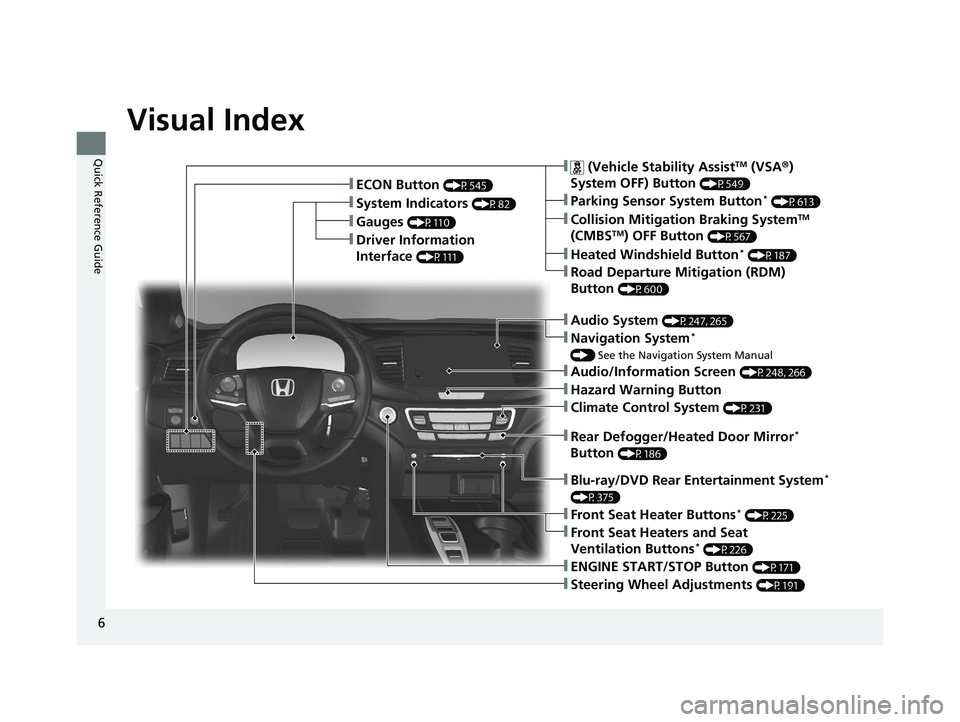
Visual Index
❚Gauges (P110)
❚Driver Information
Interface
(P111)
❚System Indicators (P82)
❚ECON Button (P545)
❚Audio System (P247, 265)
❚Navigation System*
() See the Navigation System Manual
❚ (Vehicle Stability AssistTM (VSA ®)
System OFF) Button
(P549)
❚Collision Mitigation Braking SystemTM
(CMBSTM) OFF Button (P567)
❚Heated Windshield Button* (P187)
❚Road Departure Mitigation (RDM)
Button
(P600)
❚Parking Sensor System Button* (P613)
❚Blu-ray/DVD Rear Entertainment System*
(P375)
❚Steering Wheel Adjustments (P191)
❚ENGINE START/STOP Button (P171)
❚Front Seat Heater Buttons* (P225)
❚Front Seat Heaters and Seat
Ventilation Buttons* (P226)
❚Climate Control System (P231)
❚Audio/Information Screen (P248, 266)
❚Hazard Warning Button
❚Rear Defogger/Heated Door Mirror*
Button
(P186)
21 PILOT-31TG76500.book 6 ページ 2020年3月18日 水曜日 午後4時38分
Page 10 of 739
Visual Index
8
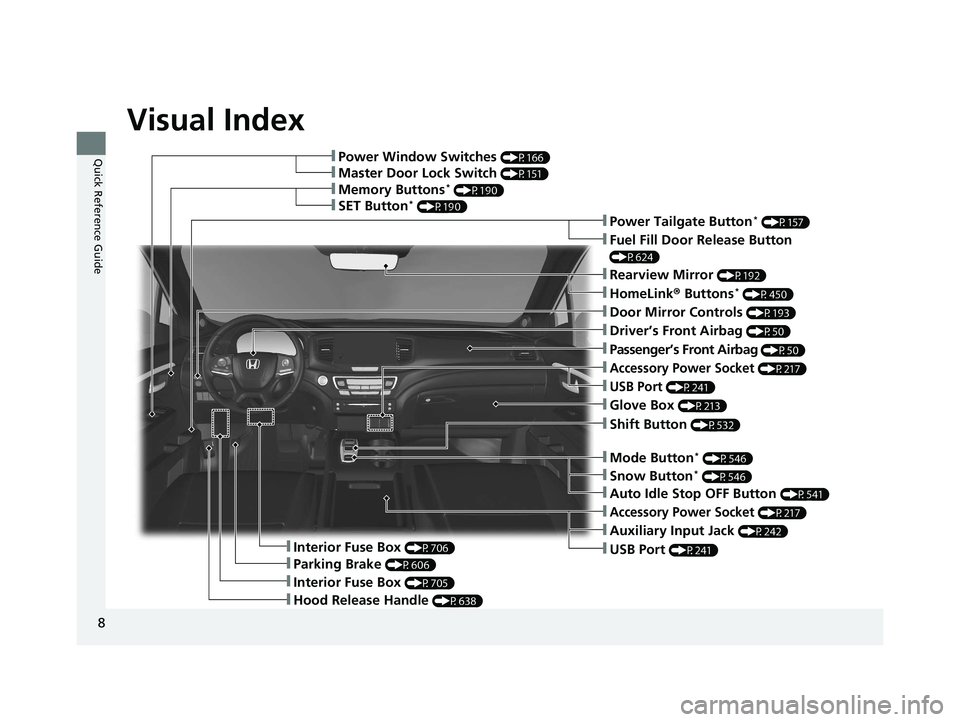
Quick Reference Guide❚Power Window Switches (P166)
❚Memory Buttons* (P190)
❚SET Button* (P190)
❚Master Door Lock Switch (P151)
❚Power Tailgate Button* (P157)
❚Fuel Fill Door Release Button
(P624)
❚Door Mirror Controls (P193)
❚Driver’s Front Airbag (P50)
❚Shift Button (P532)
❚Hood Release Handle (P638)
❚Glove Box (P213)
❚Interior Fuse Box (P706)
❚Parking Brake (P606)
❚Interior Fuse Box (P705)
❚Accessory Power Socket (P217)
❚USB Port (P241)
❚Rearview Mirror (P192)
❚HomeLink® Buttons* (P450)
❚Passenger’s Front Airbag (P50)
❚Mode Button* (P546)
❚Accessory Power Socket (P217)
❚Auxiliary Input Jack (P242)
❚USB Port (P241)
❚Auto Idle Stop OFF Button (P541)
❚Snow Button* (P546)
21 PILOT-31TG76500.book 8 ページ 2020年3月18日 水曜日 午後4時38分
Page 12 of 739
Visual Index
10
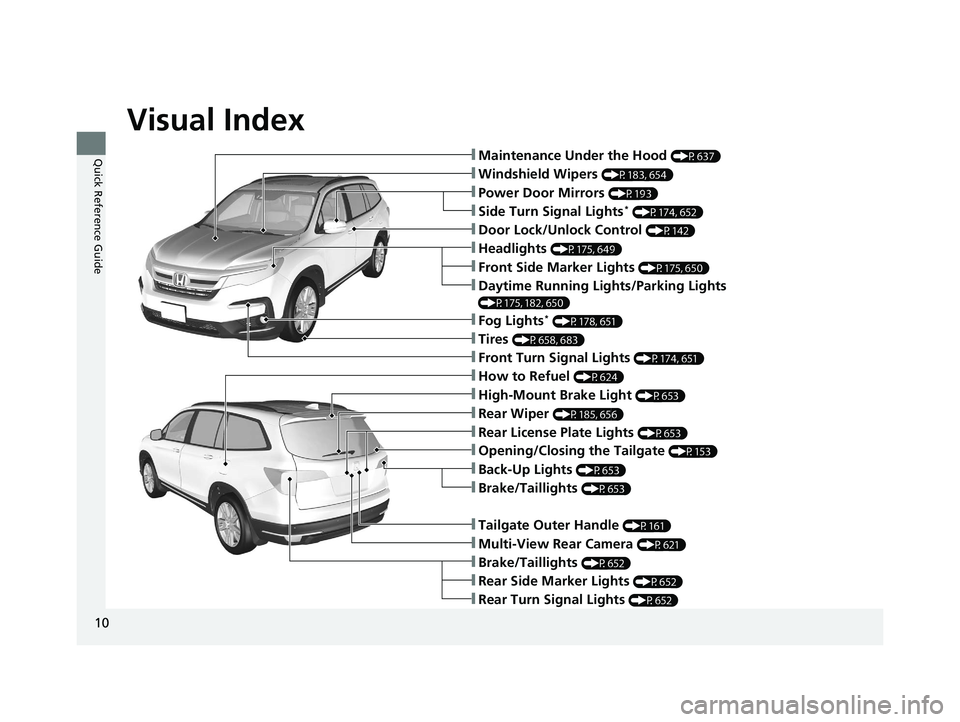
Quick Reference Guide❚Maintenance Under the Hood (P637)
❚Windshield Wipers (P183, 654)
❚Tires (P658, 683)
❚Power Door Mirrors (P193)
❚Headlights (P175, 649)
❚Front Side Marker Lights (P175, 650)
❚Front Turn Signal Lights (P174, 651)
❚Side Turn Signal Lights* (P174, 652)
❚Daytime Running Lights/Parking Lights
(P175, 182, 650)
❚How to Refuel (P624)
❚High-Mount Brake Light (P653)
❚Rear Wiper (P185, 656)
❚Rear License Plate Lights (P653)
❚Rear Side Marker Lights (P652)
❚Rear Turn Signal Lights (P652)
❚Brake/Taillights (P652)
❚Tailgate Outer Handle (P161)
❚Multi-View Rear Camera (P621)
❚Opening/Closing the Tailgate (P153)
❚Door Lock/Unlock Control (P142)
❚Fog Lights* (P178, 651)
❚Back-Up Lights (P653)
❚Brake/Taillights (P653)
21 PILOT-31TG76500.book 10 ページ 2020年3月18日 水曜日 午後4時38分
Page 19 of 739
17
Quick Reference Guide
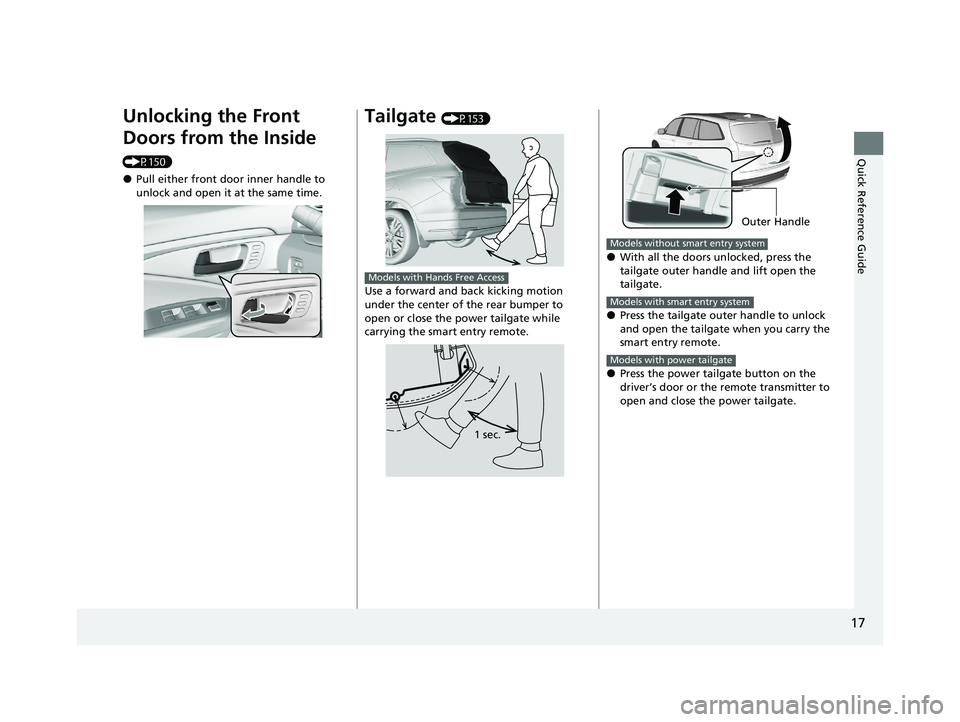
Unlocking the Front
Doors from the Inside
(P150)
●Pull either front door inner handle to
unlock and open it at the same time.
Tailgate (P153)
Use a forward and back kicking motion
under the center of the rear bumper to
open or close the power tailgate while
carrying the smart entry remote.
Models with Hands Free Access
1 sec.
●With all the doors unlocked, press the
tailgate outer handle and lift open the
tailgate.
●Press the tailgate outer handle to unlock
and open the tailgate when you carry the
smart entry remote.
●Press the power tailgate button on the
driver’s door or the remote transmitter to
open and close the power tailgate.
Outer Handle
Models without smart entry system
Models with smart entry system
Models with power tailgate
21 PILOT-31TG76500.book 17 ページ 2020年3月18日 水曜日 午後4時38分
Page 20 of 739
18
Quick Reference Guide
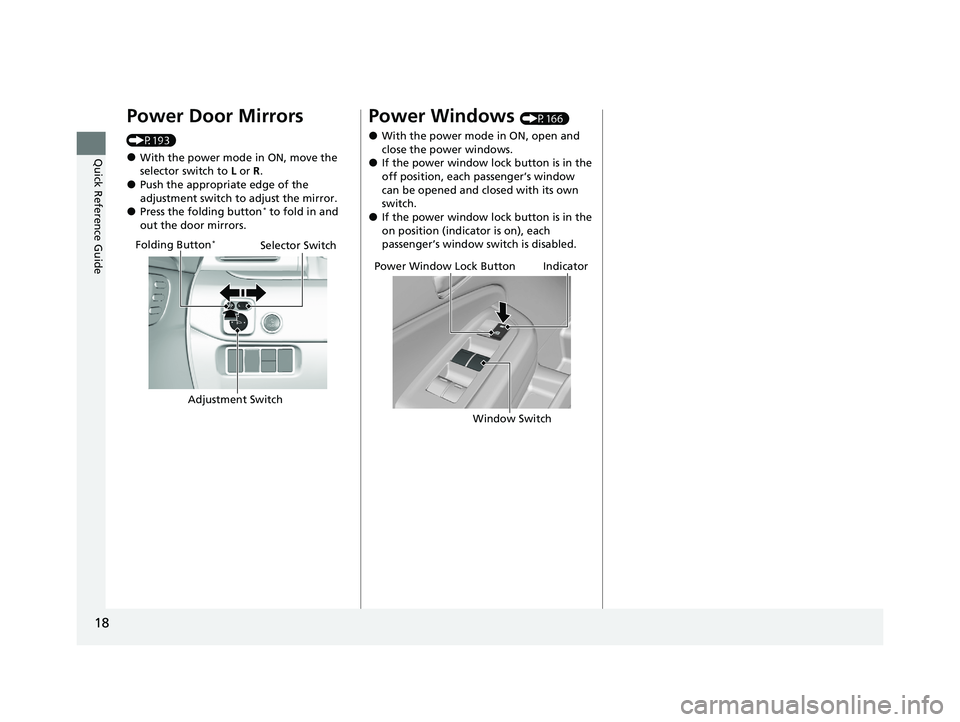
Power Door Mirrors
(P193)
●With the power mode in ON, move the
selector switch to L or R .
●Push the appropriate edge of the
adjustment switch to adjust the mirror.
●Press the folding button* to fold in and
out the door mirrors.
Selector Switch
Adjustment Switch
Folding Button*
Power Windows (P166)
●With the power mode in ON, open and
close the power windows.
●If the power window lock button is in the
off position, each passenger’s window
can be opened and closed with its own
switch.
●If the power window lock button is in the
on position (indicator is on), each
passenger’s window switch is disabled.
Power Window Lock ButtonIndicator
Window Switch
21 PILOT-31TG76500.book 18 ページ 2020年3月18日 水曜日 午後4時38分
Page 27 of 739
25
Quick Reference Guide
VSA® On and Off (P549)
●The Vehicle Stability AssistTM (VSA ®)
system helps stabilize the vehicle during
cornering, and helps maintain traction
while accelerating on loose or slippery
road surfaces.
●VSA ® comes on automatically every time
you start the engine.
●To partially disable or fully restore VSA ®
function, press and ho ld the button until
you hear a beep.
CMBSTM On and Off
(P567)
●When a possible collision is likely
unavoidable, the CMBSTM can help you to
reduce the vehicle speed and the severity
of the collision.
●The CMBSTM is turned on every time you
start the engine.
●To turn the CMBSTM on or off, press and
hold the button until you hear a beep.
Tire Pressure Monitoring System (TPMS) with Tire
Fill Assist
(P557, 702)
●The TPMS monitors tire pressure.●TPMS is turned on automatically every time you start the engine.●TPMS fill assist provides audible and visual guidance during tire pressure adjustment.
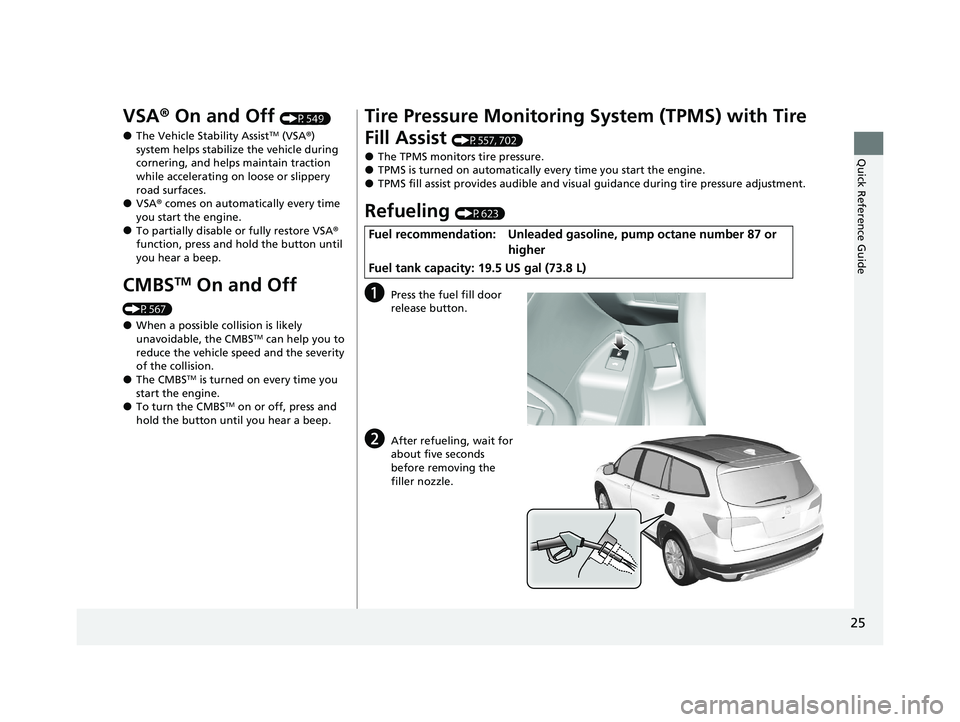
Refueling (P623)
aPress the fuel fill door
release button.
bAfter refueling, wait for
about five seconds
before removing the
filler nozzle.
Fuel recommendation: Unleaded gaso line, pump octane number 87 or
higher
Fuel tank capacity: 19.5 US gal (73.8 L)
21 PILOT-31TG76500.book 25 ページ 2020年3月18日 水曜日 午後4時38分
Page 31 of 739
29
Quick Reference Guide
What to Do If
The power mode does not
change from VEHICLE OFF
(LOCK) to ACCESSORY.
Why?
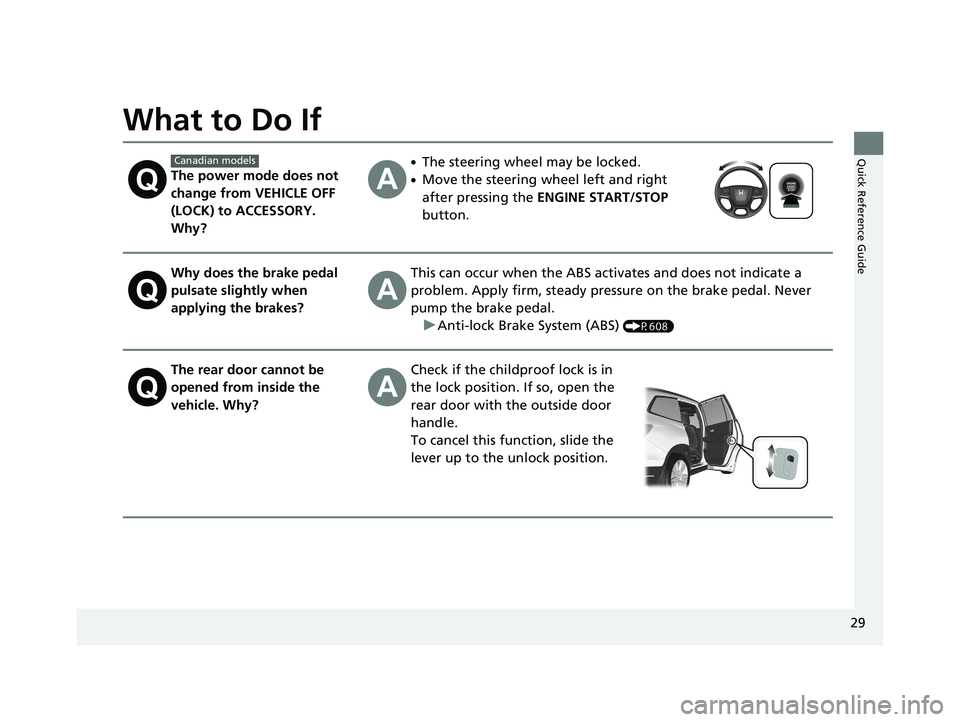
●The steering wheel may be locked.
●Move the steering wheel left and right
after pressing the ENGINE START/STOP
button.
Why does the brake pedal
pulsate slightly when
applying the brakes?This can occur when the ABS activates and does not indicate a
problem. Apply firm, steady pressure on the brake pedal. Never
pump the brake pedal. u Anti-lock Brake System (ABS)
(P608)
The rear door cannot be
opened from inside the
vehicle. Why?Check if the childproof lock is in
the lock position. If so, open the
rear door with the outside door
handle.
To cancel this function, slide the
lever up to the unlock position.
Canadian models
21 PILOT-31TG76500.book 29 ページ 2020年3月18日 水曜日 午後4時38分
Page 32 of 739
30
Quick Reference Guide
Why do the doors lock
after I unlocked the doors?If you do not open the doors within 30 seconds, the doors are
relocked automatically for security.
Why does the beeper
sound when I open the
driver’s door?The beeper sounds when:
●The power mode is in ACCESSORY.
●The exterior lights are left on.
●The Auto Idle Stop is in operation.
Why does a beeper sound
when I walk away from the
vehicle after I close the
door?
The beeper sounds if you move outside the walk away auto lock
operating range before the door completely closes.u Locking the doors and tailgate (Walk away auto lock ®)
(P144)
Why does the beeper
sound when I start driving?The beeper sounds when:
●Driver and/or front passenger are not wearing their seat belts.
●The parking brake pedal is not fully released.
Models with walk away auto lock ®
21 PILOT-31TG76500.book 30 ページ 2020年3月18日 水曜日 午後4時38分
Page 33 of 739
31
Quick Reference Guide
Why do I hear a screeching
sound when I apply the
brake pedal?The brake pads may need to be replaced. Have your vehicle
inspected by a dealer.
Why does the gear position
automatically change to
(P
when I open the driver’s
door to check for parking
space lines when
reversing?
●Fasten the driver’s seat belt.
●Close the driver’s door and manually change the gear
position. u
When opening the driver’s door (P535)
I'm seeing an amber
indicator of a tire with an
exclamation point. What is
that?The Tire Pressure Monitoring System (TPMS) needs
attention.Check tire pressure. u
If the Low Tire Pressure/Tire Pressure Monitoring System (TPMS) Indicator
Comes On or Blinks
(P702)
21 PILOT-31TG76500.book 31 ページ 2020年3月18日 水曜日 午後4時38分