rear entertainment HONDA PILOT 2021 Owner's Manual (in English)
[x] Cancel search | Manufacturer: HONDA, Model Year: 2021, Model line: PILOT, Model: HONDA PILOT 2021Pages: 739, PDF Size: 44.86 MB
Page 7 of 739
Contents
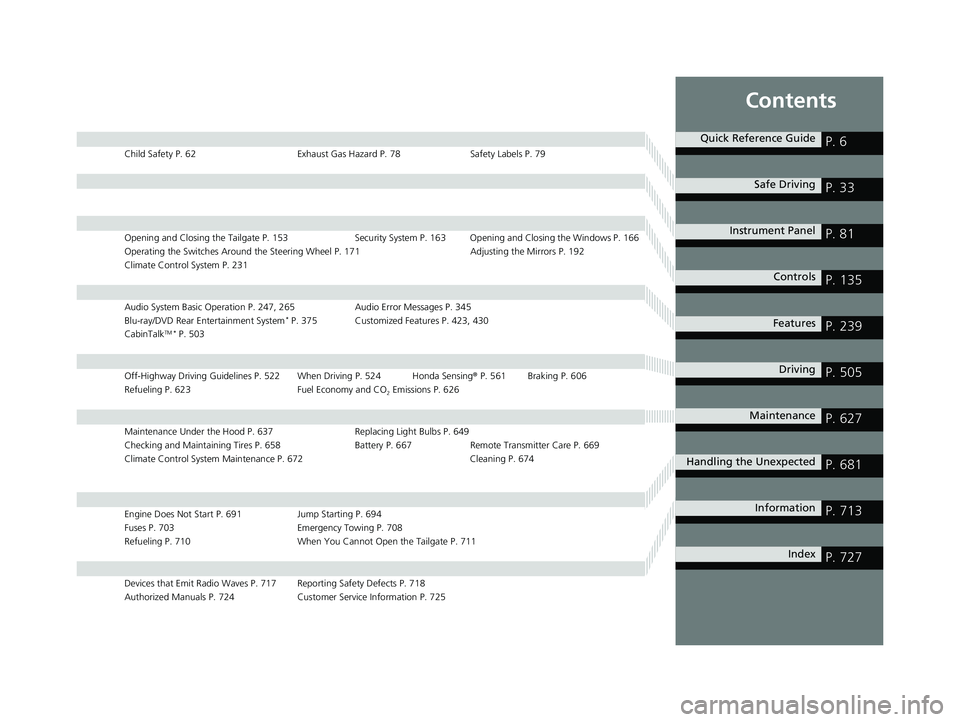
Child Safety P. 62Exhaust Gas Hazard P. 78Safety Labels P. 79
Opening and Closing the Tailgate P. 153 Security System P. 163 Opening and Closing the Windows P. 166
Operating the Switches Around the Steering Wheel P. 171 Adjusting the Mirrors P. 192
Climate Control System P. 231
Audio System Basic Operation P. 247, 265 Audio Error Messages P. 345
Blu-ray/DVD Rear Entertainment System* P. 375 Customized Features P. 423, 430
CabinTalkTM * P. 503
Off-Highway Driving Guidelines P. 522 When Driving P. 524 Honda Sensing ® P. 561 Braking P. 606
Refueling P. 623 Fuel Economy and CO
2 Emissions P. 626
Maintenance Under the Hood P. 637 Replacing Light Bulbs P. 649
Checking and Maintaining Tires P. 658 Batt ery P. 667 Remote Transmitter Care P. 669
Climate Control System Maintenance P. 672 Cleaning P. 674
Engine Does Not Start P. 691 Jump Starting P. 694
Fuses P. 703 Emergency Towing P. 708
Refueling P. 710 When You Cannot Open the Tailgate P. 711
Devices that Emit Radio Waves P. 717 Reporting Safety Defects P. 718
Authorized Manuals P. 724 Customer Service Information P. 725
Quick Reference GuideP. 6
Safe DrivingP. 33
Instrument PanelP. 81
ControlsP. 135
FeaturesP. 239
DrivingP. 505
MaintenanceP. 627
Handling the UnexpectedP. 681
InformationP. 713
IndexP. 727
21 PILOT-31TG76500.book 5 ページ 2020年3月18日 水曜日 午後4時38分
Page 8 of 739
6
Quick Reference Guide
Quick Reference Guide
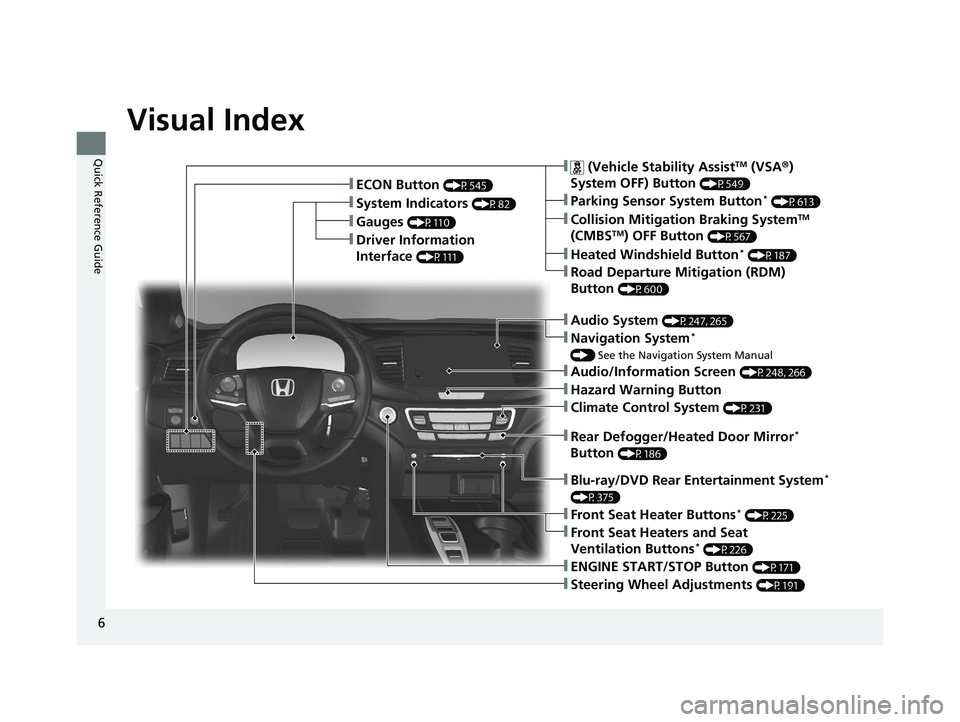
Visual Index
❚Gauges (P110)
❚Driver Information
Interface
(P111)
❚System Indicators (P82)
❚ECON Button (P545)
❚Audio System (P247, 265)
❚Navigation System*
() See the Navigation System Manual
❚ (Vehicle Stability AssistTM (VSA ®)
System OFF) Button
(P549)
❚Collision Mitigation Braking SystemTM
(CMBSTM) OFF Button (P567)
❚Heated Windshield Button* (P187)
❚Road Departure Mitigation (RDM)
Button
(P600)
❚Parking Sensor System Button* (P613)
❚Blu-ray/DVD Rear Entertainment System*
(P375)
❚Steering Wheel Adjustments (P191)
❚ENGINE START/STOP Button (P171)
❚Front Seat Heater Buttons* (P225)
❚Front Seat Heaters and Seat
Ventilation Buttons* (P226)
❚Climate Control System (P231)
❚Audio/Information Screen (P248, 266)
❚Hazard Warning Button
❚Rear Defogger/Heated Door Mirror*
Button
(P186)
21 PILOT-31TG76500.book 6 ページ 2020年3月18日 水曜日 午後4時38分
Page 11 of 739
9
Quick Reference Guide
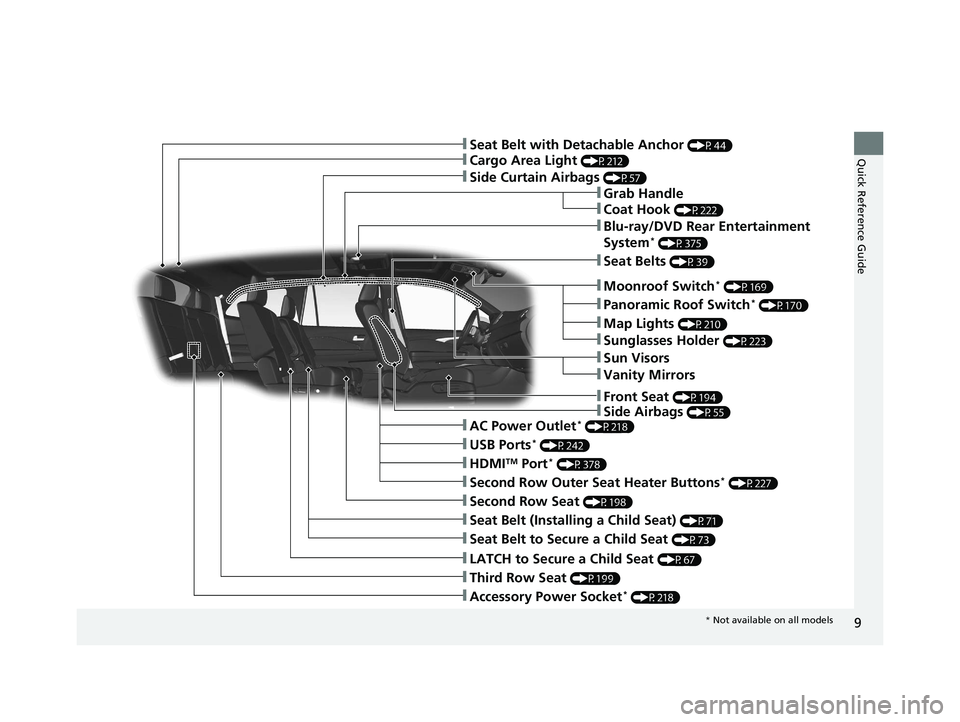
❚Accessory Power Socket* (P218)
❚LATCH to Secure a Child Seat (P67)
❚Seat Belt (Installing a Child Seat) (P71)
❚Third Row Seat (P199)
❚Second Row Seat (P198)
❚Seat Belt to Secure a Child Seat (P73)
❚Cargo Area Light (P212)
❚Side Curtain Airbags (P57)
❚Second Row Outer Seat Heater Buttons* (P227)
❚AC Power Outlet* (P218)
❚HDMITM Port* (P378)
❚USB Ports* (P242)
❚Sun Visors
❚Vanity Mirrors
❚Moonroof Switch* (P169)
❚Panoramic Roof Switch* (P170)
❚Map Lights (P210)
❚Sunglasses Holder (P223)
❚Seat Belt with Detachable Anchor (P44)
❚Side Airbags (P55)
❚Seat Belts (P39)
❚Blu-ray/DVD Rear Entertainment
System* (P375)
❚Grab Handle
❚Coat Hook (P222)
❚Front Seat (P194)
* Not available on all models
21 PILOT-31TG76500.book 9 ページ 2020年3月18日 水曜日 午後4時38分
Page 24 of 739
22
Quick Reference Guide
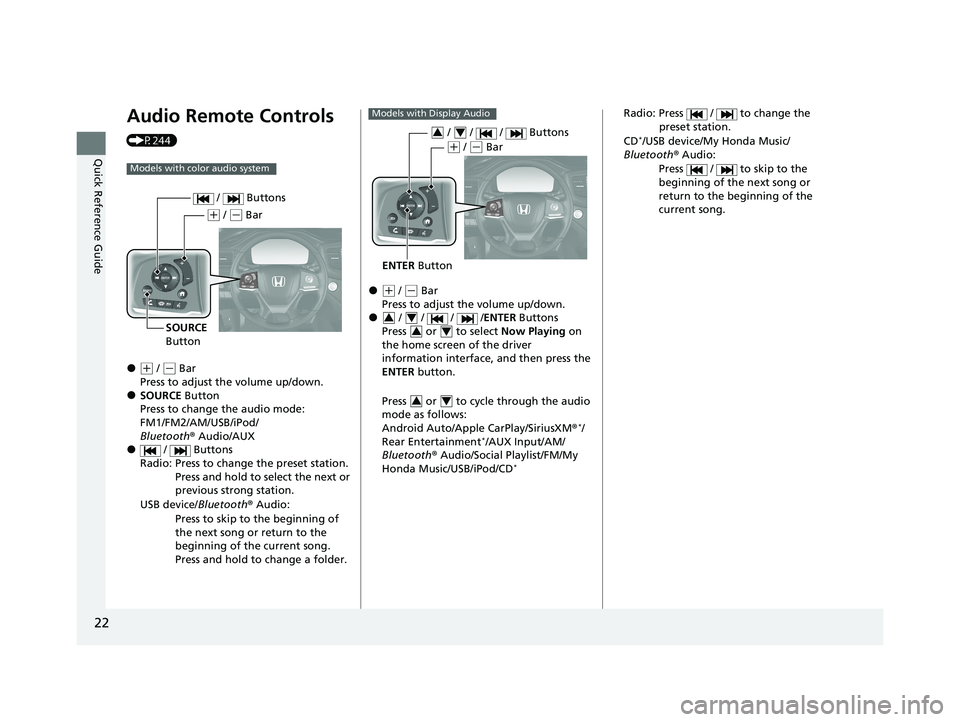
Audio Remote Controls
(P244)
●(+ / ( - Bar
Press to adjust the volume up/down.
●SOURCE Button
Press to change the audio mode:
FM1/FM2/AM/USB/iPod/
Bluetooth ® Audio/AUX
● / Buttons
Radio: Press to change the preset station. Press and hold to select the next or
previous strong station.
USB device/ Bluetooth® Audio:
Press to skip to the beginning of
the next song or return to the
beginning of the current song.
Press and hold to change a folder.
Models with color audio system
( + / (- Bar
SOURCE
Button / Buttons
●(
+ / (- Bar
Press to adjust the volume up/down.
● / / / / ENTER Buttons
Press or to select Now Playing on
the home screen of the driver
information interface, and then press the
ENTER button.
Press or to cycle through the audio
mode as follows:
Android Auto/Apple CarPlay/SiriusXM ®
*/
Rear Entertainment*/AUX Input/AM/
Bluetooth ® Audio/Social Playlist/FM/My
Honda Music/USB/iPod/CD
*
Models with Display Audio
ENTER Button
/ / / Buttons34
(+ / (- Bar
34
34
34
Radio: Press / to change the
preset station.
CD
*/USB device/My Honda Music/
Bluetooth ® Audio:
Press / to skip to the
beginning of the next song or
return to the beginning of the
current song.
21 PILOT-31TG76500.book 22 ページ 2020年3月18日 水曜日 午後4時38分
Page 124 of 739
uuGauges and Displays uDriver Information Interface
122
Instrument Panel
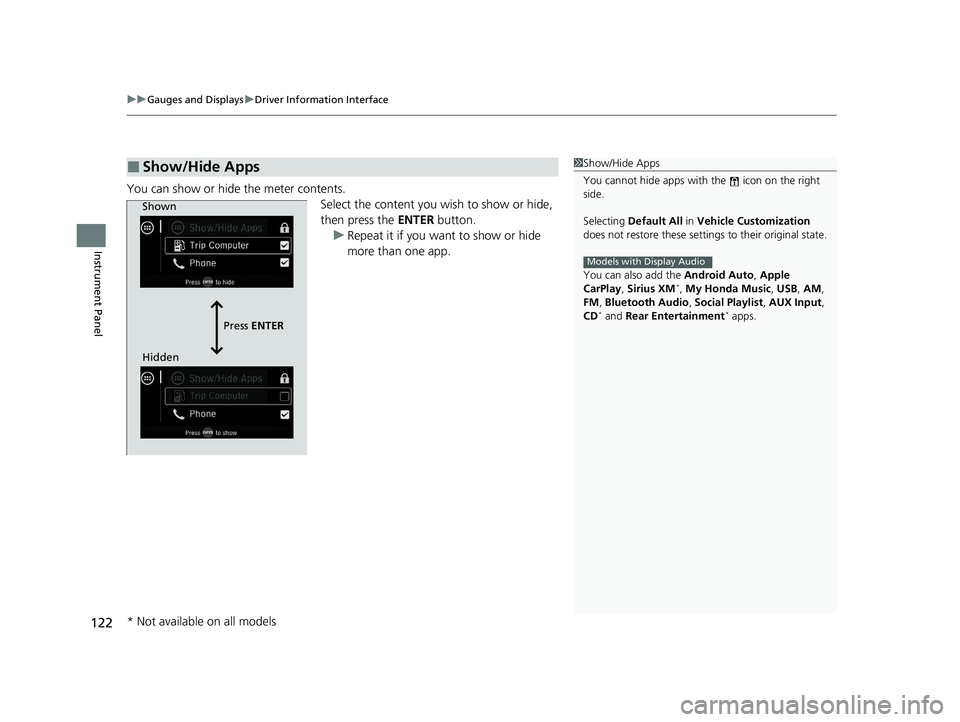
You can show or hide the meter contents.
Select the content you wish to show or hide,
then press the ENTER button.
u Repeat it if you want to show or hide
more than one app.
■Show/Hide Apps1Show/Hide Apps
You cannot hide apps with the icon on the right
side.
Selecting Default All in Vehicle Customization
does not restore these settings to their original state.
You can also add the Android Auto, Apple
CarPlay , Sirius XM
*, My Honda Music , USB, AM,
FM , Bluetooth Audio , Social Playlist , AUX Input ,
CD
* and Rear Entertainment* apps.
Models with Display Audio
Shown
Press ENTER
Hidden
* Not available on all models
21 PILOT-31TG76500.book 122 ページ 2020年3月18日 水曜日 午後4時38分
Page 241 of 739
239
Features
This chapter describes how to operate technology features.
Audio SystemAbout Your Audio System ................ 240
USB Ports ......................................... 241
Auxiliary Input Jack .......................... 242
Audio System Theft Protection ......... 243
Audio Remote Controls .................... 244
Audio System Basic Operation ..... 247, 265
Audio Error Messages
CD Player*....................................... 345
iPod/USB Flash Drive ........................ 347
Android/Apps .................................. 349
Models with Display Audio
General Information on the Audio System SiriusXM ® Radio Service
*................. 350
Recommended CDs*....................... 351
Compatible iPod, iPad, iPhone, and USB Flash Drives .................................... 353
Honda App License Agreement ........ 355
Legal Information on Apple CarPlay/
Android Auto ................................. 367
About Open Source Licenses ............ 369
License Information
*........................ 370 Blu-ray/DVD Rear Entertainment
System
*........................................... 375
Customized Features ................ 423, 430
HomeLink ® Universal Transceiver
*.. 449
Bluetooth® HandsFreeLink® ..... 452, 477
CabinTalk
TM *...................................... 503
* Not available on all models
21 PILOT-31TG76500.book 239 ページ 2020年3月18日 水曜日 午後4時38分
Page 248 of 739
246
uuAudio System uAudio Remote Controls
Features
/ / / /ENTER Buttons
• When selecting the audio mode
Press or to select Now Playing on the home screen of the driver
information interface, and then press the ENTER button.
Press or : To cycles through the audio modes as follows:
Android Auto/Apple CarPlay SiriusXM ®
*Rear Entertainment*AUX
Input AM Bluetooth ® AudioSocial Playlist FM My Honda Music USB/
iPod CD
*
• When listening to the radio
Press : To select the next preset radio station.
Press : To select the previous preset radio station.
• When listening to a CD
*, iPod, USB flash drive, My Honda Music, or Bluetooth®
Audio
Press : To skip to the next song.
Press : To go back to the beginning of the current or previous song.
34
34
34
* Not available on all models
21 PILOT-31TG76500.book 246 ページ 2020年3月18日 水曜日 午後4時38分
Page 271 of 739
269
uuAudio System Basic Operation uAudio/Information Screen
Continued
Features
■Rear Entertainment*
Displays the rear audio screen.
2 Blu-ray/DVD Rear Entertainment System* P. 375
■AT&T Hotspot*
Displays the AT&T Hotspot screen.
2AT&T Hotspot* P. 336
■File Manager
Displays the file manager screen.
2 File Manager P. 286
* Not available on all models
21 PILOT-31TG76500.book 269 ページ 2020年3月18日 水曜日 午後4時38分
Page 377 of 739
375
Features
Blu-ray/DVD Rear Entertainment System*
Rear seat passengers can enjoy a completely separate entertainment source than
front passengers, including movies, games, and other audio choices.1 Blu-ray/DVD Rear Entertainment System*
Blu-ray DiscTM, Blu-rayTM, and the logos are
trademarks of the Blu-ray Disc Association.
BD-XL, BD-Live, Blu-ray 3D , and Ultra HD Blu-ray are
not supported.
CAUTION: Radio Frequency Radiation Exposure The
Rear Entertainment System remote complies with
FCC radiation exposure lim its set forth for an
uncontrolled environment and meets the FCC radio
frequency (RF) Exposure Guidelines.
The Rear Entertainment Sy stem remote should be
kept at least 7.9 inch (20 cm) or more away from a
person’s body when operated.
* Not available on all models
21 PILOT-31TG76500.book 375 ページ 2020年3月18日 水曜日 午後4時38分
Page 378 of 739
376
uuBlu-ray/DVD Rear Entertainment System*uWireless Headphones
Features
Wireless Headphones
The rear seat passengers can listen to audio from the Blu-ray/DVD rear
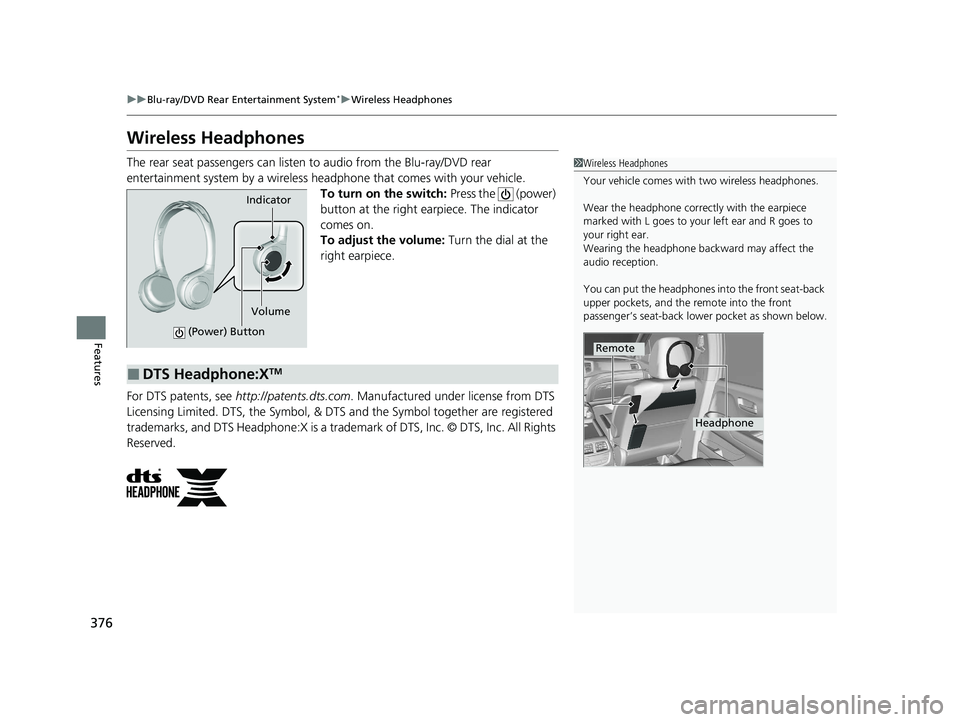
entertainment system by a wireless headphone that comes with your vehicle. To turn on the switch: Press the (power)
button at the right earpiece. The indicator
comes on.
To adjust the volume: Turn the dial at the
right earpiece.
For DTS patents, see http://patents.dts.com . Manufactured under license from DTS
Licensing Limited. DTS, the Symbol, & DTS and the Symbol together are registered
trademarks, and DTS Headphone:X is a trademark of DTS, Inc. © DTS, Inc. All Rights
Reserved.1 Wireless Headphones
Your vehicle comes with two wireless headphones.
Wear the headphone correctly with the earpiece
marked with L goes to y our left ear and R goes to
your right ear.
Wearing the headphone back ward may affect the
audio reception.
You can put the headphones into the front seat-back
upper pockets, and the remote into the front
passenger’s seat-back lowe r pocket as shown below.
Remote
Headphone
Indicator
(Power) Button
Volume
■DTS Headphone:XTM
21 PILOT-31TG76500.book 376 ページ 2020年3月18日 水曜日 午後4時38分