torque HONDA PILOT 2021 Owner's Manual (in English)
[x] Cancel search | Manufacturer: HONDA, Model Year: 2021, Model line: PILOT, Model: HONDA PILOT 2021Pages: 739, PDF Size: 44.86 MB
Page 93 of 739
91
uuIndicators u
Continued
Instrument Panel
IndicatorNameOn/BlinkingExplanationMessage
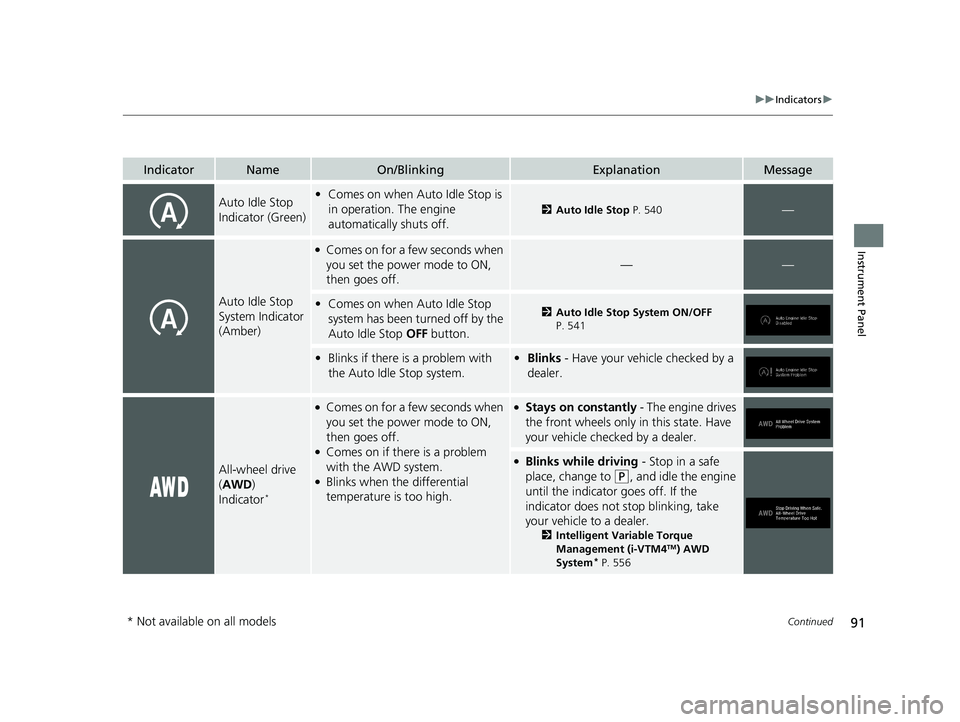
Auto Idle Stop
Indicator (Green)•Comes on when Auto Idle Stop is
in operation. The engine
automatically shuts off.
2 Auto Idle Stop P. 540—
Auto Idle Stop
System Indicator
(Amber)
●Comes on for a few seconds when
you set the power mode to ON,
then goes off.
——
•Comes on when Auto Idle Stop
system has been turned off by the
Auto Idle Stop OFF button.2Auto Idle Stop System ON/OFF
P. 541
• Blinks if there is a problem with
the Auto Idle Stop system.• Blinks - Have your vehicle checked by a
dealer.
All-wheel drive
(AWD )
Indicator
*
●Comes on for a few seconds when
you set the power mode to ON,
then goes off.
●Comes on if there is a problem
with the AWD system.
●Blinks when the differential
temperature is too high.
●Stays on constantly - The engine drives
the front wheels only in this state. Have
your vehicle checked by a dealer.
●Blinks while driving - Stop in a safe
place, change to
(P, and idle the engine
until the indicator goes off. If the
indicator does not stop blinking, take
your vehicle to a dealer.
2 Intelligent Variable Torque
Management (i-VTM4TM) AWD
System* P. 556
* Not available on all models
21 PILOT-31TG76500.book 91 ページ 2020年3月18日 水曜日 午後4時38分
Page 121 of 739
119
uuGauges and Displays uDriver Information Interface
Continued
Instrument Panel
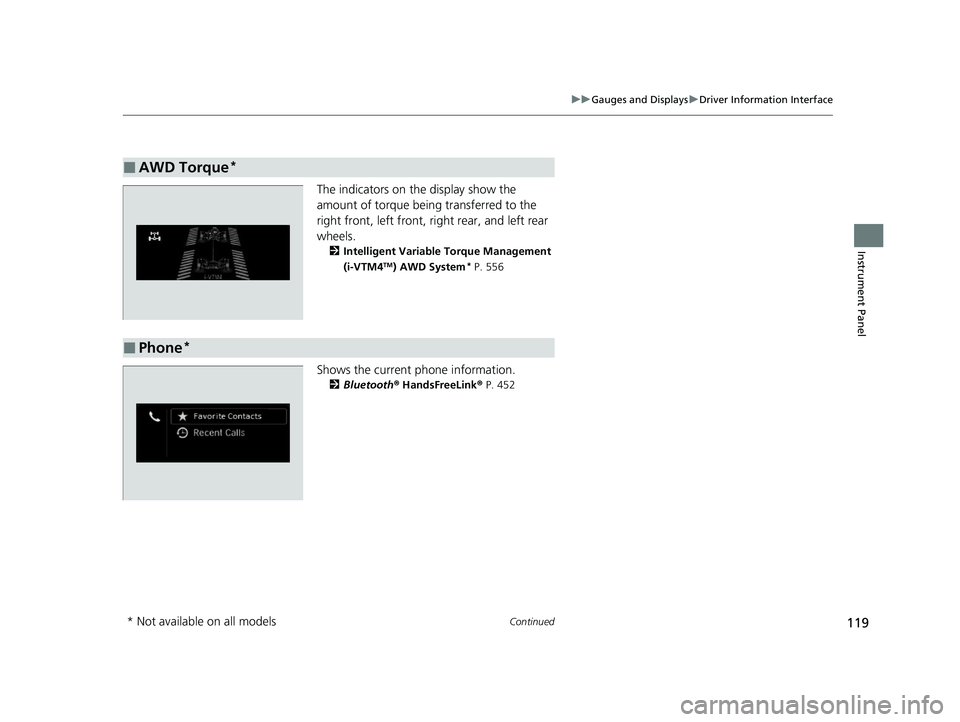
The indicators on the display show the
amount of torque being transferred to the
right front, left front, right rear, and left rear
wheels.
2 Intelligent Variable Torque Management
(i-VTM4TM) AWD System* P. 556
Shows the current phone information.
2Bluetooth® HandsFreeLink® P. 452
■AWD Torque*
■Phone*
* Not available on all models
21 PILOT-31TG76500.book 119 ページ 2020年3月18日 水曜日 午後4時38分
Page 558 of 739
556
uuWhen Driving uIntelligent Variable Torque Management (i-VTM4TM) AWD System*
Driving
Intelligent Variable Torque Management (i-VTM4TM) AWD System*
The intelligent variable torque management (i-VTM4TM) AWD system is a full time all
wheel drive system that automatically c ontrols and transfers varying amount of
engine torque to all wheels independently according to the driving conditions.
You still need to exercise the same care when accelerating, steering, and braking
that you would in a two wheel drive vehicle.
Avoid continuously driving on slippery surfa ces where a wheel is likely to spin out,
and do not drive if the AWD indicator starts blinking. Driving continuously under
such conditions can damage the system's torque distribution unit.
If the AWD indicator blinks while driving, it indicates the differential temperature is
too high. If this happens, pull to the side of the road when it is safe, shift to park, an
idle the engine idle until the indicator go es out. If the indicator does not go out, take
your vehicle to a dealer to have it checked.1Intelligent Variable Torque Management (i-VTM4TM) AWD System*
NOTICE
Do not continuously spin the front tires of your
vehicle. Continuously spinning the front tires can
cause transmission or re ar differential damage.
The intelligent variable torque management
(i-VTM4
TM) AWD system may not function properly if
tire type and size are mixed. Make sure to use the
same size and type of tire , and the air pressures as
specified. 2 Tire and Wheel Replacement P. 664
* Not available on all models
21 PILOT-31TG76500.book 556 ページ 2020年3月18日 水曜日 午後4時38分
Page 591 of 739
589
uuHonda Sensing ®u Lane Keeping Assist System (LKAS)
Continued
Driving
Lane Keeping Assist System (LKAS)
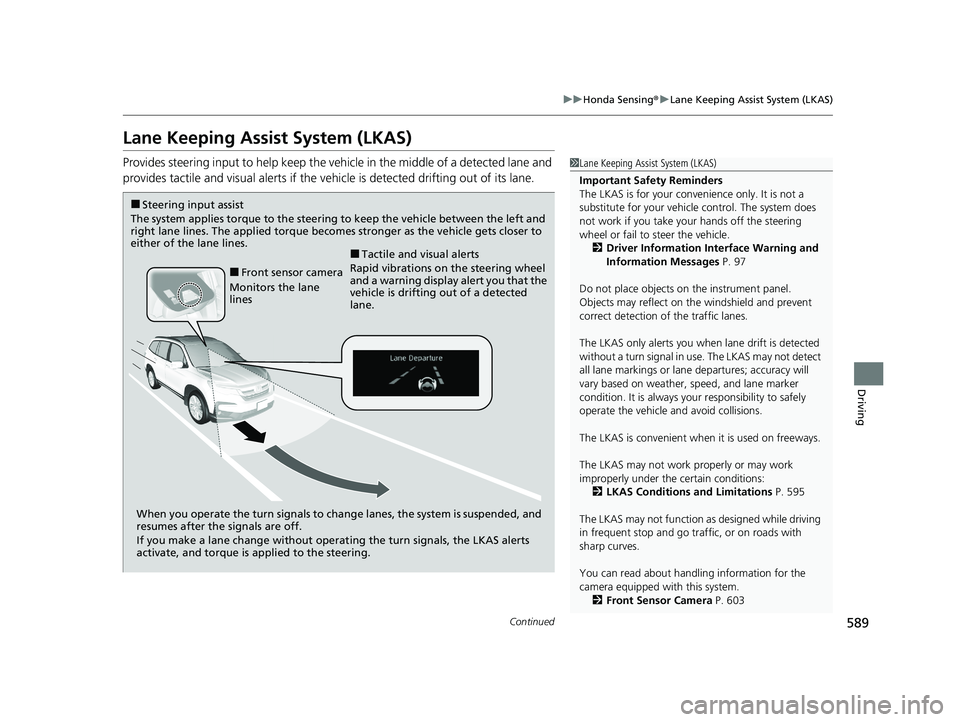
Provides steering input to help keep the vehicle in the middle of a detected lane and
provides tactile and visual al erts if the vehicle is detected drifting out of its lane.1Lane Keeping Assist System (LKAS)
Important Safety Reminders
The LKAS is for your convenience only. It is not a
substitute for your vehicle control. The system does
not work if you take y our hands off the steering
wheel or fail to steer the vehicle.
2 Driver Information Interface Warning and
Information Messages P. 97
Do not place objects on the instrument panel.
Objects may reflect on th e windshield and prevent
correct detection of the traffic lanes.
The LKAS only alerts you when lane drift is detected
without a turn signal in use. The LKAS may not detect
all lane markings or lane departures; accuracy will
vary based on weather, speed, and lane marker
condition. It is always your responsibility to safely
operate the vehicle an d avoid collisions.
The LKAS is convenient when it is used on freeways.
The LKAS may not work properly or may work
improperly under the certain conditions: 2 LKAS Conditions and Limitations P. 595
The LKAS may not function as designed while driving
in frequent stop and go traf fic, or on roads with
sharp curves.
You can read about handling information for the
camera equipped with this system. 2 Front Sensor Camera P. 603
When you operate the turn signals to chan ge lanes, the system is suspended, and
resumes after the signals are off.
If you make a lane change without operat ing the turn signals, the LKAS alerts
activate, and torque is applied to the steering.
■Front sensor camera
Monitors the lane
lines
■Tactile and visual alerts
Rapid vibrations on the steering wheel
and a warning display alert you that the
vehicle is drifting out of a detected
lane.
■Steering input assist
The system applies torque to the steering to keep the vehicle between the left and
right lane lines. The applied torque becomes stronger as the vehicle gets closer to
either of the lane lines.
21 PILOT-31TG76500.book 589 ページ 2020年3月18日 水曜日 午後4時38分
Page 593 of 739
Continued591
uuHonda Sensing ®u Lane Keeping Assist System (LKAS)
Driving
The system can be used when th e following conditions are met.
• The lane in which you are driving has detectable lane markers on both sides, and
your vehicle is in the center of the lane.
• The vehicle is travelling between about 45 and 90 mph (72 and 145 km/h).
• You are driving on a straight or slightly curved road.
• The turn signals are off.
• The brake pedal is not depressed.
• The wipers are not in continuous operation.
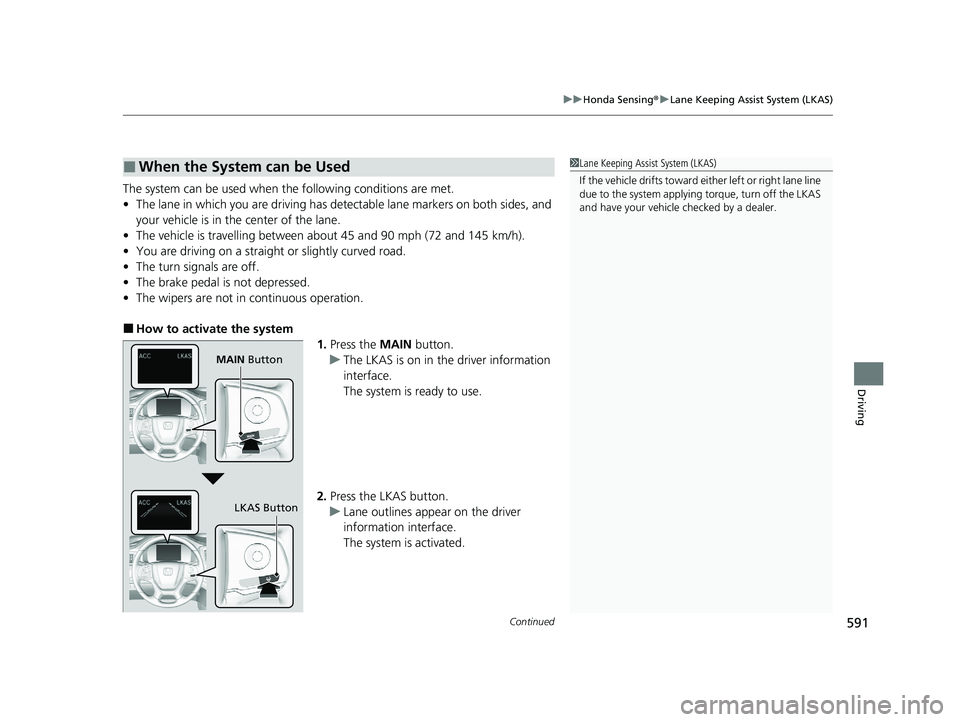
■How to activate the system
1.Press the MAIN button.
u The LKAS is on in the driver information
interface.
The system is ready to use.
2. Press the LKAS button.
u Lane outlines appear on the driver
information interface.
The system is activated.
■When the System can be Used1Lane Keeping Assist System (LKAS)
If the vehicle drifts toward ei ther left or right lane line
due to the system applying torque, turn off the LKAS
and have your vehicle checked by a dealer.
MAIN Button
LKAS Button
21 PILOT-31TG76500.book 591 ページ 2020年3月18日 水曜日 午後4時38分
Page 600 of 739
598
uuHonda Sensing ®u Road Departure Mitigation (RDM) System
Driving
Road Departure Mitigation (RDM) System
Alerts and helps to assist you when the sy stem detects a possibility of your vehicle
unintentionally crossing over detected la ne markings and/or leaving the roadway
altogether.
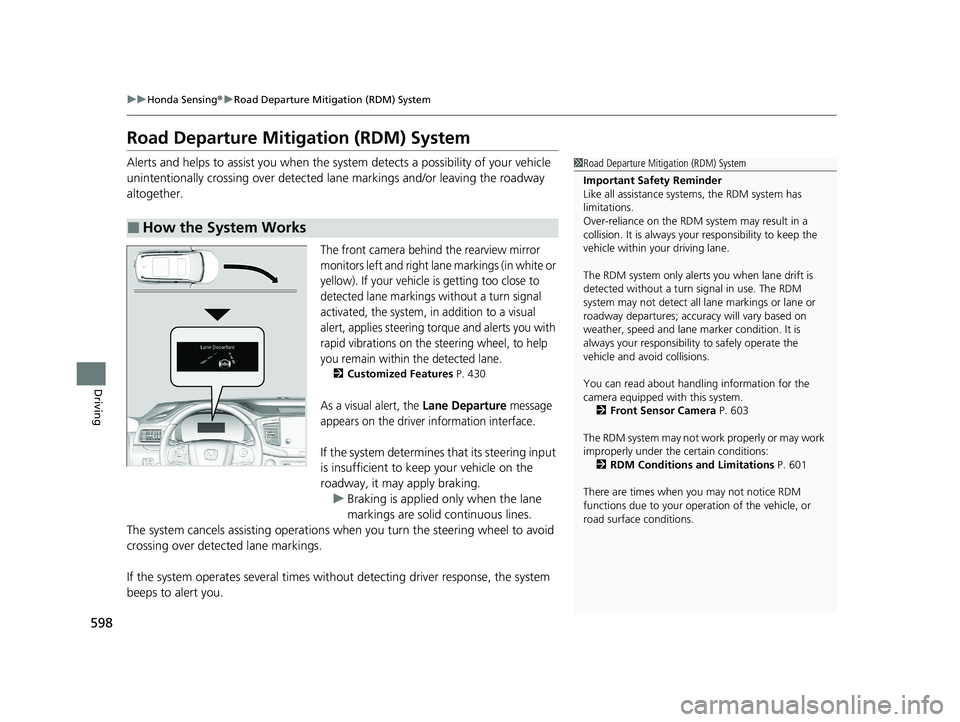
The front camera behind the rearview mirror
monitors left and right lane markings (in white or
yellow). If your vehicle is getting too close to
detected lane markings without a turn signal
activated, the system, in addition to a visual
alert, applies steering torque and alerts you with
rapid vibrations on the steering wheel, to help
you remain within the detected lane.
2 Customized Features P. 430
As a visual alert, the Lane Departure message
appears on the driver information interface.
If the system determines that its steering input
is insufficient to keep your vehicle on the
roadway, it may apply braking.
u Braking is applied only when the lane
markings are solid continuous lines.
The system cancels assisting operations wh en you turn the steering wheel to avoid
crossing over detected lane markings.
If the system operates several times without detecting driver response, the system
beeps to alert you.
■How the System Works
1 Road Departure Mitigation (RDM) System
Important Safety Reminder
Like all assistance systems, the RDM system has
limitations.
Over-reliance on the RDM system may result in a
collision. It is always your responsibility to keep the
vehicle within your driving lane.
The RDM system only alerts you when lane drift is
detected without a turn signal in use. The RDM
system may not detect all la ne markings or lane or
roadway departures; accu racy will vary based on
weather, speed and lane marker condition. It is
always your responsibilit y to safely operate the
vehicle and avoid collisions.
You can read about handling information for the
camera equipped with this system.
2 Front Sensor Camera P. 603
The RDM system may not wo rk properly or may work
improperly under the certain conditions: 2 RDM Conditions and Limitations P. 601
There are times when you may not notice RDM
functions due to your opera tion of the vehicle, or
road surface conditions.
21 PILOT-31TG76500.book 598 ページ 2020年3月18日 水曜日 午後4時38分
Page 646 of 739
uuMaintenance Under the Hood uChanging the Engine Oil and Oil Filter
644
Maintenance
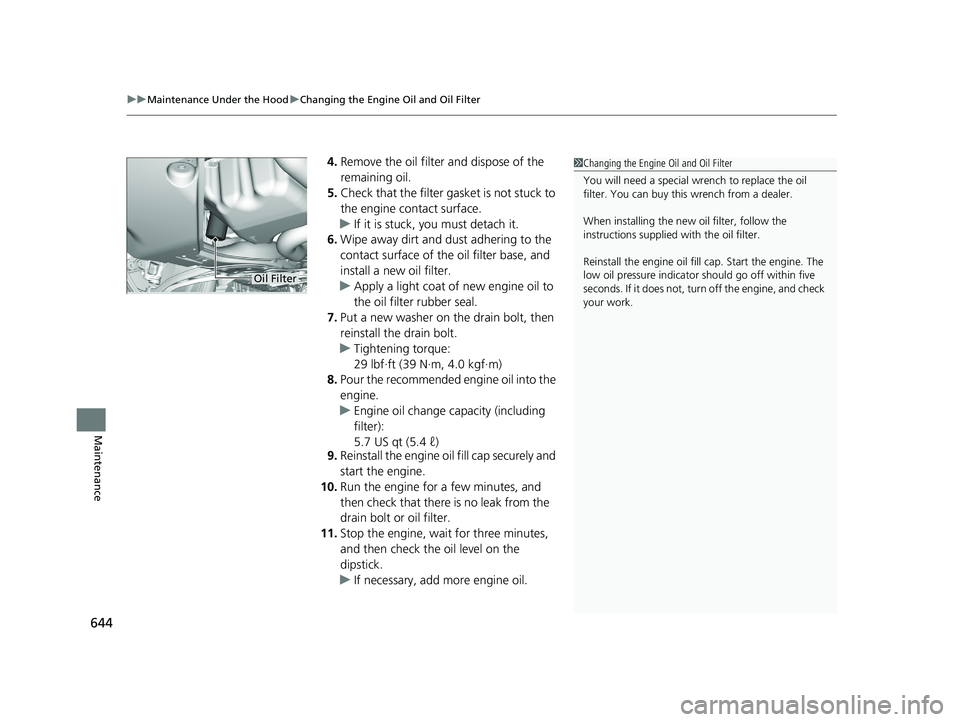
4. Remove the oil filter and dispose of the
remaining oil.
5. Check that the filter ga sket is not stuck to
the engine contact surface.
u If it is stuck, you must detach it.
6. Wipe away dirt and dust adhering to the
contact surface of the oil filter base, and
install a new oil filter.
u Apply a light coat of new engine oil to
the oil filter rubber seal.
7. Put a new washer on the drain bolt, then
reinstall the drain bolt.
u Tightening torque:
29 lbf∙ft (39 N∙m, 4.0 kgf∙m)
8. Pour the recommended engine oil into the
engine.
u Engine oil change capacity (including
filter):
5.7 US qt (5.4 ℓ)
9. Reinstall the engine oi l fill cap securely and
start the engine.
10. Run the engine for a few minutes, and
then check that there is no leak from the
drain bolt or oil filter.
11. Stop the engine, wait for three minutes,
and then check the oil level on the
dipstick.
u If necessary, add more engine oil.1Changing the Engine Oil and Oil Filter
You will need a special wrench to replace the oil
filter. You can buy this wrench from a dealer.
When installing the new oil filter, follow the
instructions supplied with the oil filter.
Reinstall the engine oil fill cap. Start the engine. The
low oil pressure indicator should go off within five
seconds. If it does not, turn off the engine, and check
your work.
Oil Filter
21 PILOT-31TG76500.book 644 ページ 2020年3月18日 水曜日 午後4時38分
Page 690 of 739
uuIf a Tire Goes Flat uChanging a Flat Tire
688
Handling the Unexpected
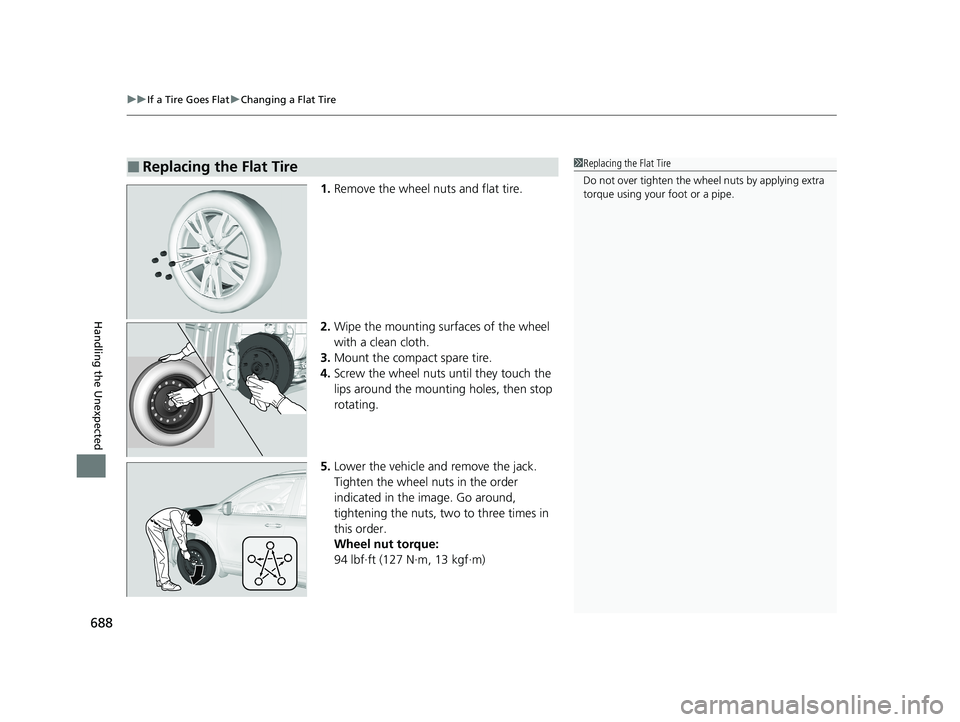
1. Remove the wheel nuts and flat tire.
2. Wipe the mounting surfaces of the wheel
with a clean cloth.
3. Mount the compact spare tire.
4. Screw the wheel nuts until they touch the
lips around the mounting holes, then stop
rotating.
5. Lower the vehicle and remove the jack.
Tighten the wheel nuts in the order
indicated in the image. Go around,
tightening the nuts, two to three times in
this order.
Wheel nut torque:
94 lbf∙ft (127 N∙m, 13 kgf∙m)
■Replacing the Flat Tire1Replacing the Flat Tire
Do not over tighten the wheel nuts by applying extra
torque using your foot or a pipe.
21 PILOT-31TG76500.book 688 ページ 2020年3月18日 水曜日 午後4時38分
Page 730 of 739
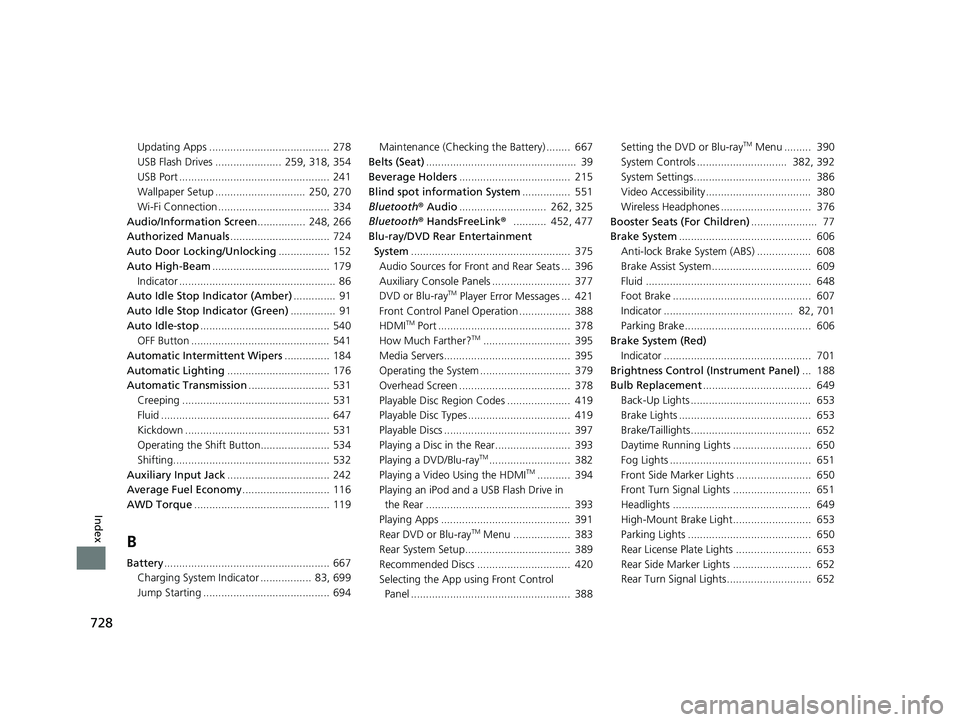
728
Index
Updating Apps ........................................ 278
USB Flash Drives ...................... 259, 318, 354
USB Port .................................................. 241
Wallpaper Setup .............................. 250, 270
Wi-Fi Connection ..................................... 334
Audio/Information Screen ................ 248, 266
Authorized Manuals ................................. 724
Auto Door Locking/Unlocking ................. 152
Auto High-Beam ....................................... 179
Indicator .................................................... 86
Auto Idle Stop Indicator (Amber) .............. 91
Auto Idle Stop Indicator (Green) ............... 91
Auto Idle-stop ........................................... 540
OFF Button .............................................. 541
Automatic Intermittent Wipers ............... 184
Automatic Lighting .................................. 176
Automatic Transmission ........................... 531
Creeping ................................................. 531
Fluid ........................................................ 647
Kickdown ................................................ 531
Operating the Shift Button....................... 534
Shifting.................................................... 532
Auxiliary Input Jack .................................. 242
Average Fuel Economy ............................. 116
AWD Torque ............................................. 119
B
Battery....................................................... 667
Charging System Indicator ................. 83, 699
Jump Starting .......................................... 694 Maintenance (Checking the Battery) ........ 667
Belts (Seat) .................................................. 39
Beverage Holders ..................................... 215
Blind spot information System ................ 551
Bluetooth® Audio............................. 262, 325
Bluetooth® HandsFreeLink ®........... 452, 477
Blu-ray/DVD Rear Entertainment System ..................................................... 375
Audio Sources for Front and Rear Seats ... 396
Auxiliary Console Panels .......................... 377
DVD or Blu-ray
TM Player Error Messages ... 421
Front Control Panel Operation ................. 388
HDMI
TM Port ............................................ 378
How Much Farther?TM............................. 395
Media Servers.......................................... 395
Operating the System .............................. 379
Overhead Screen ..................................... 378
Playable Disc Region Codes ..................... 419
Playable Disc Types .................................. 419
Playable Discs .......................................... 397
Playing a Disc in the Rear......................... 393
Playing a DVD/Blu-ray
TM........................... 382
Playing a Video Using the HDMITM........... 394
Playing an iPod and a USB Flash Drive in the Rear ................................................ 393
Playing Apps ........................................... 391
Rear DVD or Blu-ray
TM Menu ................... 383
Rear System Setup................................... 389
Recommended Discs ............................... 420
Selecting the App us ing Front Control
Panel ..................................................... 388 Setting the DVD or Blu-ray
TM Menu ......... 390
System Controls .............................. 382, 392
System Settings....................................... 386
Video Accessibility ................................... 380
Wireless Headphones .............................. 376
Booster Seats (For Children) ...................... 77
Brake System ............................................ 606
Anti-lock Brake System (ABS) .................. 608
Brake Assist System................................. 609
Fluid ....................................................... 648
Foot Brake .............................................. 607
Indicator ........................................... 82, 701
Parking Brake.......................................... 606
Brake System (Red)
Indicator ................................................. 701
Brightness Control (Instrument Panel) ... 188
Bulb Replacement .................................... 649
Back-Up Lights ........................................ 653
Brake Lights ............................................ 653
Brake/Taillights........................................ 652
Daytime Running Lights .......................... 650
Fog Lights ............................................... 651
Front Side Marker Lights ......................... 650
Front Turn Signal Lights .......................... 651
Headlights .............................................. 649
High-Mount Brake Light.......................... 653
Parking Lights ......................................... 650
Rear License Plate Lights ......................... 653
Rear Side Marker Lights .......................... 652
Rear Turn Signal Lights............................ 652
21 PILOT-31TG76500.book 728 ページ 2020年3月18日 水曜日 午後4時38分