fuel HONDA PILOT 2022 User Guide
[x] Cancel search | Manufacturer: HONDA, Model Year: 2022, Model line: PILOT, Model: HONDA PILOT 2022Pages: 737, PDF Size: 28.84 MB
Page 117 of 737
115
uuGauges and Displays uDriver Information Interface
Continued
Instrument Panel
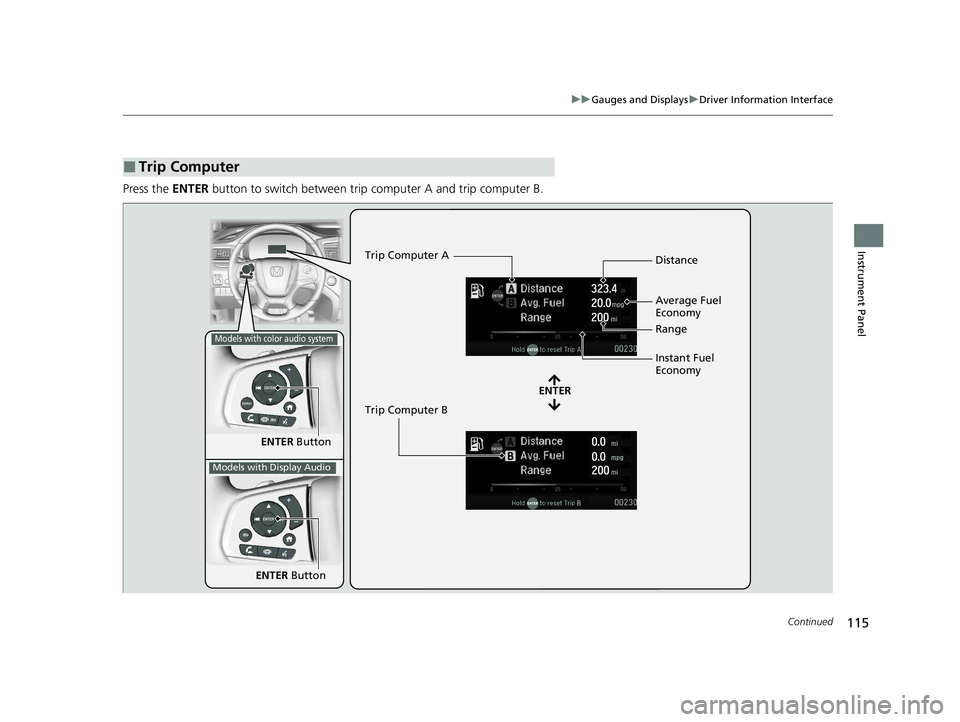
Press the ENTER button to switch between trip computer A and trip computer B.
■Trip Computer
ENTER Button
ENTER
Trip Computer A
Trip Computer B Distance
Range
Average Fuel
Economy
Instant Fuel
Economy
Models with color audio system
Models with Display Audio
ENTER
Button
22 PILOT-31TG76600.book 115 ページ 2021年6月11日 金曜日 午後4時40分
Page 118 of 737
uuGauges and Displays uDriver Information Interface
116
Instrument Panel
■Distance
Shows the total number of miles or kilomete rs driven since the last reset. Meters A
and B can be used to measure two separate trips.
Resetting distance
To reset the Distance, display it and then press and hold the ENTER button until the
Distance is reset to 0.0.
■Average fuel economy (Avg. Fuel)
Shows the estimated average fuel economy of each Distance in mpg or l/100 km.
The display is updated at set intervals. When a Distance is reset, the average fuel
economy is also reset.
■Instant fuel economy
Shows the instant fuel economy as a bar graph in mpg or l/100 km.
■Range
Shows the estimated distance you can trave l on the remaining fuel. This estimated
distance is based on the vehicle’s current fuel economy.
1 Distance
Switch between Distance A and Distance B by
pressing the ENTER button.
1Average fuel economy (Avg. Fuel )
You can change when the average fuel economy is
reset.
2 Vehicle Customization P. 125
2 Customized Features P. 429
Models with color audio system
Models with Display Audio
22 PILOT-31TG76600.book 116 ページ 2021年6月11日 金曜日 午後4時40分
Page 128 of 737
126
uuGauges and Displays uDriver Information Interface
Instrument Panel
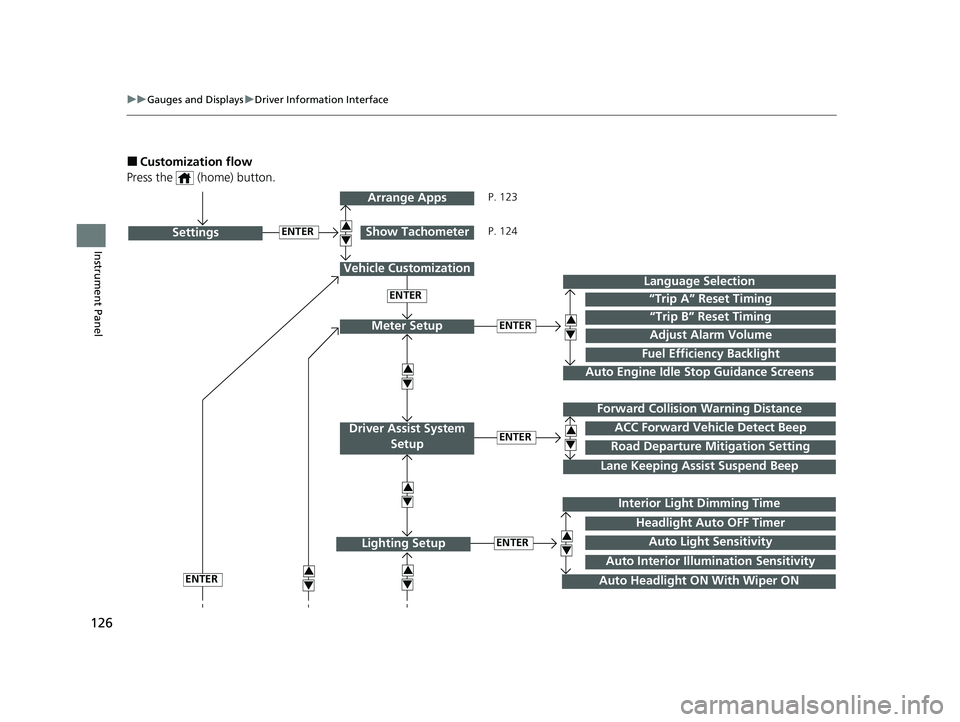
■Customization flow
Press the (home) button.
ENTER“Trip B” Reset Timing
Fuel Efficiency Backlight
“Trip A” Reset Timing
Language Selection
Adjust Alarm VolumeMeter Setup
ENTERSettings
Arrange Apps
Show Tachometer3
4
3
4
3
43
4
3
4
Vehicle Customization
ENTER
P. 123
P. 124
Interior Light Dimming Time
Auto Headlight ON With Wiper ON
ENTERLighting Setup3
4
ENTER
ENTERRoad Departure Mitigation Setting
Lane Keeping Assi st Suspend Beep
ACC Forward Vehicle Detect Beep
Forward Collision Warning Distance
Driver Assist System
Setup
3
4
3
4
Auto Light Sensitivity
Headlight Auto OFF Timer
Auto Interior Illu mination Sensitivity
Auto Engine Idle Stop Guidance Screens
22 PILOT-31TG76600.book 126 ページ 2021年6月11日 金曜日 午後4時40分
Page 130 of 737
128
uuGauges and Displays uDriver Information Interface
Instrument Panel
■List of customizable options
*1:Default Setting Setup Group Customizable Features Description Selectable settings
Meter Setup
Language SelectionChanges the displayed language.English*1/
Français /Español
“Trip A” Reset TimingChanges the setting of how the distance and
average fuel economy of trip computer A is reset.When Fully Refueled /
IGN OFF /Manually Reset*1
“Trip B” Reset TimingChanges the setting of how the distance and
average fuel economy of trip computer B is reset.When Fully Refueled /
IGN OFF /Manually Reset*1
Adjust Alarm VolumeChanges the volume setting for buzzers, warnings,
turn signals, and other alerting systems.High /Mid*1/Low
Fuel Efficiency BacklightTurns the ambient meter feature on and off.ON*1/ OFF
Auto Engine Idle Stop
Guidance ScreensTurns the engine idle-stop guidance displayed in the
meter display on and off during the auto engine idle-
stop system is in operation.
ON /OFF*1
Driver Assist
System
Setup Forward Collision
Warning Distance
Changes the distance at which CMBS
TM alerts.
Long/Normal*1/Short
ACC Forward Vehicle
Detect Beep Causes the system to beep when the system detects a
vehicle, or when the vehicle goes out of ACC range.
ON
/OFF
*1
Road Departure
Mitigation Setting Changes the setting for the road departure
mitigation system.
Normal*1/
Wide /Warning Only
Lane Keeping Assist
Suspend Beep Causes the system to b
eep when the LKAS is
suspended. ON
/OFF
*1
22 PILOT-31TG76600.book 128 ページ 2021年6月11日 金曜日 午後4時40分
Page 133 of 737
131
uuGauges and Displays uDriver Information Interface
Continued
Instrument Panel
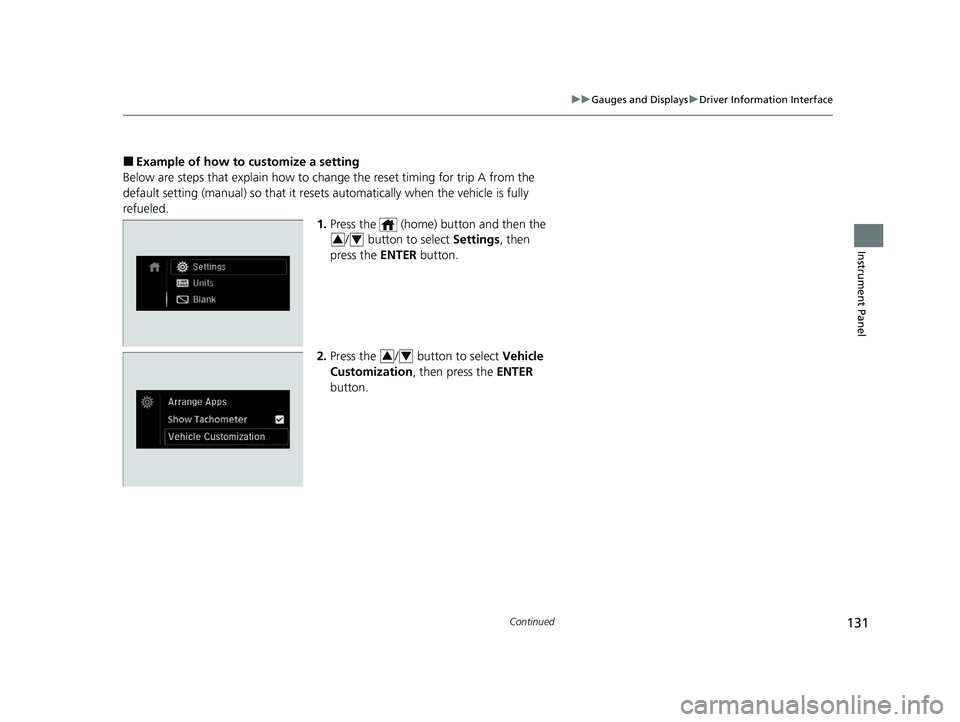
■Example of how to customize a setting
Below are steps that explain how to ch ange the reset timing for trip A from the
default setting (manual) so that it resets automatically when the vehicle is fully
refueled. 1.Press the (home) button and then the
/ button to select Settings, then
press the ENTER button.
2. Press the / button to select Vehicle
Customization, then press the ENTER
button.
34
34
22 PILOT-31TG76600.book 131 ページ 2021年6月11日 金曜日 午後4時40分
Page 134 of 737
132
uuGauges and Displays uDriver Information Interface
Instrument Panel
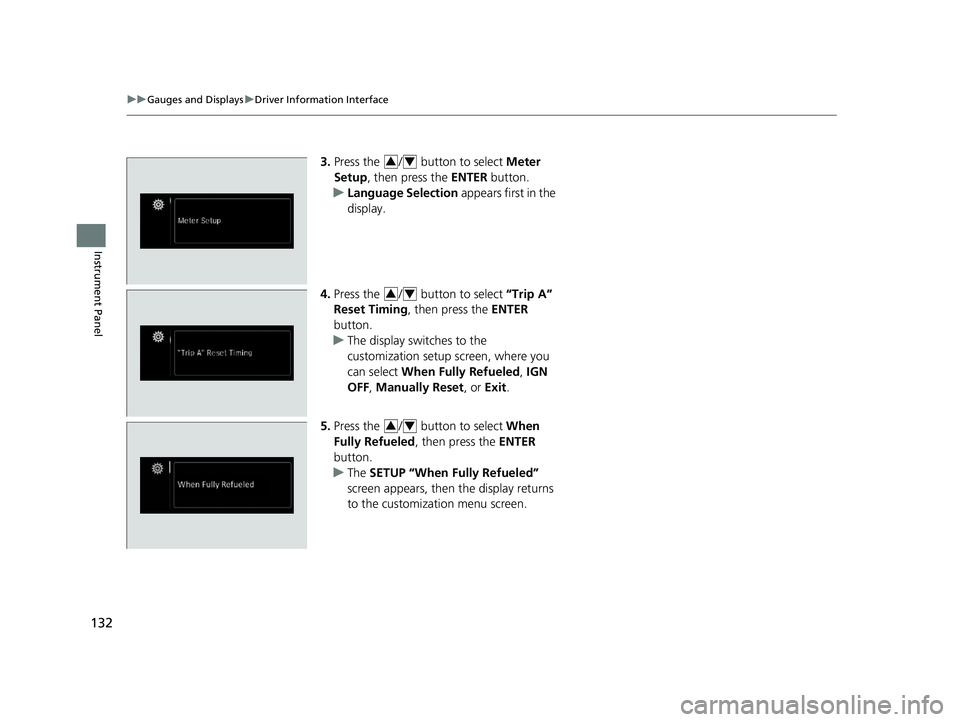
3. Press the / button to select Meter
Setup , then press the ENTER button.
u Language Selection appears first in the
display.
4. Press the / button to select “Trip A”
Reset Timing , then press the ENTER
button.
u The display switches to the
customization setup screen, where you
can select When Fully Refueled , IGN
OFF , Manually Reset , or Exit .
5. Press the / button to select When
Fully Refueled , then press the ENTER
button.
u The SETUP “When Fully Refueled”
screen appears, then the display returns
to the customization menu screen.34
34
34
22 PILOT-31TG76600.book 132 ページ 2021年6月11日 金曜日 午後4時40分
Page 362 of 737
360
uuGeneral Information on the Audio System uHonda App License Agreement
Features
E. Information Coll ection and Storage
1. Information Collection, Use, Transmission and Storage of Data. Consent to Use of Data:
You agree that HONDA and PROVIDERS may
collect and use your information gathered in any manner as part of product support services related to the SOFTWARE or related services.
HONDA may share such information with third parties, including, without limitation, PROVIDERS, th ird party software and services
suppliers, their affiliates and/or their desi gnated agents, solely to improve their products or to provide services or technolo gies to you.
HONDA, third party software and systems s uppliers, their affiliates and/or their designated agent may disclose this information to others,
but not in a form that pe rsonally identifies you.
2. Information Storage.
Depending on the type of multimedia system you have in your VEHICLE, certain information may be stored for ease
of use of the SOFTWARE including, without limitation, search hi story, location history in certain applications, previous and saved
destinations, map locations within certain applications, and device numbers and contact information.
(a) Vehicle Health Information.
Your VEHICLE may remotely trans mit information regarding the status and health of your VEHICLE
(“VEHICLE INFORMATION”) to HONDA without notification to you. VEHICLE INFORMATION may contain VEHICLE maintenance and
malfunction status that is derived from VEHICLE diagnostic data and includes, but is not limited to, status of powered doors and windows,
battery life data, battery charging data, VEHICLE speed, coolant temperat ure, air compressor revolution, output power, warning codes,
diagnostic trouble codes, fuel injection volu me, and engine rotations per minute. VEHICL E HEALTH INFORMATION may be used by HON DA
for research and development, to deliver HONDA SERVICES and information to you, and to contact you, and is retained only for a period
of time necessary to fulfill these goals.
(b) VEHICLE Geolocation Data (non-navigation/map based).
If you opt-in to geolocation-based SERVICES, your vehicle’s geolocation data
(latitude and longitude) will be automatically se nt from your VEHICLE to HONDA and PROVIDERS.
(c) You understand that the inputting or uploading of information to your VEHICLE’s multimedia system or the SOFTWARE or SERVIC ES is
at your own risk and that HONDA is not responsible for unauthorized access to or use of any personal or other information. All information
uploaded to the SOFTWARE and SERVICES may be stored on your VEHICLES’s multimedia system and you understand that the security and
safety of your VEHICLE’s multimedia system is your sole responsibility.
22 PILOT-31TG76600.book 360 ページ 2021年6月11日 金曜日 午後4時40分
Page 435 of 737
433
uuCustomized Features u
Continued
Features
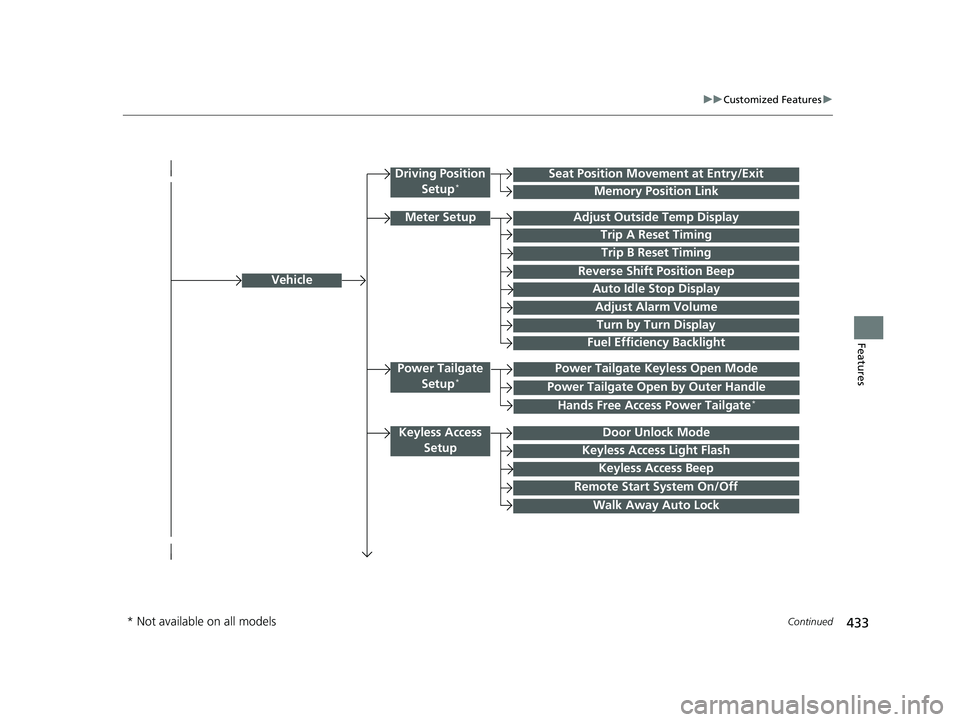
Vehicle
Driving Position
Setup*Seat Position Movement at Entry/Exit
Memory Position Link
Meter SetupAdjust Outside Temp Display
Trip A Reset Timing
Trip B Reset Timing
Reverse Shift Position Beep
Auto Idle Stop Display
Adjust Alarm Volume
Turn by Turn Display
Power Tailgate
Setup*Power Tailgate Keyless Open Mode
Power Tailgate Open by Outer Handle
Keyless Access SetupDoor Unlock Mode
Keyless Access Light Flash
Keyless Access Beep
Remote Start System On/Off
Walk Away Auto Lock
Fuel Efficiency Backlight
Hands Free Access Power Tailgate*
* Not available on all models
22 PILOT-31TG76600.book 433 ページ 2021年6月11日 金曜日 午後4時40分
Page 442 of 737
440
uuCustomized Features u
Features
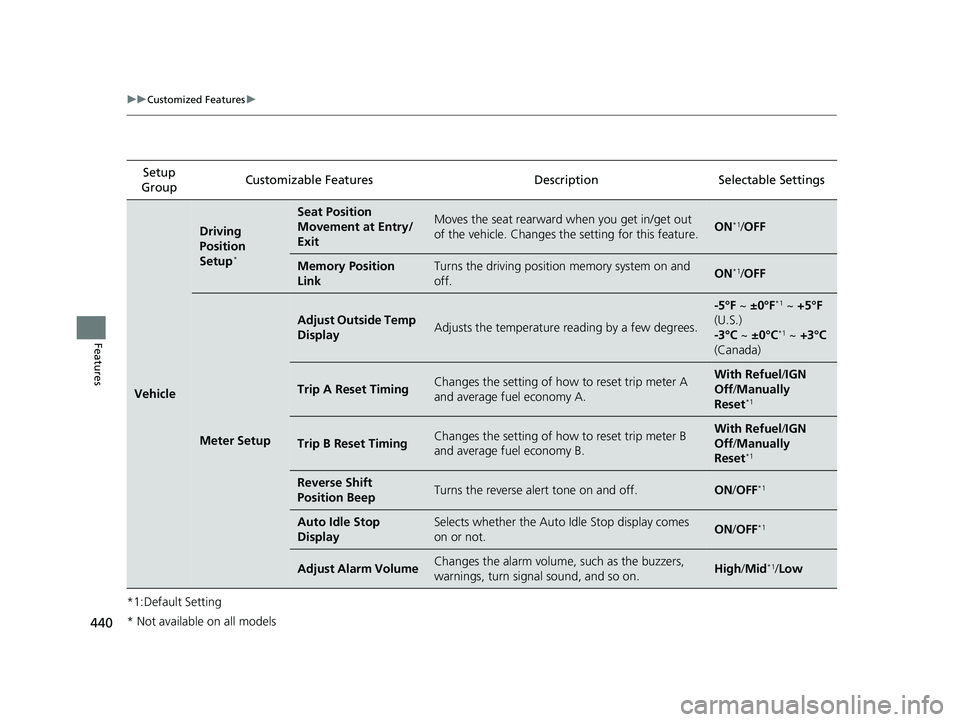
*1:Default SettingSetup
Group Customizable Features Description Selectable Settings
Vehicle
Driving
Position
Setup
*
Seat Position
Movement at Entry/
ExitMoves the seat rearward when you get in/get out
of the vehicle. Changes the setting for this feature.ON*1/
OFF
Memory Position
LinkTurns the driving position memory system on and
off.ON*1/ OFF
Meter Setup
Adjust Outside Temp
DisplayAdjusts the temperature reading by a few degrees.
-5°F ~ ±0°F*1 ~ +5°F
(U.S.)
-3°C ~ ±0°C
*1 ~ +3°C
(Canada)
Trip A Reset TimingChanges the setting of how to reset trip meter A
and average fuel economy A.With Refuel /IGN
Off /Manually
Reset
*1
Trip B Reset TimingChanges the setting of how to reset trip meter B
and average fuel economy B.With Refuel /IGN
Off /Manually
Reset
*1
Reverse Shift
Position BeepTurns the reverse alert tone on and off.ON /OFF*1
Auto Idle Stop
DisplaySelects whether the Auto Idle Stop display comes
on or not.ON /OFF*1
Adjust Alarm VolumeChanges the alarm volume, such as the buzzers,
warnings, turn signal sound, and so on.High /Mid*1/Low
* Not available on all models
22 PILOT-31TG76600.book 440 ページ 2021年6月11日 金曜日 午後4時40分
Page 443 of 737
441
uuCustomized Features u
Continued
Features
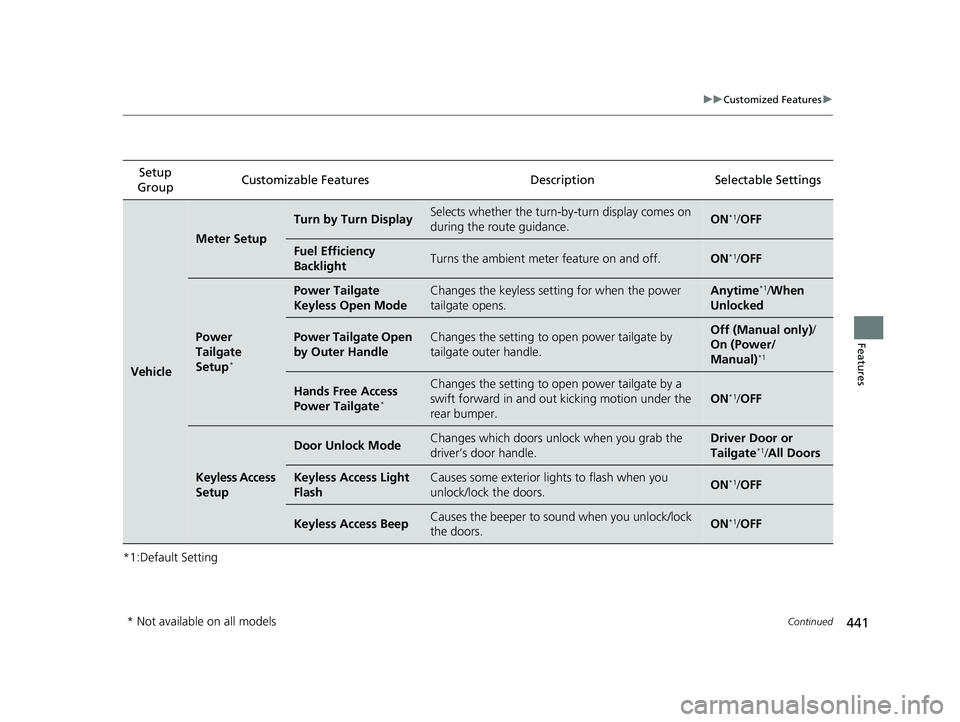
*1:Default SettingSetup
Group Customizable Features Description Selectable Settings
Vehicle
Meter Setup
Turn by Turn DisplaySelects whether the turn-b
y-turn display comes on
during the route guidance.ON*1/ OFF
Fuel Efficiency
BacklightTurns the ambient meter feature on and off.ON*1/OFF
Power
Tailgate
Setup
*
Power Tailgate
Keyless Open ModeChanges the keyless setting for when the power
tailgate opens.Anytime*1/When
Unlocked
Power Tailgate Open
by Outer HandleChanges the setting to open power tailgate by
tailgate outer handle.Off (Manual only) /
On (Power/
Manual)
*1
Hands Free Access
Power Tailgate*
Changes the setting to open power tailgate by a
swift forward in and out kicking motion under the
rear bumper.
ON*1/ OFF
Keyless Access
Setup
Door Unlock ModeChanges which doors unlock when you grab the
driver’s door handle.Driver Door or
Tailgate*1/All Doors
Keyless Access Light
FlashCauses some exterior lights to flash when you
unlock/lock the doors.ON*1/OFF
Keyless Access BeepCauses the beeper to so und when you unlock/lock
the doors.ON*1/ OFF
* Not available on all models
22 PILOT-31TG76600.book 441 ページ 2021年6月11日 金曜日 午後4時40分