key HONDA PILOT 2022 Service Manual
[x] Cancel search | Manufacturer: HONDA, Model Year: 2022, Model line: PILOT, Model: HONDA PILOT 2022Pages: 737, PDF Size: 28.84 MB
Page 443 of 737
441
uuCustomized Features u
Continued
Features
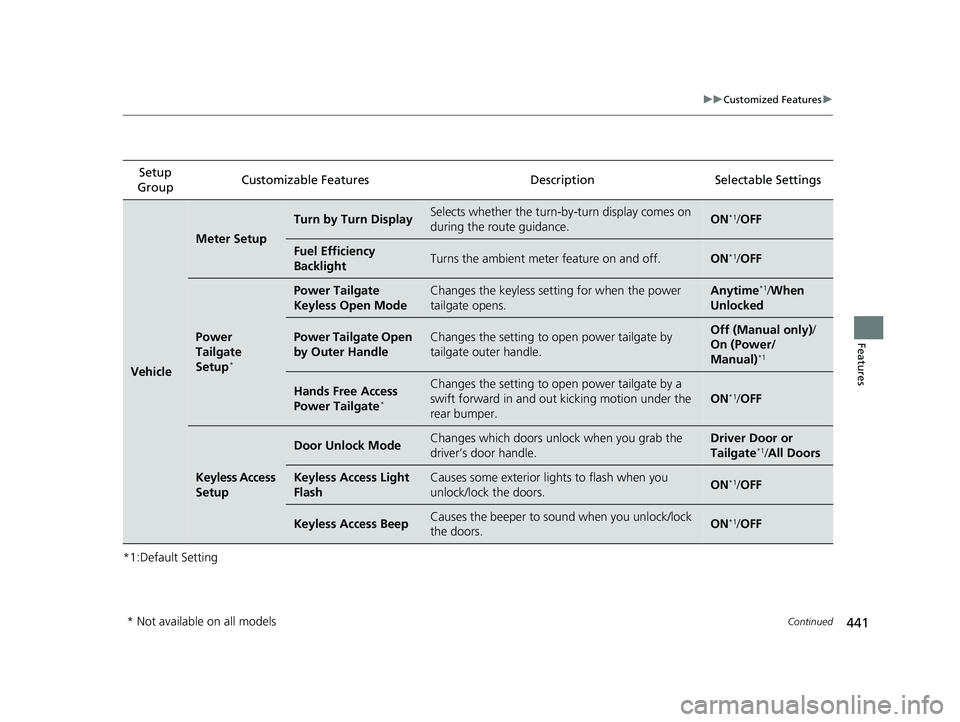
*1:Default SettingSetup
Group Customizable Features Description Selectable Settings
Vehicle
Meter Setup
Turn by Turn DisplaySelects whether the turn-b
y-turn display comes on
during the route guidance.ON*1/ OFF
Fuel Efficiency
BacklightTurns the ambient meter feature on and off.ON*1/OFF
Power
Tailgate
Setup
*
Power Tailgate
Keyless Open ModeChanges the keyless setting for when the power
tailgate opens.Anytime*1/When
Unlocked
Power Tailgate Open
by Outer HandleChanges the setting to open power tailgate by
tailgate outer handle.Off (Manual only) /
On (Power/
Manual)
*1
Hands Free Access
Power Tailgate*
Changes the setting to open power tailgate by a
swift forward in and out kicking motion under the
rear bumper.
ON*1/ OFF
Keyless Access
Setup
Door Unlock ModeChanges which doors unlock when you grab the
driver’s door handle.Driver Door or
Tailgate*1/All Doors
Keyless Access Light
FlashCauses some exterior lights to flash when you
unlock/lock the doors.ON*1/OFF
Keyless Access BeepCauses the beeper to so und when you unlock/lock
the doors.ON*1/ OFF
* Not available on all models
22 PILOT-31TG76600.book 441 ページ 2021年6月11日 金曜日 午後4時40分
Page 444 of 737
442
uuCustomized Features u
Features
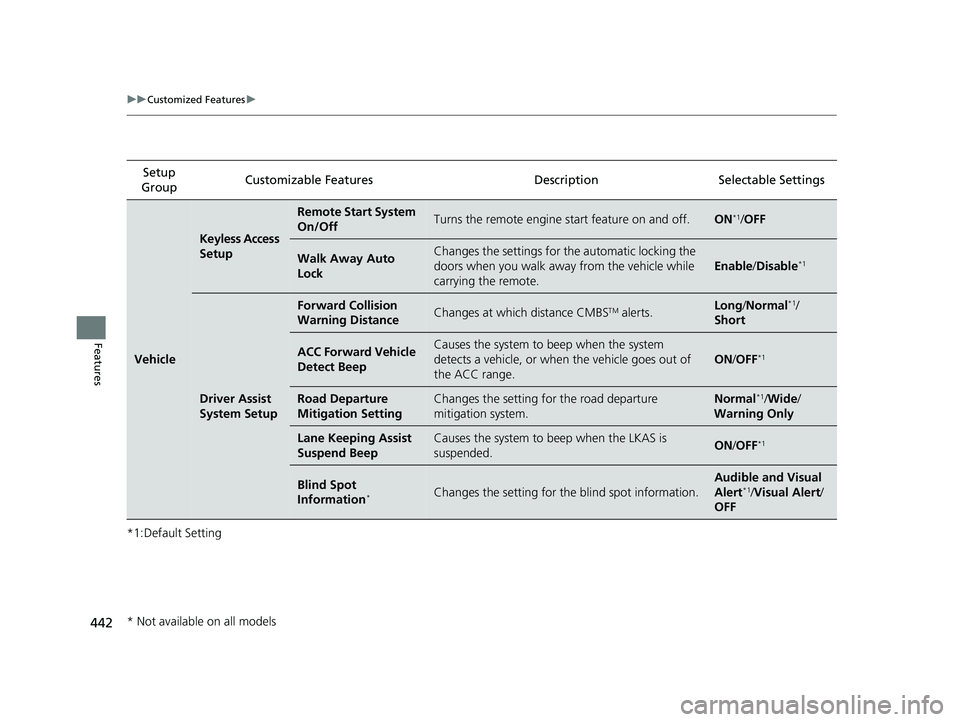
*1:Default SettingSetup
Group Customizable Features Description Selectable Settings
Vehicle
Keyless Access
Setup
Remote Start System
On/OffTurns the remote engine
start feature on and off.ON*1/OFF
Walk Away Auto
LockChanges the settings for the automatic locking the
doors when you walk away from the vehicle while
carrying the remote.
Enable /Disable*1
Driver Assist
System Setup
Forward Collision
Warning DistanceChanges at which distance CMBSTM alerts.Long /Normal*1/
Short
ACC Forward Vehicle
Detect BeepCauses the system to beep when the system
detects a vehicle, or when the vehicle goes out of
the ACC range.
ON /OFF*1
Road Departure
Mitigation SettingChanges the setting for the road departure
mitigation system.Normal*1/ Wide /
Warning Only
Lane Keeping Assist
Suspend BeepCauses the system to b eep when the LKAS is
suspended.ON /OFF*1
Blind Spot
Information*Changes the setting for th e blind spot information.
Audible and Visual
Alert*1/Visual Alert /
OFF
* Not available on all models
22 PILOT-31TG76600.book 442 ページ 2021年6月11日 金曜日 午後4時40分
Page 445 of 737
443
uuCustomized Features u
Continued
Features
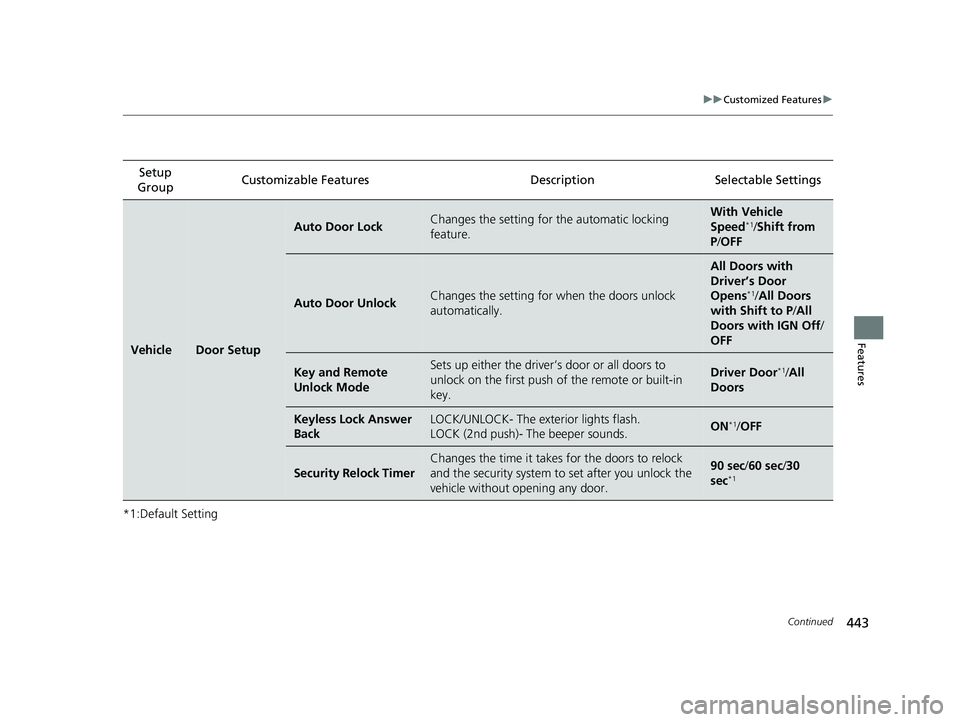
*1:Default SettingSetup
Group Customizable Features Description Selectable Settings
VehicleDoor Setup
Auto Door LockChanges the setting for
the automatic locking
feature.With Ve hicle
Speed*1/ Shift from
P /OFF
Auto Door UnlockChanges the setting for when the doors unlock
automatically.
All Doors with
Driver’s Door
Opens
*1/ All Doors
with Shift to P /All
Doors with IGN Off /
OFF
Key and Remote
Unlock ModeSets up either the driver’s door or all doors to
unlock on the first push of the remote or built-in
key.Driver Door*1/ All
Doors
Keyless Lock Answer
BackLOCK/UNLOCK- The exterior lights flash.
LOCK (2nd push)- The beeper sounds.ON*1/ OFF
Security Relock Timer
Changes the time it takes for the doors to relock
and the security system to set after you unlock the
vehicle without opening any door.90 sec/ 60 sec/30
sec*1
22 PILOT-31TG76600.book 443 ページ 2021年6月11日 金曜日 午後4時40分
Page 456 of 737
454
uuBluetooth ® HandsFreeLink ®u HFL Menus
Features
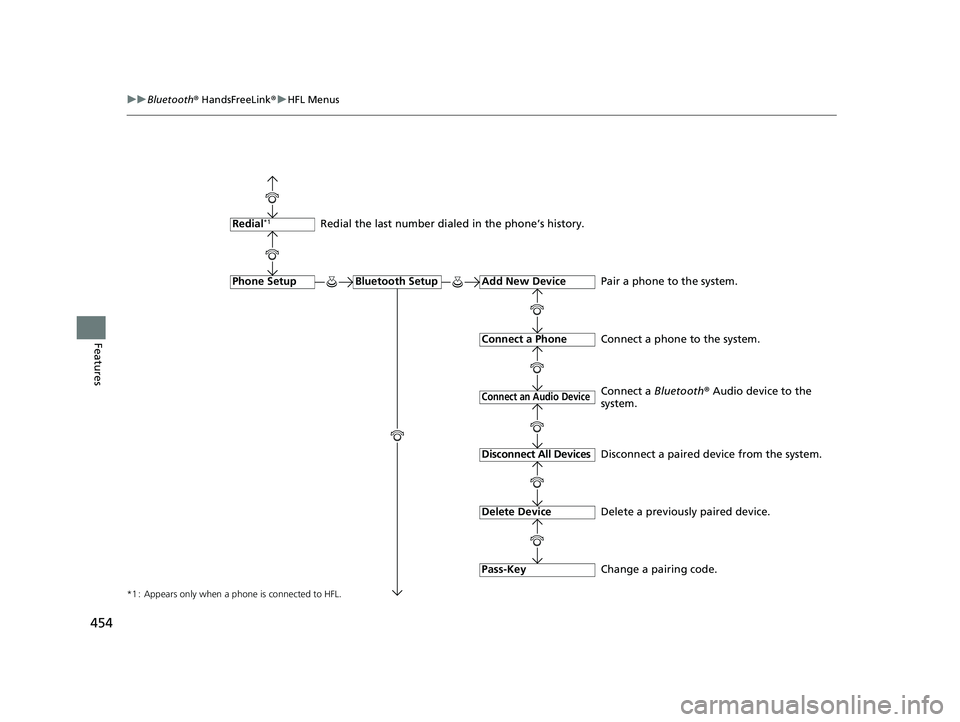
*1 : Appears only when a phone is connected to HFL.
Redial the last number dialed in the phone’s history.
Add New Device
Connect a Phone
Connect an Audio Device
Bluetooth SetupPhone Setup
Redial*1
Pair a phone to the system.
Connect a phone to the system.
Change a pairing code.
Disconnect All Devices
Delete Device
Pass-Key
Disconnect a paired device from the system.
Delete a previously paired device. Connect a
Bluetooth® Audio device to the
system.
22 PILOT-31TG76600.book 454 ページ 2021年6月11日 金曜日 午後4時40分
Page 463 of 737
461
uuBluetooth ® HandsFreeLink ®u HFL Menus
Continued
Features
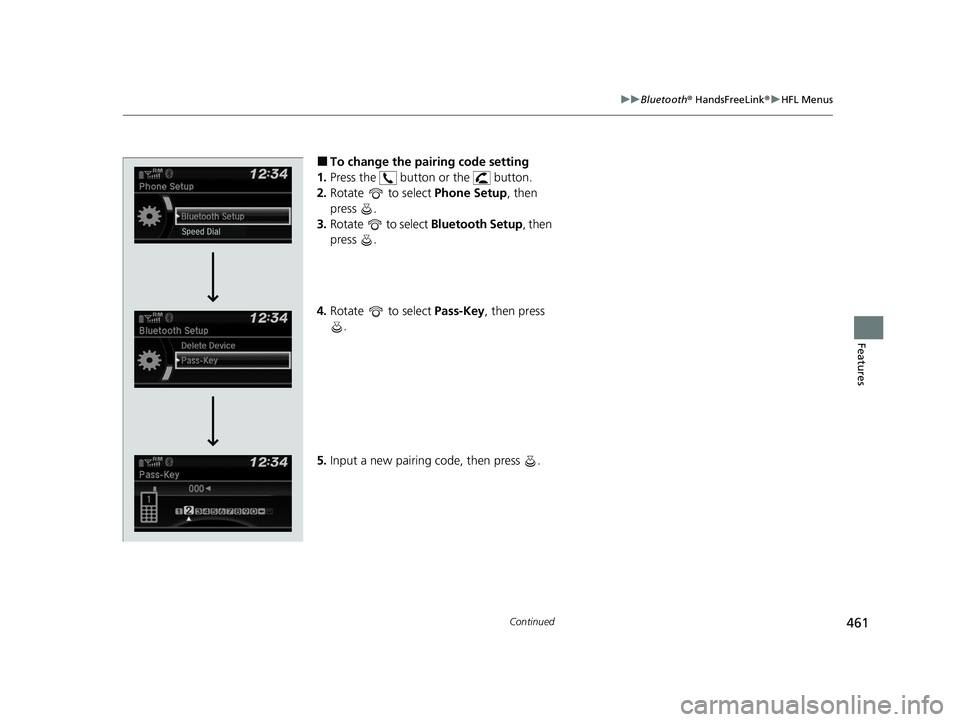
■To change the pairing code setting
1. Press the button or the button.
2. Rotate to select Phone Setup, then
press .
3. Rotate to select Bluetooth Setup, then
press .
4. Rotate to select Pass-Key, then press
.
5. Input a new pairing code, then press .
22 PILOT-31TG76600.book 461 ページ 2021年6月11日 金曜日 午後4時40分
Page 482 of 737
480
uuBluetooth ® HandsFreeLink ®u HFL Menus
Features
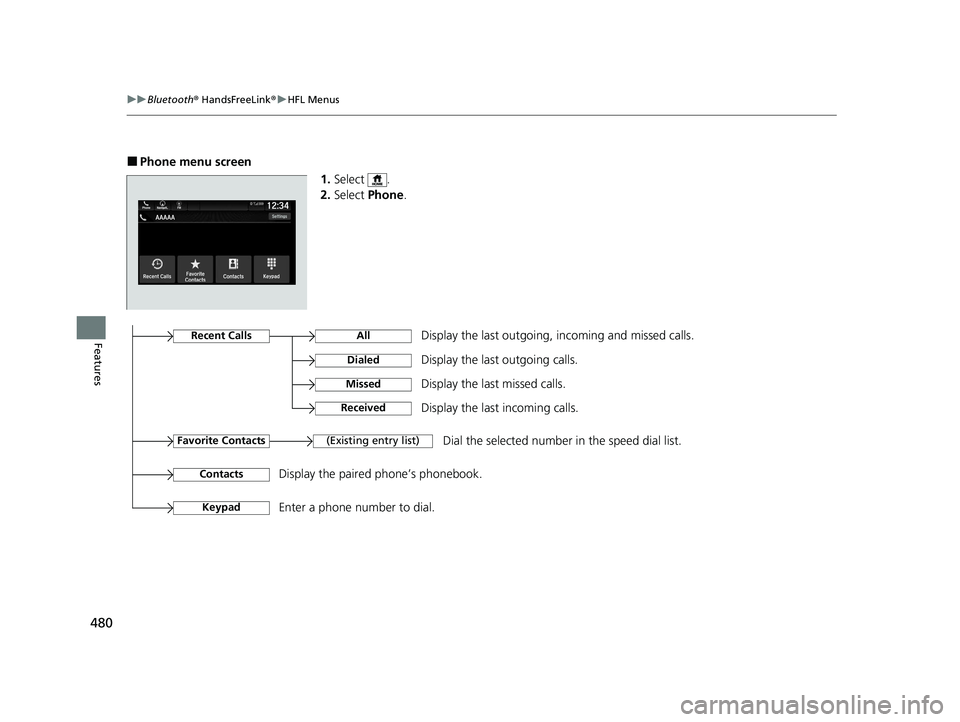
■Phone menu screen
1.Select .
2. Select Phone .
Display the last outgoing, incoming and missed calls.Recent Calls
Favorite Contacts
All
Dialed
Received
Display the last outgoing calls.
Display the last incoming calls.
MissedDisplay the last missed calls.
KeypadEnter a phone number to dial.
(Existing entry list)Dial the selected number in the speed dial list.
ContactsDisplay the paired phone’s phonebook.
22 PILOT-31TG76600.book 480 ページ 2021年6月11日 金曜日 午後4時40分
Page 488 of 737
486
uuBluetooth ® HandsFreeLink ®u HFL Menus
Features
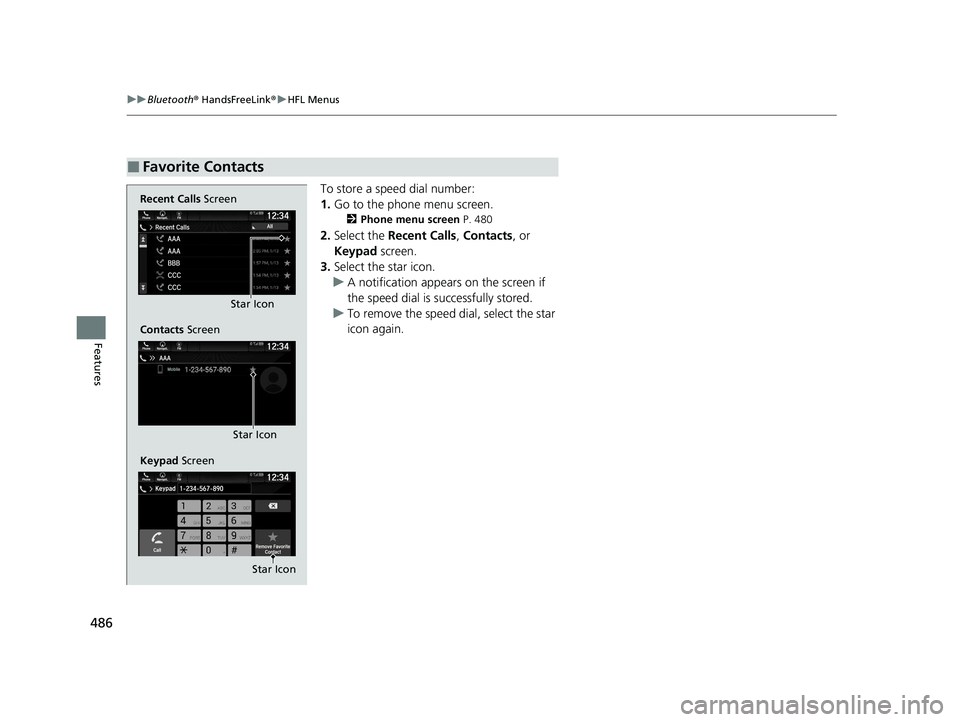
To store a speed dial number:
1. Go to the phone menu screen.
2 Phone menu screen P. 480
2.Select the Recent Calls , Contacts, or
Keypad screen.
3. Select the star icon.
u A notification appears on the screen if
the speed dial is successfully stored.
u To remove the speed dial, select the star
icon again.
■Favorite Contacts
Recent Calls Screen
Contacts Screen
Keypad Screen Star Icon
Star Icon
Star Icon
22 PILOT-31TG76600.book 486 ページ 2021年6月11日 金曜日 午後4時40分
Page 491 of 737
489
uuBluetooth ® HandsFreeLink ®u HFL Menus
Continued
Features
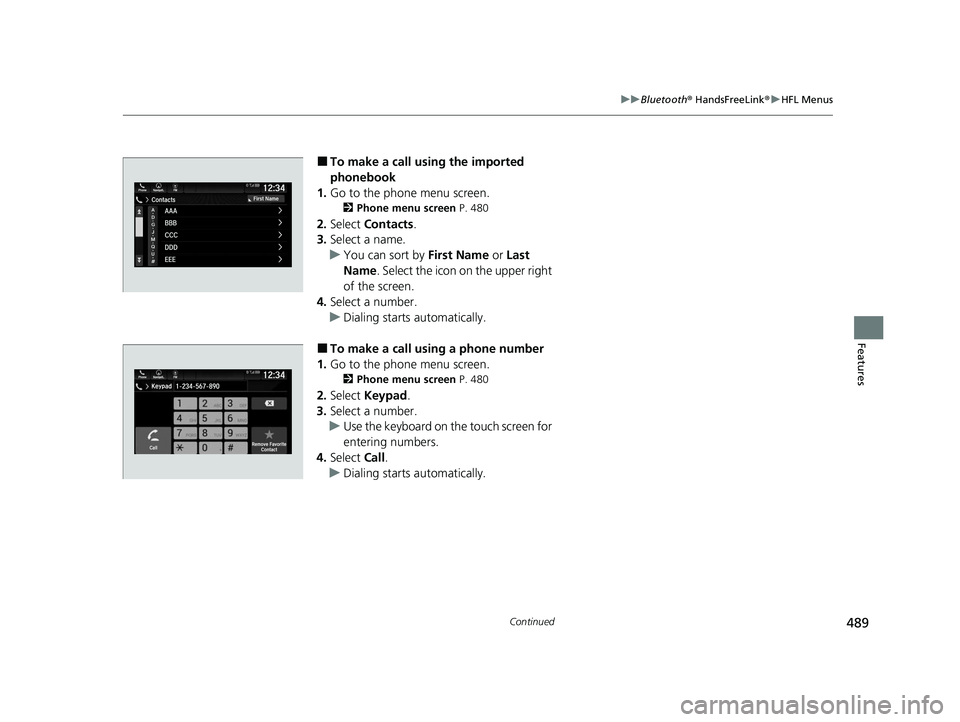
■To make a call using the imported
phonebook
1. Go to the phone menu screen.
2 Phone menu screen P. 480
2.Select Contacts .
3. Select a name.
u You can sort by First Name or Last
Name . Select the icon on the upper right
of the screen.
4. Select a number.
u Dialing starts automatically.
■To make a call using a phone number
1. Go to the phone menu screen.
2 Phone menu screen P. 480
2.Select Keypad .
3. Select a number.
u Use the keyboard on the touch screen for
entering numbers.
4. Select Call.
u Dialing starts automatically.
22 PILOT-31TG76600.book 489 ページ 2021年6月11日 金曜日 午後4時40分
Page 493 of 737
Continued491
uuBluetooth ® HandsFreeLink ®u HFL Menus
Features
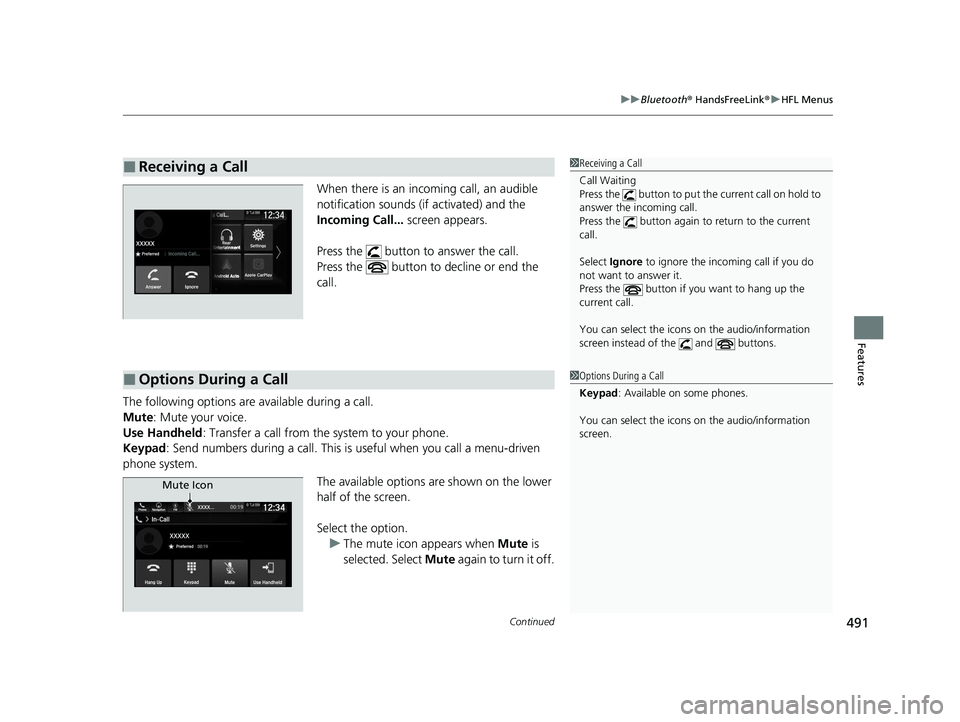
When there is an inco ming call, an audible
notification sounds (if activated) and the
Incoming Call... screen appears.
Press the button to answer the call.
Press the button to decline or end the
call.
The following options ar e available during a call.
Mute: Mute your voice.
Use Handheld : Transfer a call from the system to your phone.
Keypad : Send numbers during a call. This is useful when you call a menu-driven
phone system.
The available options are shown on the lower
half of the screen.
Select the option.u The mute icon appears when Mute is
selected. Select Mute again to turn it off.
■Receiving a Call1Receiving a Call
Call Waiting
Press the button to put th e current call on hold to
answer the incoming call.
Press the button again to return to the current
call.
Select Ignore to ignore the incoming call if you do
not want to answer it.
Press the button if you want to hang up the
current call.
You can select the icons on the audio/information
screen instead of the and buttons.
■Options During a Call1 Options During a Call
Keypad : Available on some phones.
You can select the icons on the audio/information
screen.
Mute Icon
22 PILOT-31TG76600.book 491 ページ 2021年6月11日 金曜日 午後4時40分
Page 499 of 737
Continued497
uuBluetooth ® HandsFreeLink ®u HFL Menus
Features
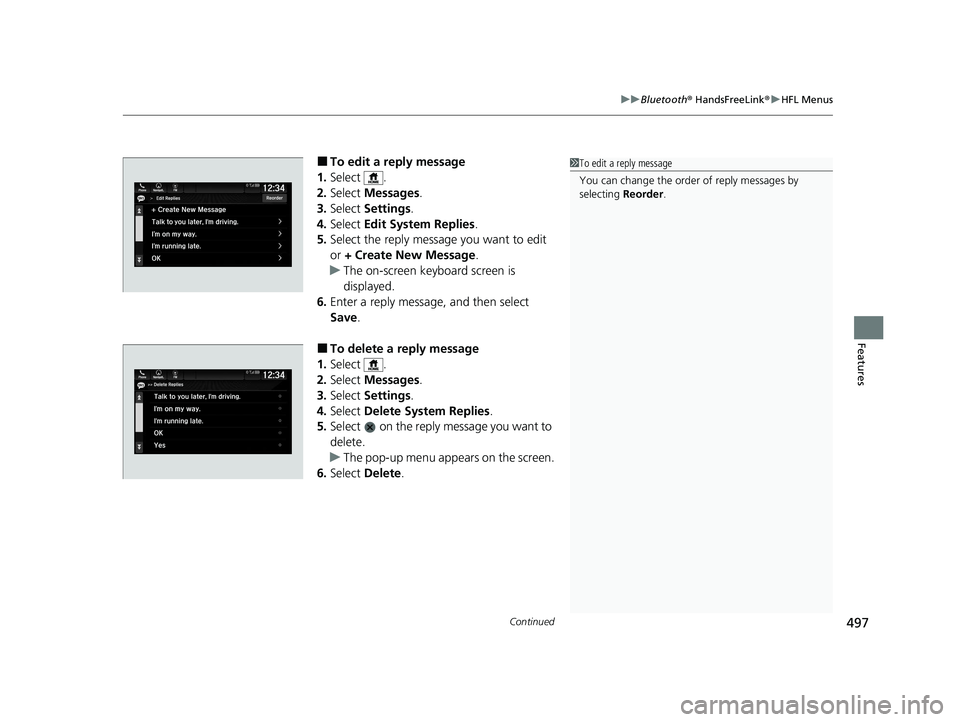
■To edit a reply message
1. Select .
2. Select Messages.
3. Select Settings .
4. Select Edit System Replies .
5. Select the reply message you want to edit
or + Create New Message .
u The on-screen keyboard screen is
displayed.
6. Enter a reply message, and then select
Save.
■To delete a reply message
1. Select .
2. Select Messages.
3. Select Settings .
4. Select Delete System Replies .
5. Select on the reply message you want to
delete.
u The pop-up menu appears on the screen.
6. Select Delete .
1To edit a reply message
You can change the order of reply messages by
selecting Reorder.
22 PILOT-31TG76600.book 497 ページ 2021年6月11日 金曜日 午後4時40分