battery HONDA PILOT 2023 Workshop Manual
[x] Cancel search | Manufacturer: HONDA, Model Year: 2023, Model line: PILOT, Model: HONDA PILOT 2023Pages: 814, PDF Size: 29.02 MB
Page 706 of 814
705
Maintenance
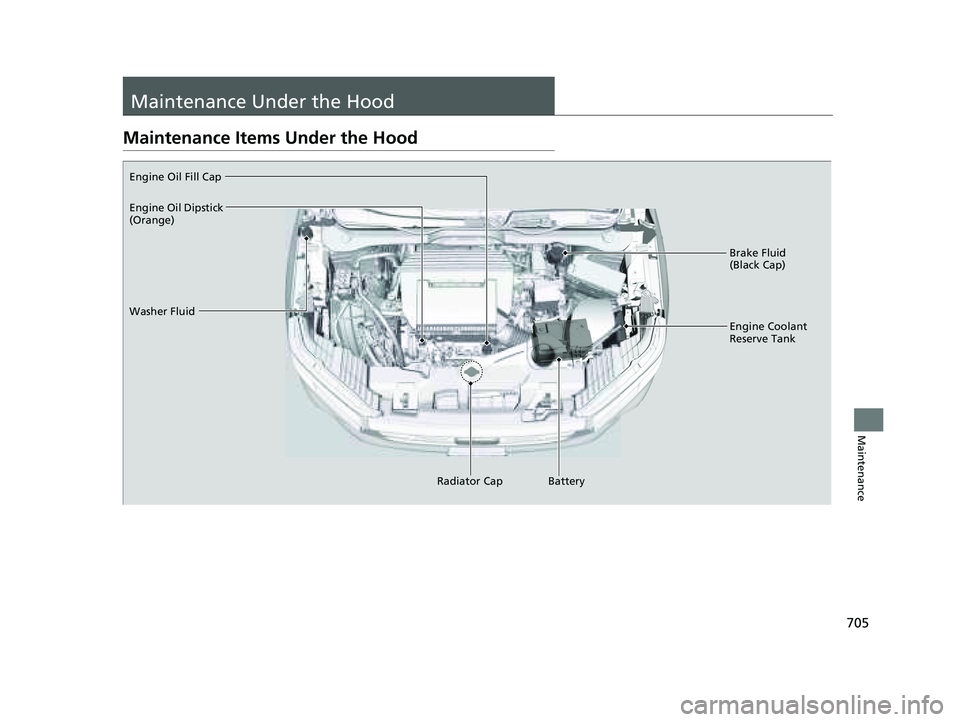
Maintenance Under the Hood
Maintenance Items Under the Hood
Brake Fluid
(Black Cap)
Washer Fluid
Radiator CapEngine Coolant
Reserve Tank
Engine Oil Fill Cap
Battery
Engine Oil Dipstick
(Orange)
23 PILOT-31T906000_03.book 705 ページ 2022年10月31日 月曜日 午前10時26分
Page 738 of 814
737
Maintenance
Battery
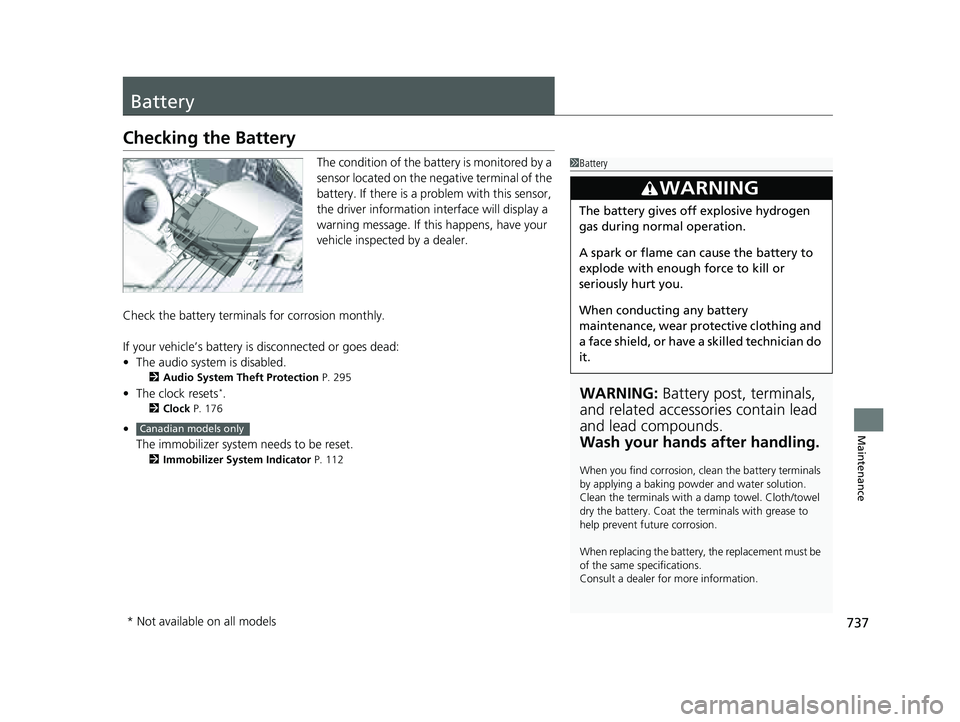
Checking the Battery
The condition of the battery is monitored by a
sensor located on the negative terminal of the
battery. If there is a problem with this sensor,
the driver information interface will display a
warning message. If this happens, have your
vehicle inspected by a dealer.
Check the battery termina ls for corrosion monthly.
If your vehicle’s battery is disconnected or goes dead:
• The audio system is disabled.
2 Audio System Theft Protection P. 295
•The clock resets*.
2 Clock P. 176
•
The immobilizer system needs to be reset.
2 Immobilizer System Indicator P. 112
1Battery
WARNING: Battery post, terminals,
and related accessories contain lead
and lead compounds.
Wash your hands after handling.
When you find corrosion, cl ean the battery terminals
by applying a baking powder and water solution.
Clean the terminals with a damp towel. Cloth/towel
dry the battery. Coat the terminals with grease to
help prevent future corrosion.
When replacing the battery, the replacement must be
of the same specifications.
Consult a dealer for more information.
3WARNING
The battery gives off explosive hydrogen
gas during normal operation.
A spark or flame can cause the battery to
explode with enough force to kill or
seriously hurt you.
When conducting any battery
maintenance, wear prot ective clothing and
a face shield, or have a skilled technician do
it.
Canadian models only
* Not available on all models
23 PILOT-31T906000_03.book 737 ページ 2022年10月31日 月曜日 午前10時26分
Page 739 of 814
738
uuBattery uCharging the AGM Battery
Maintenance
Charging the AGM Battery
AGM labeled batteries like those installe d in your vehicle require a compatible
charger to be properly charged. Damage to the battery can result if the battery is
charged improperly or with the wrong equipment. For more information on how to
charge your vehicle’s AGM battery, consult a dealer.1Battery
The battery installed in this vehicle is specifically
designed for a model wi th Auto Idle Stop.
Using a battery other than this specified type may
shorten the battery life, a nd prevent Auto Idle Stop
from activating. If you need to replace the battery,
make sure to select the specified type and size. Ask a
dealer for more details.
The Vehicle Stability Assist
TM (VSA ®) system, Adaptive
Cruise Control (ACC) with Low Speed Follow, brake
system (amber), and safety support indicators may
come on in amber along with a message in the driver
information interface when you set the power mode
to ON after reconnecting the battery.
Drive a short distance at more than 12 mph
(20 km/h). Each indicator should go off. If any does
not, have your vehicle checked by a dealer.
23 PILOT-31T906000_03.book 738 ページ 2022年10月31日 月曜日 午前10時26分
Page 740 of 814
739
Maintenance
Remote Transmitter Care
Replacing the Remote Battery
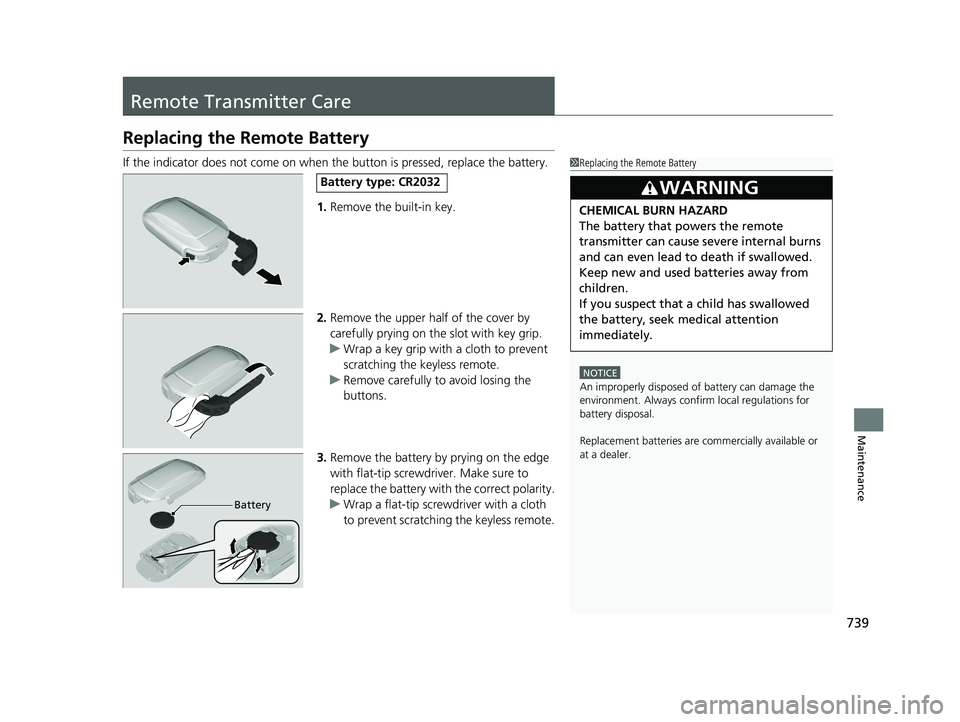
If the indicator does not come on when the button is pressed, replace the battery.
1. Remove the built-in key.
2. Remove the upper half of the cover by
carefully prying on the slot with key grip.
u Wrap a key grip with a cloth to prevent
scratching the keyless remote.
u Remove carefully to avoid losing the
buttons.
3. Remove the battery by prying on the edge
with flat-tip screwdriver. Make sure to
replace the battery with the correct polarity.
u Wrap a flat-tip screwdriver with a cloth
to prevent scratching the keyless remote.1Replacing the Remote Battery
NOTICE
An improperly disposed of battery can damage the
environment. Always conf irm local regulations for
battery disposal.
Replacement batteries are commercially available or
at a dealer.
3WARNING
CHEMICAL BURN HAZARD
The battery that powers the remote
transmitter can cause severe internal burns
and can even lead to death if swallowed.
Keep new and used batteries away from
children.
If you suspect that a child has swallowed
the battery, seek medical attention
immediately.
Battery type: CR2032
Battery
23 PILOT-31T906000_03.book 739 ページ 2022年10月31日 月曜日 午前10時26分
Page 746 of 814
Continued745
uuCleaning uExterior Care
Maintenance
A good coat of automotive body wax helps protect your vehicle’s paint from the
elements. Wax will wear off over time and expose your vehicle’s paint to the
elements, so reapply as necessary.
If you get gasoline, oil, engine coolant, or battery fluid on resi n-coated parts, they
may stain or the coating may peel. Prompt ly wipe it away using a soft cloth and
clean water.
Wipe using a glass cleaner.
Aluminum is susceptible to deterioration caused by salt and other road
contaminants. When necessary, as early as possible use a sponge and mild detergent
to wipe away these contaminants. Do no t use a stiff brush or harsh chemicals
(including some commercial wheel cleaners). These can damage the protective finish
on aluminum alloy wheels, resulting in corrosion. Depending on the type of finish,
the wheels also may lo se their luster or appear burn ished. To avoid water stains,
wipe the wheels dry with a cloth while they are still wet.
■Applying Wax
■Maintaining the Bumpers and Other Resin-Coated Parts
■Cleaning the Window
■Maintaining Aluminum Wheels
1 Applying Wax
NOTICE
Chemical solvents and st rong cleaners can damage
the paint, metal, and plasti c on your vehicle. Wipe
away spills immediately.
1 Maintaining the Bumpers an d Other Resin-Coated Parts
Ask a dealer about the corr ect coating material when
you want to repair the painted surface of the parts
made of resin.
23 PILOT-31T906000_03.book 745 ページ 2022年10月31日 月曜日 午前10時26分
Page 749 of 814
748
uuAccessories and Modifications uModifications
Maintenance
Modifications
Do not modify your vehicle in a manner that may affect its handling, stability, or
reliability, or install non-genuine Honda parts or accessories that may have a similar
effect.
Even minor modifications to vehicle system s can affect overall vehicle performance.
Always make sure all equipment is prop erly installed and maintained, and do not
make any modification to your vehicle or its systems that might cause your vehicle
to no longer meet federal, state, province, territory, and local regulations.
The on-board diagnostic port (OBD-II/SAE J1962 connector) installed on this vehicle
is intended to be used with automobile system diagnostic devices or with other
devices that Honda has approved. Use of any other type of device may adversely
affect the vehicle’s electronic systems or allow them to be compromised, possibly
resulting in a system malfunction, draine d battery, or other unexpected problems.
Do not modify or attempt to repair any of the electrical components.
23 PILOT-31T906000_03.book 748 ページ 2022年10月31日 月曜日 午前10時26分
Page 750 of 814

749
Handling the Unexpected
This chapter explains how to handle unexpected troubles.
ToolsTypes of Tools .................................. 750
If a Tire Goes Flat Changing a Flat Tire ......................... 751
Engine Does Not Start Checking the Engine ........................ 762
If the Keyless Remote Battery is Weak .. 764
Emergency Engine Start ................... 765
Emergency Engine Stop ................... 766
If the Battery Is Dead ....................... 767
Overheating How to Handle Overheating ............. 769 Indicator Coming On/Blinking
If the Engine oil pressure low Warning
Appears ............................................. 771
If the Charging System Indicator Comes On ....772If the Malfunction Indicator Lamp Comes
On or Blinks ................................... 772
If the Brake System Indicator (Red) Comes
On or Blinks ................................... 773
If the Electric Power Steering (EPS) System Indicator Comes On ....................... 774
If the Brake System Indicator (Red) Comes On or Blinks at the Same Time When the Brake
System Indicator (Amber) Comes On .. 775 If the Low Tire Pressure/TPMS Indicator
Comes On or Blinks ....................... 776
If the Transmission System Indicator Blinks
along with the Warning Message ....... 777
Fuses Fuse Locations ................................. 778
Inspecting and Changing Fuses ........ 783
Emergency Towing ........................... 785
If You Cannot Unlock the Fuel Fill Door.. 786If You Cannot Open the Tailgate .... 787
Refueling
Refueling From a Portable Fuel
Container ................................... 788
23 PILOT-31T906000_03.book 749 ページ 2022年10月31日 月曜日 午前10時26分
Page 763 of 814
762
Handling the Unexpected
Engine Does Not Start
Checking the Engine
If the engine does not start, check the starter.
If you cannot start the engine after checking all the items in the list above, have your vehicle checked by a dealer.
Starter conditionChecklist
Starter doesn’t turn or turns
over slowly.
The battery may be dead. Check
each of the items on the right and
respond accordingly.Check for a message on the dr iver information interface.
If the To start, touch start button with emblem side of remote message appears
2If the Keyless Remote Battery is Weak P. 764
Check the fuses.
Check all fuses, or have your vehicle checked by a dealer.
2Inspecting and Changing Fuses P. 783
The starter turns over normally
but the engine doesn’t start.
There may be a problem with a
fuse. Check each of the items on
the right and respond accordingly. Review the engine start procedure.
Follow its instructions, and try to start the engine again.
2
Starting the Engine P. 524
Check the immobilizer system indicator.
When the immobilizer system indicator is blinking, the engine cannot be started.
2Immobilizer System P. 207
2 Immobilizer System Indicator P. 112
Check the fuel level.
There should be enough fuel in the tank.
2 Fuel Gauge P. 122
Check the fuses.
Check all fuses, or have your vehicle checked by a dealer.
2Inspecting and Changing Fuses P. 783
If the problem continues:
2Emergency Towing P. 785
23 PILOT-31T906000_03.book 762 ページ 2022年10月31日 月曜日 午前10時26分
Page 764 of 814
763
uuEngine Does Not Start uChecking the Engine
Handling the Unexpected
If you must start the vehicle immediately, use an assisting vehicle or booster battery
to jump start it.
2 If the Battery Is Dead P. 767
Depending on the situation, it may be possibl e to temporarily start the engine using
the emergency start procedure.
2 Emergency Engine Start P. 765
23 PILOT-31T906000_03.book 763 ページ 2022年10月31日 月曜日 午前10時26分
Page 765 of 814
764
uuEngine Does Not Start uIf the Keyless Remote Battery is Weak
Handling the Unexpected
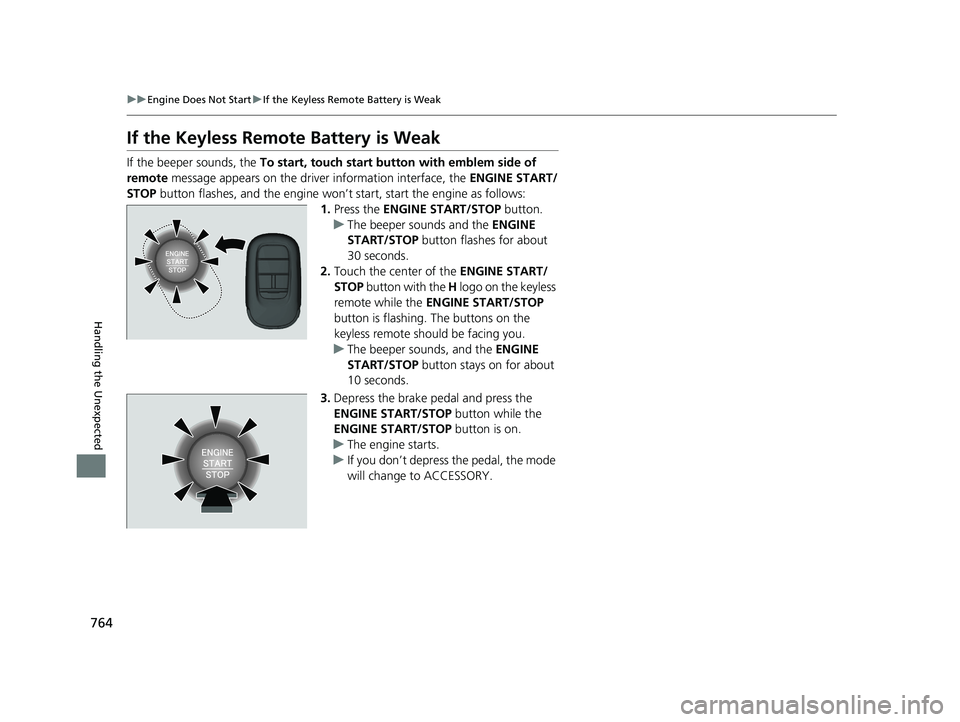
If the Keyless Remote Battery is Weak
If the beeper sounds, the To start, touch start butto n with emblem side of
remote message appears on the driver information interface, the ENGINE START/
STOP button flashes, and the engine won’t start, start the engine as follows:
1.Press the ENGINE START/STOP button.
u The beeper sounds and the ENGINE
START/STOP button flashes for about
30 seconds.
2. Touch the center of the ENGINE START/
STOP button with the H logo on the keyless
remote while the ENGINE START/STOP
button is flashing. The buttons on the
keyless remote should be facing you.
u The beeper sounds, and the ENGINE
START/STOP button stays on for about
10 seconds.
3. Depress the brake pedal and press the
ENGINE START/STOP button while the
ENGINE START/STOP button is on.
u The engine starts.
u If you don’t depress the pedal, the mode
will change to ACCESSORY.
23 PILOT-31T906000_03.book 764 ページ 2022年10月31日 月曜日 午前10時26分