steering HONDA PILOT 2023 Workshop Manual
[x] Cancel search | Manufacturer: HONDA, Model Year: 2023, Model line: PILOT, Model: HONDA PILOT 2023Pages: 814, PDF Size: 29.02 MB
Page 401 of 814
400
Features
General Information on the Audio System
SiriusXM® Radio Service*
1. You need your radio ID ready before regist ering for subscription. To see the ID on
the screen, select Channel 0.
2. Have your radio ID ready, and either call or visit the SiriusXM ® website to
subscribe.
Switch to the SiriusXM ® mode by using the audio remote controls on the steering
wheel, or through the audio/information screen, and stay in this mode for about 30
minutes until the service is activated. Make sure your vehicle is in an open area with
good reception.
Channel **** is not subscribed. Call SiriusXM to subscribe.
*1
You are not subscribed to the channel selected.
Subscription Updated:
SiriusXM ® radio is receiving informat ion update from the network.
Channel Not Available:
No such channel exists, or the artist or title information is unavailable.
No Signal:
The signal is too weak in the current location.
Check Tuner:
There is a problem with the SiriusXM ® tuner. Contact a dealer.
Antenna Disconnected, Antenna Shorted:
There is a problem with the SiriusXM ® antenna. Contact a dealer.
*1 : ****part is variable characters, and w ill change depending upon the channel selected.
■Subscribing to SiriusXM® Radio
■Receiving SiriusXM ® Radio
■SiriusXM ® Radio Display Messages
1 Subscribing to SiriusXM ® Radio
Contact Information for SiriusXM ® Radio:
•U.S.: SiriusXM ® Radio at www.siriusxm.com/
subscribenow , or 1-866-635-2349
•Canada: SiriusXM ® Canada at www.siriusxm.ca/
subscribe-now , or 1-877-209-0079
1Receiving SiriusXM ® Radio
The SiriusXM ® satellites are in orbit over the equator;
therefore, objects south of the vehicle may cause
satellite reception interruptions. Sa tellite signals are
more likely to be blocked by tall buildings and
mountains the farther north you travel from the
equator.
You may experience rece ption problems under the
following circumstances:
•In a location with an obstruction to the south of
your vehicle.
•In tunnels•On the lower level of a multi-tiered road
•Large items carried on the roof rack
* Not available on all models
23 PILOT-31T906000_03.book 400 ページ 2022年10月31日 月曜日 午前10時26分
Page 427 of 814
426
uuCustomized Features u
Features
*1:Default Setting
Customizable FeaturesDescriptionSelectable Settings
Display Adjustment Brightness
Changes the brightness of the audio/
information screen.
—
Contrast
Changes the contrast of the audio/
information screen.
Black Level Changes the black level of the audio/
information screen.
Day Changes between the daytime mode,
nighttime mode and display off mode.
Night
Display OFF
Touch Panel SensitivitySets the sensitivity of
the touch panel screen.Normal*1/High
Rear Camera Setting Fixed Guideline
Shows the guideline that does not move with
the steering wheel.
2
Multi-View Rear Camera* P. 672
ON*1/OFF
Dynamic Guideline Shows the guideline that moves with the
steering wheel.
2
Multi-View Rear Camera* P. 672
ON*1/OFF
Cross Traffic Monitor*Shows arrows on the rear camera image to
indicate vehicles approaching from the sides.
2 Cross Traffic Monitor* P. 668
ON*1/OFF
Language Changes the display language.English
*1/Español /Français
LicenseShows the legal information.—
Factory Data Reset Resets all the settings to their factory default.
2
Defaulting All the Settings P. 428—
* Not available on all models
23 PILOT-31T906000_03.book 426 ページ 2022年10月31日 月曜日 午前10時26分
Page 443 of 814
442
uuCustomized Features u
Features
■Camera
*1:Default Setting Customizable Features Desc
ription Selectable Settings
Rear Camera*
Fixed Guideline
Shows the guideline that does not move with the
steering wheel.
2 Multi-View Rear Camera* P. 672
ON*1/OFF
Dynamic Guideline
Shows the guideline that moves with the steering
wheel.
2 Multi-View Rear Camera* P. 672
ON*1/OFF
Multi
View
Camera
*
Guidelines
Fixed Guideline
Shows the guideline that does not move with the
steering wheel.
2 Surround View Camera System* P. 674
ON*1/OFF
Dynamic Guideline
Shows the guideline that moves with the steering
wheel.
2 Surround View Camera System* P. 674
ON*1/OFF
Customize
Show after shifting
from ReverseSelects whether to display the forward camera image
after shifting from
(R to (D.ON /OFF*1
Auto display when
obstacle is detectedDisplays the forward camera image when a parking
sensor detects an obstacle.ON*1/OFF
Cross Traffic Monitor
Shows arrows on the rear camera image to indicate
vehicles approaching from the sides.
2 Cross Traffic Monitor* P. 668
ON*1/OFF
* Not available on all models
23 PILOT-31T906000_03.book 442 ページ 2022年10月31日 月曜日 午前10時26分
Page 504 of 814
Continued503
uuBefore Driving uDriving Preparation
Driving
• Store or secure all items on board properly.
u Carrying too much cargo, or improperly storing it, can affect your vehicle’s
handling, stability, sto pping distance, and tires, and make it unsafe.
2Maximum Load Limit P. 505
•Do not pile items higher than the seat height.
u They can block your view and may be thrown forward in the event of sudden
braking.
• Do not place anything in the front seat footwells. Make sure to secure the floor
mat.
u An object or unsecured floor mat can in terfere with your brake and accelerator
pedal operation while driving.
• If you have any animals on board, do not let them move around in the vehicle.
u They may interfere with driving and a crash could occur.
• Securely close and lock al l doors and the tailgate.
2Locking/Unlocking the Doors from the Inside P. 192
•Adjust your seating position properly.
u Adjust the head restraint, too.
2Seats P. 239
2 Adjusting the Front and Second Row Outer Seat Head Restraint Positions
P. 253
• Adjust the mirrors and steering wheel properly.
u Adjust them while sitting in the proper driving position.
2 Adjusting the Steering Wheel P. 235
2 Mirrors P. 236
■Interior Checks1Interior Checks
The headlight aim is set by the factory, and does not
need to be adjusted. Howeve r, if you regularly carry
heavy items in the cargo area or tow a trailer, have
the aiming readjusted at a dealer or by a qualified
technician.
23 PILOT-31T906000_03.book 503 ページ 2022年10月31日 月曜日 午前10時26分
Page 516 of 814
515
uuTowing a Trailer uTrailer Stability Assist
Driving
Trailer Stability Assist
Helps stabilize the vehicle and traile r when the trailer severely sways.
■How trailer stability assist works
When the vehicle and trailer become unstable while driving, trailer stability assist
determines the cause. If the trailer oscilla tion is detected as the cause, and the
swaying increases, the system applies the br akes or controls engine output to reduce
vehicle speed.
Both the vehicle and trailer brake lights co me on automatically if you brake to
reduce vehicle speed.
1 Trailer Stability Assist
Trailer stability assist is not a function that prevents
the vehicle and trailer from swaying. Avoid high
speeds, abrupt steering, improper trailer load, and
sudden braking to keep th e trailer from swaying.
When swaying too severely, the system becomes
ineffective, and you may lose control of your vehicle,
causing the trailer to ro ll over or get damaged.
2 Driving Safely with a Trailer P. 516
Trailer towing sway is caused by:
•Crosswinds
•Improper tongue load
•Excessive Speed
The VSA ® system indicator blinks during the trailer
stability assist operation. 2 VSA ® Operation P. 555
23 PILOT-31T906000_03.book 515 ページ 2022年10月31日 月曜日 午前10時26分
Page 522 of 814
521
uuOff-Highway Driv ing GuidelinesuOff-Highway Driving
Continued
Driving
Off-Highway Driving
Your vehicle is designed, built and equipped with systems and features to provide
you with exceptional drivin g performance off-highway. Howe ver, due to the risks to
both you and other road users, including the risk of injury or death from loss of
control or crash, if you engage in off-h ighway driving, it is important to take
precautions before doing so.
When driving off-highway, yo u should always obey the posted speed limits and
other traffic laws, reduce speed as needed for traffic and environmental conditions,
and not engage in driving behaviors that may create heightened risks for yourself
and any other off-highway users who may be present (even if you are unaware of
them).
Your vehicle’s TRAIL or SAND mode and other systems are designed for increased
performance off-highway. Use of these sy stems may delay the intervention of
vehicle safety systems designed to minimize the risk of a loss of traction or steering
control, and can cause your vehicle to handle differently than you might expect or
would experience under normal driving conditions on pavement. Use of these
systems will not make up for a lack of a ppropriate driver experience and skill, and
will not allow the driver to overcome risks created by:
• A lack of proper vehicle maintenance
• Less than ideal road conditions and/or unfamiliarity with the driving environment
• Other traffic or off-highway users
1Off-Highway Driving
NOTICE
The vehicle warranty does not cover any damage or
failure resulting from off- highway driving, crawling,
competitive climbing of any sort whatsoever, or use
on an off-road course or similar-type venue. See
warranty book for details. 2 TRAIL Mode
* P. 551
Models with TRAIL and SAND mode
* Not available on all models
23 PILOT-31T906000_03.book 521 ページ 2022年10月31日 月曜日 午前10時26分
Page 530 of 814
Continued529
uuWhen Driving uStarting the Engine
Driving
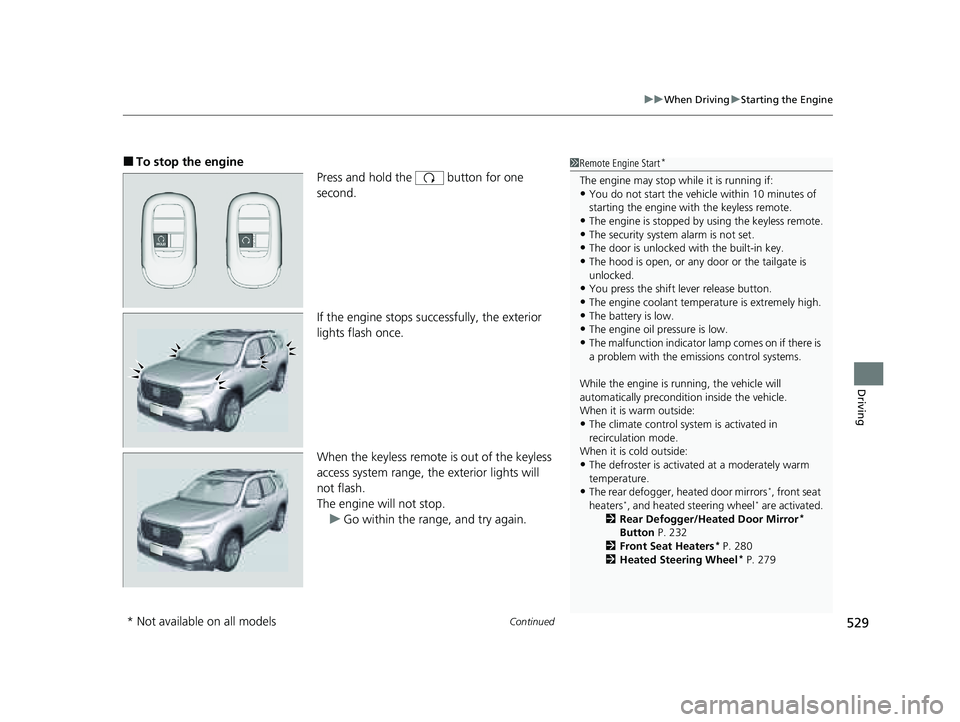
■To stop the engine
Press and hold the button for one
second.
If the engine stops successfully, the exterior
lights flash once.
When the keyless remote is out of the keyless
access system range, the exterior lights will
not flash.
The engine will not stop.u Go within the range, and try again.1Remote Engine Start*
The engine may stop whil e it is running if:•You do not start the vehicl e within 10 minutes of
starting the engine with the keyless remote.
•The engine is stopped by using the keyless remote.•The security system alarm is not set.
•The door is unlocked with the built-in key.
•The hood is open, or any door or the tailgate is
unlocked.
•You press the shift lever release button.
•The engine coolant temper ature is extremely high.•The battery is low.
•The engine oil pressure is low.
•The malfunction indicator la mp comes on if there is
a problem with the emissions control systems.
While the engine is running, the vehicle will
automatically preconditi on inside the vehicle.
When it is warm outside:
•The climate control system is activated in
recirculation mode.
When it is cold outside:
•The defroster is activated at a moderately warm
temperature.
•The rear defogger, heated door mirrors*, front seat
heaters*, and heated steering wheel* are activated.
2 Rear Defogger/Heated Door Mirror*
Button P. 232
2 Front Seat Heaters
* P. 280
2 Heated Steering Wheel* P. 279
* Not available on all models
23 PILOT-31T906000_03.book 529 ページ 2022年10月31日 月曜日 午前10時26分
Page 532 of 814
531
uuWhen Driving uPrecautions While Driving
Continued
Driving
Precautions While Driving
Utility vehicles have a significantly higher rollover rate than other types of vehicles.
To prevent rollovers or loss of control:
• Take corners at slower speeds than yo u would with a passenger vehicle.
• Avoid sharp turns and abrupt maneuvers whenever possible.
• Do not modify your vehicle in any way th at you would raise the center of gravity.
• Do not carry heavy cargo on the roof.
Never carry more than 165 lbs (75 kg) of cargo on the roof rack (Honda accessory).
Avoid driving in deep water and on flooded roads. This can damage the engine,
driveline, or cause electrical component failure.
■Driving Guidelines for Your Utility Vehicle
■In Rain
1 Precautions While Driving
NOTICE
Do not select a shift button while pressing the
accelerator pedal. You could damage the
transmission.
NOTICE
If you repeatedly turn the steering wheel at an
extremely low speed, or hold the steering wheel in
the full left or right position for a while, the electric
power steering (EPS) system heats up. The system
goes into a protective mode, and limits its
performance. The steering wheel becomes harder
and harder to operate. Once the system cools down,
the EPS system is restor ed. Repeated operation under
these conditions can eventually damage the system.
If the power mode is set to ACCESSORY while
driving, the engine will shut down and all steering
and brake power assist functi ons will stop, making it
difficult to control the vehicle.
Do not select
( N while driving as you will lose engine
braking (and accelera tion) performance.
During the first 600 miles (1,000 km) of operation,
avoid sudden acceleration or full throttle operation so
as not to damage the engine or powertrain.
Avoid hard braking for the first 200 miles (300 km)
after purchasing your new vehicle or replacing the
brake pads or rotors to allow for proper break-in.
23 PILOT-31T906000_03.book 531 ページ 2022年10月31日 月曜日 午前10時26分
Page 541 of 814
uuWhen Driving uShifting
540
Driving
Use the paddle shifters to change between 1st and 10th gears without removing
your hands from the steering wheel. The tr ansmission will switch to the sequential
mode.
■When the transmi ssion is in (D:
The vehicle will go into the sequential mode momentarily, and the sequential mode
gear selection indicator will come on.
When the vehicle goes into the sequential mode by
(- paddle shifter and the lower
gear is available, the trans mission properly selects single or double gear change.
Once the vehicle starts traveling at consta nt speed or accelerates, the sequential
mode will be automatically turned off, and the sequential mode gear selection
indicator will go off.
Holding the
(+ paddle shifter for two seconds will cancel this mode.
■When the transmi ssion is in (S
The vehicle will go into the sequential mode, and the M (sequential mode) indicator
and sequential mode gear selection indicator will come on.
If the vehicle speed increases and the engi ne speed reaches near the tachometer red
zone, the transmission automatically shifts up to the next gear.
Holding the
(+ paddle shifter for two seconds or pushing button will cancel
this mode. When the sequential mode is canceled, the sequential mode indicator
and sequential mode gear selection indicator go off.
■Sequential Mode1 Sequential Mode
The sequential mode may be canceled if the drive
mode is changed to another drive mode.
D/S
23 PILOT-31T906000_03.book 540 ページ 2022年10月31日 月曜日 午前10時26分
Page 546 of 814
545
uuWhen Driving uAuto Idle Stop
Continued
Driving
■Auto Idle Stop may not activate when:
• The vehicle is stopped by braking suddenly.
• The steering wheel is operated.
• The fan speed is high.
• The climate control system is in use, an d there is a significant difference between
the set temperature and the actual interior temperature.
• The climate control system is in use, and humidity in the interior is high.
23 PILOT-31T906000_03.book 545 ページ 2022年10月31日 月曜日 午前10時26分