turn signal HONDA PILOT 2023 Owners Manual
[x] Cancel search | Manufacturer: HONDA, Model Year: 2023, Model line: PILOT, Model: HONDA PILOT 2023Pages: 814, PDF Size: 29.02 MB
Page 10 of 814
9
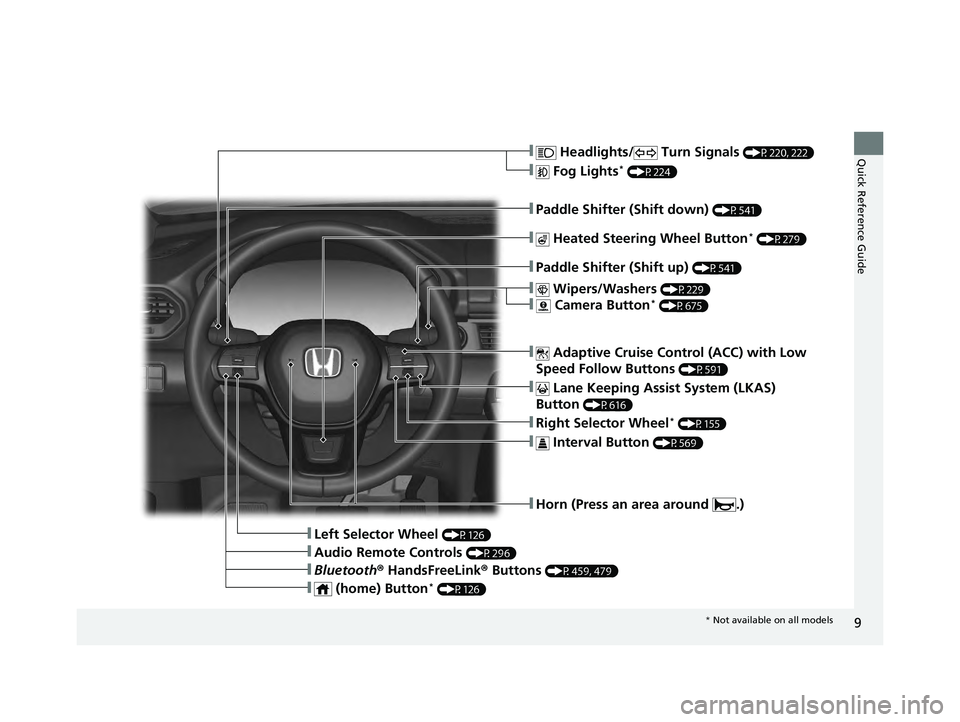
Quick Reference Guide❚ Headlights/ Turn Signals (P220, 222)
❚ Fog Lights* (P224)
❚Paddle Shifter (Shift down) (P541)
❚Paddle Shifter (Shift up) (P541)
❚ Lane Keeping Assist System (LKAS)
Button
(P616)
❚Horn (Press an area around .)
❚Left Selector Wheel (P126)
❚ Adaptive Cruise Control (ACC) with Low
Speed Follow Buttons
(P591)
❚Right Selector Wheel* (P155)
❚ Wipers/Washers (P229)
❚ Camera Button* (P675)
❚ Heated Steering Wheel Button* (P279)
❚ Interval Button (P569)
❚Bluetooth ® HandsFreeLink ® Buttons (P459, 479)
❚Audio Remote Controls (P296)
❚ (home) Button* (P126)
* Not available on all models
23 PILOT-31T906000_03.book 9 ページ 2022年10月31日 月曜日 午前10時26分
Page 13 of 814
Visual Index
12
Quick Reference Guide
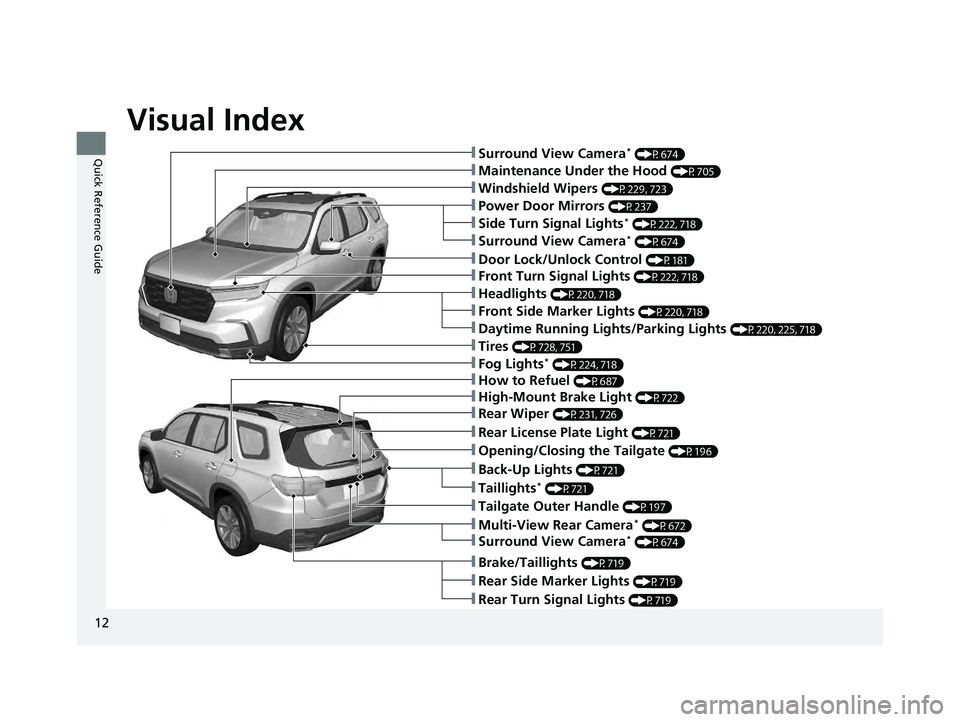
❚Maintenance Under the Hood (P705)
❚Windshield Wipers (P229, 723)
❚Tires (P728, 751)
❚Power Door Mirrors (P237)
❚How to Refuel (P687)
❚High-Mount Brake Light (P722)
❚Rear Wiper (P231, 726)
❚Rear License Plate Light (P721)
❚Tailgate Outer Handle (P197)
❚Multi-View Rear Camera* (P672)
❚Surround View Camera* (P674)
❚Fog Lights* (P224, 718)
❚Opening/Closing the Tailgate (P196)
❚Taillights* (P721)
❚Back-Up Lights (P721)
❚Rear Side Marker Lights (P719)
❚Rear Turn Signal Lights (P719)
❚Brake/Taillights (P719)
❚Front Turn Signal Lights (P222, 718)
❚Headlights (P220, 718)
❚Front Side Marker Lights (P220, 718)
❚Daytime Running Lights/Parking Lights (P220, 225, 718)
❚Surround View Camera* (P674)
❚Surround View Camera* (P674)
❚Side Turn Signal Lights* (P222, 718)
❚Door Lock/Unlock Control (P181)
23 PILOT-31T906000_03.book 12 ページ 2022年10月31日 月曜日 午前10時26分
Page 20 of 814
19
Quick Reference Guide
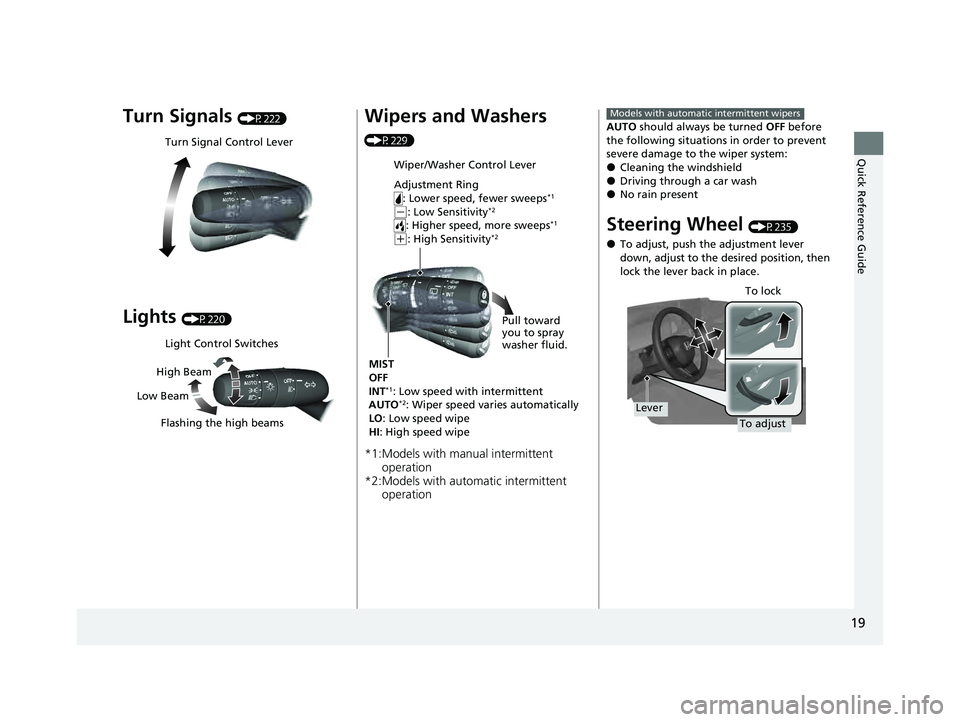
Turn Signals (P222)
Lights (P220)
Turn Signal Control Lever
Light Control Switches
Low Beam High Beam
Flashing the high beams
Wipers and Washers
(P229)
*1:Models with manual intermittent operation
*2:Models with automatic intermittent operation
Wiper/Washer Control Lever
Adjustment Ring
: Lower speed, fewer sweeps
*1
(-: Low Sensitivity*2
: Higher speed, more sweeps*1
(+: High Sensitivity*2
MIST
OFF
INT
*1: Low speed with intermittent
AUTO*2: Wiper speed varies automatically
LO : Low speed wipe
HI : High speed wipe Pull toward
you to spray
washer fluid.
AUTO
should always be turned OFF before
the following situations in order to prevent
severe damage to the wiper system:
●Cleaning the windshield●Driving through a car wash●No rain present
Steering Wheel (P235)
●To adjust, push the adjustment lever
down, adjust to the desired position, then
lock the lever back in place.
Models with automatic intermittent wipers
To adjust To lock
Lever
23 PILOT-31T906000_03.book 19 ページ 2022年10月31日 月曜日 午前10時26分
Page 61 of 814
60
uuAirbags uAirbag System Components
Safe Driving
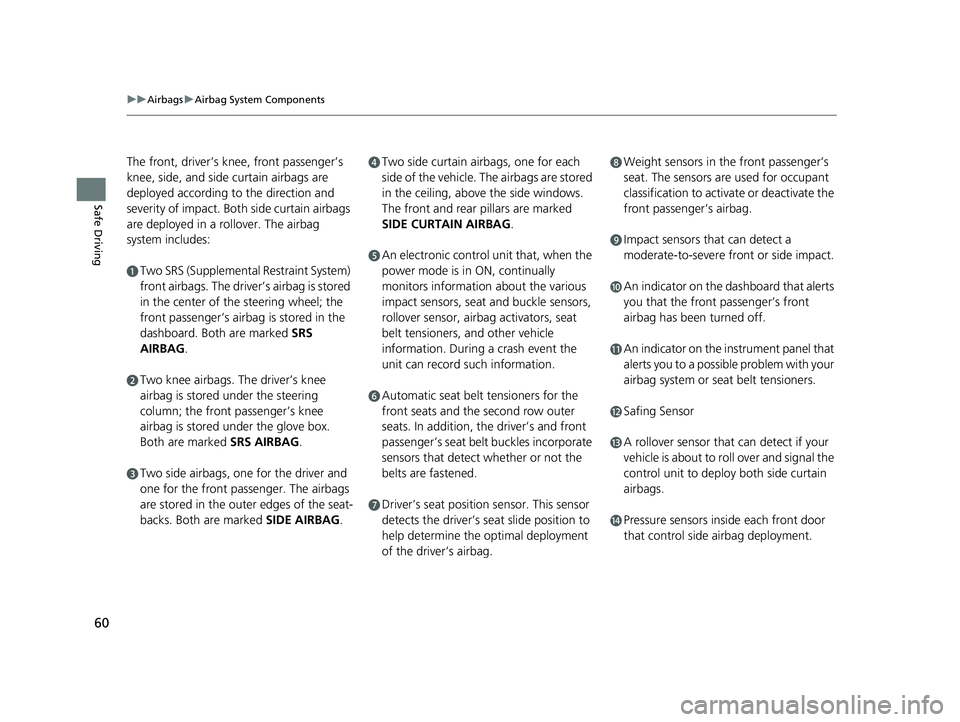
The front, driver’s knee, front passenger’s
knee, side, and side curtain airbags are
deployed according to the direction and
severity of impact. Both side curtain airbags
are deployed in a ro llover. The airbag
system includes:
aTwo SRS (Supplemental Restraint System)
front airbags. The driver’s airbag is stored
in the center of the steering wheel; the
front passenger’s airbag is stored in the
dashboard. Both are marked SRS
AIRBAG.
bTwo knee airbags. Th e driver’s knee
airbag is stored under the steering
column; the front passenger’s knee
airbag is stored under the glove box.
Both are marked SRS AIRBAG.
cTwo side airbags, one for the driver and
one for the front passenger. The airbags
are stored in the outer edges of the seat-
backs. Both are marked SIDE AIRBAG .
dTwo side curtain airbags, one for each
side of the vehicle. The airbags are stored
in the ceiling, above the side windows.
The front and rear pillars are marked
SIDE CURTAIN AIRBAG.
eAn electronic control unit that, when the
power mode is in ON, continually
monitors information about the various
impact sensors, seat and buckle sensors,
rollover sensor, airbag activators, seat
belt tensioners, and other vehicle
information. During a crash event the
unit can record such information.
fAutomatic seat belt tensioners for the
front seats and the second row outer
seats. In addition, the driver’s and front
passenger’s seat belt buckles incorporate
sensors that detect whether or not the
belts are fastened.
gDriver’s seat position sensor. This sensor
detects the driver’s seat slide position to
help determine the optimal deployment
of the driver’s airbag.
hWeight sensors in the front passenger’s
seat. The sensors are used for occupant
classification to activa te or deactivate the
front passenger’s airbag.
iImpact sensors that can detect a
moderate-to-severe front or side impact.
jAn indicator on the dashboard that alerts
you that the front passenger’s front
airbag has been turned off.
kAn indicator on the instrument panel that
alerts you to a possib le problem with your
airbag system or seat belt tensioners.
lSafing Sensor
mA rollover sensor that can detect if your
vehicle is about to roll over and signal the
control unit to deploy both side curtain
airbags.
nPressure sensors inside each front door
that control side airbag deployment.
23 PILOT-31T906000_03.book 60 ページ 2022年10月31日 月曜日 午前10時26分
Page 99 of 814
98
Instrument Panel
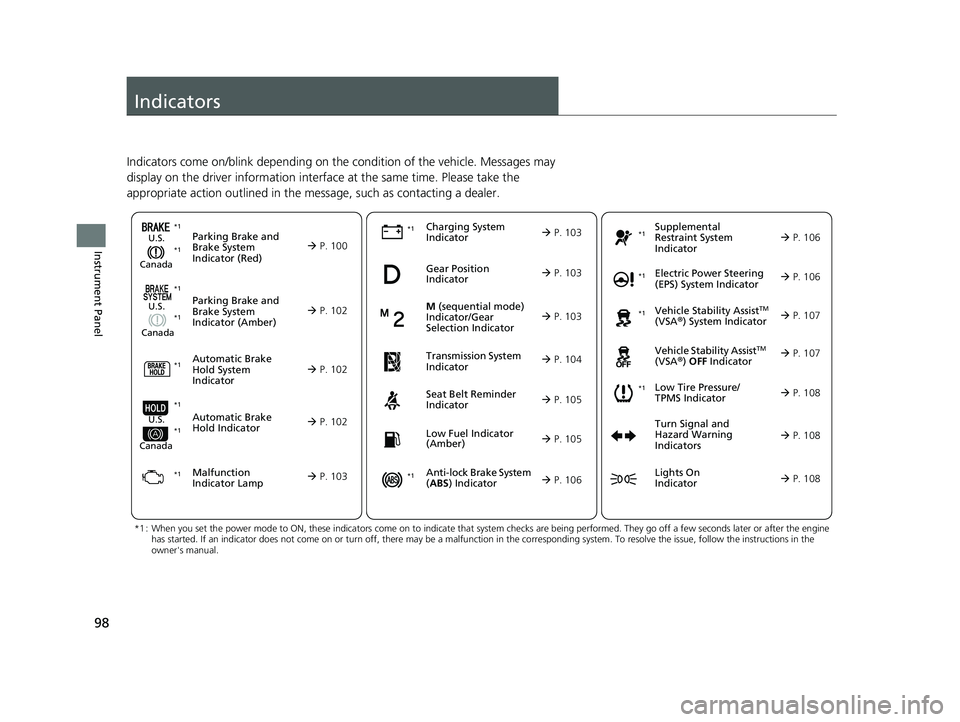
Indicators
Indicators come on/blink depending on the condition of the vehicle. Messages may
display on the driver information interface at the same time. Please take the
appropriate action outlined in the message, such as contacting a dealer.
Parking Brake and
Brake System
Indicator (Red)U.S.
Canada P. 100*1
M (sequential mode)
Indicator/Gear
Selection Indicator
P. 103Parking Brake and
Brake System
Indicator (Amber)U.S.
Canada
Automatic Brake
Hold System
Indicator
Automatic Brake
Hold IndicatorU.S.
Canada
*1 : When you set the power mode to ON, these indicators come on to indicate that system checks are being performed. They go off a few seconds later or after the engine
has started. If an indicator does not come on or turn off, ther e may be a malfunction in the corresponding system. To resolve the issue, follow the instructions in the
owner's manual.
Malfunction
Indicator Lamp Charging System
Indicator
Seat Belt Reminder
Indicator
Low Fuel Indicator
(Amber)
P. 102
P. 10
2
P. 102
P. 103
P. 103*1
*1 *1
Gear Position
Indicator
P. 103
Tr
ansmission System
Indica
tor
P. 104
P. 105
P. 105
*1
*1
Anti-lock Brake System
(ABS ) Indicator
Vehicle Stability AssistTM
(VSA®) System Indicator
Vehicle Stability Assist
TM
(VSA®) OFF Indicator
Supplemental
Restraint System
Indicator
Electric Power Steering
(EPS) System Indicator
*1
P. 106
P. 106
P. 107*1 *1
P. 107
*1 P. 106
*1
*1
*1
Low Tire Pressure/
TPMS Indicator
Turn Signal and
Hazard Warning
Indicators
Lights On
Indicator
P. 108
*1
P. 108
P. 108
23 PILOT-31T906000_03.book 98 ページ 2022年10月31日 月曜日 午前10時26分
Page 109 of 814
108
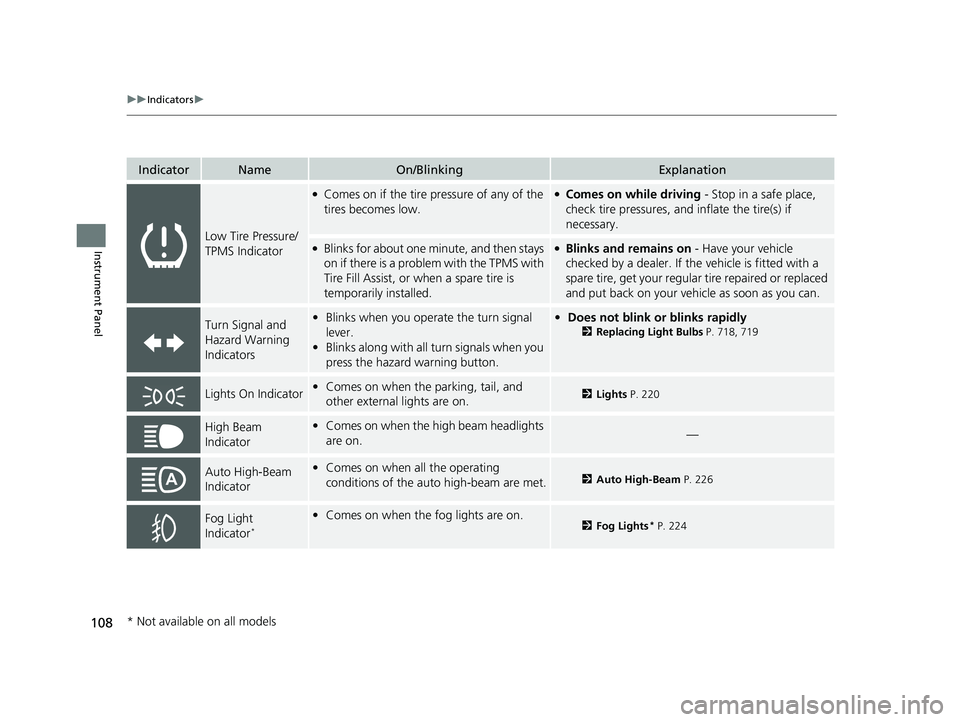
uuIndicators u
Instrument Panel
IndicatorNameOn/BlinkingExplanation
Low Tire Pressure/
TPMS Indicator
●Comes on if the tire pressure of any of the
tires becomes low.●Comes on while driving - Stop in a safe place,
check tire pressures, a nd inflate the tire(s) if
necessary.
●Blinks for about one minute, and then stays
on if there is a problem with the TPMS with
Tire Fill Assist, or when a spare tire is
temporarily installed.●Blinks and remains on - Have your vehicle
checked by a dealer. If the vehicle is fitted with a
spare tire, get your regular tire repaired or replaced
and put back on your vehicle as soon as you can.
Turn Signal and
Hazard Warning
Indicators• Blinks when you oper ate the turn signal
lever.
• Blinks along with all turn signals when you
press the hazard warning button.•Does not blink or blinks rapidly
2 Replacing Light Bulbs P. 718, 719
Lights On Indicator•Comes on when the parking, tail, and
other external lights are on.2 Lights P. 220
High Beam
Indicator•Comes on when the high beam headlights
are on.—
Auto High-Beam
Indicator•Comes on when all the operating
conditions of the auto high-beam are met.2 Auto High-Beam P. 226
Fog Light
Indicator*
•Comes on when the fog lights are on.2 Fog Lights* P. 224
* Not available on all models
23 PILOT-31T906000_03.book 108 ページ 2022年10月31日 月曜日 午前10時26分
Page 145 of 814
144
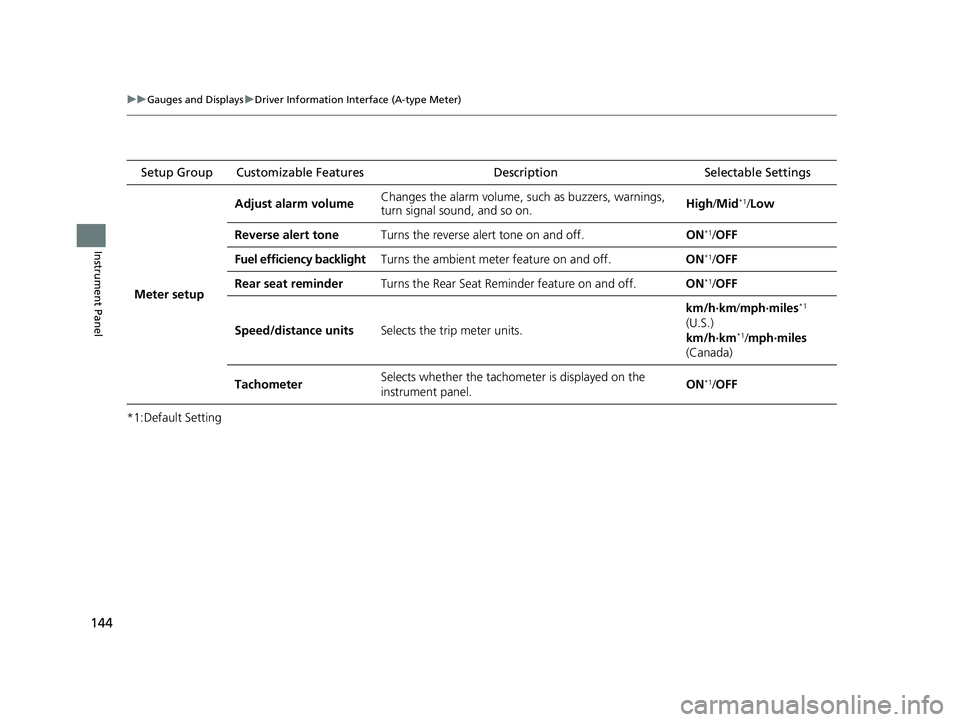
uuGauges and Displays uDriver Information Interface (A-type Meter)
Instrument Panel
*1:Default Setting Setup Group Customizable Features
Description Selectable Settings
Meter setup Adjust alarm volume
Changes the alarm volume, su
ch as buzzers, warnings,
turn signal sound, and so on. High
/Mid
*1/Low
Reverse alert tone Turns the reverse alert tone on and off. ON
*1/OFF
Fuel efficiency backlight Turns the ambient meter feature on and off. ON
*1/OFF
Rear seat reminder Turns the Rear Seat Reminder feature on and off. ON
*1/OFF
Speed/distance units Selects the trip meter units. km/h∙km/
mph∙miles
*1
(U.S.)
km/h∙km
*1/ mph∙miles
(Canada)
Tachometer Selects whether the tachomet
er is displayed on the
instrument panel. ON
*1/
OFF
23 PILOT-31T906000_03.book 144 ページ 2022年10月31日 月曜日 午前10時26分
Page 218 of 814
217Continued
Controls
Operating the Switches Around the Steering Wheel
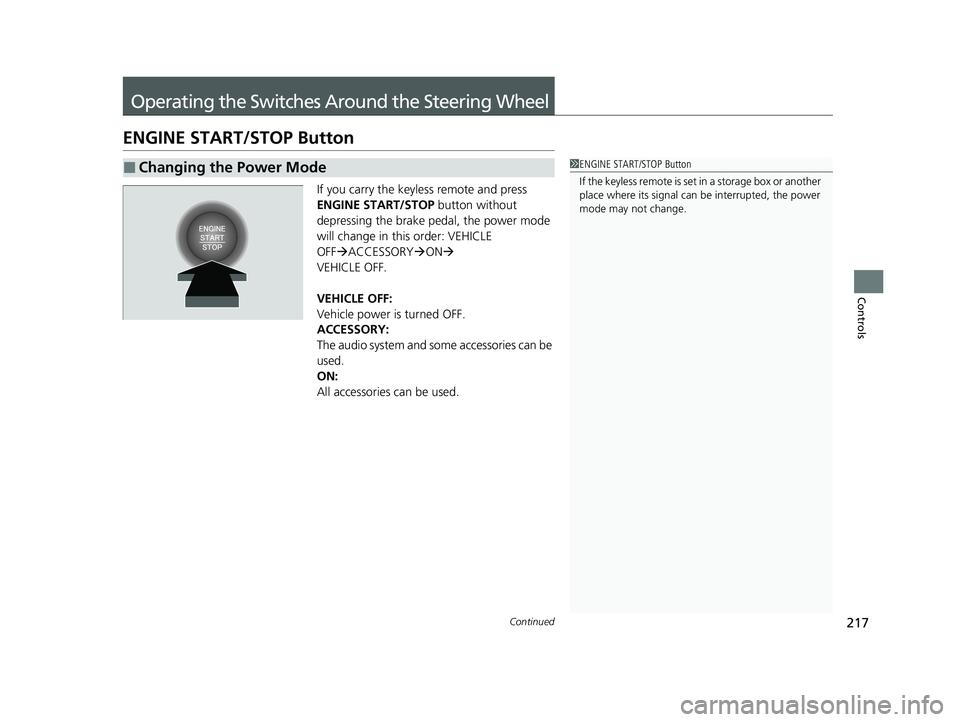
ENGINE START/STOP Button
If you carry the keyless remote and press
ENGINE START/STOP button without
depressing the brake pedal, the power mode
will change in this order: VEHICLE
OFF ACCESSORY ON
VEHICLE OFF.
VEHICLE OFF:
Vehicle power is turned OFF.
ACCESSORY:
The audio system and some accessories can be
used.
ON:
All accessories can be used.
■Changing the Power Mode1 ENGINE START/STOP Button
If the keyless remote is set in a storage box or another
place where its signal can be interrupted, the power
mode may not change.
23 PILOT-31T906000_03.book 217 ページ 2022年10月31日 月曜日 午前10時26分
Page 223 of 814
uuOperating the Switches Around the Steering Wheel uLights
222
Controls
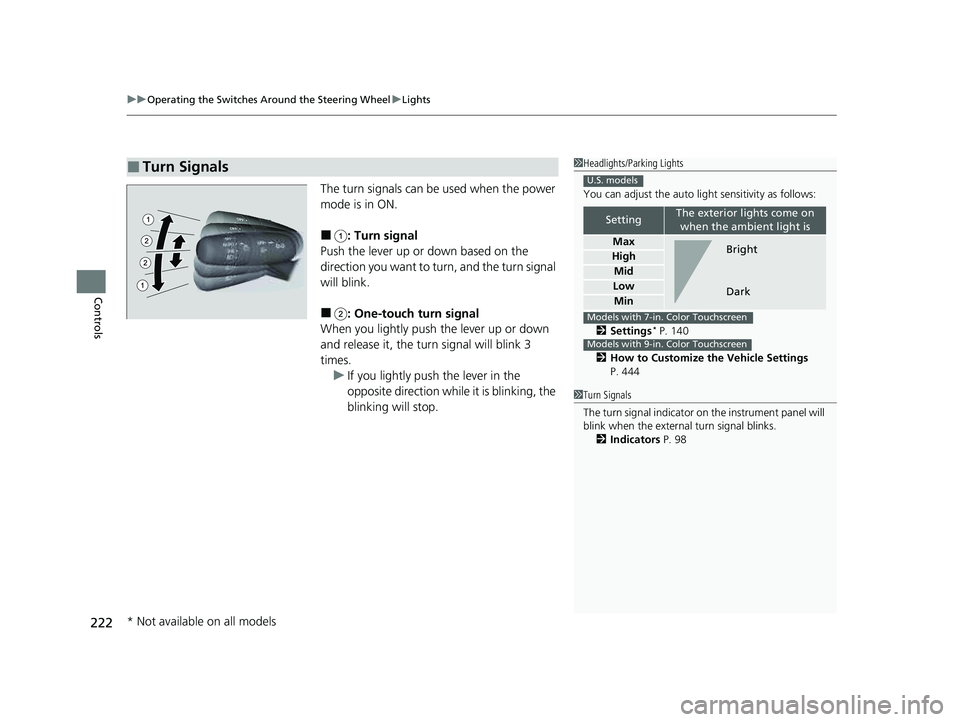
The turn signals can be used when the power
mode is in ON.
■: Turn signal
Push the lever up or down based on the
direction you want to turn, and the turn signal
will blink.
■: One-touch turn signal
When you lightly push the lever up or down
and release it, the turn signal will blink 3
times. u If you lightly push the lever in the
opposite direction while it is blinking, the
blinking will stop.
■Turn Signals1Headlights/Parking Lights
You can adjust the auto li ght sensitivity as follows:
2 Settings
* P. 140
2 How to Customize the Vehicle Settings
P. 444
SettingThe exterior lights come on when the ambient light is
Max
High
Mid
Low
Min
U.S. models
Bright
Dark
Models with 7-in. Color Touchscreen
Models with 9-in. Color Touchscreen
1 Turn Signals
The turn signal indicator on the instrument panel will
blink when the external turn signal blinks.
2 Indicators P. 98
* Not available on all models
23 PILOT-31T906000_03.book 222 ページ 2022年10月31日 月曜日 午前10時26分
Page 305 of 814
304
uuAudio System Basic Operation uPlaying AM/FM Radio
Features
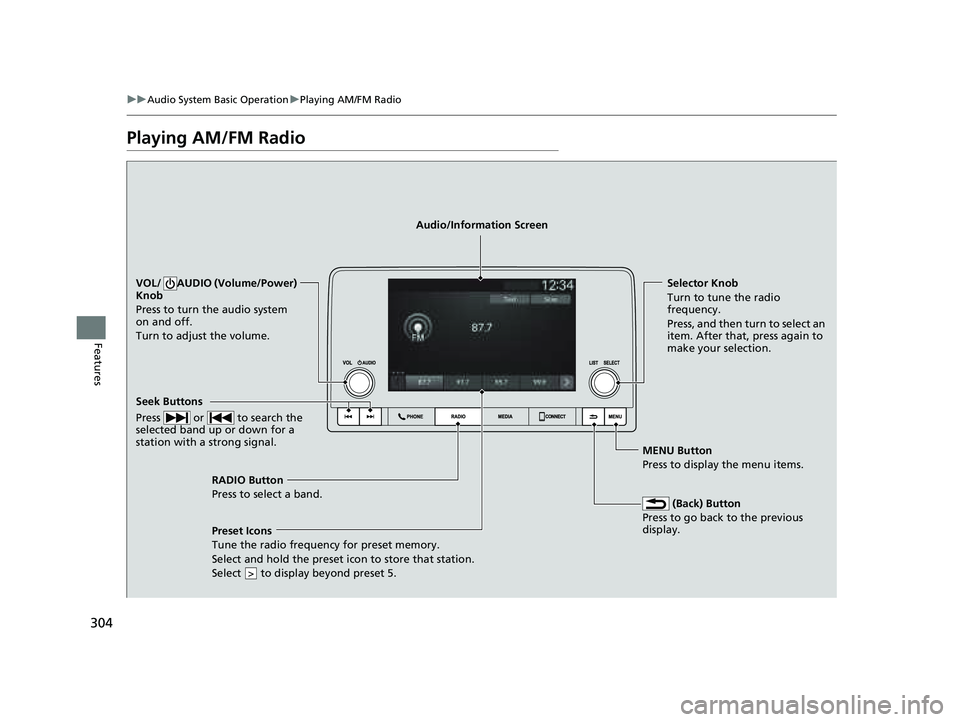
Playing AM/FM Radio
RADIO Button
Press to select a band.
(Back) Button
Press to go back to the previous
display.
Seek Buttons
Press or to search the
selected band up or down for a
station with a strong signal.
VOL/ AUDIO (Volume/Power)
Knob
Press to turn the audio system
on and off.
Turn to adjust the volume.Selector Knob
Turn to tune the radio
frequency.
Press, and then turn to select an
item. After that, press again to
make your selection.
MENU Button
Press to display the menu items.
Audio/Information Screen
Preset Icons
Tune the radio frequency for
preset memory.
Select and hold the preset icon to store that station.
Select to display beyond preset 5.
>
23 PILOT-31T906000_03.book 304 ページ 2022年10月31日 月曜日 午前10時26分