lights HONDA PRELUDE 1990 User Guide
[x] Cancel search | Manufacturer: HONDA, Model Year: 1990, Model line: PRELUDE, Model: HONDA PRELUDE 1990Pages: 143, PDF Size: 2.07 MB
Page 33 of 143
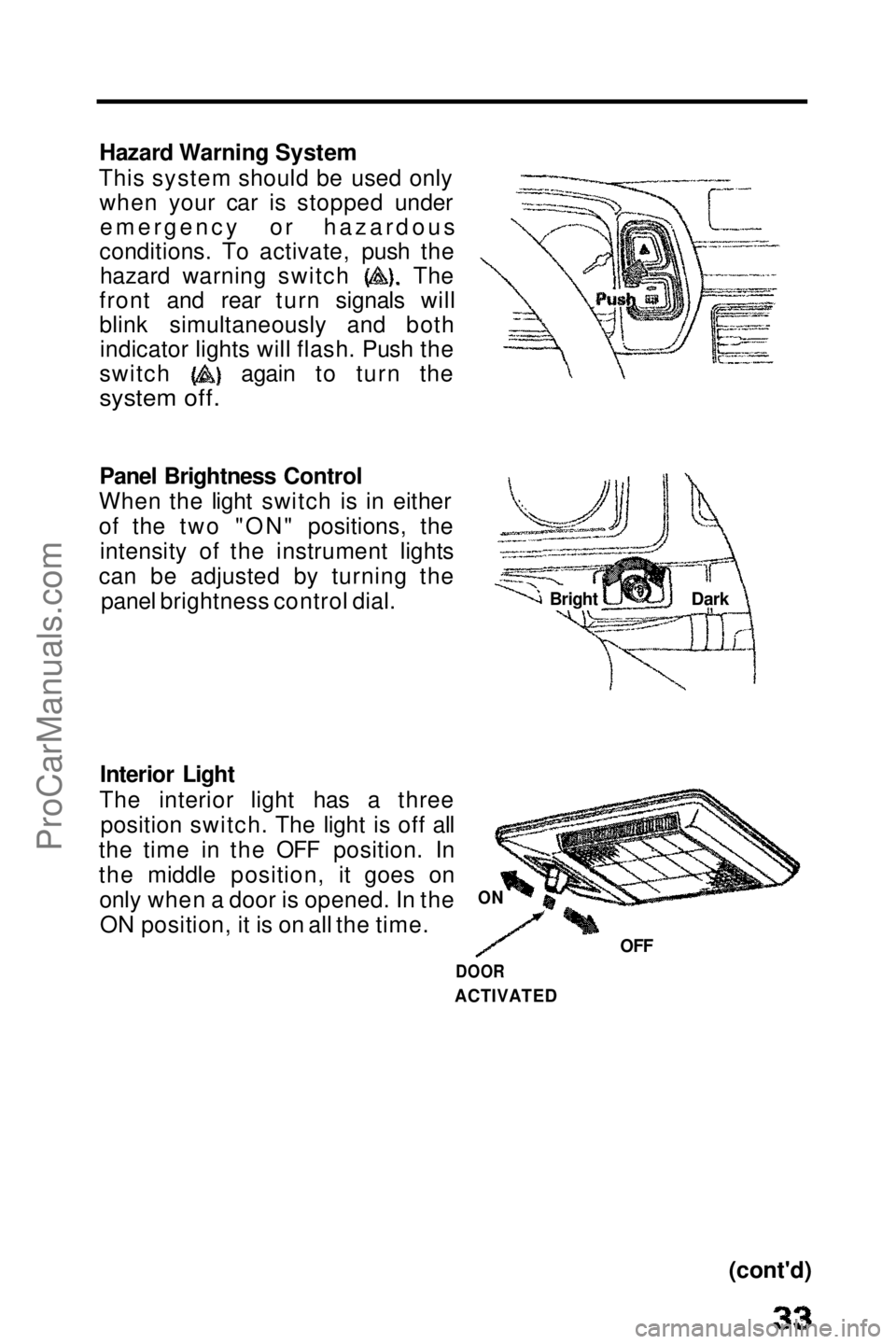
Hazard Warning System
This system should be used only when your car is stopped underemergency or hazardous
conditions. To activate, push the hazard warning switch The
front and rear turn signals will
blink simultaneously and both indicator lights will flash. Push the switch again to turn the
system off.
Panel Brightness Control
When the light switch is in either
of the two "ON" positions, the intensity of the instrument lights
can be adjusted by turning the panel brightness control dial.
Interior Light
The interior light has a three position switch. The light is off all
the time in the OFF position. In
the middle position, it goes on only when a door is opened. In theON position, it is on all the time.
(cont'd)
ON
OFF
DOOR
ACTIVATED
Bright
DarkProCarManuals.comMain Menu t s
Page 34 of 143
Lights (cont'd)
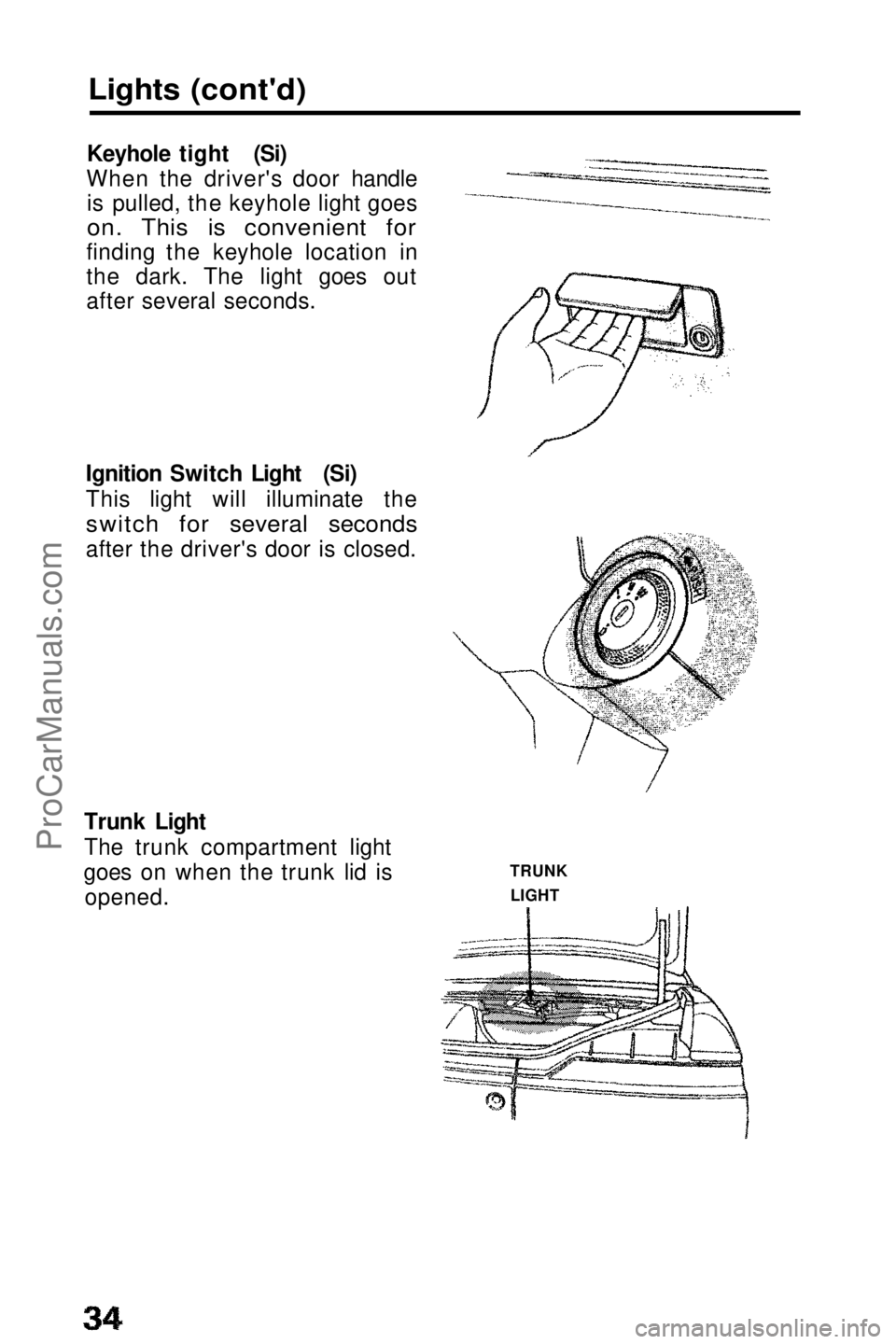
Keyhole tight (Si)
When the driver's door handle is pulled, the keyhole light goes
on. This is convenient for
finding the keyhole location in
the dark. The light goes out
after several seconds.
Ignition Switch Light (Si)
This light will illuminate the
switch for several seconds
after the driver's door is closed.
Trunk Light
The trunk compartment light
goes on when the trunk lid is opened. TRUNK
LIGHTProCarManuals.comMain Menu t s
Page 39 of 143
Glove Box,Parking Brake and Hood
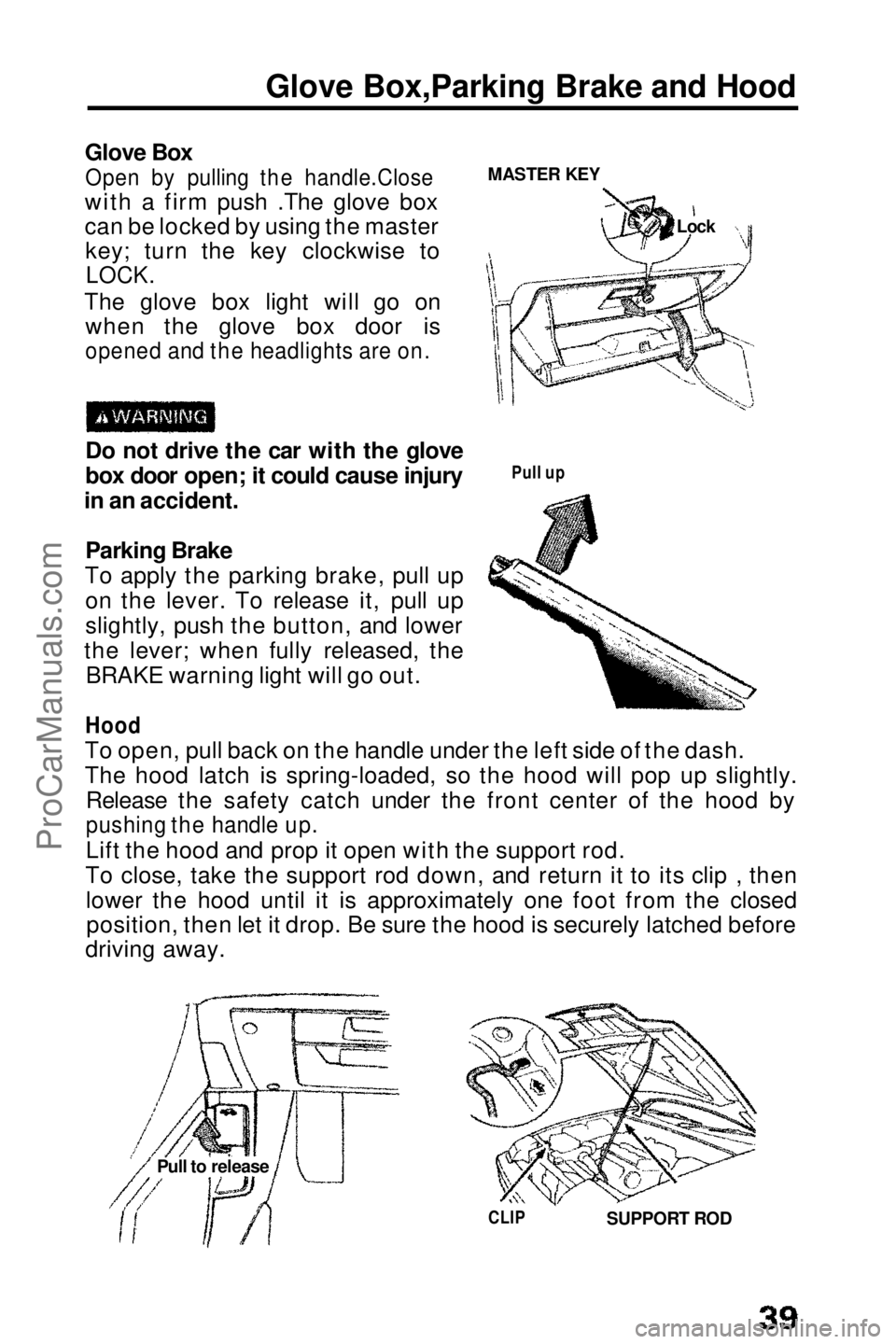
Glove Box
Open by pulling the handle.Close
with a firm push .The glove box
can be locked by using the master key; turn the key clockwise to
LOCK.
The glove box light will go on when the glove box door is
opened and the headlights are on.
Do not drive the car with the glove
box door open; it could cause injury
in an accident.
Parking Brake
To apply the parking brake, pull up on the lever. To release it, pull up
slightly, push the button, and lower
the lever; when fully released, the BRAKE warning light will go out.
Hood
To open, pull back on the handle under the left side of the dash.
The hood latch is spring-loaded, so the hood will pop up slightly. Release the safety catch under the front center of the hood by
pushing the handle up.
Lift the hood and prop it open with the support rod.
To close, take the support rod down, and return it to its clip , then lower the hood until it is approximately one foot from the closedposition, then let it drop. Be sure the hood is securely latched before
driving away. MASTER KEY
Pull up
CLIP
SUPPORT ROD
Pull to release LockProCarManuals.comMain Menu t s
Page 43 of 143
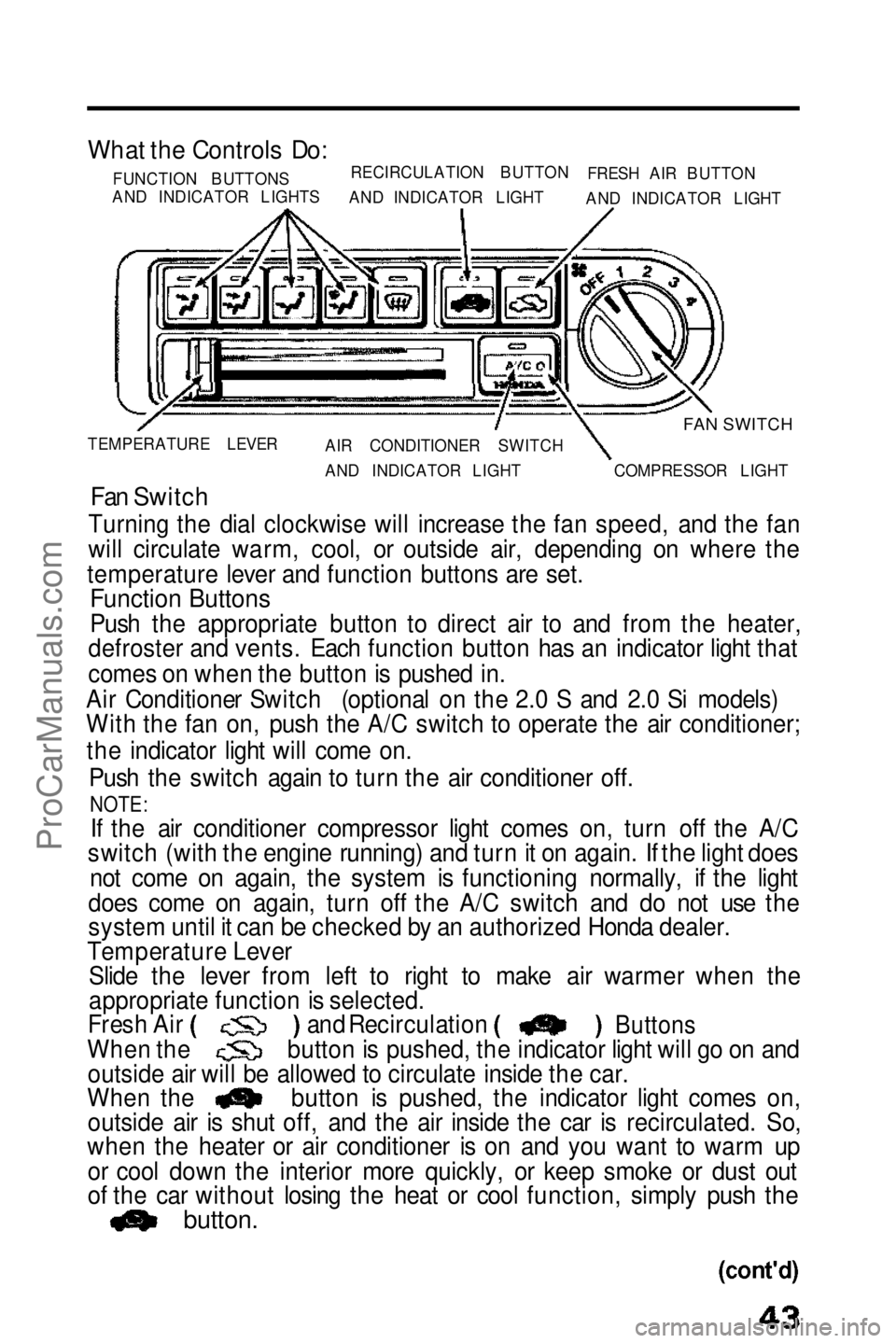
What the Controls Do:
FUNCTION BUTTONS
AND INDICATOR LIGHTS RECIRCULATION BUTTON
AND INDICATOR LIGHT FRESH AIR BUTTON
AND INDICATOR LIGHT
FAN SWITCH
TEMPERATURE LEVER AIR CONDITIONER SWITCH
AND INDICATOR LIGHT COMPRESSOR LIGHT
Fan Switch
Turning the dial clockwise will increase the fan speed, and the fan
will circulate warm, cool, or outside air, depending on where the
temperature lever and function buttons are set.
Function Buttons
Push the appropriate button to direct air to and from the heater,
defroster and vents. Each function button has an indicator light that
comes on when the button is pushed in.
Air Conditioner Switch (optional on the 2.0 S and 2.0 Si models)
With the fan on, push the A/C switch to operate the air conditioner;
the indicator light will come on.
Push the switch again to turn the air conditioner off.
NOTE:
If the air conditioner compressor light comes on, turn off the A/C
switch (with the engine running) and turn it on again. If the light does
not come on again, the system is functioning normally, if the light
does come on again, turn off the A/C switch and do not use the
system until it can be checked by an authorized Honda dealer.
Temperature Lever Slide the lever from left to right to make air warmer when the
appropriate function is selected. and Recirculation
Fresh Air
When the
Buttons
button is pushed, the indicator light will go on and
outside air will be allowed to circulate inside the car.
When the outside air is shut off, and the air inside the car is recirculated. So,
when the heater or air conditioner is on and you want to warm up
or cool down the interior more quickly, or keep smoke or dust out
of the car without losing the heat or cool function, simply push the
button.
button is pushed, the indicator light comes on,ProCarManuals.comMain Menu t s
Page 48 of 143
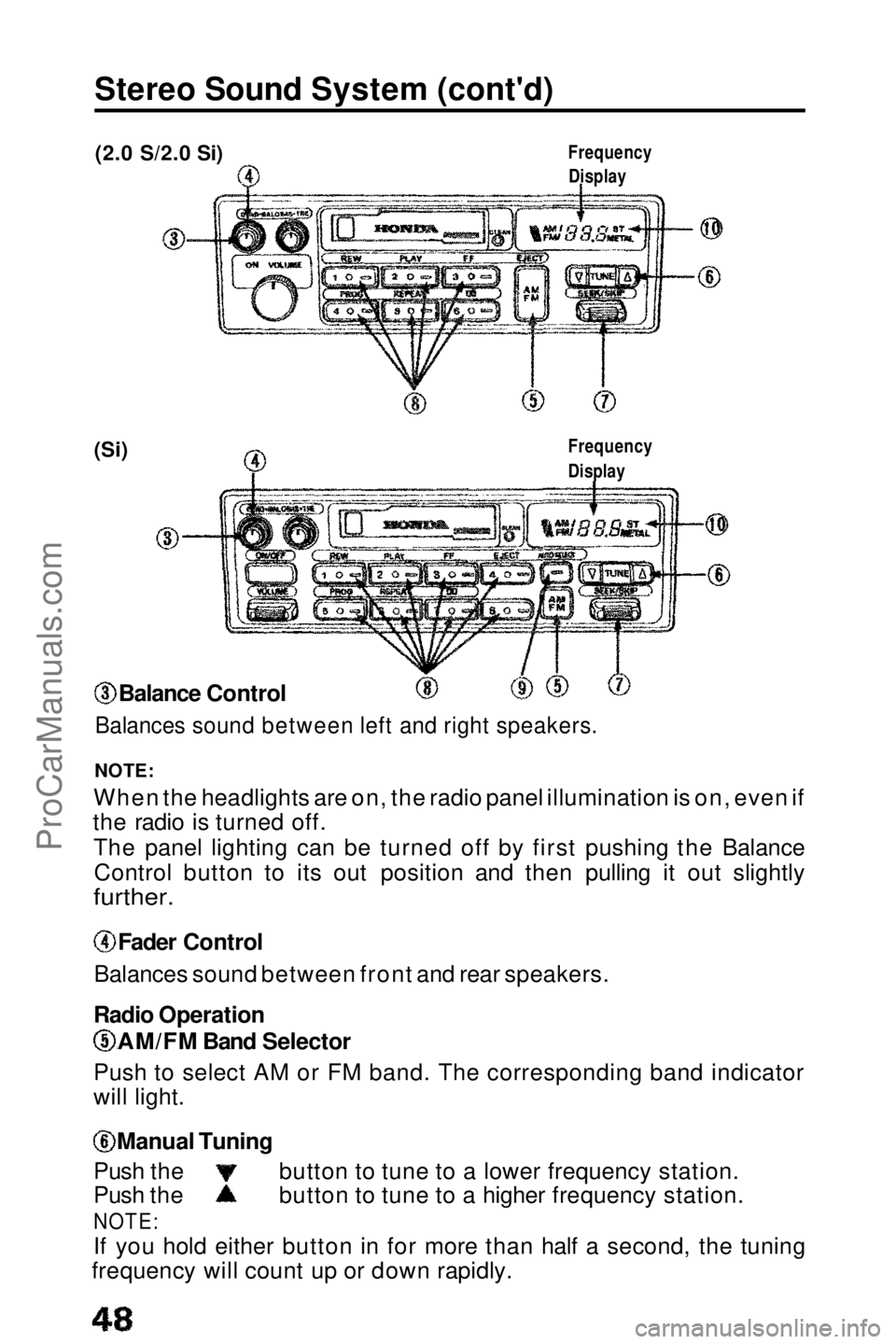
Stereo Sound System (cont'd)
(2.0 S/2.0 Si)
(Si)
NOTE:
When the headlights are on, the radio panel illumination is on, even if
the radio is turned off.
The panel lighting can be turned off by first pushing the BalanceControl button to its out position and then pulling it out slightly
further.
Fader Control
Balances sound between front and rear speakers.
Radio Operation AM/FM Band Selector
Push to select AM or FM band. The corresponding band indicator
will light. Manual Tuning
Push the button to tune to a lower frequency station.
Push the button to tune to a higher frequency station.
NOTE:
If you
hold either button in for more than half a second, the tuning
frequency will count up or down rapidly. Balance Control
Balances sound between left and right speakers.
Frequency
Display
Frequency
DisplayProCarManuals.comMain Menu t s
Page 49 of 143

Seek Tuning
Each time you push this button up or down, the tuner will
automatically seek the next higher or lower frequency station. Preset Station Selection
1 .Select AM or FM band by depressing the Band Selector. Find the station you want by Manual Tuning or Seek Tuning.
Press and hold one of the Preset Buttons.
2. In a few seconds, a beep will sound and the light in the button will
3. come on. The station is now preset in the memory. You may preset 1 AM and 1 FM station per button.
(total, 6 of each on the 2.0 S and 2.0 Si models and 8 of each on
the Si model).
4. You can tune to a preset station by pushing its corresponding preset button.
NOTE: On the Si model
The Auto Preset button must be off before the Preset Station Selection can be used. Auto Select Button (Si only)
If you are visiting a new broadcast area, you can quickly enter into
memory the stronger stations in that area by simply pushing the
Auto Select Button. The radio will then automatically scan the AM
and FM bands and temporarily memorize up to eight stations in each.
With the Auto Select Button on, these stations can then be tuned by pushing the preset buttons. Manually-preset stations remainmemorized for use when you return to your normal broadcast area,
but are only selectable with the Auto Select Button off. Stereo indicator
This lights up when an FM broadcast in stereo is being received. It will flash when the signal strength diminishes. If it flashes, good
stereo reception cannot be expected. Stereo reception is available
only for FM stereo broadcasts, not for AM stereo broadcasts.
(cont'd)ProCarManuals.comMain Menu t s
Page 61 of 143

Starting the Engine
Before Starting
Manual Transmission:
1 . Apply the parking brake.
2 . Push the clutch pedal all the way in (see NOTE below).
3 . Shift the transmission to neutral.
NOTE:
On cars equipped with manual transmissions, the engine will
not crank unless the clutch pedal is fully depressed.
Automatic Transmission: 1. Make sure the shift lever is in Park (P).
2. Apply the parking brake and the foot brake.
Starting a Cold Engine(2.0 S)
NOTE:
When starting in cold weather, keep all unnecessary electrical
circuits off (lights, defogger, etc.) for the best battery output.
1. Above 32°F(0°C) Push the accelerator to the floor 1 time and slowly release it.
Below 32°F(0°C)
Push the accelerator to the floor 2 or 3 times and slowly
release it.
Below 0°F(-18°C)
Push the accelerator to the floor 3 or 4 times and slowly
release it.
DO NOT pump while cranking.
2. With your foot OFF the accelerator, crank the engine until it starts and runs. (It may require more than 5 seconds of cranking.)
NOTE:
If the engine won't start, push the accelerator pedal down 1 more
time and slowly release it, then start the engine.Repeat once more if necessary,
If the engine still won't start, push the accelerator down about halfway; hold it there and crank the engine until it starts. Once the
engine starts, release the accelerator gradually as the enginewarms up.If the engine doesn't start within 15 seconds of cranking, turn the
key off
and wait 10 seconds before trying again.
3. If the outside temperature is below freezing, or if your car has not been driven for several days, warm up the engine for a few
minutes before driving.
(cont'd)ProCarManuals.comMain Menu t s
Page 62 of 143

Starting the Engine (cont'd)
Starting a Warm Engine (2.0 S)
Start it without pushing the accelerator down. If it won't start, push
the accelerator pedal about halfway and hold it there while cranking the engine until it starts. It may take 20 to 30 seconds of cranking. DO NOT pump the accelerator.
Once the engine starts, release the accelerator gradually as the
engine speeds up.
Starting the Engine (2.0 Si,Si) NOTE: When starting in cold weather, keep all unnecessary electrical
circuits off (lights, defogger, etc.) for the best battery output.
Do not crank the engine for more than 15 seconds at a time. Wait
10 seconds before going to the next step.
1. With YOUR FOOT OFF THE ACCELERATOR start the engine by turning the key to the III position.
2. If the engine won't start within 15 seconds or starts but fails to continue to run, push the accelerator pedal halfway, and hold it
there while cranking the engine. Once the engine starts, release
the accelerator gradually as the engine speeds up.
3. If it doesn't start within 15 seconds, push the accelerator pedal down to the floor and hold it there while cranking in order to clear
flooding. Try step 2 again.
Cold Weather at High Altitude Starting (2.0 Si,Si) NOTE: When starting in cold weather, keep all unnecessary electrical
circuits off (lights, defogger, etc.) for the best battery output.
Do not crank the engine for more than 15 seconds at a time. Wait
10 seconds before going to the next step.
1. When starting in cold weather at high altitude (above 8,000 feet), push the accelerator pedal about halfway and hold it there while
cranking the engine. Once the engine starts, release the
accelerator gradually as the engine speeds up.
2. If it doesn't start within 15 seconds, push the accelerator pedal down to the floor and hold it there while cranking in order to clear
flooding. Try step 1 again.
NOTE:
If the outside temperature is below freezing, or if your car has not
been driven for several days, warm up the engine for a few minutes
before driving.ProCarManuals.comMain Menu t s
Page 63 of 143
Safety Items
Before driving away, check that: The doors are closed properly. The mirrors are properly adjusted, and the windows clean.
The driver and passengers are wearing properly adjusted seat
belts.
The head restraints are properly adjusted.
The warning and indicator lights are operating properly.
The brake pedal feels normal.
All luggage and cargo is secured.
Nothing is interfering with the driver's feet or blocking vision to
the rear.
While driving remember to: Always drive defensively; expect the unexpected. Reduce your speed during night hours and bad weather.
Follow at a safe distance; don't tailgate.
Get off the highway when you are tired; stop and take a rest.
When stopping for repairs: Park the car well off the road.
Turn on the hazard warning flasher. Use flares or other warning devices to warn other motorists.
After parking your car: Apply the parking brake and shift to first gear if equipped withmanual transmission, or PARK on automatic transmission
equipped cars.
Make sure the windows are closed and all doors are locked.
If parked on a hill:
Turn the front wheels away from the curb if facing uphill.
Turn the front wheels toward the curb if facing downhill. Never leave children unattended in a parked car.
Take your
keys.ProCarManuals.comMain Menu t s
Page 72 of 143

Towing a Trailer (cont'd)
Hitches
Use only a hitch recommended by your Honda dealer. The hitch
should be bolted securely to the car and installed by a qualified
technician. Do not use a hitch designed for temporary installation
and never use one that attaches only to the bumper.
Trailer Brakes and safety chains
The Honda Automobile Division recommends that trailers equippedwith brakes, should conform to any applicable federal and stateregulations, When using a trailer equipped with electric brakes, a
trailer brake controller that connects to the car's electrical system is recommended. Installing a brake controller that connects to the car's
brake hydraulic system could result in brake fluid contamination or
leaks, A safety chain must always be used between the car and the
trailer. Leave sufficient slack in the chain so that it does not bind in
sharp turns. The chain should cross under the trailer tongue to prevent the tongue from dropping to the ground.
Tires
Make sure your car's are properly inflated. Adjust tire pressure
to the recommended tire pressure indicated on the label attached to
the edge of the driver's door.The trailer tires should be of the proper size, load rating and inflated to the pressure recommended
by the trailer manufacturer.
Trailer Lights
Trailer light must comply with federal, state and local regulations. See your local recreation vehicle dealer or rental agency for the
correct type of lighting and wiring for your trailer, Check for correct
operation of the turn signals and stop lights each time you hitch up.
CAUTION:
Connections to your car's electrical system should be made by
your Honda dealer or a qualified electrician.Improper installation
may damage your vehicle's electrical system and cause a
malfunction of the lights.
ProCarManuals.comMain Menu t s