manual radio set HONDA PRELUDE 1992 Owners Manual
[x] Cancel search | Manufacturer: HONDA, Model Year: 1992, Model line: PRELUDE, Model: HONDA PRELUDE 1992Pages: 225, PDF Size: 2.1 MB
Page 67 of 225
Comfort and Convenience Features
The heating and air conditioning* system in your car provides a com-
fortable driving environment in all
weather conditions.
The audio sound system is very
versatile. To get the most from thissystem, take the time to learn what
the controls do.
Some models have an anti-theft
system that requires a code
number to enable it.
* Air conditioner is optional on S
model.
Heating and Cooling...................... 68
What Each Control Does .......... 70
How to Use the System............. 71
Controlling Air Flow
Direction............................. .
71
Ventilation...............................
71
To Cool.................................... .
72
To Dehumidify and Defog
with
A/C...............................
73
To Heat.................................... 74
To Defrost............................... 74
To Turn Everything off ....... 74
Audio System (S)............................ 75
Adjusting the Sound.................. 76Operating the Radio.................. 77
Presetting.................................... 79
Radio Frequencies..................... 80Operating the Cassette
Player........................................ 81
Cassette Search Functions ...... 82 Audio Syste
m
(Si, SR)................... 84
Adjusting the Sound.................. 85
Operating the Radio.................. 86
Presetting.................................... 88
Radio Frequencies..................... 90
Operating the Cassette Player. 91
Cassette Search Functions....... 92
Caring for the Cassettes Player .. 94
Theft Protection............................. 95
Comfort and Convenience FeaturesProCarManuals.comMain Menu s t
Page 76 of 225
Audio System (S)
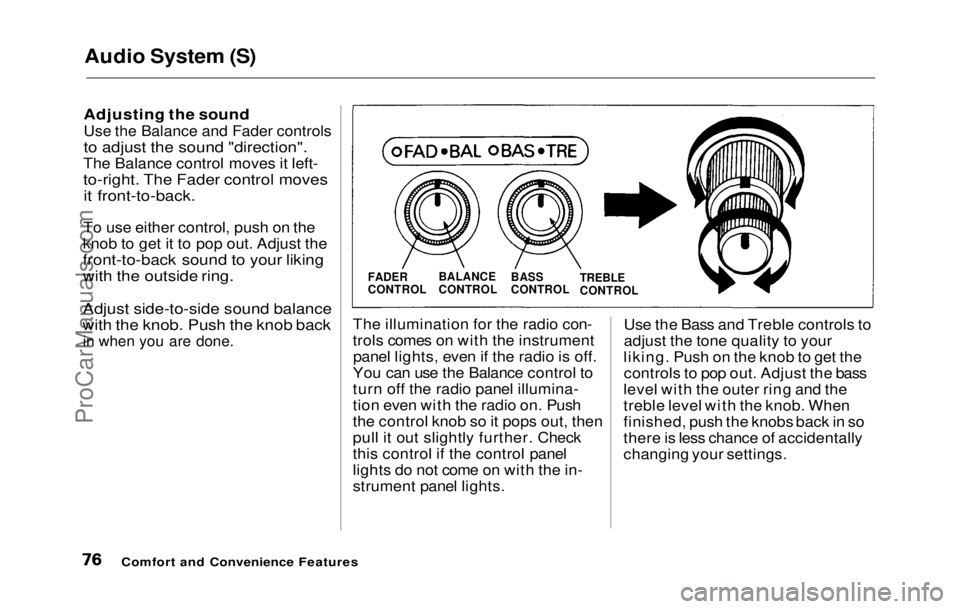
Adjusting the soundUse the Balance and Fader controls
to adjust the sound "direction".
The Balance control moves it left-
to-right. The Fader control moves it front-to-back.
To use either control, push on the
knob to get it to pop out. Adjust the
front-to-back sound to your liking
with the outside ring.
Adjust side-to-side sound balance
with the knob. Push the knob back
in when you are done.
The illuminatio n
for the radio con-
trols comes on with the instrument panel lights, even if the radio is off.
You can use the Balance control to
turn off the radio panel illumina-
tion even with the radio on. Push
the control knob so it pops out, then
pull it out slightly further. Check
this control if the control panel
lights do not come on with the in-
strument panel lights. Use the Bass and Treble controls to
adjust the tone quality to your
liking. Push on the knob to get the controls to pop out. Adjust the bass
level with the outer ring and the
treble level with the knob. When
finished, push the knobs back in so
there is less chance of accidentally
changing your settings.
Comfort and Convenience Features
FADER
CONTROL
BALANCE
CONTROL
BASS
CONTROL
TREBLE
CONTROLProCarManuals.comMain Menu Table of Contents s t
Page 78 of 225
Audio System (S)
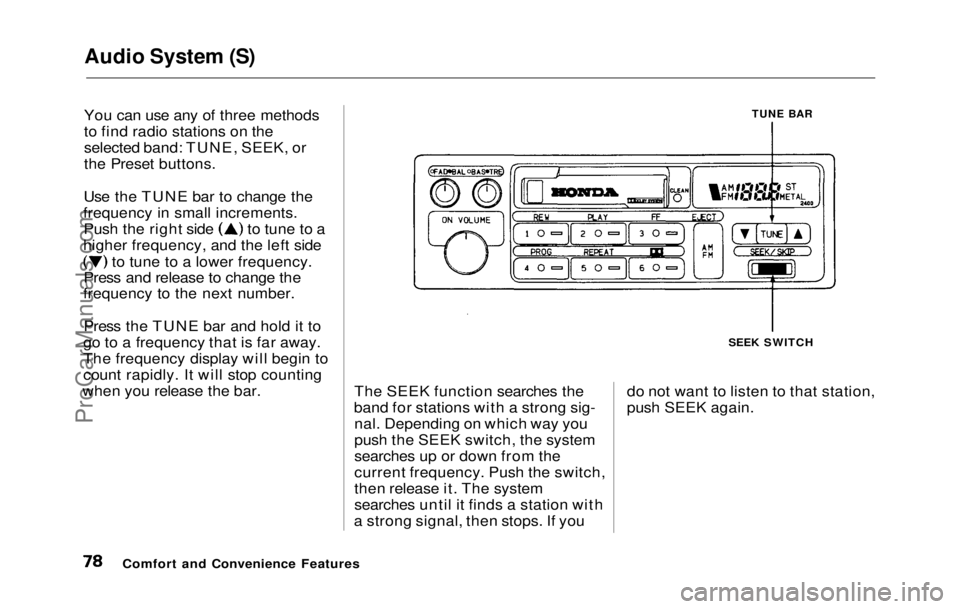
You can use any of three methods
to find radio stations on the
selected band: TUNE, SEEK, or
the Preset buttons.
Use the TUNE bar to change the
frequency in small increments. Push the right side to tune to a
higher frequency, and the left side to tune to a lower frequency.
Press and release to change the
frequency to the next number.
Press the TUNE bar and hold it to
go to a frequency that is far away.
The frequency display will begin to
count rapidly. It will stop counting
when you release the bar.
TUNE BAR
The SEEK function searches the
band for stations with a strong sig- nal. Depending on which way you
push the SEEK switch, the system
searches up or down from the
current frequency. Push the switch,
then release it. The system
searches until it finds a station with
a strong signal, then stops. If you SEEK SWITCH
do not want to listen to that station,
push SEEK again.
Comfort and Convenience FeaturesProCarManuals.comMain Menu Table of Contents s t
Page 79 of 225
Audio System (S)
Presetting
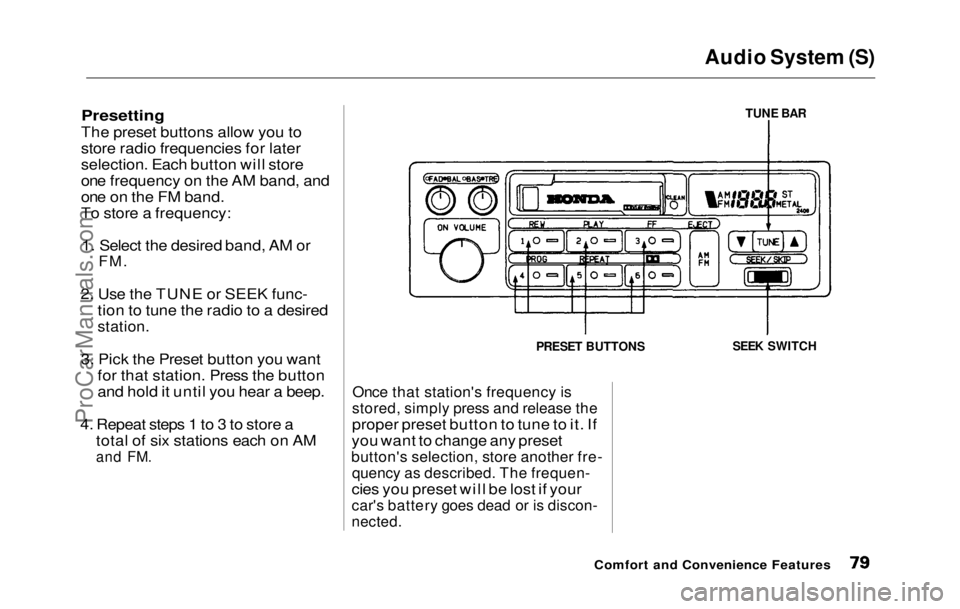
The preset buttons allow you to
store radio frequencies for later
selection. Each button will store
one frequency on the AM band, and
one on the FM band.
To store a frequency:
1. Select the desired band, AM or
FM.
2. Use
the TUNE or SEEK func-
tion to tune the radio to a desired
station.
3. Pic
k
the Preset button you want
for that station. Press the button
and hold it until you hear a beep.
4. Repea
t
steps 1 to 3 to store a
total of six stations each on AM
and
FM.
Once tha
t
station's frequency is
stored, simply press and release the
proper preset button to tune to it. If
you want to change any preset
button's selection, store another fre-
quency as described. The frequen-
cies you preset will be lost if your
car's battery goes dead or is discon-
nected.
Comfort and Convenience Features
TUNE BAR
SEEK SWITCH
PRESET BUTTONSProCarManuals.comMain Menu Table of Contents s t
Page 85 of 225
Audio System (Si, SR)
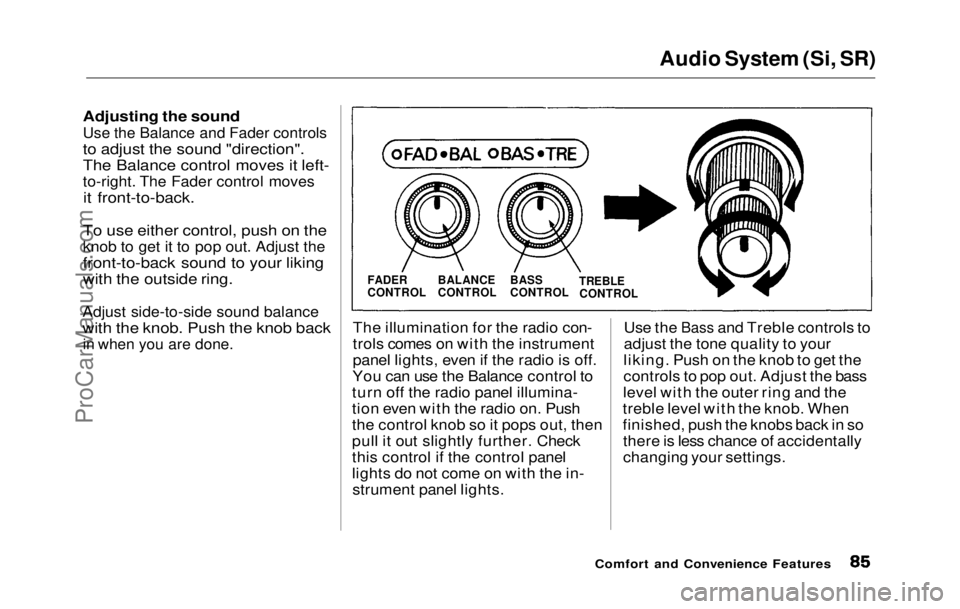
Adjusting the soundUse the Balance and Fader controls
to adjust the sound "direction".
The Balance control moves it left-
to-right. The Fader control moves
it front-to-back.
To use either control, push on the
knob to get it to pop out. Adjust the
front-to-back sound to your liking
with the outside ring.
Adjust side-to-side sound balance
with the knob. Push the knob back
in when you are done.
The illuminatio n
for the radio con-
trols comes on with the instrument
panel lights, even if the radio is off.
You can use the Balance control to
turn off the radio panel illumina-
tion even with the radio on. Push
the control knob so it pops out, then
pull it out slightly further. Check
this control if the control panel
lights do not come on with the in- strument panel lights. Use the
Bass and Treble controls to
adjust th e
tone quality to your
liking. Push on the knob to get the
controls to pop out. Adjust the bass
level with the outer ring and the
treble level with the knob. When
finished, push the knobs back in so there is less chance of accidentally
changing your settings.
Comfort and Convenience Features
FADER
CONTROL
BALANCE
CONTROL
BASS
CONTROL
TREBLE
CONTROLProCarManuals.comMain Menu Table of Contents s t
Page 87 of 225
Audio System (Si, SR)
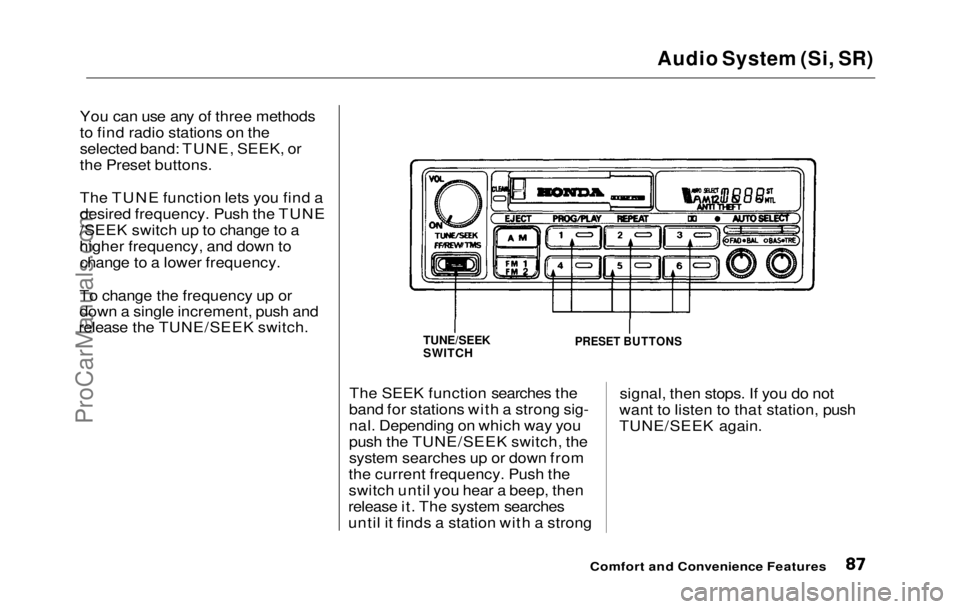
You can use any of three methods
to find radio stations on the
selected band: TUNE, SEEK, or
the Preset buttons.
The TUNE function lets you find a
desired frequency. Push the TUNE
/SEEK switch up to change to a
higher frequency, and down to change to a lower frequency.
To change the frequency up or
down a single increment, push and
release the TUNE/SEEK switch.
The SEEK function searches the
band for stations with a strong sig-
nal. Depending on which way you
push the TUNE/SEEK switch, the
system searches up or down from
the current frequency. Push the
switch until you hear a beep, then
release it. The system searches
until it finds a station with a strong signal, then stops. If you do not
want to listen to that station, push
TUNE/SEEK again.
Comfort and Convenience Features
TUNE/SEEK
SWITCH
PRESET BUTTONSProCarManuals.comMain Menu Table of Contents s t
Page 88 of 225
Audio System (Si, SR)
Presetting
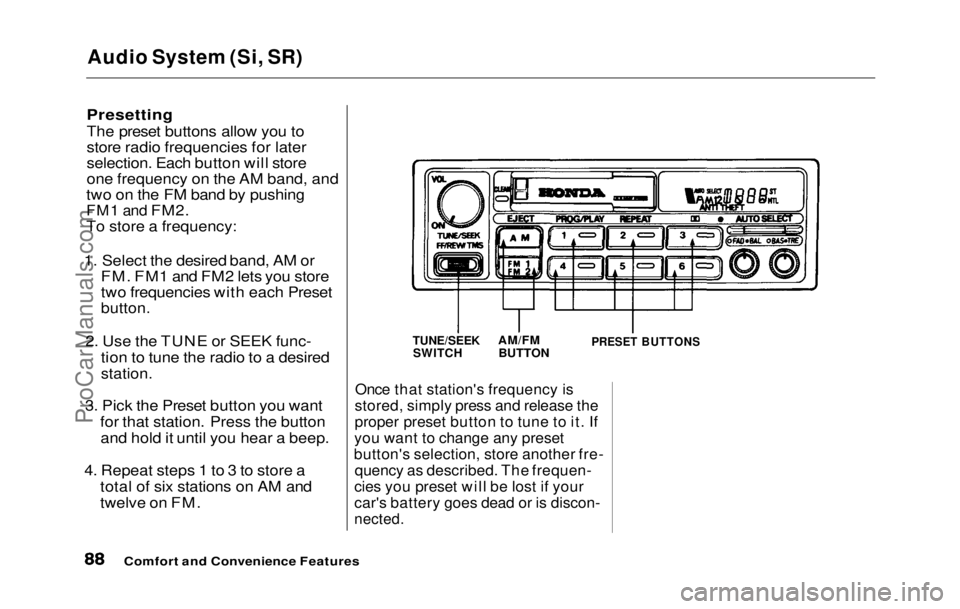
The preset buttons allow you to
store radio frequencies for later
selection. Each button will store
one frequency on the AM band, and
two on the FM band by pushing
FM1 and
FM2.
To store a frequency:
1. Select the desired band, AM or FM. FM1 and FM2 lets you store
two frequencies with each Preset
button.
2. Use the TUNE or SEEK func- tion to tune the radio to a desired
station.
3. Pick the Preset button you want for that station. Press the buttonand hold it until you hear a beep.
4. Repeat steps 1 to 3 to store a total of six stations on AM and
twelve on FM.
Once that station's frequency is
stored, simply press and release the
proper preset button to tune to it. If
you want to change any preset
button's selection, store another fre- quency as described. The frequen-
cies you preset will be lost if your
car's battery goes dead or is discon-
nected.
Comfort and Convenience Features
TUNE/SEEK
SWITCH
AM/FM
BUTTON
PRESET BUTTONSProCarManuals.comMain Menu Table of Contents s t
Page 89 of 225
Audio System (Si, SR)
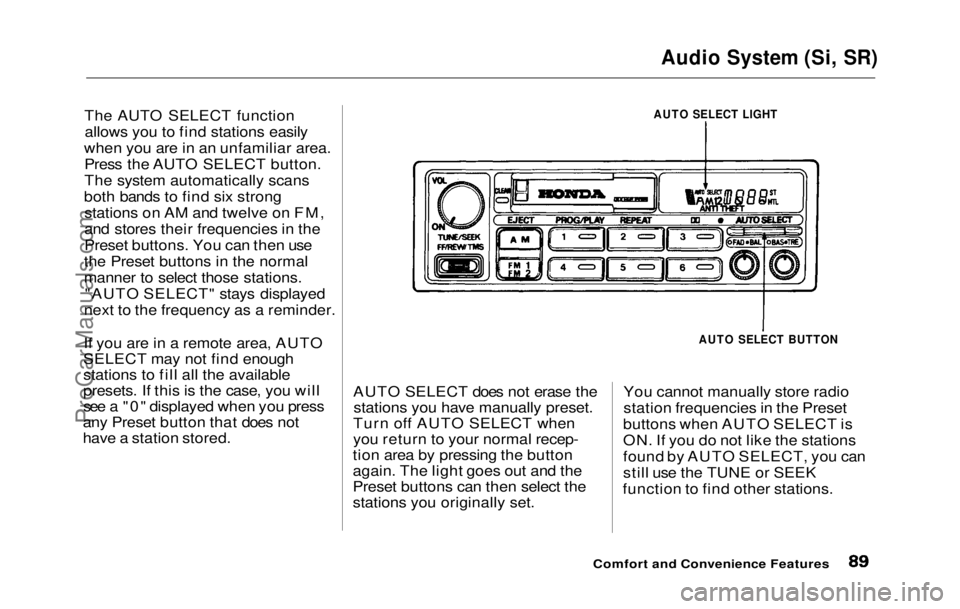
The AUTO SELECT function allows you to find stations easily
when you are in an unfamiliar area. Press the AUTO SELECT button.
The system automatically scans
both bands to find six strong stations on AM and twelve on FM,
and stores their frequencies in the
Preset buttons. You can then use
the Preset buttons in the normal
manner to select those stations. "AUTO SELECT" stays displayed
next to the frequency as a reminder.
If you are in a remote area, AUTO
SELECT may not find enough
stations to fill all the available
presets. If this is the case, you will
see a "0" displayed when you press
any Preset button that does not
have a station stored. AUTO SELECT does not erase the
stations you have manually preset.
Turn off AUTO SELECT when
you return to your normal recep-
tion area by pressing the button
again. The light goes out and the
Preset buttons can then select the
stations you originally set. You cannot manually store radio
station frequencies in the Preset
buttons when AUTO SELECT is
ON. If you do not like the stations
found by AUTO SELECT, you can
still use the TUNE or SEEK
function to find other stations.
Comfort and Convenience Features
AUTO SELECT LIGHT
AUTO SELECT BUTTONProCarManuals.comMain Menu Table of Contents s t
Page 95 of 225

Theft Protection
Theft Protection is standard on the Si and Si 4WS models in the U. S.,
and the SR and SR 4WS models in
Canada.
Your audio system is protected by a code number. The system immedi-
ately disables itself whenever the
radio/player unit is disconnected
from the battery. To make it work again, you must enter a five-digit
code with the station Preset
buttons.
Your dealer should have given you
two copies of your audio system's
code number with your car. Keep one of these copies at home, and
the other in your wallet or a con- cealed place in the car. If your car's battery is discon-
nected or goes dead, the audio
system will disable itself. The next
time you turn on the radio you will
see "Code" in the frequency display.
Use the Preset buttons to enter the
five-digit code. If entered correctly,
the radio will start to play.
You will then have to store your
favorite stations in the Preset
buttons. Your original settings
were lost when power was discon-
nected.
Comfort and Convenience FeaturesProCarManuals.comMain Menu Table of Contents s t
Page 104 of 225
Accessories
Your Honda dealer has many acces-
sories available to personalize your
car. Some of these are audio sys-
tems, alloy wheels, air conditioning, and color-coordinated carpet floor
mats. All Genuine Honda Acces-
sories have been approved by our
engineers for installation and use
on your car, and are covered by
warranty. For a complete guide to the Genuine Honda Accessories
available, see your dealer for a 1992
Accessories brochure.
Some non-Honda accessories you
can buy in the "aftermarket" are designed for universal applications.
Although they may fit your Honda,
they may not be within factory specifications. For example, after-
market wheels may not meet
Honda's specifications for width
and offset. They could cause sus-
pension problems which would not
be covered by your warranty. Im- properly-designed accessories can
adversely affect your car's han-
dling and stability.
Your car has several computer-
controlled systems, including the
SRS system, the engine's fuel
injection, and the Anti-lock brake
system. Strong electronic inter-
ference can affect their operation. Electronic communications equip-
ment, such as cellular telephones
and two-way radios are regulated
by the FCC and should not inter-
fere with your car's systems. Improper installation, or using
electrical equipment not intended
for mobile use may interfere with
your car's operation. If you want to
install a cellular telephone, other
mobile communications equipment
or even add-on stereo amplifiers,
please discuss it first with your
Honda dealer.
In many cases, improper instal-
lation is the real cause of problems
with aftermarket accessories. Have
these accessories installed by quali- fied technicians who are familiar
with your Honda. If possible, have
your Honda dealer inspect the final installation.
Before DrivingProCarManuals.comMain Menu Table of Contents s t