ignition HONDA PRELUDE 1998 Owner's Manual
[x] Cancel search | Manufacturer: HONDA, Model Year: 1998, Model line: PRELUDE, Model: HONDA PRELUDE 1998Pages: 278, PDF Size: 2.61 MB
Page 81 of 278
Folding Rear Seat, Power Windows
Make sure both rear shoulder belts are positioned in front of the rear
seat-back whenever the seat-back is
in its upright position.
Make sure all items in the trunk, or
items extending through the opening
into the back seat, are tied down.
Loose items can fly if you have to
brake hard. See Carrying Cargo on
page 128.
Never drive with the seat-back
folded down and the trunk lid open.
See Carbon Monoxide Hazard on
page 47. Power Windows
Your vehicle's windows are electri- cally-powered. Turn the ignitionswitch to ON (II) to raise or lower
any window.
Each door has a switch that controls
its window. To open the window,
push the switch down and hold it.
Release the switch when you want
the window to stop. Close the
window by pulling back on the switch and holding it.
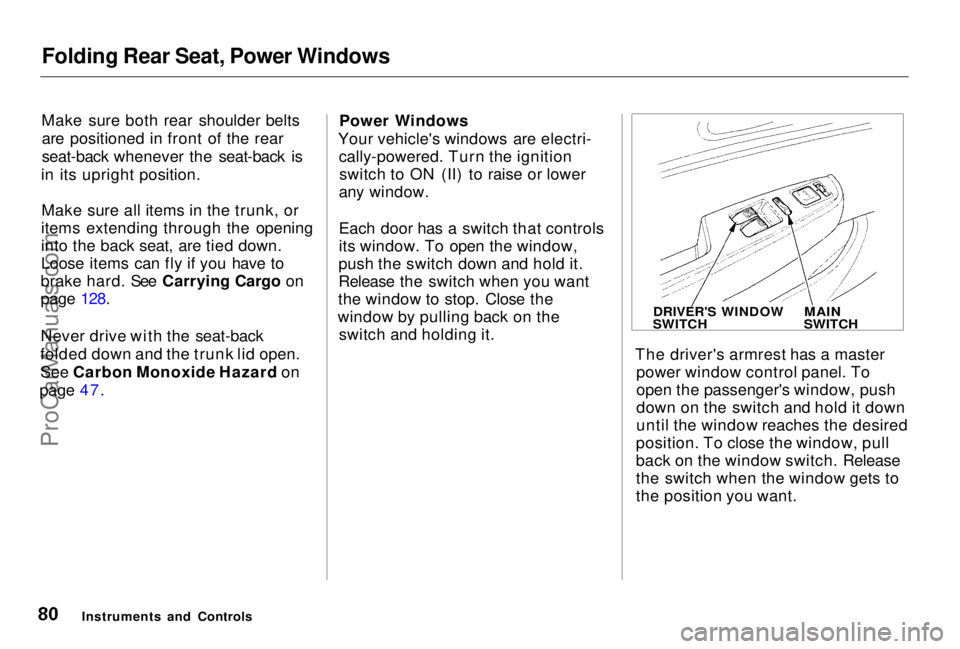
The driver's armrest has a masterpower window control panel. To
open the passenger's window, push
down on the switch and hold it down
until the window reaches the desired
position. To close the window, pull
back on the window switch. Release
the switch when the window gets to
the position you want.
Instruments and Controls
DRIVER'S WINDOW
SWITCH
MAIN
SWITCHProCarManuals.comMain Menu Table of Contents s t
Page 82 of 278
Power Windows
The master control panel also con- tains these extra features:
AUTO — To open the driver's window fully, push the window switch firmly down and release it.
The window automatically goes all the way down. To stop the window
from going all the way down, pull
back on the window switch briefly.
To open the driver's window only partially, push the window switchdown lightly and hold it. The window
will stop as soon as you release the
switch.
The AUTO function only works to lower the driver's window. To raise
the window, you must pull back on
the window switch and hold it until
the window reaches the desired
position.
The MAIN switch controls power to
the passenger's window. With thisswitch off, the passenger's window
cannot be raised or lowered. The
MAIN switch does not affect the driver's window. Keep the MAIN
switch off when you have children in
the vehicle so they do not injure themselves by operating the window
unintentionally.
The power window system has a key- off delay function. The windows will
still operate for up to ten minutes
after you turn off the ignition.
Opening either door cancels thedelay function. You must turn the
ignition ON (II) again before you can
raise or lower the windows.
Instruments and Controls
Closing a power window on a
child's hands or fingers can
cause serious injury.
Make sure your children are
away from the windows before
closing them.ProCarManuals.comMain Menu Table of Contents s t
Page 83 of 278
Moonroof
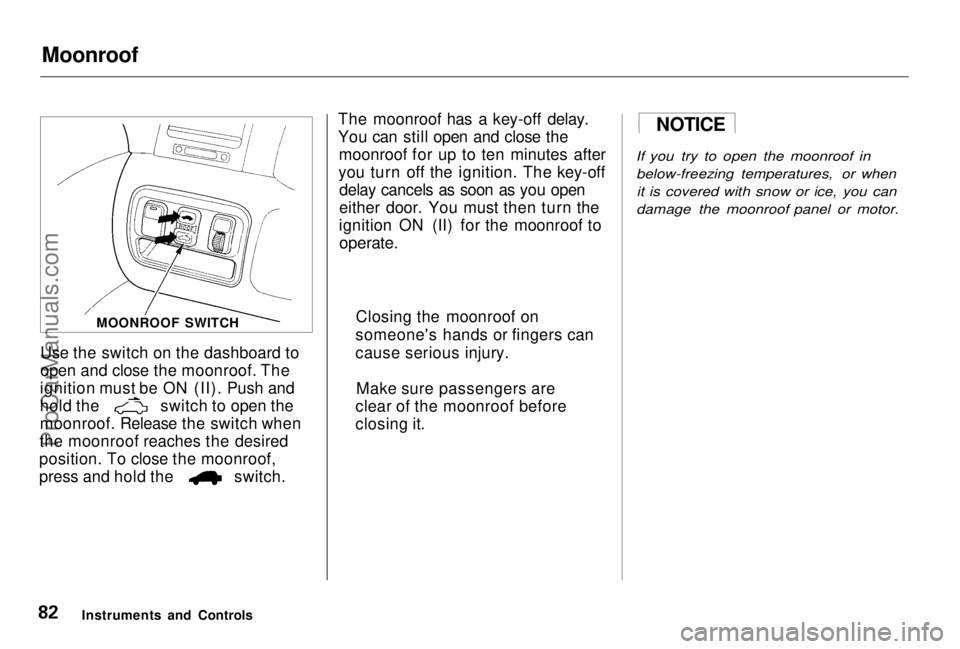
Use the switch on the dashboard to
open and close the moonroof. The
ignition must be ON (II). Push and hold the switch to open the
moonroof. Release the switch when
the moonroof reaches the desired
position. To close the moonroof, press and hold the switch. The moonroof has a key-off delay.
You can still open and close the
moonroof for up to ten minutes after
you turn off the ignition. The key-off delay cancels as soon as you open
either door. You must then turn the
ignition ON (II) for the moonroof to
operate.
If you try to open the moonroof in
below-freezing temperatures, or whenit is covered with snow or ice, you can
damage the moonroof panel or motor.
Instruments and Controls MOONROOF SWITCH
NOTICE
Closing the moonroof on
someone's hands or fingers can
cause serious injury.
Make sure passengers are
clear of the moonroof before
closing it.ProCarManuals.comMain Menu Table of Contents s t
Page 84 of 278
Mirrors
Keep the inside and outside mirrors
clean and adjusted for best visibility.
Be sure to adjust the mirrors before
you start driving.
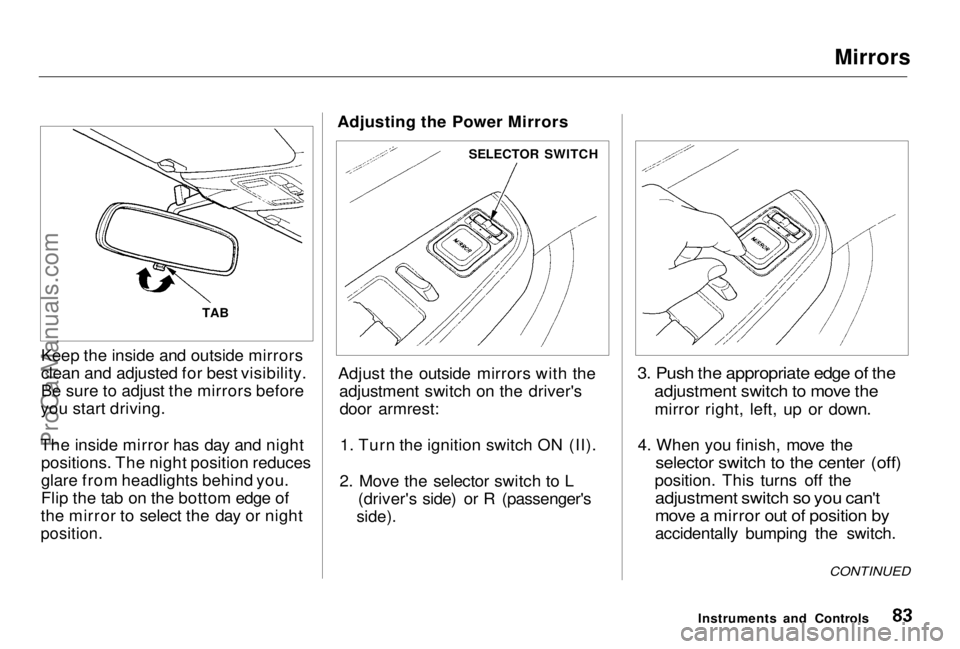
The inside mirror has day and night positions. The night position reduces
glare from headlights behind you.
Flip the tab on the bottom edge of
the mirror to select the day or night
position.
Adjusting the Power Mirrors
Adjust the outside mirrors with the adjustment switch on the driver'sdoor armrest:
1. Turn the ignition switch ON (II).
2. Move the selector switch to L (driver's side) or R (passenger's
side).
3. Push the appropriate edge of the
adjustment switch to move the
mirror right, left, up or down.
4. When you finish, move the
selector switch to the center (off)
position. This turns off the
adjustment switch so you can't
move a mirror out of position by
accidentally bumping the switch.
Instruments and Controls
TAB
SELECTOR SWITCH
CONTINUEDProCarManuals.comMain Menu Table of Contents s t
Page 85 of 278
Mirrors, Parking Brake
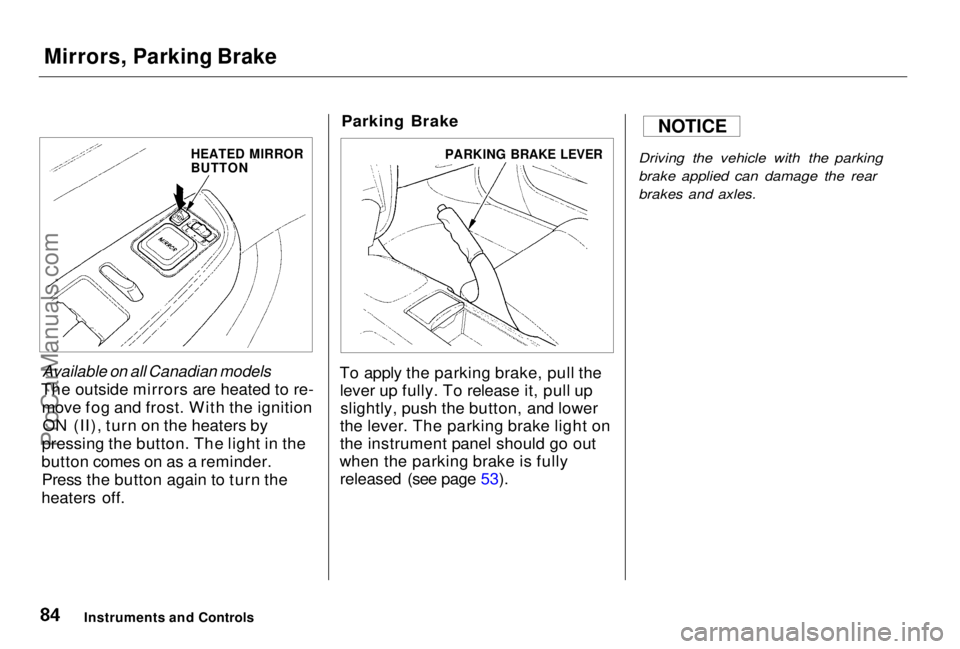
Available on all Canadian models
The outside mirrors are heated to re- move fog and frost. With the ignitionON (II), turn on the heaters by
pressing the button. The light in the
button comes on as a reminder. Press the button again to turn the
heaters off. Parking Brake
To apply the parking brake, pull the lever up fully. To release it, pull upslightly, push the button, and lower
the lever. The parking brake light on
the instrument panel should go out
when the parking brake is fully released (see page 53).
Driving the vehicle with the parking
brake applied can damage the rear
brakes and axles.
Instruments and Controls
NOTICE
HEATED MIRROR
BUTTON
PARKING BRAKE LEVERProCarManuals.comMain Menu Table of Contents s t
Page 86 of 278
Digital Clock
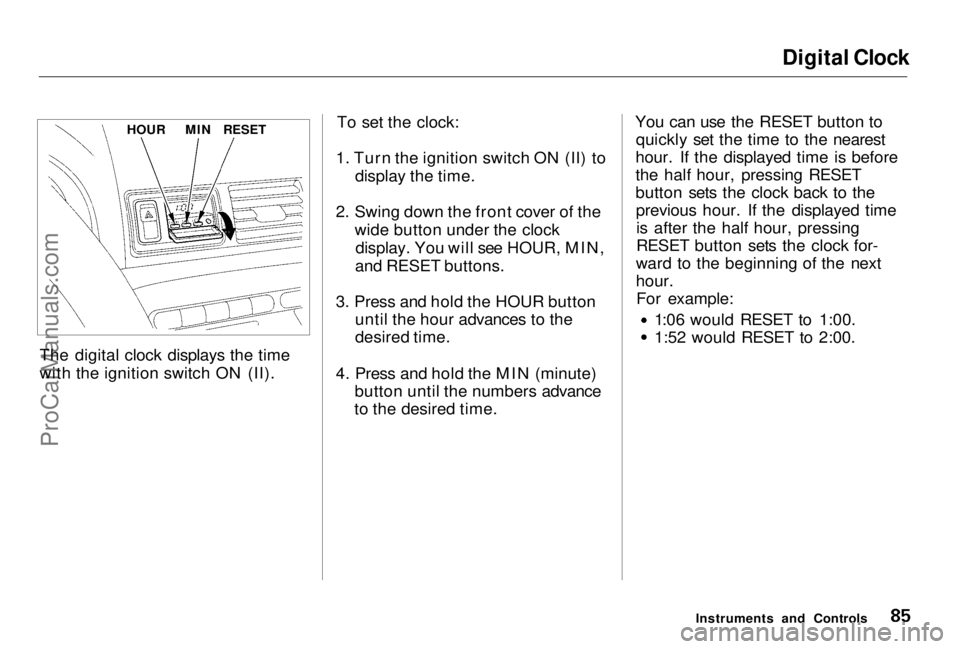
The digital clock displays the time
with the ignition switch ON (II). To set the clock:
1. Turn the ignition switch ON (II) to display the time.
2. Swing down the front cover of the wide button under the clockdisplay. You will see HOUR, MIN,
and RESET buttons.
3. Press and hold the HOUR button until the hour advances to the
desired time.
4. Press and hold the MIN (minute) button until the numbers advance
to the desired time. You can use the RESET button to
quickly set the time to the nearest
hour. If the displayed time is before
the half hour, pressing RESET
button sets the clock back to the previous hour. If the displayed timeis after the half hour, pressing
RESET button sets the clock for-
ward to the beginning of the next
hour. For example: 1:06 would RESET to 1:00.
1:52 would RESET to 2:00.
Instruments and Controls
HOUR
MIN
RESETProCarManuals.comMain Menu Table of Contents s t
Page 89 of 278
Coin Box, Accessory Power Socket
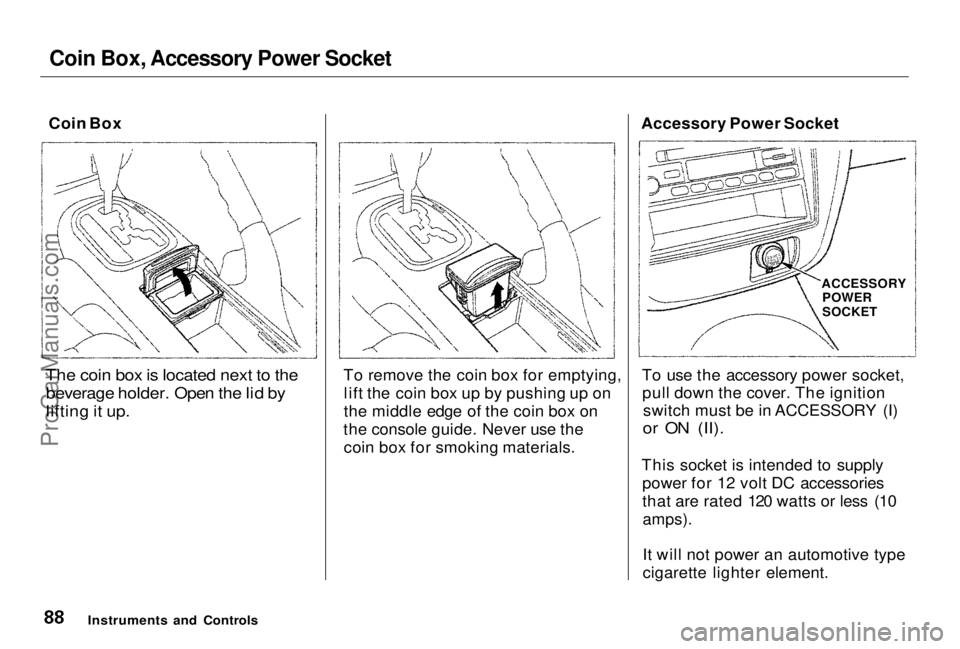
Coin Box
The coin box is located next to the beverage holder. Open the lid by
lifting it up.
To remove the coin box for emptying,
lift the coin box up by pushing up on
the middle edge of the coin box on
the console guide. Never use the coin box for smoking materials. Accessory Power Socket
To use the accessory power socket,pull down the cover. The ignition switch must be in ACCESSORY (I)
or ON (II).
This socket is intended to supply power for 12 volt DC accessories
that are rated 120 watts or less (10
amps).
It will not power an automotive type
cigarette lighter element.
Instruments and Controls
ACCESSORY
POWER
SOCKETProCarManuals.comMain Menu Table of Contents s t
Page 91 of 278
Interior Lights
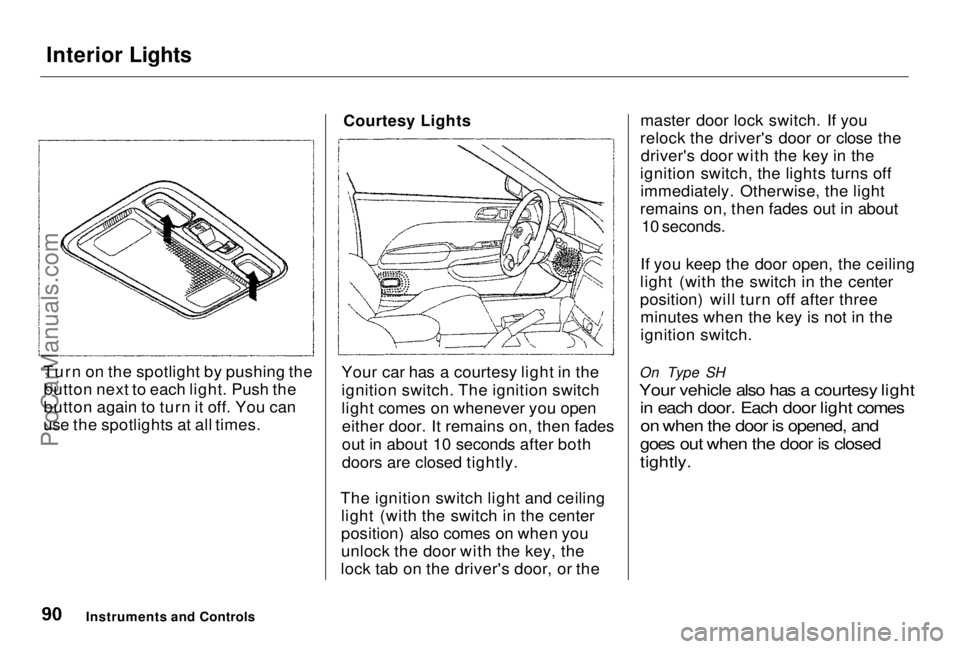
Turn on the spotlight by pushing the button next to each light. Push the
button again to turn it off. You can
use the spotlights at all times.
Courtesy Lights
Your car has a courtesy light in the
ignition switch. The ignition switch
light comes on whenever you open either door. It remains on, then fades
out in about 10 seconds after both
doors are closed tightly.
The ignition switch light and ceiling light (with the switch in the center
position) also comes on when you
unlock the door with the key, the
lock tab on the driver's door, or the master door lock switch. If you
relock the driver's door or close the driver's door with the key in the
ignition switch, the lights turns off immediately. Otherwise, the light
remains on, then fades out in about 10 seconds.
If you keep the door open, the ceiling
light (with the switch in the center
position) will turn off after three minutes when the key is not in the
ignition switch.
On Type SH
Your vehicle also has a courtesy light in each door. Each door light comes
on when the door is opened, and
goes out when the door is closed
tightly.
Instruments and ControlsProCarManuals.comMain Menu Table of Contents s t
Page 102 of 278
Audio System
Operating the Radio
The ignition switch must be in
ACCESSORY (I) or ON (II) to operate the audio system. Turn the
system on by pushing the PWR/
VOL knob. Adjust the volume by turning the same knob.
The band and frequency that the radio was last tuned to is displayed.
To change bands, press the AM/FM 1-2 button. On the FM band, ST will
be displayed if the station is broad- casting in stereo. Stereo reproduc-
tion on AM is not available. You can use any of three methods to
find radio stations on the selected
band: TUNE, SEEK, or the Preset
buttons.
TUNE— Use the TUNE bar to tune
the radio to a desired frequency. Press the side of the bar to tune
to a higher frequency, and the side to tune to a lower
frequency. The frequency numbers
will start to change rapidly. Release
the bar when the display reaches the desired frequency. To change the
frequency in small increments, press and release the TUNE bar quickly. SEEK — The SEEK function
searches the band for a station with
a strong signal. To activate it, press the SEEK bar on either the or
side, then release it.
Depending on which side you press,
the system scans upward or down-
ward from the current frequency. It stops when it finds a station with a
strong signal.
Preset — You can store the fre-
quencies of your favorite radiostations in the six preset buttons.
Each button will store one frequency on the AM band, and two on the FM
band.
CONTINUED
Comfort and Convenience Features
ProCarManuals.comMain Menu Table of Contents s t
Page 109 of 278
Audio System
If you turn the system off while a CD
is playing, either with the PWR/VOL
knob or by turning off the ignition, the disc will stay in the drive. When
you turn the system back on, the CD
will begin playing where it left off.
Press the eject button to remove the
disc from the drive.
If you eject the disc, but do not
remove it from the slot, the system
will automatically reload the disc after 15 seconds and put the CD
player in pause mode. To begin
playing the disc, press the CD button. You can use the TUNE and SEEK
bars while a disc is playing to select
passages and change tracks.
To move rapidly within a track, press and hold the TUNE bar. Press the side to move forward, or the
side to move backward.
Release the bar when the system
reaches the point you want.
Each time you press the side of
the SEEK bar, the system skips
forward to the beginning of the next track. Press the side to skip
backward to the beginning of the
current track. Press it again to skip
to the beginning of the previous
track.
REPEAT — To activate the Repeat
feature, press and release the Repeat
button. You will see RPT in the display. The system continuously
replays the current track. Press the
Repeat button again to turn it off. RANDOM PLAY — This feature,
when activated, plays the tracks on the CD in random order, rather thanin the order they are recorded on theCD. To activate Random Play, press
and hold the A. SEL/RPT button
until you see A. SEL in the display.
The system will then select and play tracks randomly. This continuesuntil you deactivate Random Play by
pressing A. SEL/RPT again.
If the system is in Repeat mode, you
must turn it off by pressing A. SEL/ RPT before you can select Random
Play. Then press and hold the button
again until you see A. SEL displayed.
Comfort and Convenience FeaturesProCarManuals.comMain Menu Table of Contents s t