steering HONDA PRELUDE 1998 Owner's Manual
[x] Cancel search | Manufacturer: HONDA, Model Year: 1998, Model line: PRELUDE, Model: HONDA PRELUDE 1998Pages: 278, PDF Size: 2.61 MB
Page 67 of 278
Steering Wheel Controls
3. Press and hold the SET/decel button on the steering wheel until
the CRUISE CONTROL light on
the instrument panel comes on.
This shows the system is now
activated.
The cruise control may not hold the set speed when you are going
up and down hills.
When climing a steep hill, the automatic transmission may
downshift to hold the set speed. Changing the Set Speed
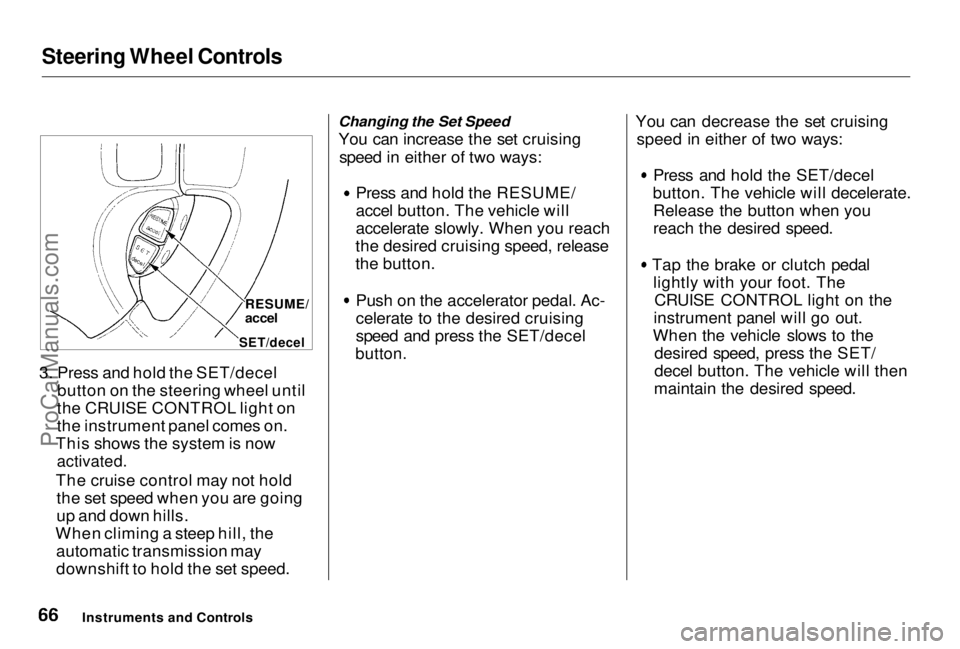
You can increase the set cruising
speed in either of two ways: Press and hold the RESUME/
accel button. The vehicle will
accelerate slowly. When you reach
the desired cruising speed, release
the button. Push on the accelerator pedal. Ac-
celerate to the desired cruising
speed and press the SET/decel
button.
You can decrease the set cruising
speed in either of two ways: Press and hold the SET/decel
button. The vehicle will decelerate. Release the button when you
reach the desired speed.
Tap the brake or clutch pedal lightly with your foot. TheCRUISE CONTROL light on the
instrument panel will go out.
When the vehicle slows to the desired speed, press the SET/
decel button. The vehicle will then
maintain the desired speed.
Instruments and Controls RESUME/
accel
SET/decelProCarManuals.comMain Menu Table of Contents s t
Page 68 of 278
Steering Wheel Controls
Even with the cruise control turned on, you can still use the accelerator
pedal to speed up for passing. After
completing the pass, take your foot
off the accelerator pedal. The vehicle
will return to the set cruising speed.
Resting your foot on the brake or
clutch pedal will cause the cruise
control to cancel.
Cancelling the Cruise Control
You can cancel the cruise control in
any of these ways:
Tap the brake or clutch pedal. Press the SET/decel and RE-
SUME/accel buttons at the same
time.
Press the Cruise Control Master
Switch.
When you tap the brake or clutch pedal, or press the SET and RE-SUME buttons at the same time, the
CRUISE CONTROL light on the
instrument panel will go out and the
vehicle will begin to slow down. You can use the accelerator pedal in the
normal way.
If you use the brake or clutch pedal
to cancel cruise control, the system
remembers the previously-set cruising speed. To return to that speed, accelerate to above 25 mph
(40 km/h) and press the RESUME/
accel button until the CRUISE CON-
TROL light comes on. The vehicle will accelerate to the same cruisingspeed as before.
If you cancel cruise control by
pressing the SET and RESUME
buttons at the same time, the previously-set cruising speed iserased. To use the cruise control,
accelerate to the desired cruisingspeed and press the SET/decel
button.
Pressing the Cruise Control Master
Switch turns the system completelyoff and erases the previous cruising
speed from memory. To use the
system again, refer to Using the
Cruise Control.
Instruments and ControlsProCarManuals.comMain Menu Table of Contents s t
Page 71 of 278
Keys and Locks
This indicator will also blink several times when you turn the ignition switch from ON (II) to ACCESSORY (I) or LOCK (0).
The system may not recognize your key's coding if the key is in contact
with a key from another immobilizer system. If you have a key from
another vehicle's immobilizer system,
keep it separate.
Do not attempt to alter this system
or add other devices to it. Electrical
problems could result that may make
your vehicle undriveable.
If you have lost your key and you
cannot start the engine, contact your
Honda dealer.
As required by the FCC:
This device complies with Part 15 of the
FCC rules. Operation is subject to the
following two conditions: (1) This device
way not cause harmful interference, and (2) this device must accept any
interference received, including
interference that may cause undesired operation.This device complies with DOC rules in
Canada.
Changes or modifications not expressly
approved by the party responsible for
compliance could void the user's
authority to operate the equipment.
Ignition Switch
The ignition switch is on the right side of the steering column. It has
four positions:
LOCK (0)
ACCESSORY (I)
ON (II) START (III)
Instruments and ControlsProCarManuals.comMain Menu Table of Contents s t
Page 72 of 278
Keys and Locks
LOCK (0) — You can insert or
remove the key only in this position.
To switch from ACCESSORY to LOCK, you must push the key in
slightly as you turn it. If your vehicle
has an automatic transmission, it must also be in Park. The anti-theft
lock will lock the steering column
when you remove the key. If the front wheels are turned, the
anti-theft lock may sometimes make
it difficult to turn the key from
LOCK to ACCESSORY. Firmly turn
the steering wheel to the left or to
the right as you turn the key. ACCESSORY (I) — In this position,
you can operate the audio systemand the accessory power socket.
ON (II) — This is the normal key
position when driving. All features and accessories on the vehicle are
usable. Several of the lights on the
instrument panel come on as a test
when you turn the ignition switch
from ACCESSORY to ON (see page
51).
START (III) — Use this position
only to start the engine. The switch
returns to ON (II) when you let go of
the key.
The engine will not start if the Immobilizer System does not
recognize the key's coding (see page 69).
You will hear a reminder beeper if
you leave the key in the ignition switch in the LOCK (0) or
ACCESSORY (I) position and open the driver's door. Remove the key to
turn off the beeper.
Instruments and Controls
Removing the key from the
ignition switch while driving
locks the steering. This can
cause you to lose control.
Remove the key from the
ignition switch only when
parked.ProCarManuals.comMain Menu Table of Contents s t
Page 127 of 278

Accessories and Modifications
Modifications Do not remove any original
equipment or modify your vehicle in
any way that would alter its design oroperation. This could make your
vehicle unsafe and illegal to drive.
For example, do not make any
modifications that would change the
ride height of your vehicle, or install
wheels and tires with a different overall diameter.
Such modifications can adversely
affect handling, and interfere with
the operation of the vehicle's anti-
lock brakes and other systems. In addition, any modifications that
decrease ground clearance increase
the chance of undercarriage parts striking a curb, speed bump, or other
raised object, which could cause
your airbags to deploy.
Do not modify your steering wheelor any other part of your
Supplemental Restraint System. Modifications could make the
system ineffective. Additional Safety Precaution
Do not attach or place objects on the
airbag covers. Any object attached toor placed on the covers marked "SRS,
in the center of the steering wheel and on top of the dashboard, could
interfere with the proper operation of the airbags. Or, if the airbags
inflate, the objects could be
propelled inside the vehicle and hurt
someone.
Before DrivingProCarManuals.comMain Menu Table of Contents s t
Page 132 of 278
Preparing to Drive
You should do the following checks and adjustments every day before
you drive your vehicle.
1. Make sure all windows, mirrors, and outside lights are clean and
unobstructed. Remove frost, snow, or ice.
2. Check that the hood and trunk are fully closed.
3. Visually check the tires. If a tire looks low, use a gauge to check its
pressure.
4. Check that any items you may be carrying with you inside are stored
properly or fastened down securely. 5. Check the adjustment of the seat
(see page 75).
6. Check the adjustment of the inside and outside mirrors (see
page 83).
7. Check the adjustment of the steering wheel (see page 64).
8. Make sure the doors are securely closed and locked.
9. Fasten your seat belt. Check that your passengers have fastenedtheir seat belts (see page 14). 10. Turn the ignition switch ON (II).
Check the indicator lights in the
instrument panel.
11. Start the engine (see page 133).
12. Check the gauges and indicator lights in the instrument panel (see
page 51).
DrivingProCarManuals.comMain Menu Table of Contents s t
Page 145 of 278

The Braking System
Your Honda is equipped with disc brakes at all four wheels. A power
assist helps reduce the effort neededon the brake pedal. The ABS helps
you retain steering control when
braking very hard.
Put your foot on the brake pedal only
when you intend to brake. Resting
your foot on the pedal keeps the
brakes applied lightly, causing them
to build up heat. Heat build-up can
reduce how well your brakes work. It also keeps your brake lights on all
the time, confusing drivers behind
you.
Constant application of the brakes
when going down a long hill builds up heat and reduces their effective-
ness. Use the engine to assist the
brakes by downshifting to a lower
gear and taking your foot off theaccelerator pedal.
Check your brakes after driving
through deep water. Apply the
brakes moderately to see if they feel normal. If not, apply them gently and
frequently until they do. Since a
longer distance is needed to stop
with wet brakes, be extra cautious and alert in your driving.
Brake Wear Indicators
All four brakes have audible brake wear indicators.
When the brake pads need replacing, you will hear a distinctive metallic "screeching" sound when you apply
the brakes. If you do not have the
brake pads replaced, they will begin screeching all the time.
Your brakes may sometimes squeal or squeak when you apply them
lightly. Do not confuse this with the
brake wear indicators. They make a
very audible "screeching."
DrivingProCarManuals.comMain Menu Table of Contents s t
Page 146 of 278
The Braking System
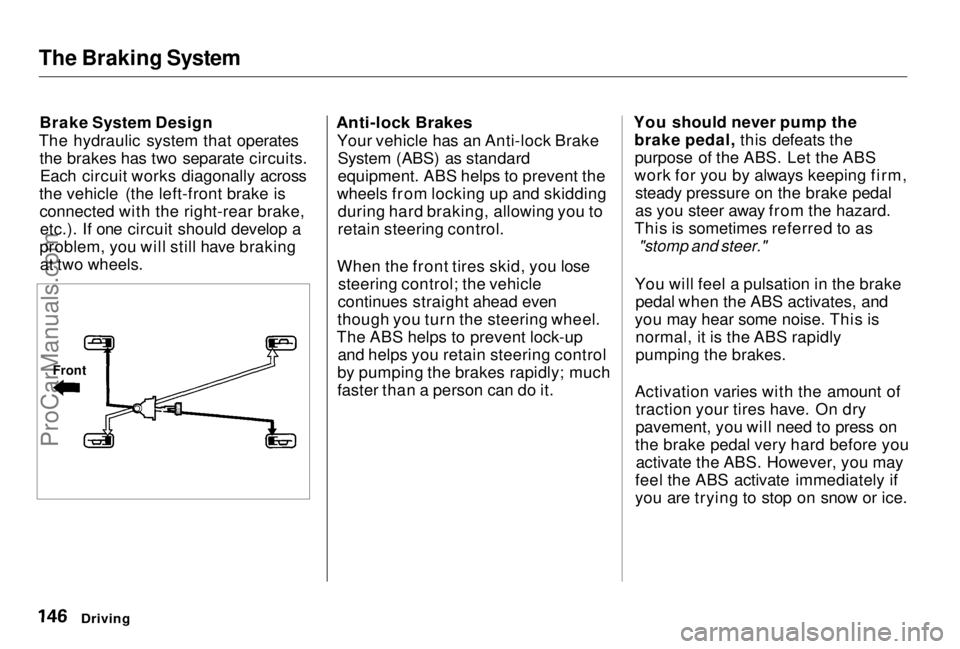
Brake System Design
The hydraulic system that operates the brakes has two separate circuits.Each circuit works diagonally across
the vehicle (the left-front brake is connected with the right-rear brake,etc.). If one circuit should develop a
problem, you will still have braking at two wheels.
Anti-lock Brakes
Your vehicle has an Anti-lock BrakeSystem (ABS) as standard
equipment. ABS helps to prevent the
wheels from locking up and skidding during hard braking, allowing you to
retain steering control.
When the front tires skid, you lose steering control; the vehicle
continues straight ahead even
though you turn the steering wheel.
The ABS helps to prevent lock-up and helps you retain steering control
by pumping the brakes rapidly; much
faster than a person can do it. You should never pump the
brake pedal, this defeats thepurpose of the ABS. Let the ABS
work for you by always keeping firm, steady pressure on the brake pedal
as you steer away from the hazard.
This is sometimes referred to as
"stomp and steer."
You will feel a pulsation in the brake pedal when the ABS activates, and
you may hear some noise. This is normal, it is the ABS rapidly
pumping the brakes.
Activation varies with the amount of traction your tires have. On dry
pavement, you will need to press on
the brake pedal very hard before you activate the ABS. However, you may
feel the ABS activate immediately if
you are trying to stop on snow or ice.
Driving
FrontProCarManuals.comMain Menu Table of Contents s t
Page 147 of 278

The Braking System
Important Safety Reminders
ABS does not reduce the time or distance it takes to stop the
vehicle, it only helps with steering control during braking. You should
always maintain a safe followingdistance from other vehicles. ABS will not prevent a skid that
results from changing direction
abruptly, such as trying to take a corner too fast or making a sudden
lane change. Always drive at a safe,
prudent speed for the road and
weather conditions.
ABS cannot prevent a loss of stability. Always steer moderately
when you are braking hard. Severe or sharp steering wheel movement
can still cause your vehicle to veer
into oncoming traffic or off the road. A vehicle with ABS may require a
longer distance to stop on loose or
uneven surfaces, such as gravel orsnow, than a vehicle without anti-
lock. Slow down and allow a greater distance between vehicles under
those conditions.
Driving
CONTINUEDProCarManuals.comMain Menu Table of Contents s t
Page 149 of 278
Active Torque Transfer System
Type SH only
Your Honda is equipped with an
Active Torque Transfer System (ATTS). Under certain driving
conditions, the ATTS enhances the
vehicle's cornering performance by transferring some torque between
the inside and outside front wheelsduring a turn.
Based on steering wheel turn angle,
lateral acceleration, and engine power, the ATTS regulates the
driving force to each drive wheel
through an electronically-controlled
hydraulic system and two sets of clutches and gears.
Important Safety Information
The ATTS cannot prevent
skidding if you enter a corner too
fast. It has almost no effect on
braking and vehicle speed.
It is still your responsibility to driveat reasonable speeds and to leave a
sufficient margin of safety.
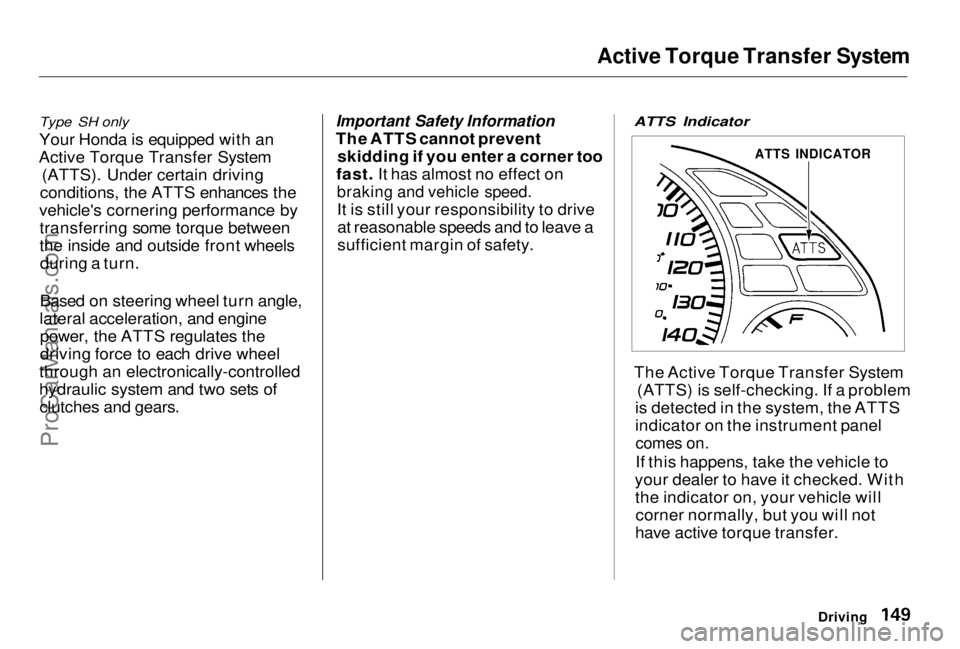
ATTS Indicator
The Active Torque Transfer System
(ATTS) is self-checking. If a problem
is detected in the system, the ATTS
indicator on the instrument panel
comes on.
If this happens, take the vehicle to
your dealer to have it checked. With the indicator on, your vehicle willcorner normally, but you will not
have active torque transfer.
Driving
ATTS INDICATORProCarManuals.comMain Menu Table of Contents s t