check oil HONDA PRELUDE 1998 Owners Manual
[x] Cancel search | Manufacturer: HONDA, Model Year: 1998, Model line: PRELUDE, Model: HONDA PRELUDE 1998Pages: 278, PDF Size: 2.61 MB
Page 52 of 278
Indicator Lights
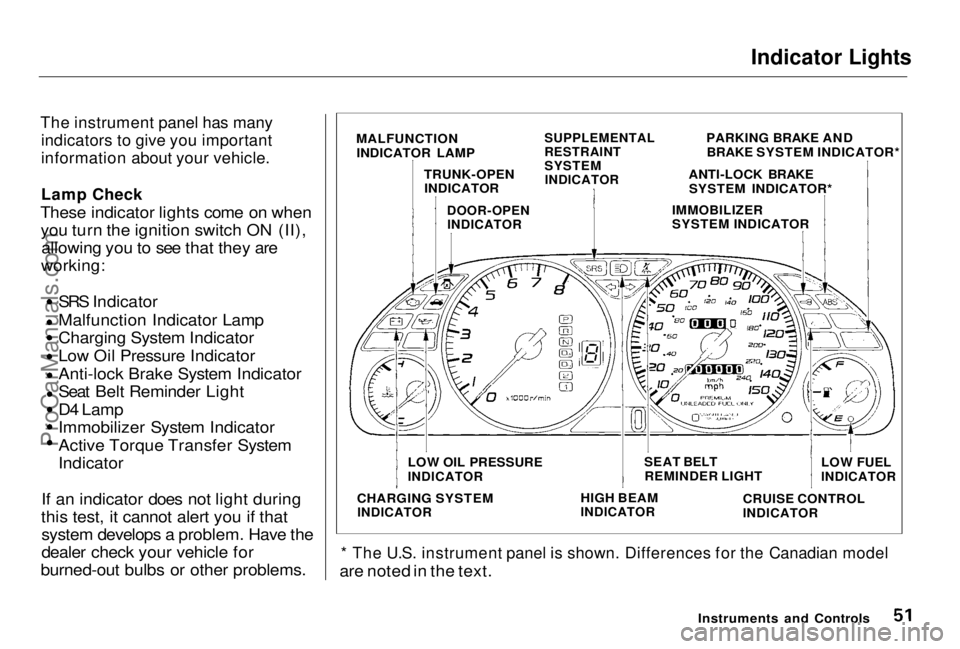
The instrument panel has many indicators to give you important
information about your vehicle.
Lamp Chec
k
These indicator lights come on when you turn the ignition switch ON (II), allowin
g you to see that they are
working:
SRS
Indicator
Malfunction Indicator Lamp
Charging System Indicator Low Oil Pressure Indicator
Anti-lock Brake System Indicator
Seat Belt Reminder Light
D4 Lamp
Immobilizer System Indicator
Active Torque Transfer
System
Indicator
If an
indicator does not light during
this test, it cannot alert you if that system
develops a problem. Have the
dealer check your vehicle for
burned-ou
t bulbs or other problems.
* The
U.S. instrument panel is shown. Differences for the Canadian model
are
noted in the text.
Instruments
and Controls
MALFUNCTION
INDICATOR LAM
P
TRUNK-OPEN INDICATOR
SUPPLEMENTAL
RESTRAINT
SYSTEM
INDICATOR
DOOR-OPEN
INDICATOR
PARKING BRAKE AND
BRAKE SYSTEM INDICATOR*
ANTI-LOCK BRAKE SYSTEM INDICATOR*
IMMOBILIZER
SYSTEM INDICATOR
LOW OIL PRESSURE
INDICATOR
SEAT BELT
REMINDER LIGHT LOW
FUEL
INDICATOR
CHARGING SYSTEM
INDICATOR
HIGH
BEAM
INDICATOR
CRUISE CONTRO L
INDICATOR
ProCarManuals.comMain Menu Table of Contents s t
Page 119 of 278
Before Driving
Before you begin driving your Honda,
you should know what gasoline to use, and how to check the levels of
important fluids. You also need to
know how to properly store luggage or packages. The information in this
section will help you. If you plan to
add any accessories to your vehicle,
please read the information in this section first. Break-in Period.............................. 120
Gasoline.......................................... 120
Service Station Procedures .......... 121 Filling the Fuel Tank................. 121
Opening the Hood..................... 122 Oil Check................................ 123
Engine Coolant Check.......... 124
Fuel Economy................................ 125
Vehicle Condition...................... 125Driving Habits............................ 125
Accessories and Modifications.... 126 Accessories................................. 126
Modifications............................. 127
Additional Safety Precaution.... 127
Carrying Cargo.............................. 128 Load Limit.................................. 129Carrying Items in the Passenger Compartment......................... 129
Carrying Cargo in the Trunk or on a Roof Rack....................... 130
Before DrivingProCarManuals.comMain Menu s t
Page 123 of 278
Service Station Procedures
Oil Check
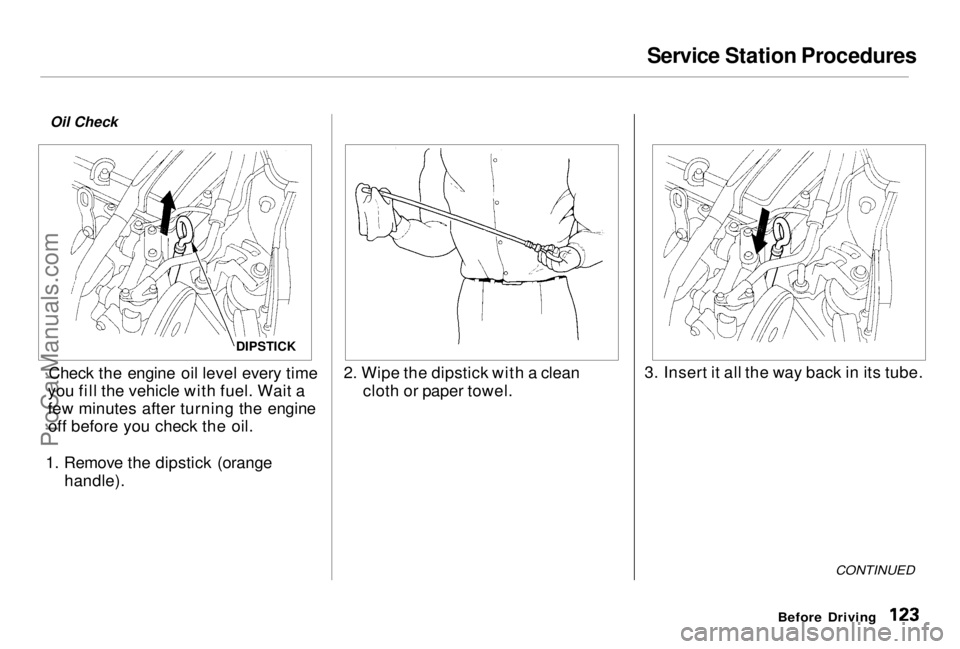
Check the engine oil level every time
you fill the vehicle with fuel. Wait a
few minutes after turning the engine off before you check the oil.
1. Remove the dipstick (orange handle). 2. Wipe the dipstick with a clean
cloth or paper towel. 3. Insert it all the way back in its tube.
CONTINUED
Before Driving
DIPSTICKProCarManuals.comMain Menu Table of Contents s t
Page 124 of 278
Service Station Procedures
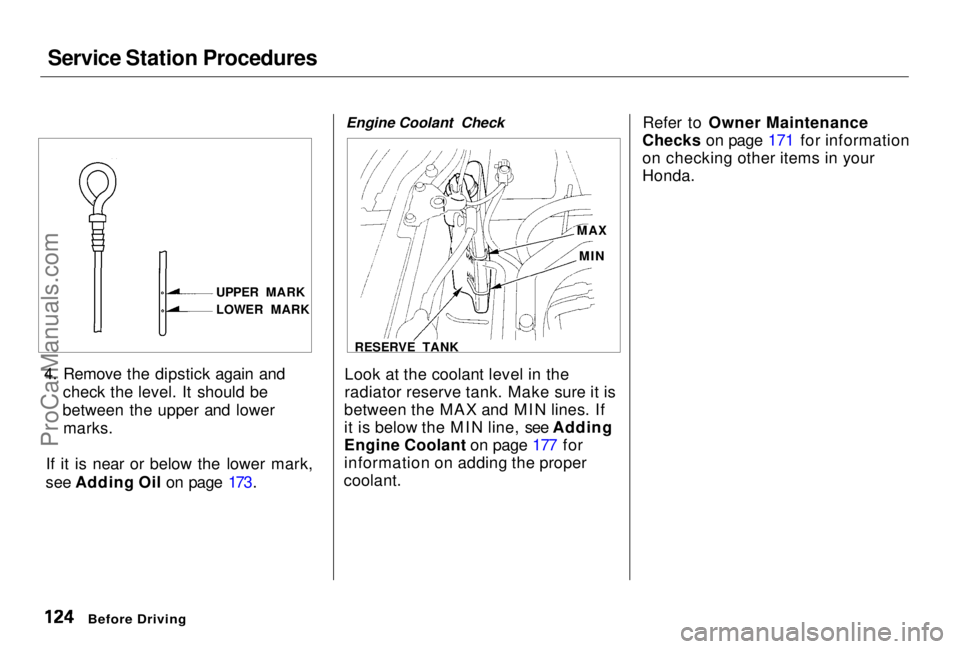
4. Remove the dipstick again and check the level. It should be
between the upper and lower marks.
If it is near or below the lower mark,
see Adding Oil on page 173. Engine Coolant Check
Look at the coolant level in the
radiator reserve tank. Make sure it is
between the MAX and MIN lines. If
it is below the MIN line, see Adding
Engine Coolant on page 177 for
information on adding the proper
coolant. Refer to Owner Maintenance
Checks on page 171 for information
on checking other items in your
Honda.
Before Driving
UPPER MARK
LOWER MARK
MAX
MIN
RESERVE TANKProCarManuals.comMain Menu Table of Contents s t
Page 158 of 278
Maintenance
This section explains why it is important to keep your vehicle wellmaintained and to follow basic
maintenance safety precautions.
This section also includes Maintenance Schedules for normaldriving and severe driving conditions,
a Maintenance Record, and instruc-
tions for simple maintenance tasks
you may want to take care of
yourself.
If you have the skills and tools to per-
form more complex maintenance
tasks on your Honda, you may want to purchase the Service Manual. See
page 271 for information on how toobtain a copy, or see your Honda
dealer.
Maintenance Safety....................... 160
Important Safety Precautions ..161
Maintenance Schedule.................. 162
Required Maintenance Record.... 169 Owner Maintenance Checks........ 171
Fluid Locations............................... 172
Engine Oil.......................................173
Adding Oil................................... 173Recommended Oil..................... 173Synthetic Oil............................... 174
Additives..................................... 174
Changing the Oil and Filter...... 175
Cooling System.............................. 177
Adding Engine Coolant............. 177Replacing Engine Coolant........ 179
Windshield Washers..................... 182
Transmission Fluid........................ 183 AutomaticTransmission.......................... 183
5-speed Manual Transmission.......................... 184
Brake and Clutch Fluid................. 185 Brake System............................. 185
Clutch System............................ 186
Power Steering............................... 186
Air Cleaner Element...................... 187 Spark Plugs..................................... 188
Replacement............................... 188
Specifications............................. 190
Battery............................................ 190
Wiper Blades.................................. 193
Air Conditioning System............... 195 Drive Belts...................................... 196
Timing Belt..................................... 196
Tires................................................ 197
Inflation....................................... 197
Inspection................................... 198
Maintenance............................... 199
Tire Rotation.............................. 200 Replacing Tires and Wheels .... 200
Wheels and Tires....................... 201
Winter Driving...........................201
Snow Tires.............................. 202
Tire Chains............................. 202
Lights.............................................. 203
Headlight Aimimg..................... 205
Replacing Bulbs......................... 206
Storing Your Vehicle..................... 217
MaintenanceProCarManuals.comMain Menu s t
Page 159 of 278
Maintenance Safety
Regularly maintaining your vehicle is
the best way to protect your investment. Proper maintenance is
essential to your safety and thesafety of your passengers. It will also
reward you with more economical,
trouble-free driving and help reduce air pollution. This section includes instructions for
simple maintenance tasks, such as
checking and adding oil. Any service
items not detailed in this section should be performed by a Honda
technician or other qualified mechanic. Some of the most important safety
precautions are given here. However,
we cannot warn you of every conceivable hazard that can arise in
performing maintenance. Only you can decide whether or not youshould perform a given task.
Maintenance
Failure to properly follow
maintenance instructions and
precautions can cause you to be seriously hurt or killed.
Always follow the procedures and precautions in this owner'smanual.
Improperly maintaining this
vehicle or failing to correct a problem before driving can
cause a crash in which you can
be seriously hurt or killed.
Always follow the inspection and maintenancerecommendations and
schedules in this owner's
manual.ProCarManuals.comMain Menu Table of Contents s t
Page 170 of 278
Owner Maintenance Checks
You should check the following items at the specified intervals. If
you are unsure of how to perform any check, turn to the page given. Engine oil level — Check every
time you fill the fuel tank. See page 123. Engine coolant level — Check the
radiator reserve tank every time
you fill the fuel tank. See page 124.
Windshield washer fluid — Check
the level in the reservoir monthly.If weather conditions cause you to
use the washers frequently, check
the reservoir each time you stop
for fuel. See page 182. Automatic transmission — Check
the fluid level monthly. See page
183.
Brakes — Check the fluid level
monthly. See page 185. Tires — Check the tire pressure
monthly. Examine the tread for
wear and foreign objects. See page
197.
Lights — Check the operation of
the headlights, parking lights,
taillights, high-mount brake light,
turn signals, brake lights, and
license plate lights monthly. See
page 203.
MaintenanceProCarManuals.comMain Menu Table of Contents s t
Page 172 of 278
Engine Oil
Adding Oil
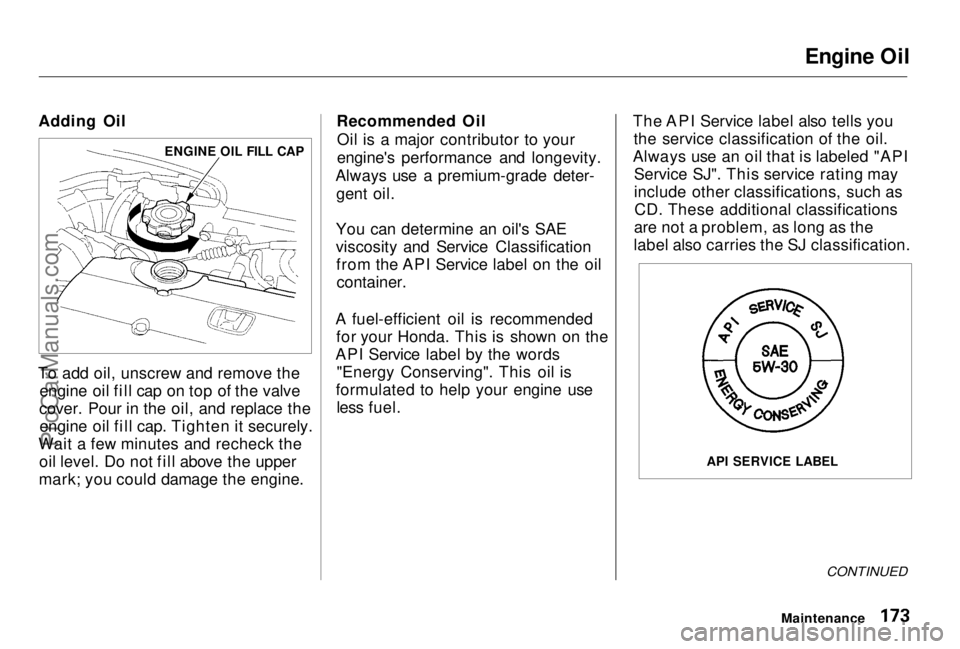
To add oil, unscrew and remove the engine oil fill cap on top of the valve
cover. Pour in the oil, and replace the engine oil fill cap. Tighten it securely.
Wait a few minutes and recheck the oil level. Do not fill above the upper
mark; you could damage the engine. Recommended Oil
Oil is a major contributor to your
engine's performance and longevity.
Always use a premium-grade deter- gent oil.
You can determine an oil's SAE
viscosity and Service Classification from the API Service label on the oilcontainer.
A fuel-efficient oil is recommended for your Honda. This is shown on the
API Service label by the words "Energy Conserving". This oil is
formulated to help your engine use less fuel. The API Service label also tells you
the service classification of the oil.
Always use an oil that is labeled "API Service SJ". This service rating may
include other classifications, such asCD. These additional classifications
are not a problem, as long as the
label also carries the SJ classification.
CONTINUED
Maintenance
ENGINE OIL FILL CAP
API SERVICE LABELProCarManuals.comMain Menu Table of Contents s t
Page 175 of 278
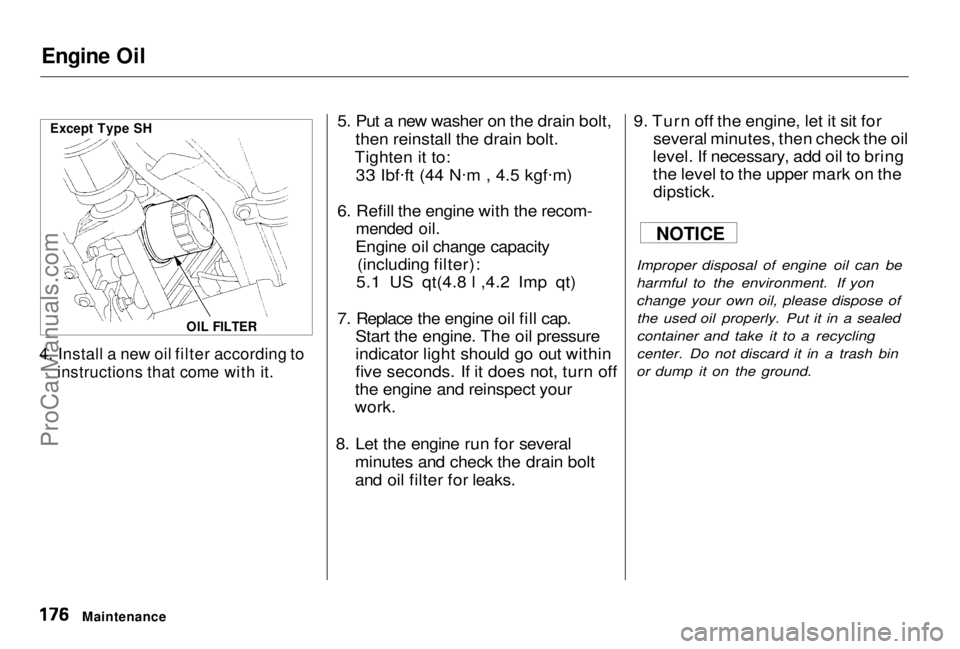
Engine Oil
4. Install a new oil filter according to
instructions that come with it.
5. Put a new washer on the drain bolt,
then reinstall the drain bolt.
Tighten it to:
33 Ibf .
ft (44 N .
m , 4.5 kgf .
m)
6. Refill the engine with the recom-
mended oil.
Engine oil change capacity (including filter):
5.1 US qt(4.8 l ,4.2 Imp qt)
7. Replace the engine oil fill cap. Start the engine. The oil pressure
indicator light should go out within
five seconds. If it does not, turn off
the engine and reinspect your
work.
8. Let the engine run for several minutes and check the drain bolt
and oil filter for leaks. 9. Turn off the engine, let it sit for
several minutes, then check the oil
level. If necessary, add oil to bring
the level to the upper mark on the
dipstick.
Improper disposal of engine oil can be
harmful to the environment. If yon
change your own oil, please dispose of the used oil properly. Put it in a sealed
container and take it to a recycling
center. Do not discard it in a trash bin
or dump it on the ground.
Maintenance
OIL FILTER
Except Type SH
NOTICE
ProCarManuals.comMain Menu Table of Contents s t
Page 183 of 278
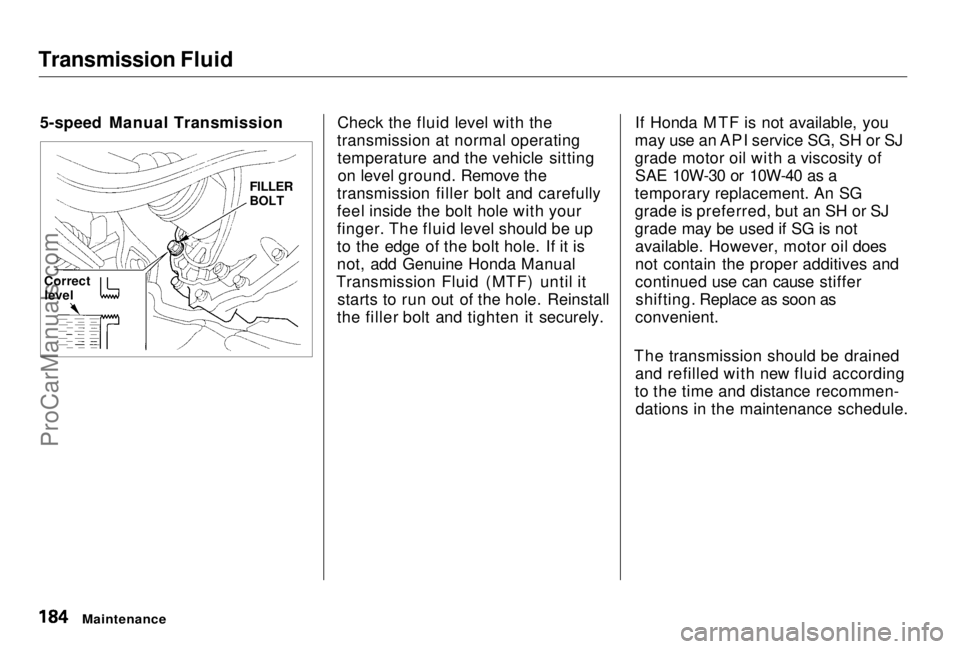
Transmission Fluid
5-speed Manual Transmission Check the fluid level with the
transmission at normal operating temperature and the vehicle sittingon level ground. Remove the
transmission filler bolt and carefully
feel inside the bolt hole with your
finger. The fluid level should be up
to the edge of the bolt hole. If it is
not, add Genuine Honda Manual
Transmission Fluid (MTF) until it starts to run out of the hole. Reinstall
the filler bolt and tighten it securely. If Honda MTF is not available, you
may use an API service SG, SH or SJ
grade motor oil with a viscosity of SAE 10W-30 or 10W-40 as a
temporary replacement. An SG
grade is preferred, but an SH or SJ
grade may be used if SG is not available. However, motor oil does
not contain the proper additives and
continued use can cause stiffershifting. Replace as soon as
convenient.
The transmission should be drained and refilled with new fluid according
to the time and distance recommen- dations in the maintenance schedule.
Maintenance
Correct
level
FILLER
BOLTProCarManuals.comMain Menu Table of Contents s t