lights HONDA PRELUDE 2000 (in English) User Guide
[x] Cancel search | Manufacturer: HONDA, Model Year: 2000, Model line: PRELUDE, Model: HONDA PRELUDE 2000Pages: 293, PDF Size: 3.43 MB
Page 69 of 293
Controls Nea r th e Steerin g Wheel
Make sure the rear window is clear
and you have good visibility before starting to drive.
The defogger and antenna wires on the inside of the rear window can be accidentally damaged. When
cleaning the glass, always wipe side
to side. Steerin
g Whee l Adjustmen t
See page 17 for important safety
information about how to properly
position the steering wheel.
Make any steering wheel adjustment
before you start driving.
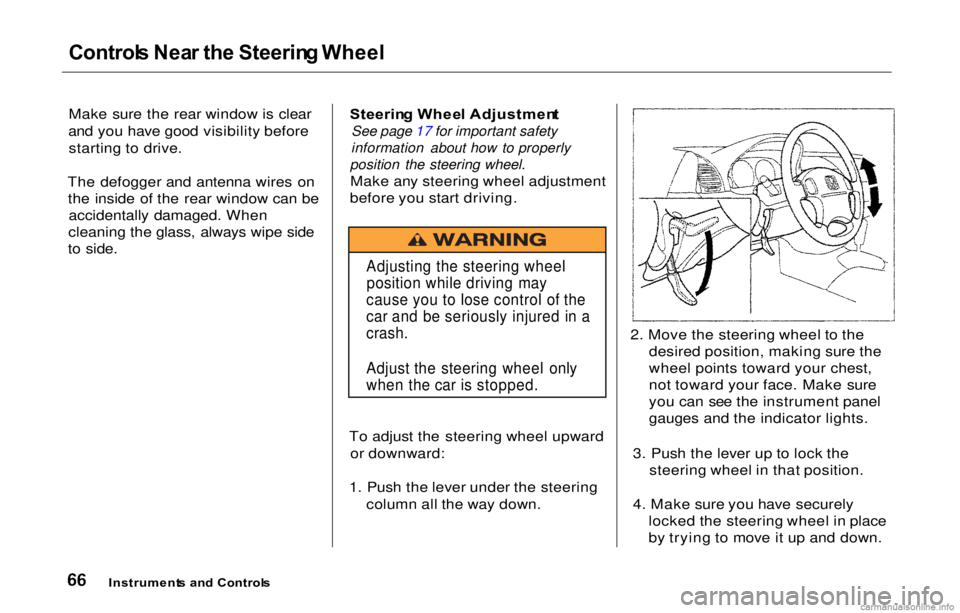
To adjust the steering wheel upward or downward:
1. Push the lever under the steering column all the way down. 2. Move the steering wheel to the
desired position, making sure the
wheel points toward your chest,
not toward your face. Make sure
you can see the instrument panel
gauges and the indicator lights.
3. Push the lever up to lock the steering wheel in that position.
4. Make sure you have securely locked the steering wheel in place
by trying to move it up and down.
Instrument s an d Control s
Adjusting the steering wheel
position while driving may
cause you to lose control of the
car and be seriously injured in a
crash.
Adjust the steering wheel only
when the car is stopped.
Page 76 of 293
Key
s an d Lock s
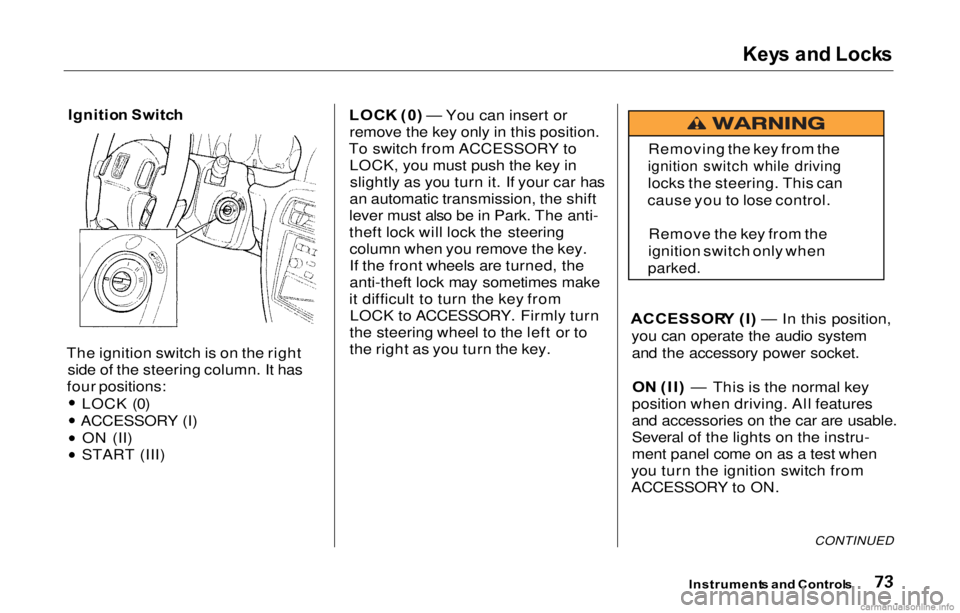
Ignitio n Switc h
The ignition switch is on the right side of the steering column. It has
four positions:
LOCK (0)
ACCESSORY (I) ON (II)
START (III) LOC
K (0 ) — You can insert or
remove the key only in this position.
To switch from ACCESSORY to LOCK, you must push the key inslightly as you turn it. If your car has
an automatic transmission, the shift
lever must also be in Park. The anti-
theft lock will lock the steering column when you remove the key.
If the front wheels are turned, the
anti-theft lock may sometimes make
it difficult to turn the key from LOCK to ACCESSORY. Firmly turn
the steering wheel to the left or to
the right as you turn the key. ACCESSOR
Y (I ) — In this position,
you can operate the audio system and the accessory power socket.
O N (II ) — This is the normal key
position when driving. All features
and accessories on the car are usable.
Several of the lights on the instru-
ment panel come on as a test when
you turn the ignition switch from
ACCESSORY to ON.
CONTINUED
Instrument s an d Control s
Removing the key from the
ignition switch while driving
locks the steering. This can
cause you to lose control.
Remove the key from the
ignition switch only when
parked.
Page 86 of 293
Sea
t Heater s
On Canadian models
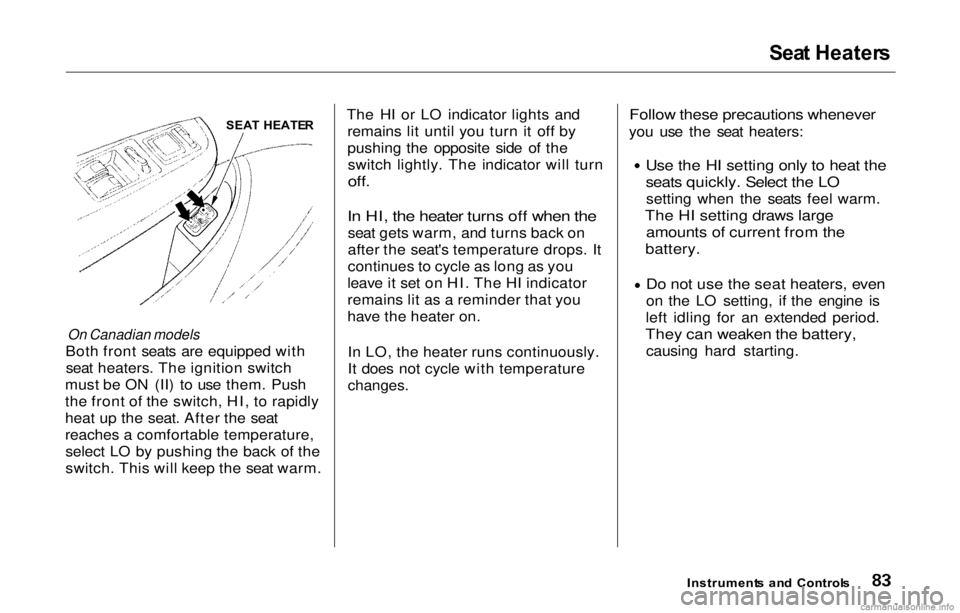
Both front seats are equipped with seat heaters. The ignition switch
must be ON (II) to use them. Push
the front of the switch, HI, to rapidly
heat up the seat. After the seat
reaches a comfortable temperature, select LO by pushing the back of the
switch. This will keep the seat warm. The HI or LO indicator lights and
remains lit until you turn it off by
pushing the opposite side of theswitch lightly. The indicator will turn
off.
In HI, the heater turns off when the
seat gets warm, and turns back on
after the seat's temperature drops. It
continues to cycle as long as you
leave it set on HI. The HI indicator
remains lit as a reminder that you
have the heater on.
In LO, the heater runs continuously.
It does not cycle with temperature
changes.
Follow these precautions whenever
you use the seat heaters:
Use the HI setting only to heat the
seats quickly. Select the LO
setting when the seats feel warm.
The HI setting draws large amounts of current from the
battery.
Do not use the seat heaters, even
on the
LO setting, i
f the engine is
left idling for an extended period.
They can weaken the battery,
causing hard starting.
Instrument s an d Control s
SEA
T HEATE R
Page 91 of 293
Mirror
s
Keep the inside and outside mirrors
clean and adjusted for best visibility.
Be sure to adjust the mirrors before
you start driving.
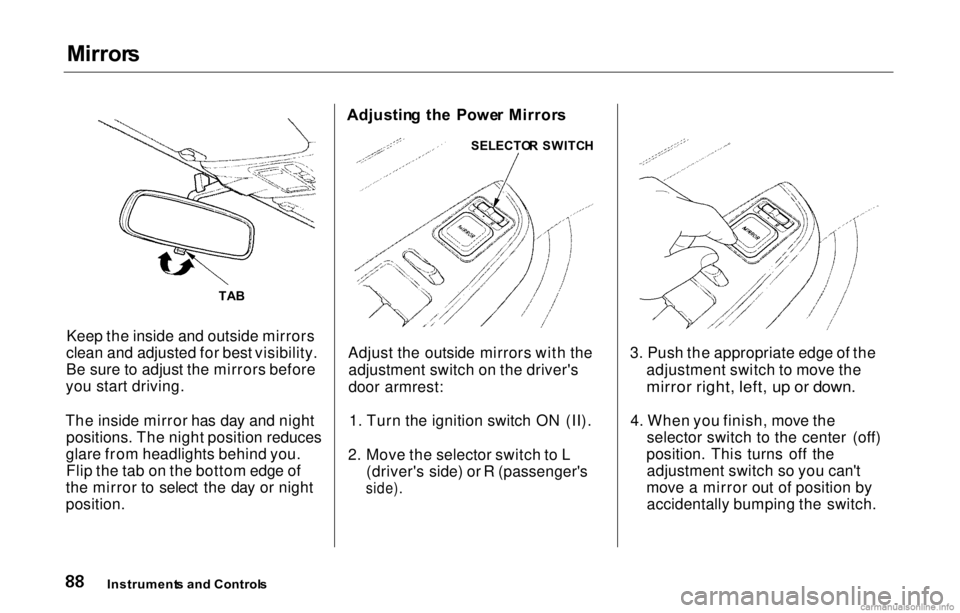
The inside mirror has day and night positions. The night position reduces
glare from headlights behind you. Flip the tab on the bottom edge of
the mirror to select the day or night
position. Adjustin
g th e Powe r Mirror s
Adjust the outside mirrors with the adjustment switch on the driver's
door armrest:
1. Turn the ignition switch ON (II).
2. Move the selector switch to L (driver's side) or R (passenger's
side).
3. Push the appropriate edge of the
adjustment switch to move the
mirror right, left, up or down.
4.
When you finish, mov
e the
selector switch to the center (off)
position. This turns off the adjustment switch so you can't
move a mirror out of position by accidentally bumping the switch.
Instrument s an d Control s
TA
B SELECTO
R SWITC H
Page 97 of 293
Ashtrays
, Interio r Light s
Ashtray s
(Optional )
A front ashtray, which is available as an option, can be used as a
replacement for the coin box.
Use the ashtray only for cigarettes,
cigars, and other smoking materials. To prevent a possible fire and damage
to your car, don't put paper or other
things that can burn in the ashtray.
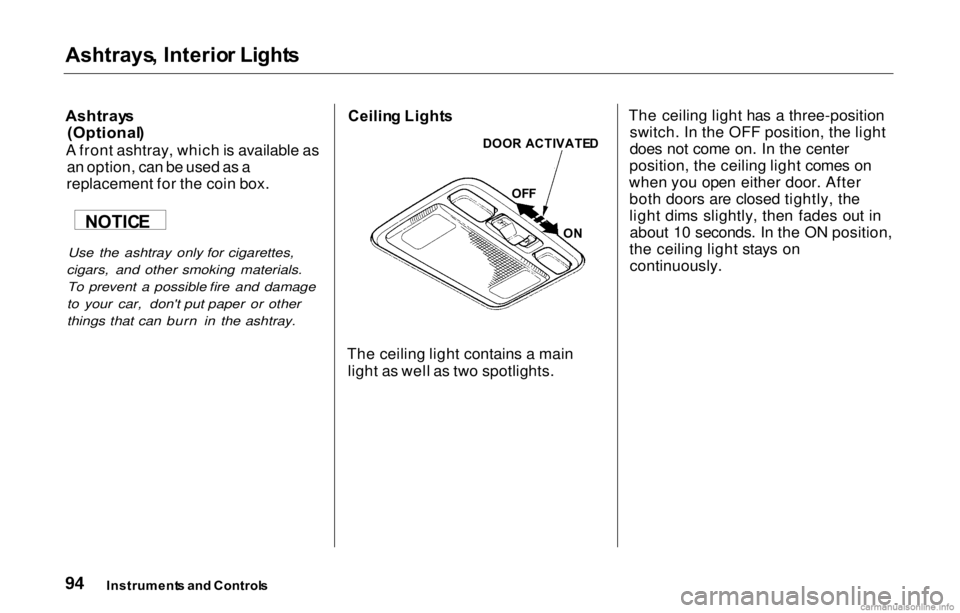
Ceilin
g Light s
The ceiling light contains a main light as well as two spotlights. The ceiling light has a three-position
switch. In the OFF position, the light
does not come on. In the center
position, the ceiling light comes on
when you open either door. After both doors are closed tightly, the
light dims slightly, then fades out inabout 10 seconds. In the ON position,
the ceiling light stays on continuously.
Instrument s an d Control s
NOTIC
E
DOOR
ACTIVATE D
OF F
ON
Page 98 of 293
Interior
Lights
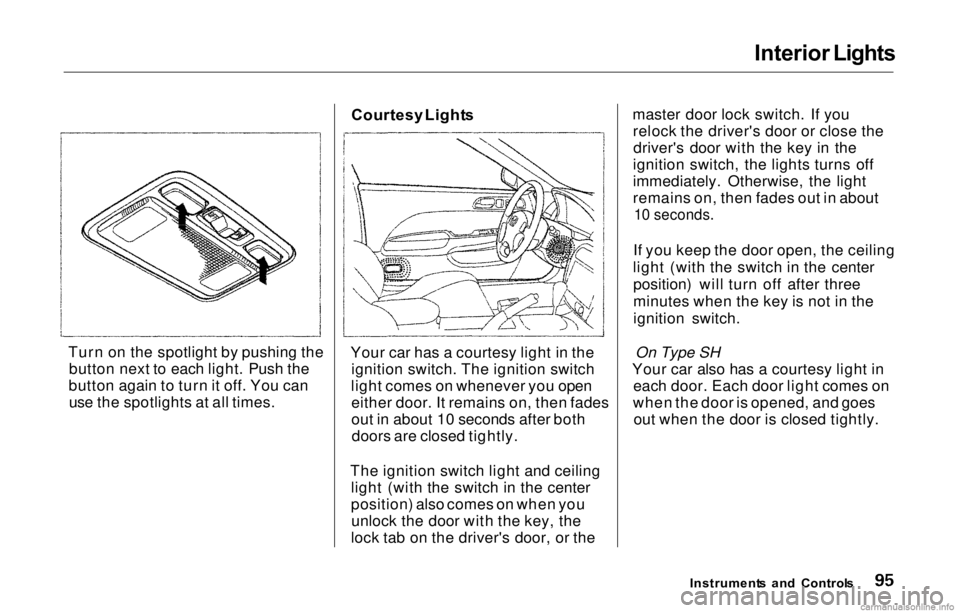
Turn on the spotlight by pushing the button next to each light. Push the
button again to turn it off. You can use the spotlights at all times. Courtesy
Light s
Your car has a courtesy light in the ignition switch. The ignition switch
light comes on whenever you open either door. It remains on, then fades
out in about 10 seconds after bothdoors are closed tightly.
The ignition switch light and ceiling light (with the switch in the center
position) also comes on when youunlock the door with the key, the
lock tab on the driver's door, or the master door lock switch. If you
relock the driver's door or close thedriver's door with the key in the
ignition switch, the lights turns off
immediately. Otherwise, the light
remains on, then fades out in about
10 seconds.
If you keep the door open, the ceiling
light (with the switch in the center position) will turn off after three
minutes when the key is not in the
ignition switch.
On Type SH
Your car also has a courtesy light in each door. Each door light comes on
when the door is opened, and goes out when the door is closed tightly.
Instrument s an d Control s
Page 101 of 293
Heatin
g an d Coolin g
Proper use of the Heating and
Cooling system can make the
interior dry and comfortable, and
keep the windows clear for best
visibility.
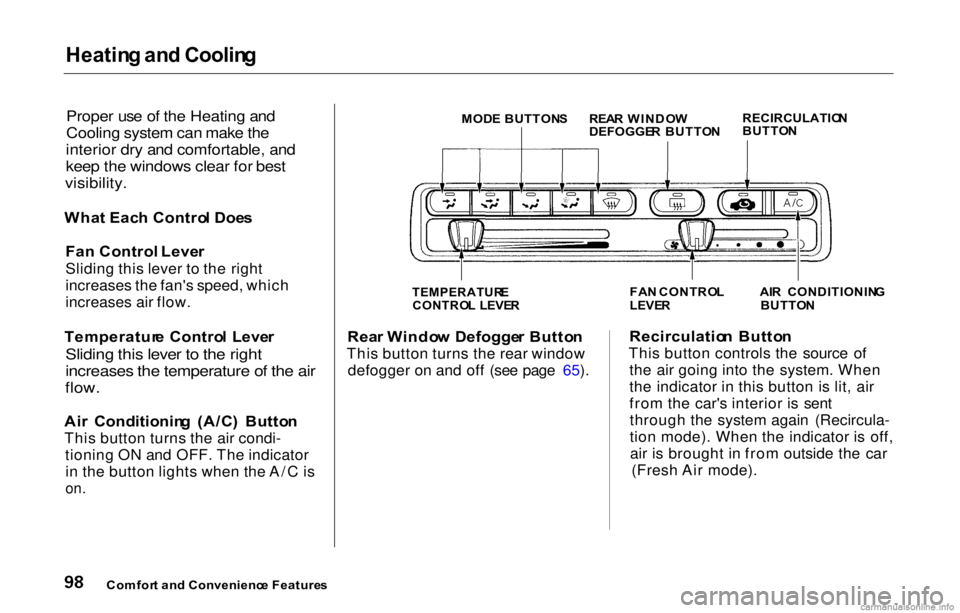
Wha t Eac h Contro l Doe s
Fan Control Leve r
Sliding this lever to the right
increases the fan's speed, which
increases air flow.
Temperatur e Contro l Leve r
Sliding this lever to the right
increases the temperature of the air
flow.
Ai r Conditionin g (A/C ) Butto n
This button turns the air condi- tioning ON and OFF. The indicatorin the button lights when the A/C is
on.
Rea
r Windo w Defogge r Butto n
This button turns the rear window defogger on and off (see page 65). Recirculatio
n Butto n
This button controls the source of the air going into the system. When
the indicator in this button is lit, air
from the car's interior is sentthrough the system again (Recircula-
tion mode). When the indicator is off,air is brought in from outside the car (Fresh Air mode).
Comfor t an d Convenienc e Feature s MOD
E BUTTON SREAR WINDO W
DEFOGGE R BUTTO NRECIRCULATIO
N
BUTTO N
TEMPERATUR E
CONTRO L LEVE R
FA
N CONTRO L
LEVE R
AI
R CONDITIONIN G
BUTTO N
Page 113 of 293
Audi
o Syste m
Audi o Syste m Lightin g
You can use the instrument panel brightness control dial to adjust the il-lumination of the audio system (see
page 63). The audio system
illuminates when the parking lights
are on, even if the radio is turned off.
Radi o Frequencie s
Your Honda's radio can receive the complete AM and FM bands.
Those bands cover these frequen-
cies:
AM band:
530 to 1,710 kilohertz
FM band:
87.7 to 107.9 megahertz
Radio stations on the AM band are
assigned frequencies at least ten
kilohertz apart (530, 540, 550).
Stations on the FM band are
assigned frequencies at least 0.2
megahertz apart (87.9, 88.1, 88.3). Stations must use these exact
frequencies. It is fairly common for
stations to round-off the frequency in
their advertising, so your radio could
display a frequency of 100.9 even
though the announcer may identify
the station as "FM101."
Radi o Receptio n
How well your Honda's radio
receives stations is dependent on
many factors, such as the distance
from the station's transmitter,
nearby large objects, and atmos-
pheric conditions.
A radio station's signal gets weaker as you get farther away from its
transmitter. If you are listening to an
AM station, you will notice the sound
volume becoming weaker, and the station drifting in and out. If you are
listening to an FM station, you will see the stereo indicator flickering off
and on as the signal weakens.
Eventually, the stereo indicator will go off and the sound will fade
completely as you get out of range of
the station's signal.
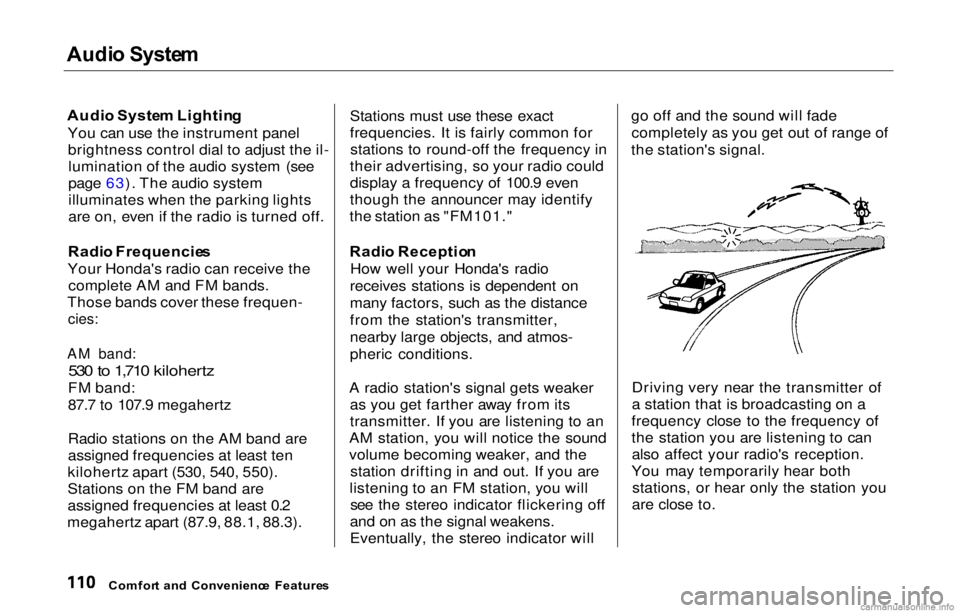
Driving very near the transmitter of
a station that is broadcasting on a
frequency close to the frequency of
the station you are listening to can also affect your radio's reception.
You may temporarily hear both stations, or hear only the station you
are close to.
Comfor t an d Convenienc e Feature s
Page 136 of 293
Accessorie
s an d Modification s
Modifying your car, or installing
some non-Honda accessories, can
make your car unsafe. Before you
make any modifications or add any
accessories, be sure to read the
following information.
Accessorie s
Your dealer has Genuine Honda accessories that allow you to
personalize your car. These accessories have been designed and
approved for your car, and are
covered by warranty.
Non-Honda accessories are usually designed for universal applications.
Although aftermarket accessories may fit on your car, they may not
meet factory specifications, and could adversely affect your car's
handling and stability. (See "Modifications" on the page 134 for
additional information.) When properly installed, cellular
phones, alarms, two-way radios, and
low-powered audio systems should
not interfere with your car'scomputer-controlled systems, such
as the SRS and anti-lock brake
system.
However, if electronic accessories are improperly installed, or exceed
your car's electrical system capacity, they can interfere with the operation of your car, or even cause the
airbags to deploy.
Before installing any accessory:
Make sure the accessory does not
obscure any lights, or interfere
with proper car operation or
performance. Be sure electronic accessories do
not overload electrical circuits (see page 256). Have the installer contact your
Honda dealer for assistance before
installing any electronic accessory.
If possible, have your dealer inspect
the final installation.
Before Drivin g
Improper accessories or
modifications can affect your
car's handling, stability and performance, and cause a
crash in which you can be hurt
or killed.
Follow all instructions in this
owner's manual regarding
accessories and modifications.
Page 143 of 293
Preparing to Driv e
You should do the following checks
and adjustments every day before
you drive your car.
1. Make sure all windows, mirrors, and outside lights are clean and
unobstructed. Remove frost, snow,
or ice.
2. Check that the hood and trunk are fully closed.
3. Visually check the tires. If a tire looks low, use a gauge to check its
pressure.
4. Check that any items you may becarrying with you inside are stored
properly or fastened down
securely.
5. Check the adjustment of the seat (see page 80).
6. Check the adjustment of the inside and outside mirrors (see
page 88).
7. Check the adjustment of the steering wheel (see page 66 ).
8. Make sure the doors are securely closed and locked.
9. Fasten your seat belt. Check that your passengers have fastenedtheir seat belts (see page 16 ).10. Turn the ignition switch ON (II). Check the indicator lights in the
instrument panel.
11. Start the engine (see page 141).
12. Check the gauges and indicator lights in the instrument panel (see
page 53).
Drivin g