lock HONDA PRELUDE 2000 (in English) User Guide
[x] Cancel search | Manufacturer: HONDA, Model Year: 2000, Model line: PRELUDE, Model: HONDA PRELUDE 2000Pages: 293, PDF Size: 3.43 MB
Page 39 of 293
Protectin
g Childre n
To deactivate the locking mechanism in order to remove a
child seat, unlatch the buckle,
unroute the seat belt, and let the belt
fully retract. Additional Precautions for Small
Children
Never hold a small child on your
lap. If you are not wearing a seat
belt in a crash, you could be
thrown forward into the dashboard and crush the child.
If you are wearing a seat belt, the
child can be torn from your arms during a crash. For example, if
your car crashes into a parked
vehicle at 30 mph (48 km/h), a 30-lb (14 kg) child will become a
900-lb (410 kg) force, and you will
not be able to hold on.
Never put a seat belt over yourself
and a child. During a crash, the
belt could press deep into the child
and cause very serious injuries.
Protectin
g Large r Childre n
When a child reaches the recommended weight or height limit
for a forward-facing child seat, the child should sit in one of the backseats and wear a lap/shoulder belt.
If a child is too short for the shoulder
part of the belt to properly fit, we recommend that the child use a
booster seat until they are tall enough to use the seat belt without a
booster.
The following pages give instructions on how to check properseat belt fit, what kind of booster
seat to use if one is needed, and
important precautions for children
who must sit in the front seat.
Drive r an d Passenge r Safet y
Page 45 of 293
Additiona
l Informatio n Abou t You r Sea t Belt s
Sea t Bel t Syste m Component s
Your seat belt system includes lap/ shoulder belts in all four seating
positions.
The seat belt system alsoincludes a light on the
instrument panel to remind you and
your passengers to fasten your belts. If the driver's seat belt is not
fastened before the ignition is turned ON (II), the light will come on and a
beeper will also sound. The beeper
will stop after a few seconds, but the
light will stay on until the driver's seat belt is fastened.
Lap/Shoulde
r Bel t
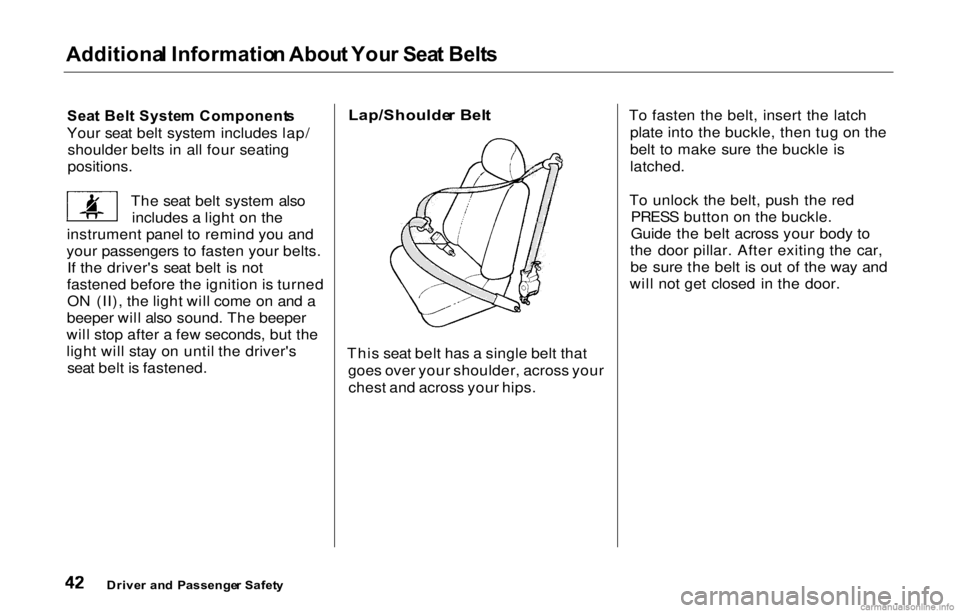
This seat belt has a single belt that goes over your shoulder, across yourchest and across your hips. To fasten the belt, insert the latch
plate into the buckle, then tug on the
belt to make sure the buckle is
latched.
To unlock the belt, push the red PRESS button on the buckle.
Guide the belt across your body to
the door pillar. After exiting the car, be sure the belt is out of the way and
will not get closed in the door.
Drive r an d Passenge r Safet y
Page 46 of 293
Additiona
l Informatio n Abou t You r Sea t Belt s
All seat belts have an emergency locking retractor. In normal driving,
the retractor lets you move freely in
your seat while it keeps some tension on the belt. During a collision or sudden stop, the retractor
automatically locks the belt to help
restrain your body.
The seat belts in all seating positions except the driver's have an additional
locking mechanism that must be activated to secure a child seat. (See
pages 30 and 34 for instructions on
how to secure child seats with this
type of seat belt.)
If the shoulder part of the belt is
pulled all the way out, the locking
mechanism will activate. The belt
will retract, but it will not allow the
passenger to move freely. To deactivate the locking
mechanism, unlatch the buckle and
let the seat belt fully retract. To
refasten the belt, pull it out only as
far as needed.
See page 16 for instructions on how
to wear the lap/shoulder belt
properly.
Driver an d Passenge r Safet y
Page 54 of 293
Instrument
s an d Control s
This section gives information about the controls and displays that
contribute to the daily operation of
your Honda. All the essential controls are within easy reach.
Control Locations............................ 52
Indicator Lights................................ 53
Gauges.............................................. 58
Speedometer................................ 58
Tachometer..................................
58
Odometer...................................... 58
Trip Meter.................................... 58
Fuel Gauge...................................
59
Temperature Gauge.................... 59
Maintenance Required
Indicator...................................
60
Controls Near the Steering
Wheel........................................
61
Headlights....................................
62
Daytime Running Lights............. 62
Instrument Panel Brightness..... 63
Turn Signals................................. 63
Windshield Wipers...................... 64
Windshield Washers................... 65
Hazard Warning........................... 65
Rear Window Defogger.............. 65
Steering Wheel Adjustment....... 66
Steeling Wheel Controls................ 67
Cruise Control.............................. 67
Keys and Locks................................ 70
Keys............................................... 70
Learning Key................................ 71
Immobilizer System..................... 71
Ignition Switch............................. 73
Power Door Locks.......................74
Lockout Prevention..................... 75
Remote Transmitter ...................
. 75
Trunk...........................................
78
Glove Box..................................... 79
Seat Adjustments............................ .
80
Front Seat Adjustments.............. 80
Driver's Seat Height Adjustment............................... 81
Rear Seat Access......................... 81
Head Restraints........................... 82
Seat Heaters..................................... 83
Folding Rear Seat............................ 84
Power Windows............................... 85
Moonroof.......................................... 87
Mirrors..............................................
88
Adjusting the Power Mirrors..... 8
8
Parking Brake.................................. 89
Digital Clock..................................... 90
Beverage Holder..............................
91
Console Compartment.................... 92
Coin Box.......................................... .
93
Accessory Power Socket................ 93
Ashtrays............................................ 94
Interior Lights.................................. 94
Ceiling Lights............................... 94
Courtesy Lights........................... 95
Instrument s an d Control s
Page 58 of 293
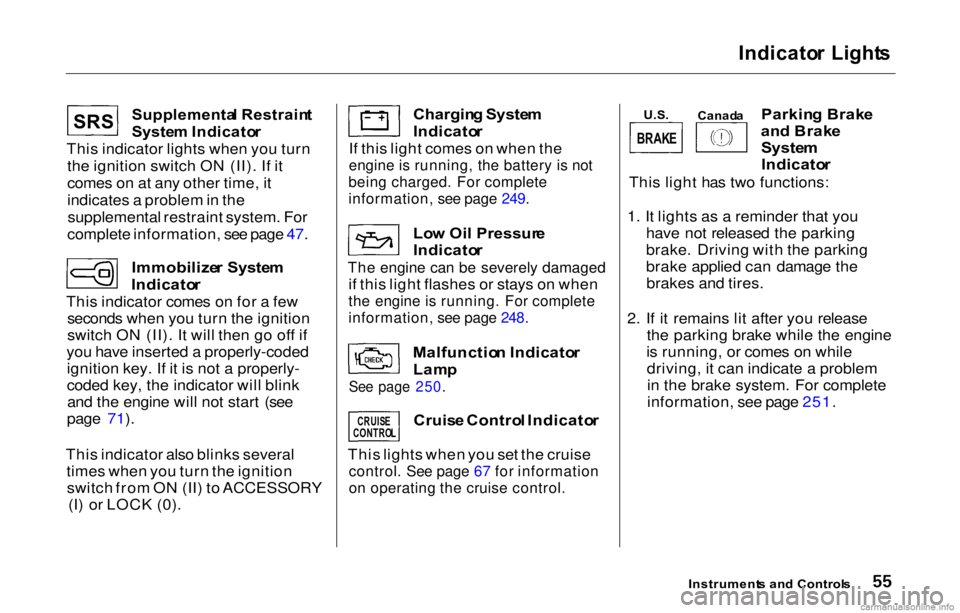
Indicator Light s
Supplementa l Restrain t
System Indicato r
This indicator lights when you turn
the ignition switch ON (II). If it
comes on at any other time, it
indicates a problem in thesupplemental restraint system. For
complete information, see page 47.
Immobilize r Syste m
Indicato r
This indicator comes on for a few seconds when you turn the ignition
switch ON (II). It will then go off if
you have inserted a properly-coded ignition key. If it is not a properly-
coded key, the indicator will blinkand the engine will not start (see
page 71).
This indicator also blinks several times when you turn the ignitionswitch from ON (II) to ACCESSORY (I) or LOCK (0). Chargin
g Syste m
Indicato r
If this light comes on when the
engine is running, the battery is not
being charged. For complete
information, see page 249.
Lo w Oi l Pressur e
Indicato r
The engine can be severely damaged
if this light flashes or stays on when
the engine is running. For complete
information, see page 248.
Malfunctio n Indicato r
Lam p
See page 250.
Cruis e Contro l Indicato r
This lights when you set the cruise
control. See page 67 for information
on operating the cruise control.
Parkin g Brak e
an d Brak e
System
Indicato r
This light has two functions:
1. It lights as a reminder that you have not released the parking
brake. Driving with the parking
brake applied can damage thebrakes and tires.
2. If it remains lit after you release the parking brake while the engine
is running, or comes on while driving, it can indicate a problemin the brake system. For complete
information, see page 251.
Instrument s an d Control s
SRS
CRUISE
CONTRO L
U.S. Canad a
BRAKE
Page 59 of 293
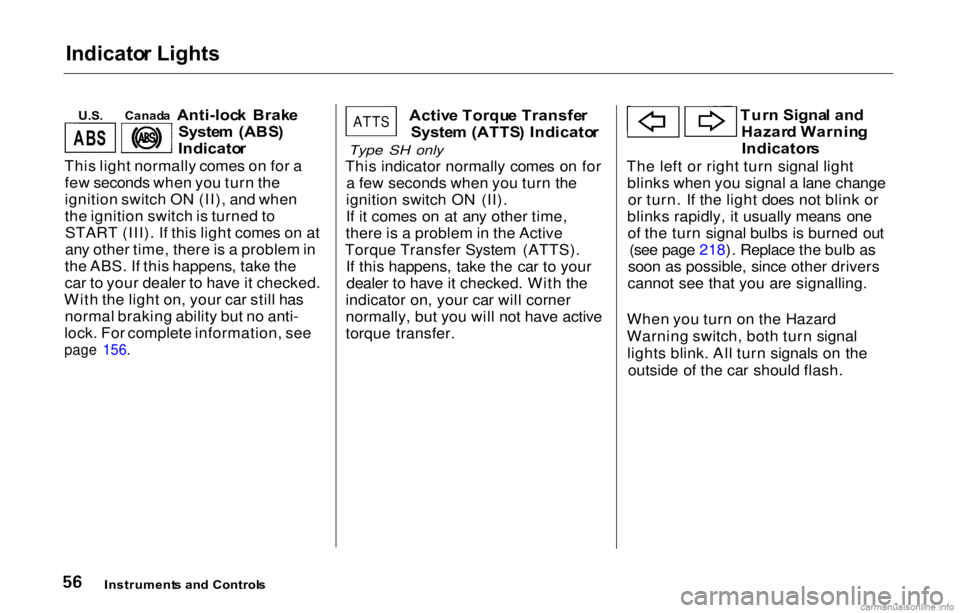
Indicato
r Lights
U.S .
Anti-lock Brak e
Syste m (ABS )
Indicato r
This light normally comes on for a few seconds when you turn the
ignition switch ON (II), and when
the ignition switch is turned toSTART (III). If this light comes on at
any other time, there is a problem in
the ABS. If this happens, take the
car to your dealer to have it checked.
With the light on, your car still has normal braking ability but no anti-
lock. For complete information, see
page 156.
Activ
e Torqu e Transfe r
Syste m (ATTS ) Indicato r
Type SH only
This indicator normally comes o
n for
a few seconds when you turn the
ignition switch ON (II).
If it comes on at any other time,
there is a problem in the Active
Torque Transfer System (ATTS). If this happens, take the car to yourdealer to have it checked. With the
indicator on, your car will corner
normally, but you will not have active
torque transfer. Tur
n Signa l an d
Hazar d Warnin g
Indicator s
The left or right turn signal light blinks when you signal a lane changeor turn. If the light does not blink or
blinks rapidly, it usually means one of the turn signal bulbs is burned out (see page 218). Replace the bulb as
soon as possible, since other drivers
cannot see that you are signalling.
When you turn on the Hazard
Warning switch, both turn signal lights blink. All turn signals on the outside of the car should flash.
Instrument s an d Control s
Canad
a
AB S
ATTS
Page 65 of 293
Controls
Nea r th e Steerin g Whee l
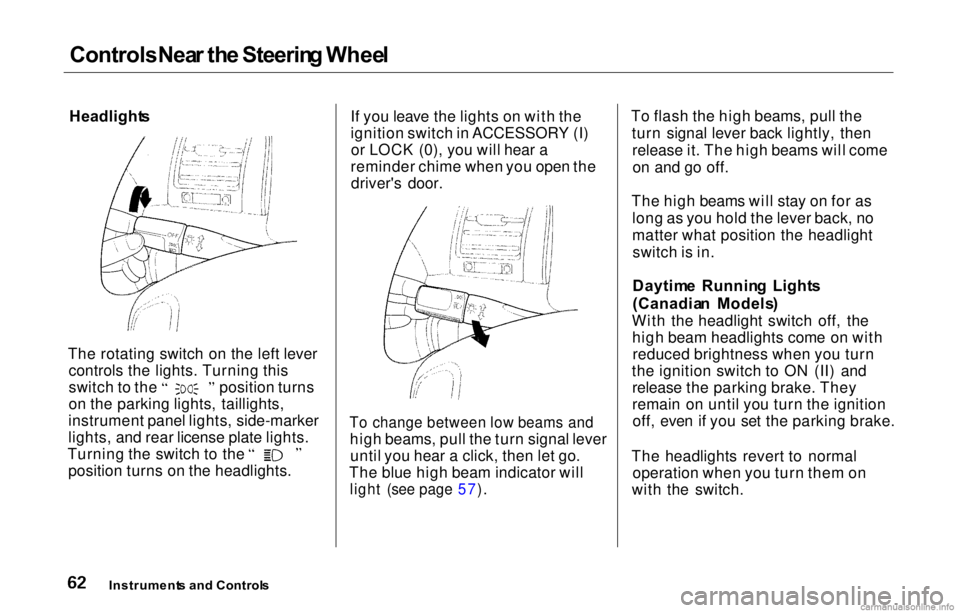
Headlight s
The rotating switch on the left lever controls the lights. Turning this switch to the position turns
on the parking lights, taillights,
instrument panel lights, side-marker
lights, and rear license plate lights. Turning the switch to the
position turns on the headlights. If you leave the lights on with the
ignition switch in ACCESSORY (I)
or LOCK (0), you will hear a
reminder chime when you open the driver's door.
To change between low beams and
high beams, pull the turn signal leveruntil you hear a click, then let go.
The blue high beam indicator will
light (see page 57).
To flash the high beams, pull the
turn signal lever back lightly, thenrelease it. The high beams will comeon and go off.
The high beams will stay on for as long as you hold the lever back, no
matter what position the headlightswitch is in.
Daytim e Runnin g Light s
(Canadia n Models )
With the headlight switch off, the high beam headlights come on withreduced brightness when you turn
the ignition switch to ON (II) and release the parking brake. They
remain on until you turn the ignitionoff, even if you set the parking brake.
The headlights revert to normal operation when you turn them on
with the switch.
Instrument s an d Control s
Page 68 of 293
Controls
Nea r th e Steering Whee l
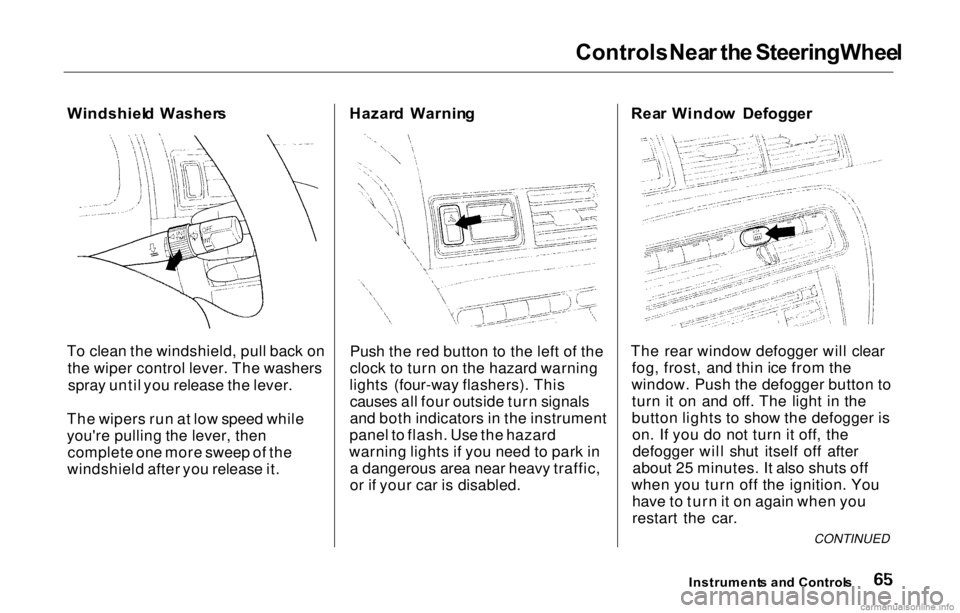
Windshiel d Washer s
To clea
n the
windshield, pull back on
the wiper control lever. The washers spray until you release the lever.
The wipers run at low speed while
you're pulling the lever, then complete one more sweep of the
windshield after you release it. Hazar
d Warnin g
Push the red button to the left of the
clock to turn on the hazard warning
lights (four-way flashers). This causes all four outside turn signals
and both indicators in the instrument
panel to flash. Use the hazard
warning lights if you need to park in a dangerous area near heavy traffic,
or if your car is disabled. Rea
r Windo w Defogger
The rear window defogger will clear fog, frost, and thin ice from the
window. Push the defogger button to turn it on and off. The light in the
button lights to show the defogger ison. If you do not turn it off, thedefogger will shut itself off after
about 25 minutes. It also shuts off
when you turn off the ignition. You have to turn it on again when you
restart the car.
Instrument s an d Control s
CONTINUED
Page 69 of 293
Controls Nea r th e Steerin g Wheel
Make sure the rear window is clear
and you have good visibility before starting to drive.
The defogger and antenna wires on the inside of the rear window can be accidentally damaged. When
cleaning the glass, always wipe side
to side. Steerin
g Whee l Adjustmen t
See page 17 for important safety
information about how to properly
position the steering wheel.
Make any steering wheel adjustment
before you start driving.
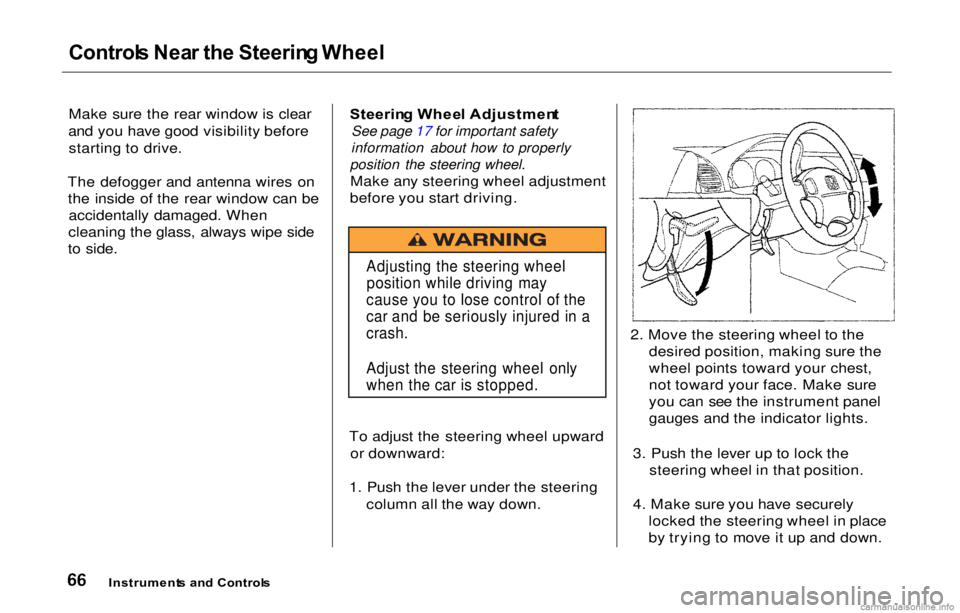
To adjust the steering wheel upward or downward:
1. Push the lever under the steering column all the way down. 2. Move the steering wheel to the
desired position, making sure the
wheel points toward your chest,
not toward your face. Make sure
you can see the instrument panel
gauges and the indicator lights.
3. Push the lever up to lock the steering wheel in that position.
4. Make sure you have securely locked the steering wheel in place
by trying to move it up and down.
Instrument s an d Control s
Adjusting the steering wheel
position while driving may
cause you to lose control of the
car and be seriously injured in a
crash.
Adjust the steering wheel only
when the car is stopped.
Page 70 of 293
Steering Whee l Controls
Cruis e Contro l
Cruise control allows you to maintain
a set speed above 25 mph (40 km/h)
without keeping your foot on the accelerator pedal. It should be used
for cruising on straight, openhighways. It is not recommended for
conditions such as city driving,
winding roads, slippery roads, heavy rain, or bad weather. You should
have full control of the car under
those conditions.
The cruise control, as it operates,
moves the accelerator pedal. You can
damage your car's accelerator mechanism by resting your foot under the pedal and blocking the movement. Using the Cruise Control
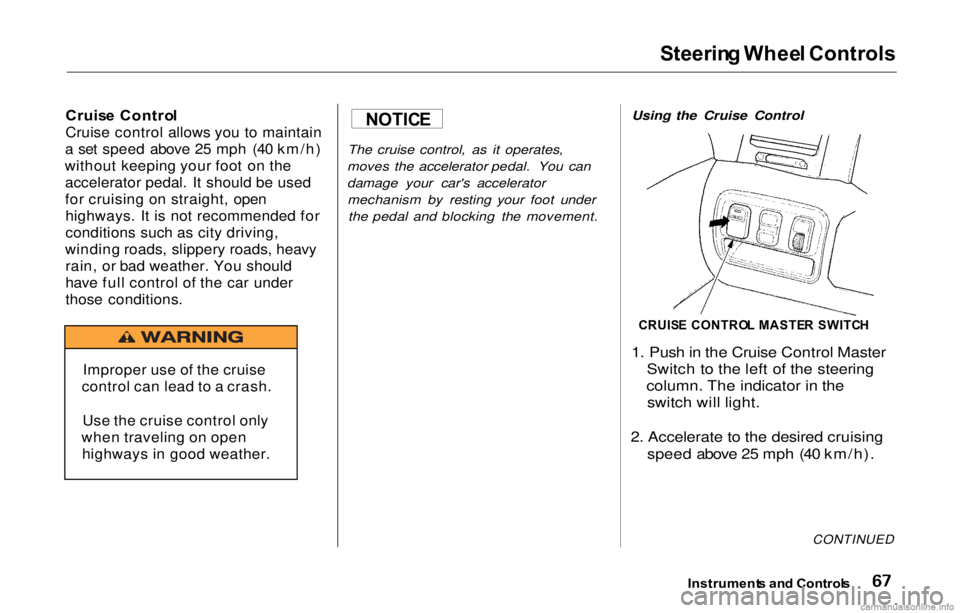
1. Push in the Cruise Control Master
Switch to the left of the steering
column. The indicator in the switch will light.
2. Accelerate to the desired cruising speed above 25 mph (40 km/h).
CONTINUED
Instrument s an d Control s
NOTICE
Improper use of the cruise
control can lead to a crash.
Use the cruise control only
when traveling on open highways in good weather.
CRUIS E CONTRO L MASTE R SWITC H