phone HONDA RIDGELINE 2008 1.G Navigation Manual
[x] Cancel search | Manufacturer: HONDA, Model Year: 2008, Model line: RIDGELINE, Model: HONDA RIDGELINE 2008 1.GPages: 135, PDF Size: 11.61 MB
Page 96 of 135
96Navigation System
System Limitations
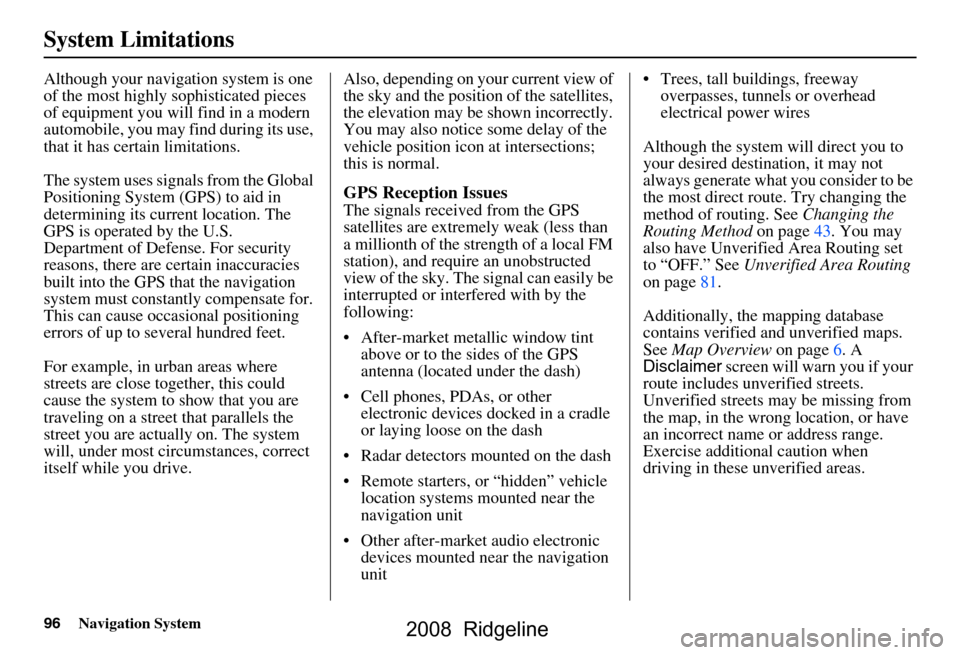
Although your navigation system is one
of the most highly sophisticated pieces
of equipment you will find in a modern
automobile, you may find during its use,
that it has certain limitations.
The system uses signals from the Global
Positioning System (GPS) to aid in
determining its current location. The
GPS is operated by the U.S.
Department of Defense. For security
reasons, there are certain inaccuracies
built into the GPS that the navigation
system must constantly compensate for.
This can cause occasional positioning
errors of up to several hundred feet.
For example, in urban areas where
streets are close together, this could
cause the system to show that you are
traveling on a street that parallels the
street you are actually on. The system
will, under most circumstances, correct
itself while you drive. Also, depending on your current view of
the sky and the position of the satellites,
the elevation may be shown incorrectly.
You may also notice some delay of the
vehicle position icon at intersections;
this is normal.
GPS Reception Issues
The signals received from the GPS
satellites are extremely weak (less than
a millionth of the strength of a local FM
station), and require an unobstructed
view of the sky. The
signal can easily be
interrupted or interfered with by the
following:
After-market metallic window tint above or to the sides of the GPS
antenna (located under the dash)
Cell phones, PDAs, or other electronic devices docked in a cradle
or laying loose on the dash
Radar detectors mounted on the dash
Remote starters, or “hidden” vehicle location systems mounted near the
navigation unit
Other after-market audio electronic devices mounted near the navigation
unit Trees, tall buildings, freeway
overpasses, tunnels or overhead
electrical power wires
Although the system will direct you to
your desired destination, it may not
always generate what you consider to be
the most direct rout e. Try changing the
method of routing. See Changing the
Routing Method on page43. You may
also have Unverified Area Routing set
to “OFF.” See Unverified Area Routing
on page81.
Additionally, the mapping database
contains verified and unverified maps.
See Map Overview on page6. A
Disclaimer screen will warn you if your
route includes unverified streets.
Unverified streets may be missing from
the map, in the wrong location, or have
an incorrect name or address range.
Exercise addition al caution when
driving in these unverified areas.
2008 Ridgeline
Page 100 of 135
100Navigation System
Customer Assistance
Reporting Errors
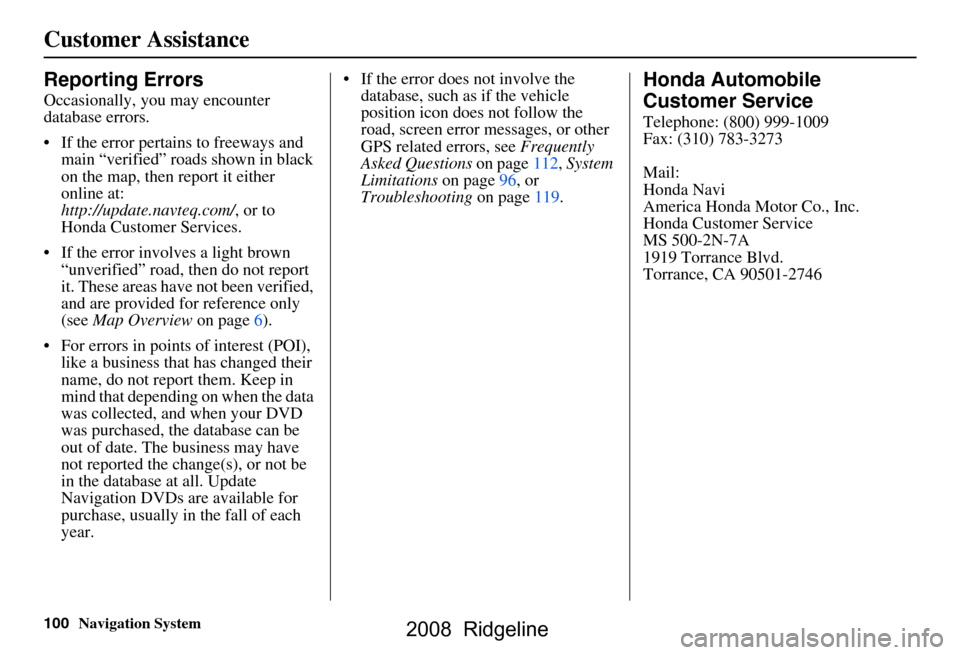
Occasionally, you may encounter
database errors.
If the error pertains to freeways and main “verified” roads shown in black
on the map, then report it either
online at:
http://update.navteq.com/ , or to
Honda Customer Services.
If the error involves a light brown “unverified” road, then do not report
it. These areas have not been verified,
and are provided for reference only
(see Map Overview on page6).
For errors in points of interest (POI), like a business that has changed their
name, do not report them. Keep in
mind that depending on when the data
was collected, and when your DVD
was purchased, the database can be
out of date. The business may have
not reported the change(s), or not be
in the database at all. Update
Navigation DVDs are available for
purchase, usually in the fall of each
year. If the error does not involve the
database, such as if the vehicle
position icon does not follow the
road, screen error messages, or other
GPS related errors, see Frequently
Asked Questions on page112, System
Limitations on page96, or
Troubleshooting on page119.
Honda Automobile
Customer Service
Telephone: (800) 999-1009
Fax: (310) 783-3273
Mail:
Honda Navi
America Honda Motor Co., Inc.
Honda Customer Service
MS 500-2N-7A
1919 Torrance Blvd.
Torrance, CA 90501-2746
2008 Ridgeline
Page 112 of 135
112Navigation System
Frequently Asked Questions
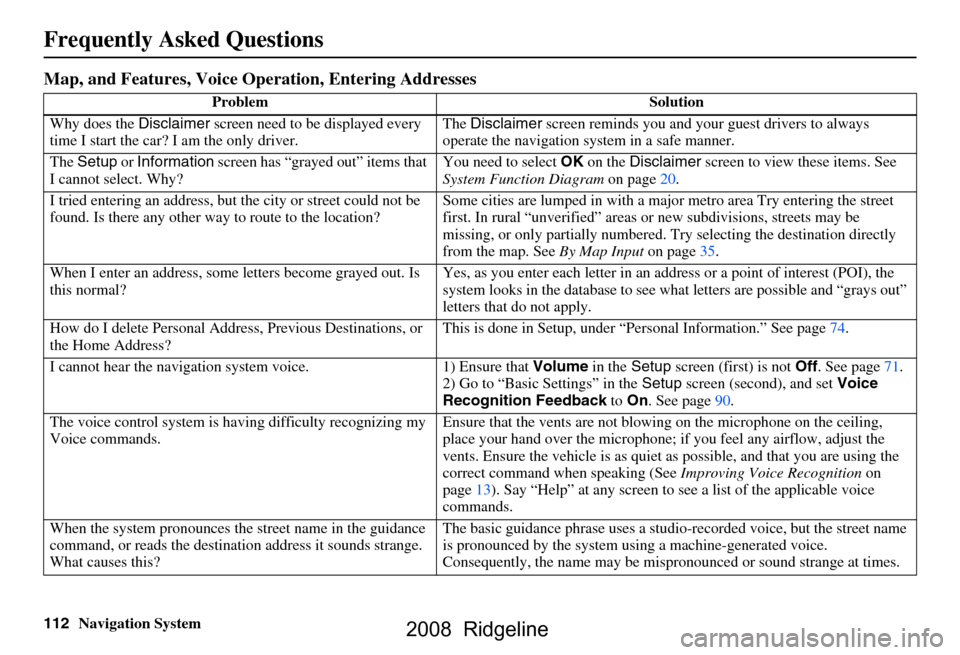
Map, and Features, Voice Operation, Entering Addresses
Problem Solution
Why does the Disclaimer screen need to be displayed every
time I start the car? I am the only driver. The
Disclaimer screen reminds you and your guest drivers to always
operate the navigation sy stem in a safe manner.
The Setup or Information screen has “grayed out” items that
I cannot select. Why? You need to select
OK on the Disclaimer screen to view these items. See
System Function Diagram on page20.
I tried entering an address, but th e city or street could not be
found. Is there any other way to route to the location? Some cities are lumped in with a major metro area Try entering the street
first. In rural “unverified” areas
or new subdivisions, streets may be
missing, or only partiall y numbered. Try selecting the destination directly
from the map. See By Map Input on page
35.
When I enter an address, some letters become grayed out. Is
this normal? Yes, as you enter each letter in an addr
ess or a point of interest (POI), the
system looks in the databa se to see what letters are possible and “grays out”
letters that do not apply.
How do I delete Personal Address, Previous Destinations, or
the Home Address? This is done in Setup, under “P
ersonal Information.” See page
74.
I cannot hear the navigation sy stem voice. 1) Ensure that Volume in the Setup screen (first) is not Off. See page
71.
2) Go to “Basic Settings” in the Setup screen (second), and set Voice
Recognition Feedback to On . See page
90.
The voice control system is ha ving difficulty recognizing my
Voice commands. Ensure that the vents are not blow
ing on the microphone on the ceiling,
place your hand over the microphone; if you feel any airflow, adjust the
vents. Ensure the vehicle is as quiet as possible, and that you are using the
correct command when speaking (See Improving Voice Recognition on
page
13). Say “Help ” at any screen to see a list of the applicable voice
commands.
When the system pronounces the street name in the guidance
command, or reads the destinat ion address it sounds strange.
What causes this? The basic guidance phrase uses a studio
-recorded voice, but the street name
is pronounced by the system us ing a machine-generated voice.
Consequently, the name may be misp ronounced or sound strange at times.
2008 Ridgeline
Page 114 of 135
114Navigation System
Frequently Asked Questions
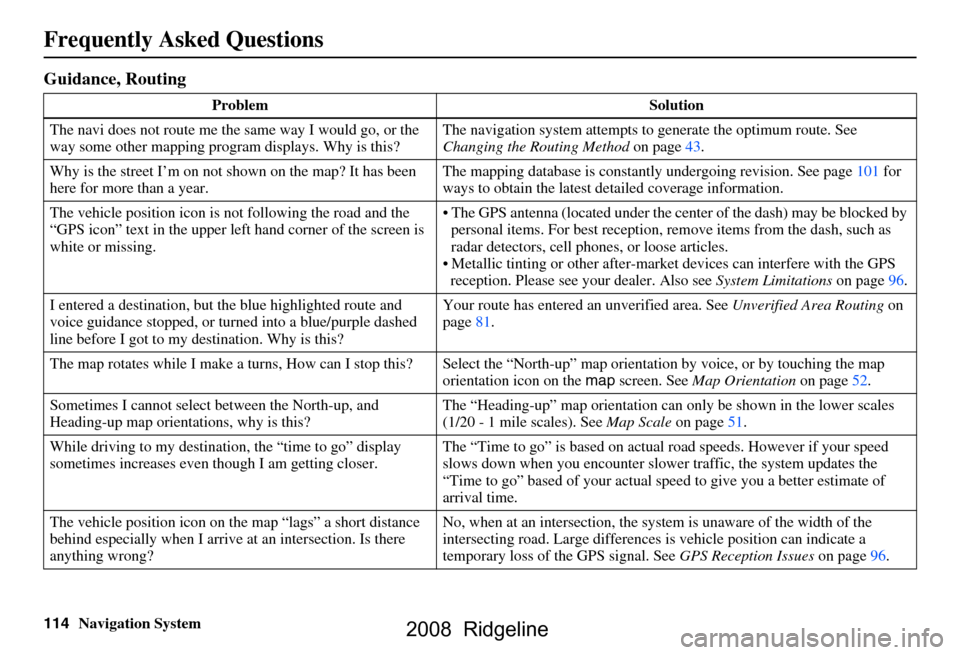
Guidance, Routing
Problem Solution
The navi does not route me the same way I would go, or the
way some other mapping progr am displays. Why is this? The navigation system attempts to
generate the optimum route. See
Changing the Routing Method on page43.
Why is the street I’m on not s hown on the map? It has been
here for more than a year. The mapping database is
constantly undergoing revision. See page101 for
ways to obtain the latest de tailed coverage information.
The vehicle position icon is not following the road and the
“GPS icon” text in the upper left hand corner of the screen is
white or missing. The GPS antenna (located
under the center of the dash) may be blocked by
personal items. For best reception, remove items from the dash, such as
radar detectors, cell phone s, or loose articles.
Metallic tinting or other after-marke t devices can interfere with the GPS
reception. Please see your dealer. Also see System Limitations on page96.
I entered a destination, but th e blue highlighted route and
voice guidance stopped, or turned into a blue/purple dashed
line before I got to my destination. Why is this? Your route has entered
an unverified area. See Unverified Area Routing on
page81.
The map rotates while I make a turns, Ho w can I stop this? Select the “North-up” ma p orientation by voice, or by touching the map
orientation icon on the map screen. See Map Orientation on page52.
Sometimes I cannot select between the North-up, and
Heading-up map orientations, why is this? The “Heading-up” map orientation can
only be shown in the lower scales
(1/20 - 1 mile scales). See Map Scale on page51.
While driving to my destinati on, the “time to go” display
sometimes increases even though I am getting closer. The “Time to go” is based on actual
road speeds. However if your speed
slows down when you encounter slower traffic, the system updates the
“Time to go” based of your actual spee d to give you a better estimate of
arrival time.
The vehicle position icon on the map “lags” a short distance
behind especially when I arrive at an intersection. Is there
anything wrong? No, when at an intersection, the syst
em is unaware of the width of the
intersecting road. Large differences is vehicle position can indicate a
temporary loss of the GPS signal. See GPS Reception Issues on page96.
2008 Ridgeline
Page 119 of 135
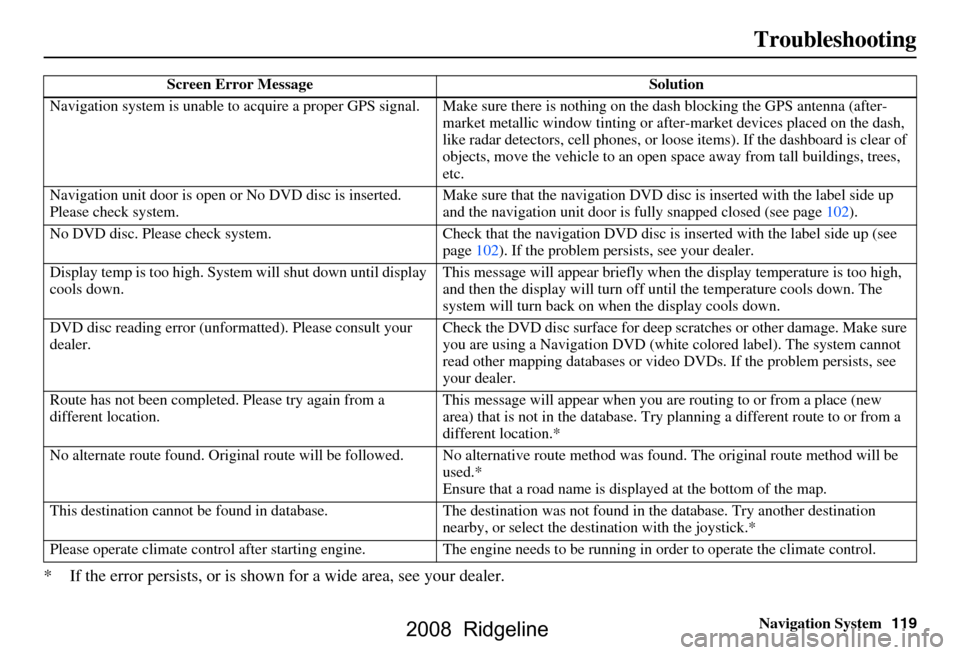
Navigation System119
Troubleshooting
* If the error persists, or is shown for a wide area, see your dealer.
Screen Error Message Solution
Navigation system is unable to acquire a pr oper GPS signal. Make sure there is nothi ng on the dash blocking the GPS antenna (aft er-
market metallic window ti nting or after-market devices placed on the dash,
like radar detectors, cell phones, or loose items). If the dashboard is clear of
objects, move the vehicle to an open sp ace away from tall buildings, trees,
etc.
Navigation unit door is open or No DVD disc is inserted.
Please check system. Make sure that the navigation DVD disc
is inserted with the label side up
and the navigation unit door is fully snapped closed (see page102).
No DVD disc. Please check system. Check that the navigation DVD disc is inserted with the label side up (see
page102). If the problem persists, see your dealer.
Display temp is too high. Syst em will shut down until display
cools down. This message will appear briefly when
the display temperature is too high,
and then the display will turn off until the temperature cools down. The
system will turn back on when the display cools down.
DVD disc reading error (unfor matted). Please consult your
dealer. Check the DVD disc surface
for deep scratches or other damage. Make sure
you are using a Navigation DVD (white colored label). The system cannot
read other mapping databases or vide o DVDs. If the problem persists, see
your dealer.
Route has not been complete d. Please try again from a
different location. This message will appear when you are routing to or from a place (new
area) that is not in the database. Try
planning a different route to or from a
different location.*
No alternate route found. Origin al route will be followed. No alternative route method was f ound. The original route method will be
used.*
Ensure that a road name is di splayed at the bottom of the map.
This destination cannot be found in da tabase. The destination was not found in the database. Try another destination
nearby, or select the des tination with the joystick.*
Please operate climate c ontrol after starting engine . The engine needs to be running in order to operate the climate control.
2008 Ridgeline
Page 121 of 135
Navigation System121
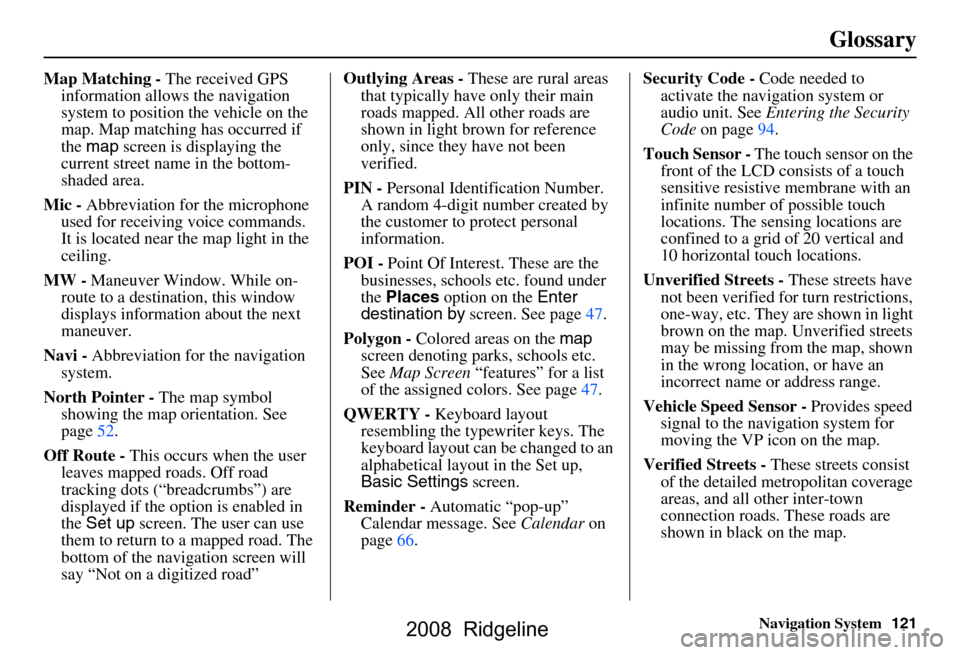
Glossary
Map Matching - The received GPS
information allows the navigation
system to position the vehicle on the
map. Map matching has occurred if
the map screen is displaying the
current street name in the bottom-
shaded area.
Mic - Abbreviation for the microphone
used for receiving voice commands.
It is located near the map light in the
ceiling.
MW - Maneuver Window. While on-
route to a destination, this window
displays informatio n about the next
maneuver.
Navi - Abbreviation for the navigation
system.
North Pointer - The map symbol
showing the map orientation. See
page52.
Off Route - This occurs when the user
leaves mapped roads. Off road
tracking dots (“breadcrumbs”) are
displayed if the option is enabled in
the Set up screen. The user can use
them to return to a mapped road. The
bottom of the navigation screen will
say “Not on a digitized road” Outlying Areas -
These are rural areas
that typically have only their main
roads mapped. All other roads are
shown in light brown for reference
only, since they have not been
verified.
PIN - Personal Identification Number.
A random 4-digit number created by
the customer to protect personal
information.
POI - Point Of Interest. These are the
businesses, schools etc. found under
the Places option on the Enter
destination by screen. See page47.
Polygon - Colored areas on the map
screen denoting parks, schools etc.
See Map Screen “features” for a list
of the assigned colors. See page47.
QWERTY - Keyboard layout
resembling the typewriter keys. The
keyboard layout can be changed to an
alphabetical layout in the Set up,
Basic Settings screen.
Reminder - Automatic “pop-up”
Calendar message. See Calendar on
page66. Security Code -
Code needed to
activate the navigation system or
audio unit. See Entering the Security
Code on page94.
Touch Sensor - The touch sensor on the
front of the LCD consists of a touch
sensitive resistive membrane with an
infinite number of possible touch
locations. The sensing locations are
confined to a grid of 20 vertical and
10 horizontal touch locations.
Unverified Streets - These streets have
not been verified for turn restrictions,
one-way, etc. They are shown in light
brown on the map. Unverified streets
may be missing from the map, shown
in the wrong location, or have an
incorrect name or address range.
Vehicle Speed Sensor - Provides speed
signal to the navigation system for
moving the VP icon on the map.
Verified Streets - These streets consist
of the detailed metropolitan coverage
areas, and all other inter-town
connection roads. These roads are
shown in black on the map.
2008 Ridgeline
Page 122 of 135
122Navigation System
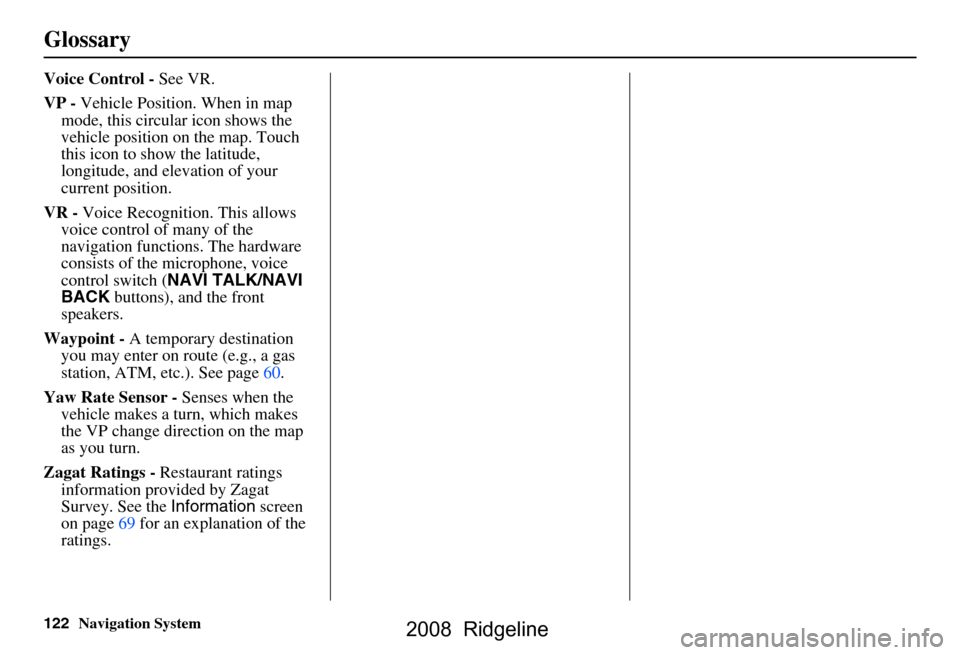
Glossary
Voice Control - See VR.
VP - Vehicle Position. When in map
mode, this circular icon shows the
vehicle position on the map. Touch
this icon to show the latitude,
longitude, and elevation of your
current position.
VR - Voice Recognition. This allows
voice control of many of the
navigation functions. The hardware
consists of the microphone, voice
control switch ( NAVI TALK/NAVI
BACK buttons), and the front
speakers.
Waypoint - A temporary destination
you may enter on route (e.g., a gas
station, ATM, etc.). See page60.
Yaw Rate Sensor - Senses when the
vehicle makes a turn, which makes
the VP change direction on the map
as you turn.
Zagat Ratings - Restaurant ratings
information provided by Zagat
Survey. See the Information screen
on page69 for an explanation of the
ratings.
2008 Ridgeline
Page 132 of 135
132Navigation System
Index
Entering Security Code....................94
Entering the Street Number..............25
Entering Your Schedule................... 67
Error Message............................... 119
F
Find Place Commands
................... 125
Frequently Asked Questions..........112
G
Getting Started
..................... ...........10
Global Commands........................ 123
Glossary.............................. .........120
Go Home.................................. 21, 41
Go Home PIN.................................79
Going Off the Route........................57
GPS Initialization............................ 95
Guidance Mode............................... 88
Guidance Prompts...........................73
Guidance Screen............................. 48
H
Home Address
................................ 77
Hotel/Motel (Lodging)....................30
I
Icon Bar
...... .................................. 55
INFO button............................10, 65
Information.................................... 65
Information Screen Voice
Commands
................................128
Intersection.............................. 21, 26
J
Joystick
......................................... 11
K
Key to Zagat Ratings
...................... 69
Keyboard Layout........................... 90
L
Landmark Icons
............................. 53
Leisure.......................................... 30
Lodging (Hotel/Motel)...................30
M
Map Color
... .................................. 93
Map Coverage.............................103
Map Input................................ 21, 35
Map Legend.......................18, 47, 68
Map Matching................................ 95
Map Orientation.............................52
Map Scale......................................51
Map Screen.............................. 18, 47
MAP/GUIDE button.................10, 48
Maximize Freeways....................... 43
MENU button.......................... 10, 21
Menu Color................................... 93
Message........................................ 67
Microphone...................................12
Minimize Freeways........................43
Minimize Toll Roads......................43
N
Name
................................ 29, 33, 75
NAVI BACK button.......................12
NAVI TALK button....................... 12
Navigation Display Commands.....124
Navigation General Commands.....123
O
Off-road Tracking
.................... 57, 88
On-Screen Commands..................129
On-Screen Commands Assist........129
On-Screen Keyboard...................... 15
2008 Ridgeline
Page 133 of 135
Navigation System133
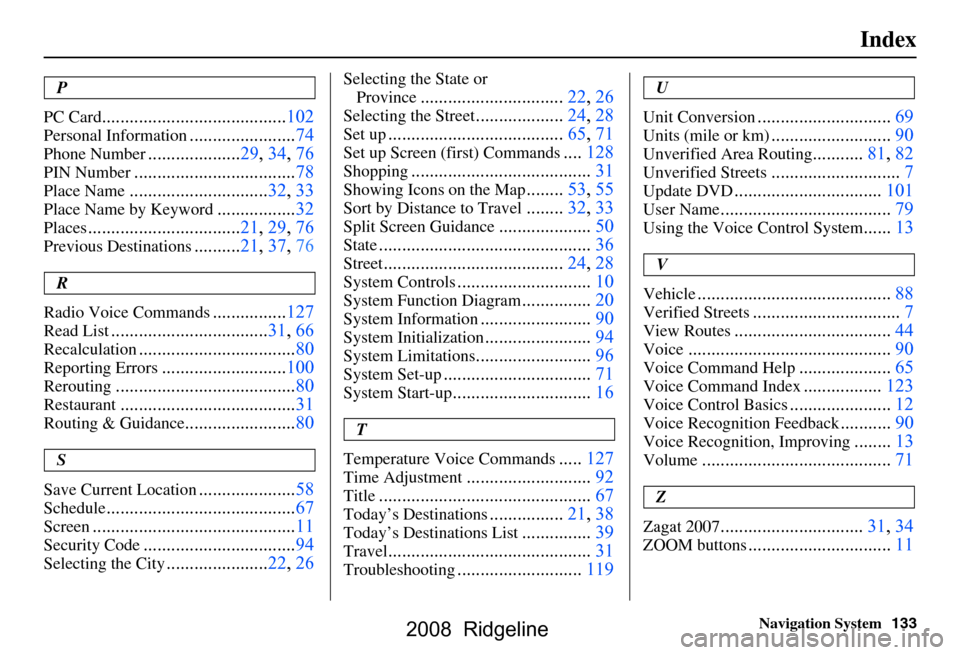
Index
P
PC Card
........................................ 102
Personal Information.......................74
Phone Number....................29, 34, 76
PIN Number........................ ...........78
Place Name.............................. 32, 33
Place Name by Keyword.................32
Places................................. 21, 29, 76
Previous Destinations.......... 21, 37, 76
R
Radio Voice Commands
....... ......... 127
Read List.................................. 31, 66
Recalculation..................................80
Reporting Errors........................... 100
Rerouting....................................... 80
Restaurant......................................31
Routing & Guidance........................80
S
Save Current Location
..................... 58
Schedule......................................... 67
Screen............................................ 11
Security Code.................................94
Selecting the City...................... 22, 26
Selecting the State or
Province
............................... 22, 26
Selecting the Street...................24, 28
Set up...................................... 65, 71
Set up Screen (first) Commands....128
Shopping....................................... 31
Showing Icons on the Map........53, 55
Sort by Distance to Travel........32, 33
Split Screen Guidance.................... 50
State.............................................. 36
Street....................................... 24, 28
System Controls.............................10
System Function Diagram...............20
System Information........................ 90
System Initialization.......................94
System Limitations......................... 96
System Set-up................................ 71
System Start-up..............................16
T
Temperature Voice Commands
..... 127
Time Adjustment........................... 92
Title.............................................. 67
Today’s Destinations................21, 38
Today’s Destinations List...............39
Travel............................................ 31
Troubleshooting...........................119
U
Unit Conversion
............................. 69
Units (mile or km).......................... 90
Unverified Area Routing...........81, 82
Unverified Streets............................ 7
Update DVD................................ 101
User Name..................................... 79
Using the Voice Control System......13
V
Vehicle
.......................................... 88
Verified Streets................................ 7
View Routes.................................. 44
Voice............................................ 90
Voice Command Help.................... 65
Voice Command Index................. 123
Voice Control Basics...................... 12
Voice Recognition Feedback...........90
Voice Recognition, Improving........13
Volume......................................... 71
Z
ZOOM buttons...............................11
Zagat 2007...............................31, 34
2008 Ridgeline