phone HONDA RIDGELINE 2009 1.G Navigation Manual
[x] Cancel search | Manufacturer: HONDA, Model Year: 2009, Model line: RIDGELINE, Model: HONDA RIDGELINE 2009 1.GPages: 149, PDF Size: 4.83 MB
Page 32 of 149
32Navigation System
By Places
After you select Places from the Enter
destination by screen, the display
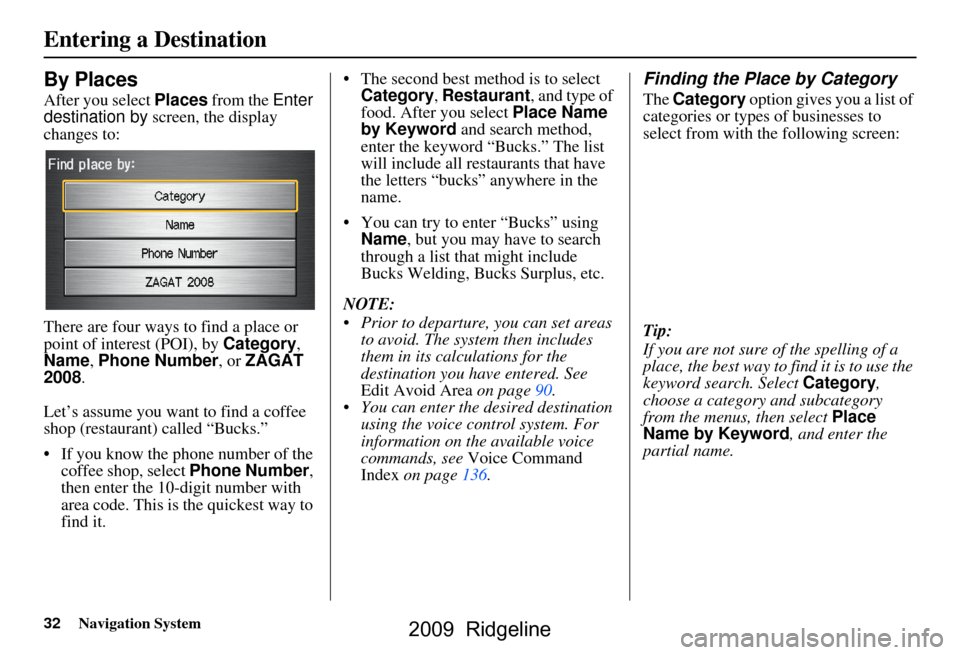
changes to:
There are four ways to find a place or
point of interest (POI), by Category,
Name , Phone Number , or ZAGAT
2008 .
Let’s assume you want to find a coffee
shop (restaurant) called “Bucks.”
If you know the phone number of the coffee shop, select Phone Number,
then enter the 10-d igit number with
area code. This is the quickest way to
find it. The second best me
thod is to select
Category , Restaurant, and type of
food. After you select Place Name
by Keyword and search method,
enter the keyword “Bucks.” The list
will include all restaurants that have
the letters “bucks” anywhere in the
name.
You can try to enter “Bucks” using Name, but you may have to search
through a list that might include
Bucks Welding, Bucks Surplus, etc.
NOTE:
Prior to departure, you can set areas to avoid. The system then includes
them in its calculations for the
destination you have entered. See
Edit Avoid Area on page90.
You can enter the desired destination using the voice control system. For
information on the available voice
commands, see Voice Command
Index on page136.
Finding the Place by Category
The Category option gives you a list of
categories or types of businesses to
select from with the following screen:
Tip:
If you are not sure of the spelling of a
place, the best way to find it is to use the
keyword search. Select Category,
choose a category and subcategory
from the menus, then select Place
Name by Keyword , and enter the
partial name.
Entering a Destination
2009 Ridgeline
Page 37 of 149
Navigation System37
Finding the Place by Phone
Number
The Phone Number option allows
you to select a destination by its
telephone number. Only telephone
numbers stored in the system under the
Places (of business) option are
recognized. The system does not contain
residential telephone numbers, or
numbers you may have entered in your
personal Address Book.
Tip:
If you know the phone number of a point
of interest (POI), its uniqueness makes it
the fastest entry meth od. When using the
voice control system, the entry should be
spoken as a continuous string of
numbers. For example, the telephone
number (310) 555-4000 should be
spoken as “Three, one, zero, five, five,
five, four, zero, zero, zero.”
Finding the Place by Zagat 2008
The ZAGAT 2008 option allows you to
find a restaurant by the Zagat Rating
information. The syst em lets you select
the metro area, neighborhood, and food
type to search the restaurant you like.
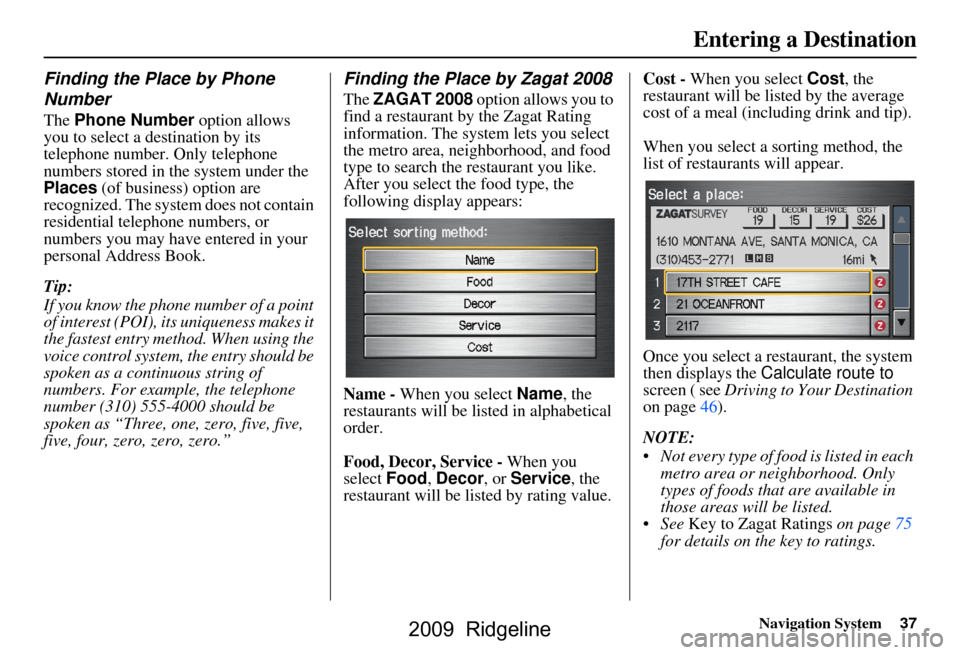
After you select the food type, the
following display appears:
Name - When you select Name, the
restaurants will be listed in alphabetical
order.
Food, Decor, Service - When you
select Food, Decor , or Service, the
restaurant will be listed by rating value. Cost -
When you select Cost, the
restaurant will be listed by the average
cost of a meal (including drink and tip).
When you select a sorting method, the
list of restaurants will appear.
Once you select a restaurant, the system
then displays the Calculate route to
screen ( see Driving to Your Destination
on page46).
NOTE:
Not every type of food is listed in each metro area or neighborhood. Only
types of foods that are available in
those areas will be listed.
See Key to Zagat Ratings on page75
for details on the key to ratings.
Entering a Destination
2009 Ridgeline
Page 62 of 149
62Navigation System
Viewing/Saving the Current
Location
Whenever you are on a map screen, you
can always obtain your current location
either by touching the Vehicle Position
icon or by using the voice control
system and saying “Display current
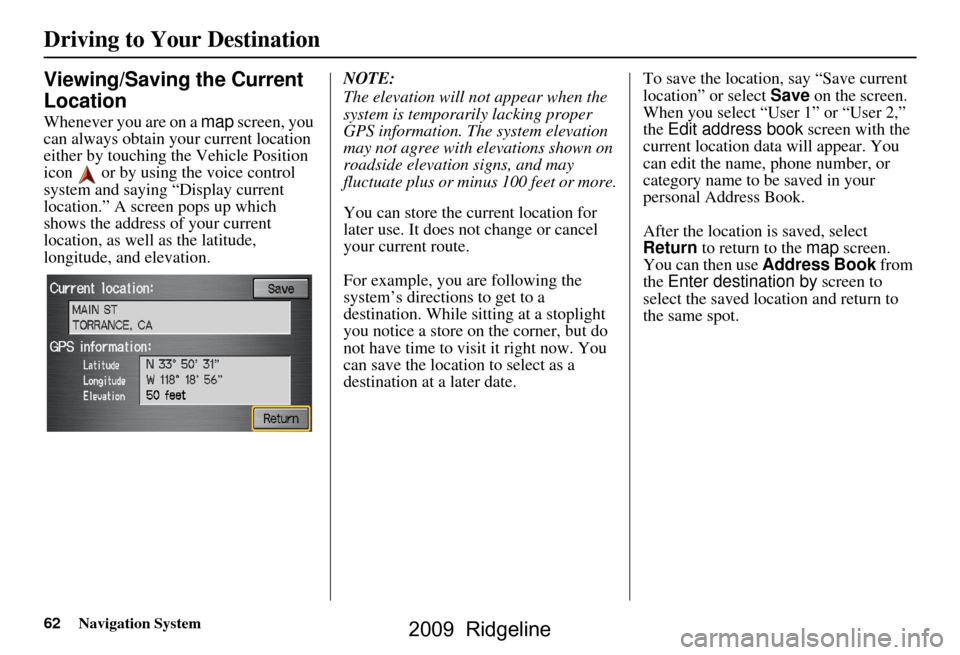
location.” A screen pops up which
shows the address of your current
location, as well as the latitude,
longitude, and elevation. NOTE:
The elevation will not appear when the
system is temporarily lacking proper
GPS information. The system elevation
may not agree with elevations shown on
roadside elevation signs, and may
fluctuate plus or minus 100 feet or more.
You can store the current location for
later use. It does not change or cancel
your current route.
For example, you
are following the
system’s directions to get to a
destination. While sitting at a stoplight
you notice a store on the corner, but do
not have time to visit it right now. You
can save the location to select as a
destination at a later date. To save the location, say “Save current
location” or select
Save on the screen.
When you select “User 1” or “User 2,”
the Edit address book screen with the
current location data will appear. You
can edit the name, phone number, or
category name to be saved in your
personal Address Book.
After the location is saved, select
Return to return to the map screen.
You can then use Address Book from
the Enter destination by screen to
select the saved location and return to
the same spot.
Driving to Your Destination
2009 Ridgeline
Page 70 of 149
70Navigation System
Information Features
Information Screen
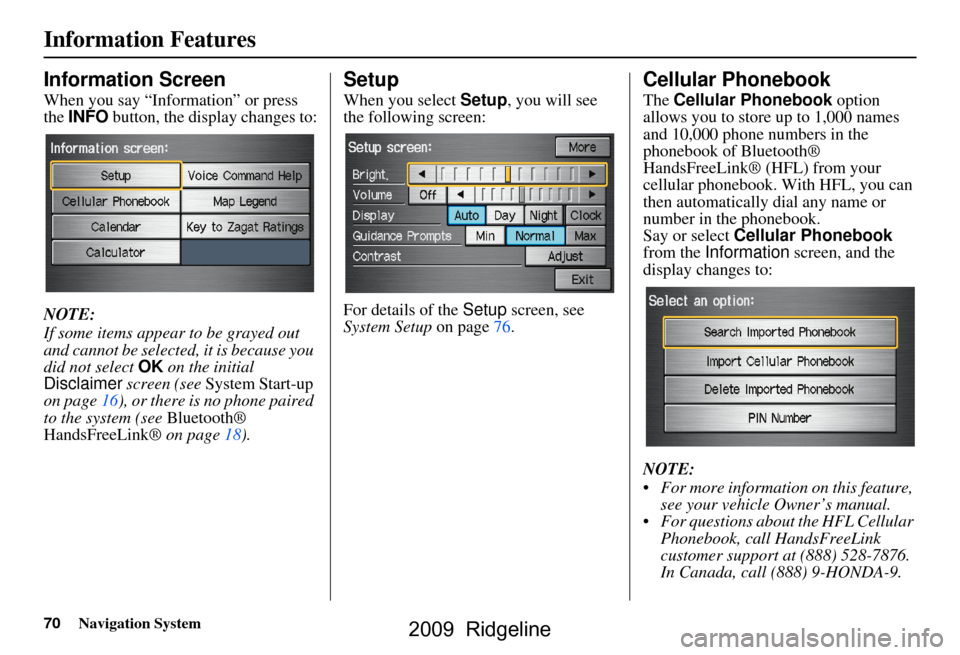
When you say “Information” or press
the INFO button, the display changes to:
NOTE:
If some items appear to be grayed out
and cannot be selected, it is because you
did not select OK on the initial
Disclaimer screen (see System Start-up
on page16), or there is no phone paired
to the system (see Bluetooth®
HandsFreeLink® on page18).
Setup
When you select Setup, you will see
the following screen:
For details of the Setup screen, see
System Setup on page76.
Cellular Phonebook
The Cellular Phonebook option
allows you to store up to 1,000 names
and 10,000 phone numbers in the
phonebook of Bluetooth®
HandsFreeLink® (HFL) from your
cellular phonebook. With HFL, you can
then automatically dial any name or
number in the phonebook.
Say or select Cellular Phonebook
from the Information screen, and the
display changes to:
NOTE:
For more information on this feature, see your vehicle Owner’s manual.
For questions about the HFL Cellular Phonebook, call HandsFreeLink
customer support at (888) 528-7876.
In Canada, call (888) 9-HONDA-9.
2009 Ridgeline
Page 81 of 149
Navigation System81
System Setup
Edit Address
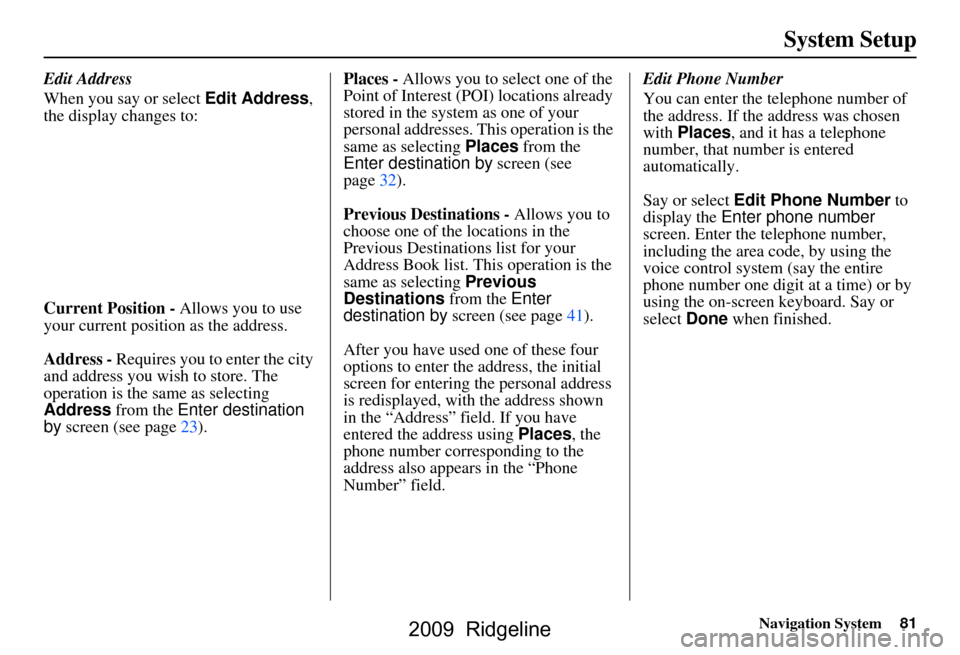
When you say or select Edit Address,
the display changes to:
Current Position - Allows you to use
your current position as the address.
Address - Requires you to enter the city
and address you wish to store. The
operation is the same as selecting
Address from the Enter destination
by screen (see page23). Places -
Allows you to select one of the
Point of Interest (POI) locations already
stored in the system as one of your
personal addresses. This operation is the
same as selecting Places from the
Enter destination by screen (see
page32).
Previous Destinations - Allows you to
choose one of the locations in the
Previous Destinations list for your
Address Book list. Th is operation is the
same as selecting Previous
Destinations from the Enter
destination by screen (see page41).
After you have used one of these four
options to enter the address, the initial
screen for entering the personal address
is redisplayed, with the address shown
in the “Address” field. If you have
entered the address using Places, the
phone number corresponding to the
address also appears in the “Phone
Number” field. Edit Phone Number
You can enter the telephone number of
the address. If the
address was chosen
with Places , and it has a telephone
number, that number is entered
automatically.
Say or select Edit Phone Number to
display the Enter phone number
screen. Enter the telephone number,
including the area code, by using the
voice control system (say the entire
phone number one digit at a time) or by
using the on-screen keyboard. Say or
select Done when finished.
2009 Ridgeline
Page 83 of 149
Navigation System83
System Setup
Home Address
This feature lets you return “Home”
from any location simply by saying “Go
home” at the map screen. Alternatively,
you can select Go Home on the Enter
destination by screen (see By Go Home
on page45).
Enter the name, address, and phone
number in the same way as entering a
personal address, then say or select
Done . To leave the screen, press the
CANCEL button.
NOTE:
If your Home address cannot be found
in the system, while lo cated on the street
close to your home, select “Current
Position” when entering the “Edit
Address” field.
PIN Number
You can set a four-digit PIN (Personal
Identification Number) for accessing
and changing personal addresses and
your home address if desired. Once you
set the PIN on this screen, the system
asks you to enter the PIN when you
access a personal address or your home
address.
NOTE:
PINs are optional. If you choose to use a
PIN, make sure you remember it. If you
forget your PIN, the dealer will have to
reset it for you.
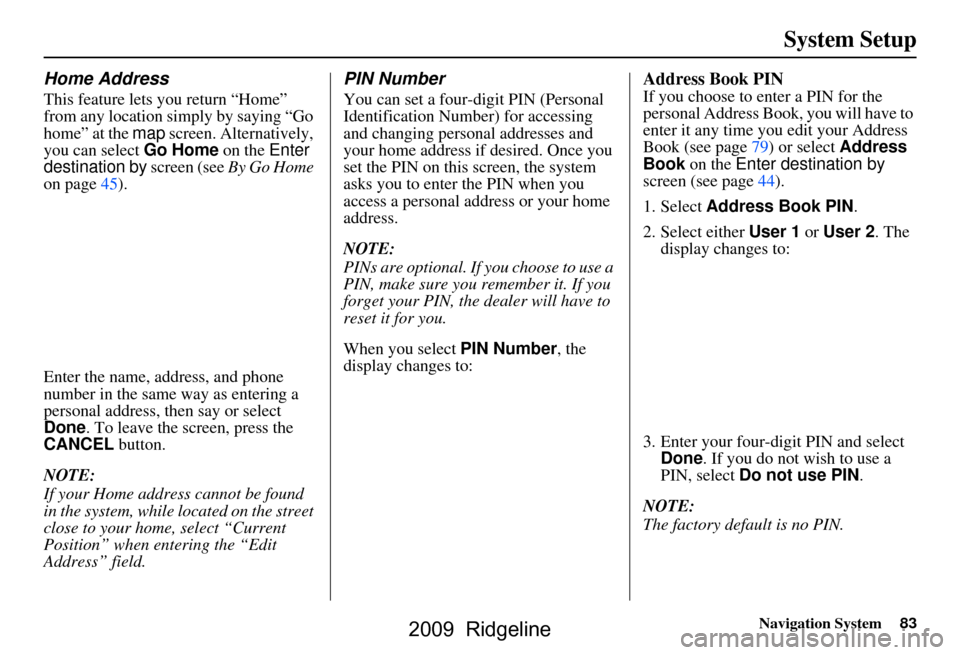
When you select PIN Number, the
display changes to:
Address Book PIN
If you choose to enter a PIN for the
personal Address Book, you will have to
enter it any time you edit your Address
Book (see page79) or select Address
Book on the Enter destination by
screen (see page44).
1. Select Address Book PIN .
2. Select either User 1 or User 2 . The
display changes to:
3. Enter your four-digit PIN and select Done . If you do not wish to use a
PIN, select Do not use PIN .
NOTE:
The factory default is no PIN.
2009 Ridgeline
Page 101 of 149
Navigation System101
System Initialization
GPS Initialization
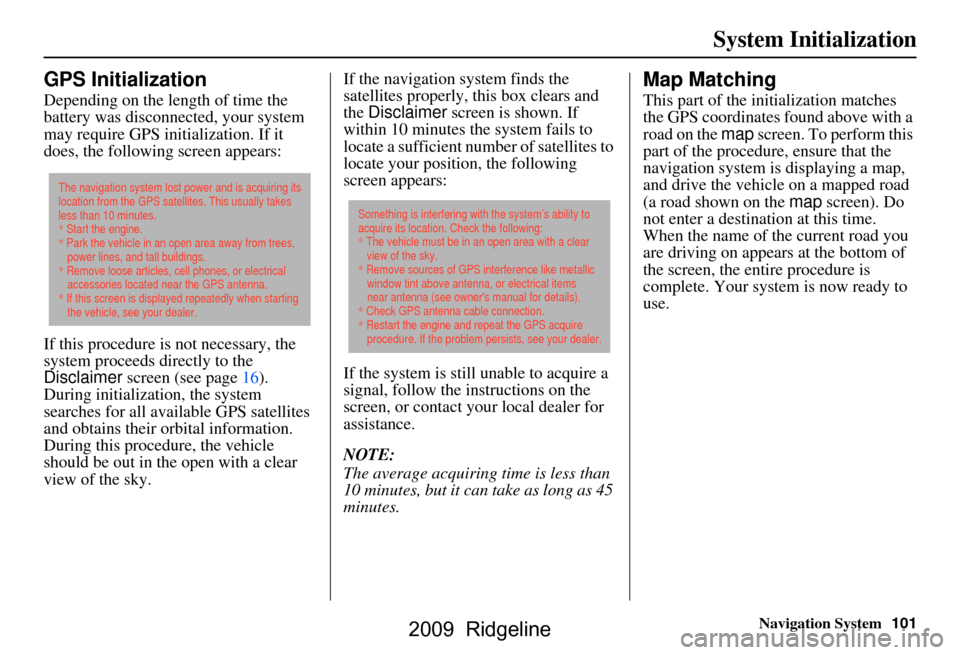
Depending on the length of time the
battery was disconnected, your system
may require GPS initialization. If it
does, the following screen appears:
If this procedure is not necessary, the
system proceeds directly to the
Disclaimer screen (see page16).
During initialization, the system
searches for all available GPS satellites
and obtains their orbital information.
During this procedure, the vehicle
should be out in th e open with a clear
view of the sky. If the navigation system finds the
satellites properly, this box clears and
the
Disclaimer screen is shown. If
within 10 minutes the system fails to
locate a sufficient number of satellites to
locate your position, the following
screen appears:
If the system is still unable to acquire a
signal, follow the instructions on the
screen, or contact you r local dealer for
assistance.
NOTE:
The average acquiring time is less than
10 minutes, but it can take as long as 45
minutes.
Map Matching
This part of the initialization matches
the GPS coordinates found above with a
road on the map screen. To perform this
part of the procedure, ensure that the
navigation system is displaying a map,
and drive the vehicle on a mapped road
(a road shown on the map screen). Do
not enter a destina tion at this time.
When the name of the current road you
are driving on appears at the bottom of
the screen, the entire procedure is
complete. Your system is now ready to
use.
The navigation system lost power and is acquiring its
location from the GPS satellites. This usually takes
less than 10 minutes.
* Start the engine.
* Park the vehicle in an open area away from trees,
power lines, and tall buildings.
* Remove loose articles, cell phones, or electrical
accessories located near the GPS antenna.
* If this screen is displayed repeatedly when starting
the vehicle, see your dealer.
Something is interfering with the system’s ability to
acquire its location. Check the following:
* The vehicle must be in an open area with a clear
view of the sky.
* Remove sources of GPS interference like metallic
window tint above antenna, or electrical items
near antenna (see owner's manual for details).
* Check GPS antenna cable connection.
* Restart the engine and repeat the GPS acquire
procedure. If the problem persists, see your dealer.
2009 Ridgeline
Page 102 of 149
102Navigation System
System Limitations
Although your navigation system is one
of the most highly sophisticated pieces
of equipment you will find in a modern
automobile, you may find during its use
that it has certain limitations.
The system uses signals from the Global
Positioning System (GPS) to aid in
determining its current location. The
GPS is operated by the U.S.
Department of Defense. For security
reasons, there are certain inaccuracies
built into the GPS that the navigation
system must constantly compensate for.
This can cause occasional positioning
errors of up to several hundred feet.
For example, in urban areas where
streets are close together, this could
cause the system to show that you are
traveling on a street that parallels the
street you are actually on. The system
will, under most circumstances, correct
itself while you drive. Depending on your current view of the
sky and the position of the satellites, the
elevation may be shown incorrectly.
You may also notice some delay of the
vehicle position icon at intersections;
this is normal.
GPS Reception Issues
The signals received from the GPS
satellites are extremely weak (less than
a millionth of the strength of a local FM
station) and requir
e an unobstructed
view of the sky. The signal can easily be
interrupted or interfered with by the
following:
Aftermarket metallic window tint above or to the sides of the GPS
antenna (located under the
dashboard)
Cell phones, PDAs, or other electronic devices docked in a cradle
or lying loose on the dashboard
Radar detectors mounted on the dashboard
Remote starters, or “hidden” vehicle tracking systems mounted near the
navigation unit Other aftermarket audio electronic
devices mounted near the navigation
unit
Trees, tall buildings, freeway overpasses, tunnels, or overhead
electrical power wires
Although the system will direct you to
your desired destination, it may not
always generate what you consider to be
the most direct rout e. Try changing the
method of routing. See Changing the
Routing Method on page47. You may
also have Unverified Area Routing set
to OFF. See Unverified Area Routing on
page86.
Additionally, the mapping database
contains verified and unverified maps.
See Map Overview on page6. A
Disclaimer screen will warn you if your
route includes unverified streets.
Unverified streets may be missing from
the map, in the wrong location, or have
an incorrect name or address range.
Exercise addition al caution when
driving in these unverified areas.
2009 Ridgeline
Page 106 of 149
106Navigation System
Customer Assistance
Reporting Errors
Occasionally, you may encounter
database errors.
If the error pertains to freeways and main “verified” roads shown in black
on the map, then report it either
online at
http://update.navteq.com/ , or to
Honda Customer Service.
If the error involves a light brown “unverified” road, then do not report
it. These areas have not been verified,
and are provided for reference only
(see Map Overview on page6).
For errors in points of interest (POI), like a business that has changed its
name, do not report them. Keep in
mind that depending on when the data
was collected and when your DVD
was purchased, the database can be
out of date. The business may have
not reported the change(s), or not be
in the database at all. Update
Navigation DVDs are available for
purchase, usually in the fall of each
year. If the error does not involve the
database, such as vehicle position
icon errors, screen error messages, or
other GPS-related errors, see
Frequently Asked Questions on
page124, System Limitations on
page102, or Troubleshooting on
page131.
Honda Automobile
Customer Service
Telephone: (800) 999-1009
Fax: (310) 783-3273
Mail:
Honda Navi
America Honda Motor Co., Inc.
Honda Customer Service
MS 500-2N-7A
1919 Torrance Blvd.
Torrance, CA 90501-2746
2009 Ridgeline
Page 123 of 149
Navigation System123
Coverage Areas
Address and POI Entry Screens
When in Hawaii, the following
differences occur for map, address, and
POI selection:
It is not possible to enter U.S.
mainland addresses or scroll the map
east to the U.S. mainland.
Selection of the “State” is confined to the state of Hawaii only.
Entry of a destination address or POI on an island other than your current
island may result in a screen caution
message. This is normal because
there are no “ferry” routes between
islands available in the database.
If the “Guidance Prompts” setting on the Setup screen is set to normal or
maximum, street names will not be
spoken in voice guidance commands.
Setup Screen Differences
The Setup screen differences are minor
and are listed below. See the Setup
section (page76) for additional
information.
Routing and Guidance (Unverified
Area Routing On/Off)
This feature is unavailable. All roads
displayed on the map are verified.
Clock Adjust Screen
There is no daylight saving time for
Hawaii. Auto Daylight Saving
Time, Auto Time Zone by GPS , and
DST Selection will not be shown on
the Clock adjustment screen. To test
your adjustment, use the voice control
system, and say “What time is it?” (see
page96).
Bluetooth® HandsFreeLink®
Operation
When pairing a cell phone to use the
Bluetooth® HandsFreeLink® feature,
you may see a “Phone-Data
Connection” screen. If so, do not
complete this portion of the process.
Shipping a Vehicle To or From
Hawaii
Although the DVD in the vehicle
contains maps for both U.S. mainland
and Hawaii, the dealer must perform the
selection of “U.S. mainland” or
“Hawaii” for you. When the dealer
makes the switch from U.S. mainland to
Hawaii or vice versa, the system clears
all user data. Make sure to record any
personal information that you do not
want to lose.
NOTE:
Shipping a vehicle from Hawaii to the
U.S. mainland
If you wish to receive XM audio you must call XM and set up an account
at (800) 852-9696.
Shipping a vehicle from the U.S.
mainland to Hawaii
If a U.S. mainland -delivered vehicle
is shipped to Hawaii, there is no XM
reception. See your Hawaii dealer to
allow viewing of local Hawaii maps.
The issues under “Operation in Hawaii” above apply.
2009 Ridgeline