clock HONDA RIDGELINE 2010 1.G User Guide
[x] Cancel search | Manufacturer: HONDA, Model Year: 2010, Model line: RIDGELINE, Model: HONDA RIDGELINE 2010 1.GPages: 421, PDF Size: 7.23 MB
Page 194 of 421
Turnthekeyclockwiseagain,and
hold it. All f our side windows start
to open. To stop the windows,
release the key.
To open the windows f urther, turn
andholdthekeyagain(within
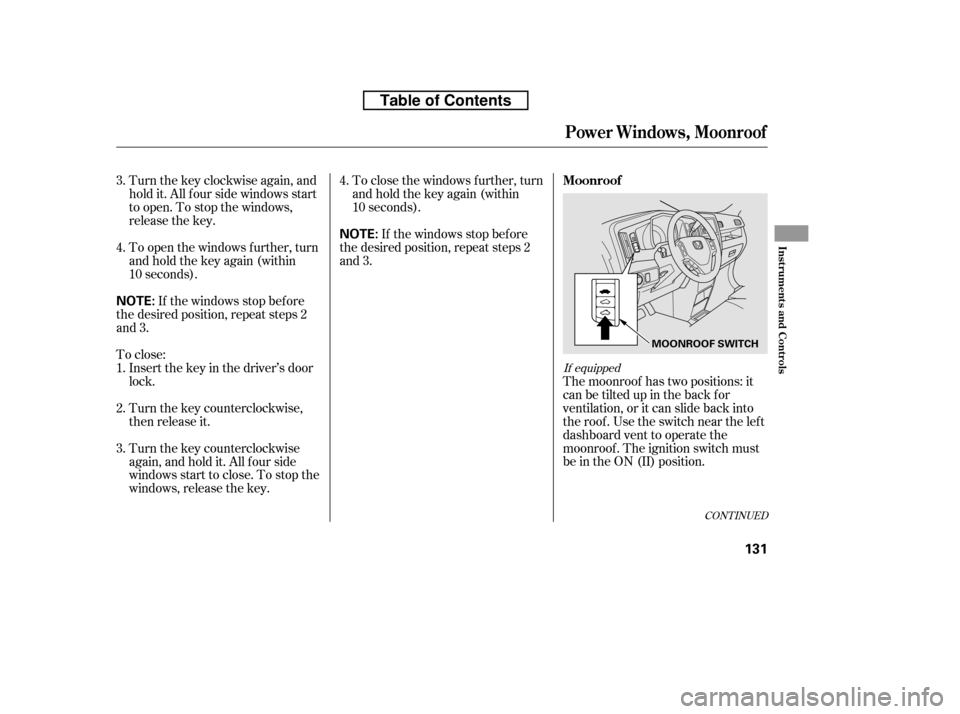
10 seconds).The moonroof has two positions: it
can be tilted up in the back f or
ventilation, or it can slide back into
the roof. Use the switch near the left
dashboard vent to operate the
moonroof . The ignition switch must
be in the ON (II) position.
If the windows stop bef ore
the desired position, repeat steps 2
and 3. To close the windows f urther, turn
andholdthekeyagain(within
10 seconds).
To close: If the windows stop bef ore
the desired position, repeat steps 2
and 3.
Insert the key in the driver’s door
lock.
Turn the key counterclockwise,
then release it.
Turn the key counterclockwise
again, and hold it. All four side
windowsstarttoclose.Tostopthe
windows, release the key.
1. 2.3. 4.
3. 4.
If equipped
CONT INUED
Moonroof
Power Windows, Moonroof
Inst rument s and Cont rols
131
NOTE:
NOTE:
MOONROOF SWITCH
Table of Contents
Page 204 of 421
Always run the engine when you use
the AC power outlet.
The maximum capacity f or this
power outlet is 115 volt AC at 100
watts or less. If you use an appliance
which requires more than 100 watts,
it automatically stops supplying the
power. If this happens, turn the
ignition switch of f and turn it on
again.The AC power outlet is not
designed f or electric appliances
which require high initial peak
wattage such as cathode-ray tube
type televisions, ref rigerators,
electric pumps, etc. It is also not
suitable f or devices that process
precise data such as medical
equipment or measuring instruments.
Any appliances that require an
extremely stable power supply such
as microcomputer-controlled electric
blankets, touch sensor lamps, etc.,
should not be connected to this
outlet.
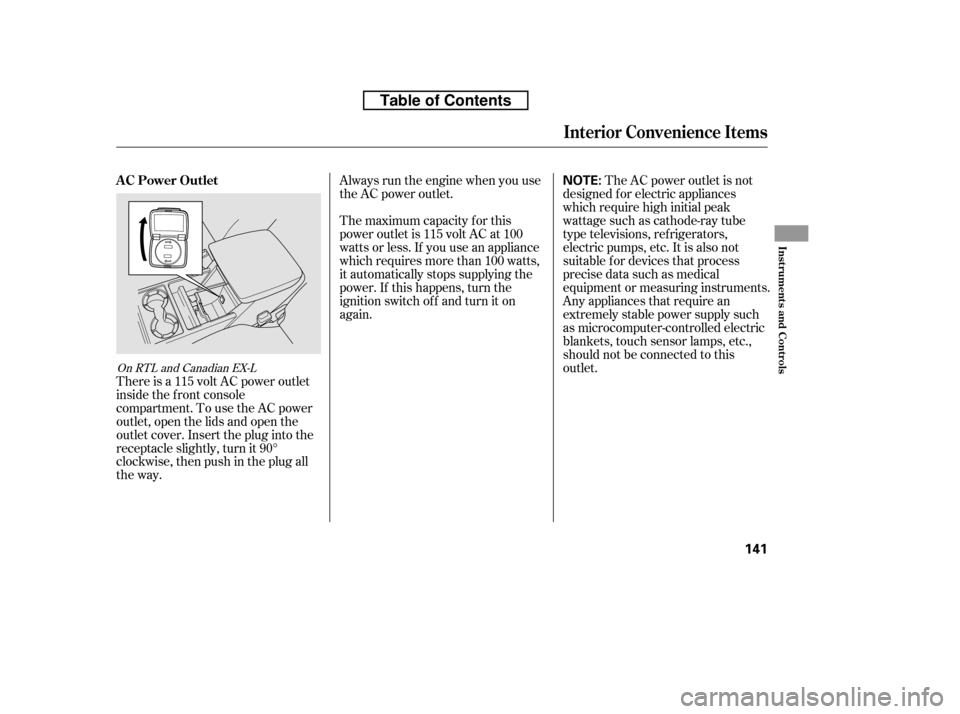
There is a 115 volt AC power outlet
inside the f ront console
compartment. To use the AC power
outlet, open the lids and open the
outlet cover. Insert the plug into the
receptacle slightly, turn it 90°
clockwise, then push in the plug all
the way.
On RTL and Canadian EX-L
Interior Convenience Items
AC Power Outlet
Inst rument s and Cont rols
141
NOTE:
Table of Contents
Page 208 of 421

The heating and air conditioning
system in your vehicle provides a
comf ortable driving environment in
all weather conditions.
The standard audio system has
many f eatures. This section
describes those f eatures and how to
use them.
Your vehicle has an anti-theft audio
system that requires a code number
to enable it.
The security system helps to dis-
courage vandalism and thef t of your
vehicle.
Theclimatecontrolsystemandthe
audio system have a voice control
feature. Refer to the navigation
system manual f or more inf ormation..............Vents, Heating, and A/C . 146
...............
Climate Control System . 152
..........
Playing the AM/FM Radio . 159
............
AM/FM Radio Reception . 165
................
Playing the XM
Radio . 167
...................................
Playing CDs . 173
.......................................
CD Player . 175
CD Changer
(Models without navigation ..................................
system) . 181
CD Changer
(Models with navigation
..................................
system) . 189
....................
Protecting Your CDs . 198
CD Player/Changer Error
...................................
Messages . 202
................
Remote Audio Controls . 203
......................
Auxiliary Input Jack . 205
.................
Radio Thef t Protection . 206
..........................
Setting the Clock . 207
............................
Security System . 208
...............................
Cruise Control . 210
.........................................
Compass . 213
HomeLink
Universal
................................
Transceiver . 217
........
HandsFreeLink. 221 ...
Rearview Camera and Monitor . 246Bluetooth
On RTS, RTL models, and Canadian
EX-L models
On models with navigation system
Features
Features
145
Page 210 of 421

This button turns the air
conditioningonandoff.Youwillsee
A/C ON or A/C OFF in the display.When the indicator in the button is
on, air f rom the vehicle’s interior is
sent throughout the system again.
When the indicator is off, air is
brought in f rom the outside of the
vehicle (fresh air mode).
Thesystemshouldbeleftinfresh
air mode under almost all conditions.
Keeping the system in recirculation
mode, particularly with the A/C of f ,
can cause the windows to fog up.
Switch to recirculation mode when
driving through dusty or smoky
conditions, then return to fresh air
mode.
The outside air intakes f or the
heating and cooling system are at
the base of the windshield. Keep this
area clear of leaves and other debris.
Turn this dial to increase or decrease
the fan speed and airflow.
Turning this dial clockwise increases
the temperature of the airflow.
Vents, Heating, and A/C
Air Conditioning (A/C) Button Recirculation Button
Fan Control Dial
T emperature Control Dial
Features
147
Table of Contents
Page 216 of 421

The automatic climate control
system in your vehicle maintains the
interior temperature you select. The
system also adjusts the f an speed
and airf low levels.The system automatically selects the
proper mix of conditioned and/or
heated air that will, as quickly as
possible, raise or lower the interior
temperature to your pref erence.
When you set either side
temperature to its lower limit
( ) or its upper limit ( ),
the system runs at f ull cooling or
heating only. It does not regulate the
interior temperature.
When you press a f an control button,
the fan is taken out of AUTO mode.
The driver’s and passenger’s side
temperatures should always be set
separately. Turn the desired dial
clockwisetoincreasetheairflow
temperature of that side, and
counterclockwise to decrease it.
Press the Auto button on the front
control panel. You will see AUTO
in the system display.
Adjust the temperature for the
driver’s and passenger’s side
separately, using the desired
temperature control dial.
The passenger’s side temperature
setting does not synchronize to the
driver’s side at any time except when
the system is in the defroster mode
(see page ).
1. 2.
155
CONT INUED
Using A utomatic Climate Control
T emperat ure Cont rol
Climat e Cont rol Syst em
Features
153
Table of Contents
Page 270 of 421
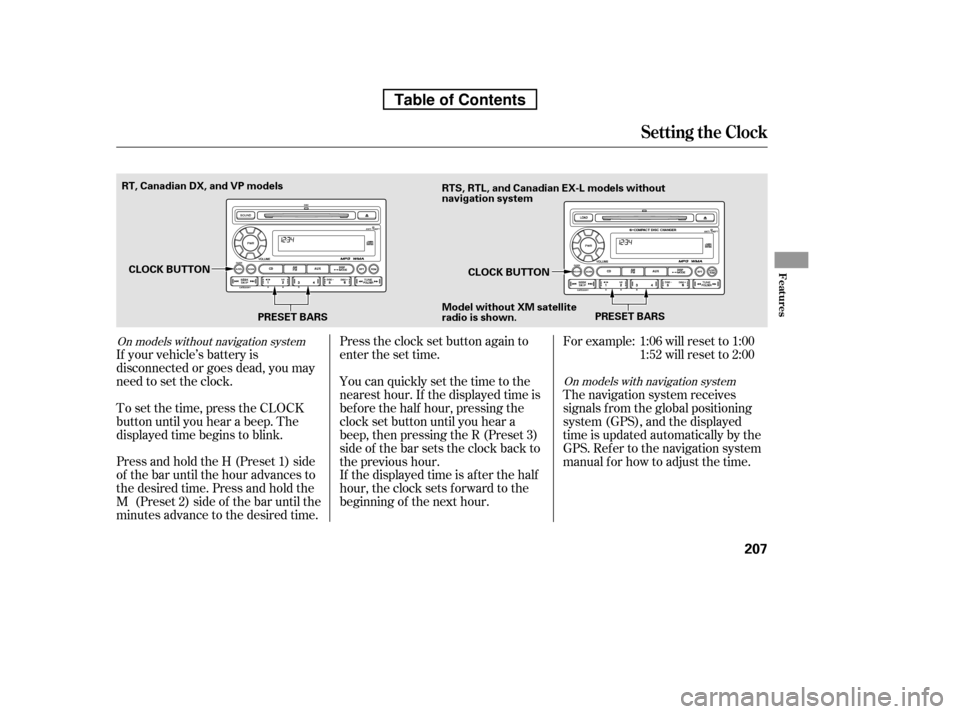
Press and hold the H (Preset 1) side
of the bar until the hour advances to
the desired time. Press and hold the
M (Preset 2) side of the bar until the
minutes advance to the desired time.
To set the time, press the CLOCK
button until you hear a beep. The
displayed time begins to blink.
If your vehicle’s battery is
disconnected or goes dead, you may
need to set the clock. You can quickly set the time to the
nearest hour. If the displayed time is
bef ore the half hour, pressing the
clock set button until you hear a
beep, then pressing the R (Preset 3)
side of the bar sets the clock back to
the previous hour.
If the displayed time is after the half
hour, the clock sets f orward to the
beginning of the next hour.
Press the clock set button again to
enter the set time.
For example:
The navigation system receives
signals f rom the global positioning
system (GPS), and the displayed
time is updated automatically by the
GPS. Ref er to the navigation system
manual f or how to adjust the time.1:06 will reset to 1:00
1:52 will reset to 2:00
On models with navigation system
On models without navigation system
Setting the Clock
Features
207
PRESET BARS
PRESET BARS
CLOCK BUTTON
CLOCK BUTTON
RT, Canadian DX, and VP models
RTS, RTL, and Canadian EX-L models without
navigation system
Model without XM satellite
radio is shown.
Table of Contents
Page 377 of 421
CONT INUED
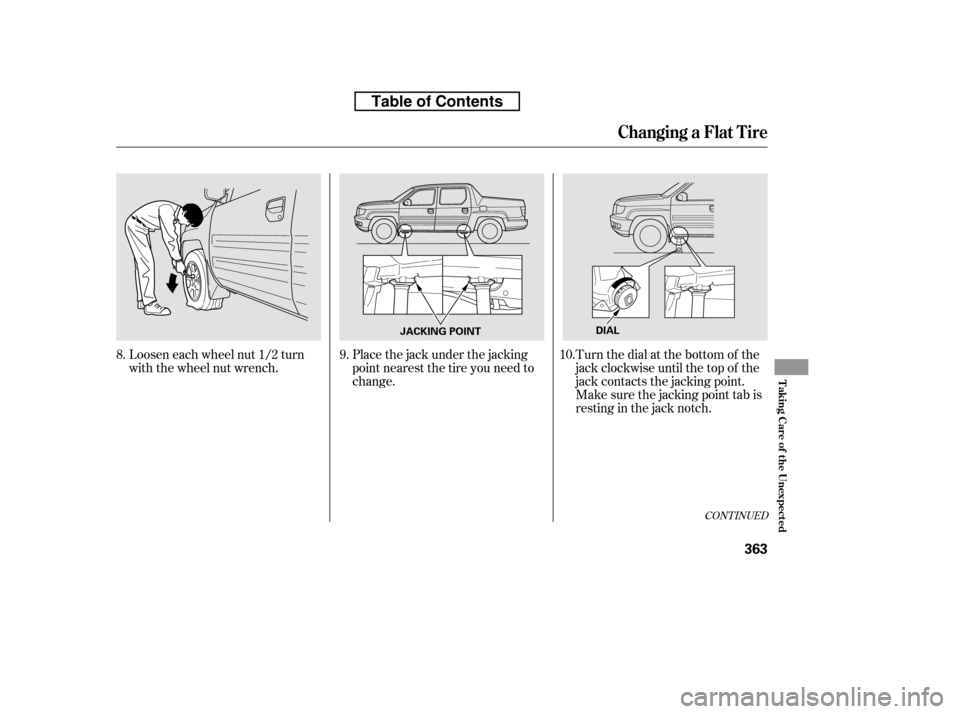
Loosen each wheel nut 1/2 turn
with the wheel nut wrench.Place the jack under the jacking
point nearest the tire you need to
change.Turn the dial at the bottom of the
jack clockwise until the top of the
jack contacts the jacking point.
Make sure the jacking point tab is
restinginthejacknotch.
8.
9.10.
Changing a Flat T ire
T aking Care of t he Unexpect ed
363
JACKING POINTDIAL
Table of Contents
Page 378 of 421
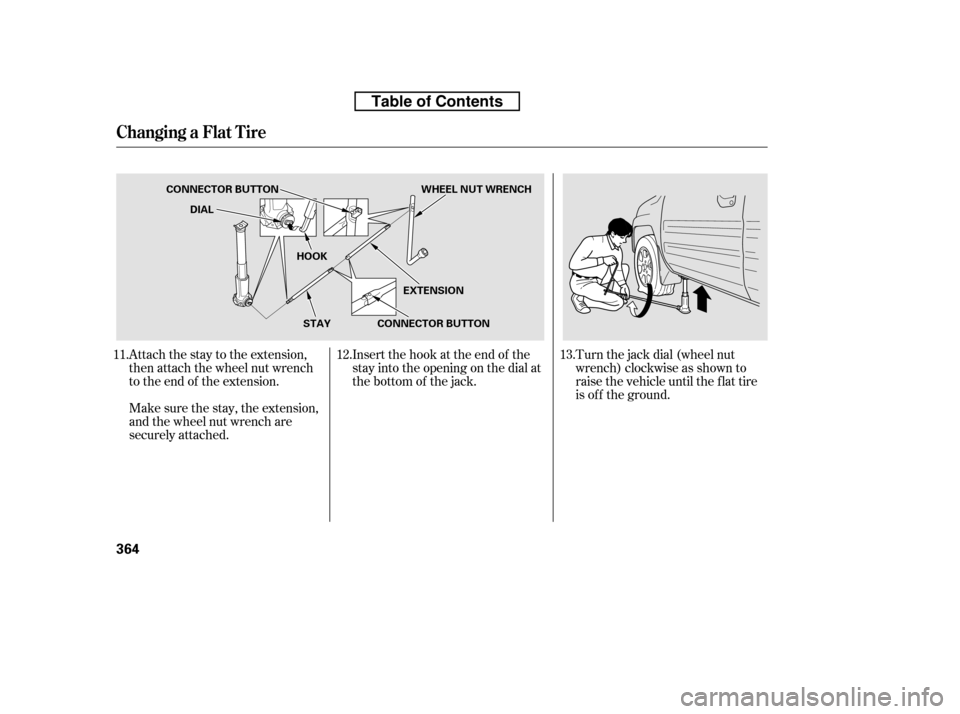
Attach the stay to the extension,
then attach the wheel nut wrench
to the end of the extension.Turn the jack dial (wheel nut
wrench) clockwise as shown to
raise the vehicle until the f lat tire
is of f the ground.
Make sure the stay, the extension,
and the wheel nut wrench are
securely attached. Insert the hook at the end of the
stay into the opening on the dial at
the bottom of the jack.
11. 12. 13.
Changing a Flat T ire
364
EXTENSION
CONNECTOR BUTTON
DIAL
CONNECTOR BUTTON WHEEL NUT WRENCH
HOOKSTAY
Table of Contents
Page 387 of 421

If the temperature gauge stays at
the red mark, turn of f the engine.
Look f or any obvious coolant leaks,
such as a split radiator hose.
Everything is still extremely hot,
so use caution. If you f ind a leak, it
must be repaired bef ore you
continue driving (seeon page ).
Put the radiator cap back on
tightly. Run the engine, and check
the temperature gauge. If it goes
back to the red mark, the engine
needs repair (seeon page ).
If the temperature stays normal,
check the coolant level in the
radiator reserve tank. If it has
gone down, add coolant to the
MAX mark. Put the cap back on
tightly.
If you do not f ind an obvious leak,
check the coolant level in the
radiator reserve tank. Add coolant
if the level is below the MIN mark.
If there was no coolant in the
reserve tank, you may need to add
coolant to the radiator. Let the
engine cool down until the pointer
reaches the middle of the tempera-
ture gauge, or lower, bef ore check-
ing the radiator.
Using gloves or a large heavy
cloth, turn the radiator cap
counterclockwise, without pushing
down, to the f irst stop. Af ter the
pressure releases, push down on
the cap, and turn it until it comes
off.Start the engine, and set the
temperature to maximum heat
(climate control to AUTO at
‘‘ ’’). Add coolant to the
radiator up to the base of the f iller
neck. If you do not have the
proper coolant mixture available,
you can add plain water.
Remember to have the cooling
system drained and ref illed with
the proper mixture as soon as you
can.
4. 5.
6. 7. 8.9.
10. 11.
383
383
Emergency
Towing
Emergency
Towing
If theEngineOverheats
T aking Care of t he Unexpect ed
373
Removing the radiator cap
while the engine is hot can
cause the coolant to spray out,
seriously scalding you.
Always let the engine and
radiator cool down before
removing the radiator cap.
Table of Contents