light HONDA RIDGELINE 2013 1.G Navigation Manual
[x] Cancel search | Manufacturer: HONDA, Model Year: 2013, Model line: RIDGELINE, Model: HONDA RIDGELINE 2013 1.GPages: 152, PDF Size: 4.14 MB
Page 57 of 152
56Navigation System
RIDGELINE KA 31SJC860
Driving to Your Destination
Map Scale
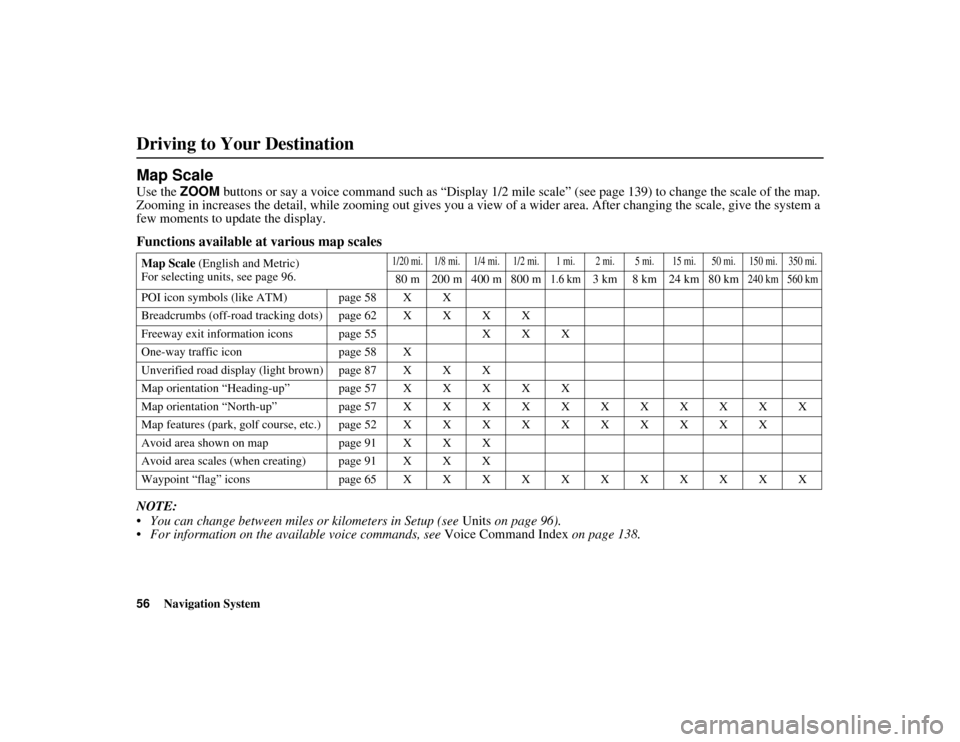
Use the ZOOM buttons or say a voice command such as “Display 1/2 mile scale” (see pa ge 139) to change the scale of the map.
Zooming in increases the de tail, while zooming out gives you a view of a wide r area. After changing the scale, give the system a
few moments to update the display.
Functions available at various map scales
NOTE:
• You can change between miles or kilometers in Setup (see Units on page 96).
• For information on the av ailable voice commands, see Voice Command Index on page 138.
Map Scale (English and Metric)
For selecting units, see page 96.1/20 mi. 1/8 mi. 1/4 mi. 1/2 mi. 1 mi. 2 mi. 5 mi. 15 mi. 50 mi. 150 mi. 350 mi.
80 m 200 m 400 m 800 m1.6 km3 km 8 km 24 km 80 km240 km 560 km
POI icon symbols (like ATM) page 58 X X
Breadcrumbs (off-road tracking dots) page 62 X X X X
Freeway exit information icons page 55 X X X
One-way traffic icon page 58 X
Unverified road display (light brown) page 87 X X X
Map orientation “Heading-up” page 57 X X X X X
Map orientation “North-up” page 57 X X X X X X X X X X X
Map features (park, golf course, etc.) page 52 X X X X X X X X X X
Avoid area shown on map page 91 X X X
Avoid area scales (when creating) page 91 X X X
Waypoint “flag” icons page65XXXXXXXXXXX
Page 64 of 152
Navigation System63
RIDGELINE KA 31SJC860
Viewing/Saving the Current
Location
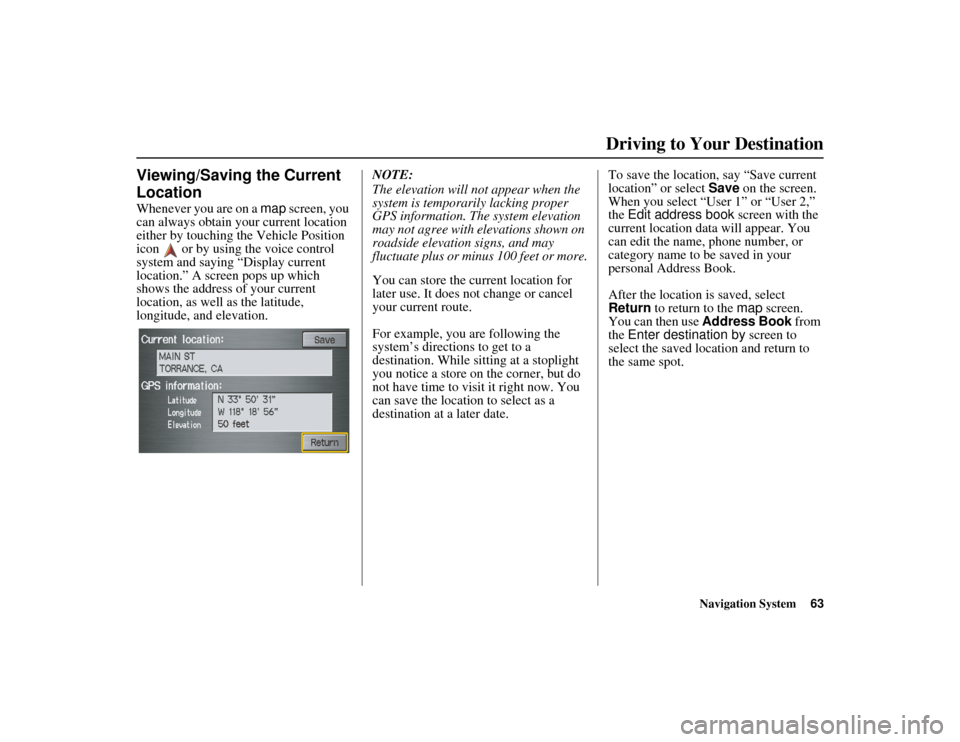
Whenever you are on a map screen, you
can always obtain your current location
either by touching the Vehicle Position
icon or by using the voice control
system and saying “Display current
location.” A screen pops up which
shows the address of your current
location, as well as the latitude,
longitude, and elevation. NOTE:
The elevation will not appear when the
system is temporarily lacking proper
GPS information. The system elevation
may not agree with elevations shown on
roadside elevation signs, and may
fluctuate plus or minus 100 feet or more.
You can store the current location for
later use. It does not change or cancel
your current route.
For example, you are following the
system’s directions to get to a
destination. While sitting at a stoplight
you notice a store on the corner, but do
not have time to visit it right now. You
can save the location to select as a
destination at a later date.To save the location, say “Save current
location” or select
Save on the screen.
When you select “User 1” or “User 2,”
the Edit address book screen with the
current location data will appear. You
can edit the name, phone number, or
category name to be saved in your
personal Address Book.
After the location is saved, select
Return to return to the map screen.
You can then use Address Book from
the Enter destination by screen to
select the saved location and return to
the same spot.
Driving to Your Destination
Page 73 of 152
72Navigation System
RIDGELINE KA 31SJC860
Information Features
Calendar
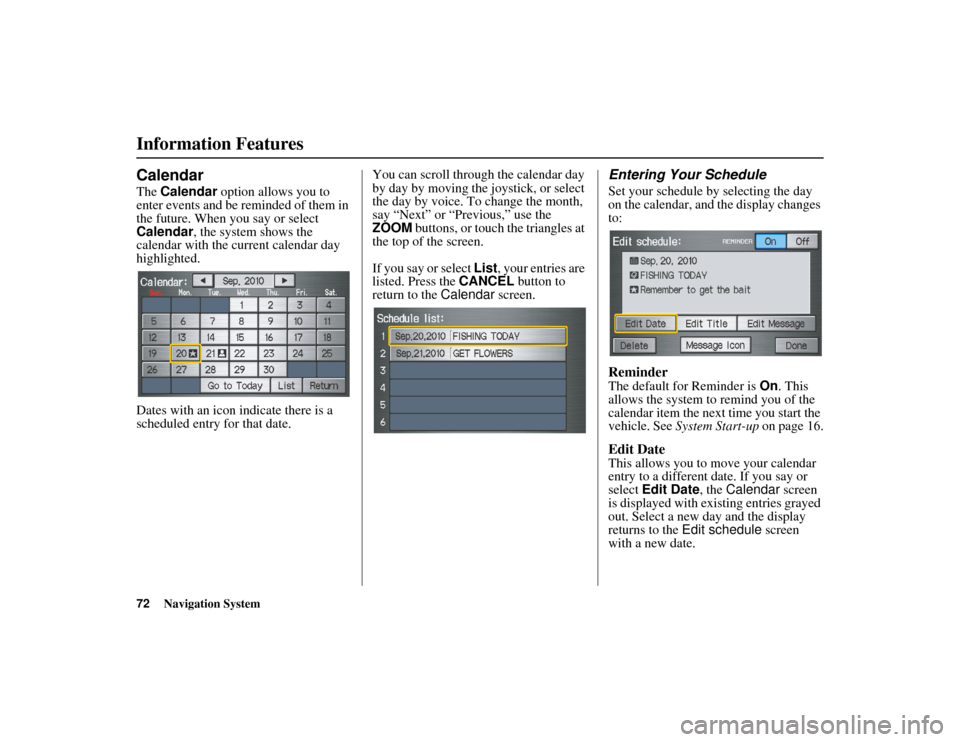
The Calendar option allows you to
enter events and be reminded of them in
the future. When you say or select
Calendar , the system shows the
calendar with the current calendar day
highlighted.
Dates with an icon indicate there is a
scheduled entry for that date. You can scroll through the calendar day
by day by moving the joystick, or select
the day by voice. To change the month,
say “Next” or “Previous,” use the
ZOOM buttons, or touch the triangles at
the top of the screen.
If you say or select
List, your entries are
listed. Press the CANCEL button to
return to the Calendar screen.
Entering Your Schedule
Set your schedule by selecting the day
on the calendar, and the display changes
to:
Reminder
The default for Reminder is On. This
allows the system to remind you of the
calendar item the next time you start the
vehicle. See System Start-up on page 16.
Edit Date
This allows you to move your calendar
entry to a different date. If you say or
select Edit Date , the Calendar screen
is displayed with existing entries grayed
out. Select a new day and the display
returns to the Edit schedule screen
with a new date.
Page 79 of 152
78Navigation System
RIDGELINE KA 31SJC860
System Setup
Display
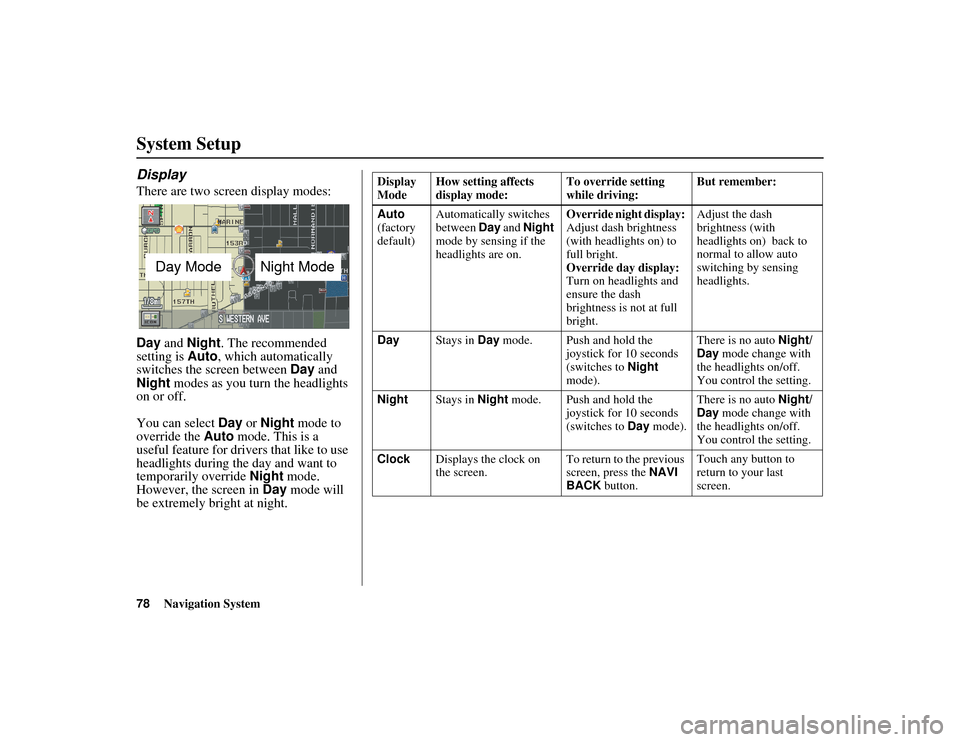
There are two screen display modes:
Day and Night. The recommended
setting is Auto, which automatically
switches the screen between Day and
Night modes as you turn the headlights
on or off.
You can select Day or Night mode to
override the Auto mode. This is a
useful feature for drivers that like to use
headlights during the day and want to
temporarily override Night mode.
However, the screen in Day mode will
be extremely bright at night.
Day ModeNight Mode
Display
Mode How setting affects
display mode: To override setting
while driving:But remember:
Auto
(factory
default) Automatically switches
between
Day and Night
mode by sensing if the
headlights are on. Override night display:
Adjust dash brightness
(with headlights on) to
full bright.
Override day display:
Turn on headlights and
ensure the dash
brightness is not at full
bright.Adjust the dash
brightness (with
headlights on) back to
normal to allow auto
switching by sensing
headlights.
Day Stays in Day mode. Push and hold the
joystick for 10 seconds
(switches to Night
mode). There is no auto
Night/
Day mode change with
the headlights on/off.
You control the setting.
Night Stays in Night mode. Push and hold the
joystick for 10 seconds
(switches to Day mode). There is no auto
Night/
Day mode change with
the headlights on/off.
You control the setting.
Clock Displays the clock on
the screen. To return to the previous
screen, press the
NAVI
BACK button. Touch any button to
return to your last
screen.
Page 88 of 152
Navigation System87
RIDGELINE KA 31SJC860
System Setup
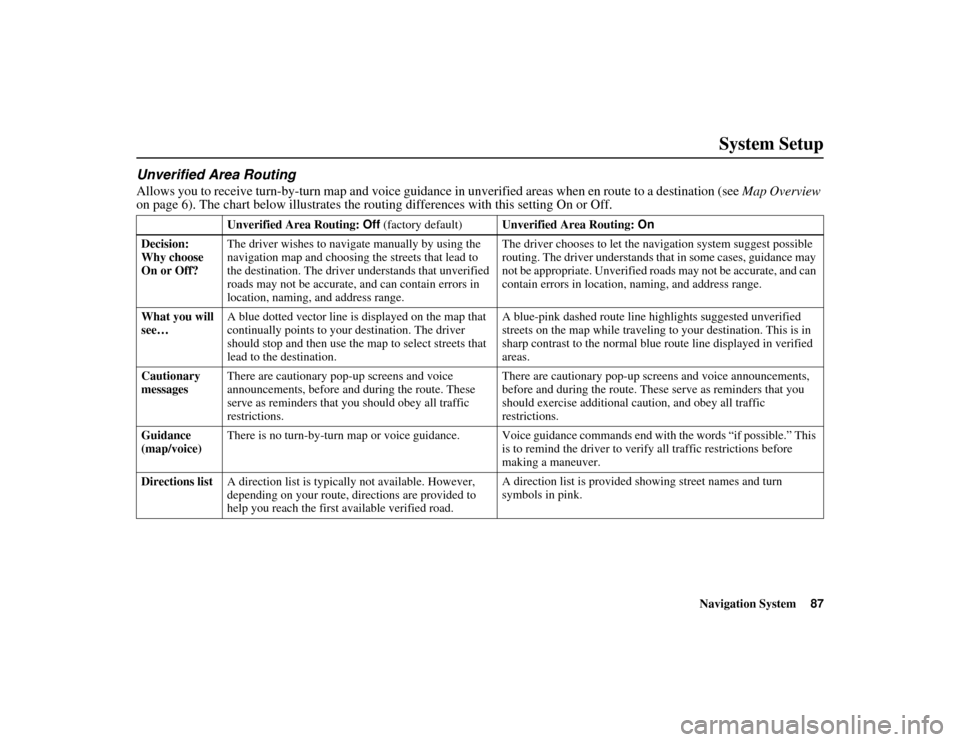
Unverified Area Routing
Allows you to receive turn-by-turn map and voice guidance in unverified areas when en route to a destination (see Map Overview
on page 6). The chart below illust rates the routing differences with this setting On or Off.
Unverified Area Routing: Off (factory default) Unverified Area Routing: On
Decision:
Why choose
On or Off? The driver wishes to navigate manually by using the
navigation map and choosing the streets that lead to
the destination. The driver
understands that unverified
roads may not be accurate, a nd can contain errors in
location, naming, and address range. The driver chooses to let the navigation system suggest possible
routing. The driver understands that in some cases, guidance may
not be appropriate. Unverified roads may not be accurate, and can
contain errors in location,
naming, and address range.
What you will
see… A blue dotted vector line is displayed on the map that
continually points to your destination. The driver
should stop and then use the
map to select streets that
lead to the destination. A blue-pink dashed route line highlights suggested unverified
streets on the map while traveling to your destination. This is in
sharp contrast to the normal blue route line displayed in verified
areas.
Cautionary
messages There are cautionary pop-
up screens and voice
announcements, before and during the route. These
serve as reminders that you should obey all traffic
restrictions. There are cautionary pop-up scr
eens and voice announcements,
before and during the route. These serve as reminders that you
should exercise additional caution, and obey all traffic
restrictions.
Guidance
(map/voice) There is no turn-by-turn map or voice guidance. Voice guidance commands end with the words “if possible.” This
is to remind the driver to verify all traffic restrictions before
making a maneuver.
Directions list A direction list is typically not available. However,
depending on your route, directions are provided to
help you reach the first available verified road. A direction list is provided showing street names and turn
symbols in pink.
Page 89 of 152
88Navigation System
RIDGELINE KA 31SJC860
System Setup
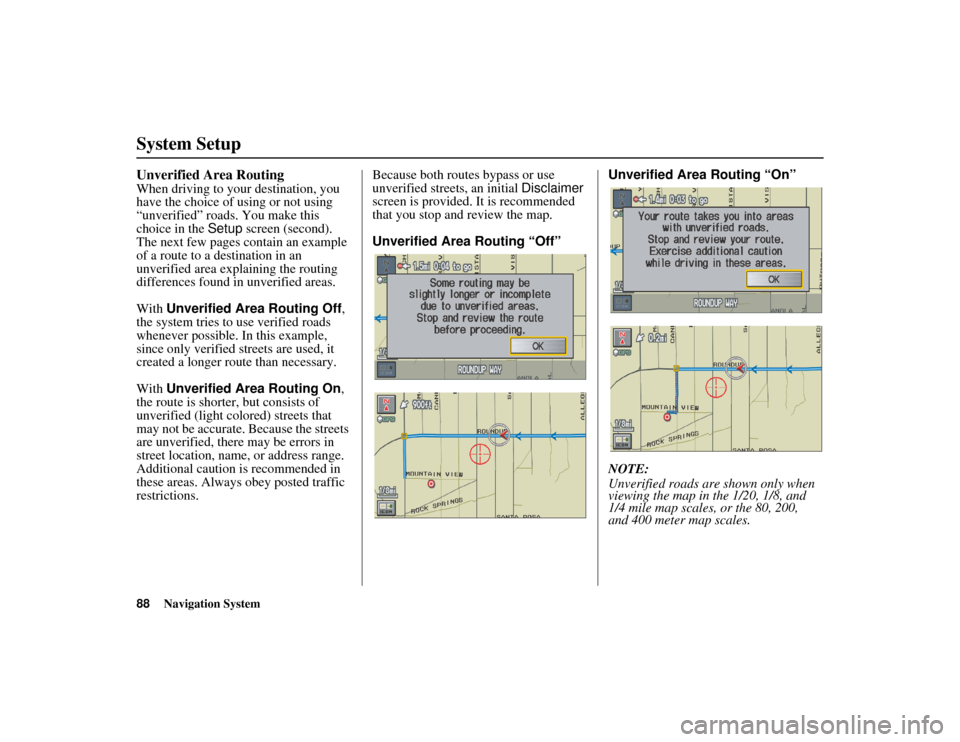
Unverified Area Routing
When driving to your destination, you
have the choice of using or not using
“unverified” roads. You make this
choice in the Setup screen (second).
The next few pages contain an example
of a route to a destination in an
unverified area explaining the routing
differences found in unverified areas.
With Unverified Area Routing Off ,
the system tries to use verified roads
whenever possible. In this example,
since only verified streets are used, it
created a longer route than necessary.
With Unverified Area Routing On ,
the route is shorter, but consists of
unverified (light colored) streets that
may not be accurate. Because the streets
are unverified, there may be errors in
street location, name, or address range.
Additional caution is recommended in
these areas. Always obey posted traffic
restrictions. Because both routes bypass or use
unverified street
s, an initial Disclaimer
screen is provided. It is recommended
that you stop and review the map.
Unverified Area Routing “Off” Unverified Area Routing “On”
NOTE:
Unverified roads are shown only when
viewing the map in the 1/20, 1/8, and
1/4 mile map scales, or the 80, 200,
and 400 meter map scales.
Page 92 of 152
Navigation System91
RIDGELINE KA 31SJC860
System Setup
Edit Avoid Area
This function allows you to select areas
you wish to avoid when calculating a
route to your destination. You can select
up to five areas to avoid. You may wish
to set up an “avoid area” to route around
long-term road construction, closures,
or any area you wish to avoid. If you
enter a route that takes you through or
into an “avoid area,” a pop-up box will
warn you that your route takes you into
one of these areas. However, you can
still choose destinations in an avoided
area.
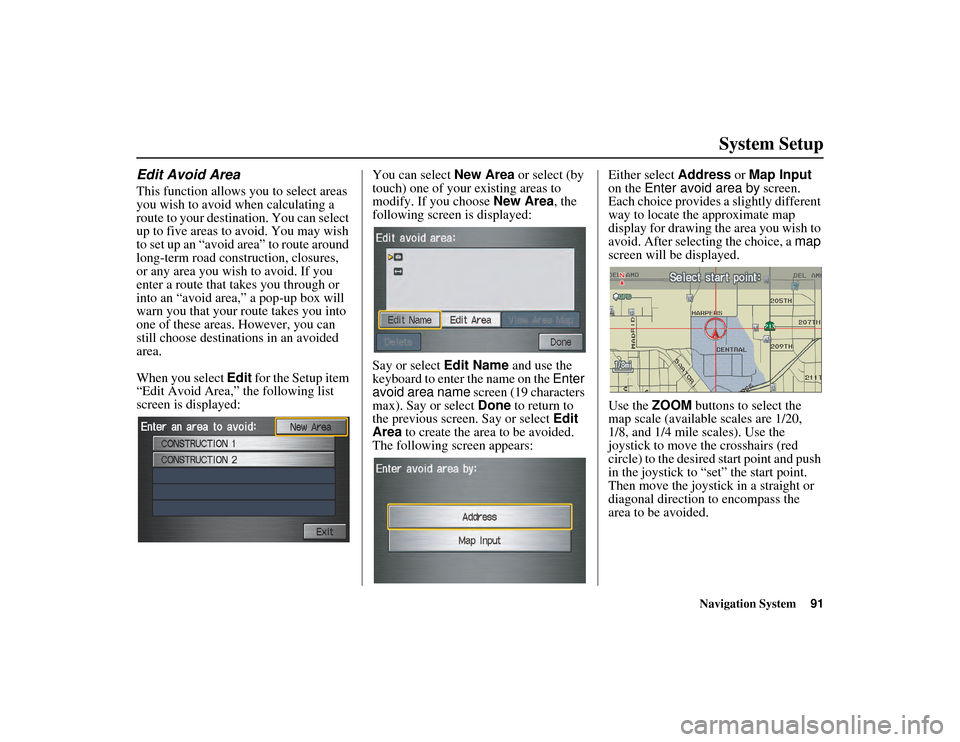
When you select Edit for the Setup item
“Edit Avoid Area,” the following list
screen is displayed: You can select
New Area or select (by
touch) one of your existing areas to
modify. If you choose New Area, the
following screen is displayed:
Say or select Edit Name and use the
keyboard to enter the name on the Enter
avoid area name screen (19 characters
max). Say or select Done to return to
the previous screen. Say or select Edit
Area to create the area to be avoided.
The following screen appears: Either select
Address or Map Input
on the Enter avoid area by screen.
Each choice provides a slightly different
way to locate th e approximate map
display for drawing the area you wish to
avoid. After selecting the choice, a map
screen will be displayed.
Use the ZOOM buttons to select the
map scale (available scales are 1/20,
1/8, and 1/4 mile scales). Use the
joystick to move the crosshairs (red
circle) to the desired start point and push
in the joystick to “set” the start point.
Then move the joystick in a straight or
diagonal direction to encompass the
area to be avoided.
Page 94 of 152
Navigation System93
RIDGELINE KA 31SJC860
System Setup
Edit Waypoint Search Area
When driving en route to your
destination, you can select a temporary
destination waypoint (marked with a
small flag on the map) along your route
for gas, a restaurant, or other POI. When
you resume your trip from the waypoint,
the system continues the trip to your
original destination. To use this feature,
see Waypoints on page 65.
This Setup item allows you to select the
distance from your highlighted route
line (on either side of your route) that
the system will search for a waypoint.
From the Routing & Guidance screen,
select Edit for “Edit Waypoint Search
Area,” and then choose the desired
search distance for either “On
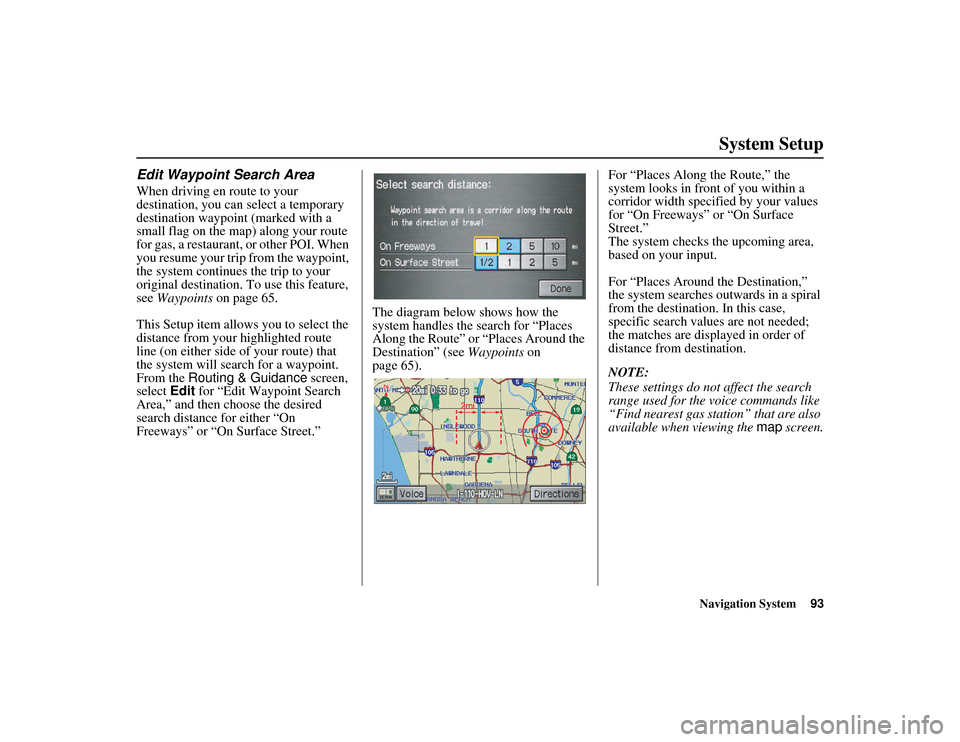
Freeways” or “On Surface Street.” The diagram below shows how the
system handles the search for “Places
Along the Route” or “Places Around the
Destination” (see
Waypoints on
page 65). For “Places Along
the Route,” the
system looks in front of you within a
corridor width specified by your values
for “On Freeways” or “On Surface
Street.”
The system checks the upcoming area,
based on your input.
For “Places Around the Destination,”
the system searches outwards in a spiral
from the destination. In this case,
specific search values are not needed;
the matches are displayed in order of
distance from destination.
NOTE:
These settings do not affect the search
range used for the voice commands like
“Find nearest gas station” that are also
available when viewing the map screen.
Page 98 of 152
Navigation System97
RIDGELINE KA 31SJC860
System Setup
Clock Adjustment
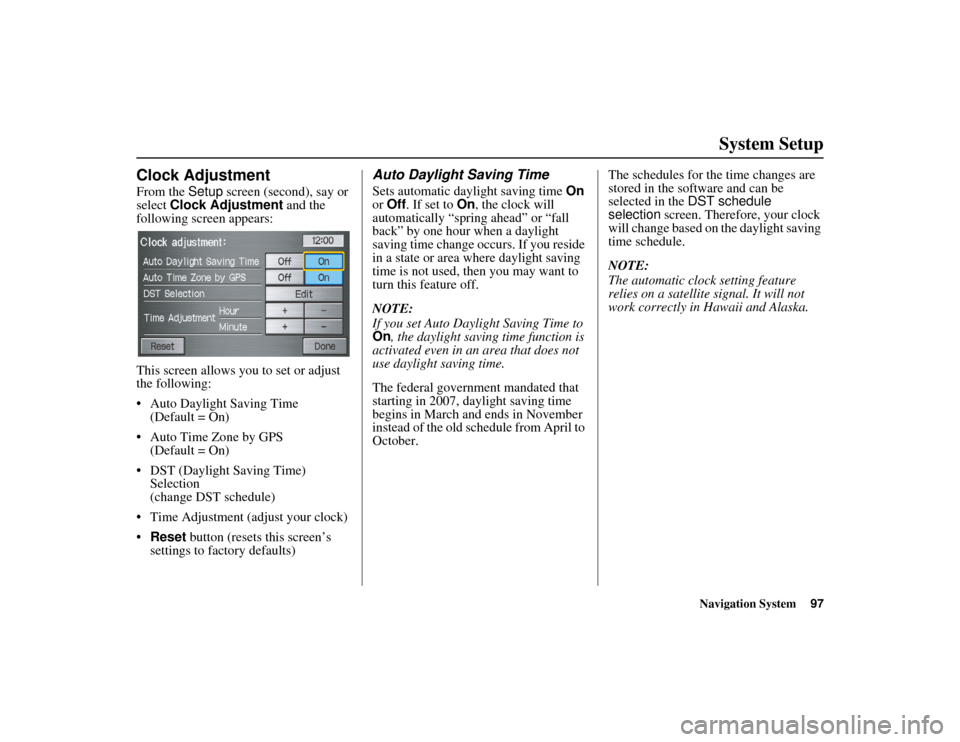
From the Setup screen (second), say or
select Clock Adjustment and the
following screen appears:
This screen allows you to set or adjust
the following:
• Auto Daylight Saving Time (Default = On)
• Auto Time Zone by GPS (Default = On)
• DST (Daylight Saving Time) Selection
(change DST schedule)
• Time Adjustment (adjust your clock)
• Reset button (resets this screen’s
settings to factory defaults)
Auto Daylight Saving Time
Sets automatic daylight saving time On
or Off . If set to On , the clock will
automatically “spring ahead” or “fall
back” by one hour when a daylight
saving time change occurs. If you reside
in a state or area where daylight saving
time is not used, then you may want to
turn this feature off.
NOTE:
If you set Auto Daylight Saving Time to
On , the daylight saving time function is
activated even in an area that does not
use daylight saving time.
The federal government mandated that
starting in 2007, daylight saving time
begins in March and ends in November
instead of the old schedule from April to
October. The schedules for the time changes are
stored in the software and can be
selected in the
DST schedule
selection screen. Therefore, your clock
will change based on the daylight saving
time schedule.
NOTE:
The automatic clock setting feature
relies on a satellite signal. It will not
work correctly in Hawaii and Alaska.
Page 99 of 152
98Navigation System
RIDGELINE KA 31SJC860
System Setup
Auto Time Zone by GPS
Sets automatic time zone selection by
GPS to On or Off . If you are driving
across the country and passing through
time zones, then this feature will
automatically set the time to the time
zone you are traveling through.
However, if you live and work in two
different time zones, you may want to
turn this feature off.
NOTE:
When driving near a time zone
boundary, the displayed time zone may
fluctuate between the two zone times.
Daylight Saving Time (DST)
Selection (Change DST
Schedule)
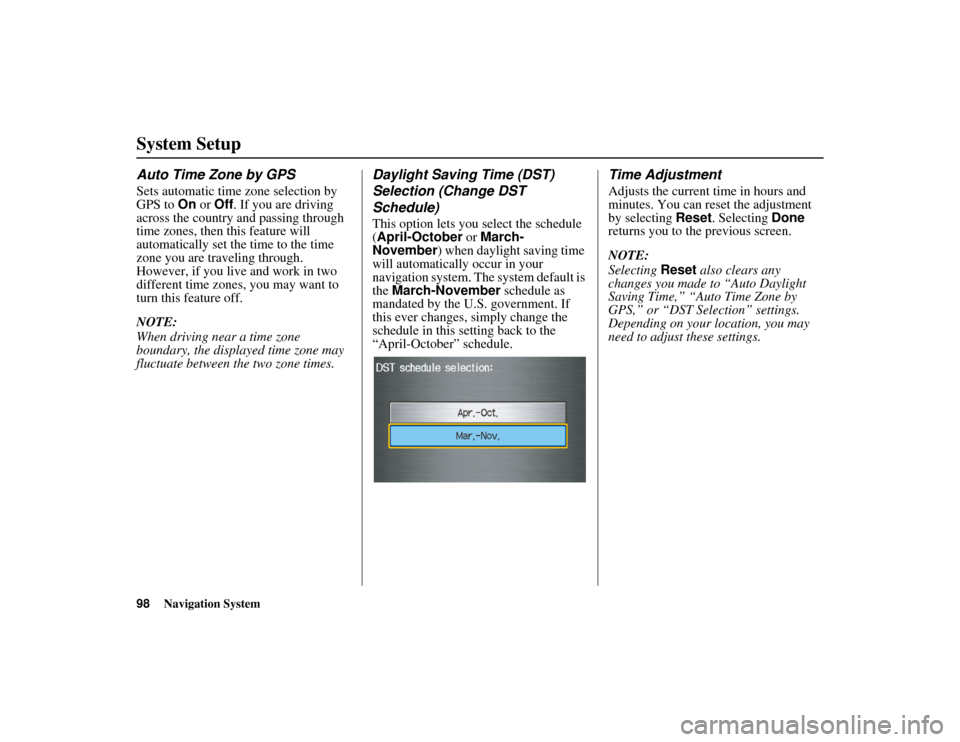
This option lets you select the schedule
(April-October or March-
November ) when daylight saving time
will automatically occur in your
navigation system. The system default is
the March-November schedule as
mandated by the U.S. government. If
this ever changes, simply change the
schedule in this setting back to the
“April-October” schedule.
Time Adjustment
Adjusts the current time in hours and
minutes. You can reset the adjustment
by selecting Reset. Selecting Done
returns you to the previous screen.
NOTE:
Selecting Reset also clears any
changes you made to “Auto Daylight
Saving Time,” “Auto Time Zone by
GPS,” or “DST Selection” settings.
Depending on your location, you may
need to adjust these settings.