brake HONDA RIDGELINE 2017 2.G User Guide
[x] Cancel search | Manufacturer: HONDA, Model Year: 2017, Model line: RIDGELINE, Model: HONDA RIDGELINE 2017 2.GPages: 606, PDF Size: 13.21 MB
Page 76 of 606
75
uuIndicators u
Continued
Instrument Panel
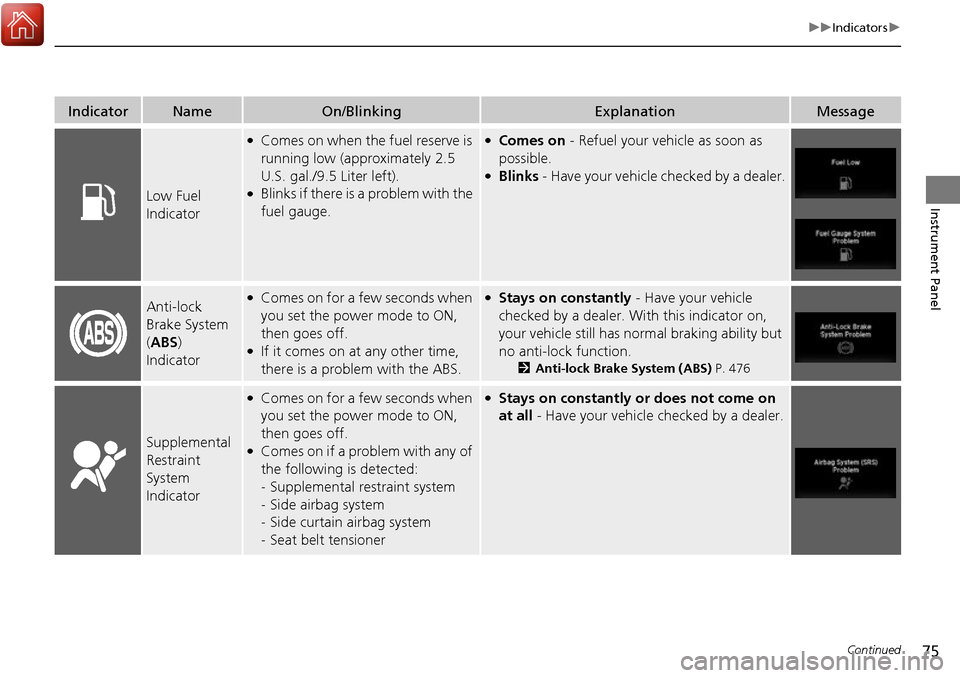
IndicatorNameOn/BlinkingExplanationMessage
Low Fuel
Indicator
●Comes on when the fuel reserve is
running low (approximately 2.5
U.S. gal./9.5 Liter left).
●Blinks if there is a problem with the
fuel gauge.
●Comes on - Refuel your vehicle as soon as
possible.
●Blinks - Have your vehicle checked by a dealer.
Anti-lock
Brake System
(ABS )
Indicator●Comes on for a few seconds when
you set the power mode to ON,
then goes off.
●If it comes on at any other time,
there is a problem with the ABS.
●Stays on constantly - Have your vehicle
checked by a dealer. Wi th this indicator on,
your vehicle still has normal braking ability but
no anti-lock function.
2 Anti-lock Brake System (ABS) P. 476
Supplemental
Restraint
System
Indicator
●Comes on for a few seconds when
you set the power mode to ON,
then goes off.
●Comes on if a problem with any of
the following is detected:
-Supplemental restraint system
- Side airbag system
- Side curtain airbag system
- Seat belt tensioner
●Stays on constantly or does not come on
at all - Have your vehicle checked by a dealer.
Page 77 of 606
76
uuIndicators u
Instrument Panel
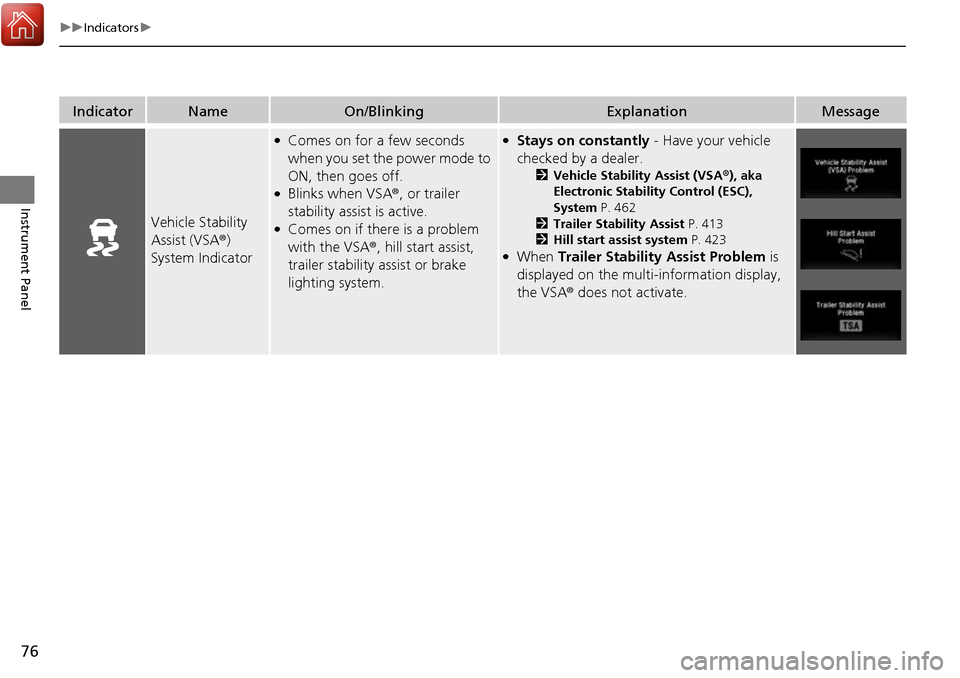
IndicatorNameOn/BlinkingExplanationMessage
Vehicle Stability
Assist (VSA ®)
System Indicator
●Comes on for a few seconds
when you set the power mode to
ON, then goes off.
●Blinks when VSA ®, or trailer
stability assist is active.
●Comes on if there is a problem
with the VSA ®, hill start assist,
trailer stability assist or brake
lighting system.
●Stays on constantly - Have your vehicle
checked by a dealer.
2 Vehicle Stability Assist (VSA ®), aka
Electronic Stability Control (ESC),
System P. 462
2 Trailer Stability Assist P. 413
2 Hill start assist system P. 423
●When Trailer Stability Assist Problem is
displayed on the multi-information display,
the VSA ® does not activate.
Page 93 of 606
92
uuIndicators uMulti-Information Display Warn ing and Information Messages
Instrument Panel
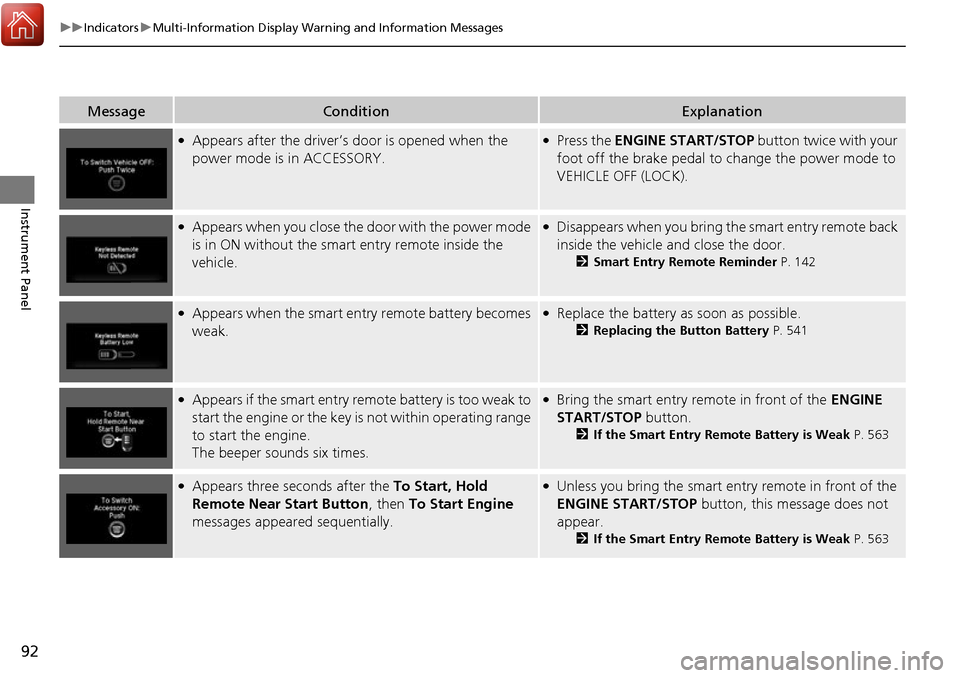
MessageConditionExplanation
●Appears after the driver’s door is opened when the
power mode is in ACCESSORY.●Press the ENGINE START/STOP button twice with your
foot off the brake pedal to change the power mode to
VEHICLE OFF (LOCK).
●Appears when you close the door with the power mode
is in ON without the smar t entry remote inside the
vehicle.●Disappears when you bring the smart entry remote back
inside the vehicle and close the door.
2 Smart Entry Remote Reminder P. 142
●Appears when the smart entry remote battery becomes
weak.●Replace the battery as soon as possible.
2Replacing the Button Battery P. 541
●Appears if the smart entry remote battery is too weak to
start the engine or the key is not within operating range
to start the engine.
The beeper sounds six times.●Bring the smart entry remote in front of the ENGINE
START/STOP button.
2 If the Smart Entry Remote Battery is Weak P. 563
●Appears three seconds after the To Start, Hold
Remote Near Start Button , then To Start Engine
messages appeared sequentially.●Unless you bring the smart en try remote in front of the
ENGINE START/STOP button, this message does not
appear.
2 If the Smart Entry Remote Battery is Weak P. 563
Page 97 of 606
96
uuIndicators uMulti-Information Display Warn ing and Information Messages
Instrument Panel
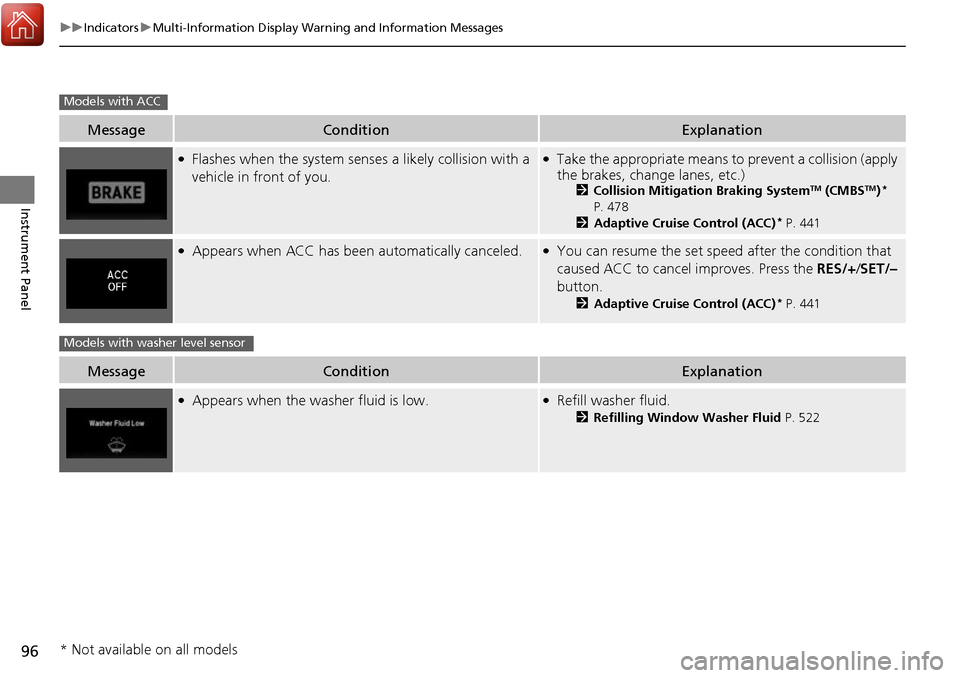
MessageConditionExplanation
●Flashes when the system senses a likely collision with a
vehicle in front of you.●Take the appropriate means to prevent a collision (apply
the brakes, change lanes, etc.)
2 Collision Mitigation Braking SystemTM (CMBSTM)*
P. 478
2 Adaptive Cruise Control (ACC)
* P. 441
●Appears when ACC has been automatically canceled.●You can resume the set speed after the condition that
caused ACC to cancel improves. Press the RES/+/SET/–
button.
2 Adaptive Cruise Control (ACC)* P. 441
MessageConditionExplanation
●Appears when the washer fluid is low.●Refill washer fluid.
2Refilling Window Washer Fluid P. 522
Models with ACC
Models with washer level sensor
* Not available on all models
Page 100 of 606
99
uuIndicators uMulti-Information Display Warning and Information Messages
Continued
Instrument Panel
MessageConditionExplanation
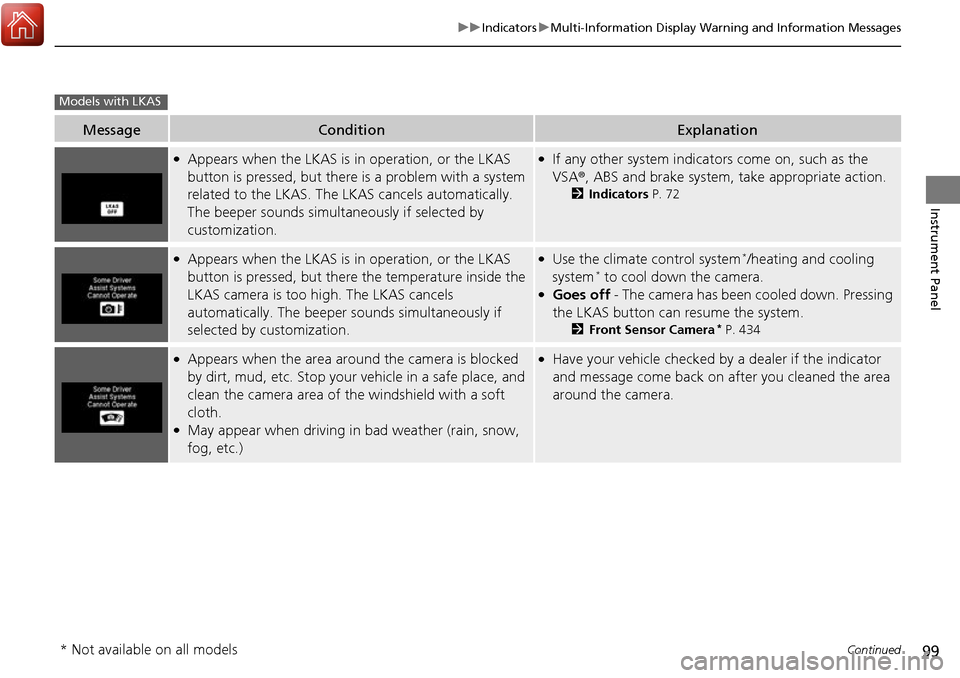
●Appears when the LKAS is in operation, or the LKAS
button is pressed, but there is a problem with a system
related to the LKAS. The LKAS cancels automatically.
The beeper sounds simultaneously if selected by
customization.●If any other system indicators come on, such as the
VSA ®, ABS and brake system, take appropriate action.
2Indicators P. 72
●Appears when the LKAS is in operation, or the LKAS
button is pressed, but there the temperature inside the
LKAS camera is too high. The LKAS cancels
automatically. The beeper sounds simultaneously if
selected by customization.●Use the climate control system*/heating and cooling
system* to cool down the camera.●Goes off - The camera has been cooled down. Pressing
the LKAS button can resume the system.
2 Front Sensor Camera* P. 434
●Appears when the area arou nd the camera is blocked
by dirt, mud, etc. Stop your vehicle in a safe place, and
clean the camera area of the windshield with a soft
cloth.
●May appear when driving in bad weather (rain, snow,
fog, etc.)
●Have your vehicle checked by a dealer if the indicator
and message come back on after you cleaned the area
around the camera.
Models with LKAS
* Not available on all models
Page 124 of 606
123
uuLocking and Unlocking the Doors uCustomizing the Auto Door Locking/Unlocking Setting*
Continued
Controls
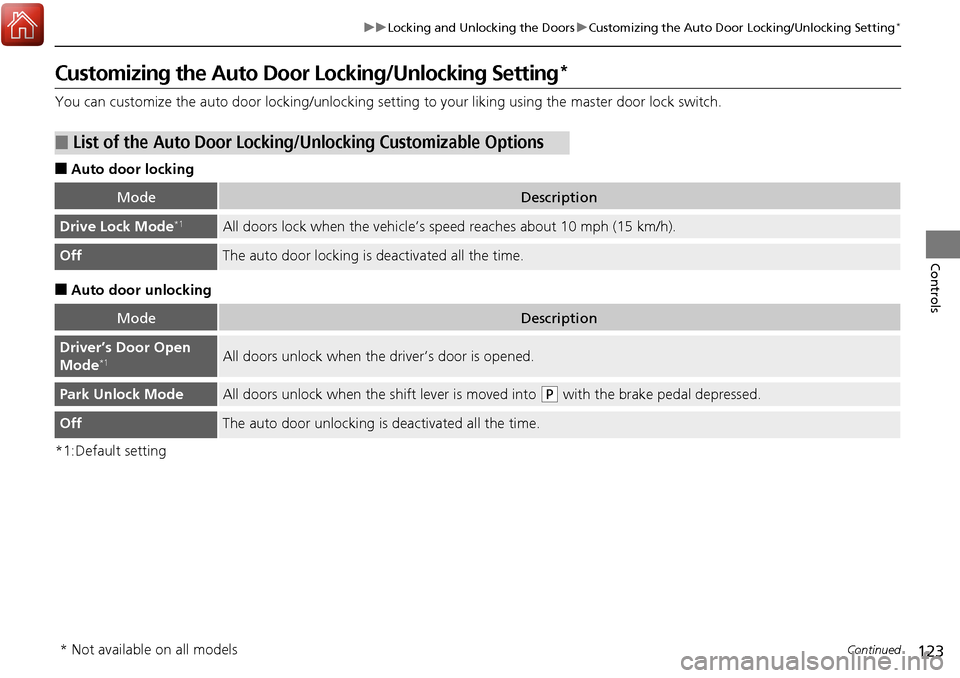
Customizing the Auto Door Locking/Unlocking Setting*
You can customize the auto door locking/unlocking setting to your liking using the master door lock switch.
■Auto door locking
■Auto door unlocking
*1:Default setting
■List of the Auto Door Locking/Unlocking Customizable Options
ModeDescription
Drive Lock Mode*1All doors lock when the vehicle’s speed reaches about 10 mph (15 km/h).
OffThe auto door locking is deactivated all the time.
ModeDescription
Driver’s Door Open
Mode*1All doors unlock when the driver’s door is opened.
Park Unlock ModeAll doors unlock when the shift lever is moved into (P with the brake pedal depressed.
OffThe auto door unlocking is deactivated all the time.
* Not available on all models
Page 125 of 606
124
uuLocking and Unlocking the Doors uCustomizing the Auto Door Locking/Unlocking Setting*
Controls
*1:Default setting
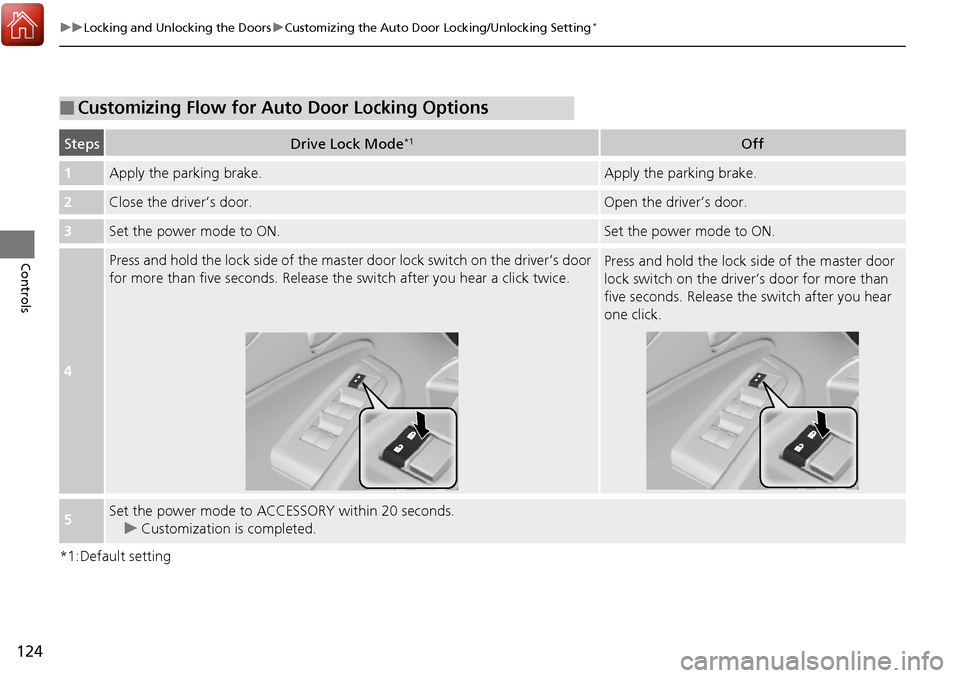
■Customizing Flow for Auto Door Locking Options
StepsDrive Lock Mode*1Off
1Apply the parking brake.Apply the parking brake.
2Close the driver’s door.Open the driv er’s door.
3Set the power mode to ON.Set the power mode to ON.
4
Press and hold the lock side of the master door lock switch on the driver’s door
for more than five seconds. Release th e switch after you hear a click twice.Press and hold the lock side of the master door
lock switch on the driver’s door for more than
five seconds. Release the switch after you hear
one click.
5Set the power mode to ACCESSORY within 20 seconds. u Customization is completed.
Page 126 of 606
125
uuLocking and Unlocking the Doors uCustomizing the Auto Door Locking/Unlocking Setting*
Controls
*1:Default setting
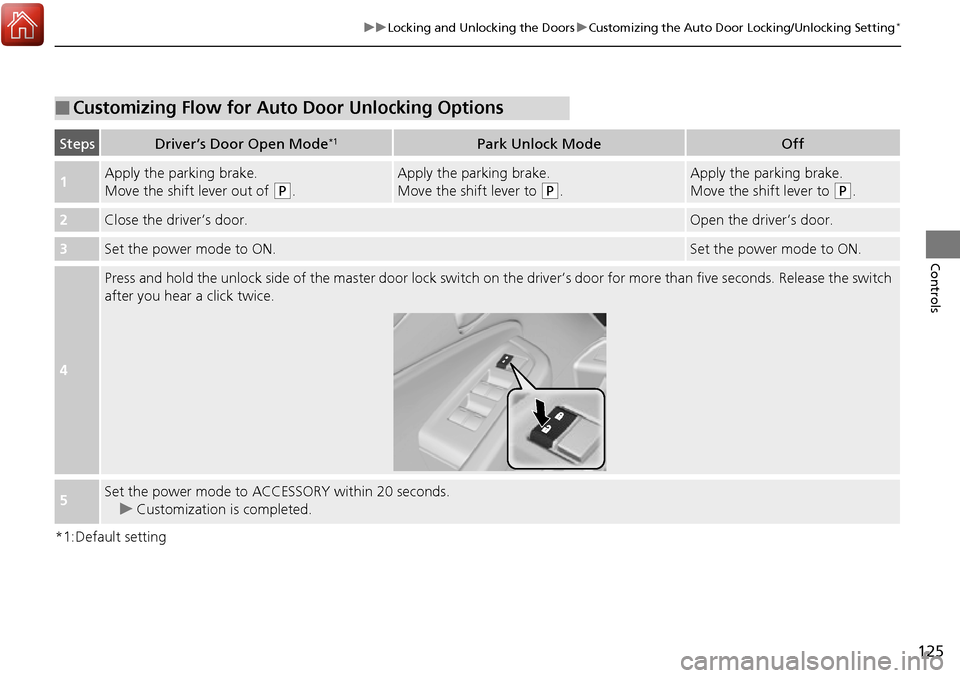
■Customizing Flow for Auto Door Unlocking Options
StepsDriver’s Door Open Mode*1Park Unlock ModeOff
1Apply the parking brake.
Move the shift lever out of
(P.
Apply the parking brake.
Move the shift lever to
(P.
Apply the parking brake.
Move the shift lever to
(P.
2Close the driver’s door.Open the driver’s door.
3Set the power mode to ON.Set the power mode to ON.
4
Press and hold the unlock side of the master door lock switch on the driver’s door for more than five seconds. Release the switch
after you hear a click twice.
5Set the power mode to ACCESSORY within 20 seconds. u Customization is completed.
Page 141 of 606
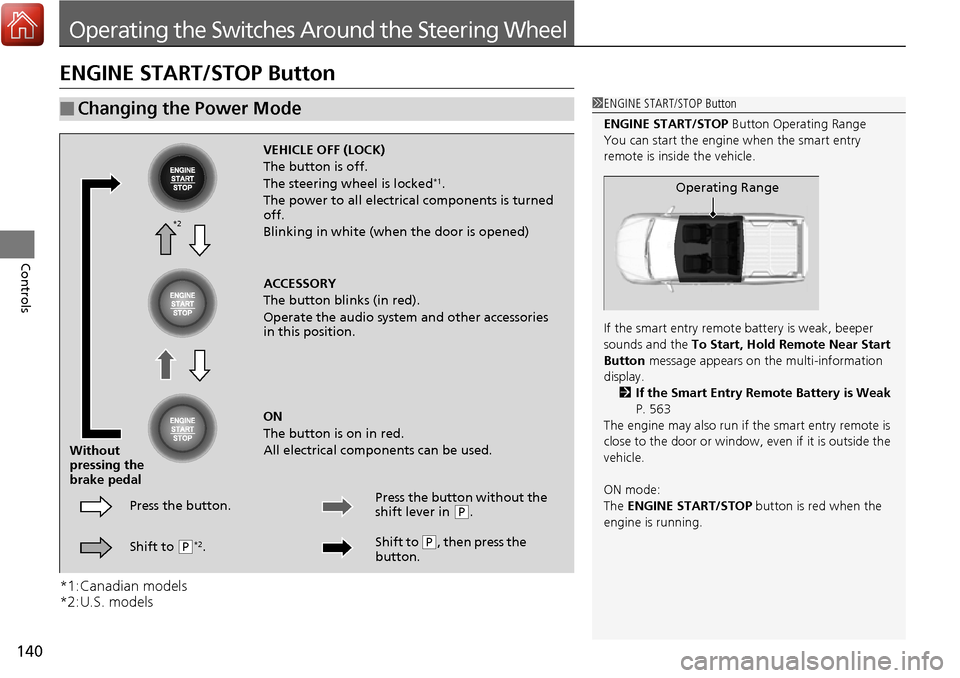
140
Controls
Operating the Switches Around the Steering Wheel
ENGINE START/STOP Button
*1:Canadian models
*2:U.S. models
■Changing the Power Mode1ENGINE START/STOP Button
ENGINE START/STOP Button Operating Range
You can start the engine when the smart entry
remote is inside the vehicle.
If the smart entry remote battery is weak, beeper
sounds and the To Start, Hold Remote Near Start
Button message appears on the multi-information
display. 2 If the Smart Entry Remote Battery is Weak
P. 563
The engine may also run if the smart entry remote is
close to the door or window, ev en if it is outside the
vehicle.
ON mode:
The ENGINE START/STOP button is red when the
engine is running.
Operating Range
VEHICLE OFF (LOCK)
The button is off.
The steering wheel is locked
*1.
The power to all electrical components is turned
off.
Blinking in white (when the door is opened)
ACCESSORY
The button blinks (in red).
Operate the audio system and other accessories
in this position.
ON
The button is on in red.
All electrical components can be used.
Press the button.
Without
pressing the
brake pedal
Shift to
(P*2. Press the button without the
shift lever in
(
P.
Shift to
( P, then press the
button.
*2
Page 149 of 606
148
uuOperating the Switches Around the Steering Wheel uDaytime Running Lights
Controls
Daytime Running Lights
The daytime running lights come on when the following conditions have been met:
• The power mode is in ON.
• The headlight switch is off.
• The parking brake is released.
The daytime running lights are off once the headlight switch is turned on, or when
the head light switch is in AUTO and it is getting darker outside.