warning light HONDA RIDGELINE 2017 2.G User Guide
[x] Cancel search | Manufacturer: HONDA, Model Year: 2017, Model line: RIDGELINE, Model: HONDA RIDGELINE 2017 2.GPages: 606, PDF Size: 13.21 MB
Page 456 of 606
Continued455
uuWhen Driving uLane Keeping Assist System (LKAS)*
Driving
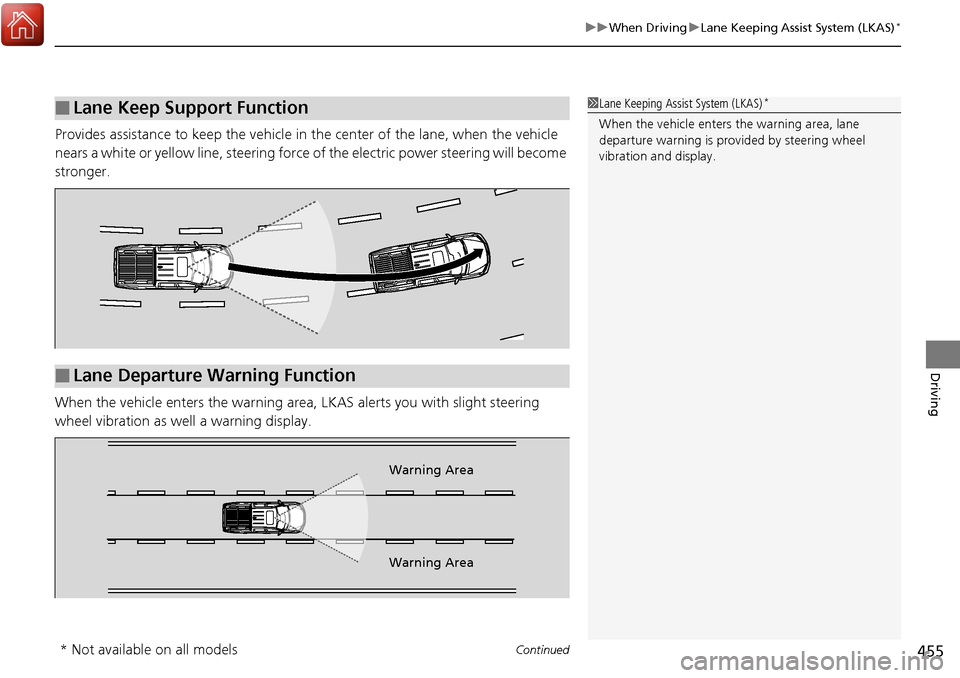
Provides assistance to keep the vehicle in the center of the lane, when the vehicle
nears a white or yellow line, steering force of the electric power steering will become
stronger.
When the vehicle enters the warning area , LKAS alerts you with slight steering
wheel vibration as well a warning display.
■Lane Keep Support Function1 Lane Keeping Assist System (LKAS)*
When the vehicle enters the warning area, lane
departure warning is prov ided by steering wheel
vibration and display.
■Lane Departure Warning Function
Warning Area
Warning Area
* Not available on all models
Page 473 of 606
472
uuWhen Driving uLaneWatchTM*
Driving
LaneWatchTM*
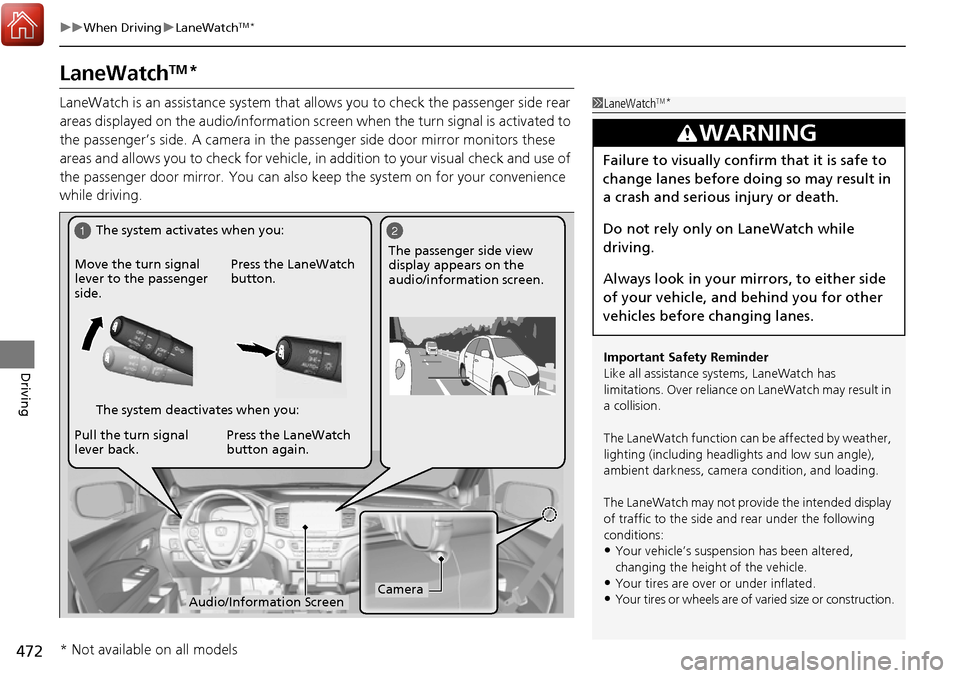
LaneWatch is an assistance system that allows you to check the passenger side rear
areas displayed on the audio/information scr een when the turn signal is activated to
the passenger’s side. A camera in the pass enger side door mirror monitors these
areas and allows you to check for vehicle, in addition to your visual check and use of
the passenger door mirror. You can also keep the system on for your convenience
while driving.1 LaneWatchTM*
Important Safety Reminder
Like all assistance systems, LaneWatch has
limitations. Over reliance on LaneWatch may result in
a collision.
The LaneWatch func tion can be affected by weather,
lighting (including headli ghts and low sun angle),
ambient darkness, camera condition, and loading.
The LaneWatch may not prov ide the intended display
of traffic to the side and rear under the following
conditions:
•Your vehicle’s suspension has been altered,
changing the height of the vehicle.
•Your tires are over or under inflated.
•Your tires or wheels are of varied size or construction.
3WARNING
Failure to visually confirm that it is safe to
change lanes before doing so may result in
a crash and serious injury or death.
Do not rely only on LaneWatch while
driving.
Always look in your mirrors, to either side
of your vehicle, and behind you for other
vehicles before changing lanes.
12
CameraAudio/Information Screen
Move the turn signal
lever to the passenger
side.
Press the LaneWatch
button.
Pull the turn signal
lever back. Press the LaneWatch
button again. The passenger side view
display appears on the
audio/information screen.
The system activates when you:
The system deactivates when you:
* Not available on all models
Page 481 of 606
480
uuBraking uCollision Mitigation Braking SystemTM (CMBSTM)*
Driving
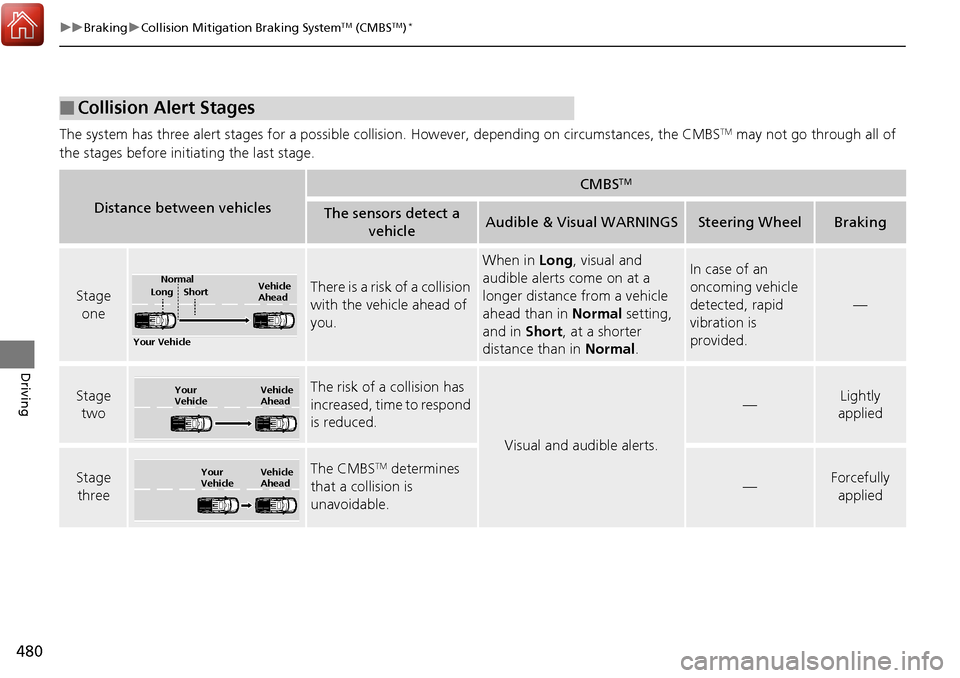
The system has three alert stages for a possible collision. However, depending on circumstances, the CMBSTM may not go through all of
the stages before initiating the last stage.
■Collision Alert Stages
Distance between vehicles
CMBSTM
The sensors detect a vehicleAudible & Visual WARNINGSSteering WheelBraking
Stage oneThere is a risk of a collision
with the vehicle ahead of
you.
When in Long, visual and
audible alerts come on at a
longer distance from a vehicle
ahead than in Normal setting,
and in Short, at a shorter
distance than in Normal.In case of an
oncoming vehicle
detected, rapid
vibration is
provided.
—
Stage
twoThe risk of a collision has
increased, time to respond
is reduced.
Visual and audible alerts.
—Lightly
applied
Stage three The CMBSTM determines
that a collision is
unavoidable.
—Forcefully applied
Your Vehicle Vehicle
Ahead
Normal
Short
Long
Your
Vehicle Vehicle
Ahead
Your
VehicleVehicle
Ahead
Page 554 of 606
553Continued
Handling the Unexpected
If a Tire Goes Flat
Changing a Flat Tire
If a tire goes flat while driving, grasp the steering wheel firmly, and brake gradually
to reduce speed. Then, stop in a safe plac e. Replace the flat tire with a compact
spare tire. Go to a dealer as soon as possib le to have the full-size tire repaired or
replaced.
1. Park the vehicle on firm, level, non-slip pery surface and apply the parking brake.
2. Move the shift lever to
(P.
3. Turn on the hazard warning lights and set the power mode to VEHICLE OFF
(LOCK).
1Changing a Flat Tire
Follow compact spare precautions:
Periodically check the tire pressure of the compact
spare. It should be set to the specified pressure.
Specified Pressure: 60 psi (420 kPa, 4.2 kgf/cm
2)
When driving with the compact spare tire, keep the
vehicle speed under 50 mph (80 km/h). Replace with
a full-size tire as soon as possible.
The compact spare tire and wheel in your vehicle are
specifically for this model. Do not use them with
another vehicle. Do not us e another type of compact
spare tire or wheel with your vehicle.
Do not mount tire chains on a compact spare tire.
If a chain-mounted front tire goes flat, remove one of
the full-size rear tires and replace it with the compact
spare tire. Remove the flat front tire and replace it
with the full-size tire that was removed from the rear.
Mount the tire chains on the front tire.
Do not use a puncture-repairi ng agent on a flat tire,
as it can damage the tire pressure sensor.
Page 566 of 606
565Continued
Handling the Unexpected
Jump Starting
Turn off the power to electric devices, such as audio and lights. Turn off the engine,
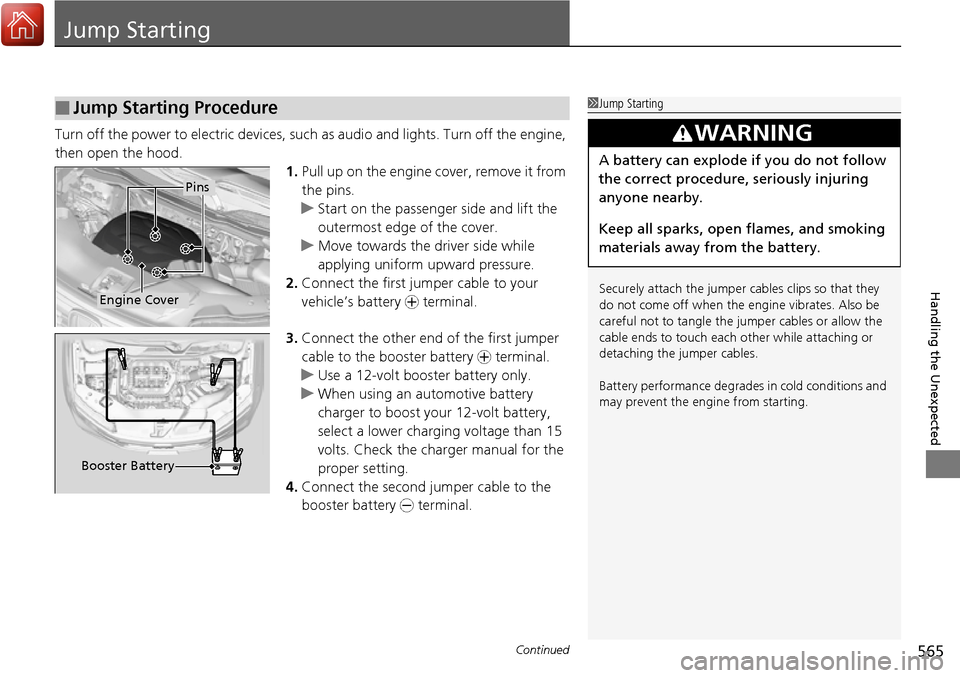
then open the hood. 1.Pull up on the engine cover, remove it from
the pins.
u Start on the passenger side and lift the
outermost edge of the cover.
u Move towards the driver side while
applying uniform upward pressure.
2. Connect the first jumper cable to your
vehicle’s battery + terminal.
3. Connect the other end of the first jumper
cable to the booster battery + terminal.
u Use a 12-volt booster battery only.
u When using an automotive battery
charger to boost your 12-volt battery,
select a lower charging voltage than 15
volts. Check the ch arger manual for the
proper setting.
4. Connect the second ju mper cable to the
booster battery - terminal.
■Jump Starting Procedure1Jump Starting
Securely attach the jumper cables clips so that they
do not come off when the e ngine vibrates. Also be
careful not to tangle the ju mper cables or allow the
cable ends to touch each other while attaching or
detaching the jumper cables.
Battery performance degrades in cold conditions and
may prevent the engi ne from starting.
3WARNING
A battery can explode if you do not follow
the correct procedure, seriously injuring
anyone nearby.
Keep all sparks, open flames, and smoking
materials away from the battery.
Pins
Engine Cover
Booster Battery
Page 570 of 606
569Continued
Handling the Unexpected
Overheating
How to Handle Overheating
Overheating symptoms are as follows:
•The temperature gauge needle is at the mark or the engine suddenly loses
power.
• Steam or spray comes out of the engine compartment.
■First thing to do
1. Immediately park the vehicle in a safe place.
2. Turn off all accessories and turn on the hazard warning lights.
u No steam or spray present: Keep the engine running and open the hood.
u Steam or spray is present: Turn off the engine and wait until it subsides.
Then, open the hood.
1 How to Handle Overheating
NOTICE
Continuing to drive with the temperature gauge
needle at the mark may damage the engine.
3WARNING
Steam and spray from an overheated
engine can seriously scald you.
Do not open the hood if steam is coming
out.
H
H
Page 572 of 606
571
Handling the Unexpected
Indicator, Coming On/Blinking
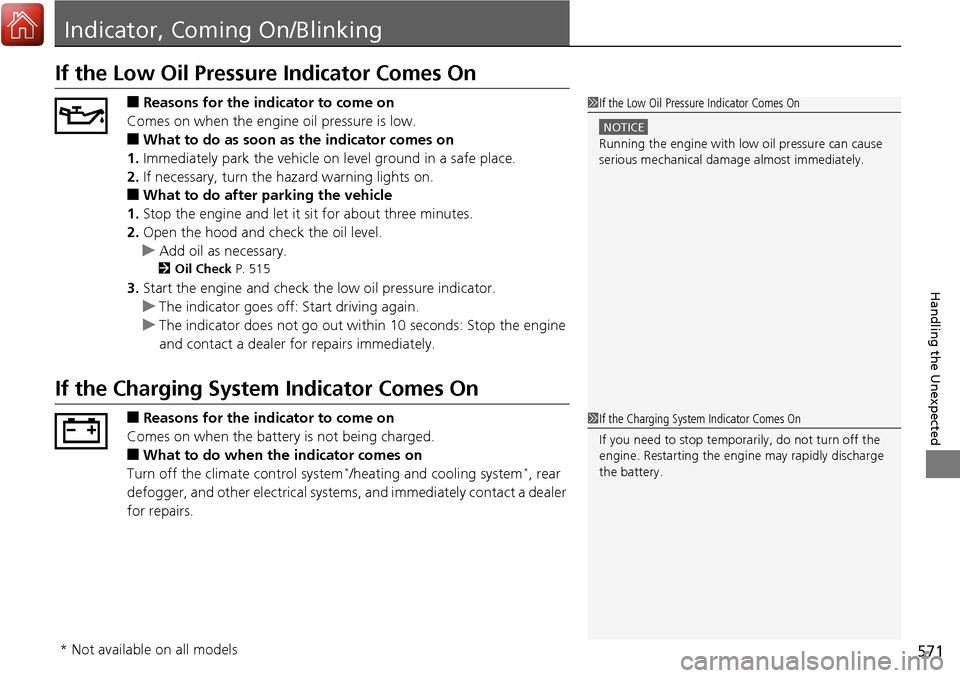
If the Low Oil Pressure Indicator Comes On
■Reasons for the indicator to come on
Comes on when the engine oil pressure is low.
■What to do as soon as the indicator comes on
1. Immediately park the vehicle on level ground in a safe place.
2. If necessary, turn the hazard warning lights on.
■What to do after parking the vehicle
1. Stop the engine and let it sit for about three minutes.
2. Open the hood and check the oil level.
u Add oil as necessary.
2 Oil Check P. 515
3.Start the engine and check th e low oil pressure indicator.
u The indicator goes off: Start driving again.
u The indicator does not go out within 10 seconds: Stop the engine
and contact a dealer for repairs immediately.
If the Charging System Indicator Comes On
■Reasons for the indicator to come on
Comes on when the battery is not being charged.
■What to do when th e indicator comes on
Turn off the climate control system*/heating and cooling system*, rear
defogger, and other electrical system s, and immediately contact a dealer
for repairs.
1 If the Low Oil Pressure Indicator Comes On
NOTICE
Running the engine with low oil pressure can cause
serious mechanical damage almost immediately.
1If the Charging System Indicator Comes On
If you need to stop temporarily, do not turn off the
engine. Restarting the engi ne may rapidly discharge
the battery.
* Not available on all models
Page 601 of 606
600
Index
F
Features..................................................... 197
Filters Dust and Pollen ....................................... 542
Oil ........................................................... 517
Flat Tire ..................................................... 553
Floor Mats ................................................. 544
Fluids
Automatic Transmission ........................... 521
Brake ....................................................... 522
Engine Coolant ........................................ 519
Windshield Washer .................................. 522
FM/AM Radio .................................... 211, 247
Fog Lights .................................................. 147
Indicator .................................................... 79
Folding Up the Rear Seat ......................... 164
Foot Brake ................................................. 475
Front Airbags (SRS) ..................................... 43
Front Seats ................................................ 161
Adjusting ................................................. 161
Front Sensor Camera ................................ 434
Fuel ...................................................... 21, 498
Economy ................................................. 501
Gauge ..................................................... 101
Instant Fuel Economy ............................... 105
Low Fuel Indicator ..................................... 75
Range ...................................................... 105
Recommendation .................................... 498
Refueling ................................................. 498
Fuel Economy and CO
2 Emissions ............ 501 Fuel Fill Door
...................................... 21, 499
Unable to Unlock .................................... 581
Fuses .......................................................... 575
Inspecting and Changing......................... 579
Locations................................. 575, 577, 578
G
Gasoline (Fuel) Economy ................................................. 501
Gauge ..................................................... 101
Information ............................................. 498
Instant Fuel Economy .............................. 105
Low Fuel Indicator ..................................... 75
Refueling................................................. 498
Gauges ...................................................... 101
Glass (care) ................................................ 547
Glove Box .................................................. 171
H
Halogen Bulbs .......................................... 523
Handling the Unexpected ........................ 551
HandsFreeLink ® (HFL) ....................... 337, 362
Automatic Import of Cellular Phonebook and Call History .................................... 351, 375
Caller’s ID Information............................. 349
Displaying Messages................................ 389
HFL Buttons..................................... 337, 362
HFL Menus ...................................... 339, 365
HFL Status Display ........................... 338, 364 In Case of Emergency ............................. 393
Limitations for Manual Operation .... 338, 364
Making a Call ................................. 356, 383
Options During a Call...................... 361, 386
Phone Setup ................................... 343, 370
Phonebook Phonetic M
odification........... 379
Receiving a Call............................... 360, 386
Receiving a Text Message/E-mail ............. 387
Ring Tone ....................................... 349, 374
Selecting a Mail Account......................... 388
Speed Dial ...................................... 352, 376
To Clear the System ................................ 350
To Set Up a Text Message/E-mail Options ................................................. 373
Hazard Warning Button .............................. 4
Hazard Warning Indicator ......................... 78
HD Radio
TM............................................... 247
Head Restraints ................................ 166, 167
Headlights ................................................ 144
Aiming.................................................... 523
Auto High-Beam ..................................... 149
Automatic Operation .............................. 145
Dimming......................................... 144, 148
Operating ............................................... 144
Heated Door Mirrors ............................... 154
Heated Steering Wheel ........................... 178
Heated Windshield Button ...................... 154
Heater (Steering Wheel) .......................... 178
Heaters (Seat) ........................... 179, 180, 181
Page 602 of 606
601
Index
Heating and Cooling System................... 193
Cooling................................................... 195
Defrosting the Windshield and Windows .............................................. 196
Heating................................................... 194
HFL (HandsFreeLink ®) ...................... 337, 362
High Beam Indicator .................................. 78
Hill Start Assist System ............................. 423
HomeLink ® Universal Transceiver ........... 334
HondaLink® .............................................. 276
I
Identification Numbers ............................ 588
Engine and Transmission ......................... 588
Vehicle Identification............................... 588
Illumination Control ................................ 155
Button .................................................... 155
Immobilizer System .................................. 131
Indicator ................................................... 79
In-Bed Box ................................................ 182
Indicators .................................................... 72
Adaptive Cruise Control (ACC).................. 83
All-wheel drive (AWD)............................... 81
Anti-lock Brake System (ABS) .................... 75
Auto high-beam ....................................... 79
Bed Lights On ........................................... 88
Blind spot information (BSI) ............... 85, 471
Brake System (Amber) ............................... 72
Charging System............................... 73, 571 Collision Mitigation Braking System
TM
(CMBSTM) ........................................... 86, 87
CRUISE CONTROL .............................. 80, 432
CRUISE MAIN .................................... 80, 431
ECON Mode .............................................. 85
Electric Power Steering (EPS) System............................................. 78, 573
Fog Lights .................................................. 79
High Beam ................................................ 78
Immobilizer System .................................... 79
Lane Keeping Assist System (LKAS) .... 84, 456
Lights On ................................................... 79
Low Fuel .................................................... 75
Low Oil Pressure ................................ 73, 571
Low Tire Pressure/TPMS ..................... 78, 574
Malfunction Indicator Lamp ............... 73, 572
Parking Brake and Brake System
(Red)................................................ 72, 573
Road Departure Mitigation (RDM) .............. 82
Seat Belt Reminder .............................. 34, 74
Security System Alarm ............................... 80
Shift Lever Position .................................... 74
Smart Entry System .................................... 81
Supplemental Restraint System ............ 50, 75
System Message ........................................ 80
Transmission .............................................. 74
Turn Signal and Haza rd Warning ............... 78
Vehicle Stability Assist (VSA ®) OFF ............ 463
Vehicle Stability Assist (VSA ®)
System............................................. 76, 462
Information ............................................... 585 Information Button
.................................. 102
Instant Fuel Economy ............................... 105
Instrument Panel ........................................ 71
Brightness Control................................... 155
Intelligent Traction Management
System ..................................................... 429
Intelligent VTM4 (i-VTM4) ....................... 465
Interior Lights ........................................... 169
Interior Rearview Mirror .......................... 159
iPhone ....................................................... 299
iPod ........................................... 213, 262, 299
J
Jack (Wheel Nut Wrench) ........................ 557
Jump Starting ........................................... 565
K
Key Number Tag ....................................... 110
Keyless Lockout Prevention ..................... 118
Keys ........................................................... 109
Lockout Prevention.................................. 118
Number Tag ............................................ 110
Rear Door Won’t Open............................ 121
Remote Transmitter ................................. 117
Types and Functions ................................ 109
Kickdown (Automatic Transmission) ....... 425