lock HONDA RIDGELINE 2017 2.G Workshop Manual
[x] Cancel search | Manufacturer: HONDA, Model Year: 2017, Model line: RIDGELINE, Model: HONDA RIDGELINE 2017 2.GPages: 606, PDF Size: 13.21 MB
Page 130 of 606
129
uuOpening and Closing the Trunk uUsing the Trunk Release Button
Controls
Using the Trunk Release Button
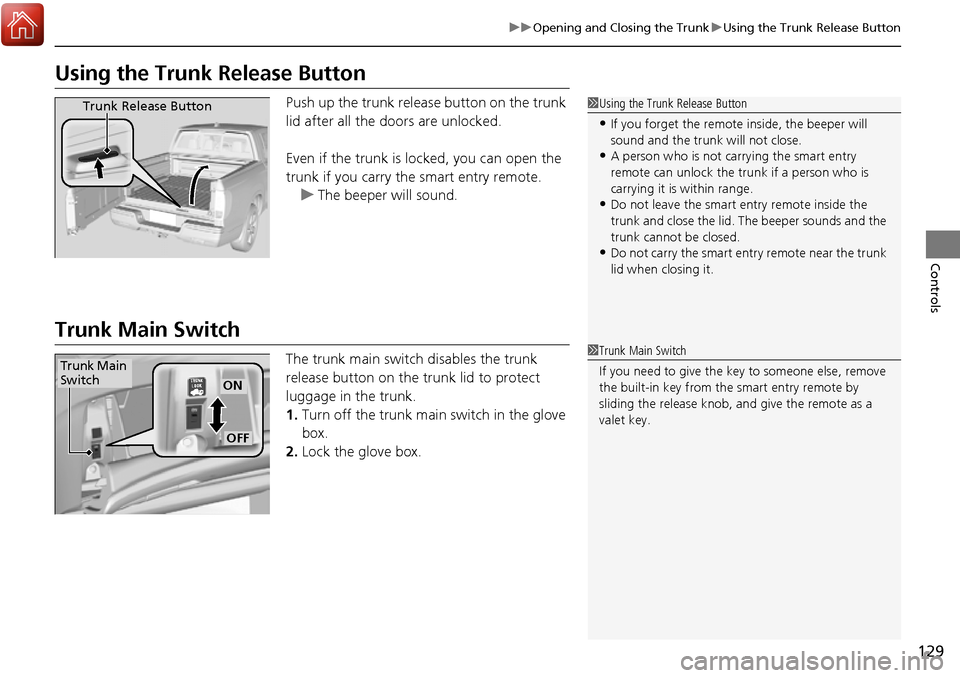
Push up the trunk releas e button on the trunk
lid after all the doors are unlocked.
Even if the trunk is locked, you can open the
trunk if you carry the smart entry remote. u The beeper will sound.
Trunk Main Switch
The trunk main switch disables the trunk
release button on the trunk lid to protect
luggage in the trunk.
1.Turn off the trunk main switch in the glove
box.
2. Lock the glove box.
1Using the Trunk Release Button
•If you forget the remote inside, the beeper will
sound and the trunk will not close.
•A person who is not carrying the smart entry
remote can unlock the tr unk if a person who is
carrying it is within range.
•Do not leave the smart entry remote inside the
trunk and close the lid. The beeper sounds and the
trunk cannot be closed.
•Do not carry the smart entry remote near the trunk
lid when closing it.
Trunk Release Button
1 Trunk Main Switch
If you need to give the ke y to someone else, remove
the built-in key from the smart entry remote by
sliding the release knob, and give the remote as a
valet key.
ON
OFF
Trunk Main
Switch
Page 133 of 606
uuSecurity System uSecurity System Alarm
132
Controls
■To deactivate the security system alarm
Unlock the vehicle using the key, remote transmitter, or smart entry with push
button start system. The system, along with the horn and fl ashing lights, is
deactivated.
■Setting the security system alarm
The security system alarm automatically sets when the following conditions have
been met:
• The power mode is set to VEHICLE OFF (LOCK).
• The hood and trunk are closed.
• All doors are locked from outside with the key, remote transmitter, or smart entry
system.
■When the security system alarm sets
The security system alarm indicator in the instrument panel blinks. When the
blinking interval changes after about 15 se conds, the security system alarm is set.
■To cancel the security system alarm
The security system alarm is canceled when the vehicle is unlocked using the key,
remote transmitter, smart entry system, or th e power mode is set to ON. The security
system alarm indicator goe s off at the same time.
1Security System Alarm
Do not set the security system alarm when someone
is in the vehicle or a window is open. The system can
accidentally activate when:
•Unlocking the door with the lock tab.•Opening the trunk with the trunk release or the
emergency trunk opener.
•Opening the hood with the hood release.•Moving the shift lever out of ( P.
If the battery goes dead after you have set the
security system alarm, the security alarm may go off
once the battery is re charged or replaced.
If this occurs, deactivate the security system alarm by
unlocking a door using the ke y, remote transmitter,
or smart entry system.
Page 135 of 606
134
Controls
Opening and Closing the Windows
Opening/Closing the Power Windows
The power windows can be opened and closed when the power mode is in ON,
using the switches on the doors. The driver’s side switches can be used to open and
close all the windows.
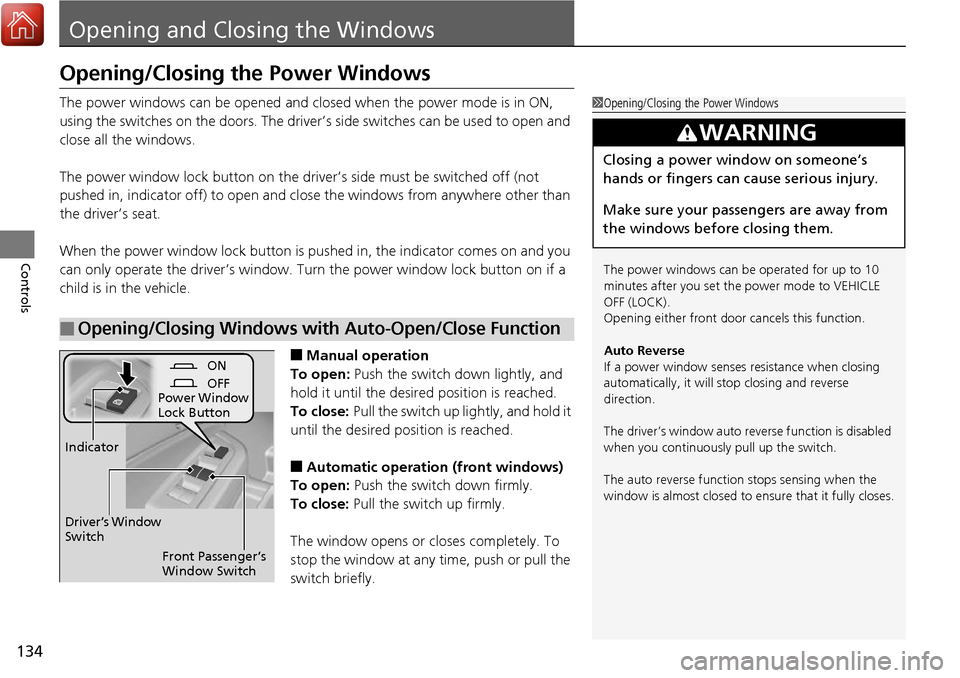
The power window lock button on the driver’s side must be switched off (not
pushed in, indicator off) to open and close the windows from anywhere other than
the driver’s seat.
When the power window lock button is pu shed in, the indicator comes on and you
can only operate the driver’s window. Turn the power window lock button on if a
child is in the vehicle.
■Manual operation
To open: Push the switch down lightly, and
hold it until the desired position is reached.
To close: Pull the switch up lightly, and hold it
until the desired position is reached.
■Automatic operatio n (front windows)
To open: Push the switch down firmly.
To close: Pull the switch up firmly.
The window opens or closes completely. To
stop the window at any time, push or pull the
switch briefly.
■Opening/Closing Windows with Auto-Open/Close Function
1 Opening/Closing the Power Windows
The power windows can be operated for up to 10
minutes after you set the power mode to VEHICLE
OFF (LOCK).
Opening either front door cancels this function.
Auto Reverse
If a power window senses resistance when closing
automatically, it will stop closing and reverse
direction.
The driver’s window auto re verse function is disabled
when you continuously pull up the switch.
The auto reverse function stops sensing when the
window is almost closed to en sure that it fully closes.
3WARNING
Closing a power window on someone’s
hands or fingers can cause serious injury.
Make sure your passengers are away from
the windows before closing them.
ON
OFF
Power Window
Lock Button
Front Passenger’s
Window Switch
Driver’s Window
Switch
Indicator
Page 137 of 606
uuOpening and Closing the Windows uOpening/Closing th e Power Windows
136
Controls
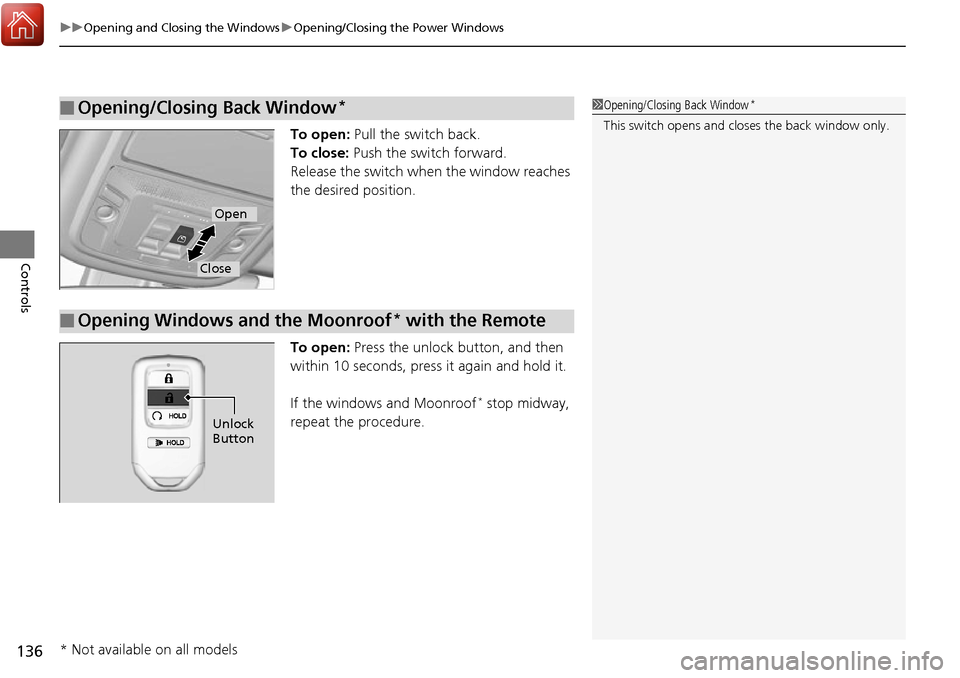
To open: Pull the switch back.
To close: Push the switch forward.
Release the switch when the window reaches
the desired position.
To open: Press the unlock button, and then
within 10 seconds, press it again and hold it.
If the windows and Moonroof
* stop midway,
repeat the procedure.
■Opening/Closing Back Window*1 Opening/Closing Back Window*
This switch opens and closes the back window only.
Open
Close
■Opening Windows and the Moonroof* with the Remote
Unlock
Button
* Not available on all models
Page 138 of 606
137
uuOpening and Closing the Windows uOpening/Closing the Power Windows
Controls
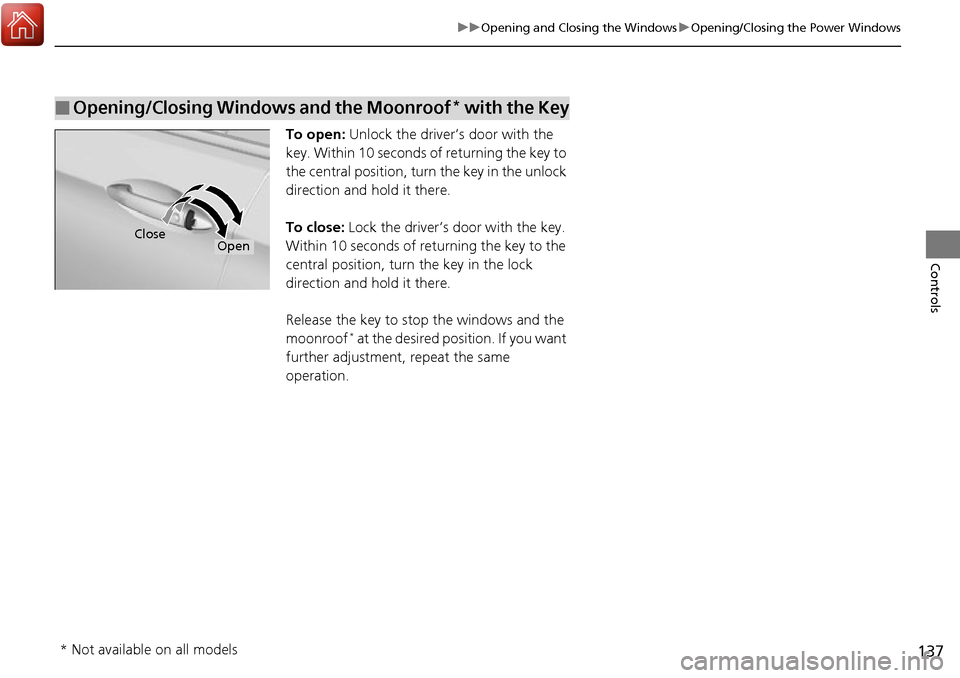
To open: Unlock the driver’s door with the
key. Within 10 seconds of returning the key to
the central position, turn the key in the unlock
direction and hold it there.
To close: Lock the driver’s door with the key.
Within 10 seconds of re turning the key to the
central position, turn the key in the lock
direction and hold it there.
Release the key to stop the windows and the
moonroof
* at the desired position. If you want
further adjustment, repeat the same
operation.
■Opening/Closing Windows and the Moonroof* with the Key
CloseOpen
* Not available on all models
Page 139 of 606
138
Controls
Opening and Closing the Moonroof*
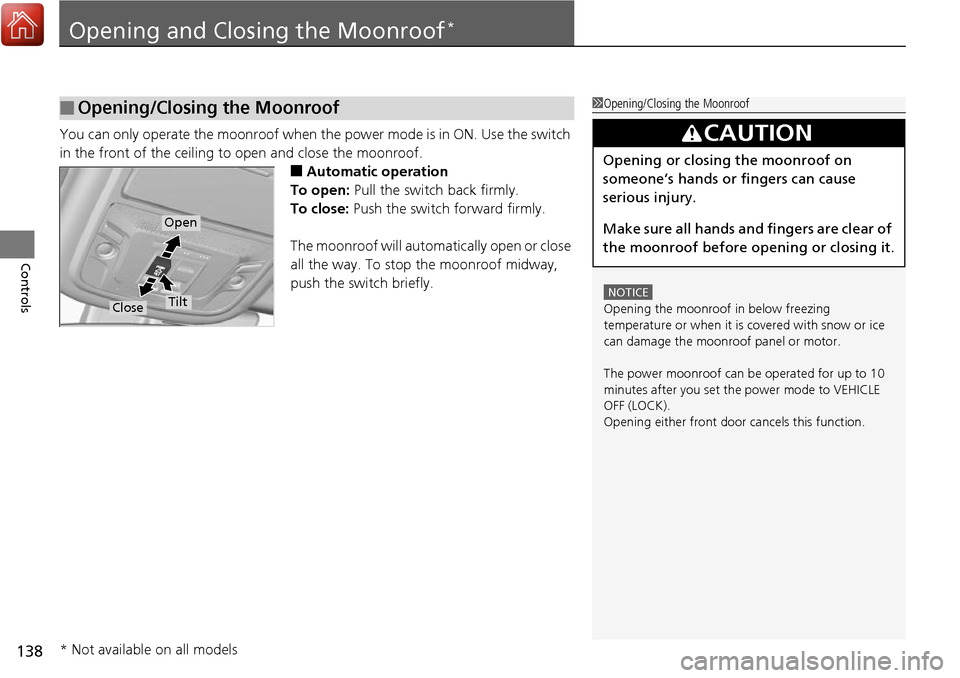
You can only operate the moonroof when the power mode is in ON. Use the switch
in the front of the ceiling to open and close the moonroof.
■Automatic operation
To open: Pull the switch back firmly.
To close: Push the switch forward firmly.
The moonroof will automatically open or close
all the way. To stop the moonroof midway,
push the switch briefly.
■Opening/Closing the Moonroof1 Opening/Closing the Moonroof
NOTICE
Opening the moonroof in below freezing
temperature or when it is covered with snow or ice
can damage the moonr oof panel or motor.
The power moonroof can be operated for up to 10
minutes after you set the power mode to VEHICLE
OFF (LOCK).
Opening either front door cancels this function.
3CAUTION
Opening or closing the moonroof on
someone’s hands or fingers can cause
serious injury.
Make sure all hands and fingers are clear of
the moonroof before opening or closing it.
Open
CloseTilt
* Not available on all models
Page 141 of 606
140
Controls
Operating the Switches Around the Steering Wheel
ENGINE START/STOP Button
*1:Canadian models
*2:U.S. models
■Changing the Power Mode1ENGINE START/STOP Button
ENGINE START/STOP Button Operating Range
You can start the engine when the smart entry
remote is inside the vehicle.
If the smart entry remote battery is weak, beeper
sounds and the To Start, Hold Remote Near Start
Button message appears on the multi-information
display. 2 If the Smart Entry Remote Battery is Weak
P. 563
The engine may also run if the smart entry remote is
close to the door or window, ev en if it is outside the
vehicle.
ON mode:
The ENGINE START/STOP button is red when the
engine is running.
Operating Range
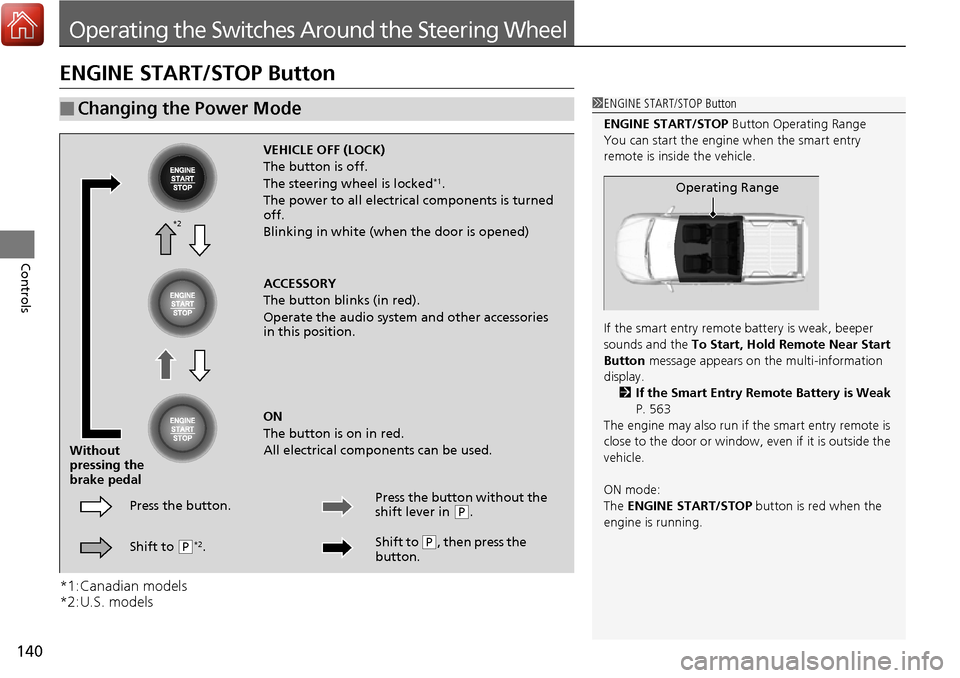
VEHICLE OFF (LOCK)
The button is off.
The steering wheel is locked
*1.
The power to all electrical components is turned
off.
Blinking in white (when the door is opened)
ACCESSORY
The button blinks (in red).
Operate the audio system and other accessories
in this position.
ON
The button is on in red.
All electrical components can be used.
Press the button.
Without
pressing the
brake pedal
Shift to
(P*2. Press the button without the
shift lever in
(
P.
Shift to
( P, then press the
button.
*2
Page 142 of 606
Continued141
uuOperating the Switches Around the Steering Wheel uENGINE START/STOP Button
Controls
If you leave the vehicle for 30 to 60 minutes with the shift lever in (P and the power
mode in ACCESSORY, the vehicle automati cally goes into the mode similar to
VEHICLE OFF (LOCK) to avoid draining the battery.
When in this mode:
The steering wheel does not lock.
You cannot lock or unlock doors with th e remote transmitter or the smart entry
system.
Press the ENGINE START/STOP button to switch the mode to VEHICLE OFF (LOCK).
If you open the driver’s door when the power mode is set to ACCESSORY, a warning
beep sounds.
■Automatic Power Off
■Power Mode Reminder
1 ENGINE START/STOP Button
If the power mode does not change from VEHICLE
OFF to ACCESSORY, press the ENGINE START/STOP
button while moving the st eering wheel left and
right. The steering wheel will unlock, allowing the
mode to change.
Do not leave the power mode in ACCESSORY or ON
when you get out.
Canadian models
Canadian models
Page 145 of 606
144
uuOperating the Switches Around the Steering Wheel uLight Switches
Controls
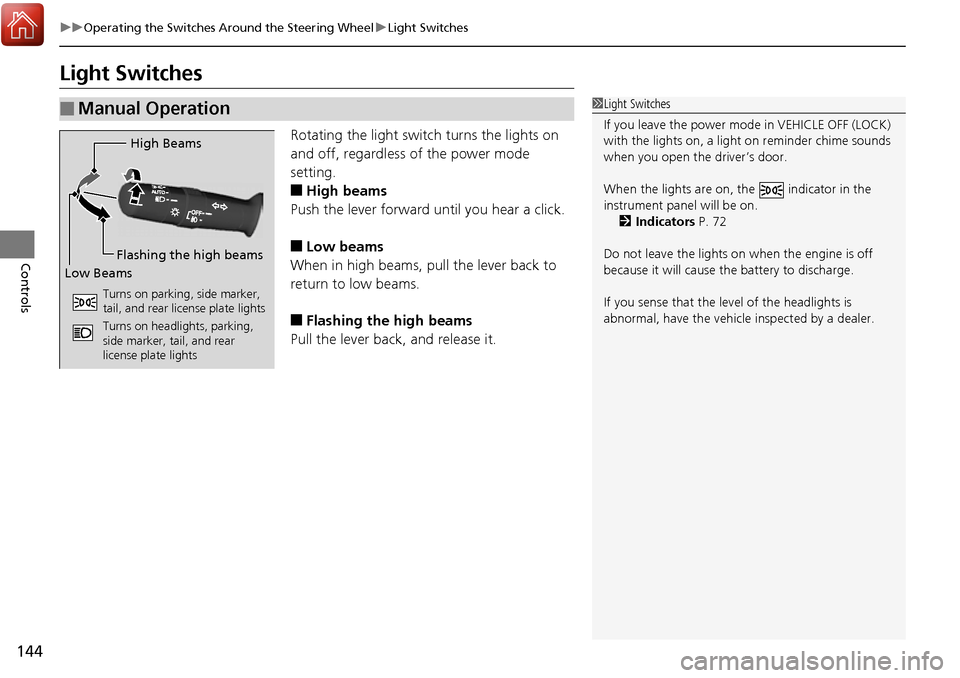
Light Switches
Rotating the light switch turns the lights on
and off, regardless of the power mode
setting.
■High beams
Push the lever forward until you hear a click.
■Low beams
When in high beams, pull the lever back to
return to low beams.
■Flashing the high beams
Pull the lever back, and release it.
■Manual Operation1 Light Switches
If you leave the power mode in VEHICLE OFF (LOCK)
with the lights on, a light on reminder chime sounds
when you open the driver’s door.
When the lights are on, the indicator in the
instrument pane l will be on.
2 Indicators P. 72
Do not leave the lights on when the engine is off
because it will cause the battery to discharge.
If you sense that the le vel of the headlights is
abnormal, have the vehicl e inspected by a dealer.
High Beams
Flashing the high beams
Low Beams
Turns on parking, side marker,
tail, and rear license plate lights
Turns on headlights, parking,
side marker, tail, and rear
license plate lights
Page 147 of 606
uuOperating the Switches Around the Steering Wheel uLight Switches
146
Controls
The headlights automatically co me on when the wipers are used several times within
a certain number of intervals wi th the headlight switch in AUTO.
The headlights automatically go off a few minutes later if the wipers are stopped.
The headlights, all other exterior lights, an d the instrument panel lights turn off 15
seconds after you set the power mode to VE HICLE OFF (LOCK), take the remote with
you, and close the driver’s door.
If you set the power mode to VEHICLE OFF (LOCK) with the headlight switch on, but
do not open the door, the li ghts turn off after 10 minutes (three minutes, if the
switch is in the AUTO position).
The lights turn on again when you unlock or open the driver’s door. If you unlock
the door, but do not open it within 15 seconds, the lights go off. If you open the
driver’s door, you will hear a lights on reminder chime.
■Headlight Integration with Wiper
■Automatic Lighting Off Feature
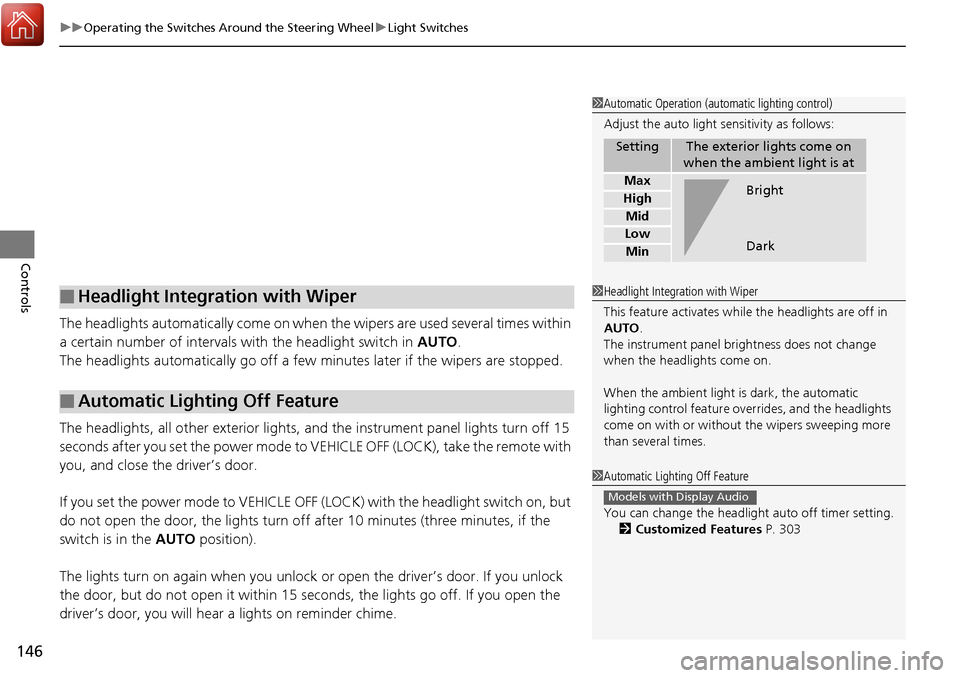
1Automatic Operation (aut omatic lighting control)
Adjust the auto light sensitivity as follows:
SettingThe exterior lights come on
when the ambient light is at
Max
High
Mid
Low
Min
Bright
Dark
1 Headlight Integration with Wiper
This feature activates while the headlights are off in
AUTO .
The instrument panel br ightness does not change
when the headlights come on.
When the ambient light is dark, the automatic
lighting control feature over rides, and the headlights
come on with or without the wipers sweeping more
than several times.
1 Automatic Lighting Off Feature
You can change the headlight auto off timer setting.
2 Customized Features P. 303
Models with Display Audio