USB HONDA RIDGELINE 2017 2.G Owners Manual
[x] Cancel search | Manufacturer: HONDA, Model Year: 2017, Model line: RIDGELINE, Model: HONDA RIDGELINE 2017 2.GPages: 606, PDF Size: 13.21 MB
Page 7 of 606
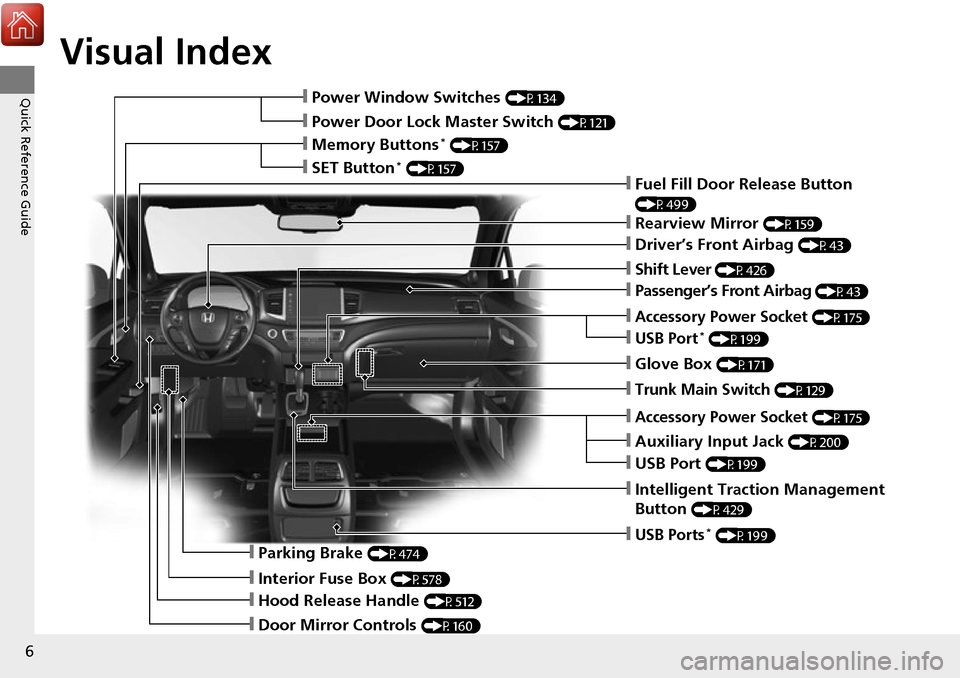
Visual Index
6
Quick Reference Guide❙Power Window Switches (P134)
❙Power Door Lock Master Switch (P121)
❙Memory Buttons* (P157)
❙SET Button* (P157)
❙Fuel Fill Door Release Button
(P499)
❙Rearview Mirror (P159)
❙Driver’s Front Airbag (P43)
❙Shift Lever (P426)
❙Glove Box (P171)
❙Auxiliary Input Jack (P200)
❙Intelligent Traction Management
Button
(P429)
❙Parking Brake (P474)
❙Interior Fuse Box (P578)
❙Hood Release Handle (P512)
❙Door Mirror Controls (P160)
❙USB Ports* (P199)
❙Accessory Power Socket (P175)
❙USB Port (P199)
❙Trunk Main Switch (P129)
❙Accessory Power Socket (P175)
❙USB Port* (P199)
❙Passenger’s Front Airbag (P43)
Page 20 of 606
19
Quick Reference Guide
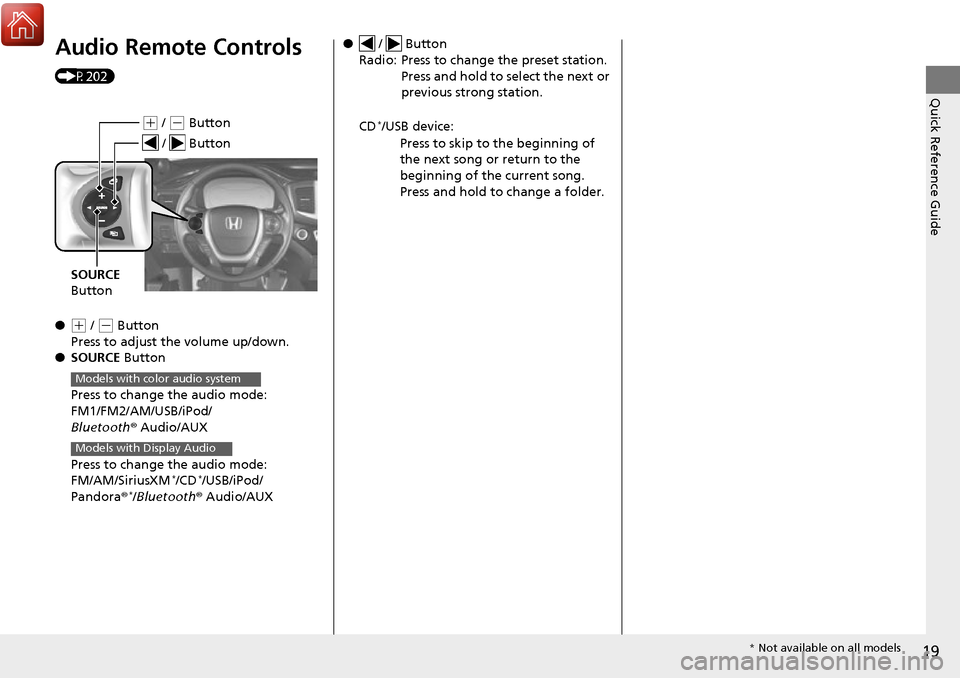
Audio Remote Controls
(P202)
●
(+ / (- Button
Press to adjust the volume up/down.
● SOURCE Button
Press to change the audio mode:
FM1/FM2/AM/USB/iPod/
Bluetooth ® Audio/AUX
Press to change the audio mode:
FM/AM/SiriusXM
*/CD*/USB/iPod/
Pandora ®*/Bluetooth® Audio/AUX
(+ / (- Button
SOURCE
Button
/ Button
Models with color audio system
Models with Display Audio
● / Button
Radio: Press to change the preset station. Press and hold to select the next or
previous strong station.
CD
*/USB device: Press to skip to the beginning of
the next song or return to the
beginning of the current song.
Press and hold to change a folder.
* Not available on all models
Page 198 of 606
197
Features
This chapter describes how to operate technology features.
Audio SystemAbout Your Audio System ................ 198
USB Port(s) ....................................... 199
Auxiliary Input Jack .......................... 200
Audio System Theft Protection ......... 201
Audio Remote Controls .................... 202
Audio System Basic Operation ........ 204
Audio/Information Screen ................ 205
Adjusting the Sound ........................ 209
Display Setup ................................... 210
Playing AM/FM Radio ....................... 211
Playing an iPod ................................ 213
Playing a USB Flash Drive ................. 216
Playing Bluetooth ® Audio ................. 219
Models with color audio system
Audio System Basic Operation ........ 222
Audio/Information Screen ................ 223
Adjusting the Sound ........................ 240
Display Setup ................................... 241
Voice Control Operation .................. 243
Playing AM/FM Radio ....................... 247
Playing SiriusXM ® Radio
*................. 251
Playing a CD .................................... 259
Playing an iPod ................................ 262
Song By Voice
TM (SBV) ...................... 265
Playing Pandora ®............................. 269
Models with Display Audio
Canadian models
Models with navigation system
U.S. models
Playing a USB Flash Drive ................. 271
Playing Bluetooth ® Audio ................ 274
HondaLink ®..................................... 276
Wi-Fi Connection ............................. 281
Siri Eyes Free .................................... 283
Apple CarPlay .................................. 284
Android Auto .................................. 287
Truck Bed Audio System
*................. 291
Audio Error Messages ...................... 292
General Information on the Audio
System ............................................. 296
Customized Features ........................ 303
HomeLink ® Universal Transceiver
*... 334
Bluetooth ® HandsFreeLink® ..... 337, 362
* Not available on all models
Page 199 of 606
198
Features
Audio System
About Your Audio System
The audio system features AM/FM radio and SiriusXM® Radio* service. It can also
play audio CDs*, WMA/MP3/AAC files*, USB flash drives, and iPod, iPhone and
Bluetooth ® devices.
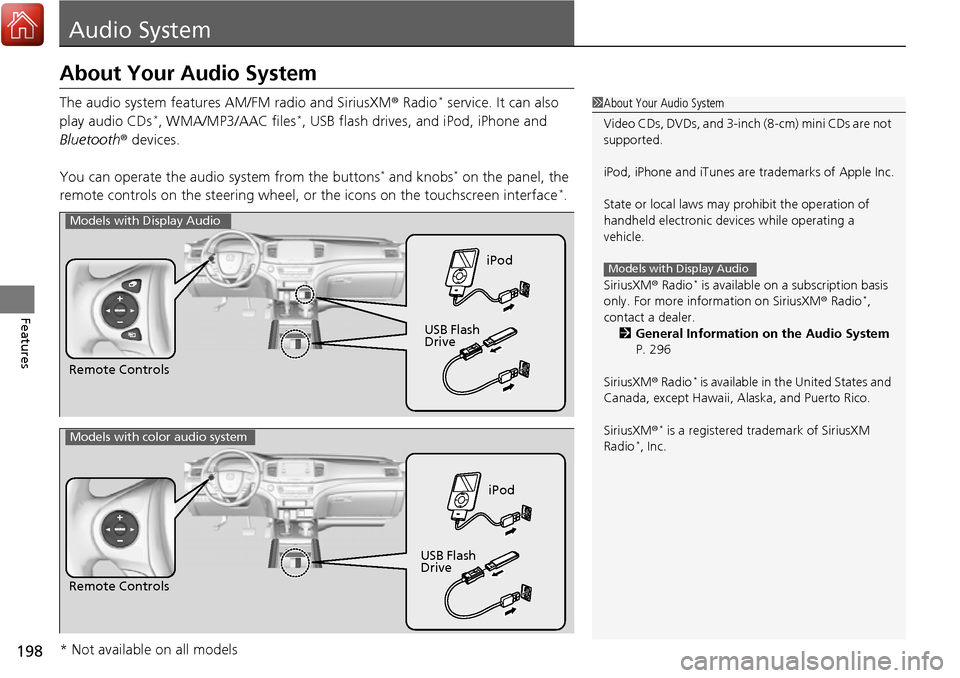
You can operate the audi o system from the buttons
* and knobs* on the panel, the
remote controls on the steering wheel, or the icons on the touchscreen interface*.
1 About Your Audio System
Video CDs, DVDs, and 3-inch (8-cm) mini CDs are not
supported.
iPod, iPhone and iTunes are trademarks of Apple Inc.
State or local laws may pr ohibit the operation of
handheld electronic devi ces while operating a
vehicle.
SiriusXM ® Radio
* is available on a subscription basis
only. For more information on SiriusXM ® Radio*,
contact a dealer. 2 General Information on the Audio System
P. 296
SiriusXM ® Radio
* is available in the United States and
Canada, except Ha waii, Alaska, and Puerto Rico.
SiriusXM ®
* is a registered trademark of SiriusXM
Radio*, Inc.
Models with Display Audio
Remote Controls iPod
USB Flash
Drive
Models with Display Audio
Remote Controls iPod
USB Flash
Drive
Models with color audio system
* Not available on all models
Page 200 of 606
199
uuAudio System uUSB Port(s)
Features
USB Port(s)
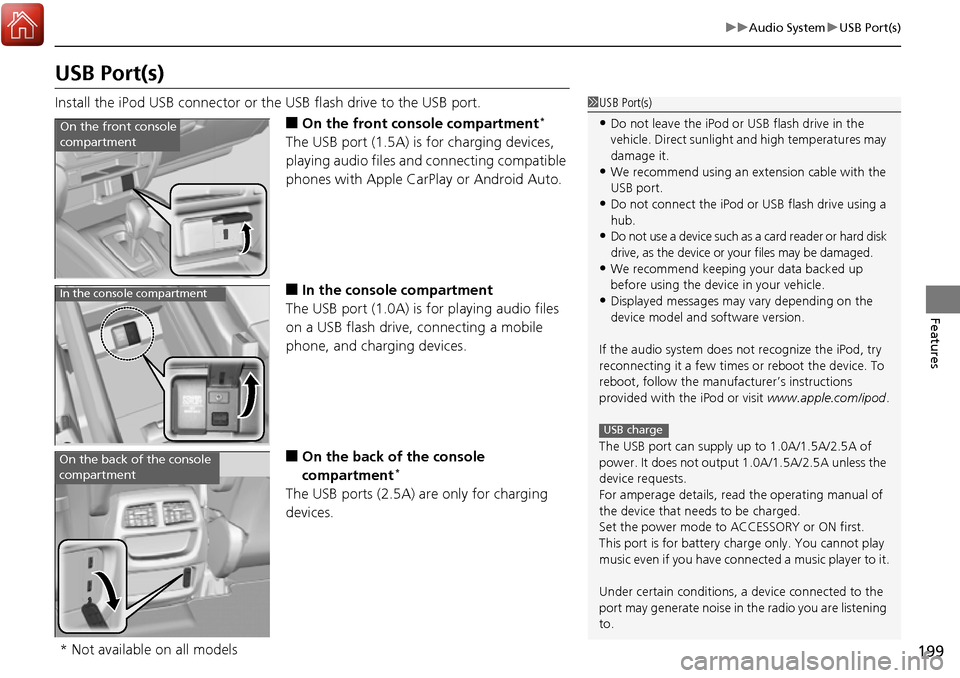
Install the iPod USB connector or the USB flash drive to the USB port.
■On the front console compartment*
The USB port (1.5A) is for charging devices,
playing audio files and connecting compatible
phones with Apple CarPlay or Android Auto.
■In the consol e compartment
The USB port (1.0A) is for playing audio files
on a USB flash drive, connecting a mobile
phone, and charging devices.
■On the back of the console
compartment*
The USB ports (2.5A) are only for charging
devices.
1 USB Port(s)
•Do not leave the iPod or USB flash drive in the
vehicle. Direct sunlight and high temperatures may
damage it.
•We recommend using an extension cable with the
USB port.
•Do not connect the iPod or USB flash drive using a
hub.
•Do not use a device such as a card reader or hard disk
drive, as the device or your files may be damaged.
•We recommend keeping y our data backed up
before using the device in your vehicle.
•Displayed messages may vary depending on the
device model and software version.
If the audio system does not recognize the iPod, try
reconnecting it a few times or reboot the device. To
reboot, follow the manufac turer’s instructions
provided with the iPod or visit www.apple.com/ipod.
The USB port can supply up to 1.0A/1.5A/2.5A of
power. It does not output 1.0A/1.5A/2.5A unless the
device requests.
For amperage details, read the operating manual of
the device that ne eds to be charged.
Set the power mode to ACCESSORY or ON first.
This port is for battery charge only. You cannot play
music even if you have conne cted a music player to it.
Under certain condi tions, a device connected to the
port may generate noise in the radio you are listening
to.
USB charge
On the front console
compartment
In the console compartment
On the back of the console
compartment
* Not available on all models
Page 203 of 606
202
uuAudio System uAudio Remote Controls
Features
Audio Remote Controls
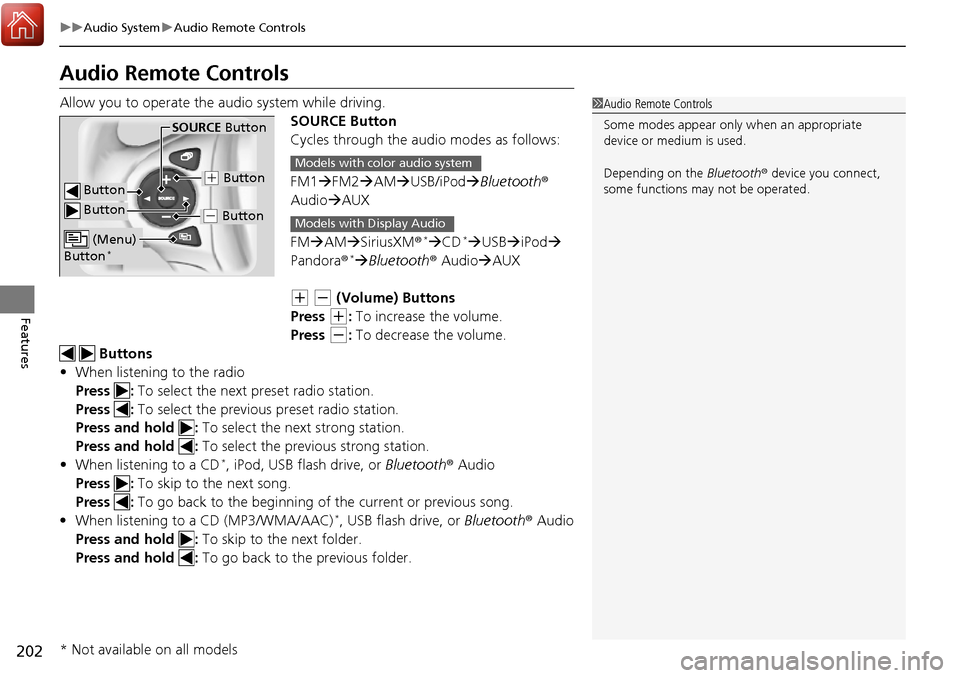
Allow you to operate the a udio system while driving.
SOURCE Button
Cycles through the audio modes as follows:
FM1FM2 AM USB/iPod Bluetooth®
Audio AUX
FM AM SiriusXM ®
*CD* USB iPod
Pandora®* Bluetooth ® Audio AUX
(+ (- (Volume) Buttons
Press
(+: To increase the volume.
Press
(-: To decrease the volume.
Buttons
• When listening to the radio
Press : To select the next preset radio station.
Press : To select the previous preset radio station.
Press and hold : To select the next strong station.
Press and hold : To select the previous strong station.
• When listening to a CD
*, iPod, USB flash drive, or Bluetooth® Audio
Press : To skip to the next song.
Press : To go back to the beginning of the current or previous song.
• When listening to a CD (MP3/WMA/AAC)
*, USB flash drive, or Bluetooth ® Audio
Press and hold : To skip to the next folder.
Press and hold : To go back to the previous folder.
1Audio Remote Controls
Some modes appear only when an appropriate
device or medium is used.
Depending on the Bluetooth® device you connect,
some functions ma y not be operated.
Button
SOURCE Button
Button
(+ Button
(- Button
(Menu)
Button*
Models with color audio system
Models with Display Audio
* Not available on all models
Page 204 of 606
203
uuAudio System uAudio Remote Controls
Features
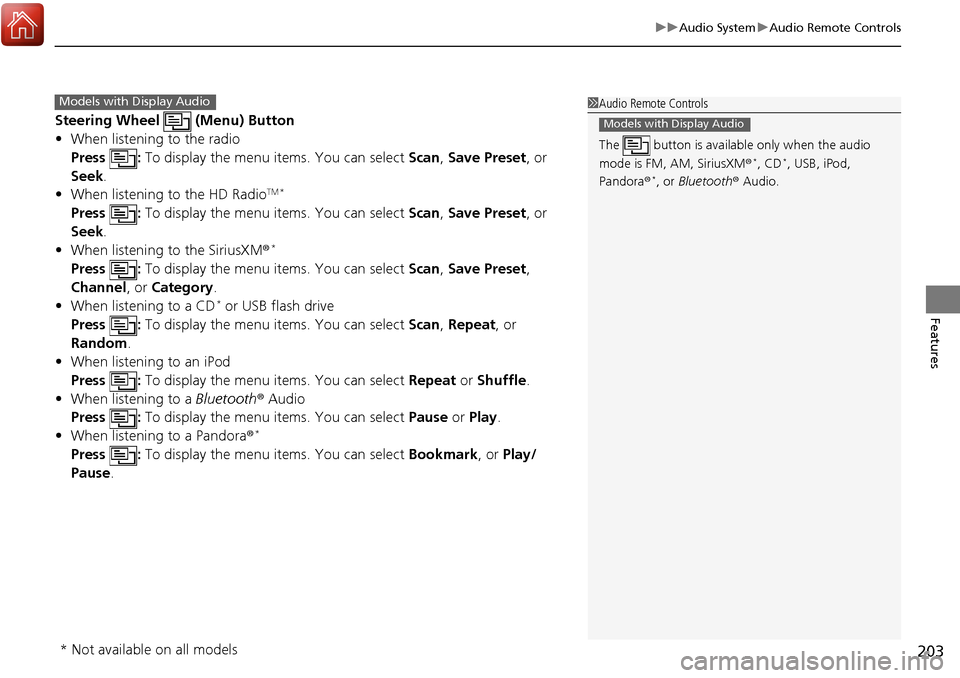
Steering Wheel (Menu) Button
• When listening to the radio
Press : To display the menu items. You can select Scan, Save Preset, or
Seek.
• When listening to the HD Radio
TM *
Press : To display the menu items. You can select Scan, Save Preset, or
Seek.
• When listening to the SiriusXM ®
*
Press : To display the menu items. You can select Scan, Save Preset,
Channel , or Category.
• When listening to a CD
* or USB flash drive
Press : To display the menu items. You can select Scan, Repeat, or
Random .
• When listening to an iPod
Press : To display the menu items. You can select Repeat or Shuffle.
• When listening to a Bluetooth® Audio
Press : To display the menu items. You can select Pause or Play.
• When listening to a Pandora ®
*
Press : To display the menu items. You can select Bookmark, or Play/
Pause .
1Audio Remote Controls
The button is availabl e only when the audio
mode is FM, AM, SiriusXM ®
*, CD*, USB, iPod,
Pandora ®*, or Bluetooth ® Audio.
Models with Display Audio
Models with Display Audio
* Not available on all models
Page 208 of 606
Continued207
uuAudio System Basic Operation uAudio/Information Screen
Features
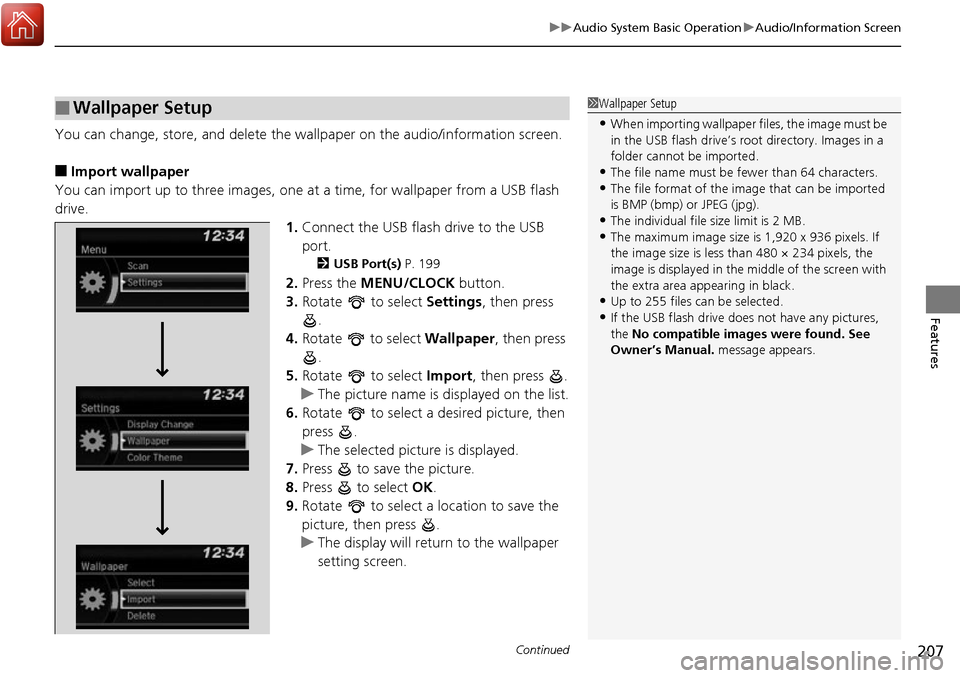
You can change, store, and delete the wa llpaper on the audio/information screen.
■Import wallpaper
You can import up to three images, one at a time, for wallpaper from a USB flash
drive.
1.Connect the USB flas h drive to the USB
port.
2 USB Port(s) P. 199
2.Press the MENU/CLOCK button.
3. Rotate to select Settings, then press
.
4. Rotate to select Wallpaper, then press
.
5. Rotate to select Import, then press .
u The picture name is displayed on the list.
6. Rotate to select a desired picture, then
press .
u The selected picture is displayed.
7. Press to save the picture.
8. Press to select OK.
9. Rotate to select a location to save the
picture, then press .
u The display will return to the wallpaper
setting screen.
■Wallpaper Setup1Wallpaper Setup
•When importing wallpaper files, the image must be
in the USB flash drive’s root directory. Images in a
folder cannot be imported.
•The file name must be fewer than 64 characters.•The file format of the im age that can be imported
is BMP (bmp) or JPEG (jpg).
•The individual file size limit is 2 MB.•The maximum image size is 1,920 x 936 pixels. If
the image size is less than 480 × 234 pixels, the
image is displayed in the middle of the screen with
the extra area appearing in black.
•Up to 255 files can be selected.
•If the USB flash drive doe s not have any pictures,
the No compatible images were found. See
Owner’s Manual. message appears.
Page 214 of 606
213
uuAudio System Basic Operation uPlaying an iPod
Continued
Features
Playing an iPod
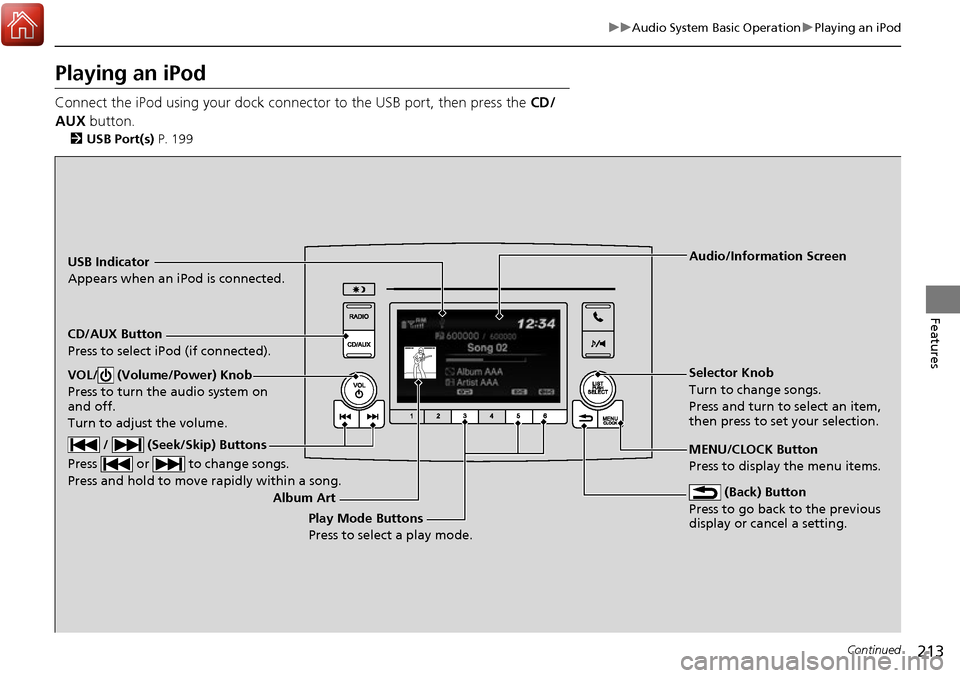
Connect the iPod using your dock connector to the USB port, then press the CD/
AUX button.
2USB Port(s) P. 199
USB Indicator
Appears when an iPod is connected.
CD/AUX Button
Press to select iPod (if connected).
(Back) Button
Press to go back to the previous
display or cancel a setting.
/ (Seek/Skip) Buttons
Press or to change songs.
Press and hold to move rapidly within a song.
VOL/ (Volume/Power) Knob
Press to turn the audio system on
and off.
Turn to adjust the volume.Selector Knob
Turn to change songs.
Press and turn to select an item,
then press to set your selection.
MENU/CLOCK Button
Press to display the menu items. Audio/Information Screen
Album Art Play Mode Buttons
Press to select a play mode.
Page 215 of 606
uuAudio System Basic Operation uPlaying an iPod
214
Features
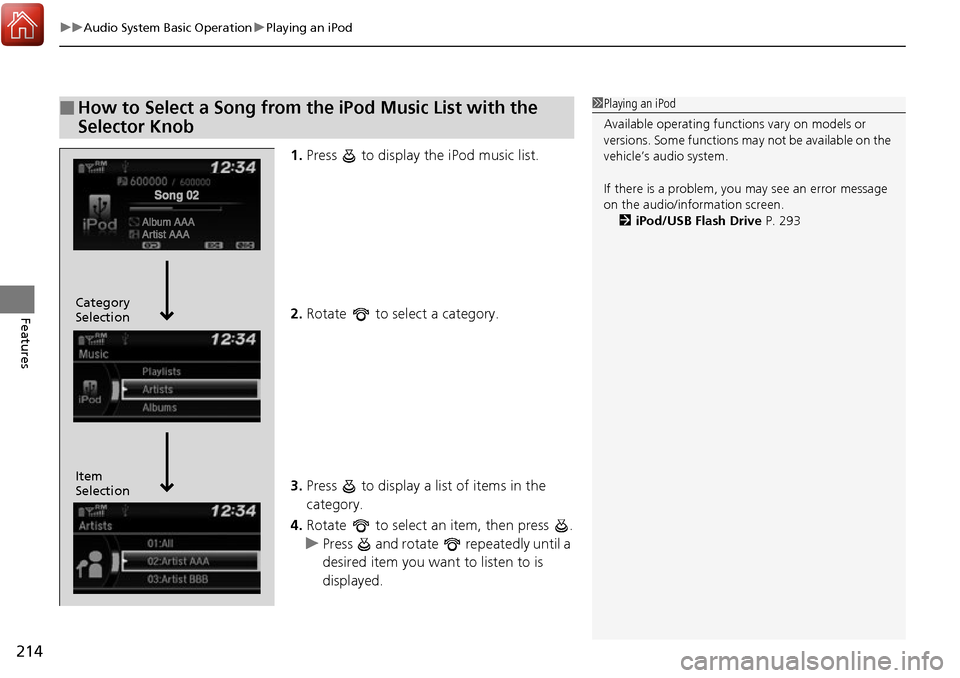
1. Press to display the iPod music list.
2. Rotate to select a category.
3. Press to display a list of items in the
category.
4. Rotate to select an item, then press .
u Press and rotate repeatedly until a
desired item you want to listen to is
displayed.
■How to Select a Song from the iPod Music List with the
Selector Knob1Playing an iPod
Available operating functi ons vary on models or
versions. Some functions ma y not be available on the
vehicle’s audio system.
If there is a problem, you may see an error message
on the audio/information screen. 2 iPod/USB Flash Drive P. 293
Item
Selection Category
Selection