mirror HONDA RIDGELINE 2017 2.G Quick Guide
[x] Cancel search | Manufacturer: HONDA, Model Year: 2017, Model line: RIDGELINE, Model: HONDA RIDGELINE 2017 2.GPages: 85, PDF Size: 8.35 MB
Page 3 of 85
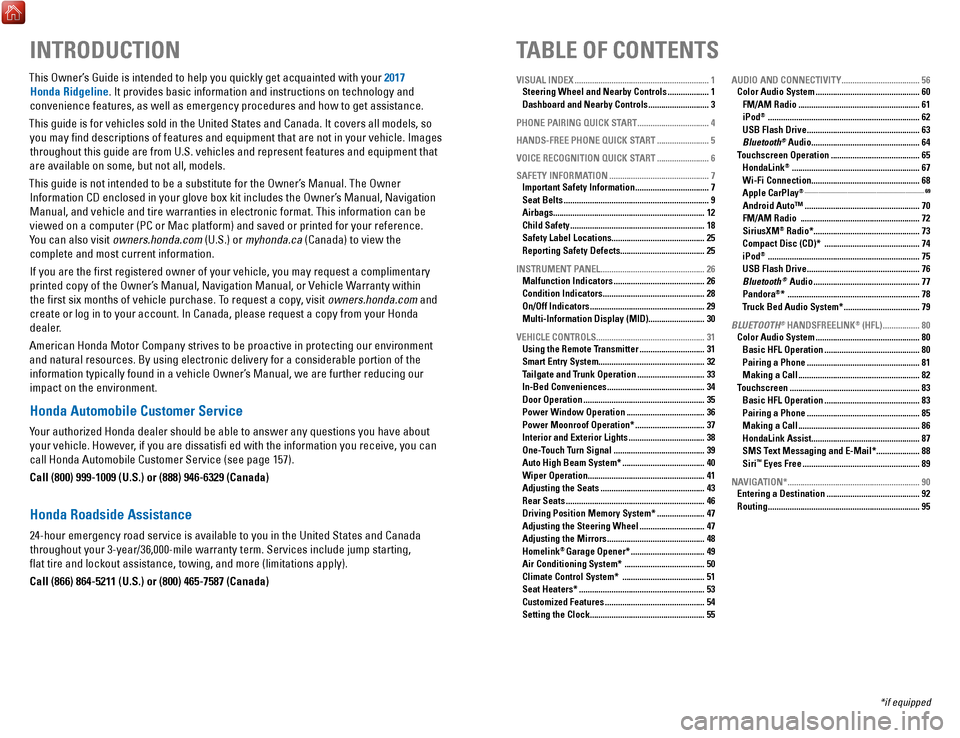
TABLE OF CONTENTS
INTRODUCTION
This Owner’s Guide is intended to help you quickly get acquainted with your 2017
Honda Ridgeline. It provides basic information and instructions on technology and
convenience features, as well as emergency procedures and how to get ass\
istance.
This guide is for vehicles sold in the United States and Canada. It cove\
rs all models, so you may find descriptions of features and equipment that are not in yo\
ur vehicle. Images throughout this guide are from U.S. vehicles and represent features and \
equipment that
are available on some, but not all, models.
This guide is not intended to be a substitute for the Owner’s Manual. The Owner Information CD enclosed in your glove box kit includes the Owner’s Manual, Navigation Manual, and vehicle and tire warranties in electronic format. This infor\
mation can be
viewed on a computer (PC or Mac platform) and saved or printed for you\
r reference.
You can also visit owners.honda.com (U.S.) or myhonda.ca (Canada) to view the complete and most current information.
If you are the first registered owner of your vehicle, you may request\
a complimentary printed copy of the Owner’s Manual, Navigation Manual, or Vehicle Warranty within the first six months of vehicle purchase. To request a copy, visit owners.honda.com and
create or log in to your account. In Canada, please request a copy from \
your Honda dealer.
American Honda Motor Company strives to be proactive in protecting our e\
nvironment and natural resources. By using electronic delivery for a considerable p\
ortion of the information typically found in a vehicle Owner’s Manual, we are further reducing our
impact on the environment.
Honda Automobile Customer Service
Your authorized Honda dealer should be able to answer any questions you h\
ave about your vehicle. However, if you are dissatisfi ed with the information you receive, you can
call Honda Automobile Customer Service (see page 157).
Call (800) 999-1009 (U.S.) or (888) 946-6329 (Canada)
Honda Roadside Assistance
24-hour emergency road service is available to you in the United States \
and Canada throughout your 3-year/36,000-mile warranty term. Services include jump starting,
flat tire and lockout assistance, towing, and more (limitations apply\
).
Call (866) 864-5211 (U.S.) or (800) 465-7587 (Canada)
VISUAL INDEX .............................................................. 1
Steering Wheel and Nearby Controls ................... 1
Dashboard and Nearby Controls ............................ 3
PHONE PAIRING QUICK START
................................. 4
HANDS-FREE PHONE QUICK START
........................ 5
VOICE RECOGNITION QUICK START
........................ 6
SAFETY INFORMATION
.............................................. 7
Important Safety Information .................................. 7
Seat Belts ................................................................... 9
Airbags ...................................................................... 12
Child Safety .............................................................. 18
Safety Label Locations ........................................... 25
Reporting Safety Defects....................................... 25
INSTRUMENT PANEL
................................................ 26
Malfunction Indicators .......................................... 26
Condition Indicators ............................................... 28
On/Off Indicators ..................................................... 29
Multi-Information Display (MID).......................... 30
VEHICLE CONTROLS
.................................................. 31
Using the Remote Transmitter .............................. 31
Smart Entry System ................................................. 32
Tailgate and Trunk Operation ............................... 33
In-Bed Conveniences ............................................. 34
Door Operation ........................................................ 35
Power Window Operation .................................... 36
Power Moonroof Operation* ................................ 37
Interior and Exterior Lights ................................... 38
One-Touch Turn Signal .......................................... 39
Auto High Beam System* ...................................... 40
Wiper Operation ...................................................... 41
Adjusting the Seats ................................................ 43
Rear Seats ................................................................ 46
Driving Position Memory System* ...................... 47
Adjusting the Steering Wheel .............................. 47
Adjusting the Mirrors ............................................. 48
Homelink® Garage Opener* .................................. 49
Air Conditioning System* ..................................... 50
Climate Control System* ...................................... 51
Seat Heaters* .......................................................... 53
Customized Features .............................................. 54
Setting the Clock. .................................................... 55AUDIO AND CONNECTIVITY
....................................
56
Color Audio System ................................................ 60
FM/AM Radio ........................................................ 61
iPod® ...................................................................... 62
USB Flash Drive .................................................... 63
Bluetooth® Audio .................................................. 64
Touchscreen Operation ......................................... 65
HondaLink® ........................................................... 67
Wi-Fi Connection .................................................. 68
Apple CarPlay® ........................................................................\
....................... 69
Android Auto™ .....................................................70
FM/AM Radio ....................................................... 72
SiriusXM® Radio* ................................................. 73
Compact Disc (CD)* ............................................ 74
iPod® ...................................................................... 75
USB Flash Drive .................................................... 76
Bluetooth® Audio ................................................. 77
Pandora®* ............................................................. 78
Truck Bed Audio System* ................................... 79
BLUETOOTH
® HANDSFREELINK® (HFL) ................. 80
Color Audio System ................................................ 80
Basic HFL Operation ............................................ 80
Pairing a Phone .................................................... 81
Making a Call ........................................................ 82
Touchscreen ............................................................ 83
Basic HFL Operation ............................................ 83
Pairing a Phone .................................................... 85
Making a Call ........................................................ 86
HondaLink Assist .................................................. 87
SMS Text Messaging and E-Mail* .................... 88
Siri™ Eyes Free ...................................................... 89
NAVIGATION*
............................................................. 90
Entering a Destination ........................................... 92
Routing ...................................................................... 95
*if equipped
Page 4 of 85
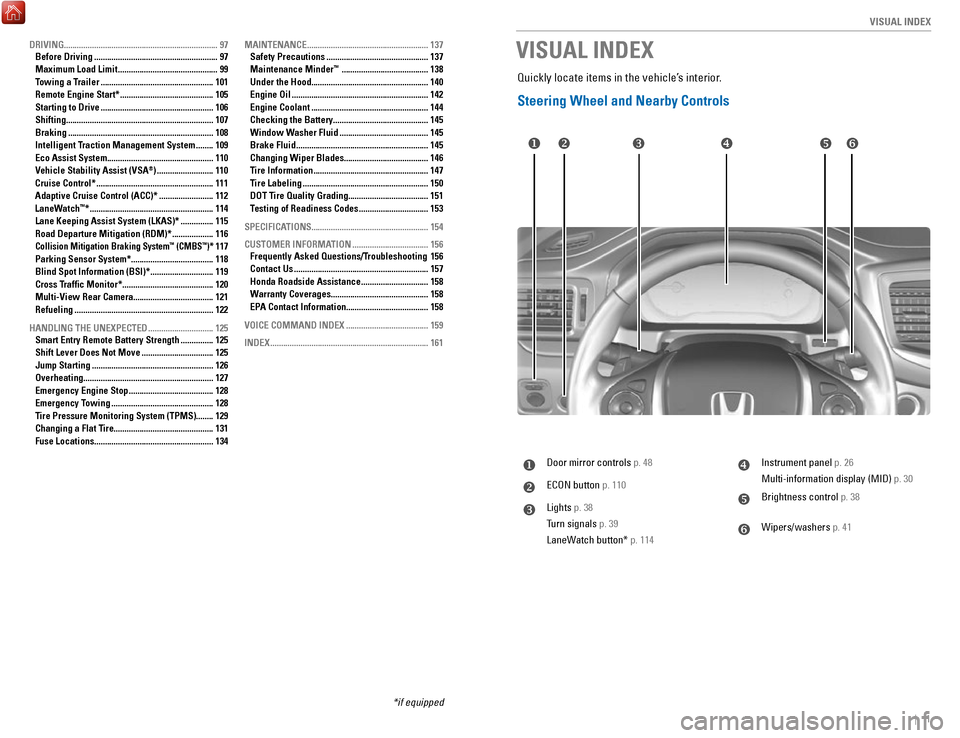
| 1
V
ISUAL INDEX
uDoor mirror controls p. 48
vECON button p. 110
wLights p. 38
Turn signals p. 39
LaneWatch button* p. 114
xInstrument panel p. 26
Multi-information display (MID) p. 30
yBrightness control p. 38
zWipers/washers p. 41
u v w x
y z
VISUAL INDEX
Quickly locate items in the vehicle’s interior.
Steering Wheel and Nearby Controls
DRIVING....................................................................... 97
Before Driving ......................................................... 97
Maximum Load Limit .............................................. 99
Towing a Trailer .................................................... 101
Remote Engine Start* ........................................... 105
Starting to Drive .................................................... 106
Shifting .................................................................... 107
Braking ................................................................... 108
Intelligent Traction Management System ........ 109
Eco Assist System ................................................. 110
Vehicle Stability Assist (VSA®) .......................... 110
Cruise Control* ...................................................... 111
Adaptive Cruise Control (ACC)* ......................... 112
LaneWatch™* ......................................................... 114
Lane Keeping Assist System (LKAS)* ............... 115
Road Departure Mitigation (RDM)* ................... 116Collision Mitigation Braking System™ (CMBS™)* 117
Parking Sensor System* ...................................... 118
Blind Spot Information (BSI)* ............................. 119
Cross Traffic Monitor* .......................................... 120
Multi-View Rear Camera..................................... 121
Refueling
................................................................ 122
HANDLING THE UNEXPECTED
.............................. 125
Smart Entry Remote Battery Strength ............... 125
Shift Lever Does Not Move ................................. 125
Jump Starting ........................................................ 126
Overheating ............................................................ 127
Emergency Engine Stop ....................................... 128
Emergency Towing ............................................... 128
Tire Pressure Monitoring System (TPMS)........ 129
Changing a Flat Tire
.............................................. 131
Fuse Locations
....................................................... 134MAINTENANCE
........................................................
137
Safety Precautions ............................................... 137
Maintenance Minder™ ........................................ 138
Under the Hood ...................................................... 140
Engine Oil ............................................................... 142
Engine Coolant ...................................................... 144
Checking the Battery ............................................ 145
Window Washer Fluid ......................................... 145
Brake Fluid ............................................................. 145
Changing Wiper Blades ....................................... 146
Tire Information ..................................................... 147
Tire Labeling .......................................................... 150
DOT Tire Quality Grading..................................... 151
T
esting of Readiness Codes
................................ 153
SPECIFICATIONS...................................................... 154 CUSTOMER INFORMA
TION
................................... 156
Frequently Asked Questions/Troubleshooting 156
Contact Us .............................................................. 157
Honda Roadside Assistance ............................... 158
Warranty Coverages ............................................. 158
EPA Contact Information...................................... 158
VOICE COMMAND INDEX
...................................... 159
INDEX
........................................................................\
. 161
*if equipped
Page 7 of 85

QUICK START
6 || 7
S
AFETY
VOICE RECOGNITION QUICK START
Depending on how your car is equipped, you can use voice recognition to \
place phone
calls, adjust the audio and climate-control systems, work with the avail\
able navigation
system and more.
Use these tips for better voice recognition.
• Push the Talk button before giving a command
•
Microphones are near the rear-view mirror
•
Recognition works best in a quiet environment with windows closed
•
Speak in a clear, natural voice, while seated normally and looking ahead
For audio systems like this, begin here.
You can place phone calls using speed
dial with stored voice tags. To learn how
to create a speed dial entry, follow these
steps.
1.
Press the Phone button
2.
Select Phone Setup
3.
Select Speed Dial
4.
Select Add New
5.
Select an entry method
6.
Follow the prompts to create
a voice tag
See page 82 for expanded instructions
For audio systems like this, begin here.
1. Press the Talk button
The Voice Portal will appear on the
display
The portal displays the available
categories and commands
2.
Say one of the displayed items
You may have to drill down through
a category or two until you get to the
commands
See page 159 for expanded instructions
SAFETY INFORMATION
Your safety—and the safety of others—is very important and operatin\
g this vehicle
safely is an important responsibility. While we strive to help you make informed
decisions about safety, it is not practical or possible to warn you about all the hazards
associated with operating or maintaining your vehicle. Therefore, you mu\
st use your own good judgment.
Important Safety Information
This guide explains many of your vehicle’s safety features and how to use them. Please read this information carefully. Following the instructions below will also help to keep
you and your passengers safe.
n
Important Safety Precautions •
Always wear your seat belt.
•
Secure all children in the proper restraint system.
•
Be aware of airbag hazards.
•
Don’t drink and drive.
•
Pay appropriate attention to the task of driving safely.
•
Control your speed.
•
Keep your vehicle in safe condition.
Engaging in cell phone conversation or other activities that keep you fr\
om paying
close attention to the road, other vehicles, and pedestrians could lead \
to a crash. Remember, situations can change quickly, and only you can decide when it is safe to
divert some attention away from driving.
n
Important Handling Information
Your vehicle has higher ground clearance than a passenger vehicle designe\
d for use only on pavement. Higher ground clearance has many advantages for off-hi\
ghway
driving. It allows you to travel over bumps, obstacles, and rough terrai\
n. It also provides good visibility so you can anticipate problems earlier.
These advantages come at some cost. Because your vehicle is taller and rides higher off the ground, it has a higher center of gravity making it more \
su
sceptible
to tipping or roll over if you make abrupt turns. Utility vehicles have \
a significantly
higher rollover rate than other types of vehicles. In a rollover crash, \
an unbelted
person is significantly more likely to die than a person wearing a sea\
t belt. As a reminder, make sure you and your passengers always wear seat belts.
Follow these steps to access the voice-recognition system.
Page 27 of 85
VEHICLE CONTROLS
46 || 47
V
EHICLE CONTROLS
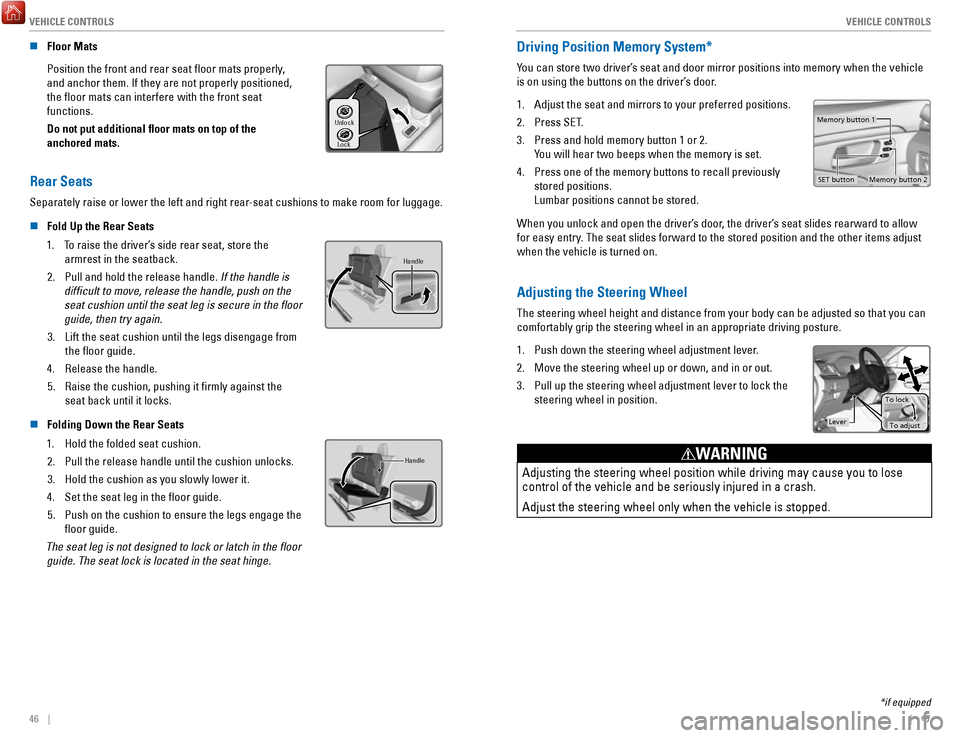
n Floor Mats
Position the front and rear seat floor mats properly,
and anchor them. If they are not properly positioned,
the floor mats can interfere with the front seat
functions.
Do not put additional floor mats on top of the
anchored mats.
Unlock
Lock
Rear Seats
Separately raise or lower the left and right rear-seat cushions to make room for luggage.n
Fold Up the Rear Seats
1.
To raise the driver’s side rear seat, store the armrest in the seatback.
2.
Pull and hold the release handle. If the handle is
difficult to move, release the handle, push on the
seat cushion until the seat leg is secure in the floor
guide, then try again.
3.
Lift the seat cushion until the legs disengage from the floor guide.
4.
Release the handle.
5.
Raise the cushion, pushing it firmly against the
seat back until it locks.
Handle
n Folding Down the Rear Seats
1.
Hold the folded seat cushion.
2.
Pull the release handle until the cushion unlocks.
3.
Hold the cushion as you slowly lower it.
4.
Set the seat leg in the floor guide.
5.
Push on the cushion to ensure the legs engage the
floor guide.
The seat leg is not designed to lock or latch in the floor guide. The seat lock is located in the seat hinge.
Handle
*if equipped
Driving Position Memory System*
You can store two driver’s seat and door mirror positions into memory when the vehicle
is on using the buttons on the driver’s door.
1.
Adjust the seat and mirrors to your preferred positions.
2.
Press SET.
3.
Press and hold memory button 1 or 2.
You will hear two beeps when the memory is set.
4.
Press one of the memory buttons to recall previously
stored positions.
Lumbar positions cannot be stored.
Memory button 1
Memory button 2
SET button
When you unlock and open the driver’s door, the driver’s seat slides rearward to allow
for easy entry. The seat slides forward to the stored position and the other items adj\
ust
when the vehicle is turned on.
Adjusting the Steering Wheel
The steering wheel height and distance from your body can be adjusted so\
that you can
comfortably grip the steering wheel in an appropriate driving posture.
1.
Push down the steering wheel adjustment lever.
2.
Move the steering wheel up or down, and in or out.
3.
Pull up the steering wheel adjustment lever to lock the
steering wheel in position.
Lever To lock
To adjust
Adjusting the steering wheel position while driving may cause you to los\
e
control of the vehicle and be seriously injured in a crash.
Adjust the steering wheel only when the vehicle is stopped.
WARNING
Page 28 of 85

VEHICLE CONTROLS
48 || 49
V
EHICLE CONTROLS
Adjusting the Mirrors
Adjust the angle of the mirrors for the best visibility when you are sit\
ting in the correct
driving position.
n Rearview Mirror with Day/Night Positions*
Manually adjust the position to reduce headlight
glare from vehicles behind you. Flip the tab to switch
between day and night positions.
n Automatic Dimming Rearview Mirror*
When driving after dark, the automatic dimming
function reduces the glare from headlights behind you.
The function cancels when the shift lever is in
Reverse (R).
n Power Door Mirrors
Adjust the power door mirrors when the vehicle is on.
L/R selector switch: Select the left or right mirror.
After adjusting the mirror, return the switch to the
center position.
Mirror position adjustment switch: Press the switch
left, right, up, or down to move the mirror
.
Folding door mirror button*: Press to fold the door
mirrors in or out.
SwitchSelector
Adjustment Switch
Folding
Button*
n Reverse Tilt Door Mirrors*
Either side door mirror can tilt downward when you shift to Reverse (R)\
to improve
visibility on the selected side of the vehicle when reversing. The mirro\
r returns to its
original position when you shift out of Reverse.
When in Reverse, slide the selector switch to the left or right side.
Homelink® Garage Opener*
Program your vehicle to operate up to three remote-controlled devices ar\
ound your
home—such as garage doors, lighting, or home security systems—usin\
g the buttons on
the ceiling.
Models without
moonroof
Buttons
Indicator
Models with moonroof
Buttons
Indicator
n Training a Button
Park near the system you want to program, and follow the instructions in\
the flowchart below.
Press and release the HomeLink
button. Press and release the button on
the remote every 2 seconds.
Does the LED change from slowly blinking
to constantly on or rapidly blinking? This
should take less than one minute.
Press and hold the
HomeLink button
again. Training
complete
YES
NO
HomeLink indicator
rapidly blinks. HomeLink LED
remains on.
YES
NO
YES
NO
Position the remote transmitter you wish
to link 1–3 inches (3–8 cm) from the
HomeLink button you want to program.1
Press and release the desired HomeLink
button. Hold the button on the remote
transmitter.
Does the HomeLink indicator (LED) change
from slowly blinking to constantly on or
rapidly blinking? This should take less than
one minute.
2
aThe remote has a rolling code. Press the
“learn” button on the remote-controlled
device (e.g., garage door opener) .
Press and hold the HomeLink button
again; the remote-controlled device
should operate. Within 30 seconds, press and hold the
programmed HomeLink button for
2 seconds.a
Press and hold the programmed
HomeLink button for about a second.
Does the device (garage door opener) work?
3
b
4
5
To retrain a button or erase codes, see the Owner’s Manual on the Owner Information
CD or at owners.honda.com (U.S.) or www.myhonda.ca (Canada).
If you need help, visit www.homelink.com or call (800) 355-3515.
*if equipped *if equipped
Night position
Ta b
Day
position
Page 29 of 85

VEHICLE CONTROLS
50 || 51
V
EHICLE CONTROLS
Air Conditioning System*
Manually control the front and rear heating and cooling in your vehicle’\
s interior using
the buttons on the dashboard.
n
Front Operation
Fan control
switch
A/C
buttonMAX A/C
button Windshield
defroster button
Temperature control switch
Recirculation button:
Recirculation mode (indicator
on): Recirculates air from the
vehicle’s interior.
Fresh air mode (indicator off):
Maintains outside ventilation. Rear defogger/
heated door
mirrors button*
ON/OFF
button
MODE button:
Change airflow
location.
Climate Control System*
The automatic climate control system can maintain your preferred interio\
r temperature
by selecting the proper mix of heated or cooled air and fan speed. Use t\
he buttons on
the dashboard to control both front and rear operation.
n
Front Operation
AUTO button: Press, then
use the temperature
control switch to set your
preferred temperature. SYNC button: Set the passenger’s
side and rear temperature to the
same as the driver’s side.
Driver’s side
temperature
control switch
A/C
buttonPassenger’s side
temperature
control switch
Recirculation button:
Recirculation mode (indicator on):
Recirculates air from the vehicle’s interior.
Fresh Air mode (indicator off):
Maintains outside ventilation.
Rear defogger/
heated door
mirrors button*
Windshield
defroster button
Fan
control
buttons
ON/OFF
button
MODE button:
Change
airflow
location.
n Rear Operation
RR SETTINGS button:
Adjust rear temperature.
REAR ON/OFF button
*if equipped
*if equipped
REAR LOCK button*:
Disable rear controls*.
Page 52 of 85
NAVIGATION
96 || 97
D
RIVING
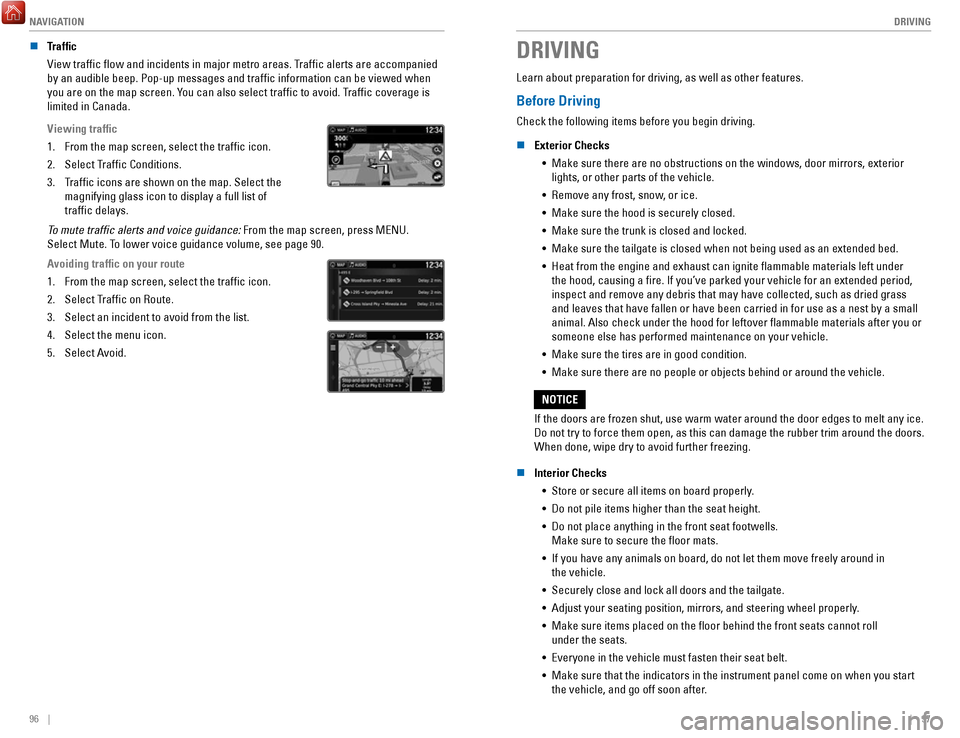
n Traffic
View traffic flow and incidents in major metro areas. Traffic alerts are accompanied
by an audible beep. Pop-up messages and traffic information can be vie\
wed when
you are on the map screen. You can also select traffic to avoid. Traffic coverage is
limited in Canada.
Viewing traffic
1.
From the map screen, select the traffic icon.
2.
Select Traffic Conditions.
3.
Traffic icons are shown on the map. Select the
magnifying glass icon to display a full list of
traffic delays.
To mute traffic alerts and voice guidance: From the map screen, press MENU.
Select Mute. To lower voice guidance volume, see page 90.
Avoiding traffic on your route
1.
From the map screen, select the traffic icon.
2.
Select Traffic on Route.
3.
Select an incident to avoid from the list.
4.
Select the menu icon.
5.
Select Avoid.
DRIVING
Learn about preparation for driving, as well as other features.
Before Driving
Check the following items before you begin driving.
n
Exterior Checks •
Make sure there are no obstructions on the windows, door mirrors, exteri\
or lights, or other parts of the vehicle.
•
Remove any frost, snow, or ice.
•
Make sure the hood is securely closed.
•
Make sure the trunk is closed and locked.
•
Make sure the tailgate is closed when not being used as an extended bed.\
•
Heat from the engine and exhaust can ignite flammable materials left u\
nder
the hood, causing a fire. If you’ve parked your vehicle for an exte\
nded period,
inspect and remove any debris that may have collected, such as dried gra\
ss
and leaves that have fallen or have been carried in for use as a nest by\
a small
animal. Also check under the hood for leftover flammable materials aft\
er you or
someone else has performed maintenance on your vehicle.
•
Make sure the tires are in good condition.
•
Make sure there are no people or objects behind or around the vehicle.
If the doors are frozen shut, use warm water around the door edges to me\
lt any ice.
Do not try to force them open, as this can damage the rubber trim around\
the doors.
When done, wipe dry to avoid further freezing.
NOTICE
n
Interior Checks •
Store or secure all items on board properly.
•
Do not pile items higher than the seat height.
•
Do not place anything in the front seat footwells.
Make sure to secure the floor mats.
•
If you have any animals on board, do not let them move freely around in \
the vehicle.
•
Securely close and lock all doors and the tailgate.
•
Adjust your seating position, mirrors, and steering wheel properly.
•
Make sure items placed on the floor behind the front seats cannot roll\
under the seats.
•
Everyone in the vehicle must fasten their seat belt.
•
Make sure that the indicators in the instrument panel come on when you s\
tart
the vehicle, and go off soon after.
Page 61 of 85
DRIVING
114 || 115
D
RIVING
*if equipped
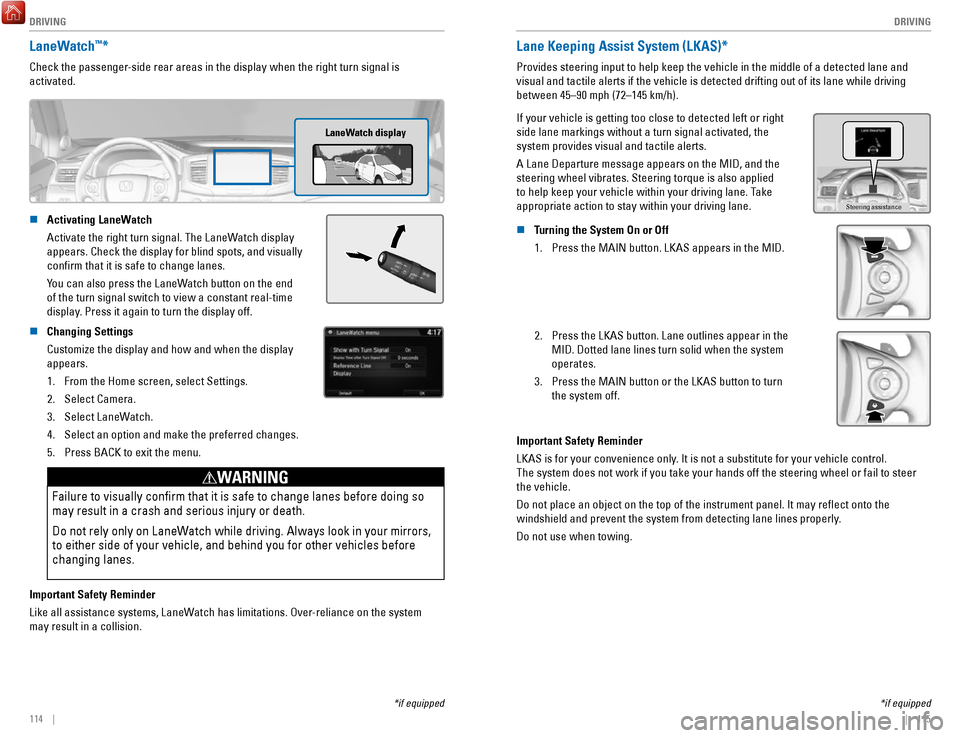
LaneWatch™*
Check the passenger-side rear areas in the display when the right turn signal is
activated.
LaneWatch display
n Activating LaneWatch
Activate the right turn signal. The LaneWatch display
appears. Check the display for blind spots, and visually
confirm that it is safe to change lanes.
You can also press the LaneWatch button on the end
of the turn signal switch to view a constant real-time
display
. Press it again to turn the display off.
n Changing Settings
Customize the display and how and when the display
appears.1.
From the Home screen, select Settings.
2.
Select Camera.
3.
Select LaneWatch.
4.
Select an option and make the preferred changes.
5.
Press BACK to exit the menu.
Failure to visually confirm that it is safe to change lanes before doi\
ng so
may result in a crash and serious injury or death.
Do not rely only on LaneWatch while driving. Always look in your mirrors,
to either side of your vehicle, and behind you for other vehicles before\
changing lanes.
WARNING
Important Safety Reminder
Like all assistance systems, LaneWatch has limitations. Over-reliance on the system
may result in a collision.
*if equipped
Lane Keeping Assist System (LKAS)*
Provides steering input to help keep the vehicle in the middle of a dete\
cted lane and
visual and tactile alerts if the vehicle is detected drifting out of its\
lane while driving
between 45–90 mph (72–145 km/h).
If your vehicle is getting too close to detected left or right
side lane markings without a turn signal activated, the
system provides visual and tactile alerts.
A Lane Departure message appears on the MID, and the
steering wheel vibrates. Steering torque is also applied
to help keep your vehicle within your driving lane. Take
appropriate action to stay within your driving lane.
Steering assistance
n Turning the System On or Off 1.
Press the MAIN button. LKAS appears in the MID.
2. Press the LKAS button. Lane outlines appear in the
MID. Dotted lane lines turn solid when the system
operates.
3.
Press the MAIN button or the LKAS button to turn
the system off.
Important Safety Reminder
LKAS is for your convenience only. It is not a substitute for your vehicle control.
The system does not work if you take your hands off the steering wheel or fail to steer
the vehicle.
Do not place an object on the top of the instrument panel. It may refl\
ect onto the
windshield and prevent the system from detecting lane lines properly.
Do not use when towing.
Page 63 of 85
DRIVING
118 || 119
D
RIVING
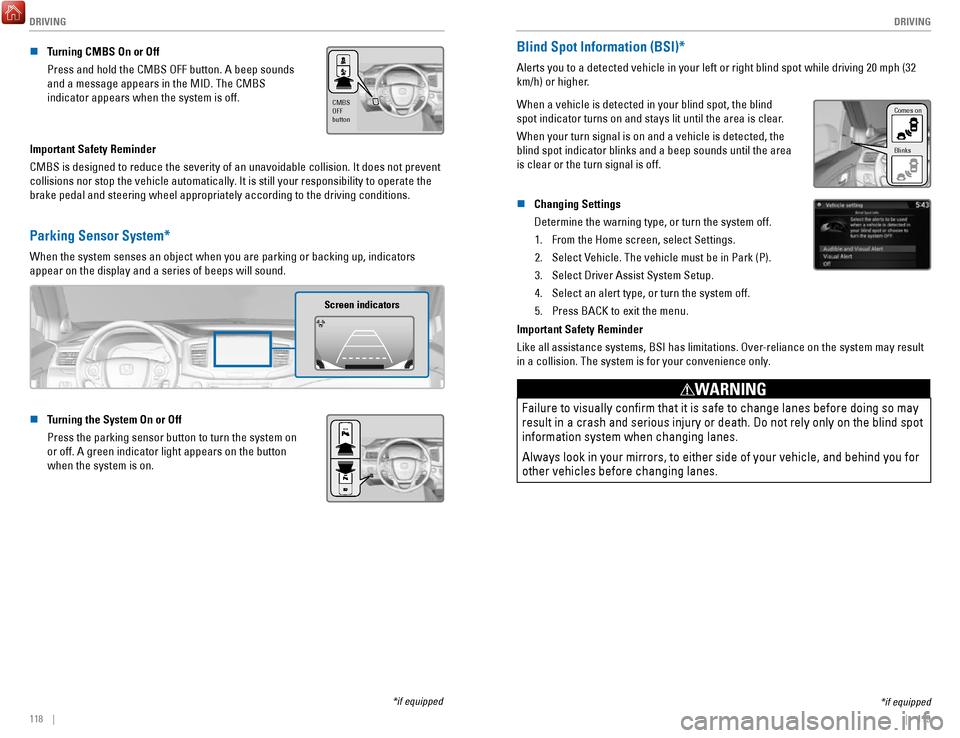
n Turning CMBS On or Off
Press and hold the CMBS OFF button. A beep sounds
and a message appears in the MID. The CMBS
indicator appears when the system is off.
CMBS
OFF
button
Important Safety Reminder
CMBS is designed to reduce the severity of an unavoidable collision. It \
does not prevent
collisions nor stop the vehicle automatically. It is still your responsibility to operate the
brake pedal and steering wheel appropriately according to the driving co\
nditions.
Parking Sensor System*
When the system senses an object when you are parking or backing up, ind\
icators
appear on the display and a series of beeps will sound.
Screen indicators
n Turning the System On or Off
Press the parking sensor button to turn the system on
or off. A green indicator light appears on the button
when the system is on.
*if equipped
*if equipped
Blind Spot Information (BSI)*
Alerts you to a detected vehicle in your left or right blind spot while \
driving 20 mph (32
km/h) or higher.
When a vehicle is detected in your blind spot, the blind
spot indicator turns on and stays lit until the area is clear.
When your turn signal is on and a vehicle is detected, the
blind spot indicator blinks and a beep sounds until the area
is clear or the turn signal is off.
Comes on
Blinks
n Changing Settings
Determine the warning type, or turn the system off.
1.
From the Home screen, select Settings.
2.
Select Vehicle. The vehicle must be in Park (P).
3.
Select Driver Assist System Setup.
4.
Select an alert type, or turn the system off.
5.
Press BACK to exit the menu.
Important Safety Reminder
Like all assistance systems, BSI has limitations. Over-reliance on the system may result
in a collision. The system is for your convenience only.
Failure to visually confirm that it is safe to change lanes before doi\
ng so may
result in a crash and serious injury or death. Do not rely only on the b\
lind spot
information system when changing lanes.
Always look in your mirrors, to either side of your vehicle, and behind \
you for
other vehicles before changing lanes.
WARNING
Page 64 of 85
 at speeds of 3 mph (5 km")
DRIVING
120 || 121
D
RIVING
*if equipped
Cross Traffic Monitor*
Alerts you if a detected vehicle is approaching from a rear corner when \
your vehicle is
in Reverse (R) at speeds of 3 mph (5 km/h) or lower, which can be helpful when backing
out of parking spaces.
Off icon
An arrow icon appears
on the side of an
approaching vehicle.
The system does not provide alerts for a vehicle that is moving away fro\
m your vehicle,
and it may not detect pedestrians, bicycles, or stationary objects.
n
Turning the System On or Off
1.
From the HOME screen, select Settings.
2.
Select Camera.
3.
Select Cross Traffic Monitor.
4.
Select On or Off.
5.
Press BACK to exit the menu.
You can also select the icon on the lower right corner
of the screen when the monitor is on to
turn it off.
This system cannot detect all approaching vehicles and may not detect an\
approaching vehicle at all.
Failure to visually confirm that it is safe to back up the vehicle bef\
ore
doing so may result in a collision.
Do not solely rely on the system when reversing; always also use your
mirrors, and look behind and to the sides of your vehicle before reversi\
ng.
CAUTION
Multi-View Rear Camera
When you shift into Reverse (R), a real-time image of the area behind \
your vehicle is
shown in the display, along with helpful parking guidelines.
Wide view Normal view Top down view
Press the selector knob (color audio system) or touch icons on the scr\
een
(touchscreen) to toggle between views.
n
Changing Settings
Turn the guidelines on or off.
Models with color audio system 1.
Press the MENU/CLOCK button.
2.
Select Settings.
3.
Select Rear Camera.
4.
Select Camera Guidelines.
5.
Select On or Off.
6.
Press the Back button to exit the menus.