engine HONDA RIDGELINE 2018 (in English) Workshop Manual
[x] Cancel search | Manufacturer: HONDA, Model Year: 2018, Model line: RIDGELINE, Model: HONDA RIDGELINE 2018Pages: 623, PDF Size: 25.85 MB
Page 411 of 623
409
Driving
This chapter discusses driving and refueling.
Before Driving................................... 410
Towing a Trailer ................................ 418
Off-Highway Driving Guidelines ..... 430
When Driving Starting the Engine .......................... 432
Precautions While Driving................. 438
Automatic Transmission ................... 439
Shifting ............................................ 440
ECON Button ................................... 442
Intelligent Traction Management...... 443
Cruise Control
*................................ 445
Front Sensor Camera*...................... 448Road Departure Mi tigation (RDM)
System*...................................... 450
Adaptive Cruise Control (ACC)*....... 455
Lane Keeping Assist System (LKAS)*.... 468Vehicle Stability Assist (VSA ®), aka Electronic
Stability Control (ESC), System ............. 476
Agile Handling Assist ....................... 478
i-VTM4 (Intelligent Variable Torque
Management)-4 ® System
*.............. 479
TPMS with Tire Fill Assist .................. 480
Tire Pressure Monitoring System (TPMS) -
Required Federal Explanation ......... 482
Blind spot inform ation (BSI) System
*.... 484
LaneWatchTM*.................................. 486 Braking
Brake System ................................... 488
Anti-lock Brake System (ABS) ........... 490
Brake Assist System ......................... 491
Collision Mitigation Braking System
TM
(CMBSTM)*..................................... 492
Parking Your Vehicle When Stopped ................................ 501
Parking Sensor System
*................... 502
Cross Traffic Monitor*..................... 506
Multi-View Rear Camera .................. 510
Refueling Fuel Information .............................. 512
How to Refuel ................................. 513
Fuel Economy and CO
2 Emissions .... 515
* Not available on all models
Page 412 of 623
410
Driving
Before Driving
Driving Preparation
Check the following items before you start driving.
• Make sure there are no obstructions on the windows, door mirrors, exterior
lights, or other parts of the vehicle.
u Remove any frost, snow, or ice.
u Remove any snow on the roof, as this can slip down and obstruct your field of
vision while driving. If frozen solid , remove ice once it has softened.
u When removing ice from around the wheel s, be sure not to damage the wheel
or wheel components.
• Make sure the hood is securely closed.
u If the hood opens while driving, your front view will be blocked.
• Make sure the tires are in good condition.
u Check air pressure, check for damage and excessive wear.
2 Checking and Maintaining Tires P. 545
•Make sure the tailgate is fully closed when it is not being used as an extended
pickup bed.
• Make sure the trunk is secu rely closed and locked.
• Make sure there are no people or objects behind or around the vehicle.
u There are blind spots from the inside.
■Exterior Checks1Exterior Checks
NOTICE
When doors are frozen s hut, use warm water around
the door edges to melt any ice. Do not try to force
them open, as this can damage the rubber trim
around the doors. When done, wipe dry to avoid
further freezing.
Do not pour warm water into the key cylinder.
You will be unable to insert the key if the water
freezes in the hole.
Heat from the engine and exhaust can ignite
flammable material s left under the hood, causing a
fire. If you’ve parked y our vehicle for an extended
period, inspect and remove any debris that may have
collected, such as dried grass and leaves that have
fallen or have been carried in for use as a nest by a
small animal. Also check under the hood for leftover
flammable materials after you or someone else has
performed maintenance on your vehicle.
Page 420 of 623
418
Driving
Towing a Trailer
Towing Preparation
Your vehicle can tow a trailer if you carefully observe the load limits, use the proper
equipment, and follow the to wing guidelines. Check the load limits before driving.
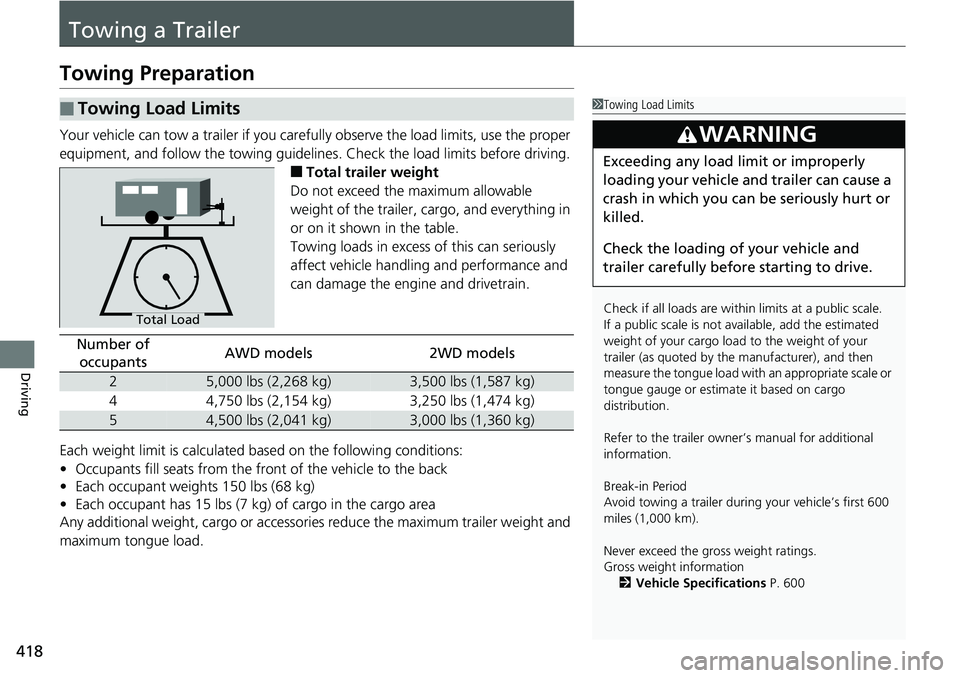
■Total trailer weight
Do not exceed the maximum allowable
weight of the trailer, cargo, and everything in
or on it shown in the table.
Towing loads in excess of this can seriously
affect vehicle handling and performance and
can damage the engine and drivetrain.
Each weight limit is calculated based on the following conditions:
• Occupants fill seats from the front of the vehicle to the back
• Each occupant weights 150 lbs (68 kg)
• Each occupant has 15 lbs (7 kg) of cargo in the cargo area
Any additional weight, cargo or accessori es reduce the maximum trailer weight and
maximum tongue load.
■Towing Load Limits1 Towing Load Limits
Check if all loads are within limits at a public scale.
If a public scale is not available, add the estimated
weight of your cargo load to the weight of your
trailer (as quoted by the manufacturer), and then
measure the tongue load with an appropriate scale or
tongue gauge or estima te it based on cargo
distribution.
Refer to the trailer owner’s manual for additional
information.
Break-in Period
Avoid towing a trailer duri ng your vehicle’s first 600
miles (1,000 km).
Never exceed the gross weight ratings.
Gross weight information 2 Vehicle Specifications P. 600
3WARNING
Exceeding any load limit or improperly
loading your vehicle and trailer can cause a
crash in which you can be seriously hurt or
killed.
Check the loading of your vehicle and
trailer carefully before starting to drive.
Total Load
Number of
occupantsAWD models2WD models
25,000 lbs (2,268 kg)3,500 lbs (1,587 kg)
44,750 lbs (2,154 kg)3,250 lbs (1,474 kg)
54,500 lbs (2,041 kg)3,000 lbs (1,360 kg)
Page 426 of 623
424
uuTowing a Trailer uTowing Preparation
Driving
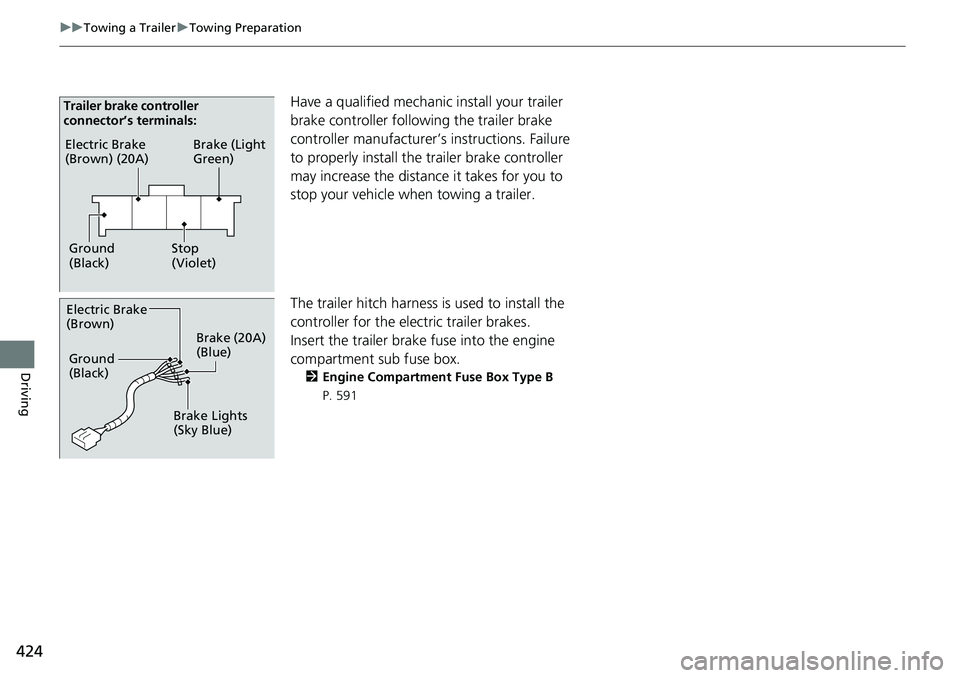
Have a qualified mechanic install your trailer
brake controller followi ng the trailer brake
controller manufacturer’ s instructions. Failure
to properly install the trailer brake controller
may increase the distance it takes for you to
stop your vehicle when towing a trailer.
The trailer hitch harness is used to install the
controller for the electric trailer brakes.
Insert the trailer brake fuse into the engine
compartment sub fuse box.
2 Engine Compartment Fuse Box Type B
P. 591
Electric Brake
(Brown) (20A)
Ground
(Black) Brake (Light
Green)
Stop
(Violet)
Trailer brake controller
connector’s terminals:
Electric Brake
(Brown)
Brake (20A)
(Blue)
Ground
(Black)
Brake Lights
(Sky Blue)
Page 429 of 623
427
uuTowing a Trailer uTrailer Stability Assist
Driving
Trailer Stability Assist
Helps to stabilize the vehicle and tra iler when the trailer severely sways.
■How trailer stability assist works
When the vehicle and trailer become unstable while driving, trailer stability assist
determines the cause. If the trailer oscilla tion is detected as the cause, and the
swaying increases, the system applies the br akes or controls engine output to reduce
vehicle speed.
Both the vehicle and trailer brake lights co me on automatically if you brake to
reduce vehicle speed.
1 Trailer Stability Assist
Trailer stability assist is not a function that prevents
the vehicle and trailer from swaying. Avoid high
speeds, abrupt steering, improper trailer load, and
sudden braking to keep the trailer from swaying.
When swayed too severely, the system becomes
ineffective, and you may lose control of your vehicle,
causing the trailer to roll over or get damaged. 2 Driving Safely with a Trailer P. 428
Trailer towing sway is caused by:
•Crosswinds
•Improper towbar down load
•Excessive Speed
The VSA ® system indicator blinks during the trailer
stability assist operation. 2 VSA ® Operation P. 476
Page 431 of 623
429
uuTowing a Trailer uTowing Your Vehicle
Driving
• Monitor your temperature gauge. If it nears the mark, turn off the heating
and cooling system*/climate control system* and reduce speed. Pull to the side of
the road safely to cool down the engine if necessary.
• Shift to the position if the transmission shifts frequently.
If the vehicle tires slip when retrieving a boat from the water, keep the transmission
in
(D. This prevents damage to the transmission.
Towing Your Vehicle
Your vehicle is not designed to be towed behind a motorhome. If your vehicle needs
to be towed in an emergency, refer to the emergency towing information.
2Emergency Towing P. 594
■Driving in Hilly Terrain
■Retrieving a Boat
H
D4
* Not available on all models
Page 434 of 623
432
Driving
When Driving
Starting the Engine
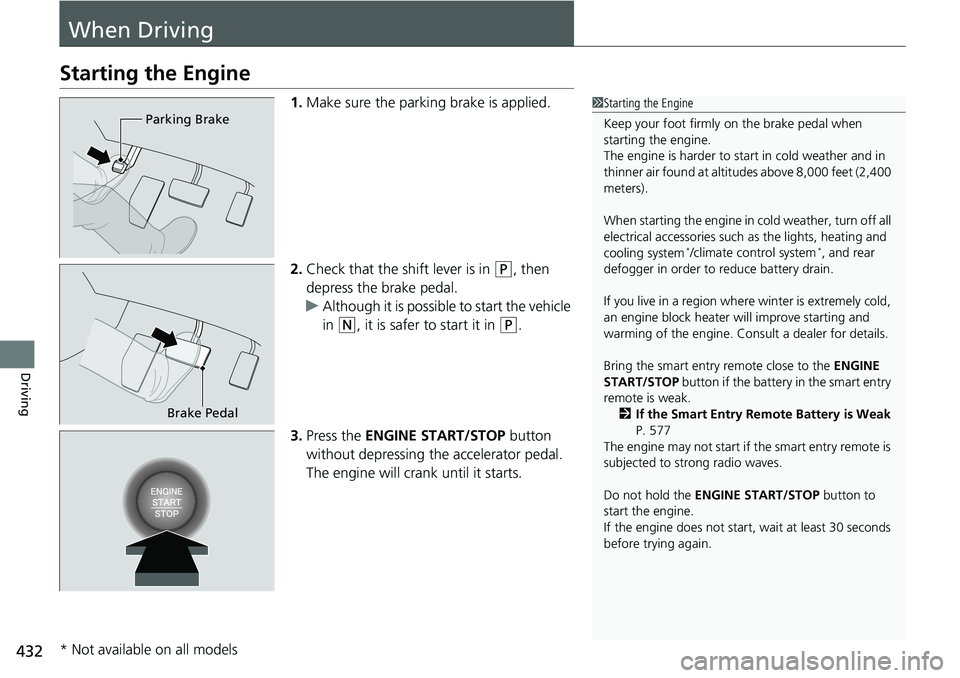
1.Make sure the parking brake is applied.
2. Check that the shift lever is in
(P, then
depress the brake pedal.
u Although it is possible to start the vehicle
in
(N, it is safer to start it in (P.
3. Press the ENGINE START/STOP button
without depressing the accelerator pedal.
The engine will crank until it starts.
1 Starting the Engine
Keep your foot firmly on the brake pedal when
starting the engine.
The engine is harder to st art in cold weather and in
thinner air found at altitudes above 8,000 feet (2,400
meters).
When starting the engine in cold weather, turn off all
electrical accessories such as the lights, heating and
cooling system
*/climate control system*, and rear
defogger in order to reduce battery drain.
If you live in a region where winter is extremely cold,
an engine block heater will improve starting and
warming of the engine. Cons ult a dealer for details.
Bring the smart entry remote close to the ENGINE
START/STOP button if the battery in the smart entry
remote is weak.
2 If the Smart Entry Remote Battery is Weak
P. 577
The engine may not start if the smart entry remote is
subjected to strong radio waves.
Do not hold the ENGINE START/STOP button to
start the engine.
If the engine does not start, wait at least 30 seconds
before trying again.
Parking Brake
Brake Pedal
* Not available on all models
Page 435 of 623
Continued433
uuWhen Driving uStarting the Engine
Driving
You can turn the engine off when the vehicle is completely stopped.
1. Shift to
(P.
2. Press the ENGINE START/STOP button with your foot on the brake pedal.
■Stopping the Engine1Starting the Engine
The immobilizer system pr otects your vehicle from
theft.
If an improperly c oded device is used, the engine’s
fuel system is disabled. 2 Immobilizer System P. 133
Page 436 of 623
uuWhen Driving uStarting the Engine
434
Driving
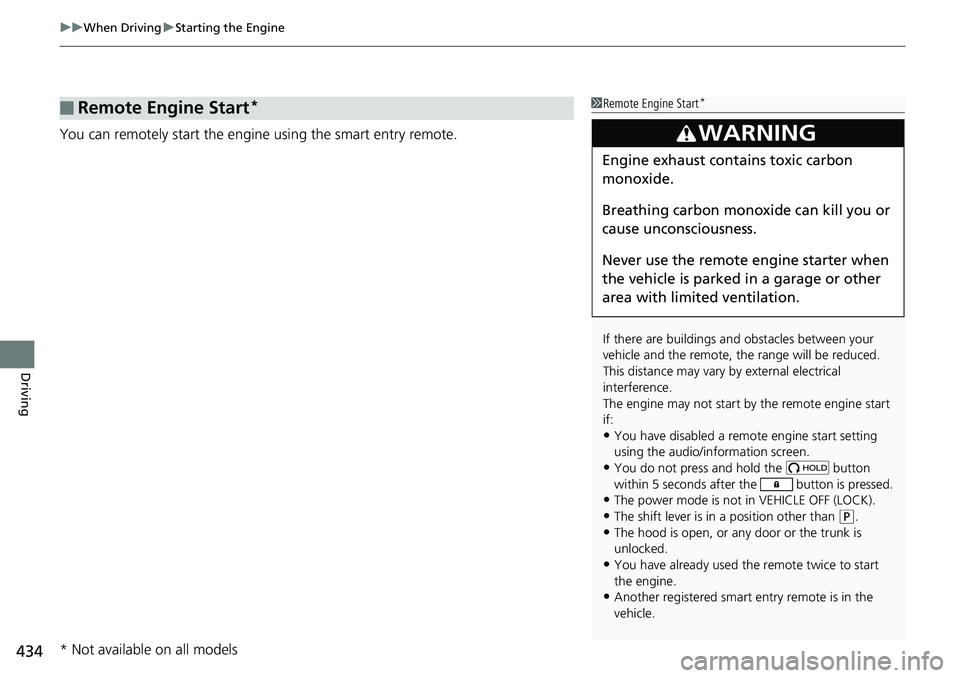
You can remotely start the engine using the smart entry remote.
■Remote Engine Start*1Remote Engine Start*
If there are buildings an d obstacles between your
vehicle and the remote, th e range will be reduced.
This distance may vary by external electrical
interference.
The engine may not start by the remote engine start
if:
•You have disabled a remo te engine start setting
using the audio/information screen.
•You do not press and hold the button
within 5 seconds after the button is pressed.
•The power mode is not in VEHICLE OFF (LOCK).•The shift lever is in a position other than ( P.
•The hood is open, or any door or the trunk is
unlocked.
•You have already used the remote twice to start
the engine.
•Another registered smart entry remote is in the
vehicle.
3WARNING
Engine exhaust contains toxic carbon
monoxide.
Breathing carbon monoxide can kill you or
cause unconsciousness.
Never use the remote engine starter when
the vehicle is parked in a garage or other
area with limited ventilation.
* Not available on all models
Page 437 of 623
Continued435
uuWhen Driving uStarting the Engine
Driving
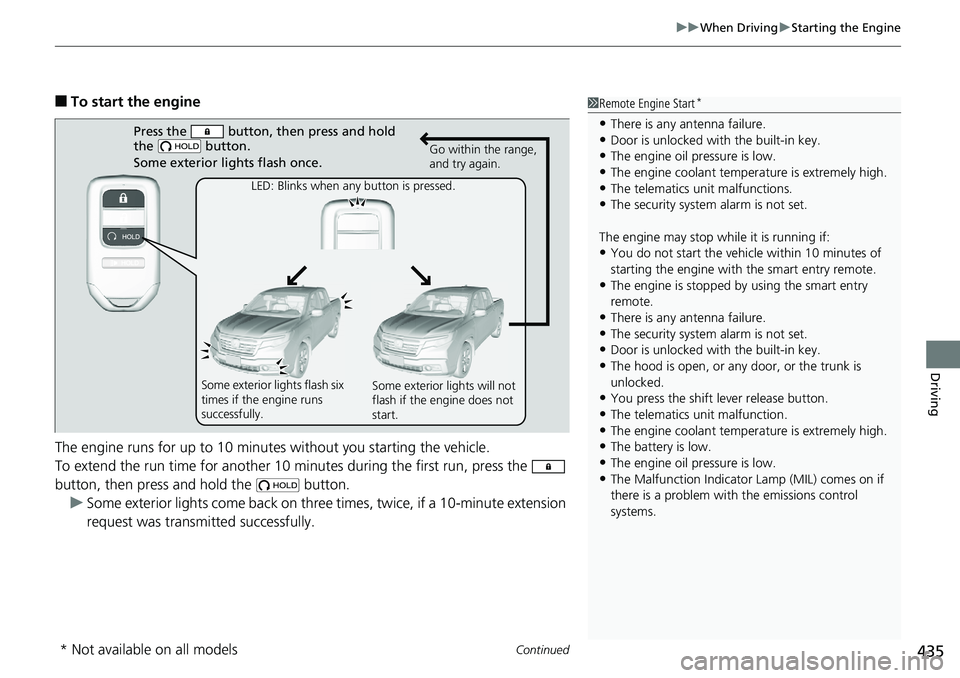
■To start the engine
The engine runs for up to 10 minutes without you starting the vehicle.
To extend the run time for another 10 minutes during the first run, press the
button, then press an d hold the button.
u Some exterior lights come back on three times, twice, if a 10-minute extension
request was transmitted successfully.1Remote Engine Start*
•There is any antenna failure.•Door is unlocked with the built-in key.
•The engine oil pressure is low.
•The engine coolant temper ature is extremely high.•The telematics unit malfunctions.
•The security system alarm is not set.
The engine may stop whil e it is running if:
•You do not start the vehicl e within 10 minutes of
starting the engine with the smart entry remote.
•The engine is stopped by using the smart entry
remote.
•There is any antenna failure.•The security system alarm is not set.
•Door is unlocked with the built-in key.
•The hood is open, or any door, or the trunk is
unlocked.
•You press the shift lever release button.
•The telematics unit malfunction.
•The engine coolant temper ature is extremely high.•The battery is low.
•The engine oil pressure is low.
•The Malfunction Indicator Lamp (MIL) comes on if
there is a problem with the emissions control
systems.
Press the button, then press and hold
the button.
Some exterior lights flash once.
LED: Blinks when any button is pressed. Go within the range,
and try again.
Some exterior lights flash six
times if the engine runs
successfully. Some exterior lights will not
flash if the engine does not
start.
* Not available on all models