language HONDA RIDGELINE 2018 Owner's Manual (in English)
[x] Cancel search | Manufacturer: HONDA, Model Year: 2018, Model line: RIDGELINE, Model: HONDA RIDGELINE 2018Pages: 623, PDF Size: 25.85 MB
Page 320 of 623
318
uuCustomized Features u
Features
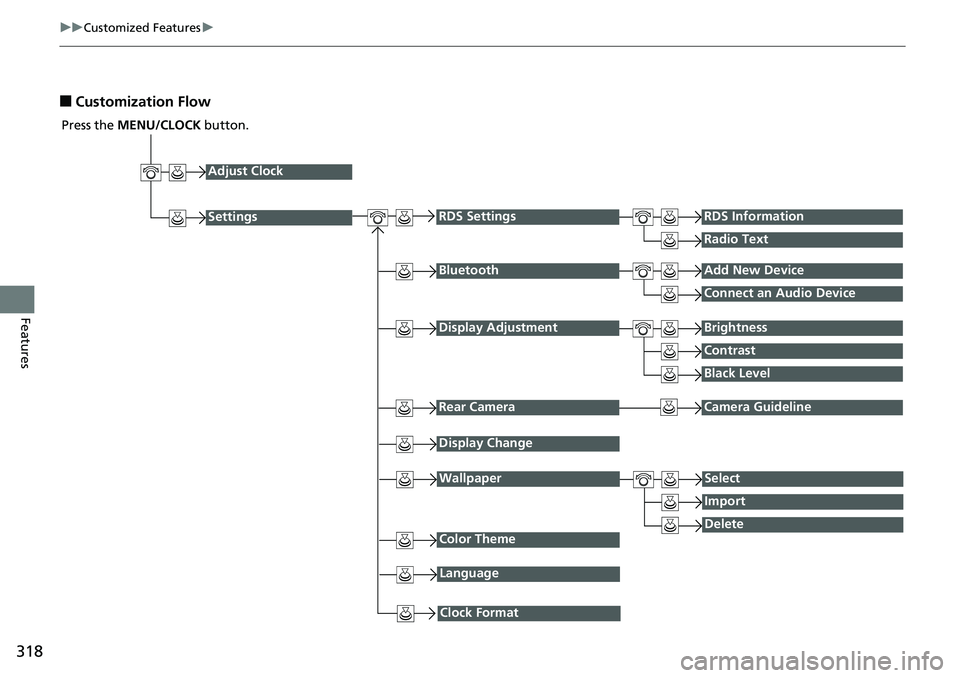
■Customization Flow
Press the MENU/CLOCK button.
Adjust Clock
Settings
BluetoothAdd New Device
Connect an Audio Device
Display AdjustmentBrightness
Contrast
Black Level
Rear CameraCamera Guideline
RDS SettingsRDS Information
Radio Text
Display Change
WallpaperSelect
Import
DeleteColor Theme
Language
Clock Format
Page 323 of 623
321
uuCustomized Features u
Continued
Features
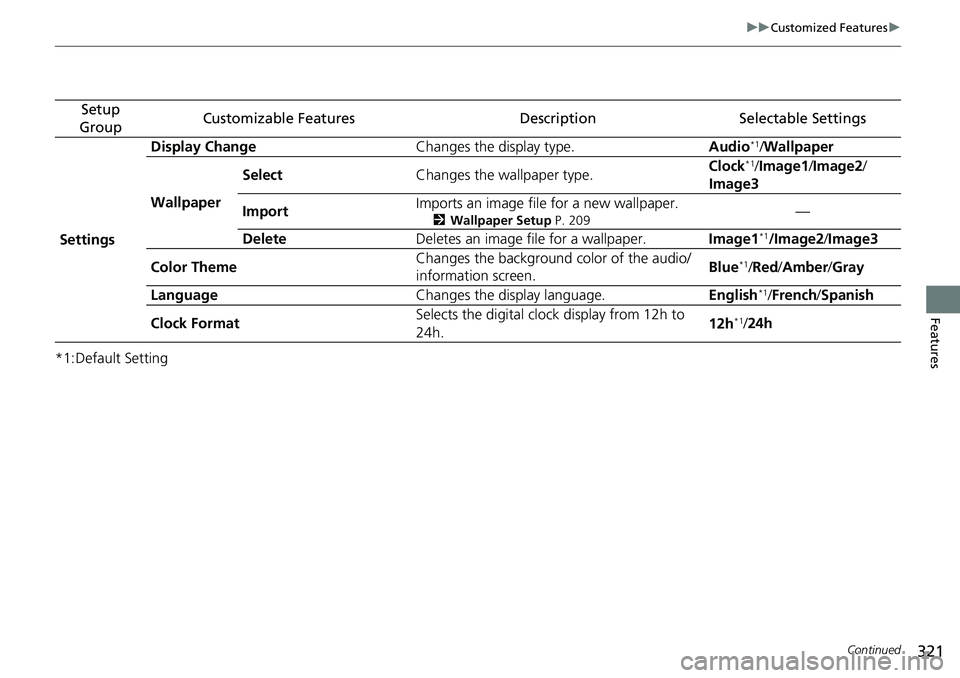
*1:Default Setting
Setup
GroupCustomizable FeaturesDescriptionSelectable Settings
Settings Display Change
Changes the display type. Audio
*1/Wallpaper
Wallpaper Select
Changes the wallpaper type. Clock*1/
Image1/ Image2/
Image3
Import Imports an image file for a new wallpaper.
2
Wallpaper Setup P. 209—
Delete Deletes an image file for a wallpaper. Image1
*1/Image2/Image3
Color Theme Changes the background color of the audio/
information screen.
Blue
*1/
Red /Amber /Gray
Language Changes the display language. English
*1/French /Spanish
Clock Format Selects the digital clock display from 12h to
24h. 12h
*1/
24h
Page 327 of 623
325
uuCustomized Features u
Continued
Features
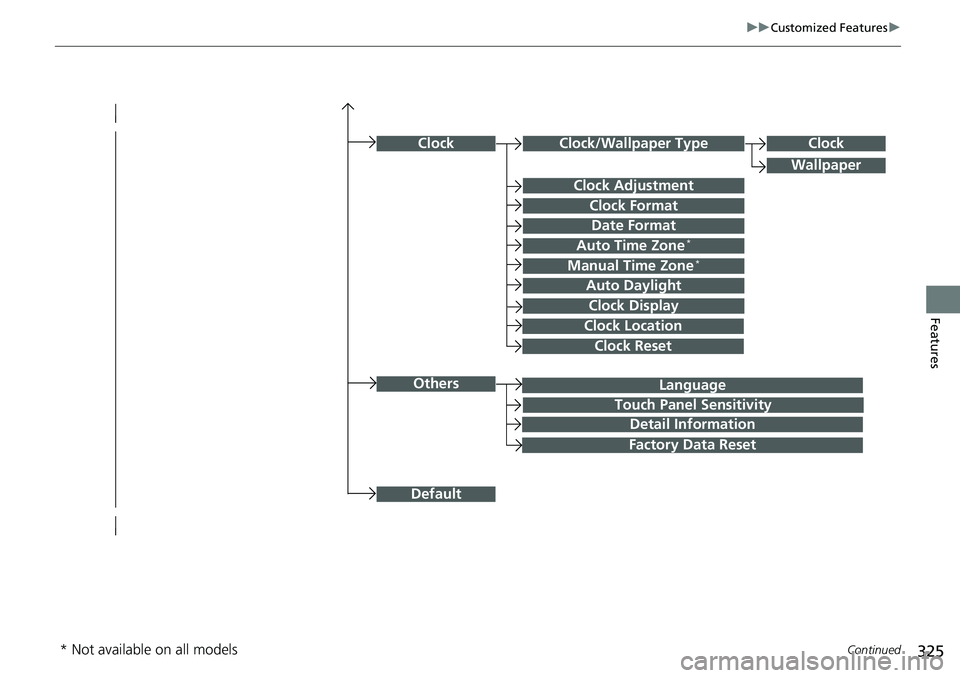
Language
Default
Others
Clock/Wallpaper Type
Date Format
Clock Adjustment
ClockClock
Wallpaper
Manual Time Zone*
Auto Daylight
Clock Display
Touch Panel Sensitivity
Clock Format
Auto Time Zone*
Detail Information
Factory Data Reset
Clock Reset
Clock Location
* Not available on all models
Page 328 of 623
326
uuCustomized Features u
Features
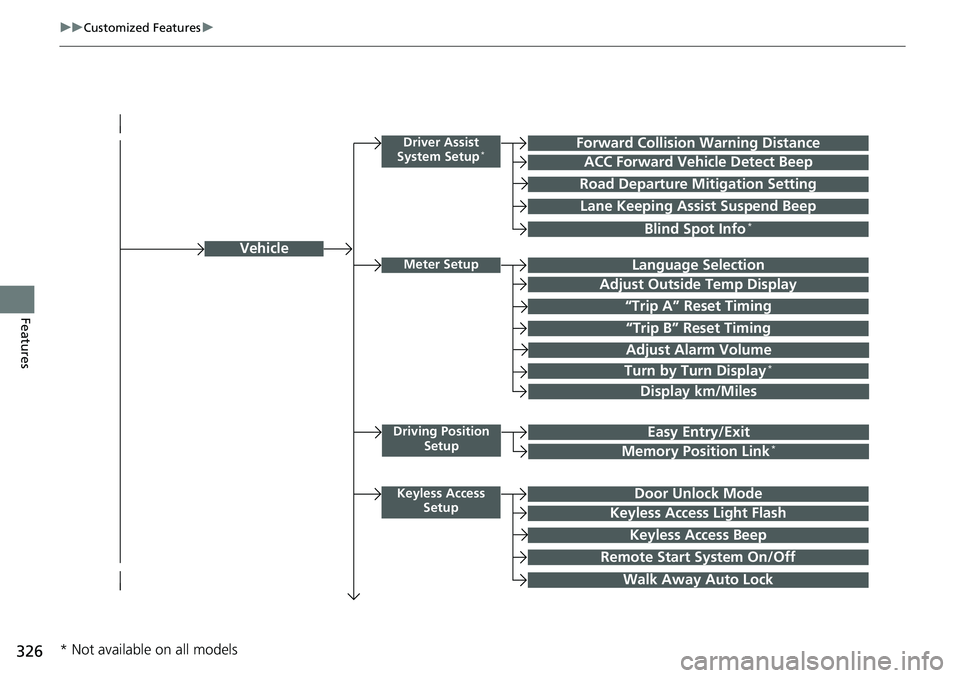
Vehicle
Driver Assist
System Setup*Forward Collision Warning Distance
ACC Forward Vehicle Detect Beep
Road Departure Mi tigation Setting
Lane Keeping Assist Suspend Beep
Blind Spot Info*
Meter SetupLanguage Selection
Adjust Outside Temp Display
“Trip A” Reset Timing
“Trip B” Reset Timing
Adjust Alarm Volume
Turn by Turn Display*
Display km/Miles
Driving Position
SetupEasy Entry/Exit
Memory Position Link*
Keyless Access SetupDoor Unlock Mode
Keyless Access Light Flash
Keyless Access Beep
Remote Start System On/Off
Walk Away Auto Lock
* Not available on all models
Page 337 of 623
335
uuCustomized Features u
Continued
Features
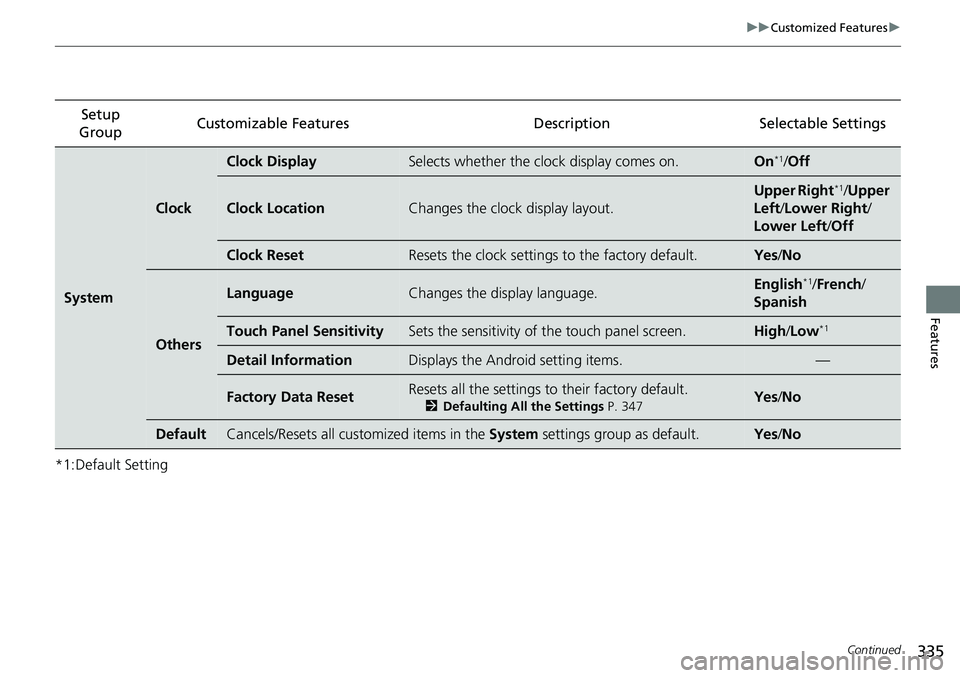
*1:Default SettingSetup
Group Customizable Features Description Selectable Settings
System
Clock
Clock DisplaySelects whether the clock display comes on.On*1/
Off
Clock LocationChanges the clock display layout.
Upper Right*1/Upper
Left/ Lower Right/
Lower Left /Off
Clock ResetResets the clock settings to the factory default.Yes /No
Others
LanguageChanges the display language.English*1/French /
Spanish
Touch Panel SensitivitySets the sensitivity of the touch panel screen.High/Low*1
Detail InformationDisplays the Android setting items.—
Factory Data ResetResets all the settings to their factory default.
2 Defaulting All the Settings P. 347Yes /No
DefaultCancels/Resets all customized items in the System settings group as default.Yes/No
Page 339 of 623
337
uuCustomized Features u
Continued
Features
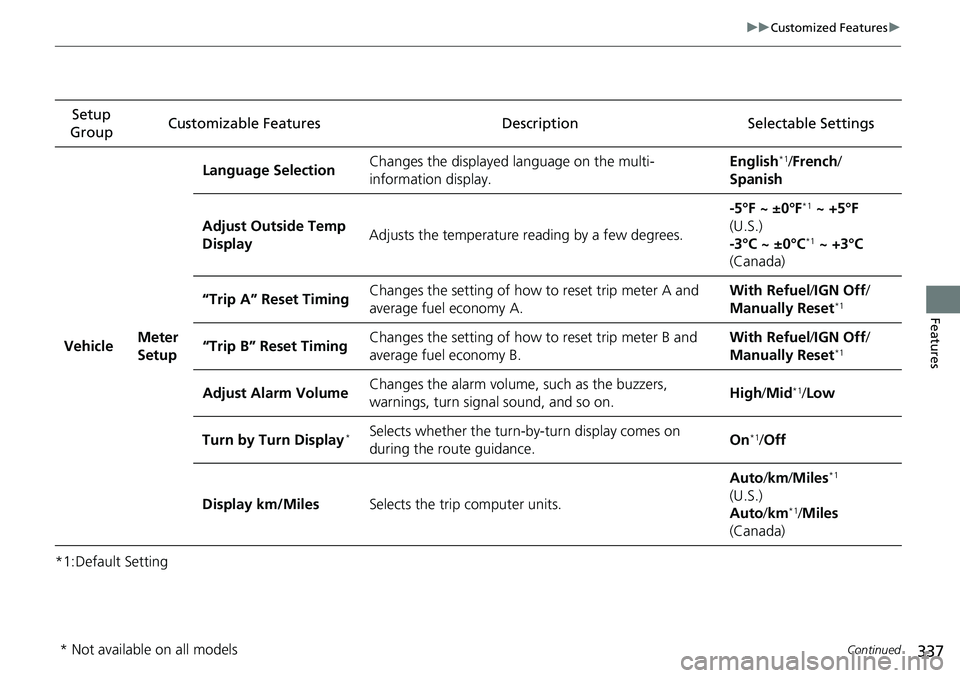
*1:Default SettingSetup
Group Customizable Features Description Selectable Settings
Vehicle Meter
SetupLanguage Selection
Changes the displayed language on the multi-
information display. English
*1/
French /
Spanish
Adjust Outside Temp
Display Adjusts the temperature reading by a few degrees. -5°F ~ ±0°F
*1
~ +5°F
(U.S.)
-3°C ~ ±0°C
*1 ~ +3°C
(Canada)
“Trip A” Reset Timing Changes the setting of how to reset trip meter A and
average fuel economy A. With Refuel
/IGN Off /
Manually Reset
*1
“Trip B” Reset Timing Changes the setting of how to reset trip meter B and
average fuel economy B. With Refuel
/IGN Off /
Manually Reset*1
Adjust Alarm Volume Changes the alarm volume, such as the buzzers,
warnings, turn signal sound, and so on. High
/Mid*1/Low
Turn by Turn Display
*Selects whether the turn-by-turn display comes on
during the route guidance. On*1/
Off
Display km/Miles Selects the trip computer units. Auto
/km /Miles
*1
(U.S.)
Auto /km*1/Miles
(Canada)
* Not available on all models
Page 354 of 623
uuBluetooth ® HandsFreeLink ®u Using HFL
352
Features
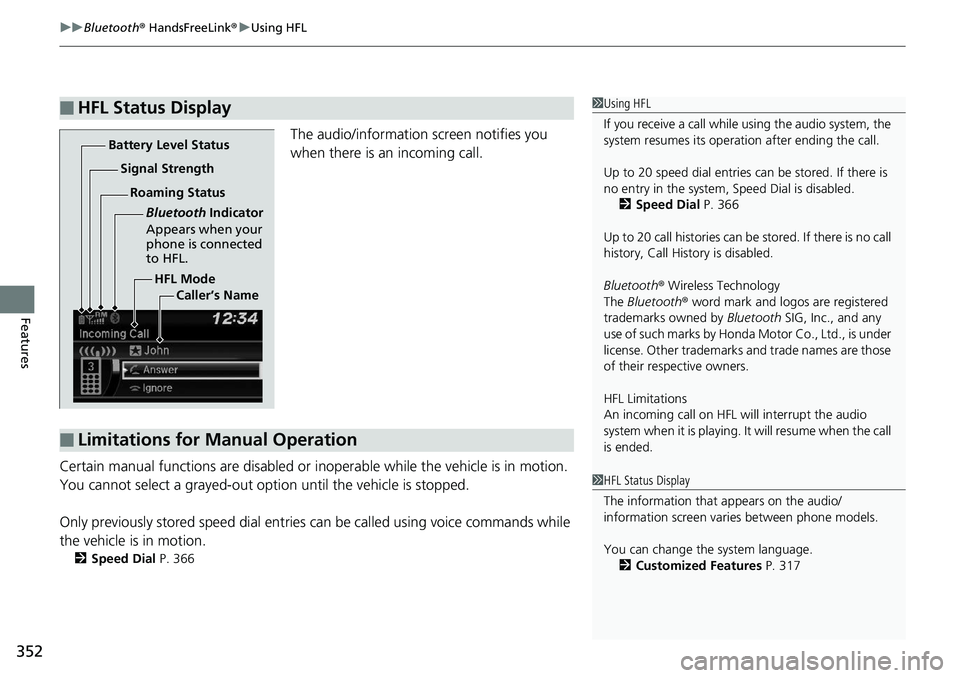
The audio/information screen notifies you
when there is an incoming call.
Certain manual functions are disabled or i noperable while the vehicle is in motion.
You cannot select a grayed-out option until the vehicle is stopped.
Only previously stored speed dial entries can be called using voice commands while
the vehicle is in motion.
2 Speed Dial P. 366
■HFL Status Display1Using HFL
If you receive a call while using the audio system, the
system resumes its operati on after ending the call.
Up to 20 speed dial entries can be stored. If there is
no entry in the system, Speed Dial is disabled. 2 Speed Dial P. 366
Up to 20 call histories can be stored. If there is no call
history, Call History is disabled.
Bluetooth ® Wireless Technology
The Bluetooth ® word mark and logos are registered
trademarks owned by Bluetooth SIG, Inc., and any
use of such marks by Honda Motor Co., Ltd., is under
license. Other trademarks and trade names are those
of their respective owners.
HFL Limitations
An incoming call on HFL will interrupt the audio
s y s te m wh e n it is p la y i n g . It wi ll re s u m e w h en t h e c a l l
is ended.
HFL Mode
Battery Level Status
Signal Strength
Bluetooth Indicator
Appears when your
phone is connected
to HFL.
Roaming Status
Caller’s Name
■Limitations for Manual Operation
1HFL Status Display
The information that appears on the audio/
information screen vari es between phone models.
You can change the system language. 2 Customized Features P. 317
Page 380 of 623
uuBluetooth ® HandsFreeLink ®u Using HFL
378
Features
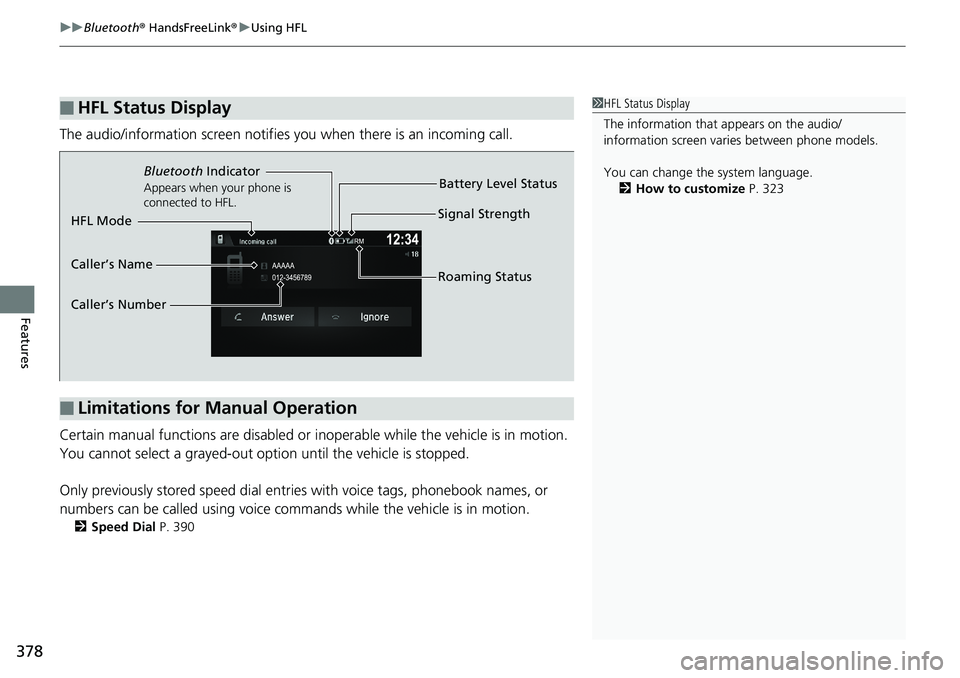
The audio/information screen notifies you when there is an incoming call.
Certain manual functions are disabled or i noperable while the vehicle is in motion.
You cannot select a grayed-out option until the vehicle is stopped.
Only previously stored spee d dial entries with voice tags, phonebook names, or
numbers can be called using voice commands while the vehicle is in motion.
2 Speed Dial P. 390
■HFL Status Display1HFL Status Display
The information that appears on the audio/
information screen vari es between phone models.
You can change the system language. 2 How to customize P. 323
■Limitations for Manual Operation
Bluetooth Indicator
Appears when your phone is
connected to HFL.
Signal Strength
HFL Mode Battery Level Status
Caller’s Name
Caller’s Number Roaming Status
Page 618 of 623
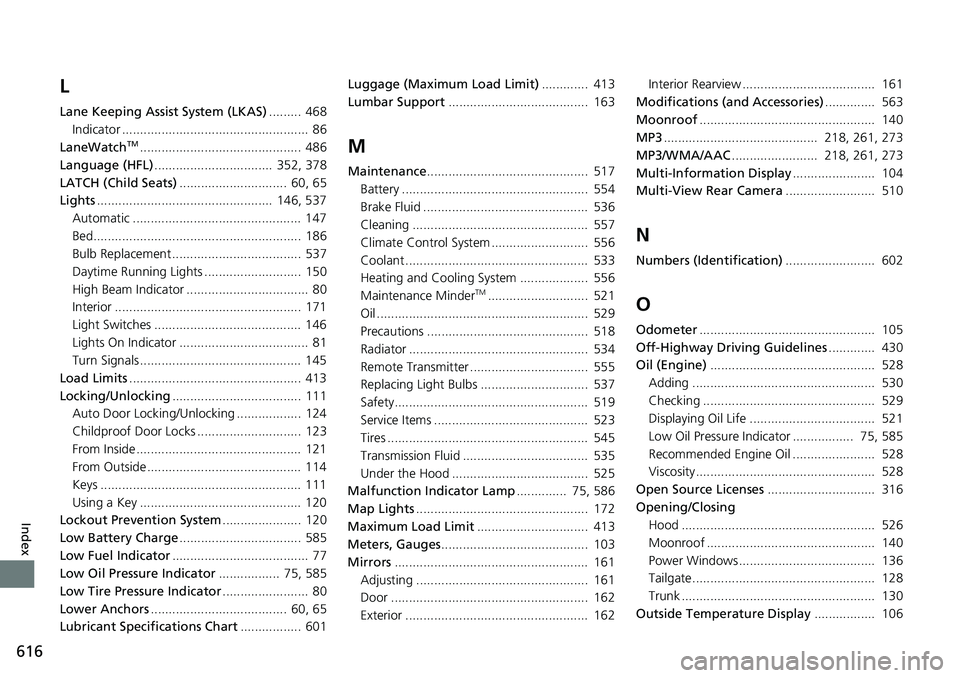
616
Index
L
Lane Keeping Assist System (LKAS)......... 468
Indicator .................................................... 86
LaneWatch
TM............................................. 486
Language (HFL) ................................. 352, 378
LATCH (Child Seats) .............................. 60, 65
Lights ................................................. 146, 537
Automatic ............................................... 147
Bed.......................................................... 186
Bulb Replacement .................................... 537
Daytime Running Lights ........................... 150
High Beam Indicator .................................. 80
Interior .................................................... 171
Light Switches ......................................... 146
Lights On Indicator .................................... 81
Turn Signals ............................................. 145
Load Limits ................................................ 413
Locking/Unlocking .................................... 111
Auto Door Locking/Unlocking .................. 124
Childproof Door Locks ............................. 123
From Inside .............................................. 121
From Outside ........................................... 114
Keys ........................................................ 111
Using a Key ............................................. 120
Lockout Prevention System ...................... 120
Low Battery Charge .................................. 585
Low Fuel Indicator ...................................... 77
Low Oil Pressure Indicator ................. 75, 585
Low Tire Pressure Indicator ........................ 80
Lower Anchors ...................................... 60, 65
Lubricant Specifications Chart ................. 601Luggage (Maximum Load Limit)
............. 413
Lumbar Support ....................................... 163M
Maintenance............................................. 517
Battery .................................................... 554
Brake Fluid .............................................. 536
Cleaning ................................................. 557
Climate Control System ........................... 556
Coolant ................................................... 533
Heating and Cooling System ................... 556
Maintenance Minder
TM............................ 521
Oil ........................................................... 529
Precautions ............................................. 518
Radiator .................................................. 534
Remote Transmitter ................................. 555
Replacing Light Bulbs .............................. 537
Safety...................................................... 519
Service Items ........................................... 523
Tires ........................................................ 545
Transmission Fluid ................................... 535
Under the Hood ...................................... 525
Malfunction Indicator Lamp .............. 75, 586
Map Lights ................................................ 172
Maximum Load Limit ............................... 413
Meters, Gauges ......................................... 103
Mirrors ...................................................... 161
Adjusting ................................................ 161
Door ....................................................... 162
Exterior ................................................... 162 Interior Rearview ..................................... 161
Modifications (and Accessories) .............. 563
Moonroof ................................................. 140
MP3 ........................................... 218, 261, 273
MP3/WMA/AAC ........................ 218, 261, 273
Multi-Information Display ....................... 104
Multi-View Rear Camera ......................... 510
N
Numbers (Identification)......................... 602
O
Odometer................................................. 105
Off-Highway Driving Guidelines ............. 430
Oil (Engine) .............................................. 528
Adding ................................................... 530
Checking ................................................ 529
Displaying Oil Life ................................... 521
Low Oil Pressure Indicator ................. 75, 585
Recommended Engine Oil ....................... 528
Viscosity.................................................. 528
Open Source Licenses .............................. 316
Opening/Closing Hood ...................................................... 526
Moonroof ............................................... 140
Power Windows...................................... 136
Tailgate................................................... 128
Trunk ...................................................... 130
Outside Temperature Display ................. 106