automatic transmission HONDA RIDGELINE 2022 Owner's Manual
[x] Cancel search | Manufacturer: HONDA, Model Year: 2022, Model line: RIDGELINE, Model: HONDA RIDGELINE 2022Pages: 598, PDF Size: 12.42 MB
Page 401 of 598
![HONDA RIDGELINE 2022 Owners Manual Continued399
uuWhen Driving uShifting
Driving
■If you want to keep the transmission in (N position [car wash mode]
With the engine running:
1. Press and hold the brake pedal.
2. Select
(N, then rel](/img/13/58878/w960_58878-400.png "HONDA RIDGELINE 2022 Owners Manual Continued399
uuWhen Driving uShifting
Driving
■If you want to keep the transmission in (N position [car wash mode]
With the engine running:
1. Press and hold the brake pedal.
2. Select
(N, then rel")
Continued399
uuWhen Driving uShifting
Driving
■If you want to keep the transmission in (N position [car wash mode]
With the engine running:
1. Press and hold the brake pedal.
2. Select
(N, then release the button to display (Neutral) (N hold mode on the
multi-information display.
3. Press and hold
(N again for two seconds.
u This puts the vehicle in car wash mode which must be used when your vehicle
is pulled through a conveyor type automatic car wash where you or an
attendant do not remain in the vehicle.
If the ENGINE STOP/START button is pressed
after car wash mode has been activated, the
power mode will change to ACCESSORY and a
message will be displayed on the multi-
information display. u For 15 minutes the transmission remains
in
(N with the power mode in
ACCESSORY. After that, the
transmission automatically changes to
(P and the power mode changes to OFF.
u Manually changing to
(P cancels
ACCESSORY mode. The
(P indicator
comes on and the power mode changes
to OFF. You must always put the
transmission into
(P when car wash
mode is no longer needed.
1If you want to keep the transmission in ( N position [car wash mode]
Note that the transmiss ion may not stay in (N
position while any of the following indicators is on:
•Transmission system indicator.
•Malfunction indicator lamp.•Charging system indicator.
Page 403 of 598
401
uuWhen Driving uShifting
Continued
Driving
Use the paddle shifters to change betwee n 1st and 9th gears without removing your
hands from the steering wheel. The transmission will switch to the sequential mode.
■When the transmi ssion is in (D:
The vehicle will go into th e sequential mode momentarily, and the sequential mode
gear selection indicator will come on.
Once you start traveling at a constant speed , the sequential mode will automatically
switch off, and the sequential mode gear selection indicator will go off.
Hold the
(+ paddle shifter for two seconds or push button to return to normal
drive.
■When the transmi ssion is in (S:
The vehicle will go into th e sequential mode, and the M (sequential mode) indicator
and sequential mode gear selection indicator will come on.
If the vehicle speed increases and the engi ne speed reaches near the tachometer’s
red zone, the transmission automatically shifts up to the next gear.
You can cancel this mode by holding the
(+ paddle shifter for two seconds or push
button. When the sequenti al mode is canceled, the M (sequential mode)
indicator and sequential mode gear selection indicator go off.
■Sequential Mode
D/S
D/S
Page 410 of 598
uuWhen Driving uAuto Idle Stop
408
Driving
The vehicle stops with the transmission in (D and the brake pedal depressed.
When you put the transmission into
(P, the Auto Idle Stop continues to operate,
even if the brake pedal is released. u If you depress the brake pedal, the engine may automatically restart.
■Auto Idle Stop does not activate when:
• The Auto Idle Stop OFF button is pressed.
• The driver’s seat belt is not fastened.
• The engine is not adequately warmed up or coolant temperature is high.
• The transmission fluid temperature is low or high.
• The vehicle comes to a stop again befo re the vehicle speed reaches 3 mph (5
km/h) after the engine starts.
• The vehicle is stopped on a steep incline.
• The transmission is in a position other than
(D.
• The engine is started with the hood open.
u Turn off the engine. Close the hood before you restart the engine to activate
Auto Idle Stop.
• The battery charge is low.
• The internal temperature of the battery is 14°F (−10°C) or less.
• The climate control system is in use, an d the outside temperature is below −4°F
(−20°C) or over 104°F (40°C).
• The climate control system is in us e, and the temperature is set to Hi or Lo.
• is ON (indicator on).
• The Intelligent Traction Management is set to Snow, Mud
*, or Sand*.
• The AC power outlet is used.
■Auto Idle Stop Activates When:1Auto Idle Stop Activates When:
Do not open the hood while the Auto Idle Stop
function is activated. If the hood is opened, the
engine will not re start automatically.
In this case, restart the engine with the ENGINE
START/STOP button.
2 Starting the Engine P. 385
Pressing the ENGINE START/STOP button causes
the engine to no longer restart automatically.
Follow the standard proce dure to start the engine.
2 Starting the Engine P. 385
Models with AC Power Outlet
* Not available on all models
Page 412 of 598
uuWhen Driving uAuto Idle Stop
410
Driving
The brake pedal is released.
■The engine restarts even if the brake pedal is depressed when:
• The Auto Idle Stop OFF button is pressed.
• The steering wheel is operated.
• The transmission is put into
(R or (S, or when it is set from (N to (D.
u If you put the transmission into
(P after the Auto Idle Stop activates, the Auto
Idle Stop continues to operate. In this case, the engine restarts when you
depress the brake pedal.
• The pressure on the brake pedal is redu ced and the vehicle starts moving while
stopped on an incline.
• The pressure on the brake pedal is repeated ly applied and released slightly during
a stop.
• The battery charge becomes low.
• The accelerator pedal is depressed.
• The driver’s seat belt is unlatched.
• is ON (indicator on).
• The climate control system is in us e, and the difference between the set
temperature and actual interior temperature becomes significant.
• The climate control system is bein g used to dehumidify the interior.
• The Intelligent Traction Management is set to Snow, Mud
*, or Sand*.
• The AC power outlet is used.
■The Engine Automatically Restarts When:1The Engine Automatically Restarts When:
If you are using an electroni c device during Auto Idle
Stop, the device may tempor arily be turned off when
the engine restarts.
Models with AC Power Outlet
* Not available on all models
Page 417 of 598
415
uuWhen Driving uIntelligent Variable Torque Management (i-VTM4TM) AWD System*
Driving
Intelligent Variable Torque Management (i-VTM4TM)
AWD System*
The Intelligent Variable To rque Management (i-VTM4TM) AWD System is a full time
all wheel drive system that automatically controls and transfers varying amount of
engine torque to all wheels independently according to the driving conditions.
You still need to exercise the same care when accelerating, steering, and braking
that you would in a two wheel drive vehicle.
Avoid continuously driving on slippery surfaces where a wheel is likely to spin out,
and do not drive if the All-wheel drive ( AWD) Indicator starts blinking. Driving
continuously under such conditions can damage the system’s torque distribution
unit.
If the All-wheel drive (AWD ) Indicator blinks while driving, it indicates the
differential temperature is too high. If this happens, pull to the side of the road
when it is safe, shift to park, and idle the engine until the indicator goes out. If the
indicator does not go out, take your vehi cle to a dealer to have it checked.1Intelligent Variable Torq ue Management (i-VTM4TM) AWD
System*
NOTICE
Do not continuously spin the front tires of your
vehicle. Continuously spinning the front tires can
cause transmission or re ar differential damageM
The Intelligent Variable Torque Management (iL
VTM4
TM) AWD System may not function properly if
tire type and size are mixed. Make sure to use the
same size and type of tire , and the air pressures as
specified. 2 Tire and Wheel Replacement P. 522
* Not available on all models
Page 483 of 598
481Continued
Driving
Multi-View Rear Camera
About Your Multi-View Rear Camera
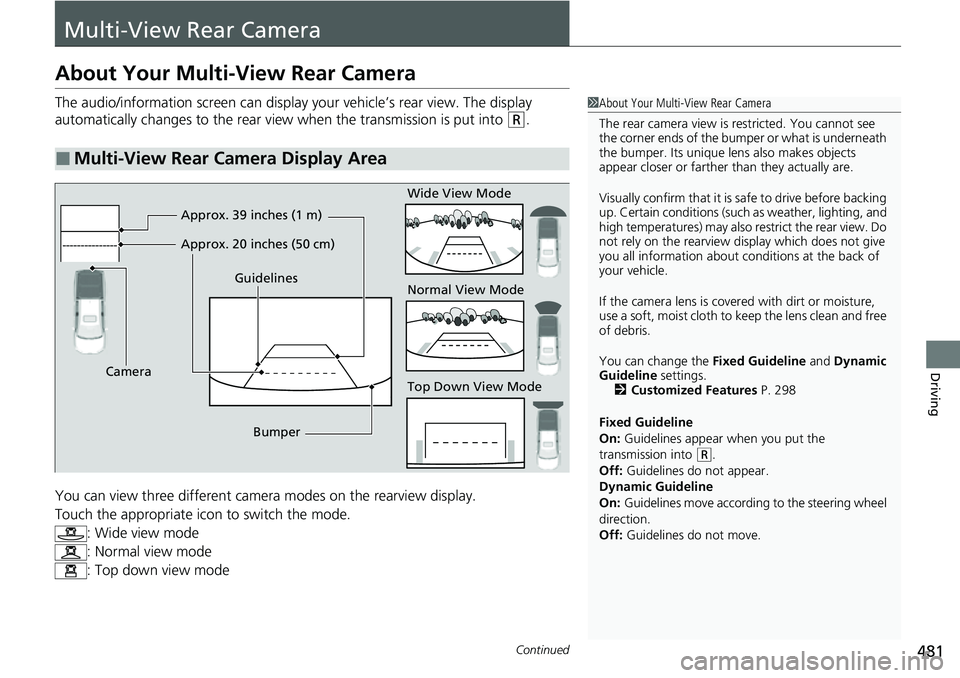
The audio/information screen can display your vehicle’s rear view. The display
automatically changes to the rear view when the transmission is put into
(R.
You can view three different camera modes on the rearview display.
Touch the appropriate icon to switch the mode. : Wide view mode
: Normal view mode
: Top down view mode
■Multi-View Rear Camera Display Area
1About Your Multi-View Rear Camera
The rear camera view is restricted. You cannot see
the corner ends of the bumper or what is underneath
the bumper. Its unique le ns also makes objects
appear closer or farther than they actually are.
Visually confirm that it is safe to drive before backing
up. Certain conditions (such as weather, lighting, and
high temperatures) may also restrict the rear view. Do
not rely on the rearview display which does not give
you all information about conditions at the back of
your vehicle.
If the camera lens is cove red with dirt or moisture,
use a soft, moist cloth to keep the lens clean and free
of debris.
You can change the Fixed Guideline and Dynamic
Guideline settings. 2 Customized Features P. 298
Fixed Guideline
On: Guidelines appear when you put the
transmission into
( R.
Off: Guidelines do not appear.
Dynamic Guideline
On: Guidelines move accordi ng to the steering wheel
direction.
Off: Guidelines do not move.
Guidelines
Bumper
Camera Approx. 39 inches (1 m)
Approx. 20 inches (50 cm)
Wide View Mode
Normal View Mode
Top Down View Mode
Page 508 of 598
506
uuMaintenance Under the Hood uTransmission Fluid
Maintenance
Transmission Fluid
Have a dealer check the fluid level and replace if necessary.
Do not attempt to check or change th e automatic transmission fluid yourself.
■Automatic Transmission Fluid
Specified fluid: Honda ATF-TYPE 3.1 or higher
1Automatic Transmission Fluid
NOTICE
Do not mix Honda ATF-TYPE 3.1 or higher with
other transmission fluids.
Using a transmission fl uid other than Honda
ATF-TYPE 3.1 or higher may adversely affect the
operation and durability of your vehicle’s
transmission, and da mage the transmission.
Any damage caused by using a transmission fluid that
is not equivalent to Honda ATF-TYPE 3.1 or higher is
not covered by Honda’s new vehicle limited warranty.
Page 534 of 598
uuCleaning uExterior Care
532
Maintenance
• Make sure to follow the instructions indicated on the automated car wash.
• Fold in the door mirrors.
• For models equipped with automatic inte rmittent wipers, turn the wipers off.
• Keep sufficient distance between the cleaning nozzl e and the vehicle body.
• Take particular care around the windows. St anding too close may cause water to
enter the vehicle interior.
• Do not spray high pressure water directly into the engine compartment. Instead,
use low pressure water and a mild detergent.
A good coat of automotive body wax helps protect your vehicle’s paint from the
elements. Wax will wear off over time and expose your vehicle’s paint to the
elements, so reapply as necessary.
■Using an Automated Car Wash
■Using High Pressure Cleaners
■Applying Wax
1 Using an Automated Car Wash
When using an automated car wash that pulls the
vehicle through with a c onveyor, make sure the
transmission in
( N position.
2 If you want to keep the transmission in
(N
position [car wash mode] P. 399
1Applying Wax
NOTICE
Chemical solvents and st rong cleaners can damage
the paint, metal, and plasti c on your vehicle. Wipe
away spills immediately.
Page 578 of 598
576
Information
Identification Numbers
Vehicle Identification Number (VIN), Engine Number,
and Transmission Number
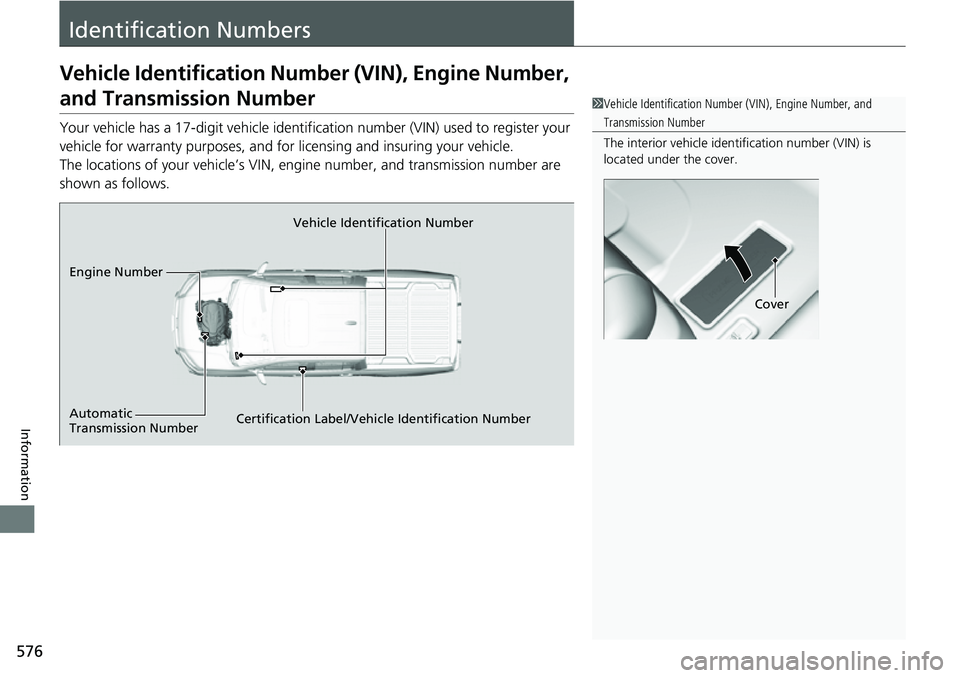
Your vehicle has a 17-digit vehicle identifi cation number (VIN) used to register your
vehicle for warranty purposes, and for licensing and insuring your vehicle.
The locations of your vehicle’s VIN, engine number, and transmission number are
shown as follows.
1 Vehicle Identification Number (VIN), Engine Number, and
Transmission Number
The interior vehicle identification number (VIN) is
located under the cover.
Cover
Vehicle Identification Number
Engine Number
Certification Label/Vehicle Identification Number
Automatic
Transmission Number
Page 589 of 598
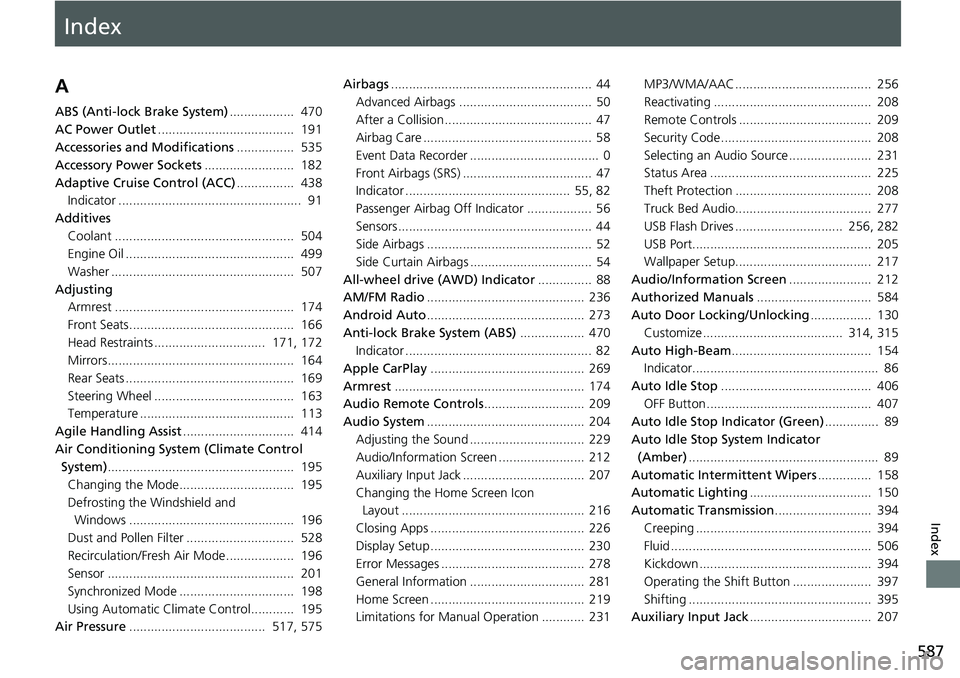
Index
587
Index
Index
A
ABS (Anti-lock Brake System).................. 470
AC Power Outlet ...................................... 191
Accessories and Modifications ................ 535
Accessory Power Sockets ......................... 182
Adaptive Cruise Control (ACC) ................ 438
Indicator ................................................... 91
Additives
Coolant .................................................. 504
Engine Oil ............................................... 499
Washer ................................................... 507
Adjusting Armrest .................................................. 174
Front Seats.............................................. 166
Head Restraints ............................... 171, 172
Mirrors.................................................... 164
Rear Seats ............................................... 169
Steering Wheel ....................................... 163
Temperature ........................................... 113
Agile Handling Assist ............................... 414
Air Conditioning System (Climate Control System) .................................................... 195
Changing the Mode................................ 195
Defrosting the Windshield and Windows .............................................. 196
Dust and Pollen Filter .............................. 528
Recirculation/Fresh Air Mode................... 196
Sensor .................................................... 201
Synchronized Mode ................................ 198
Using Automatic Climate Control............ 195
Air Pressure ...................................... 517, 575 Airbags
........................................................ 44
Advanced Airbags ..................................... 50
After a Collision ......................................... 47
Airbag Care ............................................... 58
Event Data Recorder .................................... 0
Front Airbags (SRS) .................................... 47
Indicator .............................................. 55, 82
Passenger Airbag Off Indicator .................. 56
Sensors ...................................................... 44
Side Airbags .............................................. 52
Side Curtain Airbags .................................. 54
All-wheel drive (AWD) Indicator ............... 88
AM/FM Radio ............................................ 236
Android Auto ............................................ 273
Anti-lock Brake System (ABS) .................. 470
Indicator .................................................... 82
Apple CarPlay ........................................... 269
Armrest ..................................................... 174
Audio Remote Controls ............................ 209
Audio System ............................................ 204
Adjusting the Sound ................................ 229
Audio/Information Screen ........................ 212
Auxiliary Input Jack .................................. 207
Changing the Home Screen Icon Layout ................................................... 216
Closing Apps ........................................... 226
Display Setup ........................................... 230
Error Messages ........................................ 278
General Information ................................ 281
Home Screen ........................................... 219
Limitations for Manua l Operation ............ 231 MP3/WMA/AAC ...................................... 256
Reactivating ............................................ 208
Remote Controls ..................................... 209
Security Code .......................................... 208
Selecting an Audio Source ....................... 231
Status Area ............................................. 225
Theft Protection ...................................... 208
Truck Bed Audio...................................... 277
USB Flash Drives .............................. 256, 282
USB Port.................................................. 205
Wallpaper Setup...................................... 217
Audio/Information Screen ....................... 212
Authorized Manuals ................................ 584
Auto Door Locking/Unlocking ................. 130
Customize ....................................... 314, 315
Auto High-Beam ....................................... 154
Indicator.................................................... 86
Auto Idle Stop .......................................... 406
OFF Button .............................................. 407
Auto Idle Stop Indicator (Green) ............... 89
Auto Idle Stop System Indicator (Amber) ..................................................... 89
Automatic Intermittent Wipers ............... 158
Automatic Lighting .................................. 150
Automatic Transmission ........................... 394
Creeping ................................................. 394
Fluid ........................................................ 506
Kickdown .............................. ..................
394
Operating the Shift Button ...................... 397
Shifting ................................................... 395
Auxiliary Input Jack .................................. 207