stop start HONDA RIDGELINE 2022 Owner's Manual
[x] Cancel search | Manufacturer: HONDA, Model Year: 2022, Model line: RIDGELINE, Model: HONDA RIDGELINE 2022Pages: 598, PDF Size: 12.42 MB
Page 147 of 598
145Continued
Controls
Operating the Switches Around the Steering Wheel
ENGINE START/STOP Button
*1:Canadian models
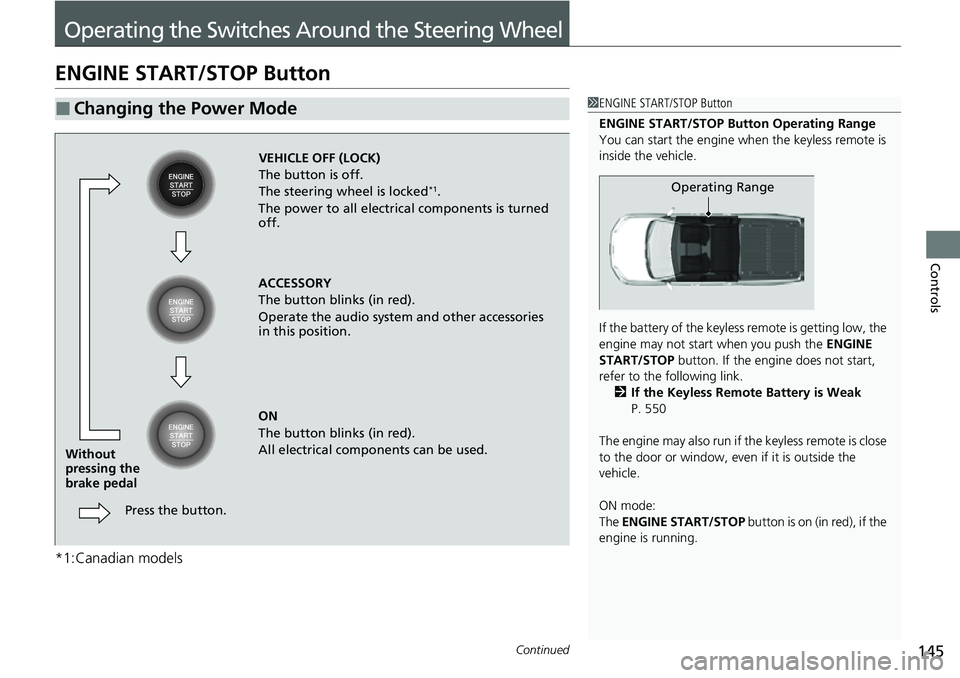
■Changing the Power Mode1ENGINE START/STOP Button
ENGINE START/STOP Button Operating Range
You can start the engine when the keyless remote is
inside the vehicle.
If the battery of the keyless remote is getting low, the
engine may not start when you push the ENGINE
START/STOP button. If the engi ne does not start,
refer to the following link. 2 If the Keyless Remote Battery is Weak
P. 550
The engine may also run if the keyless remote is close
to the door or window, even if it is outside the
vehicle.
ON mode:
The ENGINE START/STOP button is on (in red), if the
engine is running.
Operating Range
VEHICLE OFF (LOCK)
The button is off.
The steering wheel is locked
*1.
The power to all electrical components is turned
off.
ACCESSORY
The button blinks (in red).
Operate the audio system and other accessories
in this position.
ON
The button blinks (in red).
All electrical components can be used.
Press the button.
Without
pressing the
brake pedal
Page 148 of 598
uuOperating the Switches Around the Steering Wheel uENGINE START/STOP Button
146
Controls
If you leave the vehicle for 30 to 60 minutes with the transmission in (P and the
power mode in ACCESSORY, the vehicle auto matically goes into the mode similar to
VEHICLE OFF (LOCK) to avoid draining the battery.
When in this mode:
The steering wheel does not lock.
You cannot lock or unlock doors with th e remote transmitter or the keyless access
system.
Press the ENGINE START/STOP button to switch the mode to VEHICLE OFF (LOCK).
If you open the driver’s door when the power mode is set to ACCESSORY, a warning
beep sounds.
■Automatic Power Off
■Power Mode Reminder
1 ENGINE START/STOP Button
If the power mode does not change from VEHICLE
OFF to ACCESSORY, press the ENGINE START/STOP
button while moving the st eering wheel left and
right. The steering wheel will unlock, allowing the
mode to change.
Do not leave the power mode in ACCESSORY or ON
when you get out.
Canadian models
Canadian models
Page 149 of 598
147
uuOperating the Switches Around the Steering Wheel uENGINE START/STOP Button
Controls
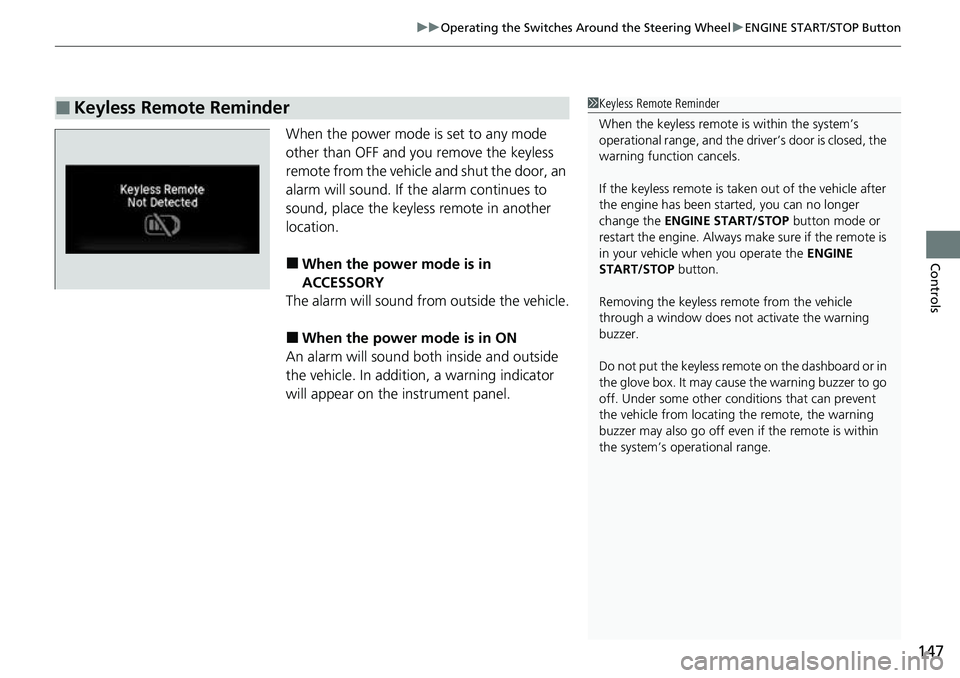
When the power mode is set to any mode
other than OFF and yo u remove the keyless
remote from the vehicle and shut the door, an
alarm will sound. If the alarm continues to
sound, place the keyless remote in another
location.
■When the power mode is in
ACCESSORY
The alarm will sound from outside the vehicle.
■When the power mode is in ON
An alarm will sound both inside and outside
the vehicle. In additi on, a warning indicator
will appear on the instrument panel.
■Keyless Remote Reminder1 Keyless Remote Reminder
When the keyless remote is within the system’s
operational range, and the driv er’s door is closed, the
warning function cancels.
If the keyless remote is taken out of the vehicle after
the engine has been st arted, you can no longer
change the ENGINE START/STOP button mode or
restart the engine. Always make sure if the remote is
in your vehicle when you operate the ENGINE
START/STOP button.
Removing the keyless remote from the vehicle
through a window does not activate the warning
buzzer.
Do not put the keyless remo te on the dashboard or in
the glove box. It may cause the warning buzzer to go
off. Under some other cond itions that can prevent
the vehicle from locating the remote, the warning
buzzer may also go off even if the remote is within
the system’s operational range.
Page 187 of 598
Continued185
uuInterior/Exterior Convenience Items uOther Interior Convenience Items
Controls
1Wireless Charger*
This system consumes a lot of power. Do not use the
system for a long time when the engine is not
running. This may weaken the battery, making it
difficult to start the engine.
When using the wireless charger, check the user’s
manual that came with th e compatible device you
want to charge.
The wireless charger can support up to 5 W, but the
charging rate varies base d on the device and other
conditions.
/05*$&
Do not place any magneti c recording media or
precision machines within the charging area while
charging.
The data on your cards such as credit cards can be
lost because of the magneti c effect. Also precision
machines such as watc hes can be affected.
“Qi” and marks are the registered trademarks
owned by Wire less Power Consortium (WPC).
In the following cases, ch arging may stop or not start:
•The device is already fully charged.•The temperature of the device is extremely high
while charging.
•You are at a place that emits strong
electromagnetic waves or noises, such as a TV
station, electric power plant, or gas station.
•The device has a cover, case or accessories which
are not compatible wi th wireless charging.
* Not available on all models
Page 198 of 598
uuClimate Control System uUsing Automatic Climate Control
196
Controls
■Switching between the recirc ulation and fresh air modes
Press the button and switch the mode depending on environmental conditions.
Recirculation Mode (indicator on): Recirculat es air from the vehicle’s interior through
the system.
Fresh Air Mode (indicator off): Maintains outside ventilation. Keep the system in
fresh air mode in normal situations.
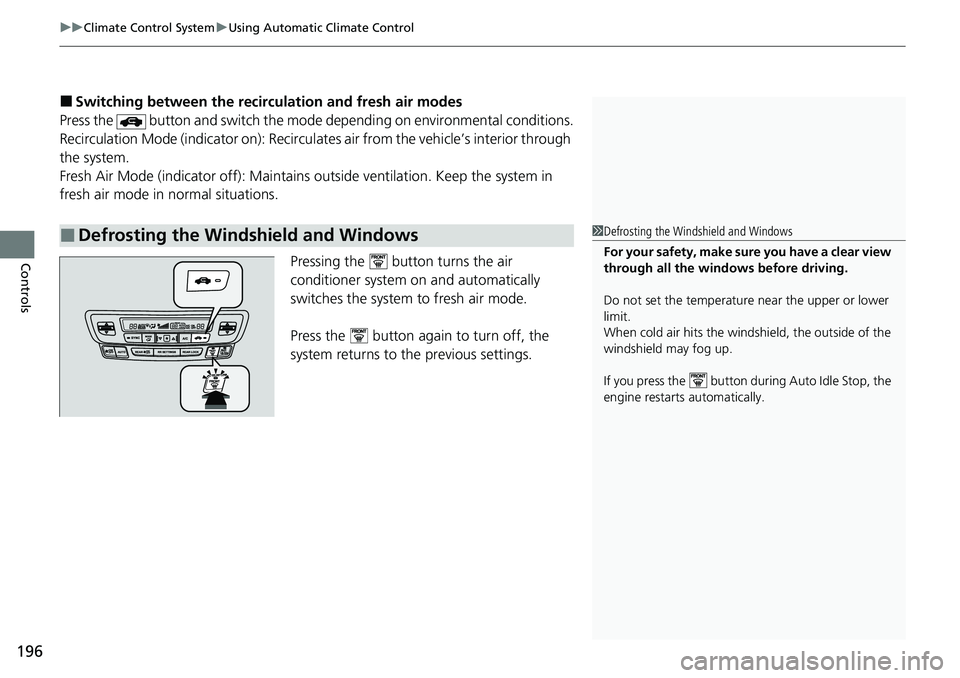
Pressing the button turns the air
conditioner system on and automatically
switches the system to fresh air mode.
Press the button again to turn off, the
system returns to the previous settings.
■Defrosting the Windshield and Windows1 Defrosting the Windshield and Windows
For your safety, make sure you have a clear view
through all the windows before driving.
Do not set the temperatur e near the upper or lower
limit.
When cold air hits the windshield, the outside of the
windshield may fog up.
If you press the button during Auto Idle Stop, the
engine restarts automatically.
Page 282 of 598
280
uuAudio Error Messages uAndroid/Apps
Features
Android/Apps
If an error occurs while using the audio system or apps, you may see the following
error messages. If you cannot clear the error message, contact a dealer.
*1:****part is variable characters, and will change depending upon where an error occurs.
Error MessageSolution
Unfortunately, **** has
stopped.*1Error has occurred within app, select OK on the screen to close the app.
**** is not responding.
Would you like to close
it?
*1
App is not responding.
Select Wait if you can wait for a response from app a littl e longer. If it does not respond even if you keep
waiting, select OK to close the app and start it up. If the error message continues, perform Factory Data
Reset .
2Defaulting All the Settings P. 322
Page 303 of 598
301
uuCustomized Features u
Continued
Features
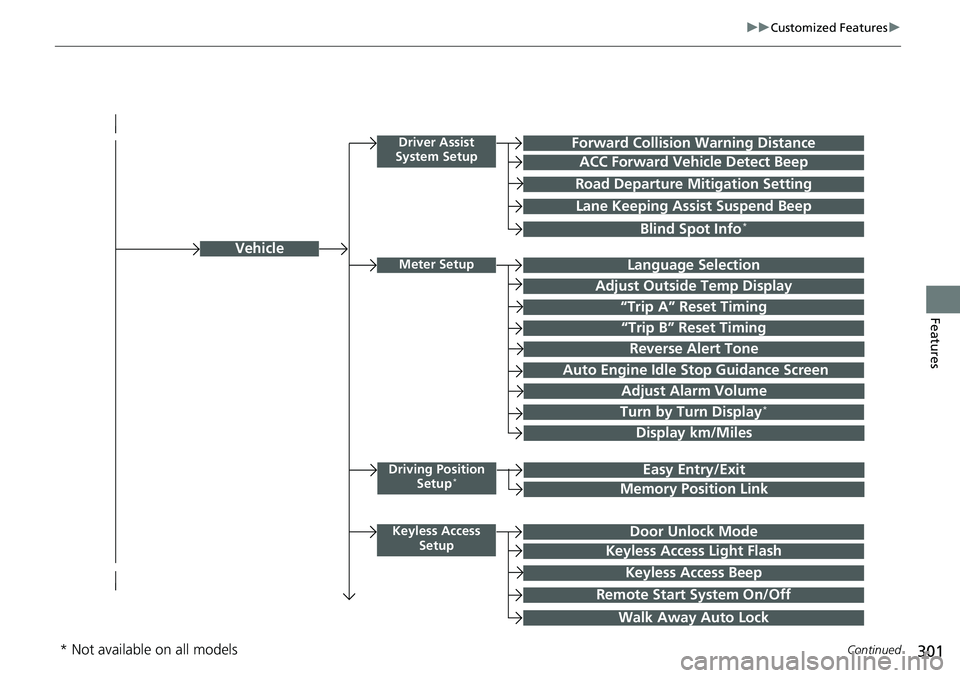
Vehicle
Driver Assist
System SetupForward Collision Warning Distance
ACC Forward Vehicle Detect Beep
Road Departure Mi tigation Setting
Lane Keeping Assist Suspend Beep
Blind Spot Info*
Meter SetupLanguage Selection
Adjust Outside Temp Display
“Trip A” Reset Timing
“Trip B” Reset Timing
Adjust Alarm Volume
Turn by Turn Display*
Display km/Miles
Driving Position
Setup*Easy Entry/Exit
Memory Position Link
Keyless Access SetupDoor Unlock Mode
Keyless Access Light Flash
Keyless Access Beep
Remote Start System On/Off
Walk Away Auto Lock
Reverse Alert Tone
Auto Engine Idle Stop Guidance Screen
* Not available on all models
Page 356 of 598
uuBluetooth ® HandsFreeLink ®u HFL Menus
354
Features
HFL can display newly received text or e-mail messages as well as the last 20
messages received on a linked cell phone. Eac h received message can be read aloud
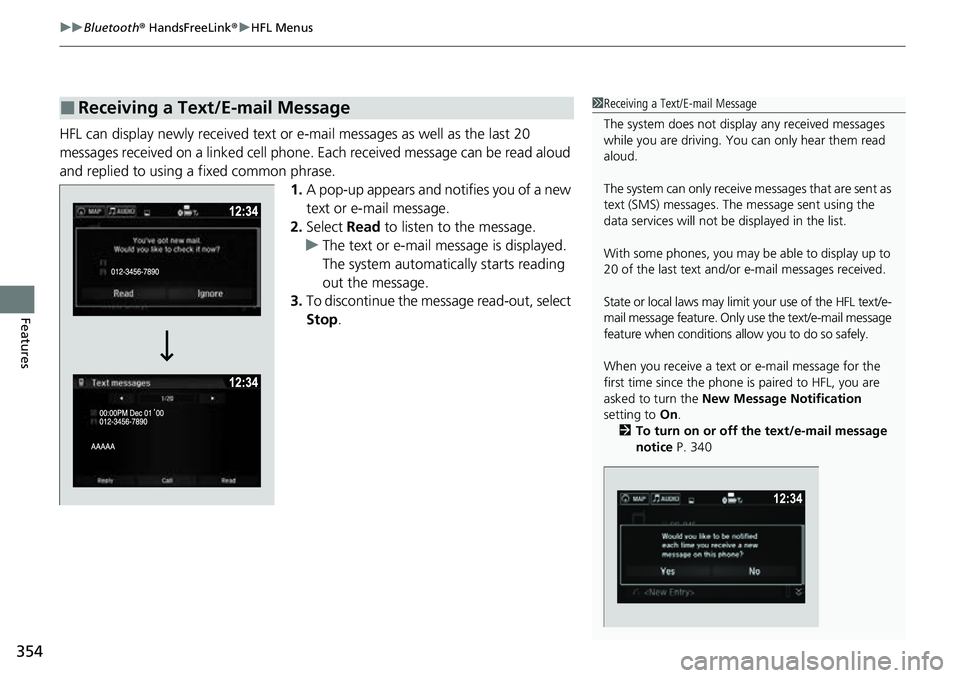
and replied to using a fixed common phrase. 1.A pop-up appears and notifies you of a new
text or e-mail message.
2. Select Read to listen to the message.
u The text or e-mail message is displayed.
The system automatically starts reading
out the message.
3. To discontinue the mess age read-out, select
Stop .
■Receiving a Text/E-mail Message1Receiving a Text/E-mail Message
The system does not display any received messages
while you are driving. You can only hear them read
aloud.
The system can only receive messages that are sent as
text (SMS) messages. The message sent using the
data services will not be displayed in the list.
With some phones, you may be able to display up to
20 of the last text and/or e-mail messages received.
State or local laws may limit your use of the HFL text/e-
mail message feature. Only use the text/e-mail message
feature when conditions a llow you to do so safely.
When you receive a text or e-mail message for the
first time since the phone is paired to HFL, you are
asked to turn the New Message Notification
setting to On.
2 To turn on or off the text/e-mail message
notice P. 340
Page 360 of 598
uuBluetooth ® HandsFreeLink ®u HFL Menus
358
Features
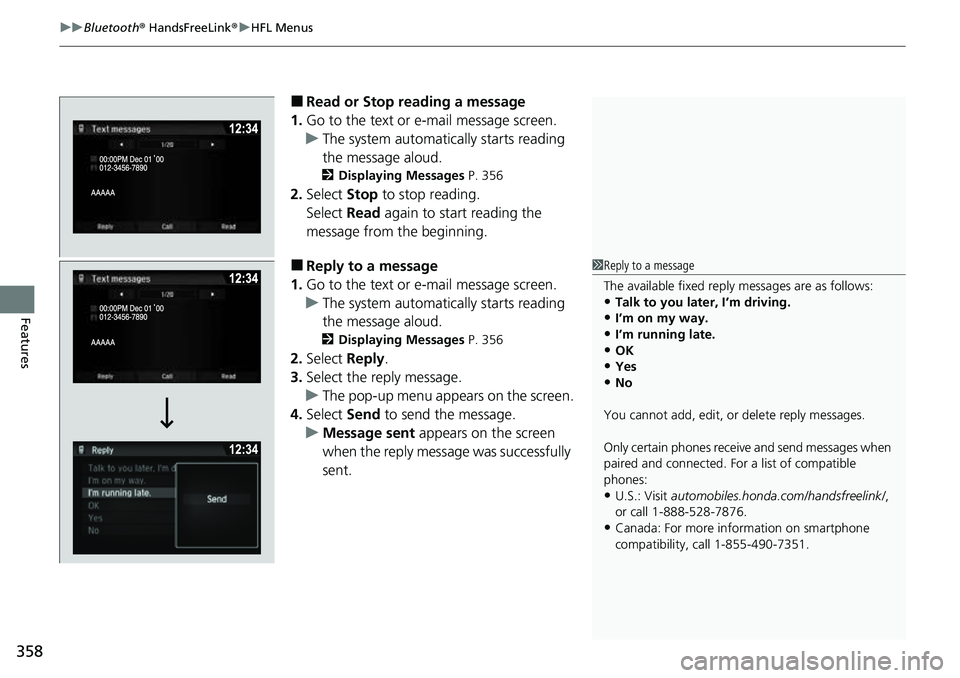
■Read or Stop reading a message
1. Go to the text or e-mail message screen.
u The system automatically starts reading
the message aloud.
2 Displaying Messages P. 356
2.Select Stop to stop reading.
Select Read again to start reading the
message from the beginning.
■Reply to a message
1. Go to the text or e-mail message screen.
u The system automatically starts reading
the message aloud.
2 Displaying Messages P. 356
2.Select Reply.
3. Select the reply message.
u The pop-up menu appears on the screen.
4. Select Send to send the message.
u Message sent appears on the screen
when the reply messag e was successfully
sent.
1 Reply to a message
The available fixed reply messages are as follows:
•Talk to you later, I’m driving.
•I’m on my way.
•I’m running late.•OK
•Yes
•No
You cannot add, edit, or delete reply messages.
Only certain phones receive and send messages when
paired and connected. For a list of compatible
phones:
•U.S.: Visit automobiles.honda.com/handsfreelink/ ,
or call 1-888-528-7876.
•Canada: For more info rmation on smartphone
compatibility, call 1-855-490-7351.
Page 365 of 598
363
Driving
This chapter discusses driving and refueling.
Before Driving................................... 364
Towing a Trailer ................................ 372
Off-Highway Driving Guidelines ..... 383
When Driving Starting the Engine .......................... 385
Precautions While Driving................. 392
Automatic Transmission ................... 394
Shifting ............................................ 395
ECON Mode .................................... 403
Intelligent Traction Management...... 404
Auto Idle Stop .................................. 406
Vehicle Stability AssistTM (VSA ®), aka Electronic
Stability Control (ESC), System ..............412
Agile Handling Assist ....................... 414 Intelligent Variable To
rque Management (i-
VTM4
TM) AWD System*.................. 415
Tire Pressure Monitoring System (TPMS) with Tire Fill Assist .......................... 416
Tire Pressure Monitoring System (TPMS) -
Required Federal Explanation ......... 418
Blind spot information System
*........... 420
Honda Sensing ®................................ 423
Collision Mitigati on Braking System
TM
(CMBSTM) ....................................... 426
Adaptive Cruise Control (ACC)......... 438
Lane Keeping Assist System (LKAS).... 451
Road Departure Mitigation System ... 460
Front Sensor Camera ....................... 465 Radar Sensor ................................... 467
Braking Brake System ................................... 468
Anti-lock Brake System (ABS) ........... 470
Brake Assist System ......................... 471
Parking Your Vehicle When Stopped ................................ 472
Parking Sensor System
*................... 473
Cross Traffic Monitor*..................... 477
Multi-View Rear Camera .................. 481
Refueling Fuel Information .............................. 483
How to Refuel ................................. 484
Fuel Economy and CO
2 Emissions .... 486
* Not available on all models