warning HONDA RIDGELINE 2022 Workshop Manual
[x] Cancel search | Manufacturer: HONDA, Model Year: 2022, Model line: RIDGELINE, Model: HONDA RIDGELINE 2022Pages: 598, PDF Size: 12.42 MB
Page 314 of 598
312
uuCustomized Features u
Features
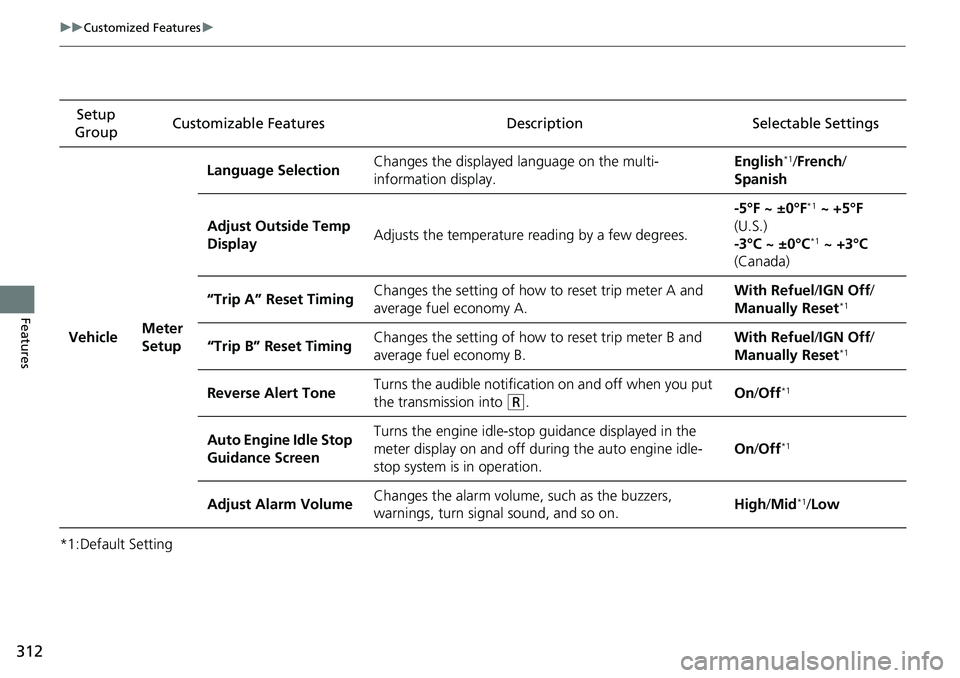
*1:Default SettingSetup
Group Customizable Features
Description Selectable Settings
Vehicle Meter
SetupLanguage Selection
Changes the displayed language on the multi-
information display. English
*1/
French /
Spanish
Adjust Outside Temp
Display Adjusts the temperature r
eading by a few degrees. -5°F ~ ±0°F
*1
~ +5°F
(U.S.)
-3°C ~ ±0°C
*1 ~ +3°C
(Canada)
“Trip A” Reset Timing Changes the setting of how to reset trip meter A and
average fuel economy A. With Refuel
/IGN Off /
Manually Reset
*1
“Trip B” Reset Timing Changes the setting of how
to reset trip meter B and
average fuel economy B. With Refuel
/IGN Off /
Manually Reset*1
Reverse Alert Tone Turns the audible notificati
on on and off when you put
the transmission into (R. On
/Off*1
Auto Engine Idle Stop
Guidance Screen Turns the engine idle-stop
guidance displayed in the
meter display on and off duri ng the auto engine idle-
stop system is in operation. On
/Off*1
Adjust Alarm Volume Changes the alarm volume, such as the buzzers,
warnings, turn signal sound, and so on. High
/Mid*1/Low
Page 369 of 598
367
uuBefore Driving uMaximum Load Limit
Continued
Driving
Maximum Load Limit
The maximum load for your ve hicle is 1,444 lbs (655 kg).
The maximum load for your ve hicle is 1,400 lbs (635 kg).
The maximum load for your ve hicle is 1,543 lbs (700 kg).
The maximum load for your ve hicle is 1,477 lbs (670 kg).
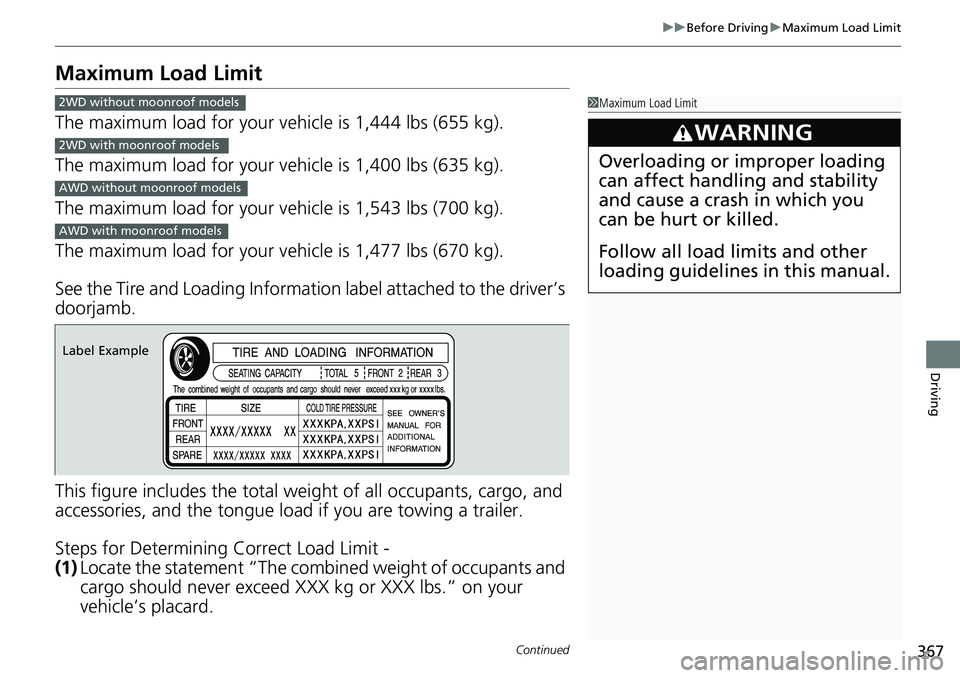
See the Tire and Loading Information label attached to the driver’s
doorjamb.
This figure includes the total weig ht of all occupants, cargo, and
accessories, and the tongue load if you are towing a trailer.
Steps for Determining Correct Load Limit -
(1) Locate the statement “The combined weight of occupants and
cargo should never exceed XXX kg or XXX lbs.” on your
vehicle’s placard.
1Maximum Load Limit
3WARNING
Overloading or improper loading
can affect handling and stability
and cause a crash in which you
can be hurt or killed.
Follow all load limits and other
loading guidelines in this manual.
2WD without moonroof models
2WD with moonroof models
AWD without moonroof models
AWD with moonroof models
Label Example
Page 370 of 598
uuBefore Driving uMaximum Load Limit
368
Driving
(2) Determine the combined weight of the driver and passengers
that will be riding in your vehicle.
(3) Subtract the combined weight of the driver and passengers
from XXX kg or XXX lbs.
(4) The resulting figure equals the available amount of cargo and
luggage load capacity. For example, if the “XXX” amount
equals 1,400 lbs. and there will be five 150 lb. passengers in
your vehicle, the amount of av ailable cargo and luggage load
capacity is 650 lbs. (1,400 - 750 (5 x 150) = 650 lbs.)
(5) Determine the combined weight of luggage and cargo being
loaded on the vehicle. That we ight may not safely exceed the
available cargo and luggage load capacity calculated in step 4.
(6) If your vehicle will be towing a trailer, load from your trailer will
be transferred to your vehicl e. Consult this manual to
determine how this reduces the available cargo and luggage
load capacity of your vehicle.1 Maximum Load Limit
Gross Vehicle Weight Rating (GVWR):
The maximum allowable weight of the vehicle, all
occupants, all a ccessories, all cargo, and the tongue
load. 2 Specifications P. 574
Gross Axle Weight Rating (GAWR):
The maximum allowable weight of the vehicle axle. 2 Specifications P. 574
3WARNING
Never let passengers ride in the
pickup bed, in the trunk space, or
on the bed rails. This could cause
very serious injuries or death. No
one should ride in any position on
your vehicle that is not equipped
with seats and seat belts.
Exceeding load limits or
improperly loading cargo on the
vehicle can cause a crash in which
you can be seriously injured or
killed.
Load the cargo carefully before
starting to drive.
Page 372 of 598
370
uuBefore Driving uCarrying Cargo
Driving
Carrying Cargo
Your vehicle can carry a large amount of cargo in the pickup bed.
However, the pickup bed is not intended for carrying passengers.
People who ride in the pickup bed can be ve ry seriously injured or killed in a crash.
• When loading and unloading cargo, make sure all passengers or any objects are
clear of the tailgate before opening or closing it. The tailgate should be closed
securely before driving when it is not used as the extended pickup bed.
• The maximum allowable loading weight for the trunk is 300 lbs (136 kg).
Do not exceed this weight limi t, or you may damage the trunk.
• The maximum allowable loading weight on the pickup bed is 1,100 lbs (500 kg).
Do not exceed the load limit.
2 Maximum Load Limit P. 367
•Distribute cargo evenly on the pickup bed. Place the heaviest items on the bottom
and as far forward as possible of the rear axle. Tie down and secure all items that
could be thrown out of the vehicle during a crash or sudden stop.
• If you stack items higher than the bed si des, tailgate, or back window, secure
them with a net or cover.
This will reduce the risk of items being thrown out of the pickup bed during a
crash or sudden stop.
• When the tailgate is dropped open, it can be used as an extended pickup bed.
The maximum allowable weight on the tailgate while driving is 300 lbs (136 kg).
Exceeding this limit c ould damage the tailgate.
• Carrying heavy cargo in the pickup bed will raise your vehicle’s center of gravity.
This can affect handling and performance. Drive more slowly and cautiously, and
allow extra time and distance for braking.
■Carrying Cargo in the Pickup Bed1 Carrying Cargo
3WARNING
Allowing passengers to ride in the pickup
bed or on the tailgate can result in death or
serious injury in a crash.
Make sure all passengers ride in a seat and
wear a seat belt properly.
3WARNING
Never let passengers ride in the pickup bed,
in the trunk space, or on the bed rails. This
could cause very serious injuries or death.
No one should ride in any position on your
vehicle that is not eq uipped with seats and
seat belts.
Exceeding load limits or improperly loading
cargo on the vehicle can cause a crash in
which you can be seriously injured or killed.
Load the cargo carefully before starting to
drive.
Page 374 of 598
372
Driving
Towing a Trailer
Towing Preparation
Your vehicle can tow a trailer if you carefully observe the load limits, use the proper
equipment, and follow the towing guidelin es. Check the load limits before driving.
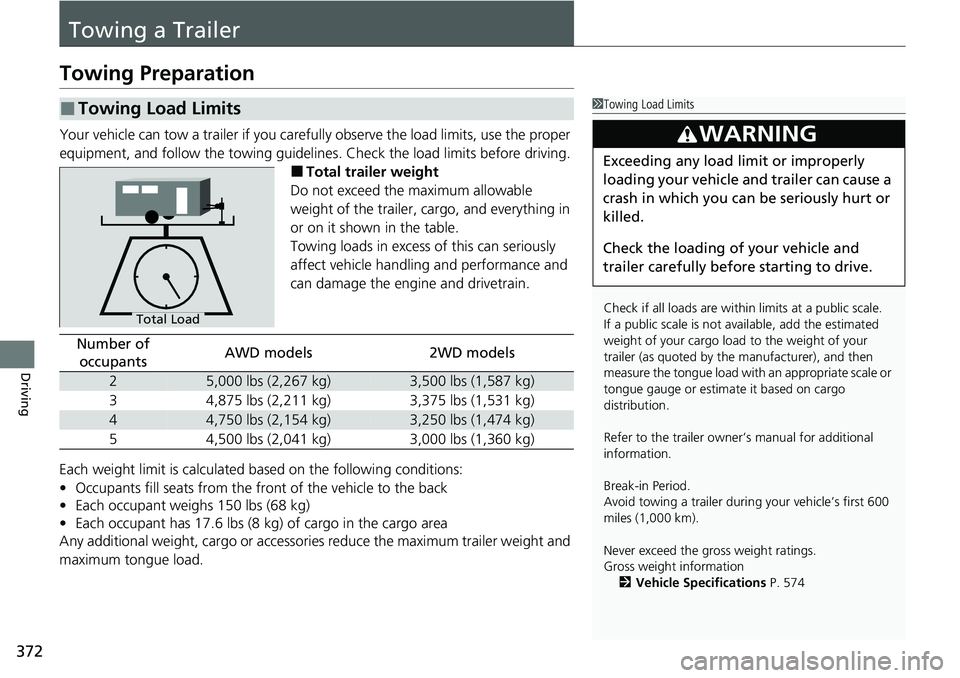
■Total trailer weight
Do not exceed the maximum allowable
weight of the trailer, cargo, and everything in
or on it shown in the table.
Towing loads in excess of this can seriously
affect vehicle handling and performance and
can damage the engine and drivetrain.
Each weight limit is calculated based on the following conditions:
• Occupants fill seats from the fro nt of the vehicle to the back
• Each occupant weighs 150 lbs (68 kg)
• Each occupant has 17.6 lbs (8 kg) of cargo in the cargo area
Any additional weight, cargo or accessori es reduce the maximum trailer weight and
maximum tongue load.
■Towing Load Limits1 Towing Load Limits
Check if all loads are within limits at a public scale.
If a public scale is not av ailable, add the estimated
weight of your cargo load to the weight of your
trailer (as quoted by the manufacturer), and then
measure the tongue load with an appropriate scale or
tongue gauge or estima te it based on cargo
distribution.
Refer to the trailer owner’s manual for additional
information.
Break-in Period.
Avoid towing a trailer duri ng your vehicle’s first 600
miles (1,000 km).
Never exceed the gross weight ratings.
Gross weight information 2 Vehicle Specifications P. 574
3WARNING
Exceeding any load limit or improperly
loading your vehicle and trailer can cause a
crash in which you can be seriously hurt or
killed.
Check the loading of your vehicle and
trailer carefully before starting to drive.
Total Load
Number of
occupantsAWD models2WD models
25,000 lbs (2,267 kg)3,500 lbs (1,587 kg)
34,875 lbs (2,211 kg)3,375 lbs (1,531 kg)
44,750 lbs (2,154 kg)3,250 lbs (1,474 kg)
54,500 lbs (2,041 kg)3,000 lbs (1,360 kg)
Page 385 of 598
383
Driving
Off-Highway Driving Guidelines
General Information
Your vehicle has been designed primarily for use on pavement, however, its higher
ground clearance allows you to occasionally travel on unpaved roads. It is not
designed for trail-blazing, or other challenging off-highway activities.
If you decide to drive on unpaved roads, you will find that it requires somewhat
different driving skills and that your vehicl e will handle somewhat differently than it
does on pavement. Pay attention to the precau tions and tips in this section, and get
acquainted with your vehicle before leaving the pavement.
Important Safety Precautions
To avoid loss of control or rollover, be sure to follow all precautions and
recommendations:
• Be sure to store cargo properly and do not exceed your cargo load limits.
2 Maximum Load Limit P. 367
•Whenever you drive, make su re you and your passengers always wear seat belts.
• Keep your speed low, and never go faster than the conditions allow.
• It’s up to you to continually assess the situation and drive within the limits.
1Off-Highway Driving Guidelines
Failure to operate your vehicle correctly might result
in a crash or a rollover.
2 Important Handling Information P. 34
2 Precautions While Driving P. 392
Spinning the tires excessiv ely can also damage the
Intelligent VTM4 (i-VTM4) system.
3WARNING
Improperly operating this vehicle on or off-
pavement can cause a crash or rollover in
which you and your passengers could be
seriously injured or killed.
• Follow all instructions and guidelines in
this owner’s manual.
• Keep your speed low, and don’t drive
faster than conditions permit.
Page 389 of 598
Continued387
uuWhen Driving uStarting the Engine
Driving
You can remotely start the engine using the keyless remote.
■Remote Engine Start1Remote Engine Start
The remote engine start may violate local laws.
Before using the remote e ngine start, check your
local laws.
If there are buildings an d obstacles between your
vehicle and the remote, th e range will be reduced.
This distance may vary by external electrical
interference.
3WARNING
Carbon monoxide ga s is toxic and can
rapidly accumulate in closed or even partly
enclosed areas.
Breathing it can cause unconsciousness and
even kill you.
Never use the remote engine starter with
the vehicle parked in a garage or other
areas with limited ventilation.
Page 397 of 598
395
uuWhen Driving uShifting
Continued
Driving
Shifting
Change the shift position in accordance with your driving needs.
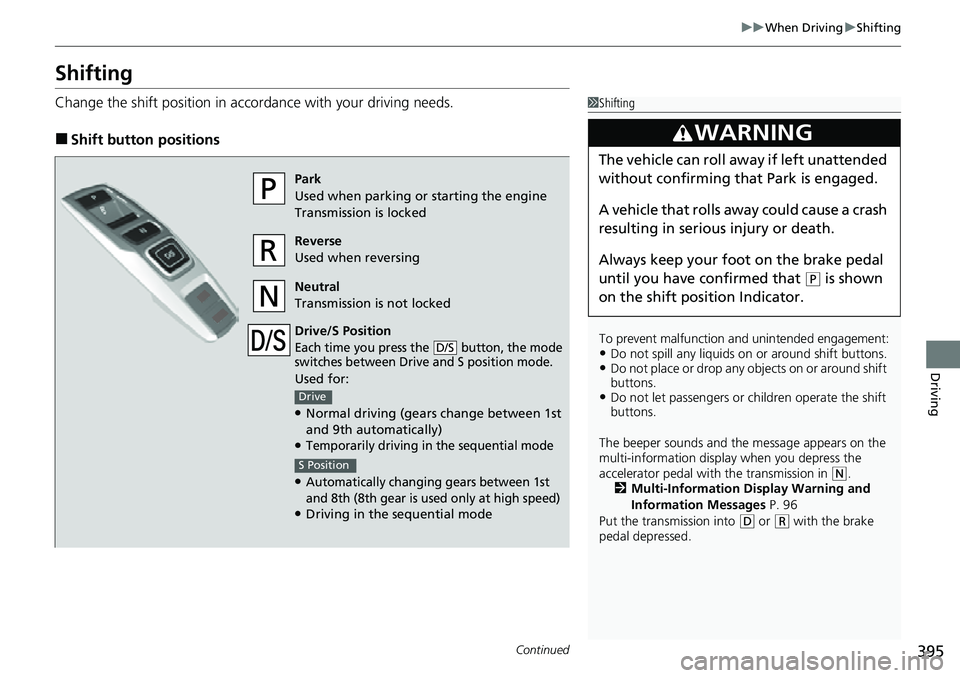
■Shift button positions
1Shifting
To prevent malfunction an d unintended engagement:
•Do not spill any liquids on or around shift buttons.•Do not place or drop any objects on or around shift
buttons.
•Do not let passengers or ch ildren operate the shift
buttons.
The beeper sounds and the message appears on the
multi-information display when you depress the
accelerator pedal with the transmission in
( N.
2 Multi-Information Display Warning and
Information Messages P. 96
Put the transmission into
( D or (R with the brake
pedal depressed.
3WARNING
The vehicle can roll aw ay if left unattended
without confirming that Park is engaged.
A vehicle that rolls away could cause a crash
resulting in seriou s injury or death.
Always keep your foot on the brake pedal
until you have confirmed that
( P is shown
on the shift posi tion Indicator.
Park
Used when parking or starting the engine
Transmission is locked
Reverse
Used when reversing
Neutral
Transmission is not locked
Drive/S Position
Each time you press the button, the mode
switches between Drive and S position mode.
Used for:
●Normal driving (gears change between 1st
and 9th automatically)
●Temporarily driving in the sequential mode
●Automatically changi ng gears between 1st
and 8th (8th gear is used only at high speed)
●Driving in the sequential mode
D/S
Drive
S Position
Page 422 of 598
420
uuWhen Driving uBlind spot information System*
Driving
Blind spot information System*
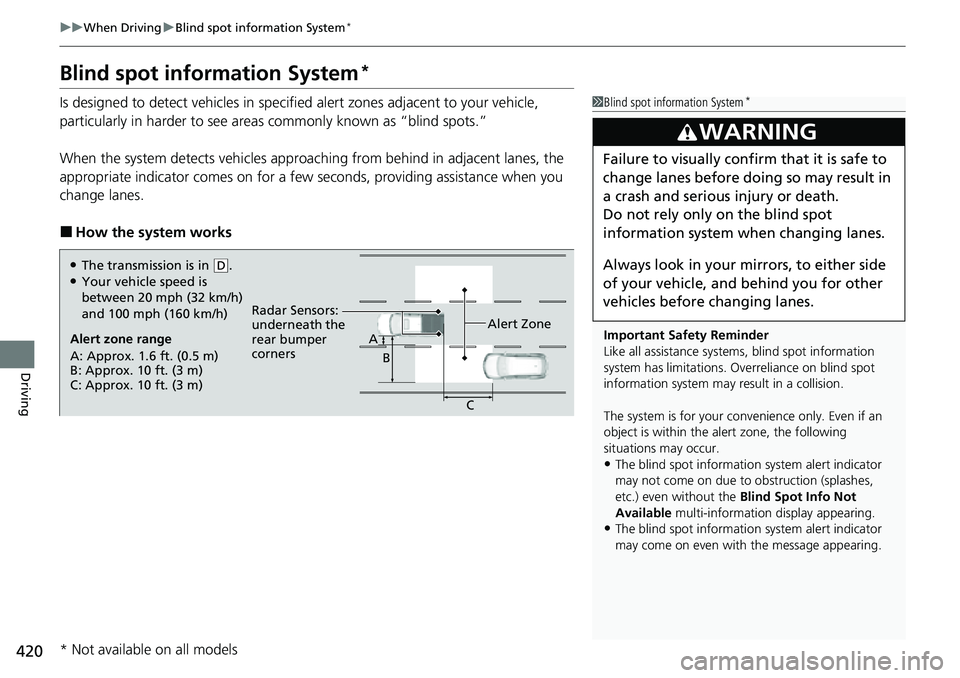
Is designed to detect vehicles in specified alert zones adjacent to your vehicle,
particularly in harder to see areas commonly known as “blind spots.”
When the system detects vehi cles approaching from behind in adjacent lanes, the
appropriate indicator comes on for a few se conds, providing assistance when you
change lanes.
■How the system works
1 Blind spot information System*
Important Safety Reminder
Like all assistance systems, blind spot information
system has limitations. Over reliance on blind spot
information system may result in a collision.
The system is for your convenience only. Even if an
object is within the alert zone, the following
situations may occur.
•The blind spot informatio n system alert indicator
may not come on due to obstruction (splashes,
etc.) even without the Blind Spot Info Not
Available multi-information display appearing.
•The blind spot informatio n system alert indicator
may come on even with the message appearing.
3WARNING
Failure to visually confirm that it is safe to
change lanes before doing so may result in
a crash and serious injury or death.
Do not rely only on the blind spot
information system wh en changing lanes.
Always look in your mi rrors, to either side
of your vehicle, and behind you for other
vehicles before changing lanes.
Alert zone range
A: Approx. 1.6 ft. (0.5 m)
B: Approx. 10 ft. (3 m)
C: Approx. 10 ft. (3 m) Radar Sensors:
underneath the
rear bumper
corners
Alert ZoneA
B
C
●The transmission is in (D.●Your vehicle speed is
between 20 mph (32 km/h)
and 100 mph (160 km/h)
* Not available on all models
Page 430 of 598
428
uuHonda Sensing ®u Collision Mitigation Braking SystemTM (CMBSTM)
Driving
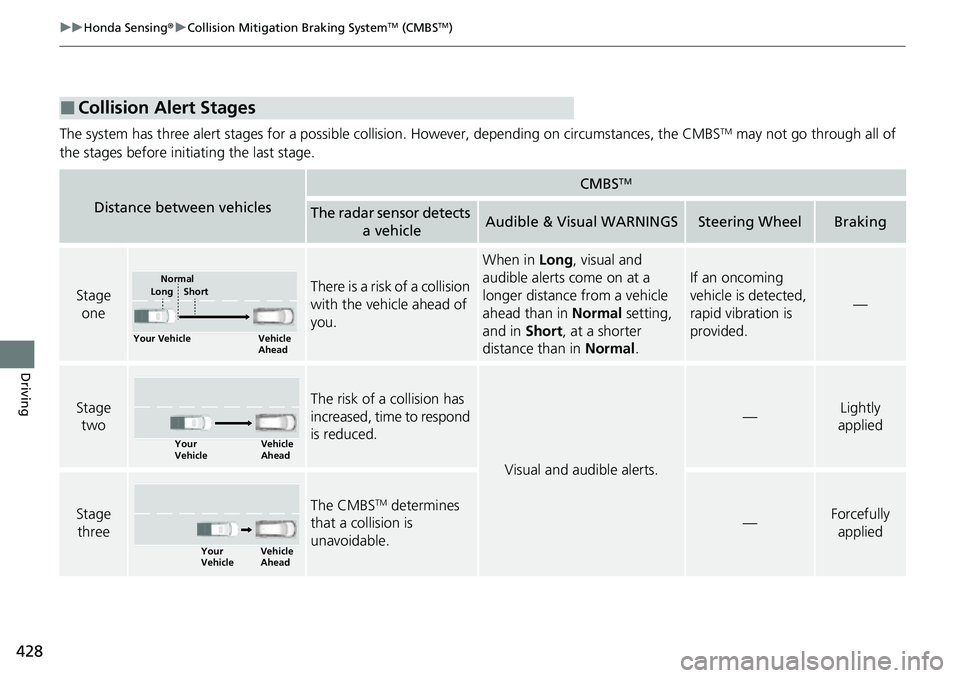
The system has three alert stages for a possible collision. However, depending on circumstances, the CMBSTM may not go through all of
the stages before initiating the last stage.
■Collision Alert Stages
Distance between vehicles
CMBSTM
The radar sensor detects a vehicleAudible & Visual WARNINGSSteering WheelBraking
Stage oneThere is a risk of a collision
with the vehicle ahead of
you.
When in Long, visual and
audible alerts come on at a
longer distance from a vehicle
ahead than in Normal setting,
and in Short, at a shorter
distance than in Normal.
If an oncoming
vehicle is detected,
rapid vibration is
provided.
—
Stage
twoThe risk of a collision has
increased, time to respond
is reduced.
Visual and audible alerts.
—Lightly
applied
Stage
three The CMBSTM determines
that a collision is
unavoidable.
—Forcefully
applied
Your Vehicle Vehicle
Ahead
Normal
Short
Long
Your
Vehicle Vehicle
Ahead
Your
VehicleVehicle
Ahead