lock HONDA RIDGELINE 2023 Owners Manual
[x] Cancel search | Manufacturer: HONDA, Model Year: 2023, Model line: RIDGELINE, Model: HONDA RIDGELINE 2023Pages: 598, PDF Size: 12.34 MB
Page 514 of 598
512
uuReplacing Light Bulbs uRear Turn Signal and Back-Up Light Bulbs
Maintenance
Rear Turn Signal and Back-Up Light Bulbs
When replacing, use the following bulbs.
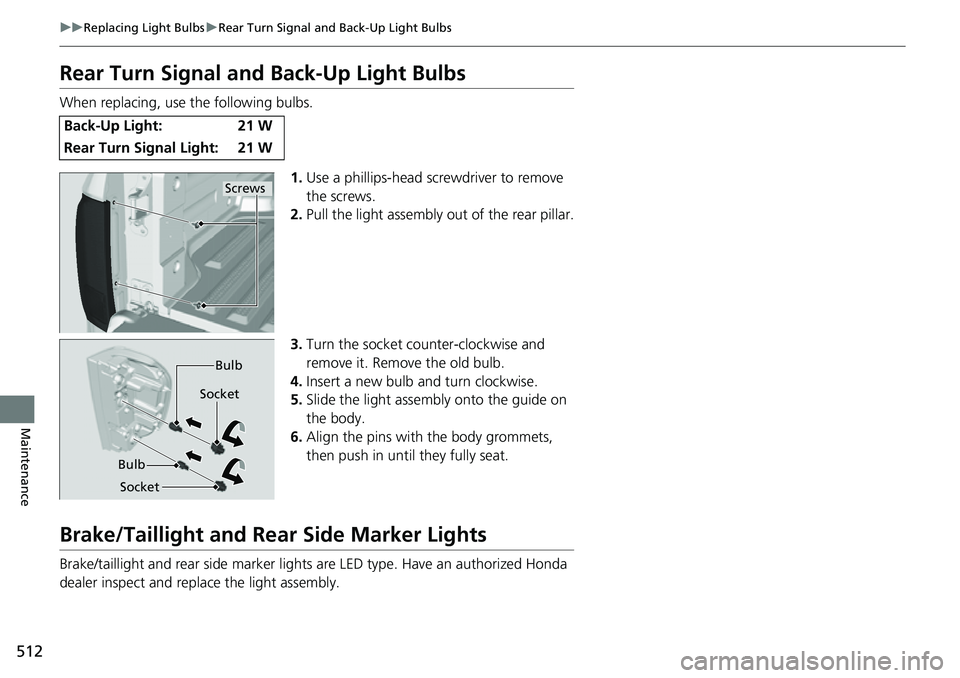
1.Use a phillips-head sc rewdriver to remove
the screws.
2. Pull the light assembly out of the rear pillar.
3. Turn the socket counter-clockwise and
remove it. Remove the old bulb.
4. Insert a new bulb and turn clockwise.
5. Slide the light assembly onto the guide on
the body.
6. Align the pins with the body grommets,
then push in unt il they fully seat.
Brake/Taillight and Rear Side Marker Lights
Brake/taillight and rear side marker lights are LED type. Have an authorized Honda
dealer inspect and replace the light assembly.
Back-Up Light: 21 W
Rear Turn Signal Light: 21 W
Screws
Bulb
Socket Bulb
Socket
Page 515 of 598
513
uuReplacing Light Bulbs uRear License Plate Light Bulbs
Maintenance
Rear License Plate Light Bulbs
When replacing, use the following bulbs.
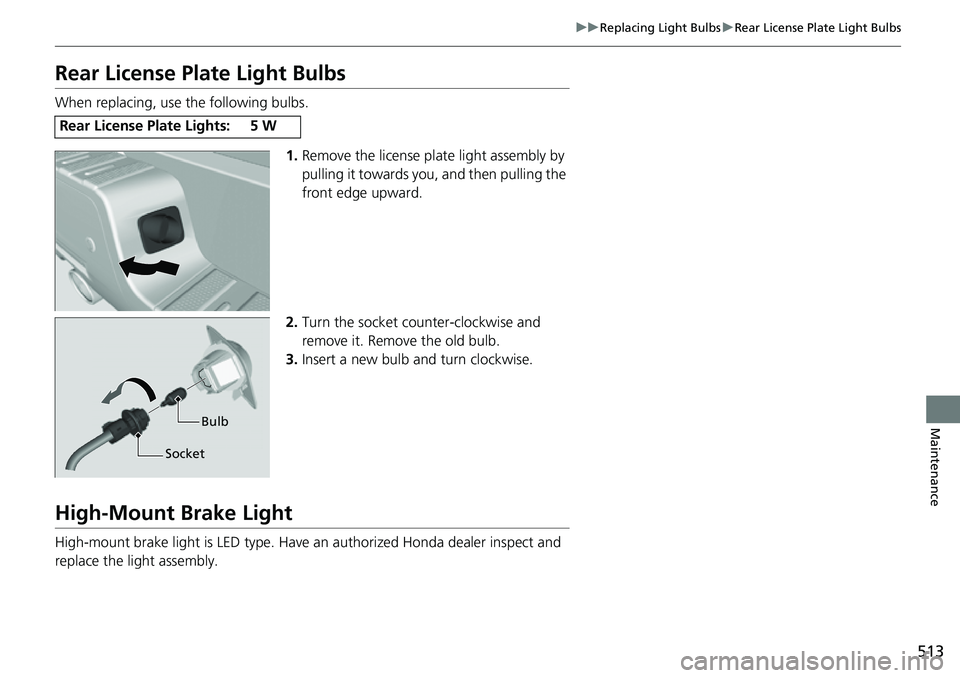
1.Remove the license plat e light assembly by
pulling it towards you, and then pulling the
front edge upward.
2. Turn the socket counter-clockwise and
remove it. Remove the old bulb.
3. Insert a new bulb and turn clockwise.
High-Mount Brake Light
High-mount brake light is LED type. Have an authorized Honda dealer inspect and
replace the light assembly.
Rear License Plate Lights:5W
Bulb
Socket
Page 516 of 598
514
Maintenance
Checking and Maintaining Wiper Blades
Checking Wiper Blades
If the wiper blade rubber has deteriorated, it will leave streaks, become noisy, and
the hard surfaces of the blade may scratch the window glass.
Changing the Wiper Blade Rubber
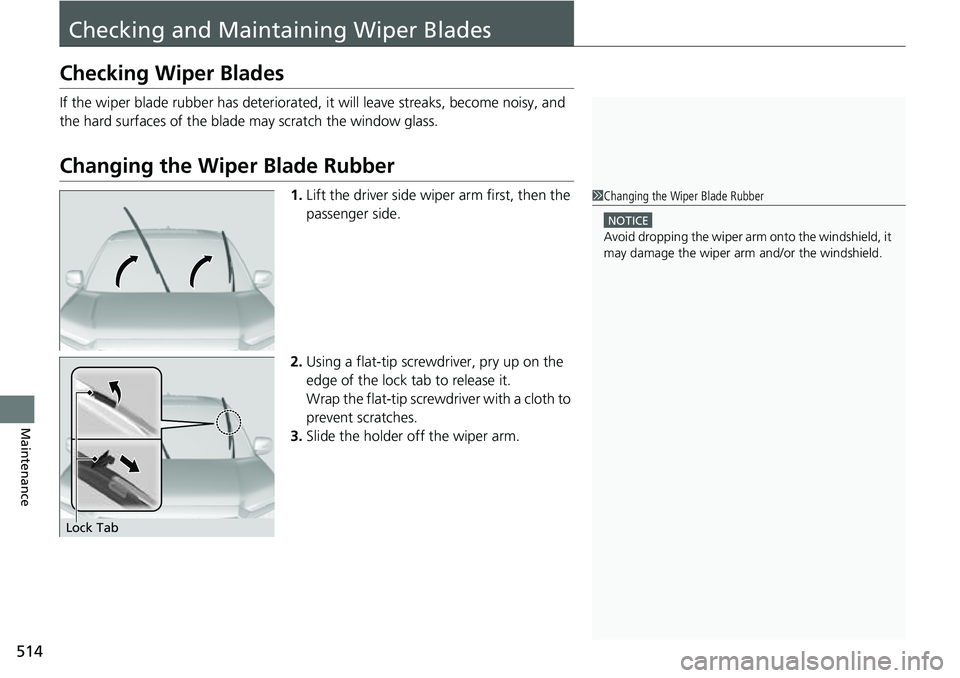
1. Lift the driver side wiper arm first, then the
passenger side.
2. Using a flat-tip screwd river, pry up on the
edge of the lock tab to release it.
Wrap the flat-tip screwdriver with a cloth to
prevent scratches.
3. Slide the holder off the wiper arm.1Changing the Wiper Blade Rubber
NOTICE
Avoid dropping the wiper arm onto the windshield, it
may damage the wiper arm and/or the windshield.
Lock Tab
Page 517 of 598
515
uuChecking and Maintaining Wiper Blades uChanging the Wiper Blade Rubber
Maintenance
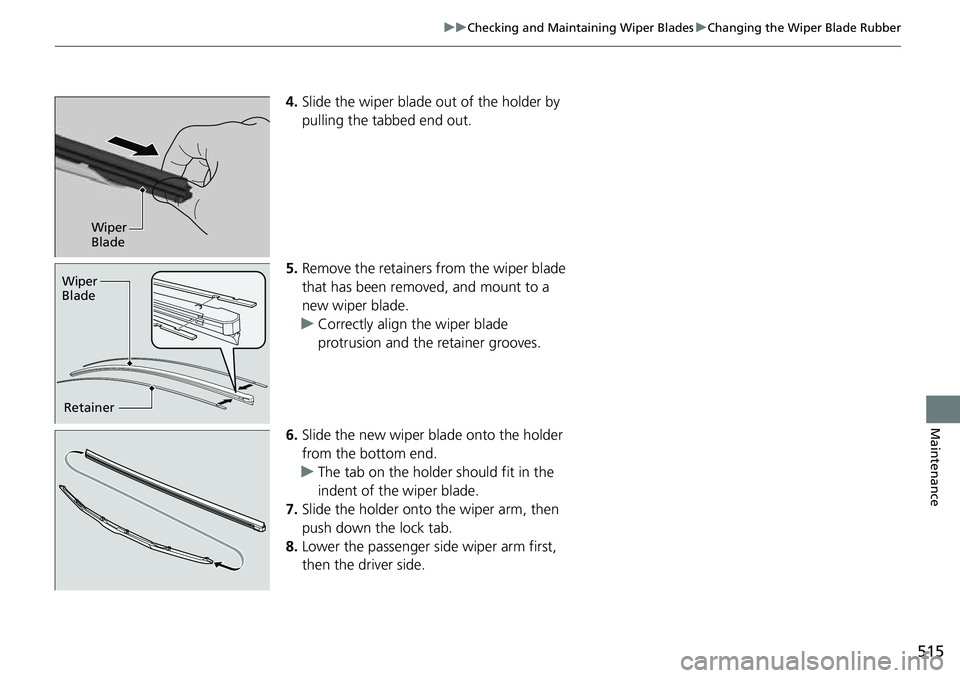
4. Slide the wiper blade out of the holder by
pulling the tabbed end out.
5. Remove the retainers from the wiper blade
that has been removed, and mount to a
new wiper blade.
u Correctly align the wiper blade
protrusion and the retainer grooves.
6. Slide the new wiper bl ade onto the holder
from the bottom end.
u The tab on the holder should fit in the
indent of the wiper blade.
7. Slide the holder onto the wiper arm, then
push down the lock tab.
8. Lower the passenger side wiper arm first,
then the driver side.
Wiper
Blade
Retainer
Wiper
Blade
Page 527 of 598
525
Maintenance
Battery
Checking the Battery
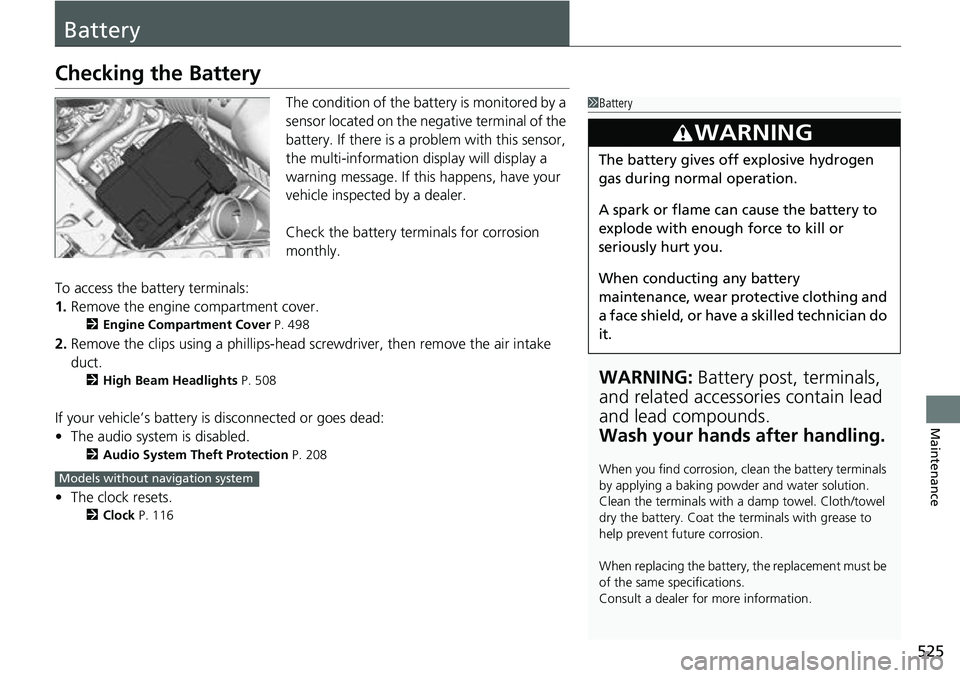
The condition of the battery is monitored by a
sensor located on the negative terminal of the
battery. If there is a problem with this sensor,
the multi-information display will display a
warning message. If this happens, have your
vehicle inspected by a dealer.
Check the battery termi nals for corrosion
monthly.
To access the battery terminals:
1. Remove the engine compartment cover.
2 Engine Compartment Cover P. 498
2.Remove the clips using a phillips-head scre wdriver, then remove the air intake
duct.
2 High Beam Headlights P. 508
If your vehicle’s battery is disconnected or goes dead:
•The audio system is disabled.
2 Audio System Theft Protection P. 208
•The clock resets.
2 Clock P. 116
1Battery
WARNING: Battery post, terminals,
and related accessories contain lead
and lead compounds.
Wash your hands after handling.
When you find corrosion, cl ean the battery terminals
by applying a baking powder and water solution.
Clean the terminals with a damp towel. Cloth/towel
dry the battery. Coat the terminals with grease to
help prevent future corrosion.
When replacing the battery, the replacement must be
of the same specifications.
Consult a dealer for more information.
3WARNING
The battery gives off explosive hydrogen
gas during normal operation.
A spark or flame can cause the battery to
explode with enough force to kill or
seriously hurt you.
When conducting any battery
maintenance, wear prot ective clothing and
a face shield, or have a skilled technician do
it.
Models without navigation system
Page 532 of 598
uuCleaning uInterior Care
530
Maintenance
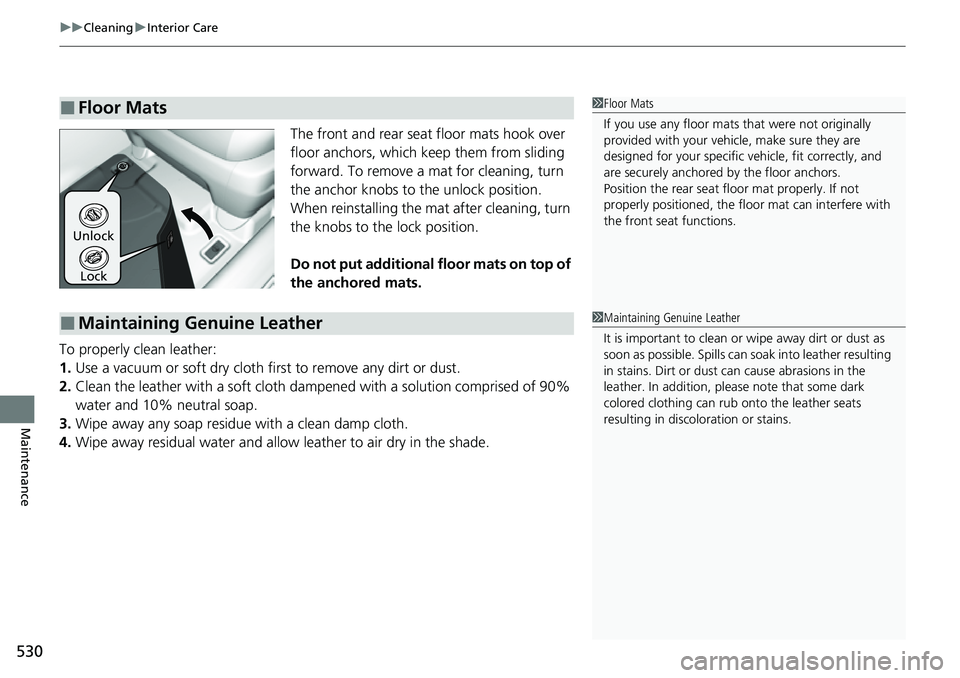
The front and rear seat floor mats hook over
floor anchors, which keep them from sliding
forward. To remove a mat for cleaning, turn
the anchor knobs to the unlock position.
When reinstalling the mat after cleaning, turn
the knobs to the lock position.
Do not put additional floor mats on top of
the anchored mats.
To properly clean leather:
1. Use a vacuum or soft dry cloth first to remove any dirt or dust.
2. Clean the leather with a soft cloth dampen ed with a solution comprised of 90%
water and 10% neutral soap.
3. Wipe away any soap residu e with a clean damp cloth.
4. Wipe away residual water and allow leather to air dry in the shade.
■Floor Mats1Floor Mats
If you use any floor mats that were not originally
provided with your vehicle, make sure they are
designed for your specific ve hicle, fit correctly, and
are securely anchored by the floor anchors.
Position the rear seat fl oor mat properly. If not
properly positioned, the fl oor mat can interfere with
the front seat functions.
Lock
Unlock
■Maintaining Genuine Leather1
Maintaining Genuine Leather
It is important to clean or wipe away dirt or dust as
soon as possible. Spills can soak into leather resulting
in stains. Dirt or dust ca n cause abrasions in the
leather. In addition, pl ease note that some dark
colored clothing can rub onto the leather seats
resulting in discol oration or stains.
Page 533 of 598
531
uuCleaning uExterior Care
Continued
Maintenance
Exterior Care
Dust off the vehicle body after you drive.
Regularly inspect your vehicle for scratches on painted surfaces. A scratch on a
painted surface can result in body rust. If you find a scratch, promptly repair it.
Wash the vehicle regularly. Wash more fr equently when driving in the following
conditions:
• If driving on roads with road salt.
• If driving in coastal areas.
• If tar, soot, bird droppings, insects, or tree sap are stuck to painted surfaces.
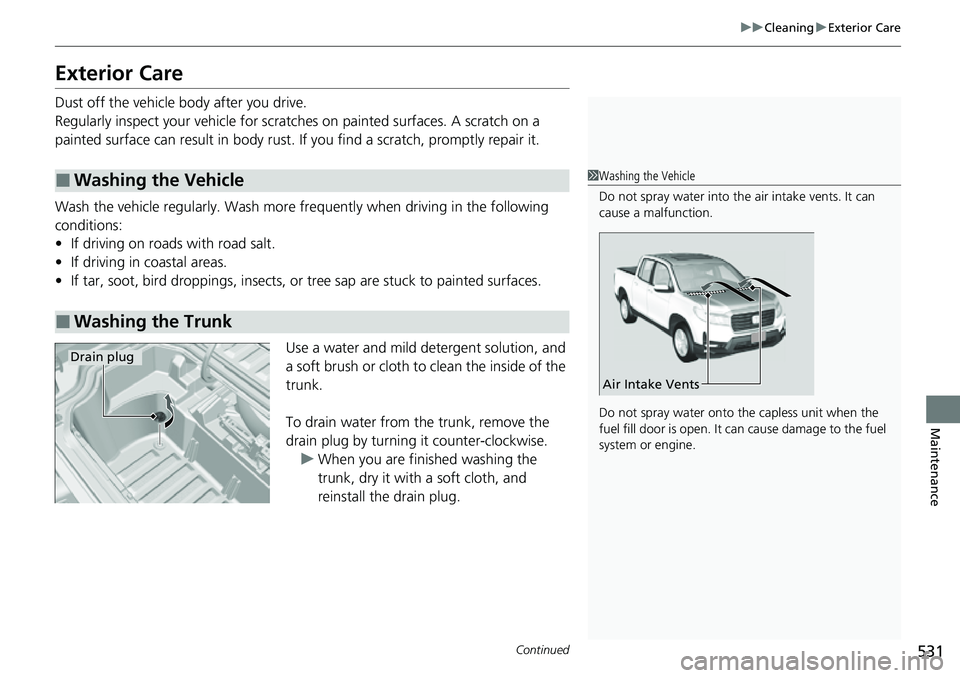
Use a water and mild detergent solution, and
a soft brush or cloth to clean the inside of the
trunk.
To drain water from the trunk, remove the
drain plug by turning it counter-clockwise. u When you are finished washing the
trunk, dry it with a soft cloth, and
reinstall the drain plug.
■Washing the Vehicle
■Washing the Trunk
1Washing the Vehicle
Do not spray water into the air intake vents. It can
cause a malfunction.
Do not spray water onto the capless unit when the
fuel fill door is open. It ca n cause damage to the fuel
system or engine.
Air Intake Vents
Drain plug
Page 539 of 598

537
Handling the Unexpected
This chapter explains how to handle unexpected troubles.
ToolsTypes of Tools .................................. 538
If a Tire Goes Flat Changing a Flat Tire ......................... 539
Engine Does Not Start
Checking the Engine ........................ 549
If the Keyless Remote Battery is Weak ...550
Emergency Engine Stop ................... 551
If the Battery Is Dead ....................... 552
Overheating How to Handle Overheating ............. 555 Indicator, Coming On/Blinking
If the Low Oil Pressure Indicator Comes
On ............................................. 557
If the Charging System Indicator Comes
On ................................................. 557
If the Malfunction Indicator Lamp Comes On or Blinks ................................... 558
If the Brake System I ndicator (Red) Comes
On .................................................559
If the Electric Power Steering (EPS) System
Indicator Comes On ....................... 559
If the Low Tire Pressure/TPMS Indicator Comes On or Blinks........................ 560 If the Transmission System Indicator Blinks
along with the Warning Message... 561
Fuses
Fuse Locations ................................. 562
Inspecting and Changing Fuses ........ 567
Emergency Towing ........................... 568
If You Cannot Unlock the Fuel Fill Door....569
If You Cannot Unlock the Tailgate ... 570
Refueling
Refueling From a Portable Fuel Container ................................... 571
Page 543 of 598
541
uuIf a Tire Goes Flat uChanging a Flat Tire
Continued
Handling the Unexpected
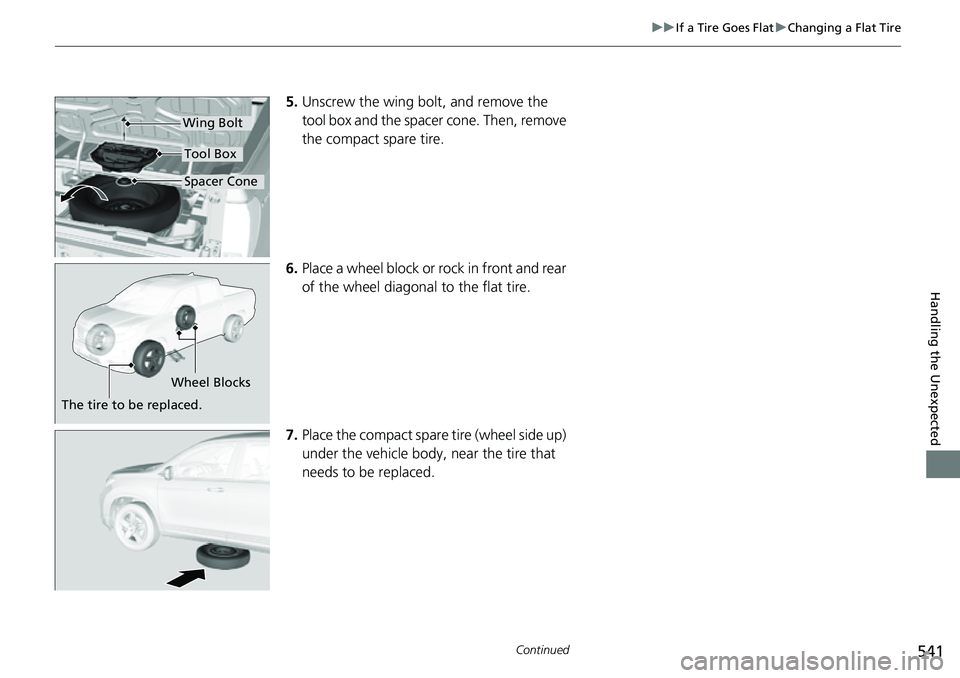
5. Unscrew the wing bolt, and remove the
tool box and the spacer cone. Then, remove
the compact spare tire.
6. Place a wheel block or rock in front and rear
of the wheel diagonal to the flat tire.
7. Place the compact spare tire (wheel side up)
under the vehicle body, near the tire that
needs to be replaced.
Wing Bolt
Spacer Cone
Tool Box
Wheel Blocks
The tire to be replaced.
Page 553 of 598
551
uuEngine Does Not Start uEmergency Engine Stop
Handling the Unexpected
Emergency Engine Stop
The ENGINE START/STOP button may be used to stop the engine due to an
emergency situation even while driving. If you must stop the engine, do either of the
following operations:
• Press and hold the ENGINE START/STOP button for about two seconds.
• Firmly press the ENGINE START/STOP button three times.
The steering wheel will not lock. However, because turning off the engine disables
the power assist the engine provides to the steering and braking systems, it will
require significantly more physical effort an d time to steer and slow the vehicle. Use
both feet on the brake pedal to slow down the vehicle and stop immediately in a
safe place.
The transmission automa tically changes to
(P after the vehicle comes to a complete
stop.
Then, the power mode changes to VEHICLE OFF.
Then press the ENGINE START/STOP button twice without depressing the brake
pedal to change the mode to VEHICLE OFF.
1 Emergency Engine Stop
Do not press the ENGINE START/STOP button while
driving unless it is absolute ly necessary for the engine
to be turned off.
If you press the ENGINE START/STOP button while
driving, the beeper sounds.
U.S. models
Canadian models