Distance HONDA RIDGELINE 2023 User Guide
[x] Cancel search | Manufacturer: HONDA, Model Year: 2023, Model line: RIDGELINE, Model: HONDA RIDGELINE 2023Pages: 598, PDF Size: 12.34 MB
Page 383 of 598
381
uuTowing a Trailer uDriving Safely with a Trailer
Continued
Driving
Driving Safely with a Trailer
• Have the trailer properly servic ed and keep it in good condition.
• Make sure that all the weights and load in the vehicle and trailer are within limits.
2Towing Load Limits P. 372
•Securely attach the hitch, safety chains, and other necessary parts to the trailer.
• Securely store all the items in and on the tra iler so that they do not shift while
driving.
• Check if the lights and brakes on the trailer are working properly.
• Check the pressure of the trail er tires, including the spare.
• Turn off the Auto Idle Stop syst em using the Auto Idle Stop OFF button. The
trailer weight can affect your vehicle’s brake effectiveness if Auto Idle Stop is
activated on a hill wh ile towing a trailer.
• Drive slower than normal.
• Obey posted speed limits fo r vehicles with trailers.
• Use the
(D position when towing a trailer on level roads.
• Turn more slowly and with a wider turning arc than normal.
• Allow more time and distance for braking.
• Do not brake or turn suddenly.
■Things You Need To Know Before Towing a Trailer
■Towing Speeds and Gears
■Turning and Braking
1Driving Safely with a Trailer
Operating speed when towing a trailer must not
exceed 62 mph (100 km/h).
Parking
In addition to the normal precautions, place wheel
chocks at each of the trailer’s tires.
When towing a trailer, we recommend that you carry
a full-size spare wheel and tire for both your vehicle
and trailer. If you use the compact spare tire that
came with your vehicle, it could adversely affect
vehicle handling.
Remember to unhitch the tra iler before changing a
flat tire. Ask the trailer sales or rental agency where
and how to store the trailer’s spare tire.
1 Towing Speeds and Gears
When towing a fixed-sided trailer (e.g., camper), do
not exceed 55 mph (88 km/h).
At higher speeds, the trai ler may sway or affect
vehicle handling.
Page 389 of 598
Continued387
uuWhen Driving uStarting the Engine
Driving
You can remotely start the engine using the keyless remote.
■Remote Engine Start1Remote Engine Start
The remote engine start may violate local laws.
Before using the remote e ngine start, check your
local laws.
If there are buildings an d obstacles between your
vehicle and the remote, th e range will be reduced.
This distance may vary by external electrical
interference.
3WARNING
Carbon monoxide ga s is toxic and can
rapidly accumulate in closed or even partly
enclosed areas.
Breathing it can cause unconsciousness and
even kill you.
Never use the remote engine starter with
the vehicle parked in a garage or other
areas with limited ventilation.
Page 429 of 598
Continued427
uuHonda Sensing ®u Collision Mitigation Braking SystemTM (CMBSTM)
Driving
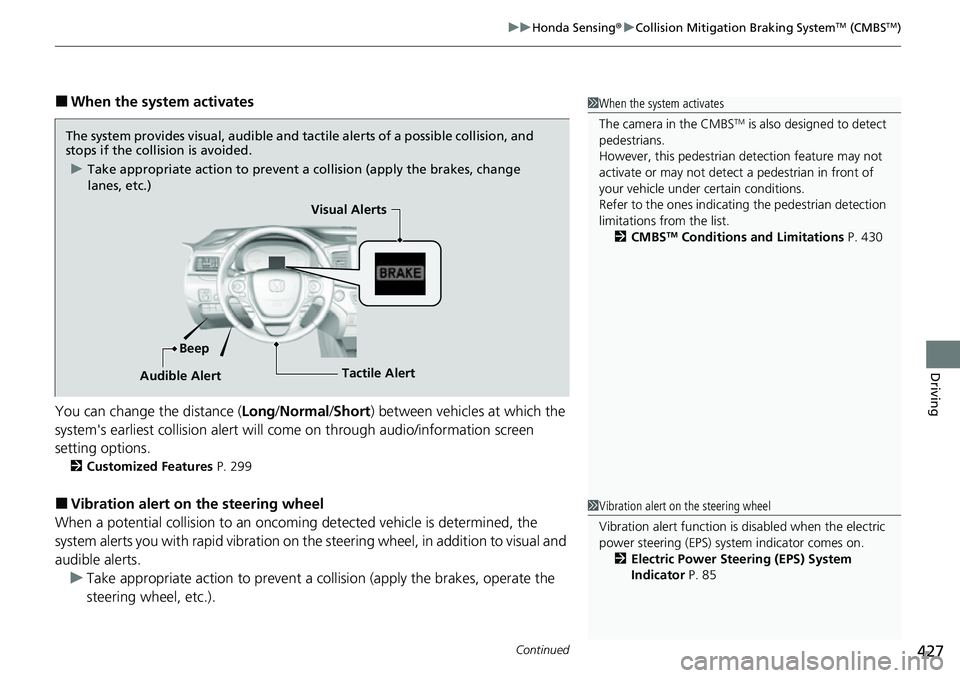
■When the system activates
You can change the distance ( Long/Normal /Short ) between vehicles at which the
system's earliest collision alert will come on through audio/information screen
setting options.
2 Customized Features P. 299
■Vibration alert on the steering wheel
When a potential collision to an oncoming detected vehicle is determined, the
system alerts you with rapid vibration on th e steering wheel, in addition to visual and
audible alerts. u Take appropriate action to prevent a col lision (apply the brakes, operate the
steering wheel, etc.).
1 When the system activates
The camera in the CMBS
TM is also designed to detect
pedestrians.
However, this pedestrian detection feature may not
activate or may not detect a pedestrian in front of
your vehicle under certain conditions.
Refer to the ones indicating the pedestrian detection
limitations from the list. 2 CMBS
TM Conditions and Limitations P. 430
The system provides visual, audible and tactile alerts of a possible collision, and
stops if the collision is avoided.
u Take appropriate action to prevent a collision (apply the brakes, change
lanes, etc.)
Beep Visual Alerts
Audible Alert
Tactile Alert
1 Vibration alert on the steering wheel
Vibration alert function is disabled when the electric
power steering (EPS) system indicator comes on. 2 Electric Power Steering (EPS) System
Indicator P. 85
Page 430 of 598
428
uuHonda Sensing ®u Collision Mitigation Braking SystemTM (CMBSTM)
Driving
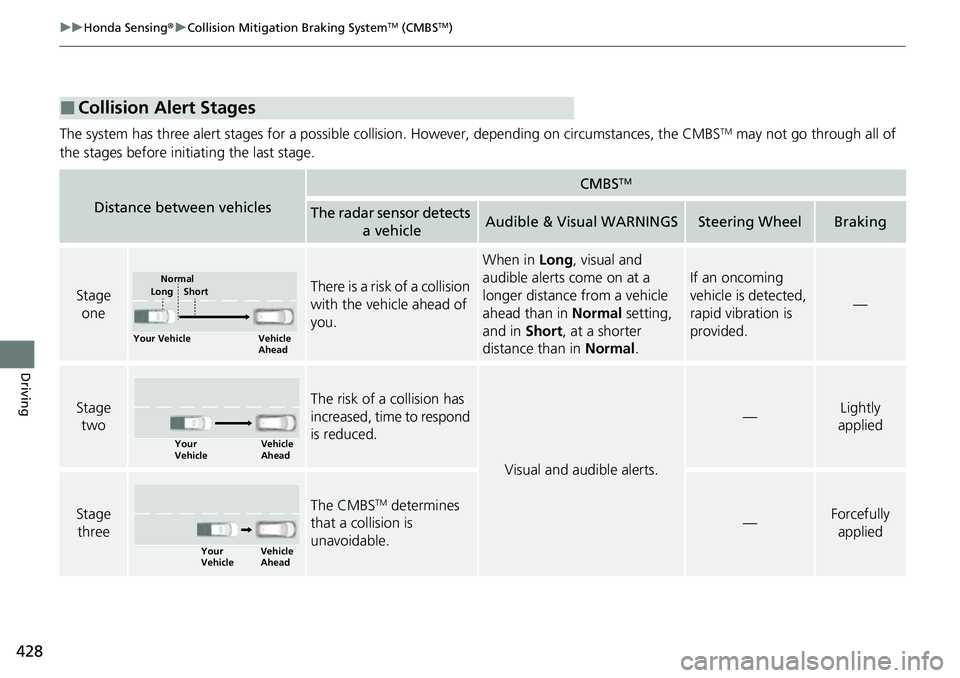
The system has three alert stages for a possible collision. However, depending on circumstances, the CMBSTM may not go through all of
the stages before initiating the last stage.
■Collision Alert Stages
Distance between vehicles
CMBSTM
The radar sensor detects a vehicleAudible & Visual WARNINGSSteering WheelBraking
Stage oneThere is a risk of a collision
with the vehicle ahead of
you.
When in Long, visual and
audible alerts come on at a
longer distance from a vehicle
ahead than in Normal setting,
and in Short, at a shorter
distance than in Normal.
If an oncoming
vehicle is detected,
rapid vibration is
provided.
—
Stage
twoThe risk of a collision has
increased, time to respond
is reduced.
Visual and audible alerts.
—Lightly
applied
Stage
three The CMBSTM determines
that a collision is
unavoidable.
—Forcefully
applied
Your Vehicle Vehicle
Ahead
Normal
Short
Long
Your
Vehicle Vehicle
Ahead
Your
VehicleVehicle
Ahead
Page 434 of 598
432
uuHonda Sensing ®u Collision Mitigation Braking SystemTM (CMBSTM)
Driving
■Detection limitations
• A vehicle or pedestrian suddenly crosses in front of you.
• The distance between your vehicle and the vehicle or pedestrian ahead of you is
too short.
• A vehicle cuts in front of you at a slow speed, and it brakes suddenly.
• When you accelerate rapidly and approach the vehicle or pedestrian ahead of you
at high speed.
• The vehicle ahead of you is a motorcycle, bicycle, mobility scooter or other small
vehicle.
• When there are animals in front of your vehicle.
• When you drive on a curved, winding or undulating road that makes it difficult for
the sensor to properly detect a vehicle in front of you.
• The speed difference between your vehicle an d a vehicle or pedestrian in front of
you is significantly large.
• An oncoming vehicle suddenly comes in front of you.
• Another vehicle suddenly comes in front of you at an intersection, etc.
• Your vehicle abruptly crosses over in front of an oncoming vehicle.
• When driving through a narrow iron bridge.
• When the lead vehicle suddenly slows down.
Page 472 of 598
470
uuBraking uAnti-lock Brake System (ABS)
Driving
Anti-lock Brake System (ABS)
Helps prevent the wheels from locking up, a nd helps you retain steering control by
pumping the brakes rapidly, much faster than you can.
The electronic brake distribution (EBD) system, which is part of the ABS, also
balances the front-to-rear braking distri bution according to vehicle loading.
You should never pump the brake pedal. Let the ABS work for you by always
keeping firm, steady pressure on the brake pe dal. This is sometimes referred to as
“stomp and steer.”
■ABS operation
The brake pedal may pulsate slightly when the ABS is working. Depress the brake
pedal and keep holding the pedal firmly dow n. On dry pavement, you will need to
press on the brake pedal very hard before the ABS activates. However, you may feel
the ABS activate immediately if yo u are trying to stop on snow or ice.
ABS may activate when you depress the brake pedal when driving on:
• Wet or snow covered roads.
• Roads paved with stone.
• Roads with uneven surfaces, such as potholes, cracks, manholes, etc.
When the vehicle speed goes unde r 6 mph (10 km/h), the ABS stops.
■ABS1Anti-lock Brake System (ABS)
NOTICE
The ABS may not function correctly if you use a tire of
the incorrect size or type.
If the ABS indicator comes on while driving, there
may be a problem with the system.
While normal braking will not be affected, there is a
possibility that the ABS wi ll not be operating. Have
your vehicle checked by a dealer immediately.
The ABS is not designed for the purpose of reducing
the time or distance it takes for a vehicle to stop: It is
designed to limit brake lo ckup which can lead to
skidding and loss of steering control.
In the following cases, yo ur vehicle may need more
distance to stop than a vehicle without the ABS:
•You are driving on rough or uneven road surfaces,
such as gravel or snow.
•The tires are equipped with tire chains.
The following may be observed with the ABS system:
•Motor sounds coming from the engine
compartment when the brakes are applied, or
when system checks are being performed after the
engine has been started and while the vehicle
accelerates.
•Brake pedal and/or the vehicle body vibration when
ABS activates.
These vibrations and sounds are normal to ABS
systems and are no cause for concern.
Page 475 of 598
473
uuParking Your Vehicle uParking Sensor System*
Continued
Driving
Parking Sensor System*
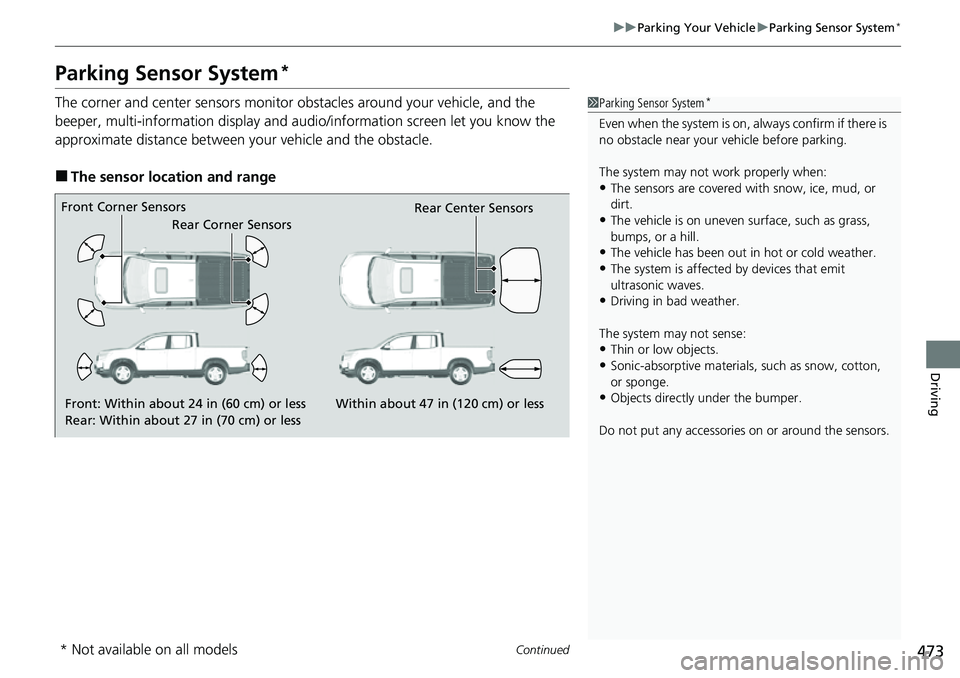
The corner and center sensors monitor obstacles around your vehicle, and the
beeper, multi-information display and audi o/information screen let you know the
approximate distance between your vehicle and the obstacle.
■The sensor location and range
1 Parking Sensor System*
Even when the system is on, always confirm if there is
no obstacle near your ve hicle before parking.
The system may not work properly when:
•The sensors are covered with snow, ice, mud, or
dirt.
•The vehicle is on uneven su rface, such as grass,
bumps, or a hill.
•The vehicle has been out in hot or cold weather.•The system is affected by devices that emit
ultrasonic waves.
•Driving in bad weather.
The system may not sense:
•Thin or low objects.•Sonic-absorptive materials, such as snow, cotton,
or sponge.
•Objects directly under the bumper.
Do not put any accessories on or around the sensors.Front: Within about 24 in (60 cm) or less
Rear: Within about 27 in (70 cm) or less
Front Corner Sensors
Rear Corner Sensors Rear Center Sensors
Within about 47 in (120 cm) or less
* Not available on all models
Page 477 of 598
475
uuParking Your Vehicle uParking Sensor System*
Continued
Driving
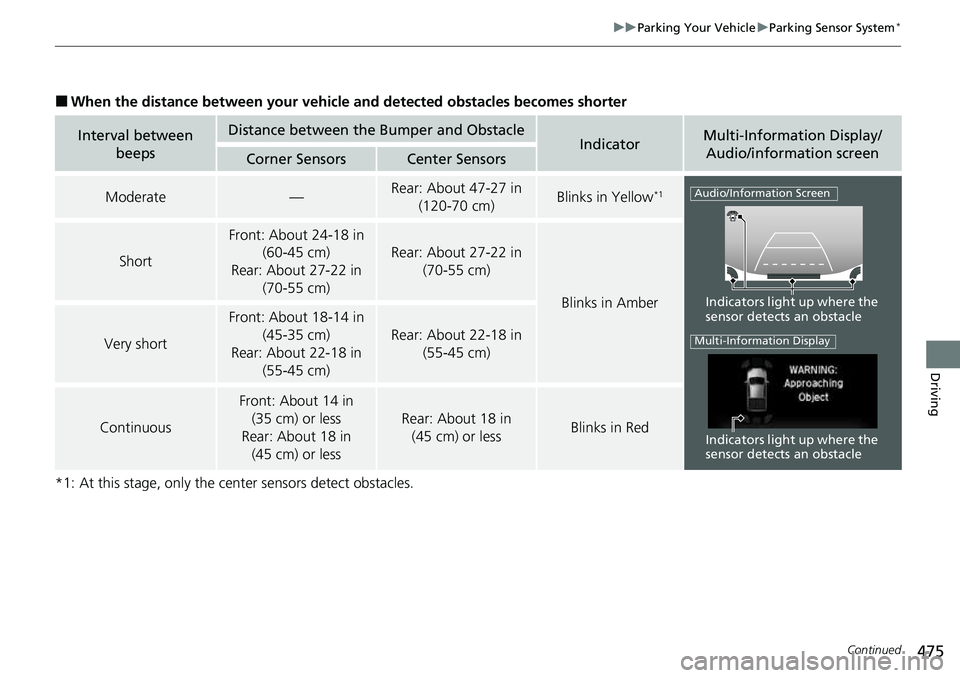
■When the distance between your vehicle and detected obstacles becomes shorter
*1: At this stage, only the center sensors detect obstacles.
Interval between beepsDistance between the Bumper and ObstacleIndicatorMulti-Information Display/
Audio/information screen
Corner SensorsCenter Sensors
Moderate—Rear: About 47-27 in (120-70 cm) Blinks in Yellow*1
Short
Front: About 24-18 in (60-45 cm)
Rear: About 27-22 in (70-55 cm)
Rear: About 27-22 in
(70-55 cm)
Blinks in Amber
Very short
Front: About 18-14 in (45-35 cm)
Rear: About 22-18 in (55-45 cm)
Rear: About 22-18 in
(55-45 cm)
Continuous
Front: About 14 in (35 cm) or less
Rear: About 18 in
(45 cm) or less
Rear: About 18 in (45 cm) or lessBlinks in Red
Indicators light up where the
sensor detects an obstacle
Audio/Information Screen
Multi-Information Display
Indicators light up where the
sensor detects an obstacle
Page 490 of 598
488
Maintenance
Before Performing Maintenance
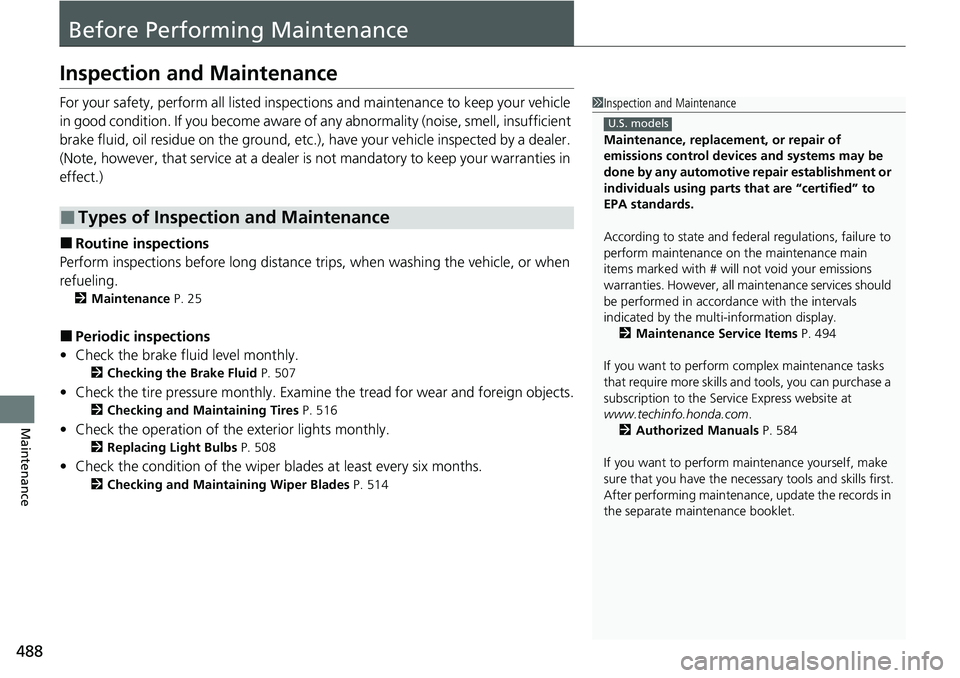
Inspection and Maintenance
For your safety, perform all listed inspections and maintenance to keep your vehicle
in good condition. If you become aware of an y abnormality (noise, smell, insufficient
brake fluid, oil residue on the ground, etc.), have your vehicle inspected by a dealer.
(Note, however, that service at a dealer is not mandatory to keep your warranties in
effect.)
■Routine inspections
Perform inspections before long distance tri ps, when washing the vehicle, or when
refueling.
2 Maintenance P. 25
■Periodic inspections
• Check the brake fluid level monthly.
2 Checking the Brake Fluid P. 507
•Check the tire pressure monthly. Examin e the tread for wear and foreign objects.
2Checking and Maintaining Tires P. 516
•Check the operation of the exterior lights monthly.
2 Replacing Light Bulbs P. 508
•Check the condition of the wiper bl ades at least every six months.
2Checking and Maintaining Wiper Blades P. 514
■Types of Inspection and Maintenance
1Inspection and Maintenance
Maintenance, replacement, or repair of
emissions control devices and systems may be
done by any automotive repair establishment or
individuals using parts that are “certified” to
EPA standards.
According to state and fede ral regulations, failure to
perform maintenance on the maintenance main
items marked with # will not void your emissions
warranties. However, all ma intenance services should
be performed in accordan ce with the intervals
indicated by the mult i-information display.
2 Maintenance Service Items P. 494
If you want to perform complex maintenance tasks
that require more skills a nd tools, you can purchase a
subscription to the Service Express website at
www.techinfo.honda.com .
2 Authorized Manuals P. 584
If you want to perform ma intenance yourself, make
sure that you have the necessary tools and skills first.
After performing maintenanc e, update the records in
the separate maintenance booklet.
U.S. models
Page 495 of 598
493
uuMaintenance MinderTMuTo Use Maintenance MinderTM
Continued
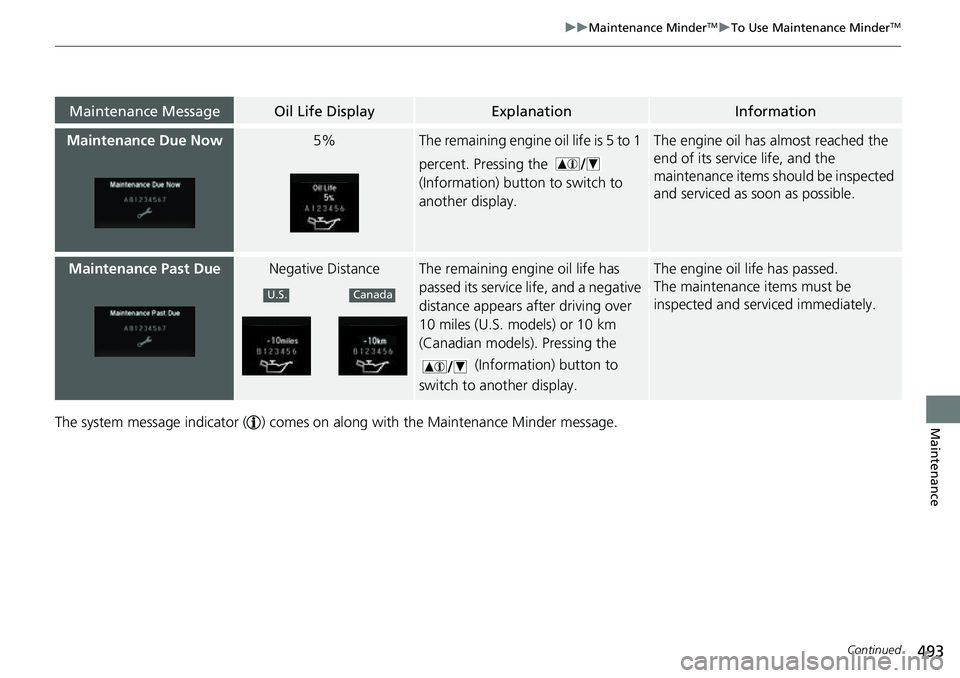
MaintenanceThe system message indicator ( ) comes on along with the Maintenance Minder message.
Maintenance MessageOil Life DisplayExplanationInformation
Maintenance Due Now5%The remaining engine oil life is 5 to 1
percent. Pressing the
(Information) button to switch to
another display.The engine oil has almost reached the
end of its service life, and the
maintenance items should be inspected
and serviced as soon as possible.
Maintenance Past DueNegative DistanceThe remaining engine oil life has
passed its service life, and a negative
distance appears after driving over
10 miles (U.S. models) or 10 km
(Canadian models). Pressing the
(Information) button to
switch to another display.The engine oil life has passed.
The maintenance items must be
inspected and serviced immediately.
U.S.Canada