Distance HONDA RIDGELINE 2023 Owners Manual
[x] Cancel search | Manufacturer: HONDA, Model Year: 2023, Model line: RIDGELINE, Model: HONDA RIDGELINE 2023Pages: 598, PDF Size: 12.34 MB
Page 113 of 598
111
uuGauges and Multi-Information Display uMulti-Information Display
Continued
Instrument Panel
Multi-Information Display
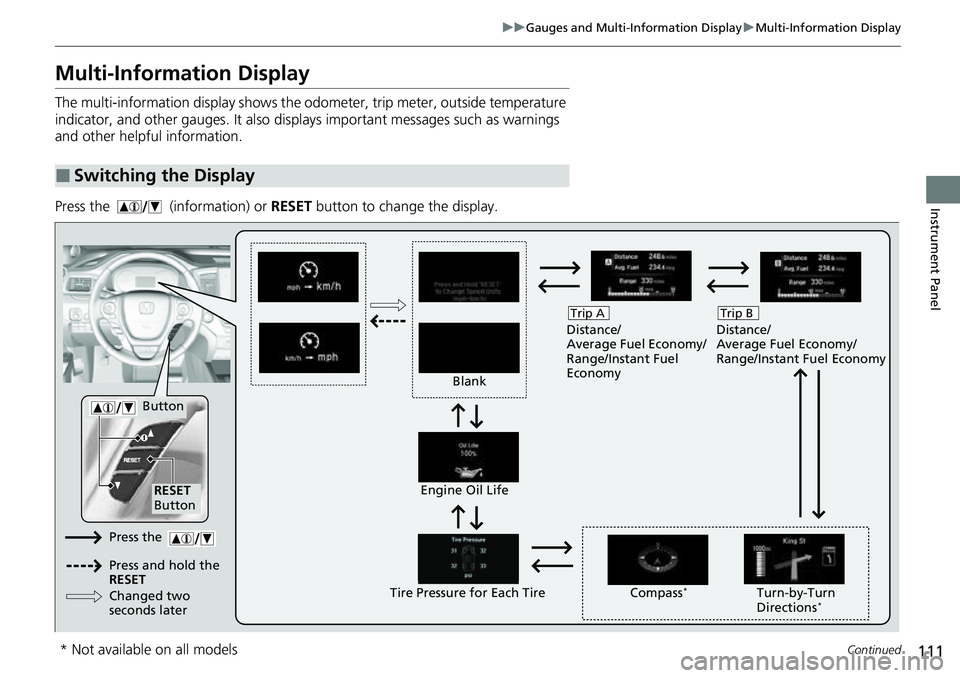
The multi-information display shows the odometer, trip meter, outside temperature
indicator, and other gauges. It also displa ys important messages such as warnings
and other helpful information.
Press the (information) or RESET button to change the display.
■Switching the Display
Blank Distance/
Average Fuel Economy/
Range/Instant Fuel
Economy
Trip A
Tire Pressure for Each TireEngine Oil Life
Turn-by-Turn
Directions*
RESET
Button Compass
*
Button
Distance/
Average Fuel Economy/
Range/Instant Fuel Economy
Trip B
Press the
Press and hold the
RESET
Changed two
seconds later
* Not available on all models
Page 116 of 598
uuGauges and Multi-Information Display uMulti-Information Display
114
Instrument Panel
Shows the estimated distance you can trave l on the remaining fuel. This estimated
distance is based on the vehicle’s current fuel economy.
Shows the instant fuel economy as a bar graph in mpg or l/100 km.
Shows each tire’s pressure.
2 Tire Pressure Monitoring System (TPMS) with Tire Fill Assist P. 416
Shows the remaining oil life and Maintenance MinderTM.
2Maintenance MinderTM P. 491
■Compass
Shows the compass screen.
■Turn-by-Turn Directions
When driving guidance is provided by the navigation system, turn-by-turn directions
to your destination appear.
2 Refer to the Navigation System Manual
■Range
■Instant Fuel Economy
■Tire Pressure Monitor
■Maintenance MinderTM
■Navigation
Models with navigation system
1Navigation
You can select whether to have the turn-by-turn
display come on or not dur ing the route guidance.
2 Customized Features P. 299
2 Refer to the navigation system
Page 127 of 598
Continued125
uuLocking and Unlocking the Doors uLocking/Unlocking the Doors from the Outside
Controls
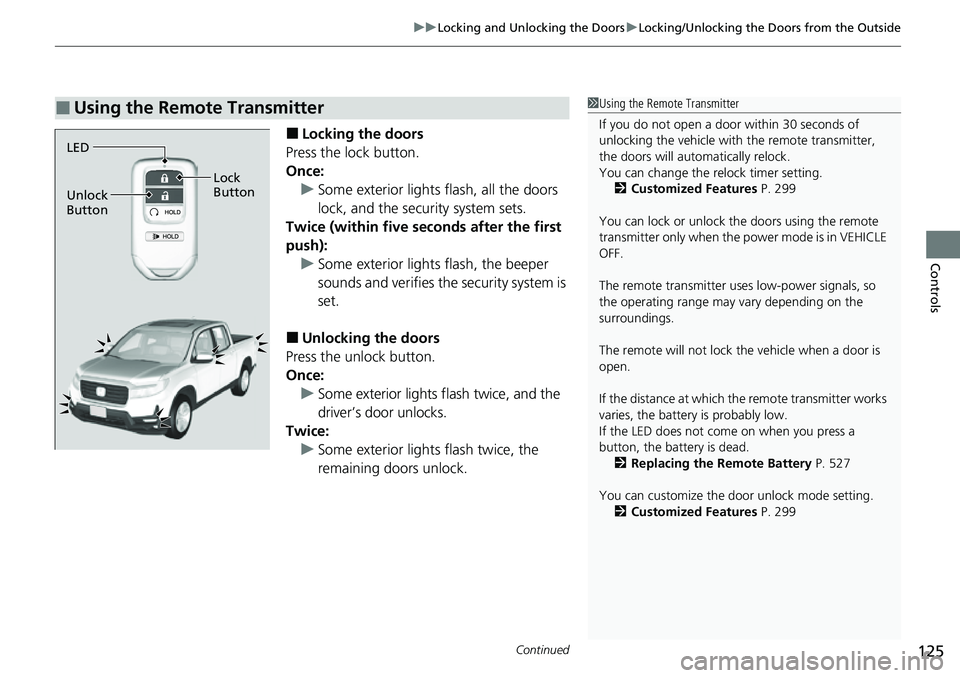
■Locking the doors
Press the lock button.
Once: u Some exterior lights flash, all the doors
lock, and the security system sets.
Twice (within five se conds after the first
push):
u Some exterior lights flash, the beeper
sounds and verifies the security system is
set.
■Unlocking the doors
Press the unlock button.
Once:
u Some exterior lights flash twice, and the
driver’s door unlocks.
Twice: u Some exterior light s flash twice, the
remaining doors unlock.
■Using the Remote Transmitter1 Using the Remote Transmitter
If you do not open a door within 30 seconds of
unlocking the vehicle with the remote transmitter,
the doors will automatically relock.
You can change the relock timer setting. 2 Customized Features P. 299
You can lock or unlock the doors using the remote
transmitter only when the power mode is in VEHICLE
OFF.
The remote transmitter us es low-power signals, so
the operating range may vary depending on the
surroundings.
The remote will not lock th e vehicle when a door is
open.
If the distance at which the remote transmitter works
varies, the batter y is probably low.
If the LED does not come on when you press a
button, the battery is dead.
2 Replacing the Remote Battery P. 527
You can customize the door unlock mode setting. 2 Customized Features P. 299
LED
Unlock
Button Lock
Button
Page 156 of 598
154
uuOperating the Switches Around the Steering Wheel uAuto High-Beam (High Beam Support System)
Controls
Auto High-Beam (High Beam Support System)
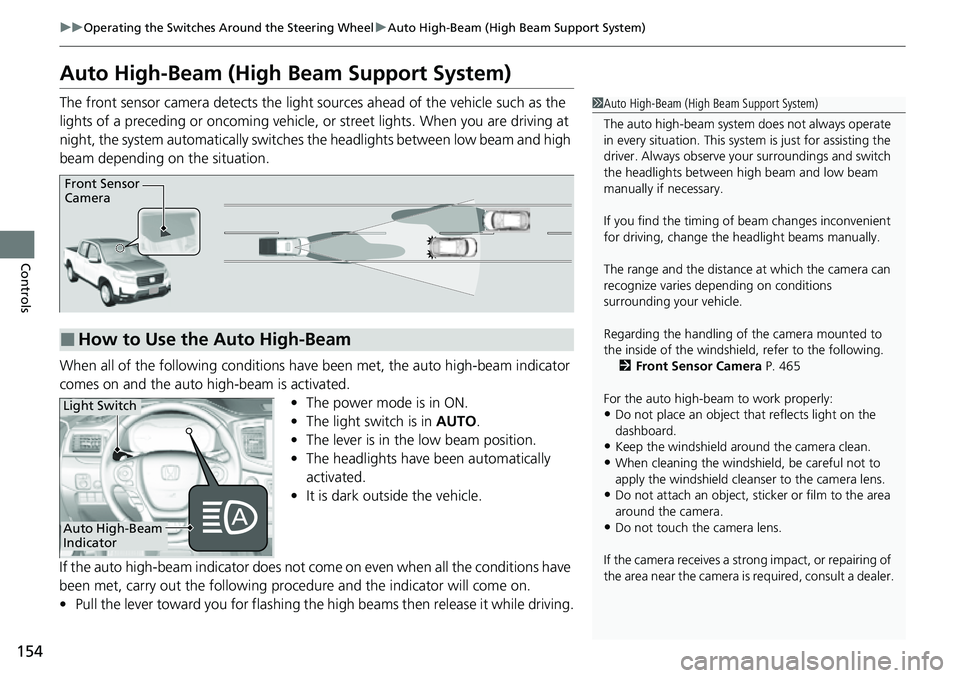
The front sensor camera detects the light sources ahead of the vehicle such as the
lights of a preceding or oncoming vehicle, or street lights. When you are driving at
night, the system automatically switches the headlights between low beam and high
beam depending on the situation.
When all of the following conditions have been met, the auto high-beam indicator
comes on and the auto high-beam is activated. •The power mode is in ON.
• The light switch is in AUTO.
• The lever is in the low beam position.
• The headlights have been automatically
activated.
• It is dark outside the vehicle.
If the auto high-beam indicator does not co me on even when all the conditions have
been met, carry out the following procedure and the indicator will come on.
• Pull the lever toward you for flashing the high beams then release it while driving.1Auto High-Beam (High Beam Support System)
The auto high-beam system does not always operate
in every situation. This syst em is just for assisting the
driver. Always observe your surroundings and switch
the headlights between high beam and low beam
manually if necessary.
If you find the timing of beam changes inconvenient
for driving, change the headlight beams manually.
The range and the distance at which the camera can
recognize varies de pending on conditions
surrounding your vehicle.
Regarding the handling of the camera mounted to
the inside of the windshiel d, refer to the following.
2 Front Sensor Camera P. 465
For the auto high-beam to work properly:
•Do not place an object that reflects light on the
dashboard.
•Keep the windshield around the camera clean.
•When cleaning the windshield, be careful not to
apply the windshield cleans er to the camera lens.
•Do not attach an object, sticker or film to the area
around the camera.
•Do not touch the camera lens.
If the camera receives a st rong impact, or repairing of
the area near the camera is required, consult a dealer.
■How to Use the Auto High-Beam
Front Sensor
Camera
Auto High-Beam
Indicator
Light Switch
Page 165 of 598
163
uuOperating the Switches Around the Steering Wheel uAdjusting the Steering Wheel
Controls
Adjusting the Steering Wheel
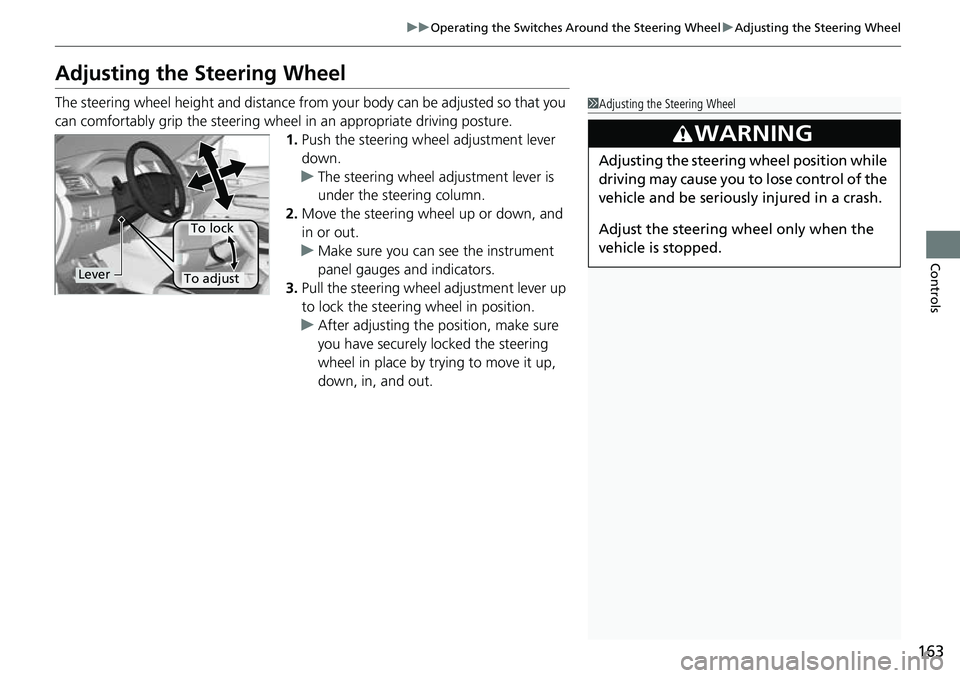
The steering wheel height and distance from your body can be adjusted so that you
can comfortably grip the steering wheel in an appropriate driving posture.
1. Push the steering wheel adjustment lever
down.
u The steering wheel adjustment lever is
under the steering column.
2. Move the steering wheel up or down, and
in or out.
u Make sure you can see the instrument
panel gauges and indicators.
3. Pull the steering wheel adjustment lever up
to lock the steering wheel in position.
u After adjusting the position, make sure
you have securely locked the steering
wheel in place by trying to move it up,
down, in, and out.1Adjusting the Steering Wheel
3WARNING
Adjusting the steering wheel position while
driving may cause you to lose control of the
vehicle and be seriously injured in a crash.
Adjust the steering wheel only when the
vehicle is stopped.
Lever
To lock
To adjust
Page 304 of 598
302
uuCustomized Features u
Features
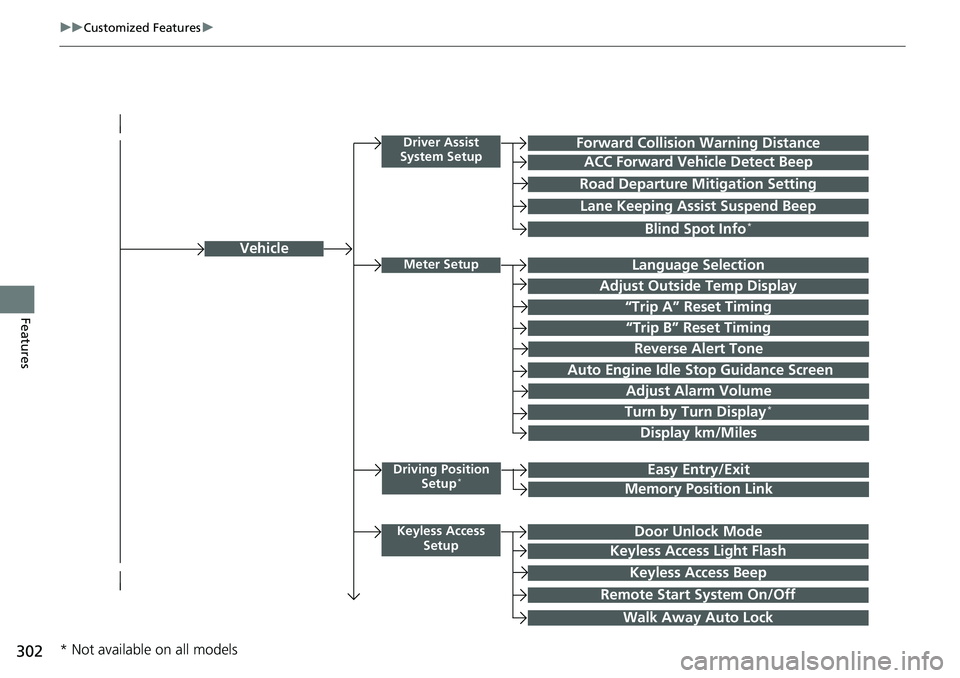
Vehicle
Driver Assist
System SetupForward Collision Warning Distance
ACC Forward Vehicle Detect Beep
Road Departure Mi tigation Setting
Lane Keeping Assist Suspend Beep
Blind Spot Info*
Meter SetupLanguage Selection
Adjust Outside Temp Display
“Trip A” Reset Timing
“Trip B” Reset Timing
Adjust Alarm Volume
Turn by Turn Display*
Display km/Miles
Driving Position
Setup*Easy Entry/Exit
Memory Position Link
Keyless Access SetupDoor Unlock Mode
Keyless Access Light Flash
Keyless Access Beep
Remote Start System On/Off
Walk Away Auto Lock
Reverse Alert Tone
Auto Engine Idle Stop Guidance Screen
* Not available on all models
Page 314 of 598
312
uuCustomized Features u
Features
*1:Default SettingSetup
Group Customizable Features Descri
ption Selectable Settings
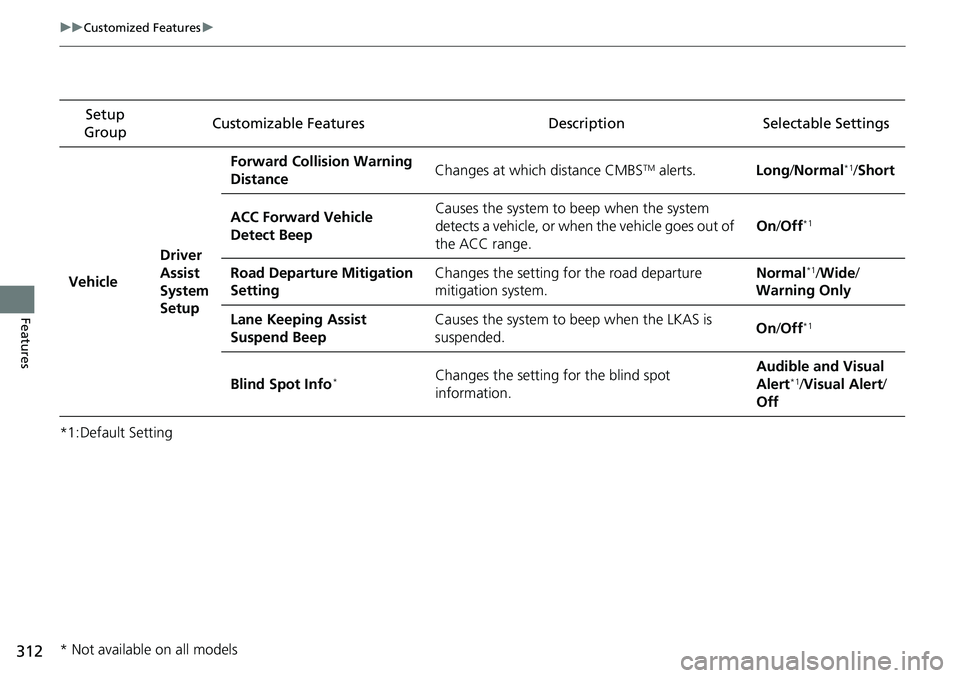
Vehicle Driver
Assist
System
SetupForward Collision Warning
Distance
Changes at which distance CMBS
TM alerts.
Long/Normal*1/ Short
ACC Forward Vehicle
Detect Beep Causes the system to
beep when the system
detects a vehicle, or when the vehicle goes out of
the ACC range. On
/Off
*1
Road Departure Mitigation
Setting Changes the setting for the road departure
mitigation system. Normal*1/
Wide /
Warning Only
Lane Keeping Assist
Suspend Beep Causes the system to b
eep when the LKAS is
suspended. On
/Off
*1
Blind Spot Info*Changes the setting for the blind spot
information. Audible and Visual
Alert*1/
Visual Alert /
Off
* Not available on all models
Page 367 of 598
Continued365
uuBefore Driving uDriving Preparation
Driving
• Store or secure all items on board properly.
u Carrying too much cargo, or improperly storing it, can affect your vehicle’s
handling, stability, sto pping distance, and tires, and make it unsafe.
2Maximum Load Limit P. 367
•Do not pile items higher than the seat height.
u They can block your view and may be thrown forward in the event of sudden
braking.
• Do not place anything in the front seat footwells. Make sure to secure the floor
mat.
u An object or unsecured floor mat can in terfere with your brake and accelerator
pedal operation while driving.
• If you have any animals on board, do not let them move around in the vehicle.
u They may interfere with driving and a crash could occur.
• Securely close and lock all doors.
2Locking/Unlocking the Doors from the Inside P. 127
•Adjust your seating position properly.
u Adjust the head restraint, too.
2Seats P. 166
2 Adjusting the front head restraint positions P. 171
•Adjust the mirrors and steering wheel properly.
u Adjust them while sitting in the proper driving position.
2 Adjusting the Steering Wheel P. 163
2 Mirrors P. 164
■Interior Checks1Interior Checks
The headlight aim is set by the factory, and does not
need to be adjusted. Howeve r, if you regularly carry
heavy items in the cargo area or tow a trailer, have
the aiming readjusted at a dealer or by a qualified
technician.
Page 372 of 598
370
uuBefore Driving uCarrying Cargo
Driving
Carrying Cargo
Your vehicle can carry a large amount of cargo in the pickup bed.
However, the pickup bed is not intended for carrying passengers.
People who ride in the pickup bed can be ve ry seriously injured or killed in a crash.
• When loading and unloading cargo, make sure all passengers or any objects are
clear of the tailgate before opening or closing it. The tailgate should be closed
securely before driving when it is not used as the extended pickup bed.
• The maximum allowable loading weight for the trunk is 300 lbs (136 kg).
Do not exceed this weight limi t, or you may damage the trunk.
• The maximum allowable loading weight on the pickup bed is 1,100 lbs (500 kg).
Do not exceed the load limit.
2 Maximum Load Limit P. 367
•Distribute cargo evenly on the pickup bed. Place the heaviest items on the bottom
and as far forward as possible of the rear axle. Tie down and secure all items that
could be thrown out of the vehicle during a crash or sudden stop.
• If you stack items higher than the bed si des, tailgate, or back window, secure
them with a net or cover.
This will reduce the risk of items being thrown out of the pickup bed during a
crash or sudden stop.
• When the tailgate is dropped open, it can be used as an extended pickup bed.
The maximum allowable weight on the tailgate while driving is 300 lbs (136 kg).
Exceeding this limit c ould damage the tailgate.
• Carrying heavy cargo in the pickup bed will raise your vehicle’s center of gravity.
This can affect handling and performance. Drive more slowly and cautiously, and
allow extra time and distance for braking.
■Carrying Cargo in the Pickup Bed1 Carrying Cargo
3WARNING
Allowing passengers to ride in the pickup
bed or on the tailgate can result in death or
serious injury in a crash.
Make sure all passengers ride in a seat and
wear a seat belt properly.
3WARNING
Never let passengers ride in the pickup bed,
in the trunk space, or on the bed rails. This
could cause very serious injuries or death.
No one should ride in any position on your
vehicle that is not eq uipped with seats and
seat belts.
Exceeding load limits or improperly loading
cargo on the vehicle can cause a crash in
which you can be seriously injured or killed.
Load the cargo carefully before starting to
drive.
Page 379 of 598
377
uuTowing a Trailer uTowing Preparation
Continued
Driving
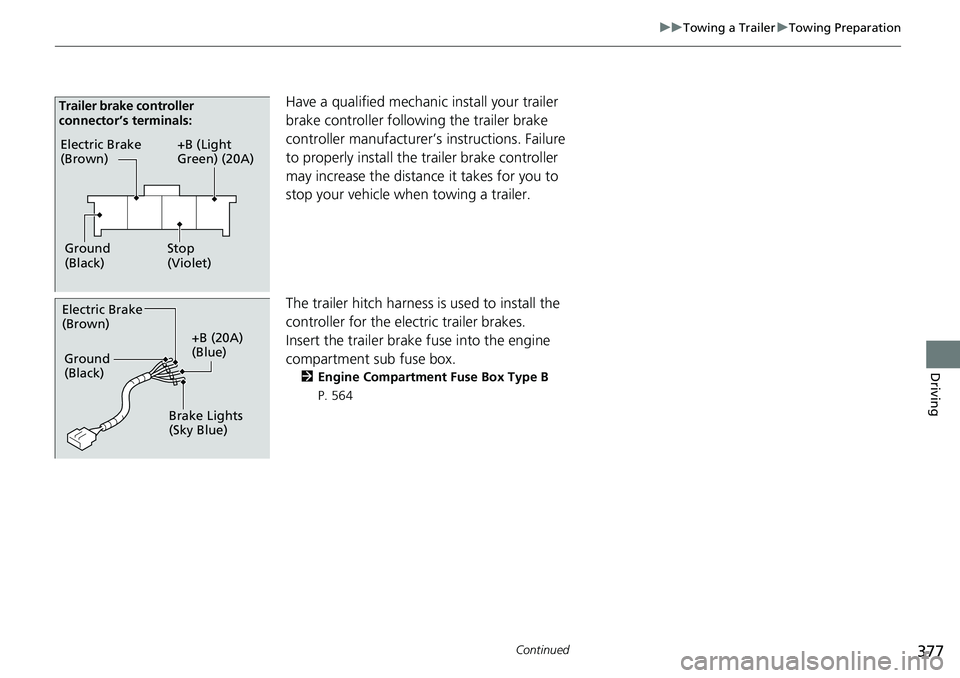
Have a qualified mechanic install your trailer
brake controller following the trailer brake
controller manufacturer’s instructions. Failure
to properly install the trailer brake controller
may increase the distance it takes for you to
stop your vehicle when towing a trailer.
The trailer hitch harness is used to install the
controller for the electric trailer brakes.
Insert the trailer brake fuse into the engine
compartment sub fuse box.
2 Engine Compartment Fuse Box Type B
P. 564
Electric Brake
(Brown)
Ground
(Black) +B (Light
Green) (20A)
Stop
(Violet)
Trailer brake controller
connector’s terminals:
Electric Brake
(Brown)
+B (20A)
(Blue)
Ground
(Black)
Brake Lights
(Sky Blue)