audio HONDA RIDGELINE 2023 User Guide
[x] Cancel search | Manufacturer: HONDA, Model Year: 2023, Model line: RIDGELINE, Model: HONDA RIDGELINE 2023Pages: 598, PDF Size: 12.34 MB
Page 130 of 598
uuLocking and Unlocking the Doors uLocking/Unlocking the Doors from the Inside
128
Controls
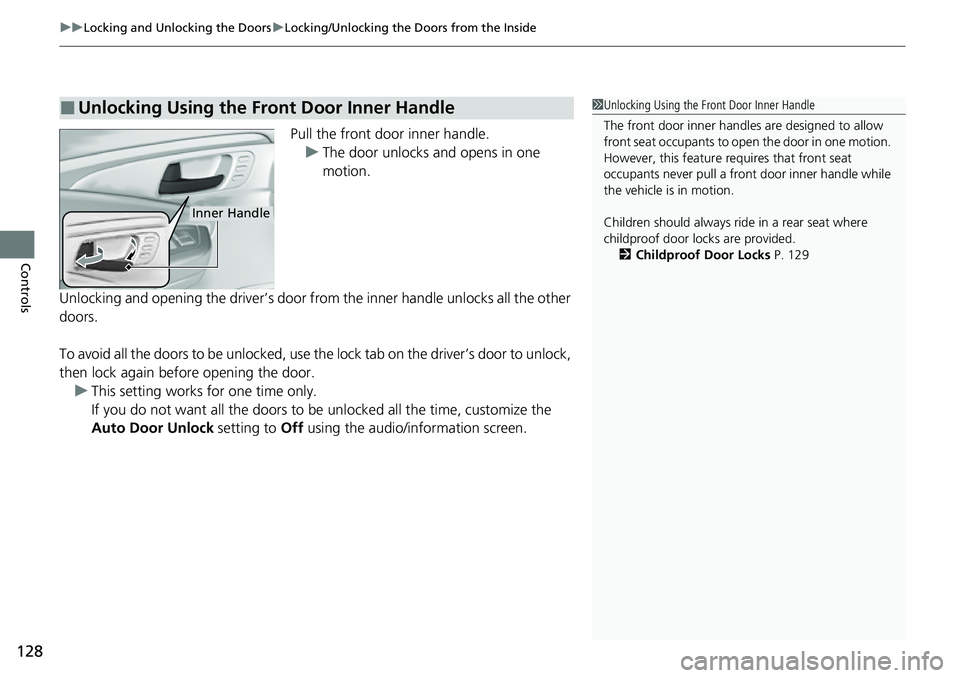
Pull the front door inner handle.
u The door unlocks and opens in one
motion.
Unlocking and opening the driver’s door from the inner handle unlocks all the other
doors.
To avoid all the doors to be unlocked, use the lock tab on the driver’s door to unlock,
then lock again before opening the door. u This setting works for one time only.
If you do not want all the doors to be unlocked all the time, customize the
Auto Door Unlock setting to Off using the audio/in formation screen.
■Unlocking Using the Front Door Inner Handle1Unlocking Using the Front Door Inner Handle
The front door inne r handles are designed to allow
front seat occupants to ope n the door in one motion.
However, this feature requires that front seat
occupants never pull a front door inner handle while
the vehicle is in motion.
Children should always ride in a rear seat where
childproof door locks are provided. 2 Childproof Door Locks P. 129
Inner Handle
Page 132 of 598
130
uuLocking and Unlocking the Doors uAuto Door Locking/Unlocking
Controls
Auto Door Locking/Unlocking
Your vehicle locks or unlocks all doors auto matically when a certain condition is met.
■Drive lock mode
All doors lock when the vehicle’s speed reaches about 10 mph (15 km/h).
■Driver’s door open mode
All doors unlock when the driver’s door is opened.
■Auto Door Locking
■Auto Door Unlocking
1 Auto Door Locking/Unlocking
You can turn off or cha nge to another auto door
locking/unlocking sett ing using the audio/
information screen. 2 Customized Features P. 299
Page 134 of 598
132
uuTailgate uOpening/Closing the Tailgate
Controls
Opening/Closing the Tailgate
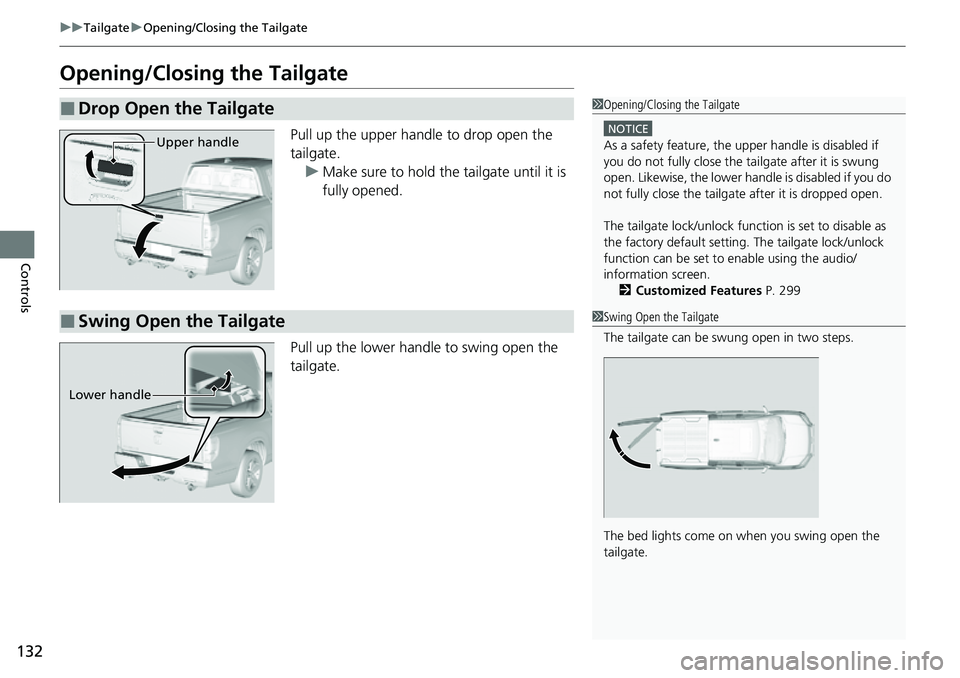
Pull up the upper handle to drop open the
tailgate.
u Make sure to hold the tailgate until it is
fully opened.
Pull up the lower handl e to swing open the
tailgate.
■Drop Open the Tailgate1 Opening/Closing the Tailgate
NOTICE
As a safety feature, the upper handle is disabled if
you do not fully close the ta ilgate after it is swung
open. Likewise, the lower ha ndle is disabled if you do
not fully close the tailgate after it is dropped open.
The tailgate lock/unlock func tion is set to disable as
the factory default setting. The tailgate lock/unlock
function can be set to enable using the audio/
information screen. 2 Customized Features P. 299Upper handle
■Swing Open the Tailgate1Swing Open the Tailgate
The tailgate can be swung open in two steps.
The bed lights come on when you swing open the
tailgate.
Lower handle
Page 138 of 598
136
Controls
Security System
Immobilizer System
This system prevents a key that has not been pre-registered from starting the
engine.
Pay attention to the follo wing when pressing the ENGINE START/STOP button:
• Do not allow objects that emit strong radio waves near the ENGINE START/
STOP button.
• Make sure the key is not covered by or touching a metal object.
• Do not bring a key from another vehi cle’s immobilizer system near the ENGINE
START/STOP button.
Do not put the key near magnetic items. El ectronic device, such as televisions and
audio systems emit strong magnetic fields . Note that even a key chain can become
magnetic.
Security System Alarm
The security system alarm activates wh en the trunk, hood or doors are forcibly
opened. The alarm does not activate if th e trunk or doors are opened with the key,
remote transmitter, or keyless access system.
However, the alarm activates if a door is opened with the key and then the hood is
opened before the power mode is set to ON.
■When the security sy stem alarm activates
The horn sounds intermittently, and some exterior lights flash.
1 Immobilizer System
NOTICE
Leaving the key in the vehicl e can result in theft or
accidental movement of the vehicle.
Always take the key with you whenever you leave the
vehicle unattended.
Do not alter the system or add other devices to it.
Doing so may damage the system and make your
vehicle inoperable.
1 Security System Alarm
Do not alter the system or add other devices to it.
Doing so may damage the system and make your
vehicle inoperable.
The security system alarm continues for a maximum
of two minutes until the security system alarm
deactivates.
Page 147 of 598
145Continued
Controls
Operating the Switches Around the Steering Wheel
ENGINE START/STOP Button
*1:Canadian models
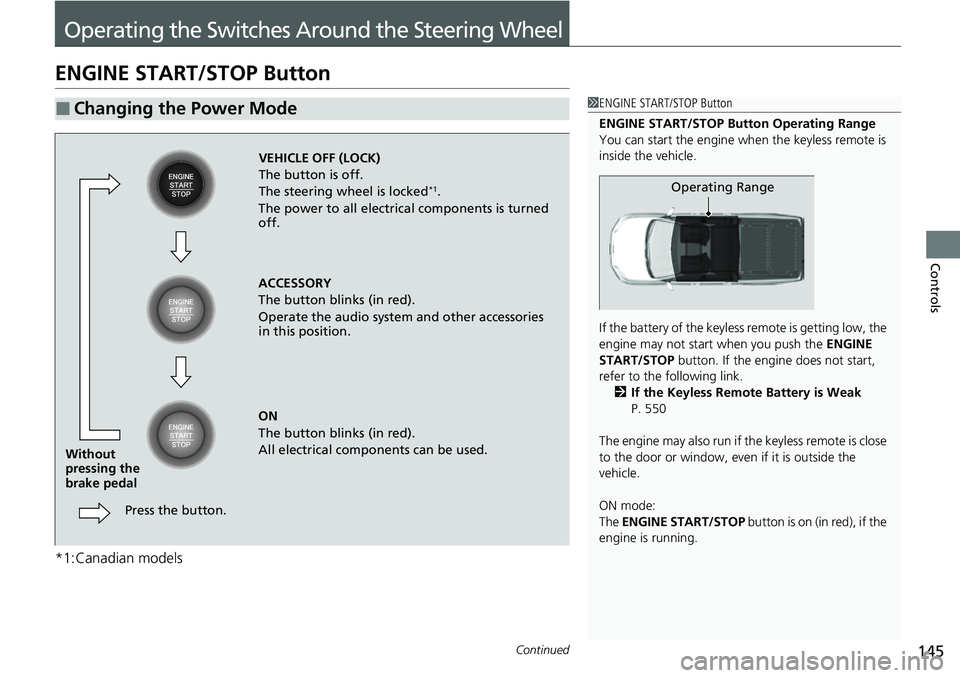
■Changing the Power Mode1ENGINE START/STOP Button
ENGINE START/STOP Button Operating Range
You can start the engine when the keyless remote is
inside the vehicle.
If the battery of the keyless remote is getting low, the
engine may not start when you push the ENGINE
START/STOP button. If the engi ne does not start,
refer to the following link. 2 If the Keyless Remote Battery is Weak
P. 550
The engine may also run if the keyless remote is close
to the door or window, even if it is outside the
vehicle.
ON mode:
The ENGINE START/STOP button is on (in red), if the
engine is running.
Operating Range
VEHICLE OFF (LOCK)
The button is off.
The steering wheel is locked
*1.
The power to all electrical components is turned
off.
ACCESSORY
The button blinks (in red).
Operate the audio system and other accessories
in this position.
ON
The button blinks (in red).
All electrical components can be used.
Press the button.
Without
pressing the
brake pedal
Page 163 of 598
161
uuOperating the Switches Around the Steering Wheel uDriving Position Memory System*
Continued
Controls
Driving Position Memory System*
You can store two driver’s seat (except for power lumbar) and door mirror positions
with the driving position memory system.
When you unlock and open the driver’s door with a remote transmitter or keyless
access system, the seat and door mirrors adjust automatically to one of the two
preset positions.
When you enter the vehicle, the multi-in formation display briefly shows you which
remote transmitter you used to unlock the vehicle.
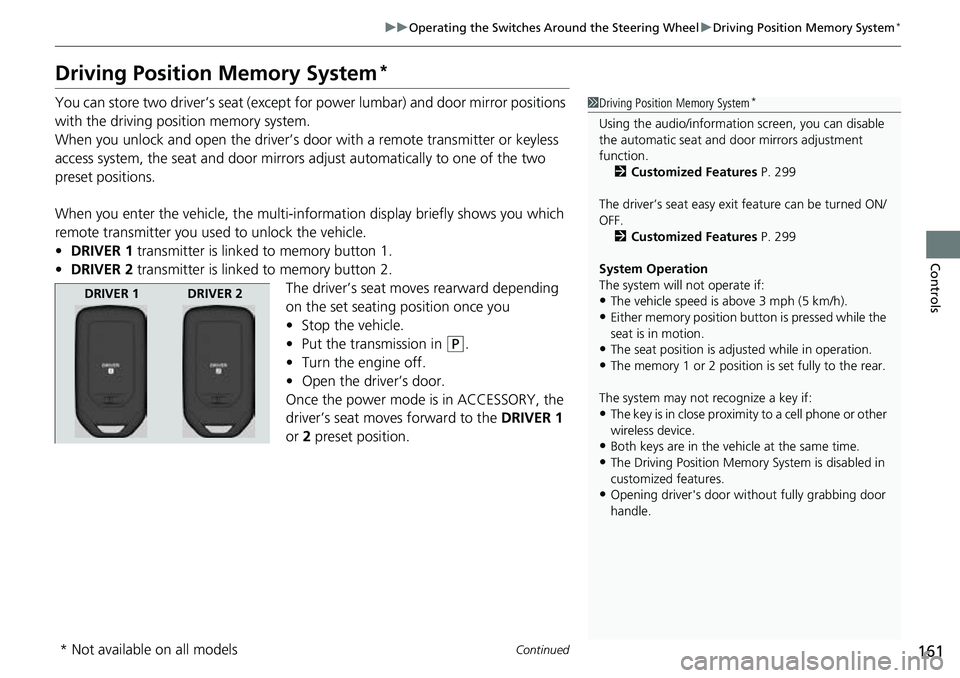
• DRIVER 1 transmitter is linked to memory button 1.
• DRIVER 2 transmitter is linked to memory button 2.
The driver’s seat moves rearward depending
on the set seating position once you
•Stop the vehicle.
• Put the transmission in
(P.
• Turn the engine off.
• Open the driv er’s door.
Once the power mode is in ACCESSORY, the
driver’s seat moves forward to the DRIVER 1
or 2 preset position.
1 Driving Position Memory System*
Using the audio/informati on screen, you can disable
the automatic seat and d oor mirrors adjustment
function. 2 Customized Features P. 299
The driver’s seat easy exit feature can be turned ON/
OFF. 2 Customized Features P. 299
System Operation
The system will not operate if:
•The vehicle speed is above 3 mph (5 km/h).•Either memory position button is pressed while the
seat is in motion.
•The seat position is adju sted while in operation.•The memory 1 or 2 position is set fully to the rear.
The system may not recognize a key if:
•The key is in close proximity to a cell phone or other
wireless device.
•Both keys are in the vehicle at the same time.•The Driving Position Memory System is disabled in
customized features.
•Opening driver's door wi thout fully grabbing door
handle.
DRIVER 1 DRIVER 2
* Not available on all models
Page 186 of 598
uuInterior/Exterior Convenience Items uOther Interior Convenience Items
184
Controls
■When charging does not start
Perform one of the solution s in the following table.
IndicatorCauseSolution
Slow Blink
There is an obstacle(s) between
the charging area and the
device.Remove the
obstacle(s).
The device is not within the
charging area. Pick up and reset the
device to the center of
the charging area
where is located.
The temperature of the wireless
charger pad increases. Temporary suspend
charging the device.
Wait for temperature
to drop and attempt to
charge the device
again.
Fast BlinkThe wireless charger is faulty.
Turn the vehicle off
and back on. If the
indicator still blinks,
contact a dealer.
1
Wireless Charger*
Using the audio/informati on screen, you can disable
the wireless ch arger function.
2 Customized Features P. 299
3CAUTION
Metal objects between the charge pad and
the device to be charged will get hot and
can burn you.
•Always remove foreign objects from the
charge pad before charging the device.
• Be sure the surface is clear of dust and
other debris before charging.
• Do not spill liquids (i. e. water, drinks,
etc.) on the charger and the device.
• Do not use oil, grease, alcohol, benzine
or thinner for cleaning the charge pad.
• Do not cover the system with towels,
clothing, or other objects while charging
etc.
• Avoid spraying aerosols which may come
in contact with the charge pad surface.
* Not available on all models
Page 194 of 598
uuInterior/Exterior Convenience Items uIn-Bed Convenience Items
192
Controls
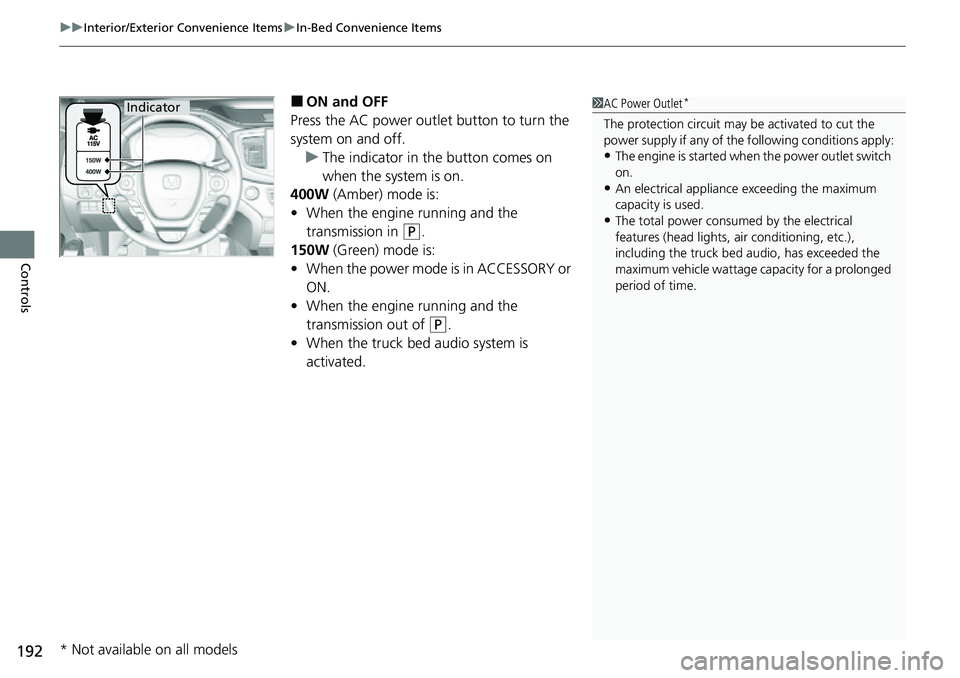
■ON and OFF
Press the AC power outlet button to turn the
system on and off. u The indicator in the button comes on
when the system is on.
400W (Amber) mode is:
• When the engine running and the
transmission in
(P.
150W (Green) mode is:
• When the power mode is in ACCESSORY or
ON.
• When the engine running and the
transmission out of
(P.
• When the truck bed audio system is
activated.
1AC Power Outlet*
The protection circuit may be activated to cut the
power supply if any of th e following conditions apply:
•The engine is started when the power outlet switch
on.
•An electrical appliance exceeding the maximum
capacity is used.
•The total power consumed by the electrical
features (head lights, air conditioning, etc.),
including the truck bed a udio, has exceeded the
maximum vehicle wattage ca pacity for a prolonged
period of time.
Indicator
* Not available on all models
Page 205 of 598
203
Features
This chapter describes how to operate technology features.
Audio SystemAbout Your Audio System ................ 204
USB Ports ......................................... 205
Auxiliary Input Jack .......................... 207
Audio System Theft Protection ......... 208
Audio Remote Controls .................... 209
Audio System Basic Operation ........ 211
Audio/Information Screen ................ 212
Adjusting the Sound ........................ 229
Display Setup ................................... 230
Voice Control Operation .................. 232
Playing AM/FM Radio ....................... 236
Playing SiriusXM ® Radio
*................. 239 Playing an iPod ................................ 247
Song By Voice
TM (SBV) ...................... 250
Playing Pandora ®*............................ 254
Playing a USB Flash Drive ................. 256
Playing Bluetooth ® Audio................. 259
HondaLink ®..................................... 261
Wi-Fi Connection ............................. 266
Siri Eyes Free .................................... 268
Apple CarPlay .................................. 269
Android Auto
TM................................ 273
Truck Bed Audio System*................ 277
Models with navigation systemAudio Error Messages ...................... 278
General Information on the Audio System ............................................. 281
Customized Features ........................ 299
HomeLink ® Universal Transceiver .... 324
Bluetooth® HandsFreeLink® ............. 330
* Not available on all models
Page 206 of 598
204
Features
Audio System
About Your Audio System
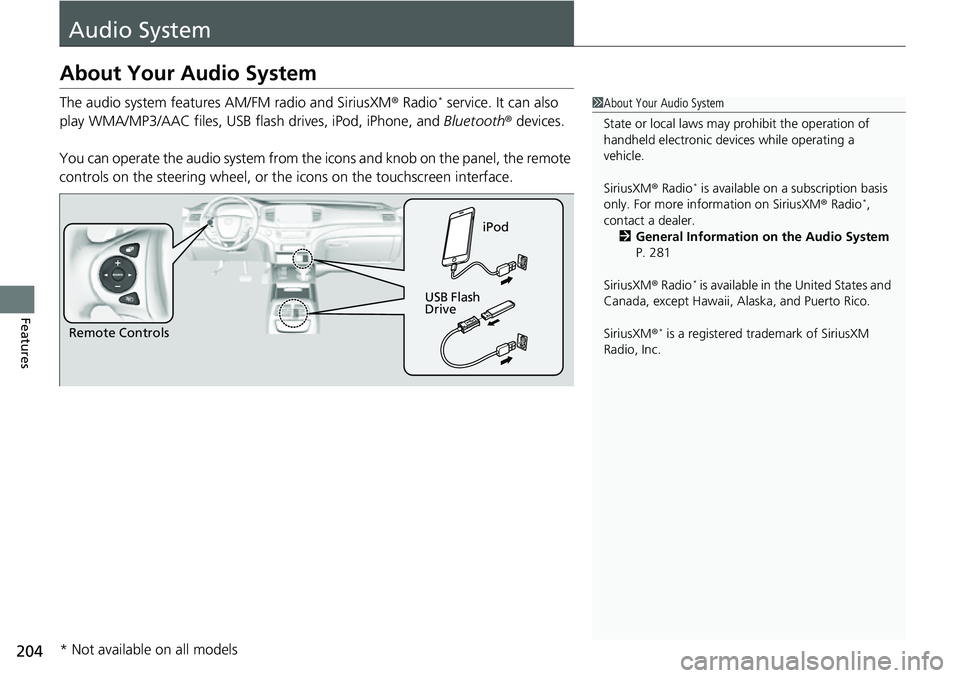
The audio system features AM/FM radio and SiriusXM® Radio* service. It can also
play WMA/MP3/AAC files, USB flash drives, iPod, iPhone, and Bluetooth® devices.
You can operate the audio system from the icons and knob on the panel, the remote
controls on the steering wheel, or th e icons on the touchscreen interface.1About Your Audio System
State or local laws may pr ohibit the operation of
handheld electronic devices while operating a
vehicle.
SiriusXM ® Radio
* is available on a subscription basis
only. For more information on SiriusXM ® Radio*,
contact a dealer. 2 General Information on the Audio System
P. 281
SiriusXM ® Radio
* is available in the United States and
Canada, except Ha waii, Alaska, and Puerto Rico.
SiriusXM ®
* is a registered tra demark of SiriusXM
Radio, Inc.Remote Controls iPod
USB Flash
Drive
* Not available on all models