automatic HONDA RIDGELINE 2023 User Guide
[x] Cancel search | Manufacturer: HONDA, Model Year: 2023, Model line: RIDGELINE, Model: HONDA RIDGELINE 2023Pages: 598, PDF Size: 12.34 MB
Page 53 of 598
51
uuAirbags uFront Airbags (SRS)
Safe Driving
We advise against allowing a child age 12 or under to ride in the front passenger’s
seat. However, if you do allow a small child or infant to ride in the front passenger’s
seat, the system is designed to automatically deactiva te the front passenger’s airbag.
Do not let a small child or infant ride in the front passenger’s seat if the airbag does
not automatically deactivate.1 Advanced Airbags
•There is no child seat or other object pressing
against the rear of the seat or seat-back.
•There is no rear passenger pushing or pulling on
the back of the front passenger’s seat.
•There are no objects placed under or beside the
front passenger’s seat . Improperly positioned
objects can interfere with the advanced airbag
sensors.
•The head restraint is not contacting the roof.
2 Passenger Airbag Off Indicator P. 56
•The floor mat behind the front passenger’s seat is
hooked to the floor mat anchor. An improperly
placed mat can interfere with the advanced airbag
sensors. 2Floor Mats P. 530
Page 60 of 598
58
uuAirbags uAirbag Care
Safe Driving
Airbag Care
You do not need to, and should not, perform any maintenance on or replace any
airbag system components yourself. However, you should have your vehicle
inspected by a dealer in the following situations:
■When the airbags have deployed
If an airbag has inflated, th e control unit and other related parts must be replaced.
Similarly, once an automatic seat belt te nsioner has been activated, it must be
replaced.
■When the vehicl e has been in a moderate-to-severe collision
Even if the airbags did not inflate, have your dealer inspect the following: the driver’s
seat position sensor, weight sensors in the passenger’s seat, front seat belt
tensioners, and each seat belt that was worn during the crash.
■Do not remove or modify a front seat without consulting a dealer
This would likely disable or affect the prop er operation of the driver’s seat position
sensor or the weight sensors in the passenger ’s seat. If it is necessary to remove or
modify a front seat to accommodate a pe rson with disabilities, contact a Honda
dealer, or for U.S. vehicles, American Honda Automobile Customer Service at
1-800-999-1009 and for Canadian vehicles , Honda Canada Customer Relations at
1-888-9-HONDA-9.
1 Airbag Care
We recommend against the use of salvaged airbag
system components, includi ng the airbag, tensioners,
sensors, and control unit.
Page 64 of 598
uuChild Safety uSafety of Infants and Small Children
62
Safe DrivingIf a child has exceeded the weight and heig ht limitations of a rearward-facing child
seat, the child should be properly restrained in a firmly secured forward-facing child
seat until they exceed the weight and height limitations for the forward-facing child
seat.
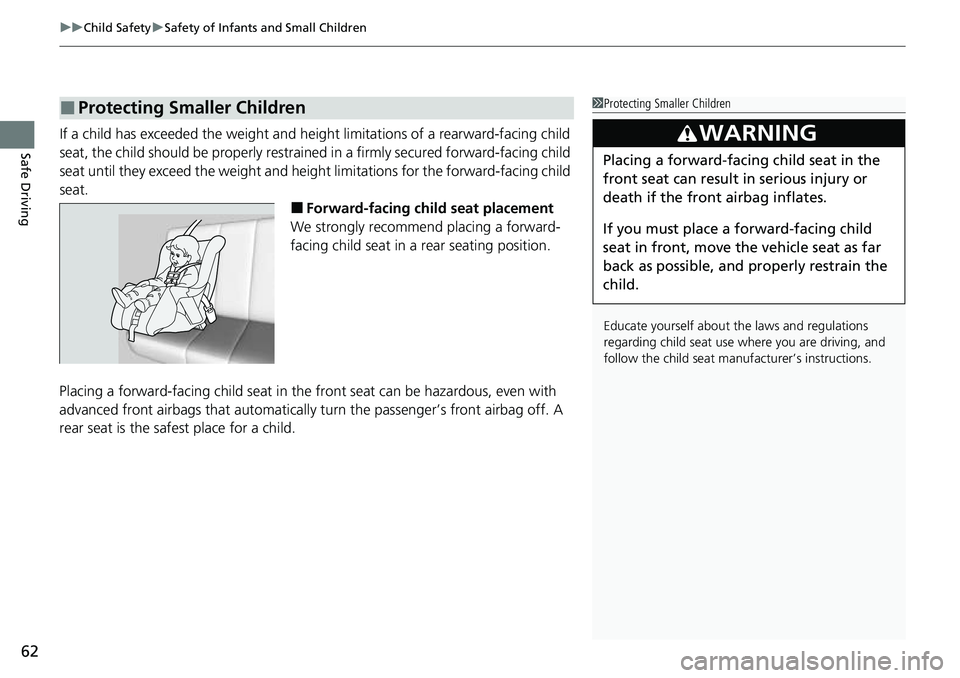
■Forward-facing child seat placement
We strongly recommend placing a forward-
facing child seat in a rear seating position.
Placing a forward-facing child seat in the front seat can be hazardous, even with
advanced front airbags that automatically turn the passenger’s front airbag off. A
rear seat is the safest place for a child.
■Protecting Smaller Children1 Protecting Smaller Children
Educate yourself about th e laws and regulations
regarding child seat use wh ere you are driving, and
follow the child seat manufacturer’s instructions.
3WARNING
Placing a forward-facing child seat in the
front seat can result in serious injury or
death if the front airbag inflates.
If you must place a forward-facing child
seat in front, move the vehicle seat as far
back as possible, and properly restrain the
child.
Page 91 of 598
89
uuIndicators u
Continued
Instrument Panel
IndicatorNameOn/BlinkingExplanationMessage
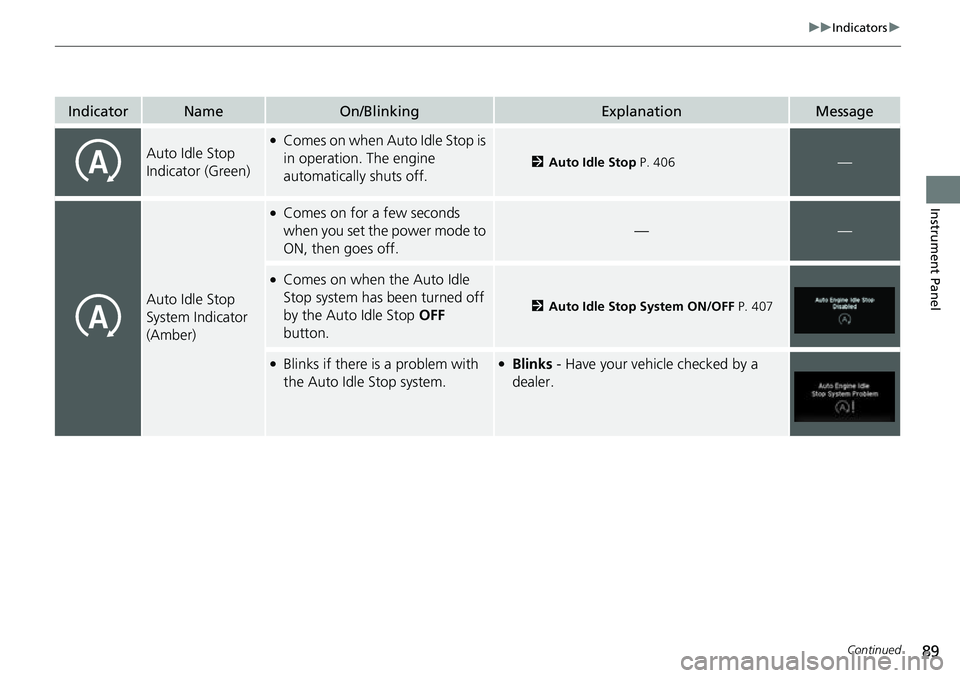
Auto Idle Stop
Indicator (Green)●Comes on when Auto Idle Stop is
in operation. The engine
automatically shuts off.
2Auto Idle Stop P. 406—
Auto Idle Stop
System Indicator
(Amber)
●Comes on for a few seconds
when you set the power mode to
ON, then goes off.
——
●Comes on when the Auto Idle
Stop system has been turned off
by the Auto Idle Stop OFF
button.
2 Auto Idle Stop System ON/OFF P. 407
●Blinks if there is a problem with
the Auto Idle Stop system.●Blinks - Have your vehicle checked by a
dealer.
Page 93 of 598
91
uuIndicators u
Continued
Instrument Panel
IndicatorNameOn/BlinkingExplanationMessage
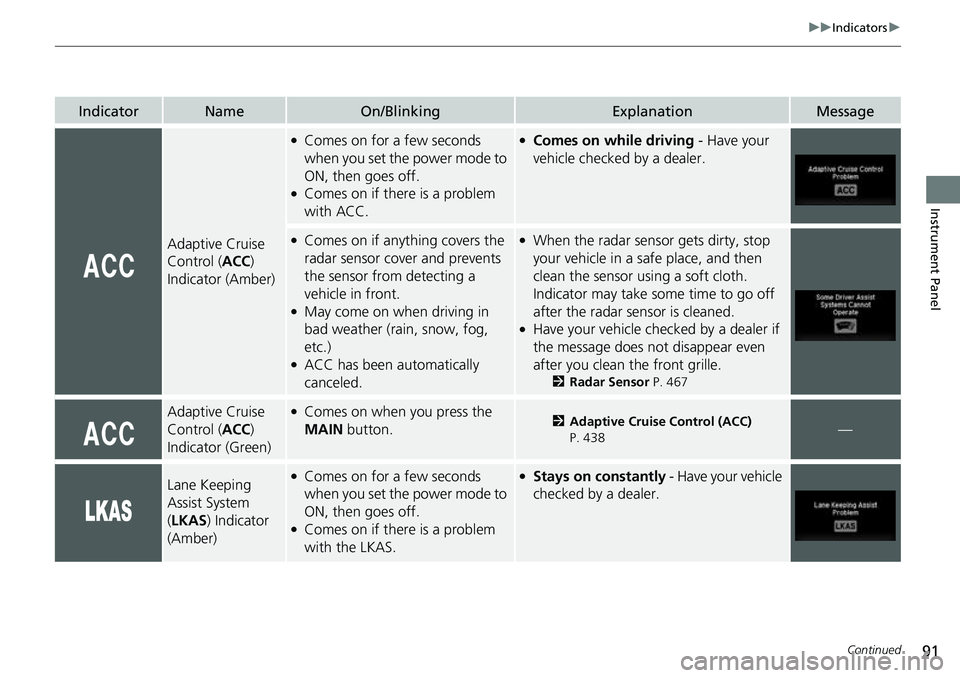
Adaptive Cruise
Control (ACC)
Indicator (Amber)
●Comes on for a few seconds
when you set the power mode to
ON, then goes off.
●Comes on if there is a problem
with ACC.
●Comes on while driving - Have your
vehicle checked by a dealer.
●Comes on if anything covers the
radar sensor cover and prevents
the sensor from detecting a
vehicle in front.
●May come on when driving in
bad weather (rai n, snow, fog,
etc.)
●ACC has been automatically
canceled.
●When the radar sensor gets dirty, stop
your vehicle in a safe place, and then
clean the sensor using a soft cloth.
Indicator may take some time to go off
after the radar sensor is cleaned.
●Have your vehicle checked by a dealer if
the message does not disappear even
after you clean the front grille.
2 Radar Sensor P. 467
Adaptive Cruise
Control (ACC)
Indicator (Green)●Comes on when you press the
MAIN button.2Adaptive Cruise Control (ACC)
P. 438—
Lane Keeping
Assist System
( LKAS ) Indicator
(Amber)●Comes on for a few seconds
when you set the power mode to
ON, then goes off.
●Comes on if there is a problem
with the LKAS.
●Stays on constantly - Have your vehicle
checked by a dealer.
Page 101 of 598
99
uuIndicators uMulti-Information Display Warning and Information Messages
Continued
Instrument Panel
MessageConditionExplanation
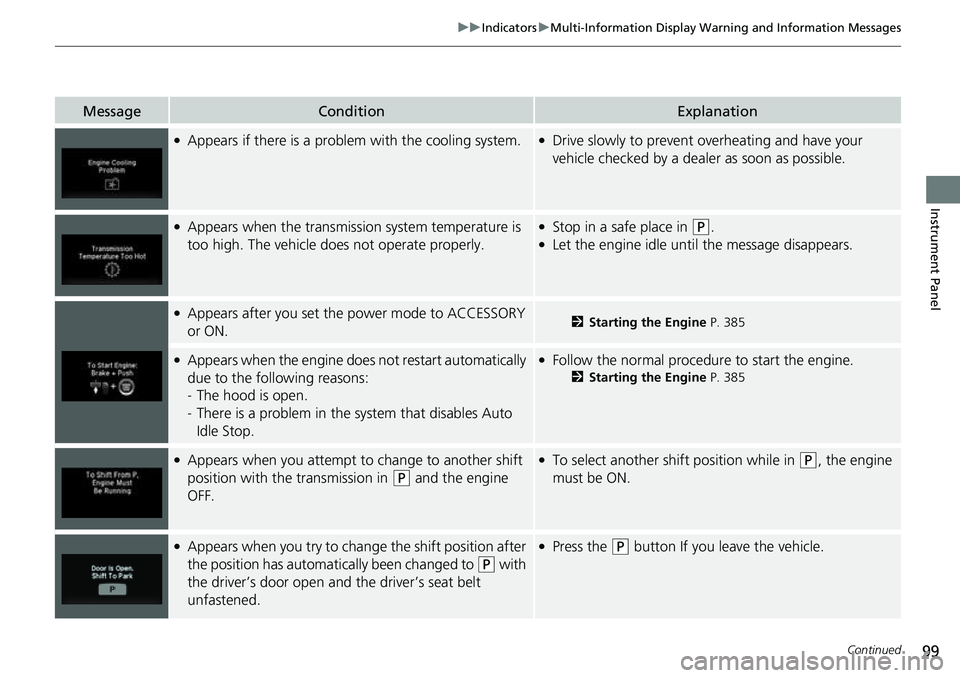
●Appears if there is a problem with the cooling system.●Drive slowly to prevent overheating and have your
vehicle checked by a deal er as soon as possible.
●Appears when the transmission system temperature is
too high. The vehicle does not operate properly.●Stop in a safe place in (P.●Let the engine idle until the message disappears.
●Appears after you set the power mode to ACCESSORY
or ON.2Starting the Engine P. 385
●Appears when the engine does not restart automatically
due to the following reasons:
-The hood is open.
- There is a problem in the sy stem that disables Auto
Idle Stop.●Follow the normal procedure to start the engine.
2 Starting the Engine P. 385
●Appears when you attempt to change to another shift
position with the transmission in
(P and the engine
OFF.
●To select another shift position while in (P, the engine
must be ON.
●Appears when you try to chan ge the shift position after
the position has automatically been changed to
( P with
the driver’s door open and the driver’s seat belt
unfastened.
●Press the (P button If you leave the vehicle.
Page 102 of 598
100
uuIndicators uMulti-Information Display Warn ing and Information Messages
Instrument Panel
MessageConditionExplanation
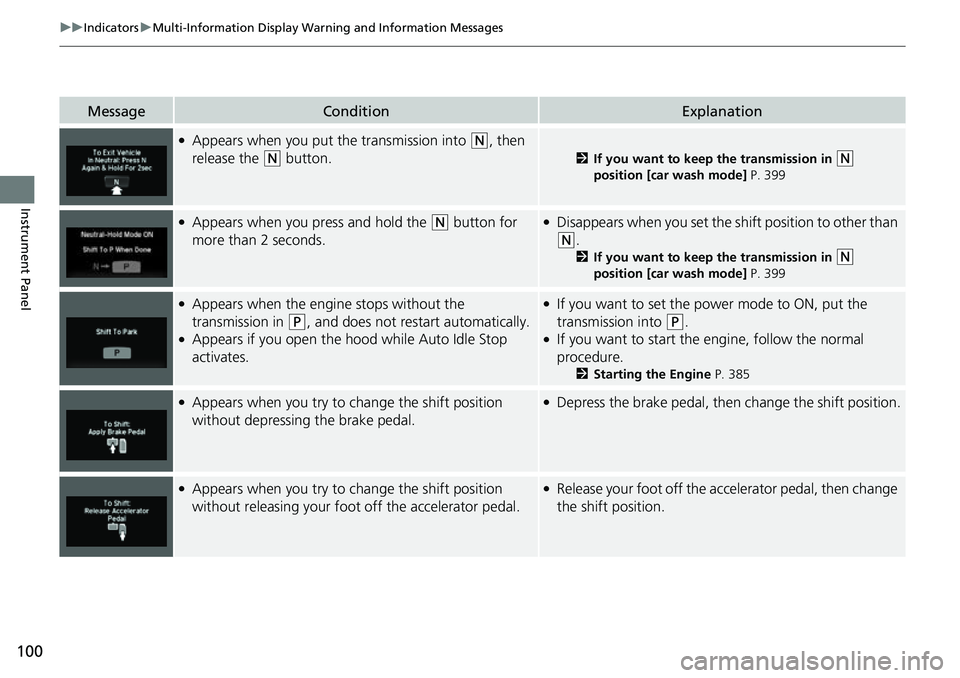
●Appears when you put the transmission into (N, then
release the
(N button.2 If you want to keep the transmission in (N
position [car wash mode] P. 399
●Appears when you press and hold the (N button for
more than 2 seconds.●Disappears when you set the sh ift position to other than
(N.
2If you want to keep the transmission in (N
position [car wash mode] P. 399
●Appears when the engine stops without the
transmission in
(P, and does not restart automatically.●Appears if you open the hood while Auto Idle Stop
activates.
●If you want to set the power mode to ON, put the
transmission into
(P.●If you want to start the engine, follow the normal
procedure.
2 Starting the Engine P. 385
●Appears when you try to change the shift position
without depressing the brake pedal.●Depress the brake pedal, then change the shift position.
●Appears when you try to change the shift position
without releasing your foot off the accelerator pedal.●Release your foot off the accelerator pedal, then change
the shift position.
Page 103 of 598
101
uuIndicators uMulti-Information Display Warning and Information Messages
Continued
Instrument Panel
MessageConditionExplanation
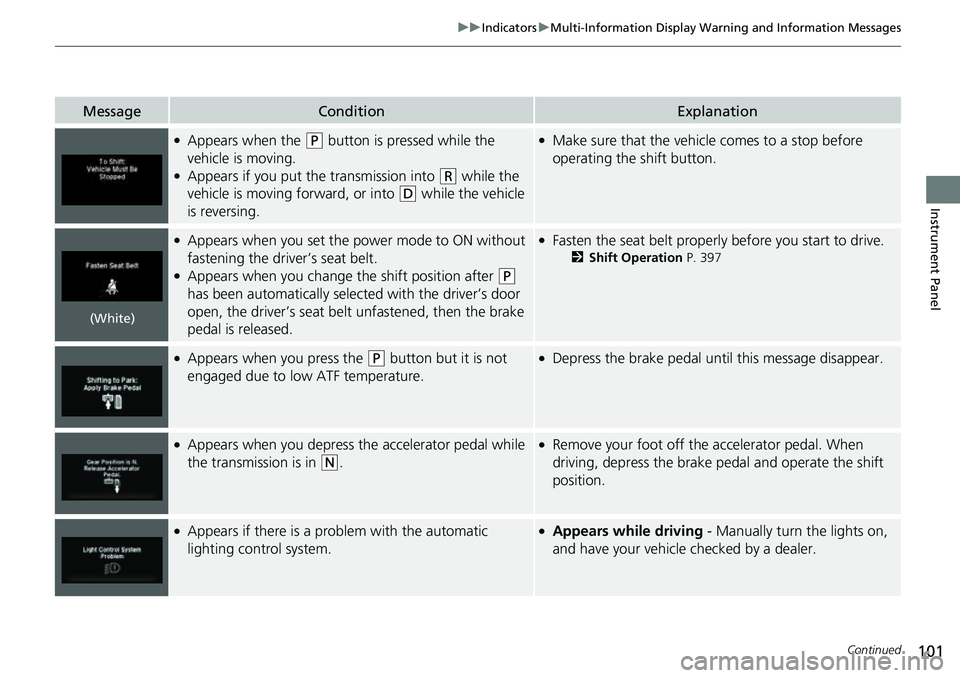
●Appears when the (P button is pressed while the
vehicle is moving.
●Appears if you put the transmission into (R while the
vehicle is moving forward, or into
(D while the vehicle
is reversing.
●Make sure that the vehicle comes to a stop before
operating the shift button.
●Appears when you set the power mode to ON without
fastening the driver’s seat belt.
●Appears when you change the shift position after (P
has been automatically selected with the driver’s door
open, the driver’s seat belt unfastened, then the brake
pedal is released.
●Fasten the seat belt properly before you start to drive.
2 Shift Operation P. 397
●Appears when you press the (P button but it is not
engaged due to low ATF temperature.●Depress the brake pedal until this message disappear.
●Appears when you depress the accelerator pedal while
the transmission is in
(N.
●Remove your foot off the accelerator pedal. When
driving, depress the brake pedal and operate the shift
position.
●Appears if there is a problem with the automatic
lighting control system.●Appears while driving - Manually turn the lights on,
and have your vehicle checked by a dealer.
(White)
Page 104 of 598
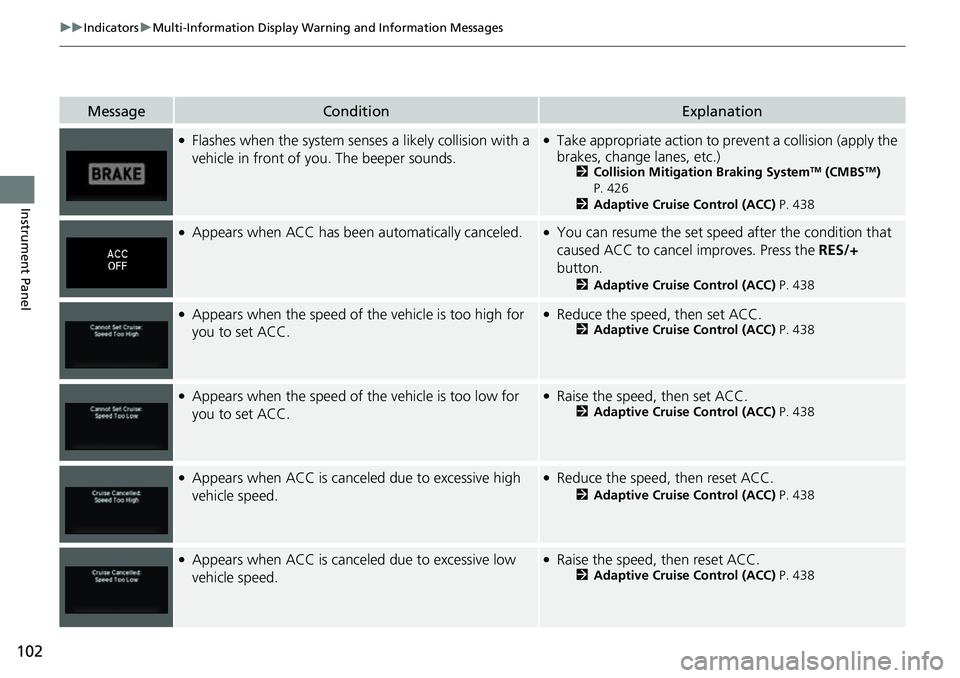
102
uuIndicators uMulti-Information Display Warn ing and Information Messages
Instrument Panel
MessageConditionExplanation
●Flashes when the system senses a likely collision with a
vehicle in front of yo u. The beeper sounds.●Take appropriate action to prev ent a collision (apply the
brakes, change lanes, etc.)
2 Collision Mitigation Braking SystemTM (CMBSTM)
P. 426
2 Adaptive Cruise Control (ACC) P. 438
●Appears when ACC has been automatically canceled.●You can resume the set speed after the condition that
caused ACC to cancel improves. Press the RES/+
button.
2 Adaptive Cruise Control (ACC) P. 438
●Appears when the speed of the vehicle is too high for
you to set ACC.●Reduce the speed, then set ACC.2 Adaptive Cruise Control (ACC) P. 438
●Appears when the speed of the vehicle is too low for
you to set ACC.●Raise the speed, then set ACC.2Adaptive Cruise Control (ACC) P. 438
●Appears when ACC is canceled due to excessive high
vehicle speed.●Reduce the speed, then reset ACC.
2 Adaptive Cruise Control (ACC) P. 438
●Appears when ACC is canceled due to excessive low
vehicle speed.●Raise the speed, then reset ACC.2 Adaptive Cruise Control (ACC) P. 438
Page 105 of 598
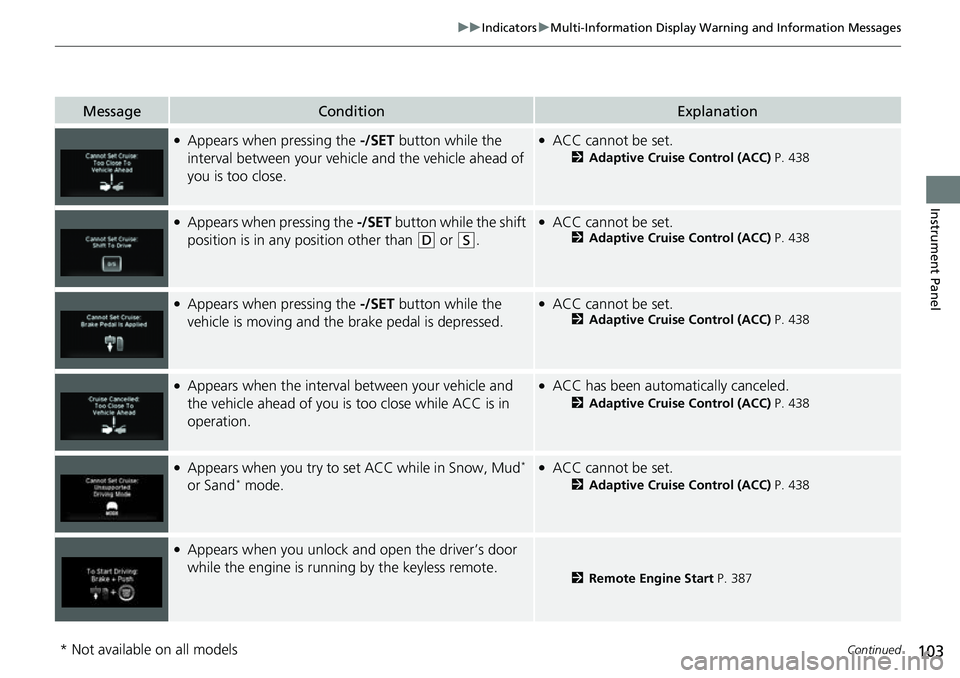
103
uuIndicators uMulti-Information Display Warning and Information Messages
Continued
Instrument Panel
MessageConditionExplanation
●Appears when pressing the -/SET button while the
interval between your vehicle and the vehicle ahead of
you is too close.●ACC cannot be set.
2 Adaptive Cruise Control (ACC) P. 438
●Appears when pressing the -/SET button while the shift
position is in any position other than
(D or (S.
●ACC cannot be set.2 Adaptive Cruise Control (ACC) P. 438
●Appears when pressing the -/SET button while the
vehicle is moving and the brake pedal is depressed.●ACC cannot be set.2 Adaptive Cruise Control (ACC) P. 438
●Appears when the interval between your vehicle and
the vehicle ahead of you is too close while ACC is in
operation.●ACC has been automatically canceled.
2 Adaptive Cruise Control (ACC) P. 438
●Appears when you try to set ACC while in Snow, Mud*
or Sand* mode.
●ACC cannot be set.
2 Adaptive Cruise Control (ACC) P. 438
●Appears when you unlock and open the driver’s door
while the engine is running by the keyless remote.
2 Remote Engine Start P. 387
* Not available on all models