brake HONDA RIDGELINE 2023 User Guide
[x] Cancel search | Manufacturer: HONDA, Model Year: 2023, Model line: RIDGELINE, Model: HONDA RIDGELINE 2023Pages: 598, PDF Size: 12.34 MB
Page 80 of 598
78
Instrument Panel
Indicators
IndicatorNameOn/BlinkingExplanationMessage
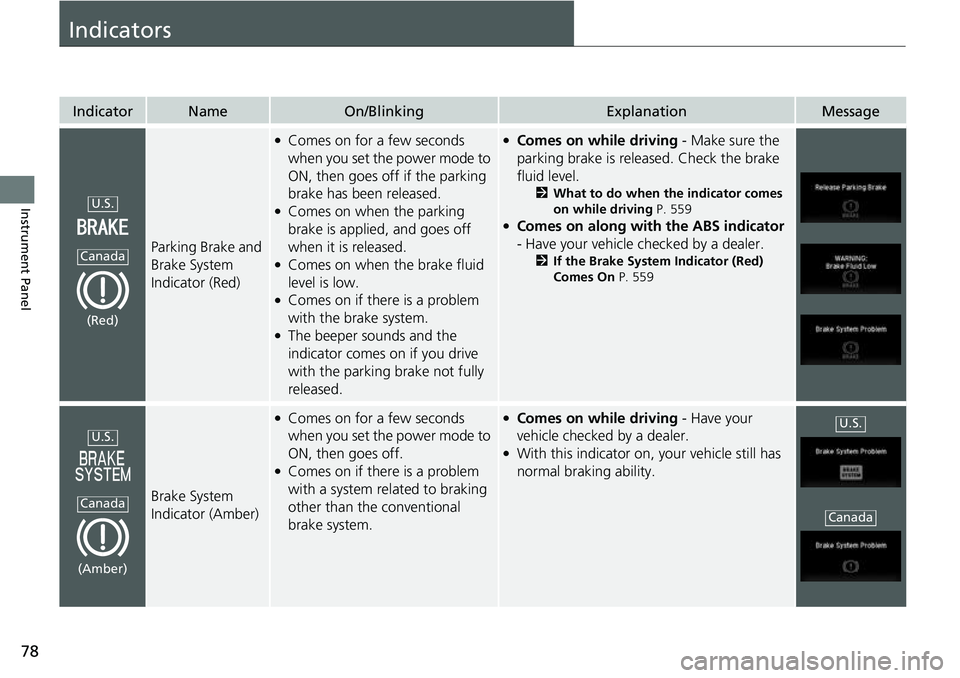
Parking Brake and
Brake System
Indicator (Red)
●Comes on for a few seconds
when you set the power mode to
ON, then goes off if the parking
brake has been released.
●Comes on when the parking
brake is applied, and goes off
when it is released.
●Comes on when the brake fluid
level is low.
●Comes on if there is a problem
with the brake system.
●The beeper sounds and the
indicator comes on if you drive
with the parking brake not fully
released.
●Comes on while driving - Make sure the
parking brake is released. Check the brake
fluid level.
2 What to do when the indicator comes
on while driving P. 559
●Comes on along with the ABS indicator
- Have your vehicle checked by a dealer.
2 If the Brake System Indicator (Red)
Comes On P. 559
Brake System
Indicator (Amber)
●Comes on for a few seconds
when you set the power mode to
ON, then goes off.
●Comes on if there is a problem
with a system related to braking
other than the conventional
brake system.
●Comes on while driving - Have your
vehicle checked by a dealer.
●With this indicator on, your vehicle still has
normal braking ability.
U.S.
Canada
(Red)
U.S.
Canada
(Amber)
U.S.
Canada
Page 83 of 598
81
uuIndicators u
Continued
Instrument Panel
IndicatorNameOn/BlinkingExplanationMessage
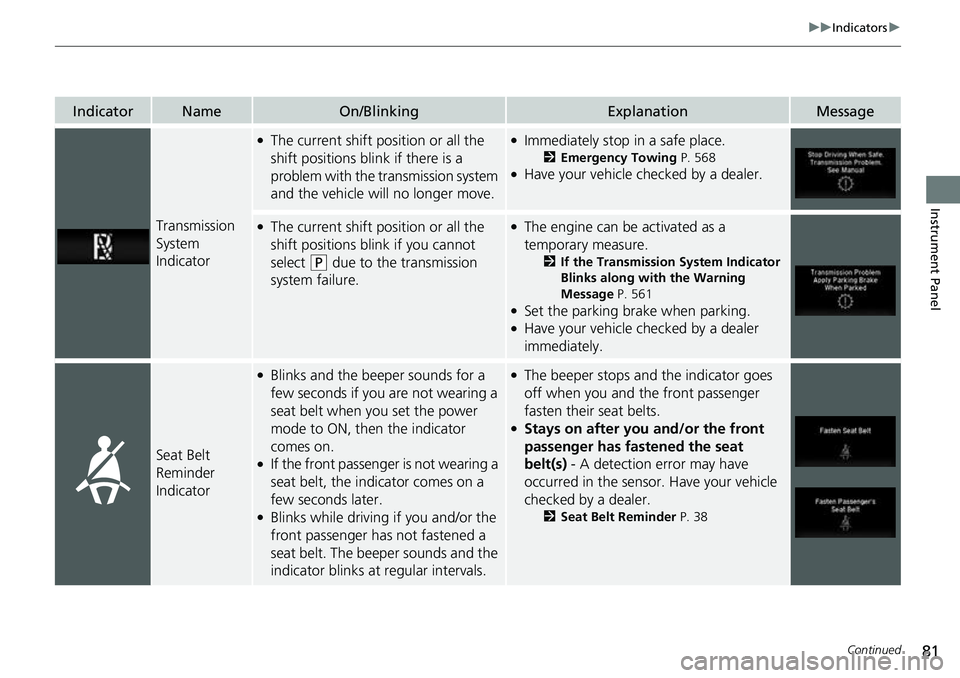
Transmission
System
Indicator
●The current shift position or all the
shift positions blink if there is a
problem with the transmission system
and the vehicle will no longer move.●Immediately stop in a safe place.
2Emergency Towing P. 568●Have your vehicle checked by a dealer.
●The current shift position or all the
shift positions blink if you cannot
select
(P due to the transmission
system failure.
●The engine can be activated as a
temporary measure.
2 If the Transmission System Indicator
Blinks along with the Warning
Message P. 561
●Set the parking brake when parking.●Have your vehicle checked by a dealer
immediately.
Seat Belt
Reminder
Indicator
●Blinks and the beeper sounds for a
few seconds if you are not wearing a
seat belt when you set the power
mode to ON, then the indicator
comes on.
●If the front passenger is not wearing a
seat belt, the indicator comes on a
few seconds later.
●Blinks while driving if you and/or the
front passenger has not fastened a
seat belt. The beeper sounds and the
indicator blinks at regular intervals.
●The beeper stops and the indicator goes
off when you and the front passenger
fasten their seat belts.
●Stays on after you and/or the front
passenger has fastened the seat
belt(s) - A detection error may have
occurred in the sensor. Have your vehicle
checked by a dealer.
2 Seat Belt Reminder P. 38
Page 84 of 598
82
uuIndicators u
Instrument Panel
IndicatorNameOn/BlinkingExplanationMessage
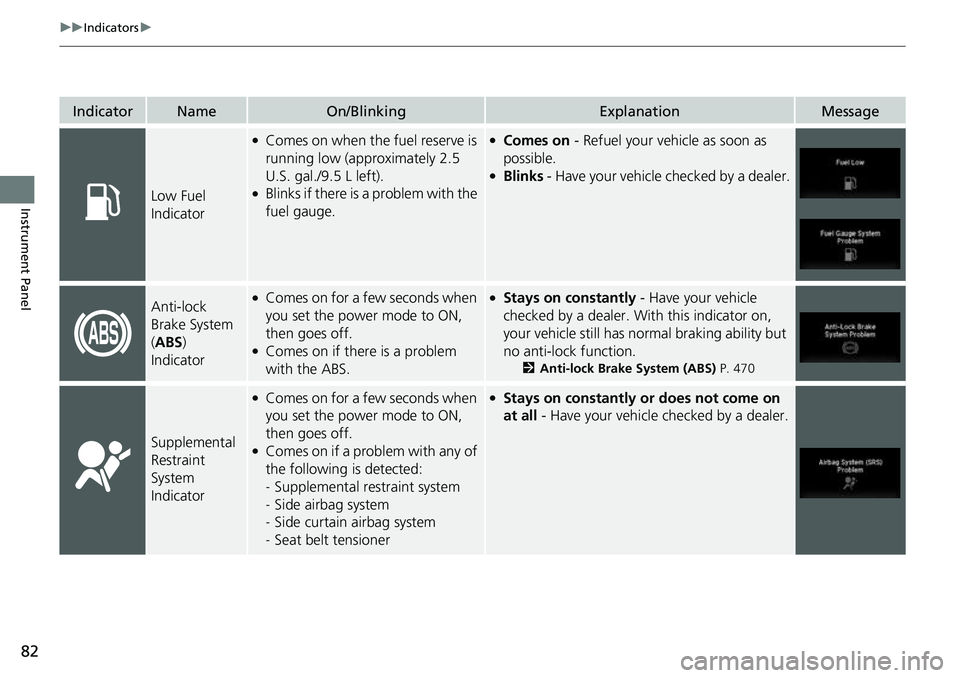
Low Fuel
Indicator
●Comes on when the fuel reserve is
running low (approximately 2.5
U.S. gal./9.5 L left).
●Blinks if there is a problem with the
fuel gauge.
●Comes on - Refuel your vehicle as soon as
possible.
●Blinks - Have your vehicle checked by a dealer.
Anti-lock
Brake System
(ABS )
Indicator●Comes on for a few seconds when
you set the power mode to ON,
then goes off.
●Comes on if there is a problem
with the ABS.
●Stays on constantly - Have your vehicle
checked by a dealer. Wi th this indicator on,
your vehicle still has normal braking ability but
no anti-lock function.
2 Anti-lock Brake System (ABS) P. 470
Supplemental
Restraint
System
Indicator
●Comes on for a few seconds when
you set the power mode to ON,
then goes off.
●Comes on if a problem with any of
the following is detected:
-Supplemental restraint system
- Side airbag system
- Side curtain airbag system
- Seat belt tensioner
●Stays on constantly or does not come on
at all - Have your vehicle checked by a dealer.
Page 85 of 598
83
uuIndicators u
Continued
Instrument Panel
IndicatorNameOn/BlinkingExplanationMessage
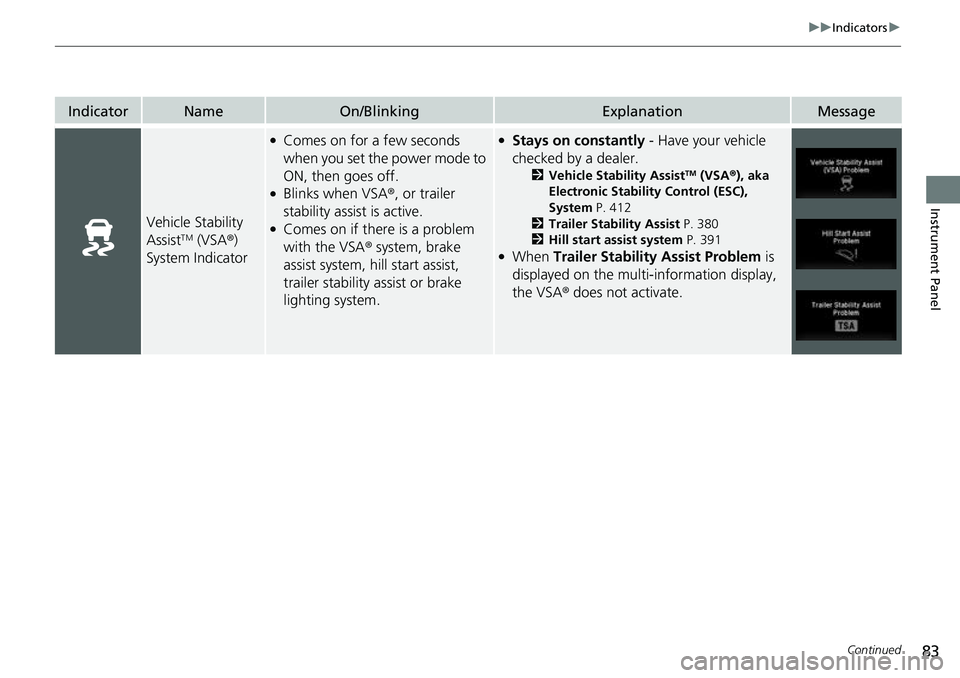
Vehicle Stability
AssistTM (VSA®)
System Indicator
●Comes on for a few seconds
when you set the power mode to
ON, then goes off.
●Blinks when VSA ®, or trailer
stability assist is active.
●Comes on if there is a problem
with the VSA ® system, brake
assist system, hill start assist,
trailer stability assist or brake
lighting system.
●Stays on constantly - Have your vehicle
checked by a dealer.
2 Vehicle Stability AssistTM (VSA ®), aka
Electronic Stability Control (ESC),
System P. 412
2 Trailer Stability Assist P. 380
2 Hill start assist system P. 391
●When Trailer Stability Assist Problem is
displayed on the multi-information display,
the VSA® does not activate.
Page 99 of 598
97
uuIndicators uMulti-Information Display Warning and Information Messages
Continued
Instrument Panel
MessageConditionExplanation
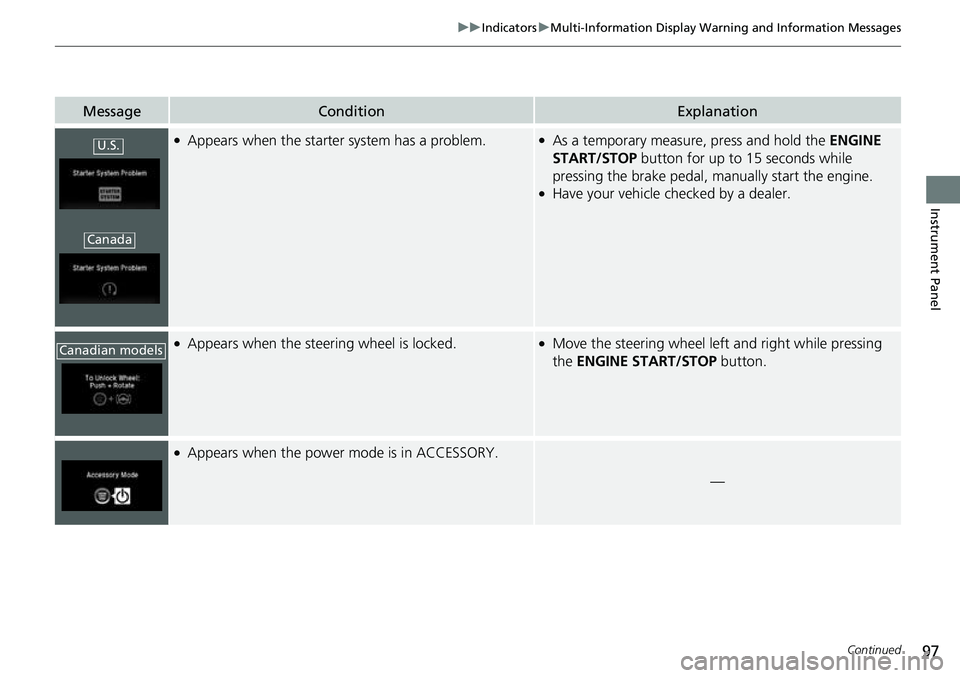
●Appears when the starter system has a problem.●As a temporary measure, press and hold the ENGINE
START/STOP button for up to 15 seconds while
pressing the brake pedal, ma nually start the engine.
●Have your vehicle checked by a dealer.
●Appears when the steering wheel is locked.●Move the steering wheel left and right while pressing
the ENGINE START/STOP button.
●Appears when the power mode is in ACCESSORY.
—
U.S.
Canada
Canadian models
Page 100 of 598
98
uuIndicators uMulti-Information Display Warn ing and Information Messages
Instrument Panel
MessageConditionExplanation
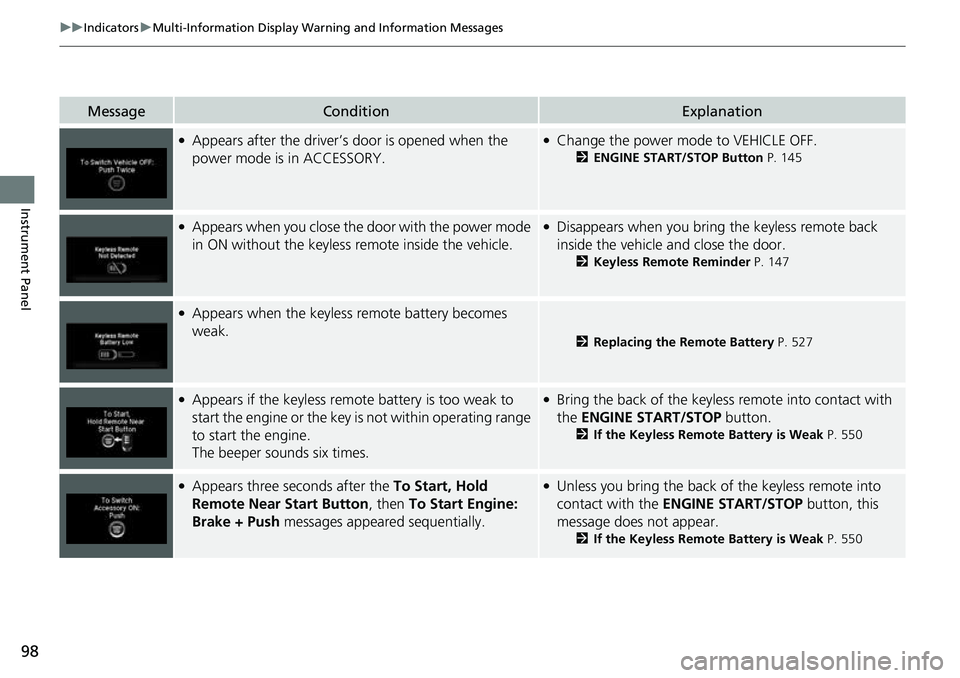
●Appears after the driver’s door is opened when the
power mode is in ACCESSORY.●Change the power mode to VEHICLE OFF.
2 ENGINE START/STOP Button P. 145
●Appears when you close the door with the power mode
in ON without the keyless remote inside the vehicle.●Disappears when you bring the keyless remote back
inside the vehicle and close the door.
2Keyless Remote Reminder P. 147
●Appears when the keyless remote battery becomes
weak.
2Replacing the Remote Battery P. 527
●Appears if the keyless remote battery is too weak to
start the engine or the key is not within operating range
to start the engine.
The beeper sounds six times.●Bring the back of the keyless remote into contact with
the ENGINE START/STOP button.
2If the Keyless Remote Battery is Weak P. 550
●Appears three seconds after the To Start, Hold
Remote Near Start Button, then To Start Engine:
Brake + Push messages appeared sequentially.●Unless you bring the back of the keyless remote into
contact with the ENGINE START/STOP button, this
message does not appear.
2 If the Keyless Remote Battery is Weak P. 550
Page 102 of 598
100
uuIndicators uMulti-Information Display Warn ing and Information Messages
Instrument Panel
MessageConditionExplanation
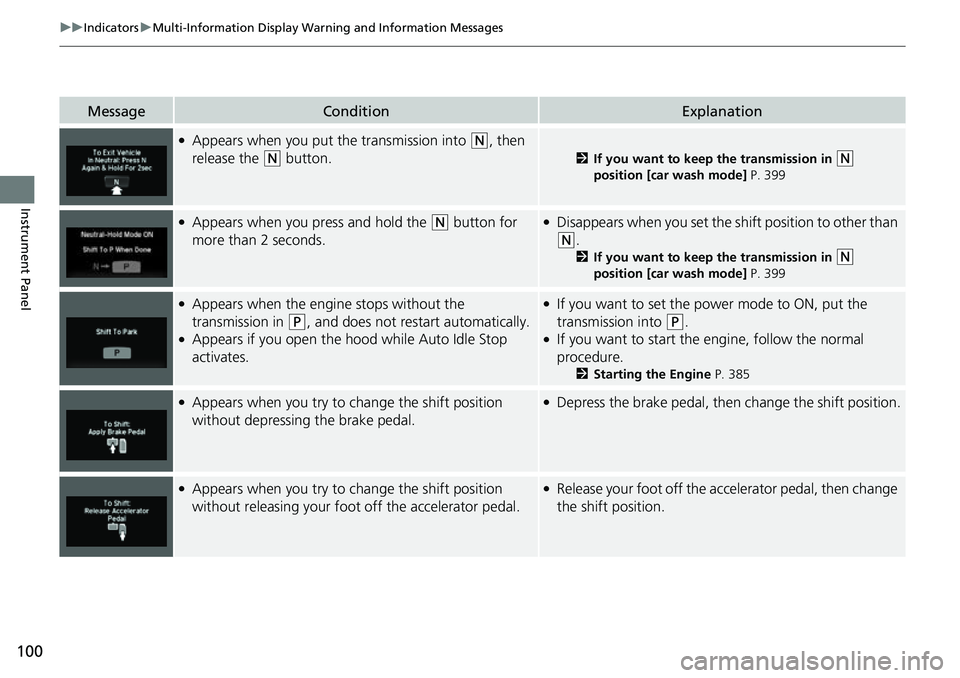
●Appears when you put the transmission into (N, then
release the
(N button.2 If you want to keep the transmission in (N
position [car wash mode] P. 399
●Appears when you press and hold the (N button for
more than 2 seconds.●Disappears when you set the sh ift position to other than
(N.
2If you want to keep the transmission in (N
position [car wash mode] P. 399
●Appears when the engine stops without the
transmission in
(P, and does not restart automatically.●Appears if you open the hood while Auto Idle Stop
activates.
●If you want to set the power mode to ON, put the
transmission into
(P.●If you want to start the engine, follow the normal
procedure.
2 Starting the Engine P. 385
●Appears when you try to change the shift position
without depressing the brake pedal.●Depress the brake pedal, then change the shift position.
●Appears when you try to change the shift position
without releasing your foot off the accelerator pedal.●Release your foot off the accelerator pedal, then change
the shift position.
Page 103 of 598
101
uuIndicators uMulti-Information Display Warning and Information Messages
Continued
Instrument Panel
MessageConditionExplanation
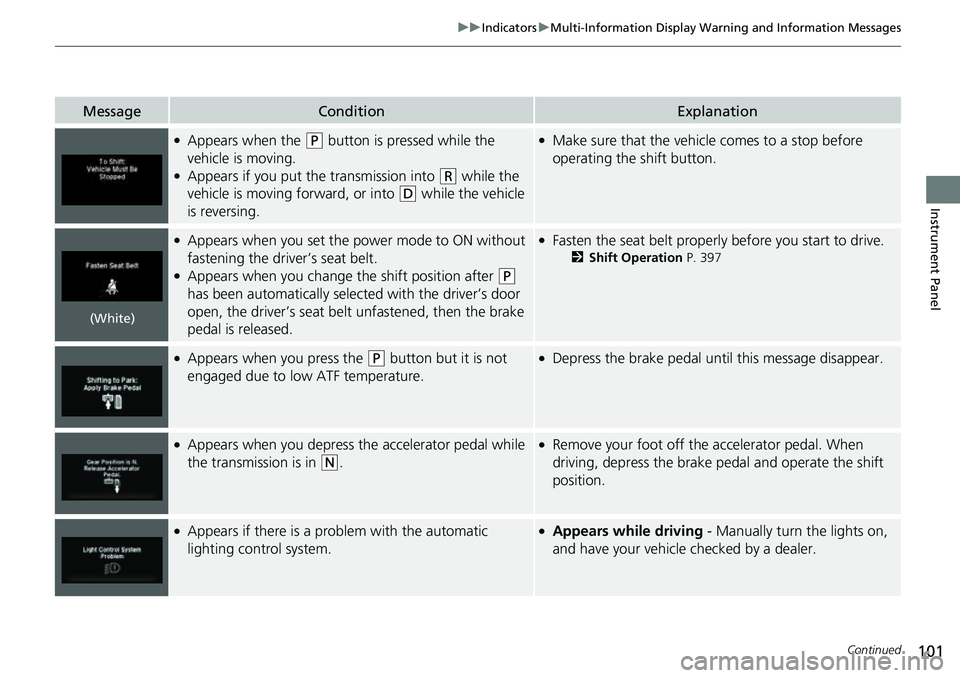
●Appears when the (P button is pressed while the
vehicle is moving.
●Appears if you put the transmission into (R while the
vehicle is moving forward, or into
(D while the vehicle
is reversing.
●Make sure that the vehicle comes to a stop before
operating the shift button.
●Appears when you set the power mode to ON without
fastening the driver’s seat belt.
●Appears when you change the shift position after (P
has been automatically selected with the driver’s door
open, the driver’s seat belt unfastened, then the brake
pedal is released.
●Fasten the seat belt properly before you start to drive.
2 Shift Operation P. 397
●Appears when you press the (P button but it is not
engaged due to low ATF temperature.●Depress the brake pedal until this message disappear.
●Appears when you depress the accelerator pedal while
the transmission is in
(N.
●Remove your foot off the accelerator pedal. When
driving, depress the brake pedal and operate the shift
position.
●Appears if there is a problem with the automatic
lighting control system.●Appears while driving - Manually turn the lights on,
and have your vehicle checked by a dealer.
(White)
Page 104 of 598
102
uuIndicators uMulti-Information Display Warn ing and Information Messages
Instrument Panel
MessageConditionExplanation
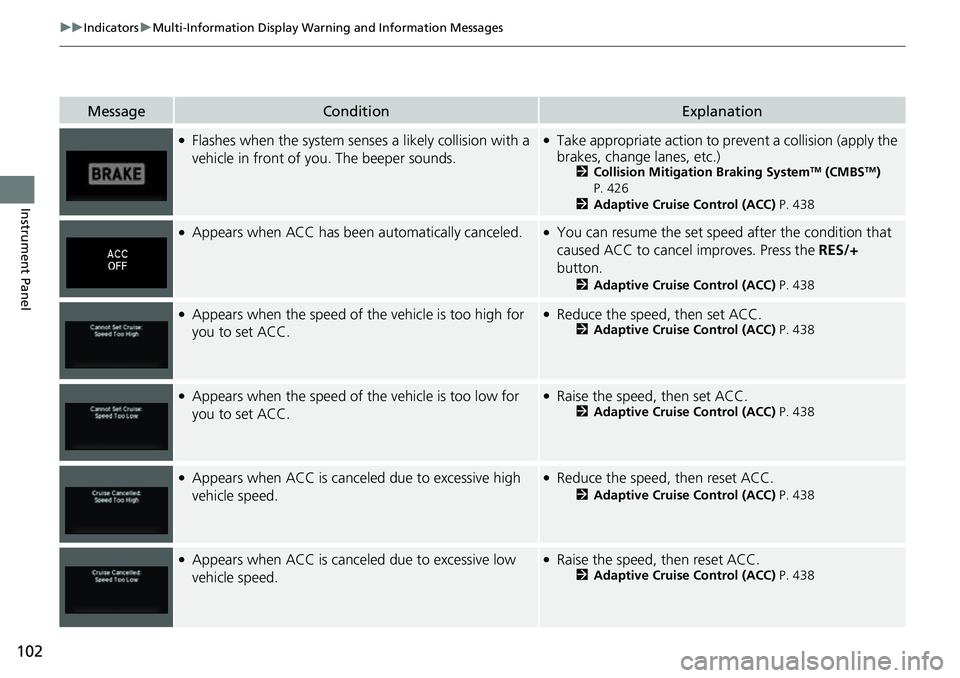
●Flashes when the system senses a likely collision with a
vehicle in front of yo u. The beeper sounds.●Take appropriate action to prev ent a collision (apply the
brakes, change lanes, etc.)
2 Collision Mitigation Braking SystemTM (CMBSTM)
P. 426
2 Adaptive Cruise Control (ACC) P. 438
●Appears when ACC has been automatically canceled.●You can resume the set speed after the condition that
caused ACC to cancel improves. Press the RES/+
button.
2 Adaptive Cruise Control (ACC) P. 438
●Appears when the speed of the vehicle is too high for
you to set ACC.●Reduce the speed, then set ACC.2 Adaptive Cruise Control (ACC) P. 438
●Appears when the speed of the vehicle is too low for
you to set ACC.●Raise the speed, then set ACC.2Adaptive Cruise Control (ACC) P. 438
●Appears when ACC is canceled due to excessive high
vehicle speed.●Reduce the speed, then reset ACC.
2 Adaptive Cruise Control (ACC) P. 438
●Appears when ACC is canceled due to excessive low
vehicle speed.●Raise the speed, then reset ACC.2 Adaptive Cruise Control (ACC) P. 438
Page 105 of 598
103
uuIndicators uMulti-Information Display Warning and Information Messages
Continued
Instrument Panel
MessageConditionExplanation
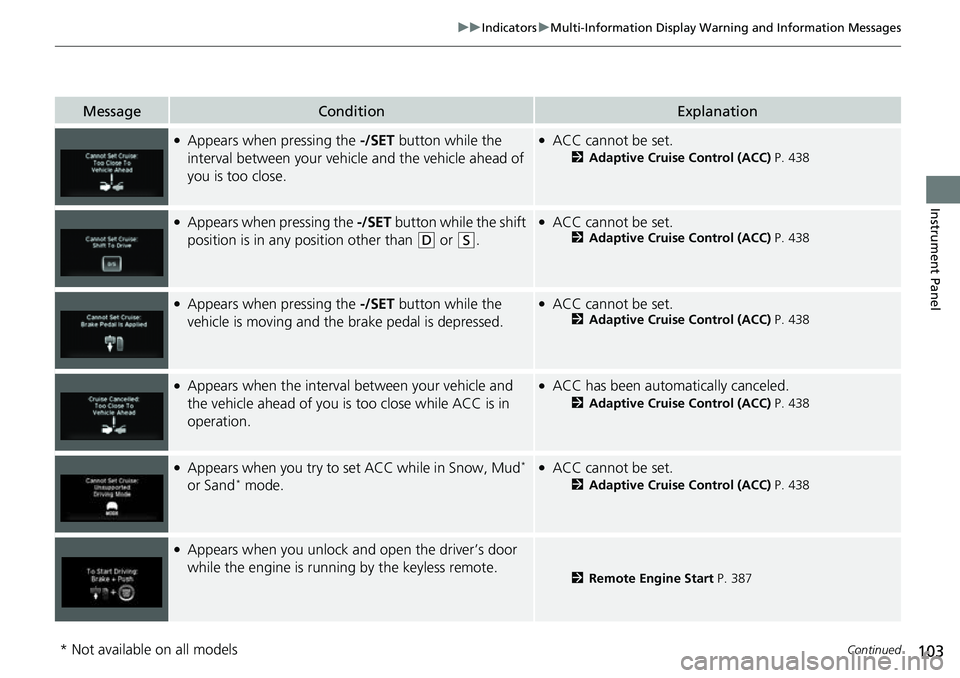
●Appears when pressing the -/SET button while the
interval between your vehicle and the vehicle ahead of
you is too close.●ACC cannot be set.
2 Adaptive Cruise Control (ACC) P. 438
●Appears when pressing the -/SET button while the shift
position is in any position other than
(D or (S.
●ACC cannot be set.2 Adaptive Cruise Control (ACC) P. 438
●Appears when pressing the -/SET button while the
vehicle is moving and the brake pedal is depressed.●ACC cannot be set.2 Adaptive Cruise Control (ACC) P. 438
●Appears when the interval between your vehicle and
the vehicle ahead of you is too close while ACC is in
operation.●ACC has been automatically canceled.
2 Adaptive Cruise Control (ACC) P. 438
●Appears when you try to set ACC while in Snow, Mud*
or Sand* mode.
●ACC cannot be set.
2 Adaptive Cruise Control (ACC) P. 438
●Appears when you unlock and open the driver’s door
while the engine is running by the keyless remote.
2 Remote Engine Start P. 387
* Not available on all models