brake HONDA RIDGELINE 2023 Owner's Manual
[x] Cancel search | Manufacturer: HONDA, Model Year: 2023, Model line: RIDGELINE, Model: HONDA RIDGELINE 2023Pages: 598, PDF Size: 12.34 MB
Page 107 of 598
105
uuIndicators uMulti-Information Display Warning and Information Messages
Continued
Instrument Panel
MessageConditionExplanation
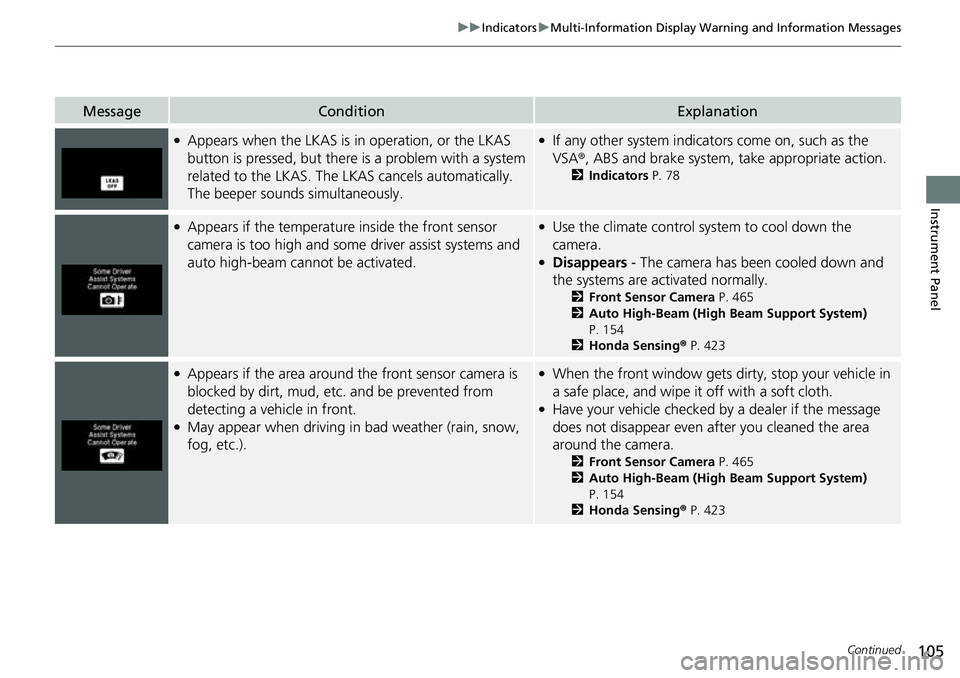
●Appears when the LKAS is in operation, or the LKAS
button is pressed, but there is a problem with a system
related to the LKAS. The LKAS cancels automatically.
The beeper sounds simultaneously.●If any other system indicators come on, such as the
VSA ®, ABS and brake system, take appropriate action.
2Indicators P. 78
●Appears if the temperature inside the front sensor
camera is too high and some driver assist systems and
auto high-beam cannot be activated.●Use the climate control system to cool down the
camera.
●Disappears - The camera has been cooled down and
the systems are activated normally.
2 Front Sensor Camera P. 465
2 Auto High-Beam (High Beam Support System)
P. 154
2 Honda Sensing ® P. 423
●Appears if the area around the front sensor camera is
blocked by dirt, mud, etc. and be prevented from
detecting a vehicle in front.
●May appear when driving in bad weather (rain, snow,
fog, etc.).
●When the front window gets dirty, stop your vehicle in
a safe place, and wipe it off with a soft cloth.
●Have your vehicle checked by a dealer if the message
does not disappear even after you cleaned the area
around the camera.
2 Front Sensor Camera P. 465
2 Auto High-Beam (High Beam Support System)
P. 154
2 Honda Sensing ® P. 423
Page 109 of 598
107
uuIndicators uMulti-Information Display Warning and Information Messages
Continued
Instrument Panel
MessageConditionExplanation
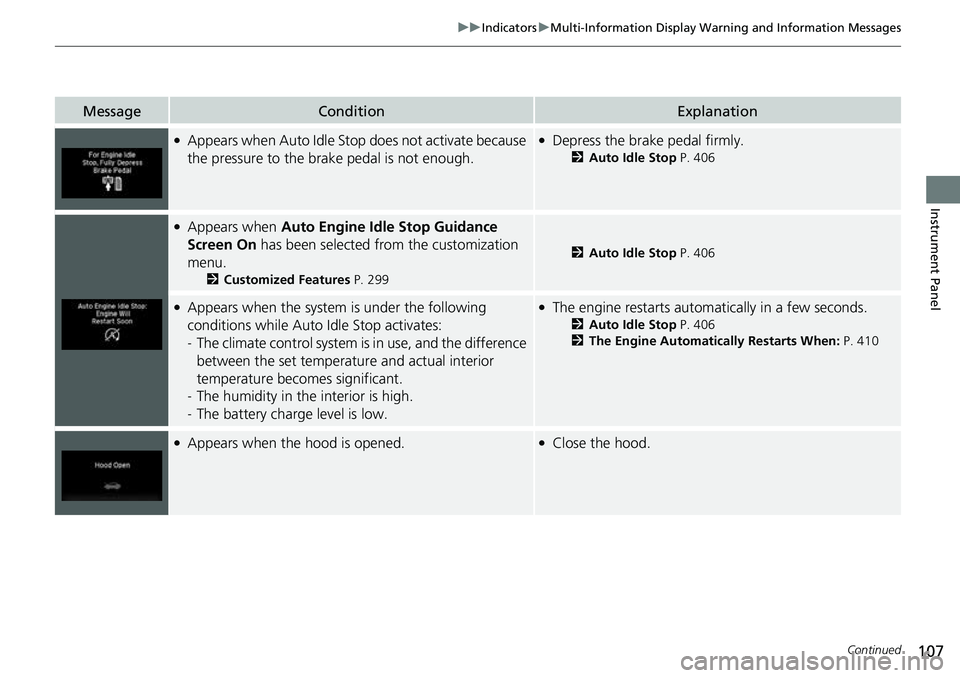
●Appears when Auto Idle St op does not activate because
the pressure to the brake pedal is not enough.●Depress the brake pedal firmly.
2 Auto Idle Stop P. 406
●Appears when Auto Engine Idle Stop Guidance
Screen On has been selected from the customization
menu.
2 Customized Features P. 299
2Auto Idle Stop P. 406
●Appears when the system is under the following
conditions while Auto Idle Stop activates:
- The climate control system is in use, and the difference
between the set temperature and actual interior
temperature becomes significant.
- The humidity in the interior is high.
- The battery charge level is low.●The engine restarts automatically in a few seconds.
2 Auto Idle Stop P. 406
2 The Engine Automatically Restarts When: P. 410
●Appears when the hood is opened.●Close the hood.
Page 147 of 598
145Continued
Controls
Operating the Switches Around the Steering Wheel
ENGINE START/STOP Button
*1:Canadian models
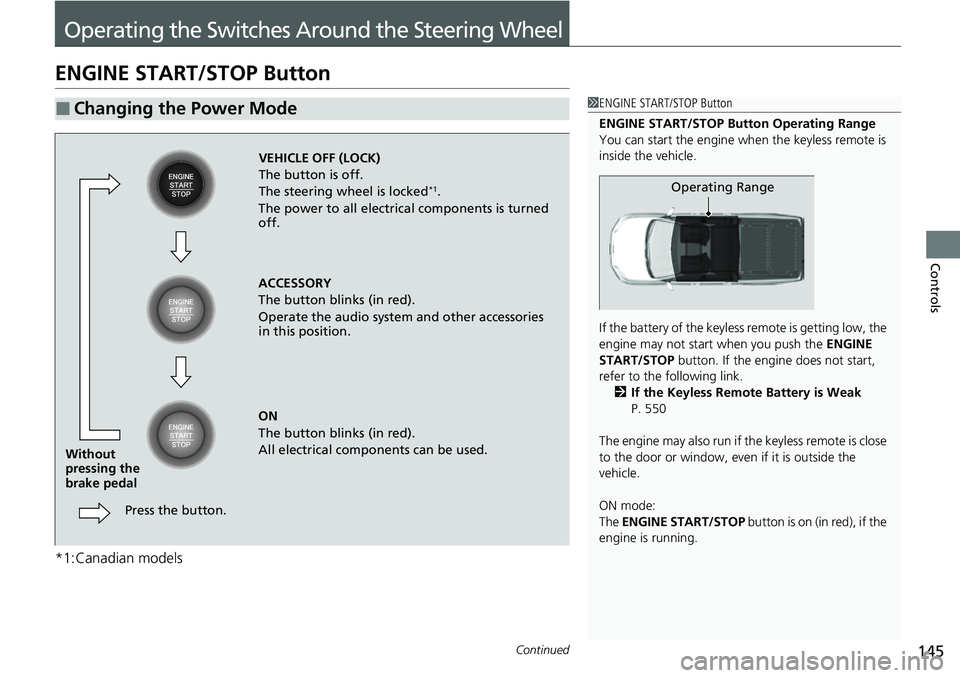
■Changing the Power Mode1ENGINE START/STOP Button
ENGINE START/STOP Button Operating Range
You can start the engine when the keyless remote is
inside the vehicle.
If the battery of the keyless remote is getting low, the
engine may not start when you push the ENGINE
START/STOP button. If the engi ne does not start,
refer to the following link. 2 If the Keyless Remote Battery is Weak
P. 550
The engine may also run if the keyless remote is close
to the door or window, even if it is outside the
vehicle.
ON mode:
The ENGINE START/STOP button is on (in red), if the
engine is running.
Operating Range
VEHICLE OFF (LOCK)
The button is off.
The steering wheel is locked
*1.
The power to all electrical components is turned
off.
ACCESSORY
The button blinks (in red).
Operate the audio system and other accessories
in this position.
ON
The button blinks (in red).
All electrical components can be used.
Press the button.
Without
pressing the
brake pedal
Page 151 of 598
149
uuOperating the Switches Around the Steering Wheel uLight Switches
Continued
Controls
Light Switches
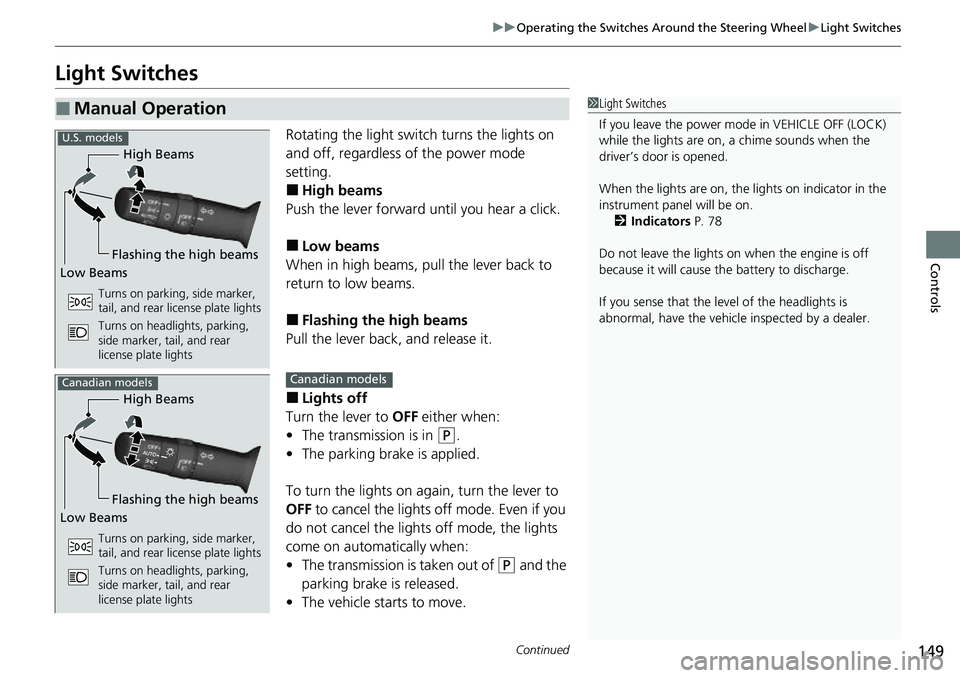
Rotating the light switch turns the lights on
and off, regardless of the power mode
setting.
■High beams
Push the lever forward until you hear a click.
■Low beams
When in high beams, pull the lever back to
return to low beams.
■Flashing the high beams
Pull the lever back, and release it.
■Lights off
Turn the lever to OFF either when:
• The transmission is in
(P.
• The parking brake is applied.
To turn the light s on again, turn the lever to
OFF to cancel the lights off mode. Even if you
do not cancel the lights off mode, the lights
come on automatically when:
• The transmission is taken out of
(P and the
parking brake is released.
• The vehicle starts to move.
■Manual Operation1Light Switches
If you leave the power mode in VEHICLE OFF (LOCK)
while the lights are on, a chime sounds when the
driver’s door is opened.
When the lights are on, the lights on indicator in the
instrument pane l will be on.
2 Indicators P. 78
Do not leave the lights on when the engine is off
because it will cause the battery to discharge.
If you sense that the le vel of the headlights is
abnormal, have the vehicl e inspected by a dealer.
High Beams
Flashing the high beams
Low Beams
Turns on parking, side marker,
tail, and rear license plate lights
Turns on headlights, parking,
side marker, tail, and rear
license plate lights
U.S. models
High Beams
Flashing the high beams
Low Beams
Turns on parking, side marker,
tail, and rear license plate lights
Turns on headlights, parking,
side marker, tail, and rear
license plate lights
Canadian modelsCanadian models
Page 155 of 598
153
uuOperating the Switches Around the Steering Wheel uDaytime Running Lights
Controls
Daytime Running Lights
The daytime running lights come on when th e following conditions have been met:
• The power mode is in ON.
• The headlight switch is AUTO or OFF .
• The parking brake is released.
• The power mode is in ON.
• The headlight switch is AUTO.
• The parking brake is released.
The lights remain on even if you set the parking brake.
Setting the power mode to VEHICLE OFF will turn off the daytime running lights.
The daytime running lights are off once the h eadlight switch is turned on, or when
the headlight switch is in AUTO and it is getting darker outside.
U.S. models
Canadian models
Page 164 of 598
uuOperating the Switches Around the Steering Wheel uDriving Position Memory System*
162
Controls
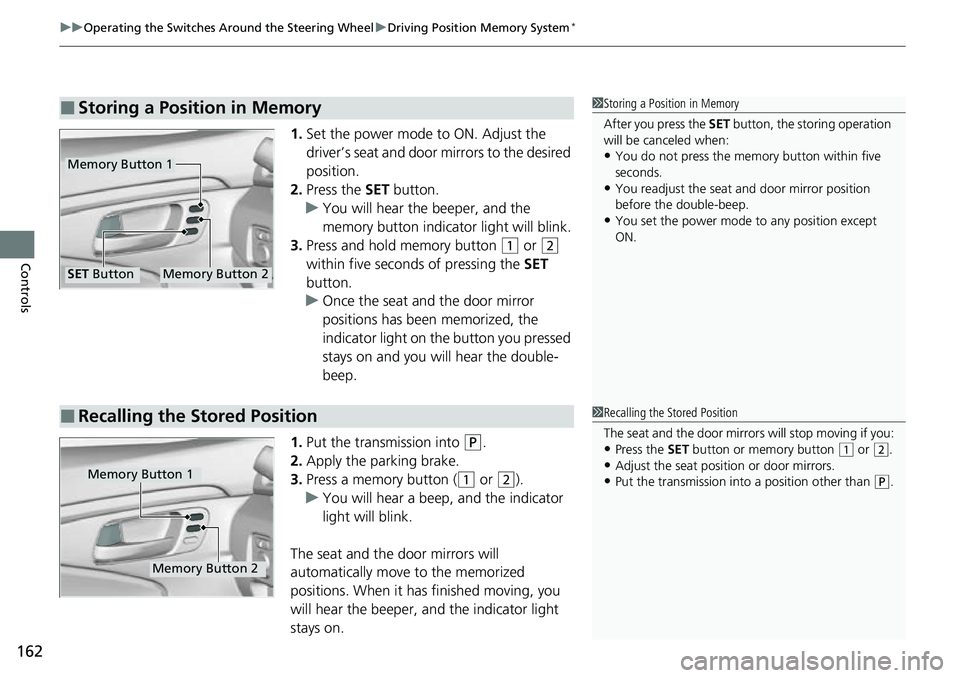
1. Set the power mode to ON. Adjust the
driver’s seat and door mirrors to the desired
position.
2. Press the SET button.
u You will hear the beeper, and the
memory button indicator light will blink.
3. Press and hold memory button
(1 or (2
within five seconds of pressing the SET
button.
u Once the seat and the door mirror
positions has been memorized, the
indicator light on the button you pressed
stays on and you will hear the double-
beep.
1. Put the transmission into
(P.
2. Apply the parking brake.
3. Press a memory button (
(1 or (2).
u You will hear a beep, and the indicator
light will blink.
The seat and the door mirrors will
automatically move to the memorized
positions. When it has finished moving, you
will hear the beeper, an d the indicator light
stays on.
■Storing a Position in Memory1 Storing a Position in Memory
After you press the SET button, the storing operation
will be canceled when:
•You do not press the memory button within five
seconds.
•You readjust the seat and door mirror position
before the double-beep.
•You set the power mode to any position except
ON.
Memory Button 1
Memory Button 2SET Button
■Recalling the Stored Position1Recalling the Stored Position
The seat and the door mirrors will stop moving if you:
•Press the SET button or memory button (1 or (2.
•Adjust the seat position or door mirrors.•Put the transmission into a position other than (P.Memory Button 1
Memory Button 2
Page 365 of 598
363
Driving
This chapter discusses driving and refueling.
Before Driving................................... 364
Towing a Trailer ................................ 372
Off-Highway Driving Guidelines ..... 383
When Driving Starting the Engine .......................... 385
Precautions While Driving................. 392
Automatic Transmission ................... 394
Shifting ............................................ 395
ECON Mode .................................... 403
Intelligent Traction Management...... 404
Auto Idle Stop .................................. 406
Vehicle Stability AssistTM (VSA ®), aka Electronic
Stability Control (ESC), System ..............412
Agile Handling Assist ....................... 414 Intelligent Variable To
rque Management (i-
VTM4
TM) AWD System*.................. 415
Tire Pressure Monitoring System (TPMS) with Tire Fill Assist .......................... 416
Tire Pressure Monitoring System (TPMS) -
Required Federal Explanation ......... 418
Blind spot information System
*........... 420
Honda Sensing ®................................ 423
Collision Mitigati on Braking System
TM
(CMBSTM) ....................................... 426
Adaptive Cruise Control (ACC)......... 438
Lane Keeping Assist System (LKAS).... 451
Road Departure Mitigation System ... 460
Front Sensor Camera ....................... 465 Radar Sensor ................................... 467
Braking Brake System ................................... 468
Anti-lock Brake System (ABS) ........... 470
Brake Assist System ......................... 471
Parking Your Vehicle When Stopped ................................ 472
Parking Sensor System
*................... 473
Cross Traffic Monitor*..................... 477
Multi-View Rear Camera .................. 481
Refueling Fuel Information .............................. 483
How to Refuel ................................. 484
Fuel Economy and CO
2 Emissions .... 486
* Not available on all models
Page 367 of 598
Continued365
uuBefore Driving uDriving Preparation
Driving
• Store or secure all items on board properly.
u Carrying too much cargo, or improperly storing it, can affect your vehicle’s
handling, stability, sto pping distance, and tires, and make it unsafe.
2Maximum Load Limit P. 367
•Do not pile items higher than the seat height.
u They can block your view and may be thrown forward in the event of sudden
braking.
• Do not place anything in the front seat footwells. Make sure to secure the floor
mat.
u An object or unsecured floor mat can in terfere with your brake and accelerator
pedal operation while driving.
• If you have any animals on board, do not let them move around in the vehicle.
u They may interfere with driving and a crash could occur.
• Securely close and lock all doors.
2Locking/Unlocking the Doors from the Inside P. 127
•Adjust your seating position properly.
u Adjust the head restraint, too.
2Seats P. 166
2 Adjusting the front head restraint positions P. 171
•Adjust the mirrors and steering wheel properly.
u Adjust them while sitting in the proper driving position.
2 Adjusting the Steering Wheel P. 163
2 Mirrors P. 164
■Interior Checks1Interior Checks
The headlight aim is set by the factory, and does not
need to be adjusted. Howeve r, if you regularly carry
heavy items in the cargo area or tow a trailer, have
the aiming readjusted at a dealer or by a qualified
technician.
Page 377 of 598
Continued375
uuTowing a Trailer uTowing Preparation
Driving
Towing generally requires a vari ety of supplemental equipment.
To ensure the best quality, we recommend that you purchase Honda equipment
whenever possible.
Your vehicle has a class 3 trailer hitch as standard equipment. The jumper harness
and trailer brake fuse are stored in the glove box.
2 Trailer brakes P. 376
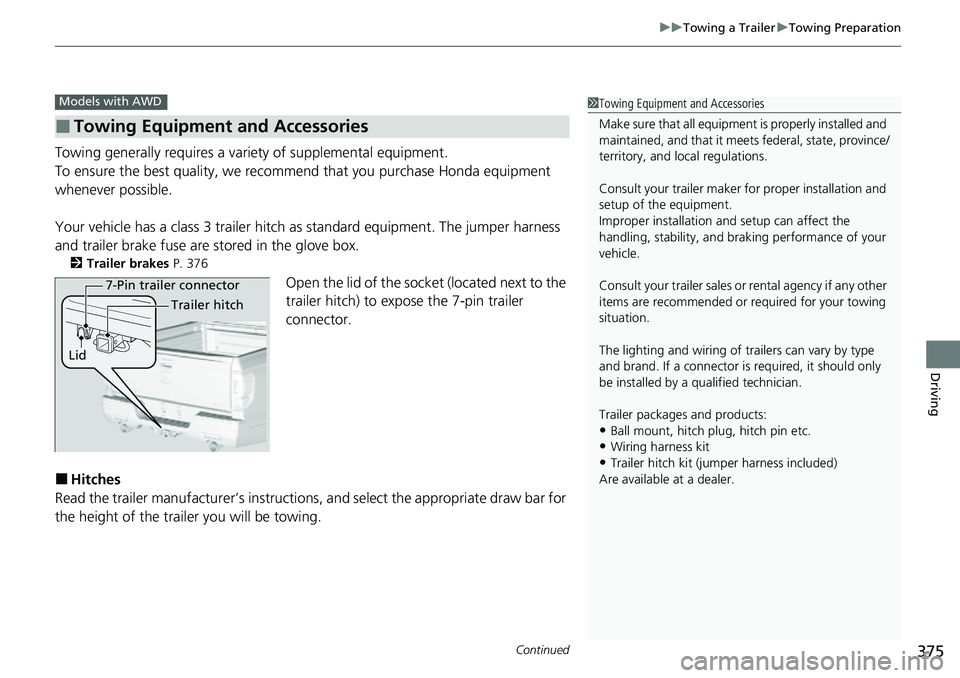
Open the lid of the socket (located next to the
trailer hitch) to expo se the 7-pin trailer
connector.
■Hitches
Read the trailer manufacturer ’s instructions, and select the appropriate draw bar for
the height of the trailer you will be towing.
■Towing Equipment and Accessories
Models with AWD1 Towing Equipment and Accessories
Make sure that all equipmen t is properly installed and
maintained, and that it meets federal, state, province/
territory, and lo cal regulations.
Consult your trai ler maker for prope r installation and
setup of the equipment.
Improper installation and setup can affect the
handling, stability, and br aking performance of your
vehicle.
Consult your traile r sales or rental agency if any other
items are recommended or required for your towing
situation.
The lighting and wiring of tra ilers can vary by type
and brand. If a connector is required, it should only
be installed by a qua lified technician.
Trailer packages and products:
•Ball mount, hitch plug, hitch pin etc.•Wiring harness kit
•Trailer hitch kit (jum per harness included)
Are available at a dealer.
7-Pin trailer connector
Lid Trailer hitch
Page 378 of 598
uuTowing a Trailer uTowing Preparation
376
Driving
■Weight distribution hitches
Your vehicle is designed to tow without the need for a load distributing hitch. If you
wish to use one, please consult your trailer maker for proper installation and set-up.
Improper set-up could degrade the handlin g, stability, and braking performance of
your vehicle.
■Safety chains
Always use safety chains when you tow a trailer. Leave enough slack to allow the
trailer to turn corners easily, but do not allow the chains to drag on the ground.
■Trailer brakes
Recommended for any trailer with a total weight of 1,000 lbs (450 kg) or more:
There are two common types of trailer brake s: surge and electric. Surge brakes are
common for boat trailers, since the brakes will get wet.
If you choose electric brakes, be sure they are electronically actuated. Do not
attempt to attach trailer brakes to your ve hicle’s hydraulic system, as it will lower
braking effectiveness and create a potential hazard.
The 4-pin gray connector installed in your vehicle has all of the circuits required to
install most electric trailer brake controllers.1 Trailer brakes
The 4-pin gray connector is located under the
instrument panel near the top of the parking brake
pedal.