light HONDA RIDGELINE 2023 User Guide
[x] Cancel search | Manufacturer: HONDA, Model Year: 2023, Model line: RIDGELINE, Model: HONDA RIDGELINE 2023Pages: 598, PDF Size: 12.34 MB
Page 52 of 598
uuAirbags uFront Airbags (SRS)
50
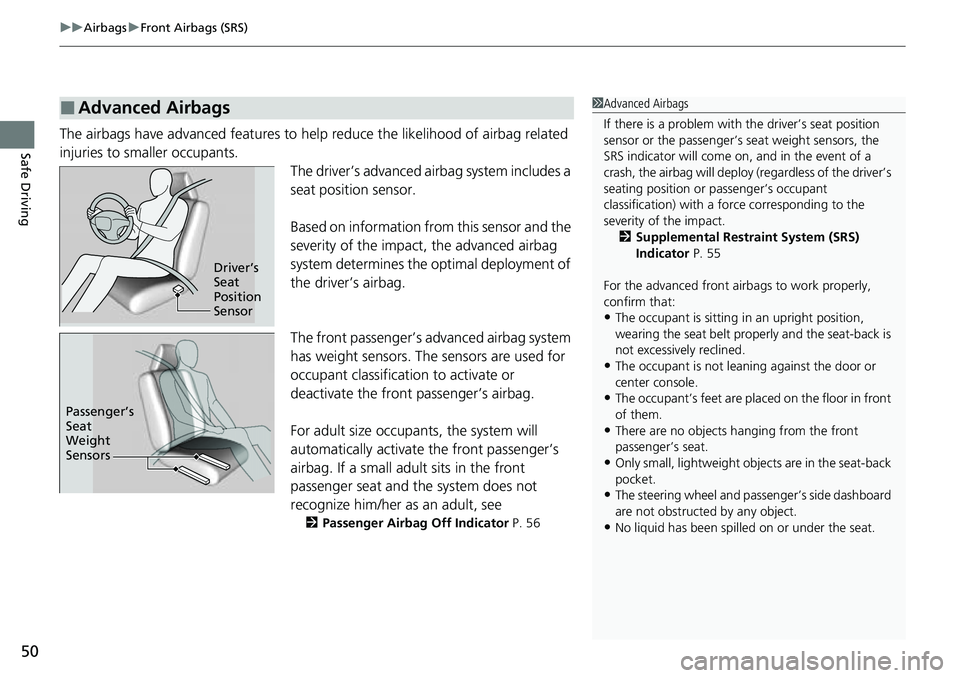
Safe DrivingThe airbags have advanced features to help reduce the likelihood of airbag related
injuries to smaller occupants.
The driver’s advanced airbag system includes a
seat position sensor.
Based on information from this sensor and the
severity of the impact, the advanced airbag
system determines the optimal deployment of
the driver’s airbag.
The front passenger’s advanced airbag system
has weight sensors. The sensors are used for
occupant classification to activate or
deactivate the front passenger’s airbag.
For adult size occupants, the system will
automatically activate the front passenger’s
airbag. If a small adult sits in the front
passenger seat and the system does not
recognize him/her as an adult, see
2Passenger Airbag Off Indicator P. 56
■Advanced Airbags1Advanced Airbags
If there is a problem with the driver’s seat position
sensor or the passenger’s s eat weight sensors, the
SRS indicator will come on, and in the event of a
crash, the airbag will deploy (regardless of the driver’s
seating position or passenger’s occupant
classification) with a force corresponding to the
severity of the impact. 2 Supplemental Restraint System (SRS)
Indicator P. 55
For the advanced front airbags to work properly,
confirm that:
•The occupant is sitting in an upright position,
wearing the seat belt prope rly and the seat-back is
not excessively reclined.
•The occupant is not leaning against the door or
center console.
•The occupant’s feet are plac ed on the floor in front
of them.
•There are no objects ha nging from the front
passenger’s seat.
•Only small, lightweight objects are in the seat-back
pocket.
•The steering wheel and passenger’s side dashboard
are not obstructed by any object.
•No liquid has been spille d on or under the seat.
Driver’s
Seat
Position
Sensor
Passenger’s
Seat
Weight
Sensors
Page 58 of 598
uuAirbags uAirbag System Indicators
56
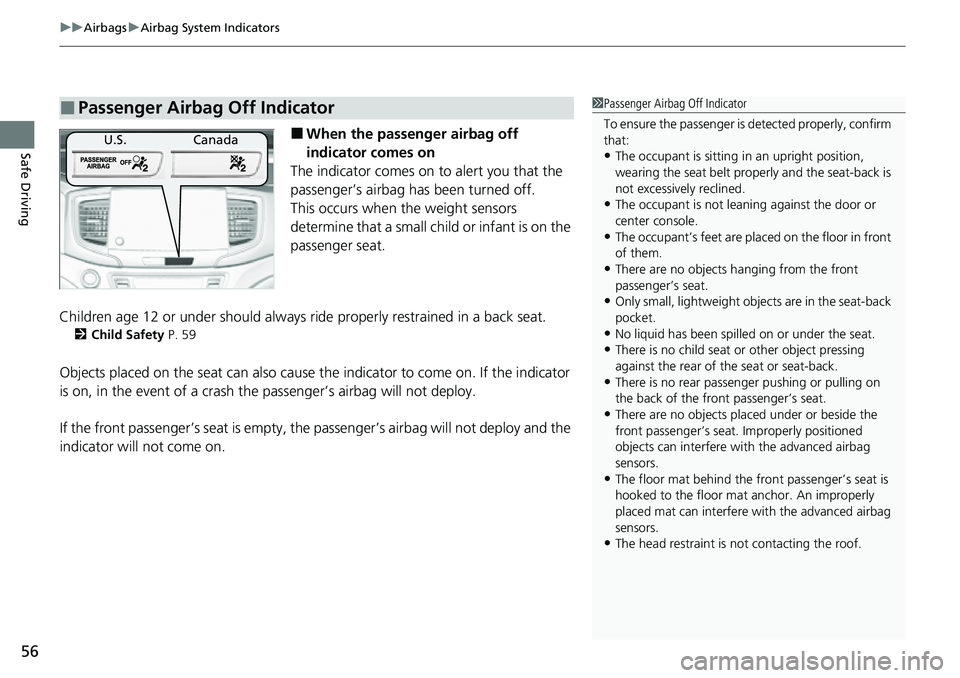
Safe Driving■When the passenger airbag off
indicator comes on
The indicator comes on to alert you that the
passenger’s airbag ha s been turned off.
This occurs when the weight sensors
determine that a small child or infant is on the
passenger seat.
Children age 12 or under should always ri de properly restrained in a back seat.
2Child Safety P. 59
Objects placed on the seat ca n also cause the indicator to come on. If the indicator
is on, in the event of a crash the passenger’s airbag will not deploy.
If the front passenger’s seat is empty, the passenger’s airbag will not deploy and the
indicator will not come on.
■Passenger Airbag Off Indicator1 Passenger Airbag Off Indicator
To ensure the passenger is detected properly, confirm
that:
•The occupant is sitting in an upright position,
wearing the seat belt prope rly and the seat-back is
not excessively reclined.
•The occupant is not leaning against the door or
center console.
•The occupant’s feet are plac ed on the floor in front
of them.
•There are no objects ha nging from the front
passenger’s seat.
•Only small, lightweight objects are in the seat-back
pocket.
•No liquid has been spille d on or under the seat.
•There is no child seat or other object pressing
against the rear of the seat or seat-back.
•There is no rear passenger pushing or pulling on
the back of the front passenger’s seat.
•There are no objects placed under or beside the
front passenger’s seat . Improperly positioned
objects can interfere with the advanced airbag
sensors.
•The floor mat behind the front passenger’s seat is
hooked to the floor mat anchor. An improperly
placed mat can interfere with the advanced airbag
sensors.
•The head restraint is not contacting the roof.
U.S.Canada
Page 82 of 598
80
uuIndicators u
Instrument Panel
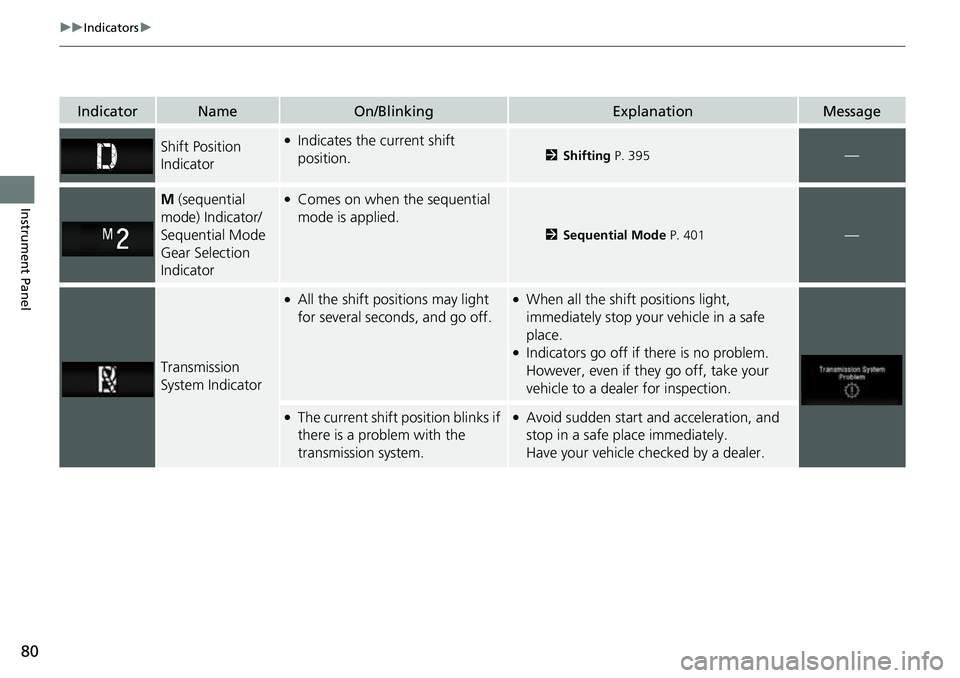
IndicatorNameOn/BlinkingExplanationMessage
Shift Position
Indicator●Indicates the current shift
position.2Shifting P. 395—
M (sequential
mode) Indicator/
Sequential Mode
Gear Selection
Indicator●Comes on when the sequential
mode is applied.
2 Sequential Mode P. 401—
Transmission
System Indicator
●All the shift positions may light
for several seconds, and go off.●When all the shift positions light,
immediately stop your vehicle in a safe
place.
●Indicators go off if there is no problem.
However, even if they go off, take your
vehicle to a dealer for inspection.
●The current shift position blinks if
there is a problem with the
transmission system.●Avoid sudden start and acceleration, and
stop in a safe place immediately.
Have your vehicle checked by a dealer.
Page 85 of 598
83
uuIndicators u
Continued
Instrument Panel
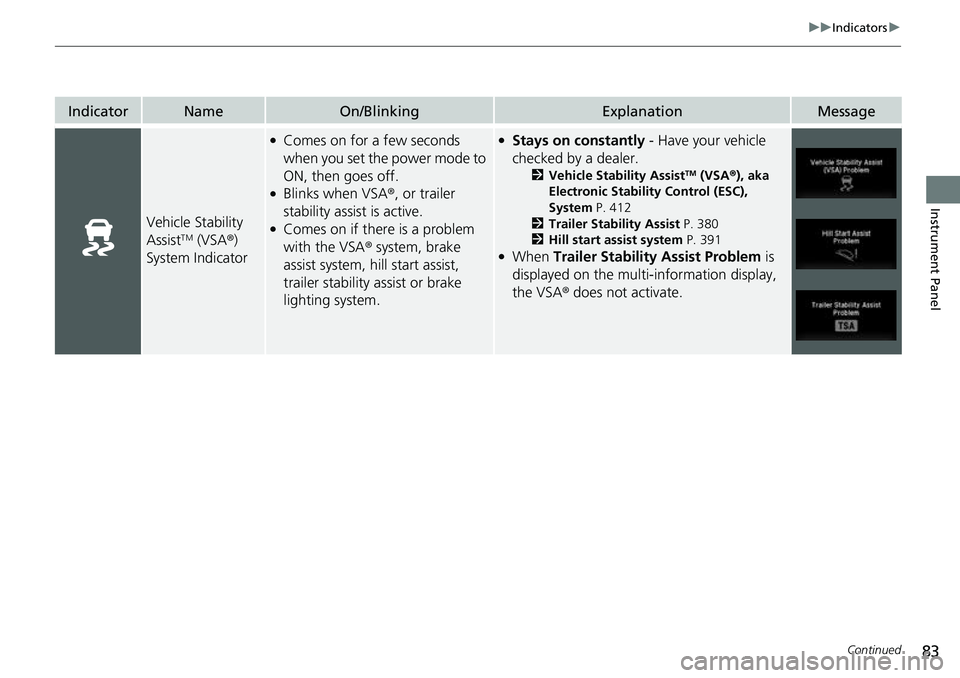
IndicatorNameOn/BlinkingExplanationMessage
Vehicle Stability
AssistTM (VSA®)
System Indicator
●Comes on for a few seconds
when you set the power mode to
ON, then goes off.
●Blinks when VSA ®, or trailer
stability assist is active.
●Comes on if there is a problem
with the VSA ® system, brake
assist system, hill start assist,
trailer stability assist or brake
lighting system.
●Stays on constantly - Have your vehicle
checked by a dealer.
2 Vehicle Stability AssistTM (VSA ®), aka
Electronic Stability Control (ESC),
System P. 412
2 Trailer Stability Assist P. 380
2 Hill start assist system P. 391
●When Trailer Stability Assist Problem is
displayed on the multi-information display,
the VSA® does not activate.
Page 87 of 598
85
uuIndicators u
Continued
Instrument Panel
IndicatorNameOn/BlinkingExplanationMessage
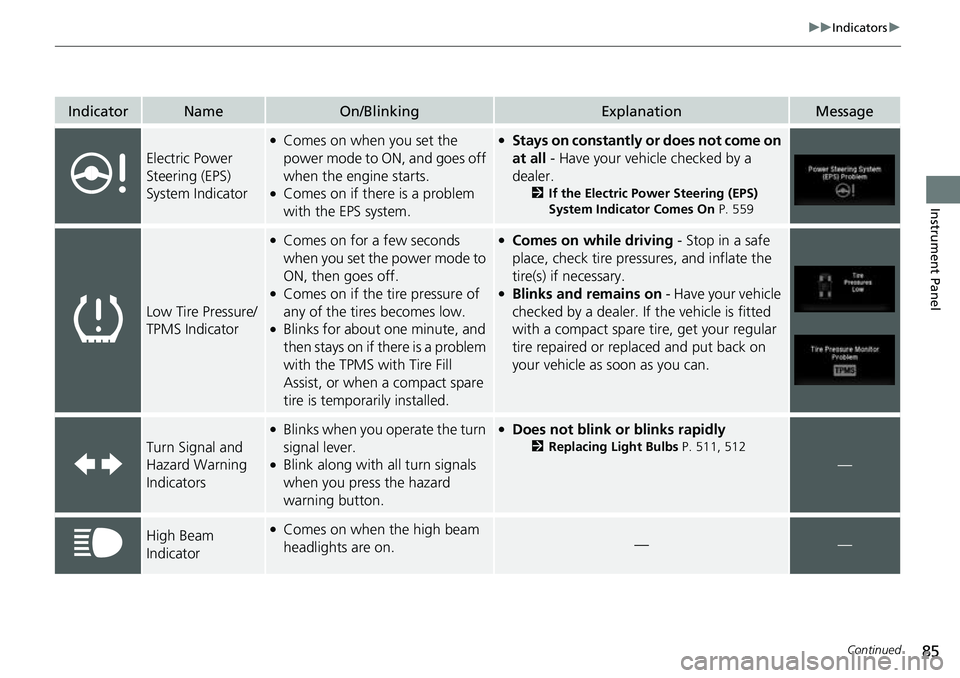
Electric Power
Steering (EPS)
System Indicator
●Comes on when you set the
power mode to ON, and goes off
when the engine starts.
●Comes on if there is a problem
with the EPS system.
●Stays on constantly or does not come on
at all - Have your vehicle checked by a
dealer.
2 If the Electric Power Steering (EPS)
System Indicator Comes On P. 559
Low Tire Pressure/
TPMS Indicator
●Comes on for a few seconds
when you set the power mode to
ON, then goes off.
●Comes on if the tire pressure of
any of the tires becomes low.
●Blinks for about one minute, and
then stays on if there is a problem
with the TPMS with Tire Fill
Assist, or when a compact spare
tire is temporarily installed.
●Comes on while driving - Stop in a safe
place, check tire pressures, and inflate the
tire(s) if necessary.
●Blinks and remains on - Have your vehicle
checked by a dealer. If the vehicle is fitted
with a compact spare ti re, get your regular
tire repaired or replaced and put back on
your vehicle as soon as you can.
Turn Signal and
Hazard Warning
Indicators
●Blinks when you operate the turn
signal lever.
●Blink along with all turn signals
when you press the hazard
warning button.
●Does not blink or blinks rapidly
2 Replacing Light Bulbs P. 511, 512
—
High Beam
Indicator●Comes on when the high beam
headlights are on.——
Page 88 of 598
86
uuIndicators u
Instrument Panel
IndicatorNameOn/BlinkingExplanationMessage
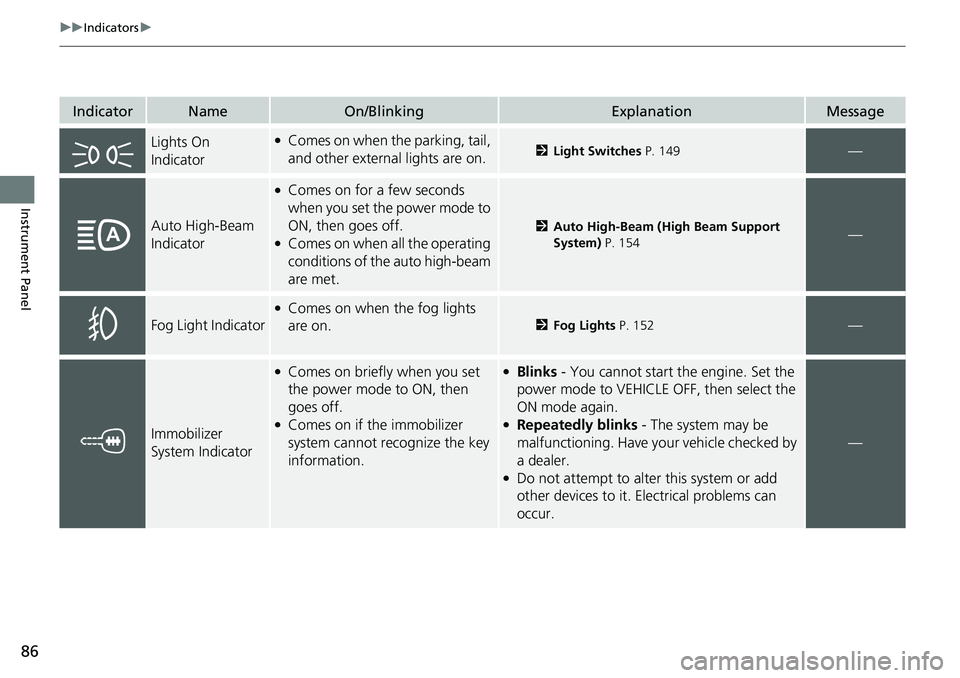
Lights On
Indicator●Comes on when the parking, tail,
and other external lights are on.2Light Switches P. 149—
Auto High-Beam
Indicator
●Comes on for a few seconds
when you set the power mode to
ON, then goes off.
●Comes on when all the operating
conditions of the auto high-beam
are met.
2Auto High-Beam (High Beam Support
System) P. 154—
Fog Light Indicator
●Comes on when the fog lights
are on.
2Fog Lights P. 152—
Immobilizer
System Indicator
●Comes on briefly when you set
the power mode to ON, then
goes off.
●Comes on if the immobilizer
system cannot recognize the key
information.
●Blinks - You cannot start the engine. Set the
power mode to VEHICLE OFF, then select the
ON mode again.
●Repeatedly blinks - The system may be
malfunctioning. Have your vehicle checked by
a dealer.
●Do not attempt to alter this system or add
other devices to it. Electrical problems can
occur.
—
Page 97 of 598
95
uuIndicators u
Instrument Panel
*1:AWD models only
*2:2WD models only
IndicatorNameOn/BlinkingExplanationMessage
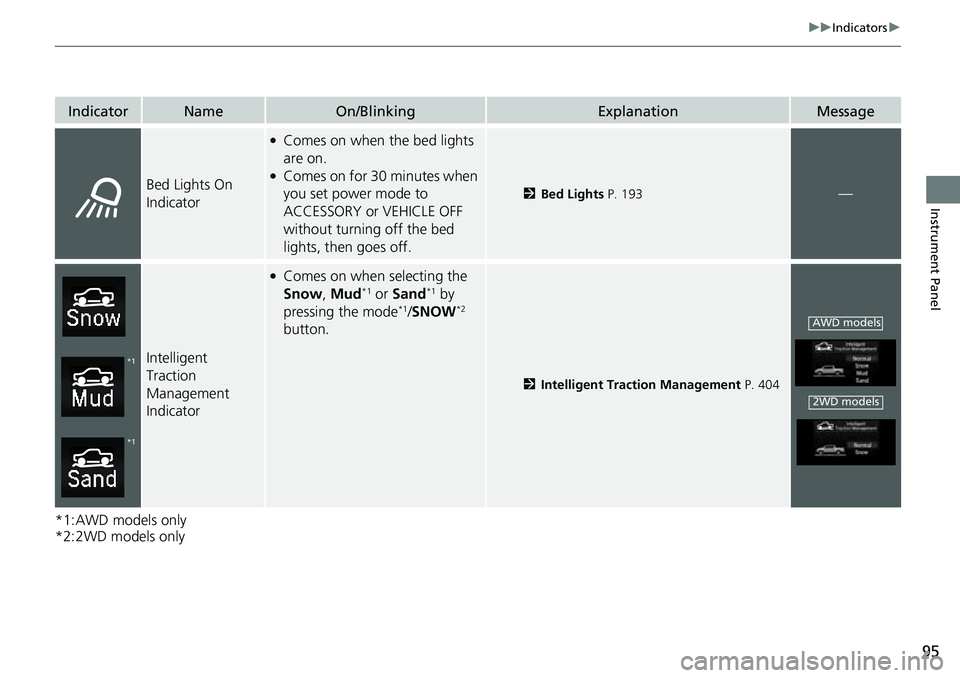
Bed Lights On
Indicator
●Comes on when the bed lights
are on.
●Comes on for 30 minutes when
you set power mode to
ACCESSORY or VEHICLE OFF
without turning off the bed
lights, then goes off.
2Bed Lights P. 193—
Intelligent
Traction
Management
Indicator
●Comes on when selecting the
Snow, Mud*1 or Sand*1 by
pressing the mode*1/ SNOW*2
button.
2 Intelligent Traction Management P. 404
*1
*1
AWD models
2WD models
Page 103 of 598
101
uuIndicators uMulti-Information Display Warning and Information Messages
Continued
Instrument Panel
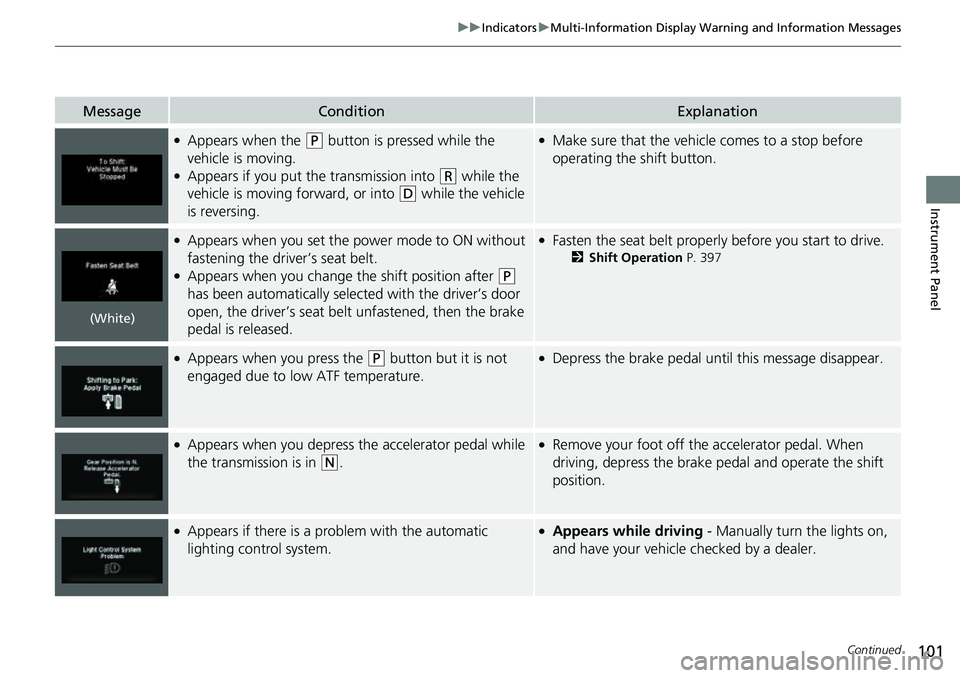
MessageConditionExplanation
●Appears when the (P button is pressed while the
vehicle is moving.
●Appears if you put the transmission into (R while the
vehicle is moving forward, or into
(D while the vehicle
is reversing.
●Make sure that the vehicle comes to a stop before
operating the shift button.
●Appears when you set the power mode to ON without
fastening the driver’s seat belt.
●Appears when you change the shift position after (P
has been automatically selected with the driver’s door
open, the driver’s seat belt unfastened, then the brake
pedal is released.
●Fasten the seat belt properly before you start to drive.
2 Shift Operation P. 397
●Appears when you press the (P button but it is not
engaged due to low ATF temperature.●Depress the brake pedal until this message disappear.
●Appears when you depress the accelerator pedal while
the transmission is in
(N.
●Remove your foot off the accelerator pedal. When
driving, depress the brake pedal and operate the shift
position.
●Appears if there is a problem with the automatic
lighting control system.●Appears while driving - Manually turn the lights on,
and have your vehicle checked by a dealer.
(White)
Page 110 of 598
108
uuIndicators uMulti-Information Display Warn ing and Information Messages
Instrument Panel
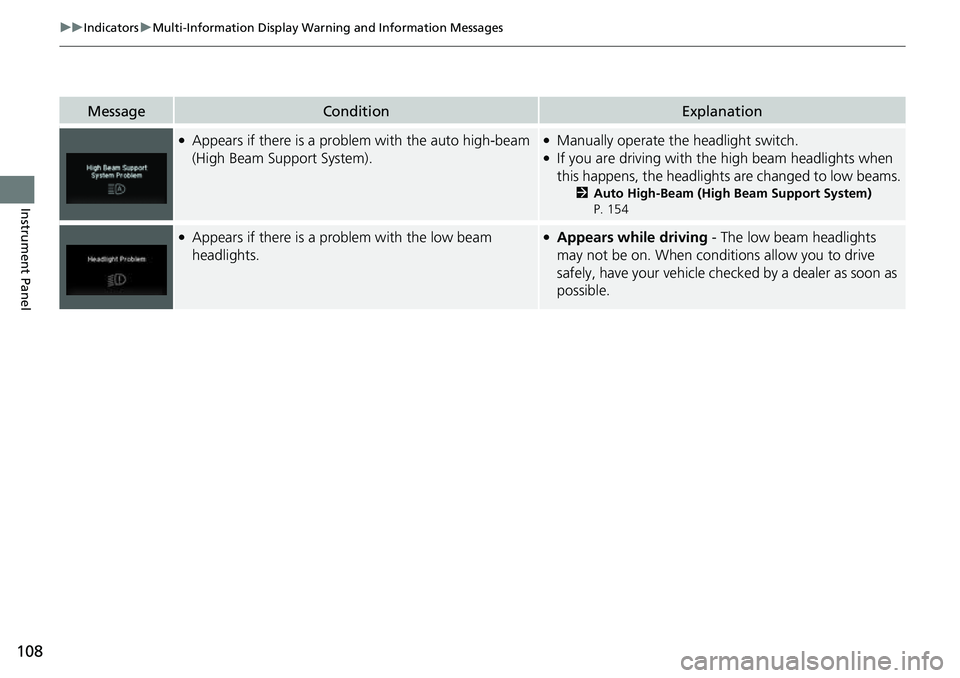
MessageConditionExplanation
●Appears if there is a problem with the auto high-beam
(High Beam Support System).●Manually operate the headlight switch.●If you are driving with the high beam headlights when
this happens, the headlight s are changed to low beams.
2Auto High-Beam (High Beam Support System)
P. 154
●Appears if there is a problem with the low beam
headlights.●Appears while driving - The low beam headlights
may not be on. When conditions allow you to drive
safely, have your vehicle chec ked by a dealer as soon as
possible.
Page 117 of 598
115
Controls
This chapter explains how to operate the various controls necessary for driving.
Clock.................................................. 116
Locking and Unlocking the Doors Key .................................................. 117
Low Keyless Remote Signal Strength .....119
Locking/Unlocking the Doors from the Outside .......................................... 120
Locking/Unlocking the Doors from the
Inside ............................................. 127
Childproof Door Locks ..................... 129
Auto Door Locking/Unlocking .......... 130
Tailgate .............................................. 131
Opening and Closing the Trunk ....... 133
Security System
Immobilizer System .......................... 136
Security System Alarm ...................... 136Windows ............................................... 139
Moonroof*............................................... 143Operating the Switches Around the Steering Wheel ENGINE START/STOP Button............. 145
Turn Signals ..................................... 148
Light Switches.................................. 149
Fog Lights ........................................ 152
Daytime Running Lights ................... 153
Auto High-Beam (H igh Beam Support
System) .......................................... 154
Wipers and Washers ........................ 157
Rear Defogger/Heat ed Door Mirror
*
Button ........................................... 159 Heated Windshield Button
*............. 159
Brightness Control ........................... 160
Driving Position Memory System
*.... 161
Adjusting the Steering Wheel .......... 163
Mirrors Interior Rearview Mirror ................... 164
Power Door Mirrors ......................... 165
Seats .................................................. 166
Interior/Exterior Convenience Items
Interior Lights .................................. 175
Storage Items .................................. 177
Other Interior Convenience Items..... 182
In-Bed Convenience Items................ 191
Climate Control System ................... 195
* Not available on all models