driver 1 HONDA RIDGELINE 2023 Owner's Manual
[x] Cancel search | Manufacturer: HONDA, Model Year: 2023, Model line: RIDGELINE, Model: HONDA RIDGELINE 2023Pages: 598, PDF Size: 12.34 MB
Page 101 of 598
99
uuIndicators uMulti-Information Display Warning and Information Messages
Continued
Instrument Panel
MessageConditionExplanation
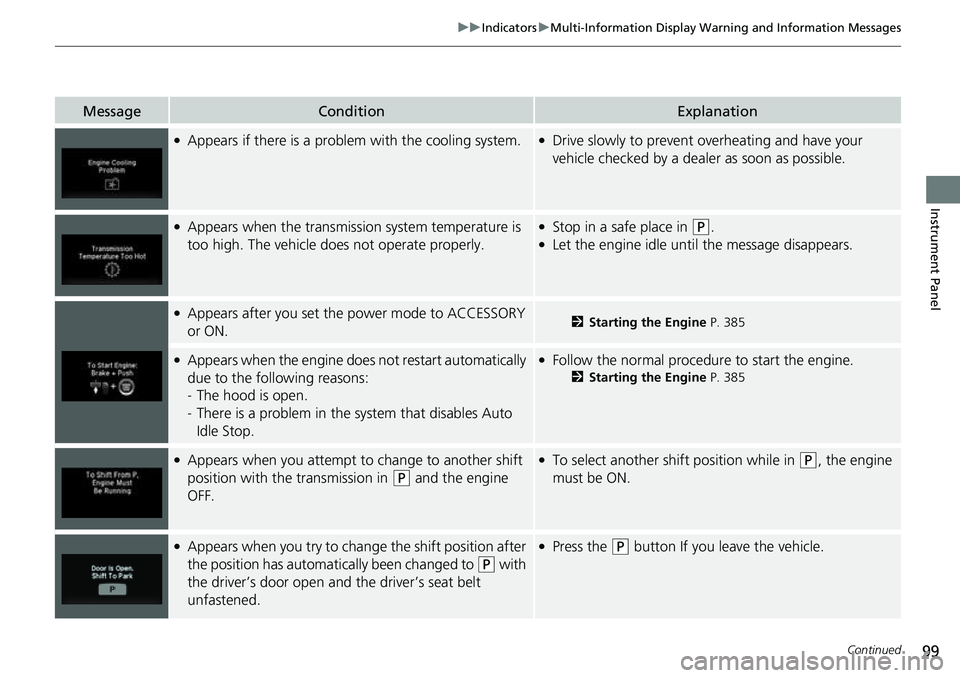
●Appears if there is a problem with the cooling system.●Drive slowly to prevent overheating and have your
vehicle checked by a deal er as soon as possible.
●Appears when the transmission system temperature is
too high. The vehicle does not operate properly.●Stop in a safe place in (P.●Let the engine idle until the message disappears.
●Appears after you set the power mode to ACCESSORY
or ON.2Starting the Engine P. 385
●Appears when the engine does not restart automatically
due to the following reasons:
-The hood is open.
- There is a problem in the sy stem that disables Auto
Idle Stop.●Follow the normal procedure to start the engine.
2 Starting the Engine P. 385
●Appears when you attempt to change to another shift
position with the transmission in
(P and the engine
OFF.
●To select another shift position while in (P, the engine
must be ON.
●Appears when you try to chan ge the shift position after
the position has automatically been changed to
( P with
the driver’s door open and the driver’s seat belt
unfastened.
●Press the (P button If you leave the vehicle.
Page 103 of 598
101
uuIndicators uMulti-Information Display Warning and Information Messages
Continued
Instrument Panel
MessageConditionExplanation
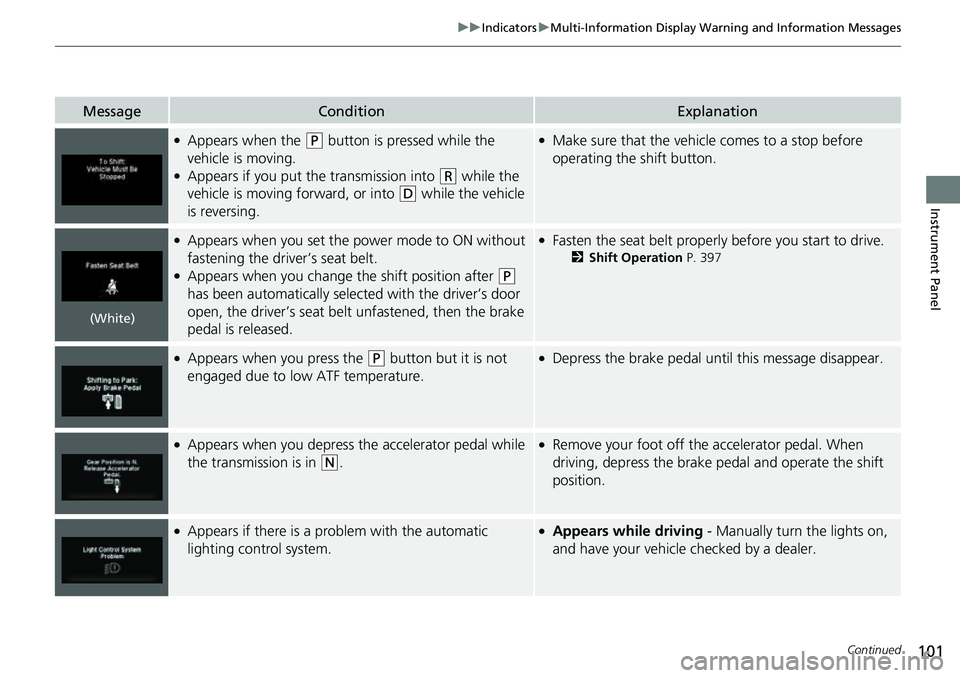
●Appears when the (P button is pressed while the
vehicle is moving.
●Appears if you put the transmission into (R while the
vehicle is moving forward, or into
(D while the vehicle
is reversing.
●Make sure that the vehicle comes to a stop before
operating the shift button.
●Appears when you set the power mode to ON without
fastening the driver’s seat belt.
●Appears when you change the shift position after (P
has been automatically selected with the driver’s door
open, the driver’s seat belt unfastened, then the brake
pedal is released.
●Fasten the seat belt properly before you start to drive.
2 Shift Operation P. 397
●Appears when you press the (P button but it is not
engaged due to low ATF temperature.●Depress the brake pedal until this message disappear.
●Appears when you depress the accelerator pedal while
the transmission is in
(N.
●Remove your foot off the accelerator pedal. When
driving, depress the brake pedal and operate the shift
position.
●Appears if there is a problem with the automatic
lighting control system.●Appears while driving - Manually turn the lights on,
and have your vehicle checked by a dealer.
(White)
Page 105 of 598
103
uuIndicators uMulti-Information Display Warning and Information Messages
Continued
Instrument Panel
MessageConditionExplanation
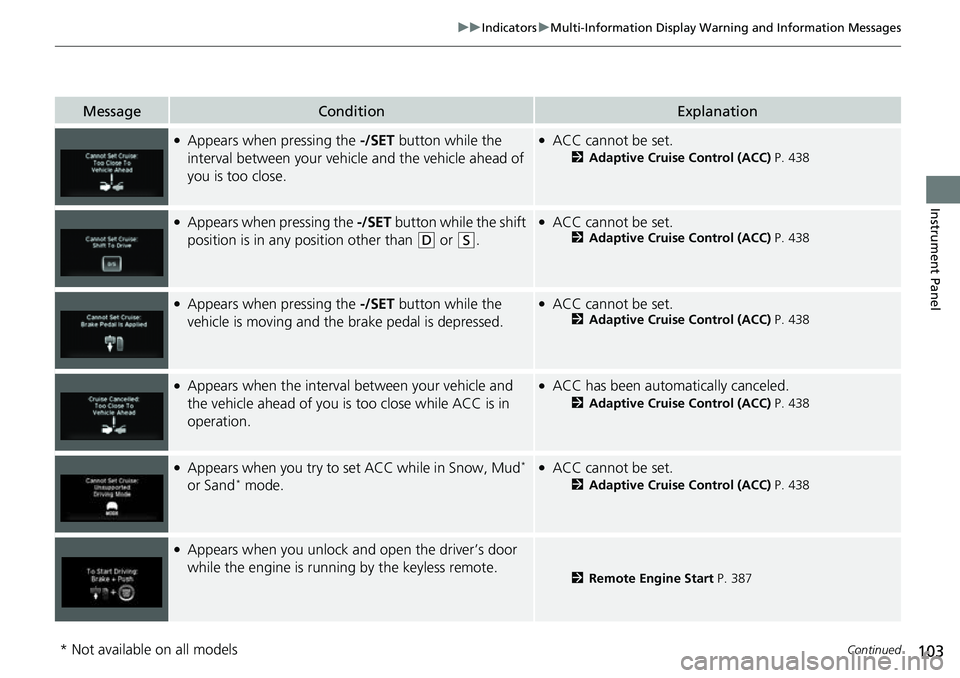
●Appears when pressing the -/SET button while the
interval between your vehicle and the vehicle ahead of
you is too close.●ACC cannot be set.
2 Adaptive Cruise Control (ACC) P. 438
●Appears when pressing the -/SET button while the shift
position is in any position other than
(D or (S.
●ACC cannot be set.2 Adaptive Cruise Control (ACC) P. 438
●Appears when pressing the -/SET button while the
vehicle is moving and the brake pedal is depressed.●ACC cannot be set.2 Adaptive Cruise Control (ACC) P. 438
●Appears when the interval between your vehicle and
the vehicle ahead of you is too close while ACC is in
operation.●ACC has been automatically canceled.
2 Adaptive Cruise Control (ACC) P. 438
●Appears when you try to set ACC while in Snow, Mud*
or Sand* mode.
●ACC cannot be set.
2 Adaptive Cruise Control (ACC) P. 438
●Appears when you unlock and open the driver’s door
while the engine is running by the keyless remote.
2 Remote Engine Start P. 387
* Not available on all models
Page 107 of 598
105
uuIndicators uMulti-Information Display Warning and Information Messages
Continued
Instrument Panel
MessageConditionExplanation
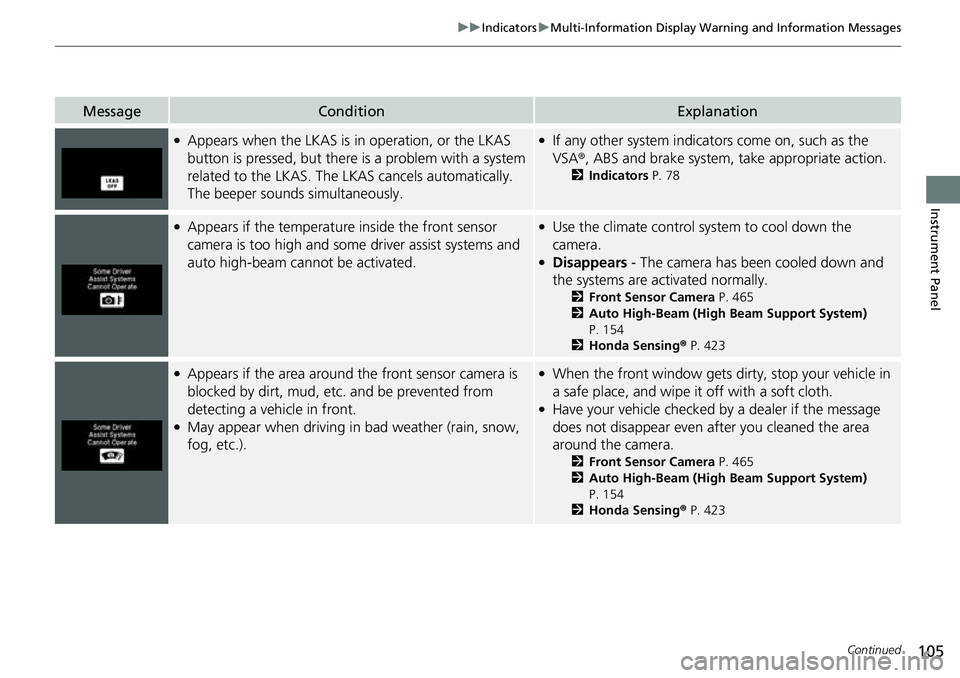
●Appears when the LKAS is in operation, or the LKAS
button is pressed, but there is a problem with a system
related to the LKAS. The LKAS cancels automatically.
The beeper sounds simultaneously.●If any other system indicators come on, such as the
VSA ®, ABS and brake system, take appropriate action.
2Indicators P. 78
●Appears if the temperature inside the front sensor
camera is too high and some driver assist systems and
auto high-beam cannot be activated.●Use the climate control system to cool down the
camera.
●Disappears - The camera has been cooled down and
the systems are activated normally.
2 Front Sensor Camera P. 465
2 Auto High-Beam (High Beam Support System)
P. 154
2 Honda Sensing ® P. 423
●Appears if the area around the front sensor camera is
blocked by dirt, mud, etc. and be prevented from
detecting a vehicle in front.
●May appear when driving in bad weather (rain, snow,
fog, etc.).
●When the front window gets dirty, stop your vehicle in
a safe place, and wipe it off with a soft cloth.
●Have your vehicle checked by a dealer if the message
does not disappear even after you cleaned the area
around the camera.
2 Front Sensor Camera P. 465
2 Auto High-Beam (High Beam Support System)
P. 154
2 Honda Sensing ® P. 423
Page 124 of 598
uuLocking and Unlocking the Doors uLocking/Unlocking the Doors from the Outside
122
Controls
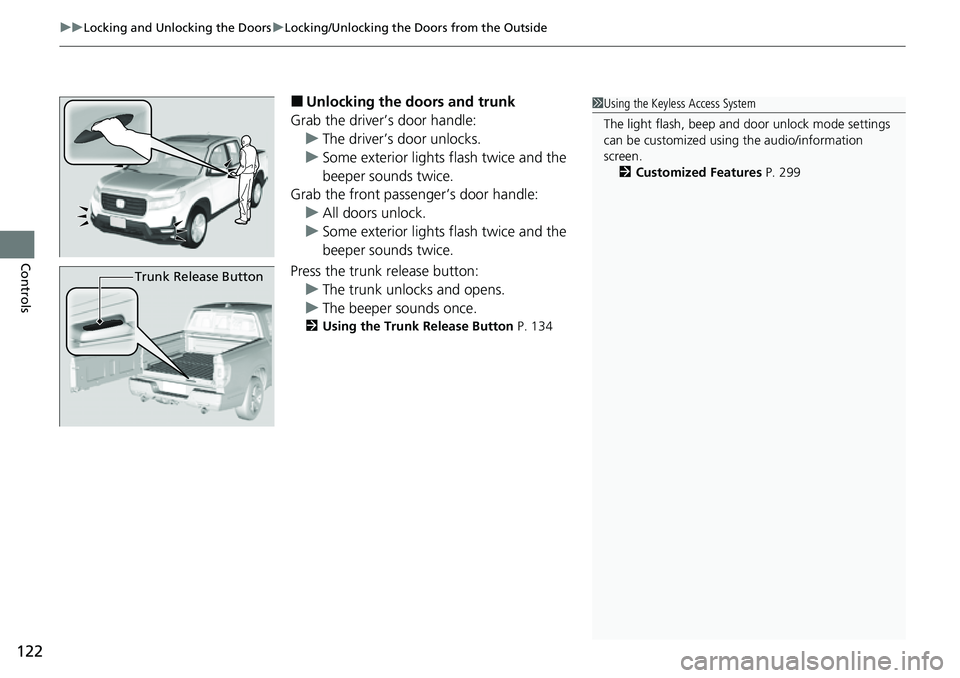
■Unlocking the doors and trunk
Grab the driver’s door handle: u The driver’s door unlocks.
u Some exterior lights flash twice and the
beeper sounds twice.
Grab the front passenger’s door handle:
u All doors unlock.
u Some exterior lights flash twice and the
beeper sounds twice.
Press the trunk release button: u The trunk unlocks and opens.
u The beeper sounds once.
2 Using the Trunk Release Button P. 134
1Using the Keyless Access System
The light flash, beep and door unlock mode settings
can be customized using the audio/information
screen.
2 Customized Features P. 299
Trunk Release Button
Page 125 of 598
Continued123
uuLocking and Unlocking the Doors uLocking/Unlocking the Doors from the Outside
Controls
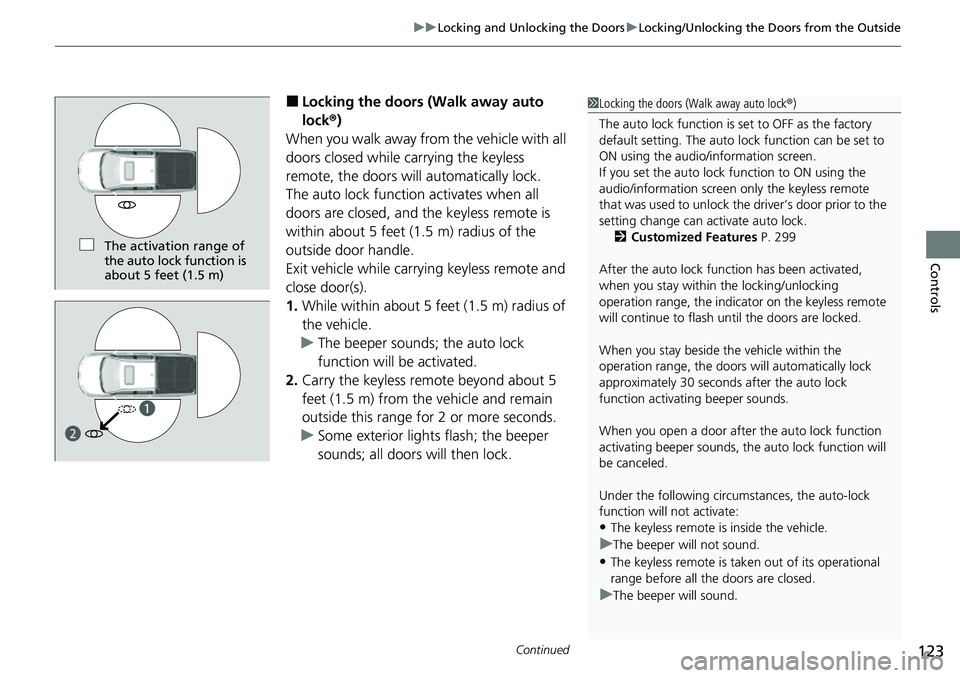
■Locking the doors (Walk away auto
lock ®)
When you walk away fro m the vehicle with all
doors closed while carrying the keyless
remote, the doors will automatically lock.
The auto lock function activates when all
doors are closed, and the keyless remote is
within about 5 feet (1.5 m) radius of the
outside door handle.
Exit vehicle while carrying keyless remote and
close door(s).
1. While within about 5 feet (1.5 m) radius of
the vehicle.
u The beeper sounds; the auto lock
function will be activated.
2. Carry the keyless remote beyond about 5
feet (1.5 m) from the vehicle and remain
outside this range for 2 or more seconds.
u Some exterior lights flash; the beeper
sounds; all doors will then lock.1Locking the doors (Walk away auto lock ®)
The auto lock function is set to OFF as the factory
default setting. The auto lo ck function can be set to
ON using the audio/information screen.
If you set the auto lock function to ON using the
audio/information screen only the keyless remote
that was used to unlock th e driver’s door prior to the
setting change can ac tivate auto lock.
2 Customized Features P. 299
After the auto lock function has been activated,
when you stay within the locking/unlocking
operation range, the indicato r on the keyless remote
will continue to flash until the doors are locked.
When you stay beside the vehicle within the
operation range, the doors wi ll automatically lock
approximately 30 seconds after the auto lock
function activating beeper sounds.
When you open a door after the auto lock function
activating beeper sounds, the auto lock function will
be canceled.
Under the following circumstances, the auto-lock
function will not activate:
•The keyless remote is inside the vehicle.
uThe beeper will not sound.
•The keyless remote is taken out of its operational
range before all the doors are closed.
uThe beeper will sound.
The activation range of
the auto lock function is
about 5 feet (1.5 m)
a
b
Page 126 of 598
uuLocking and Unlocking the Doors uLocking/Unlocking the Doors from the Outside
124
Controls
To temporarily deactivate the function:
1. Set the power mode to VEHICLE OFF.
2. Open the driver’s door.
3. Using the master door lock switch, operate
the lock as follows:
Lock Unlock Lock Unlock.
u The beeper sounds and the function is
deactivated.
To restore the function:
• Set the power mode to ON.
• Lock the vehicle without using the auto lock
function
• With the keyless remote on you, move out
of the auto lock function operation range.
• Open any door.1Locking the doors (Walk away auto lock ®)
The auto lock function does not operate when any of
the following conditions are met.
•The keyless remote is inside the vehicle.
•A door or the hood is not closed.
•The power mode is set to any mode other than
OFF.
•The keyless remote is not located within a radius of
about 5 feet (1.5 m) from the vehicle when you get
out of the vehicle and close the doors.
Auto lock function operation stop beeper
After the auto lock function has been activated, the
auto lock operation stop beeper sounds for
approximately two seconds in the following cases.
•The keyless remote is put inside the vehicle through
a window.
•You are located too close to the vehicle.•The keyless remote is put inside the trunk.
If the warning beeper sounds, check that you are
carrying the keyless remote. Then, open/close a door
and confirm the auto lock activation beeper sounds
once.
Page 127 of 598
Continued125
uuLocking and Unlocking the Doors uLocking/Unlocking the Doors from the Outside
Controls
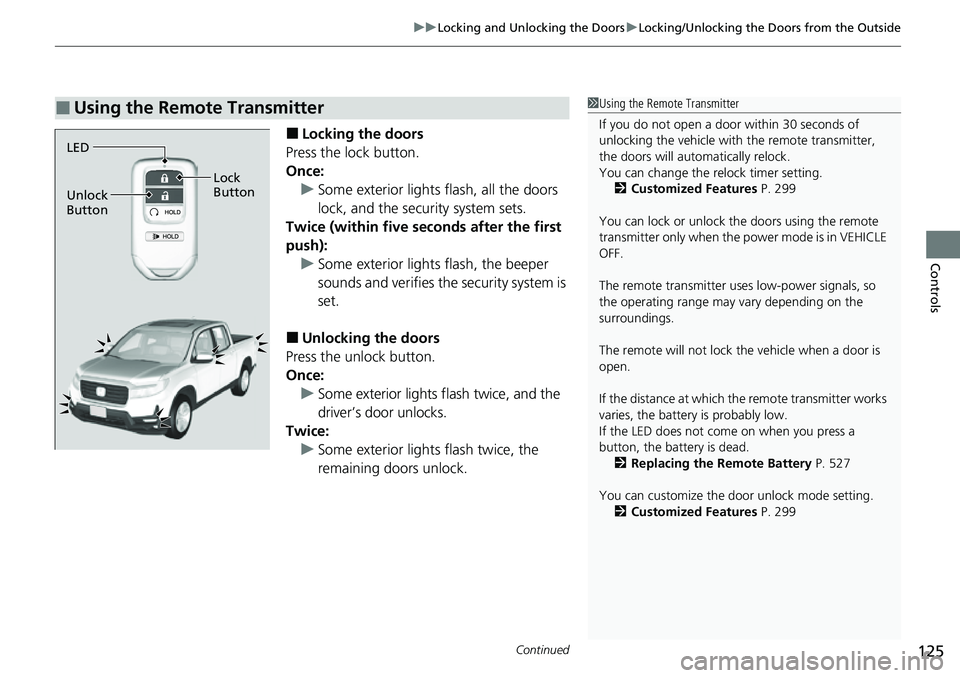
■Locking the doors
Press the lock button.
Once: u Some exterior lights flash, all the doors
lock, and the security system sets.
Twice (within five se conds after the first
push):
u Some exterior lights flash, the beeper
sounds and verifies the security system is
set.
■Unlocking the doors
Press the unlock button.
Once:
u Some exterior lights flash twice, and the
driver’s door unlocks.
Twice: u Some exterior light s flash twice, the
remaining doors unlock.
■Using the Remote Transmitter1 Using the Remote Transmitter
If you do not open a door within 30 seconds of
unlocking the vehicle with the remote transmitter,
the doors will automatically relock.
You can change the relock timer setting. 2 Customized Features P. 299
You can lock or unlock the doors using the remote
transmitter only when the power mode is in VEHICLE
OFF.
The remote transmitter us es low-power signals, so
the operating range may vary depending on the
surroundings.
The remote will not lock th e vehicle when a door is
open.
If the distance at which the remote transmitter works
varies, the batter y is probably low.
If the LED does not come on when you press a
button, the battery is dead.
2 Replacing the Remote Battery P. 527
You can customize the door unlock mode setting. 2 Customized Features P. 299
LED
Unlock
Button Lock
Button
Page 128 of 598
uuLocking and Unlocking the Doors uLocking/Unlocking the Doors from the Outside
126
Controls
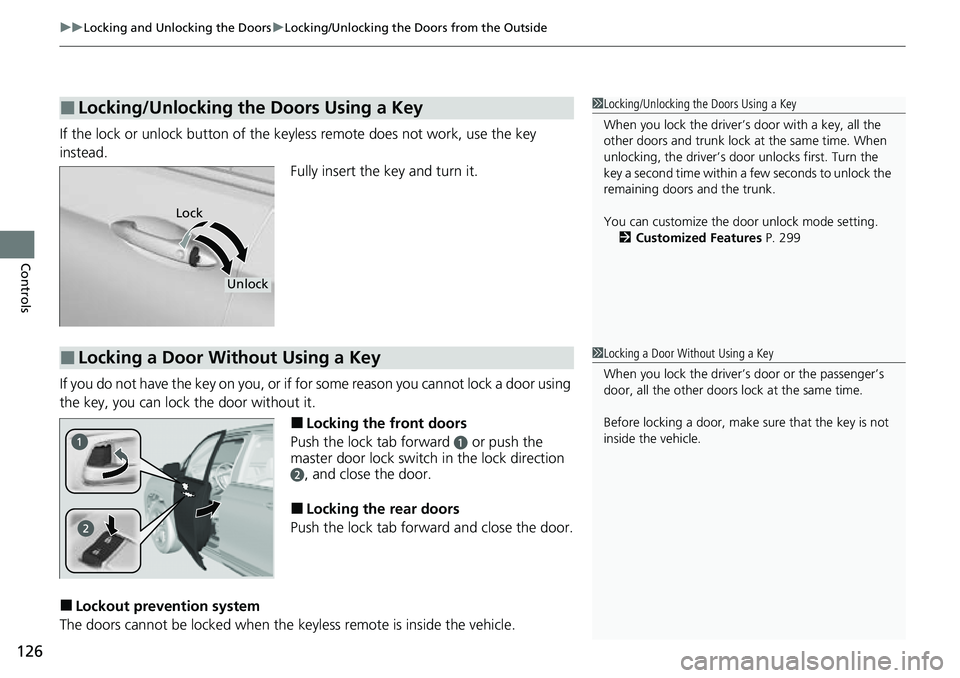
If the lock or unlock button of the key less remote does not work, use the key
instead. Fully insert the key and turn it.
If you do not have the key on you, or if for some reason you cannot lock a door using
the key, you can lock the door without it.
■Locking the front doors
Push the lock tab forward
a or push the
master door lock switch in the lock direction
b, and close the door.
■Locking the rear doors
Push the lock tab forward and close the door.
■Lockout prevention system
The doors cannot be locked when the keyless remote is inside the vehicle.
■Locking/Unlocking the Doors Using a Key1Locking/Unlocking the Doors Using a Key
When you lock the driver’s door with a key, all the
other doors and trunk lock at the same time. When
unlocking, the driver’s door unlocks first. Turn the
key a second time within a few seconds to unlock the
remaining doors and the trunk.
You can customize the door unlock mode setting. 2 Customized Features P. 299
Lock
Unlock
■Locking a Door Without Using a Key1Locking a Door Without Using a Key
When you lock the driver’s door or the passenger’s
door, all the other doors lock at the same time.
Before locking a door, make sure that the key is not
inside the vehicle.
Page 129 of 598
127
uuLocking and Unlocking the Doors uLocking/Unlocking the Doors from the Inside
Continued
Controls
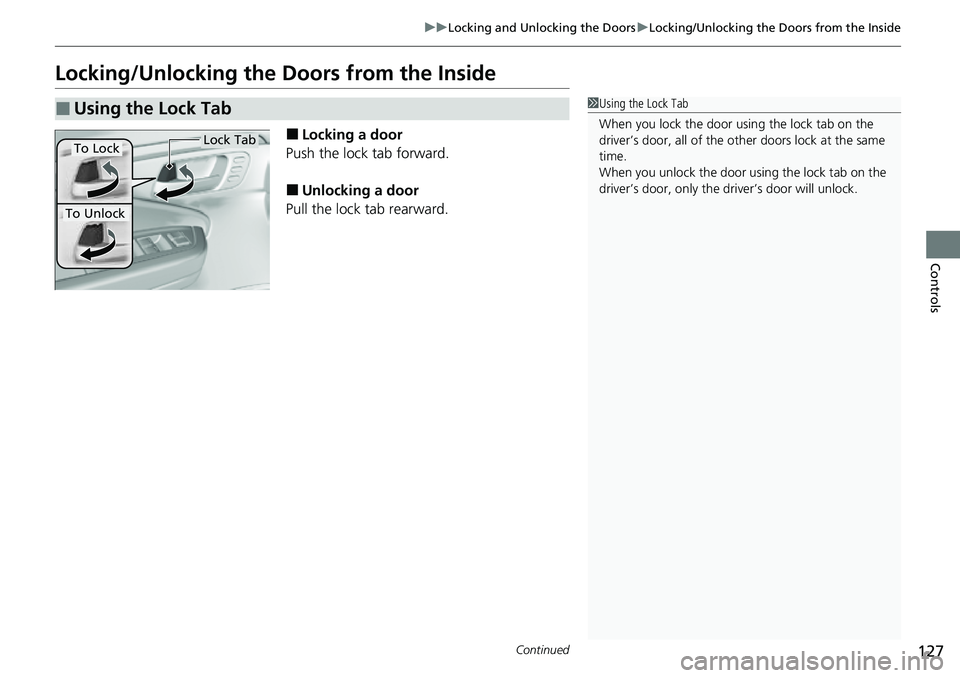
Locking/Unlocking the Doors from the Inside
■Locking a door
Push the lock tab forward.
■Unlocking a door
Pull the lock tab rearward.
■Using the Lock Tab1 Using the Lock Tab
When you lock the door using the lock tab on the
driver’s door, all of the ot her doors lock at the same
time.
When you unlock the door using the lock tab on the
driver’s door, only the driv er’s door will unlock.
To Unlock
Lock TabTo Lock