reset HONDA RIDGELINE 2023 Owner's Manual
[x] Cancel search | Manufacturer: HONDA, Model Year: 2023, Model line: RIDGELINE, Model: HONDA RIDGELINE 2023Pages: 598, PDF Size: 12.34 MB
Page 248 of 598
uuAudio System Basic Operation uPlaying SiriusXM ® Radio*
246
Features
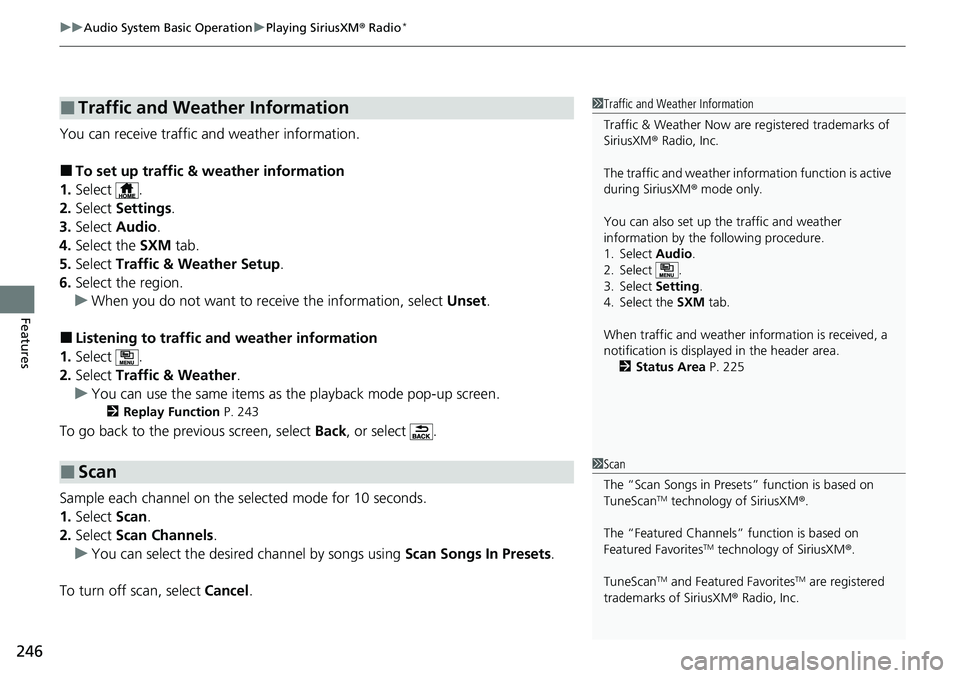
You can receive traffic and weather information.
■To set up traffic & weather information
1. Select .
2. Select Settings .
3. Select Audio .
4. Select the SXM tab.
5. Select Traffic & Weather Setup .
6. Select the region.
u When you do not want to rece ive the information, select Unset.
■Listening to traffic and weather information
1. Select .
2. Select Traffic & Weather .
u You can use the same items as the playback mode pop-up screen.
2 Replay Function P. 243
To go back to the previous screen, select Back, or select .
Sample each channel on the selected mode for 10 seconds.
1. Select Scan.
2. Select Scan Channels .
u You can select the desired channel by songs using Scan Songs In Presets .
To turn off scan, select Cancel.
■Traffic and Weather Information
■Scan
1Traffic and Weather Information
Traffic & Weather Now are registered trademarks of
SiriusXM ® Radio, Inc.
The traffic and weather info rmation function is active
during SiriusXM ® mode only.
You can also set up th e traffic and weather
information by the following procedure.
1. Select Audio.
2. Select .
3. Select Setting .
4. Select the SXM tab.
When traffic and weather information is received, a
notification is displayed in the header area. 2 Status Area P. 225
1Scan
The “Scan Songs in Preset s” function is based on
TuneScan
TM technology of SiriusXM ®.
The “Featured Channels ” function is based on
Featured Favorites
TM technology of SiriusXM ®.
TuneScan
TM and Featured FavoritesTM are registered
trademarks of SiriusXM ® Radio, Inc.
Page 282 of 598
280
uuAudio Error Messages uAndroid/Apps
Features
Android/Apps
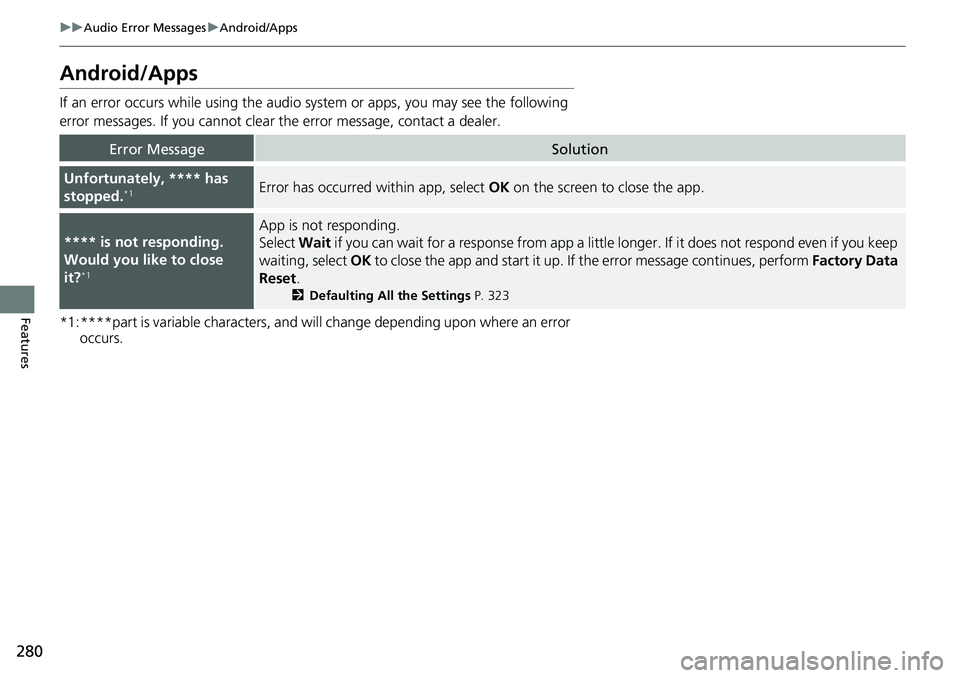
If an error occurs while using the audio system or apps, you may see the following
error messages. If you cannot clear the error message, contact a dealer.
*1:****part is variable characters, and will change depending upon where an error occurs.
Error MessageSolution
Unfortunately, **** has
stopped.*1Error has occurred within app, select OK on the screen to close the app.
**** is not responding.
Would you like to close
it?
*1
App is not responding.
Select Wait if you can wait for a response from app a littl e longer. If it does not respond even if you keep
waiting, select OK to close the app and start it up. If the error message continues, perform Factory Data
Reset .
2Defaulting All the Settings P. 323
Page 303 of 598
301
uuCustomized Features u
Continued
Features
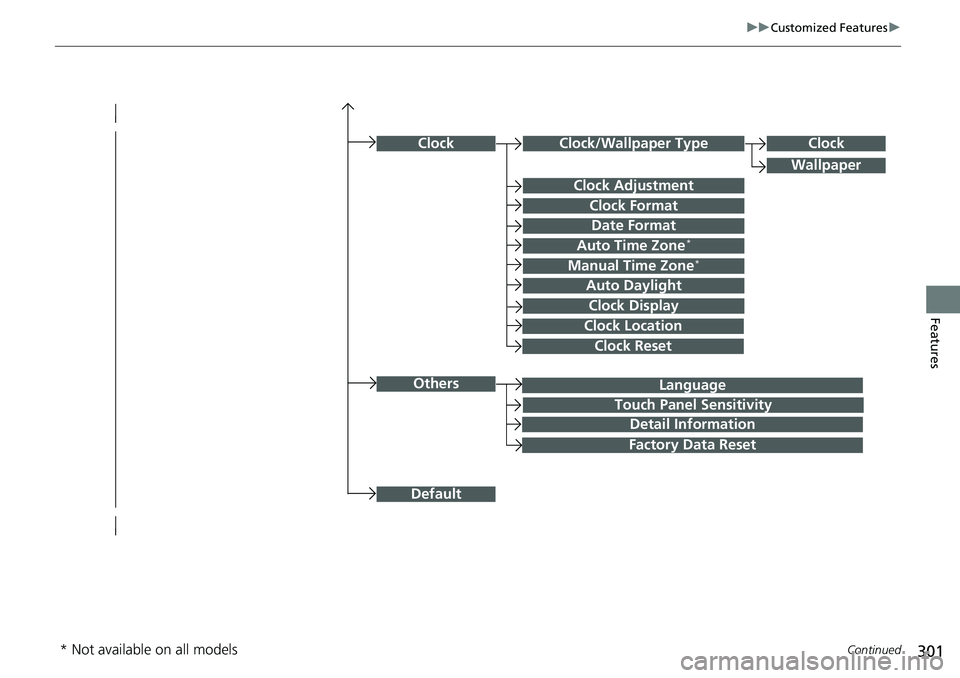
Language
Default
Others
Clock/Wallpaper Type
Date Format
Clock Adjustment
ClockClock
Wallpaper
Manual Time Zone*
Auto Daylight
Clock Display
Touch Panel Sensitivity
Clock Format
Auto Time Zone*
Detail Information
Factory Data Reset
Clock Reset
Clock Location
* Not available on all models
Page 304 of 598
302
uuCustomized Features u
Features
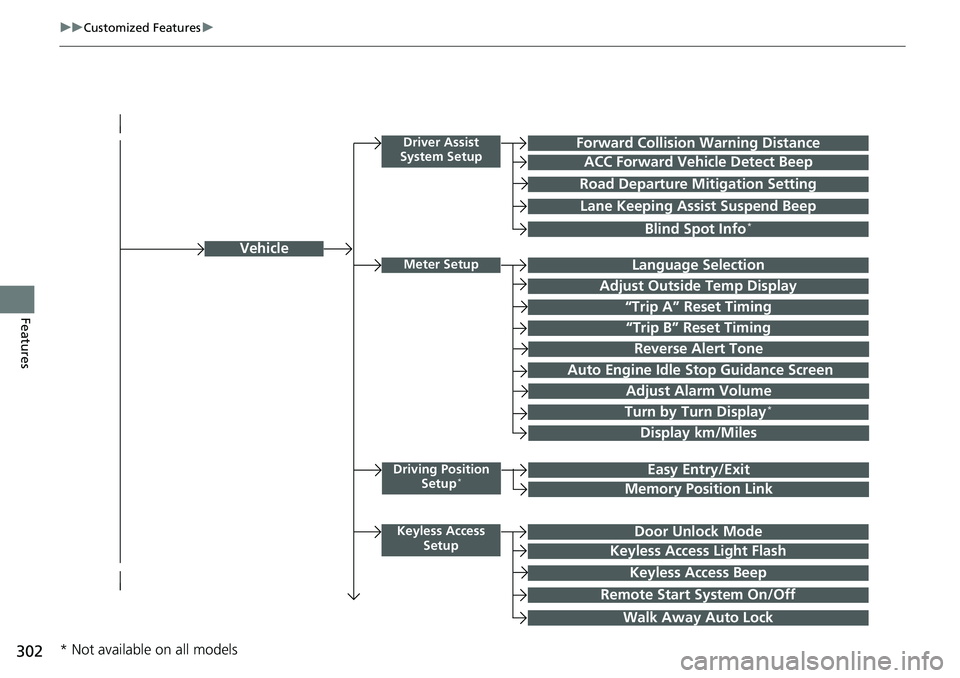
Vehicle
Driver Assist
System SetupForward Collision Warning Distance
ACC Forward Vehicle Detect Beep
Road Departure Mi tigation Setting
Lane Keeping Assist Suspend Beep
Blind Spot Info*
Meter SetupLanguage Selection
Adjust Outside Temp Display
“Trip A” Reset Timing
“Trip B” Reset Timing
Adjust Alarm Volume
Turn by Turn Display*
Display km/Miles
Driving Position
Setup*Easy Entry/Exit
Memory Position Link
Keyless Access SetupDoor Unlock Mode
Keyless Access Light Flash
Keyless Access Beep
Remote Start System On/Off
Walk Away Auto Lock
Reverse Alert Tone
Auto Engine Idle Stop Guidance Screen
* Not available on all models
Page 307 of 598
305
uuCustomized Features u
Continued
Features
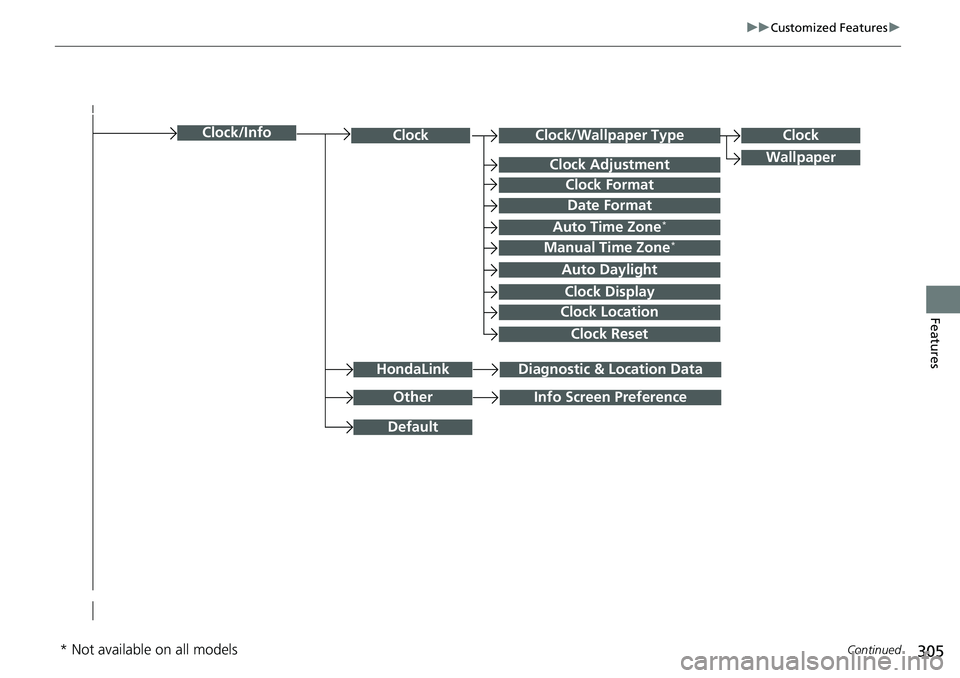
Clock/Wallpaper TypeClockClock
WallpaperClock Adjustment
Clock Format
Date Format
Auto Time Zone*
Manual Time Zone*
Auto Daylight
Clock Display
Clock Location
Clock Reset
OtherInfo Screen Preference
Default
Clock/Info
HondaLinkDiagnostic & Location Data
* Not available on all models
Page 313 of 598
311
uuCustomized Features u
Continued
Features
*1:Default SettingSetup
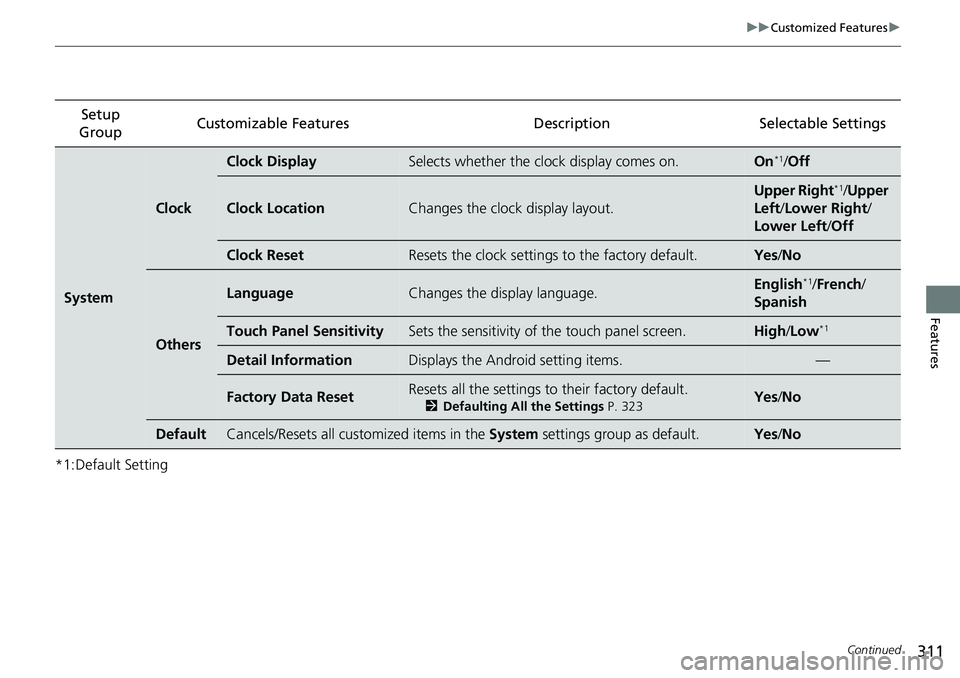
Group Customizable Features Description Selectable Settings
System
Clock
Clock DisplaySelects whether the clock display comes on.On*1/
Off
Clock LocationChanges the clock display layout.
Upper Right*1/Upper
Left/ Lower Right/
Lower Left /Off
Clock ResetResets the clock settings to the factory default.Yes /No
Others
LanguageChanges the display language.English*1/French /
Spanish
Touch Panel SensitivitySets the sensitivity of the touch panel screen.High/Low*1
Detail InformationDisplays the Android setting items.—
Factory Data ResetResets all the settings to their factory default.
2 Defaulting All the Settings P. 323Yes/No
DefaultCancels/Resets all customized items in the System settings group as default.Yes/No
Page 315 of 598
313
uuCustomized Features u
Continued
Features
*1:Default SettingSetup
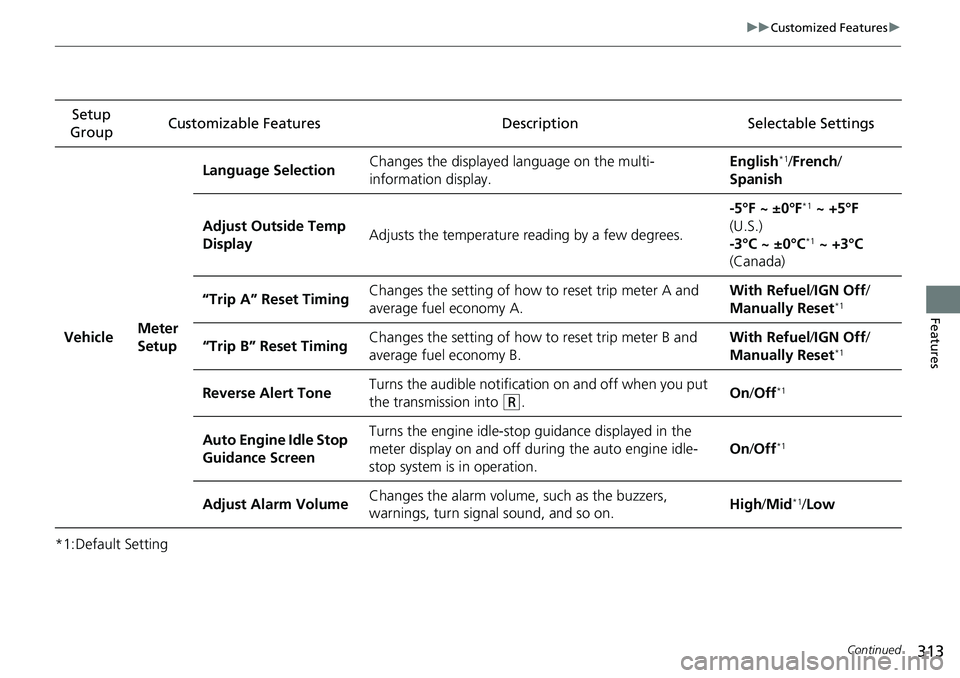
Group Customizable Features Description Selectable Settings
Vehicle Meter
SetupLanguage Selection
Changes the displayed language on the multi-
information display. English
*1/
French /
Spanish
Adjust Outside Temp
Display Adjusts the temperature reading by a few degrees. -5°F ~ ±0°F
*1
~ +5°F
(U.S.)
-3°C ~ ±0°C
*1 ~ +3°C
(Canada)
“Trip A” Reset Timing Changes the setting of how to reset trip meter A and
average fuel economy A. With Refuel
/IGN Off /
Manually Reset
*1
“Trip B” Reset Timing Changes the setting of how to reset trip meter B and
average fuel economy B. With Refuel
/IGN Off /
Manually Reset*1
Reverse Alert Tone Turns the audible notification on and off when you put
the transmission into (R. On
/Off*1
Auto Engine Idle Stop
Guidance Screen Turns the engine idle-stop guidance displayed in the
meter display on and off during the auto engine idle-
stop system is in operation.
On
/Off*1
Adjust Alarm Volume Changes the alarm volume,
such as the buzzers,
warnings, turn signal sound, and so on. High
/Mid*1/Low
Page 318 of 598
316
uuCustomized Features u
Features
*1:Default SettingSetup
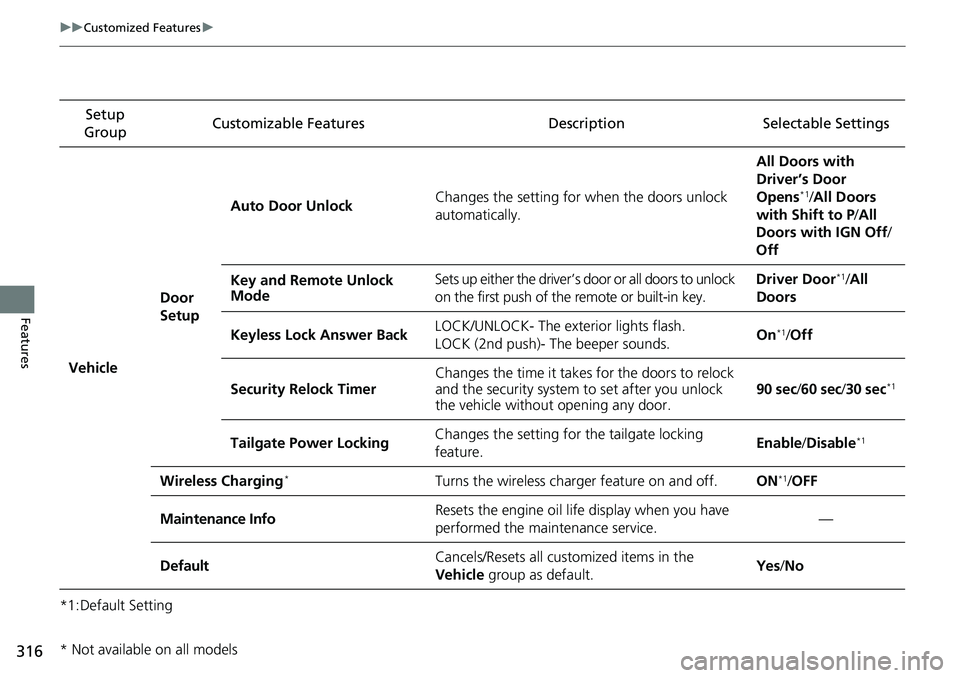
Group Customizable Features Descri
ption Selectable Settings
Vehicle
Door
SetupAuto Door Unlock
Changes the setting for when the doors unlock
automatically. All Doors with
Driver’s Door
Opens
*1/
All Doors
with Shift to P /All
Doors with IGN Off /
Off
Key and Remote Unlock
Mode Sets up either the driver’s door or all doors to unlock
on the first push of the remote or built-in key. Driver Door
*1/
All
Doors
Keyless Lock Answer Back LOCK/UNLOCK- The exterior lights flash.
LOCK (2nd push)- The beeper sounds. On
*1/
Off
Security Relock Timer Changes the time it takes for the doors to relock
and the security system to set after you unlock
the vehicle without opening any door.
90 sec
/60 sec /30 sec
*1
Tailgate Power Locking Changes the setting for the tailgate locking
feature. Enable
/Disable*1
Wireless Charging*Turns the wireless charger feature on and off.ON*1/OFF
Maintenance InfoResets the engine oil life display when you have
performed the maintenance service.—
DefaultCancels/Resets all cust omized items in the
Vehicle group as default.Yes/No
* Not available on all models
Page 320 of 598
318
uuCustomized Features u
Features
*1:Default SettingSetup
Group Customizable Features Descri
ption Selectable Settings
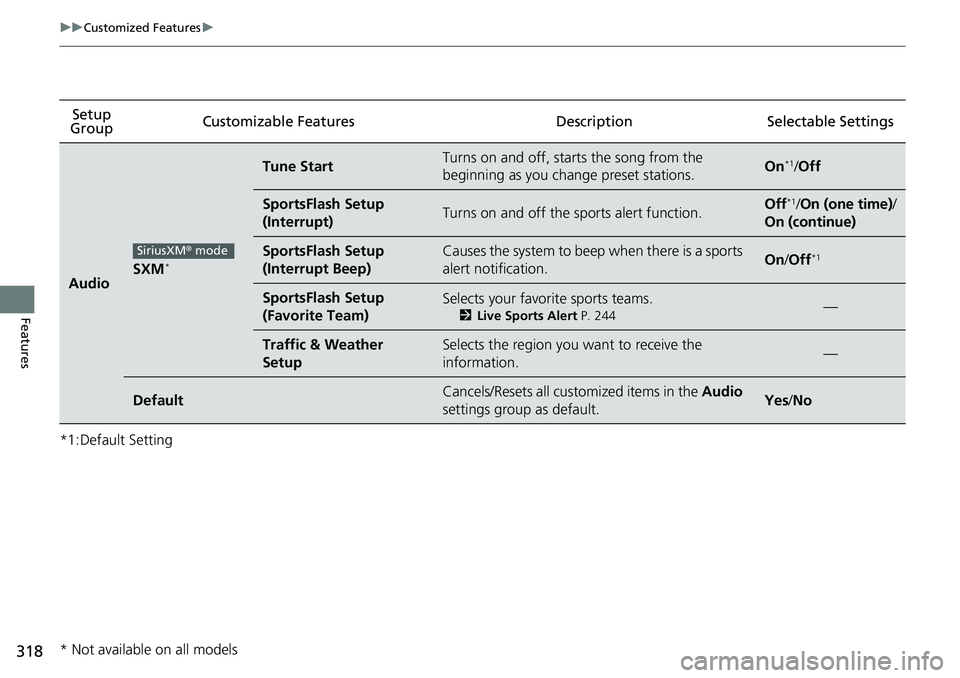
AudioSXM*
Tune StartTurns on and off, starts the song from the
beginning as you change preset stations.On*1/Off
SportsFlash Setup
(Interrupt)Turns on and off the sports alert function.Off*1/On (one time) /
On (continue)
SportsFlash Setup
(Interrupt Beep)Causes the system to beep when there is a sports
alert notification.On /Off*1
SportsFlash Setup
(Favorite Team)Selects your favorite sports teams.
2 Live Sports Alert P. 244—
Traffic & Weather
SetupSelects the region you want to receive the
information.—
DefaultCancels/Resets all customized items in the Audio
settings group as default.Yes /No
SiriusXM ® mode
* Not available on all models
Page 321 of 598
319
uuCustomized Features u
Continued
Features
*1:Default SettingSetup
Group Customizable Features Desc
ription Selectable Settings
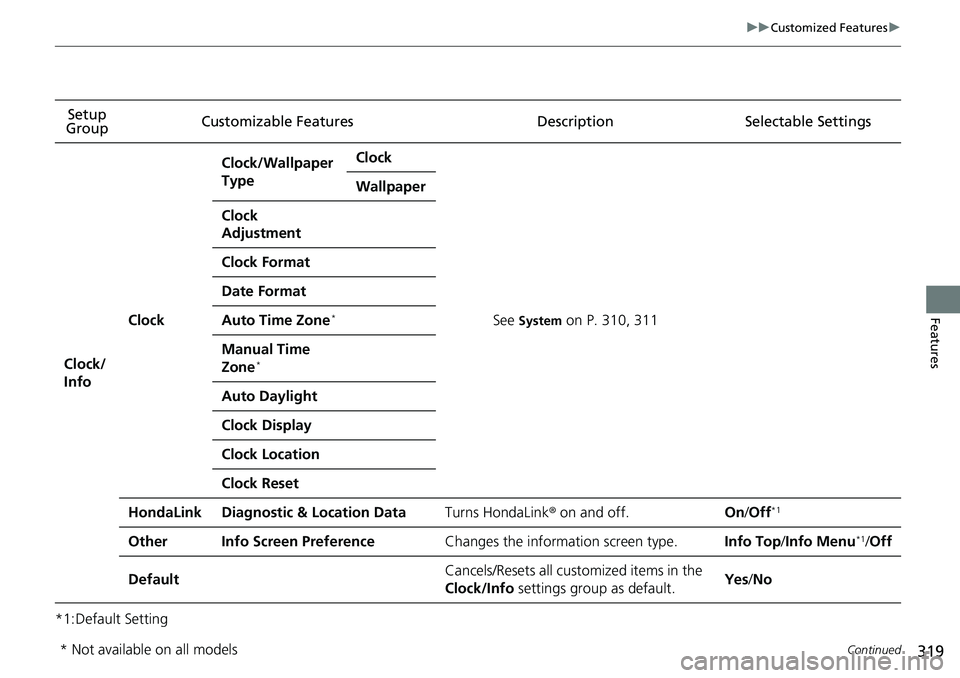
Clock/
Info
Clock
Clock/Wallpaper
TypeClock
See System on P. 310, 311
Wallpaper
Clock
Adjustment
Clock Format
Date Format
Auto Time Zone*
Manual Time
Zone*
Auto Daylight
Clock Display
Clock Location
Clock Reset
HondaLinkDiagnostic & Location DataTurns HondaLink® on and off.On/Off*1
OtherInfo Screen PreferenceChanges the information screen type.Info Top /Info Menu*1/Off
DefaultCancels/Resets all customized items in the
Clock/Info settings group as default.Yes/No
* Not available on all models