Hold HONDA RIDGELINE 2023 Owner's Guide
[x] Cancel search | Manufacturer: HONDA, Model Year: 2023, Model line: RIDGELINE, Model: HONDA RIDGELINE 2023Pages: 598, PDF Size: 12.34 MB
Page 218 of 598
uuAudio System Basic Operation uAudio/Information Screen
216
Features
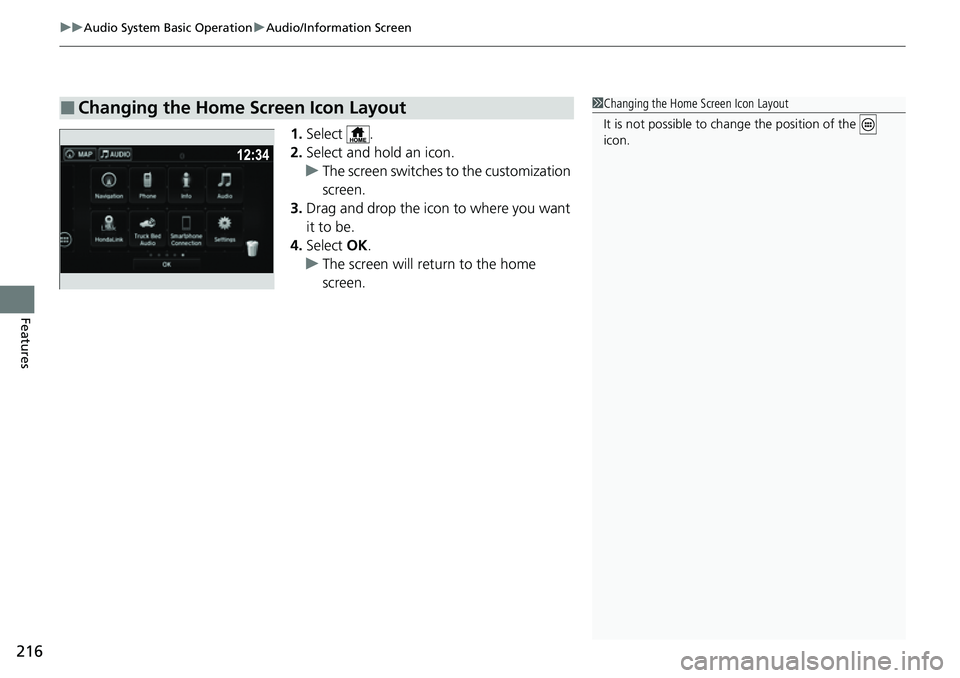
1. Select .
2. Select and hold an icon.
u The screen switches to the customization
screen.
3. Drag and drop the icon to where you want
it to be.
4. Select OK.
u The screen will return to the home
screen.
■Changing the Home Screen Icon Layout1Changing the Home Screen Icon Layout
It is not possible to cha nge the position of the
icon.
Page 222 of 598
uuAudio System Basic Operation uAudio/Information Screen
220
Features
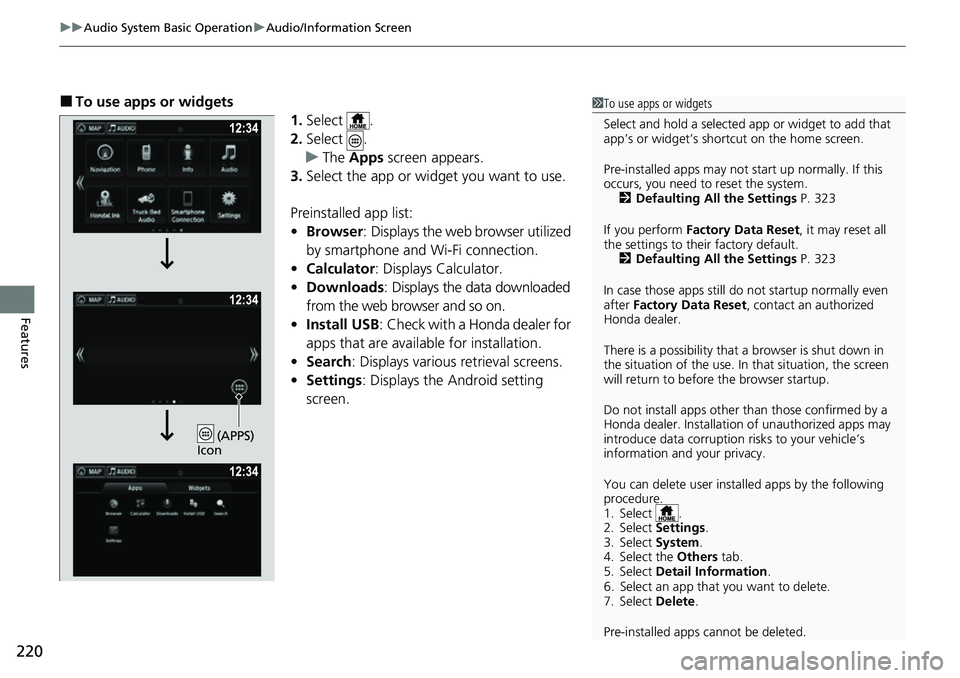
■To use apps or widgets
1.Select .
2. Select .
u The Apps screen appears.
3. Select the app or widget you want to use.
Preinstalled app list:
• Browser : Displays the web browser utilized
by smartphone and Wi-Fi connection.
• Calculator : Displays Calculator.
• Downloads : Displays the data downloaded
from the web browser and so on.
• Install USB : Check with a Honda dealer for
apps that are available for installation.
• Search : Displays various retrieval screens.
• Settings : Displays the Android setting
screen.1 To use apps or widgets
Select and hold a selected app or widget to add that
app’s or widget’s shortcut on the home screen.
Pre-installed apps may not start up normally. If this
occurs, you need to reset the system. 2 Defaulting All the Settings P. 323
If you perform Factory Data Reset , it may reset all
the settings to their factory default. 2 Defaulting All the Settings P. 323
In case those apps still do not startup normally even
after Factory Data Reset , contact an authorized
Honda dealer.
There is a possibility that a browser is shut down in
the situation of the use. In that situation, the screen
will return to before the browser startup.
Do not install apps other than those confirmed by a
Honda dealer. Installation of unauthorized apps may
introduce data corruption risks to your vehicle’s
information and your privacy.
You can delete user installed apps by the following
procedure.
1. Select .
2. Select Settings .
3. Select System .
4. Select the Others tab.
5. Select Detail Information .
6. Select an app that you want to delete.
7. Select Delete .
Pre-installed apps cannot be deleted.
(APPS)
Icon
Page 223 of 598
221
uuAudio System Basic Operation uAudio/Information Screen
Continued
Features
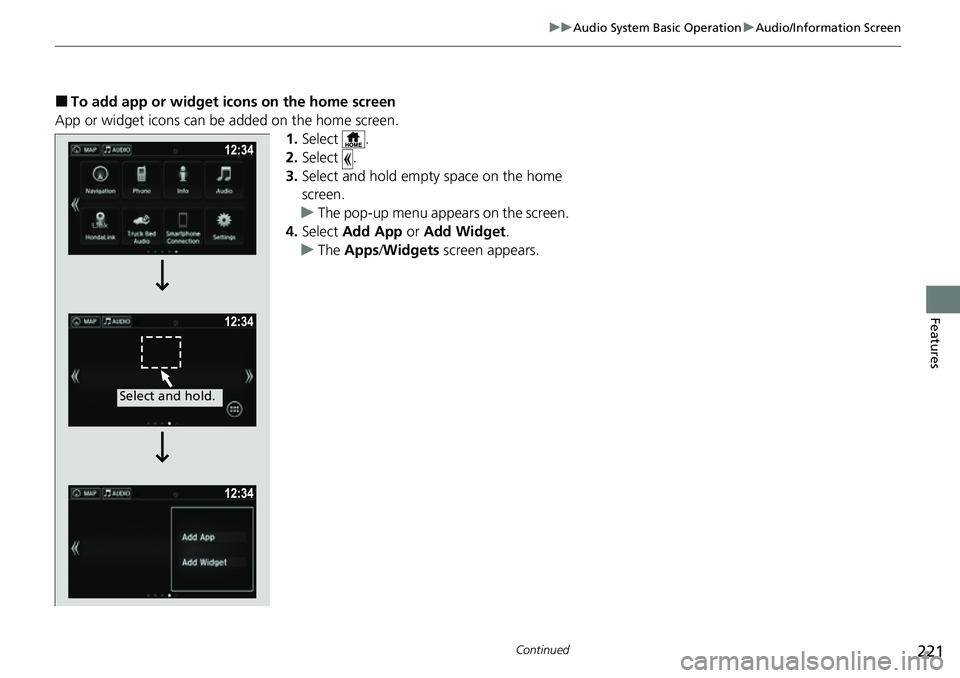
■To add app or widget icons on the home screen
App or widget icons can be added on the home screen. 1.Select .
2. Select .
3. Select and hold empty space on the home
screen.
u The pop-up menu appears on the screen.
4. Select Add App or Add Widget .
u The Apps /Widgets screen appears.
Select and hold.
Page 224 of 598
222
uuAudio System Basic Operation uAudio/Information Screen
Features
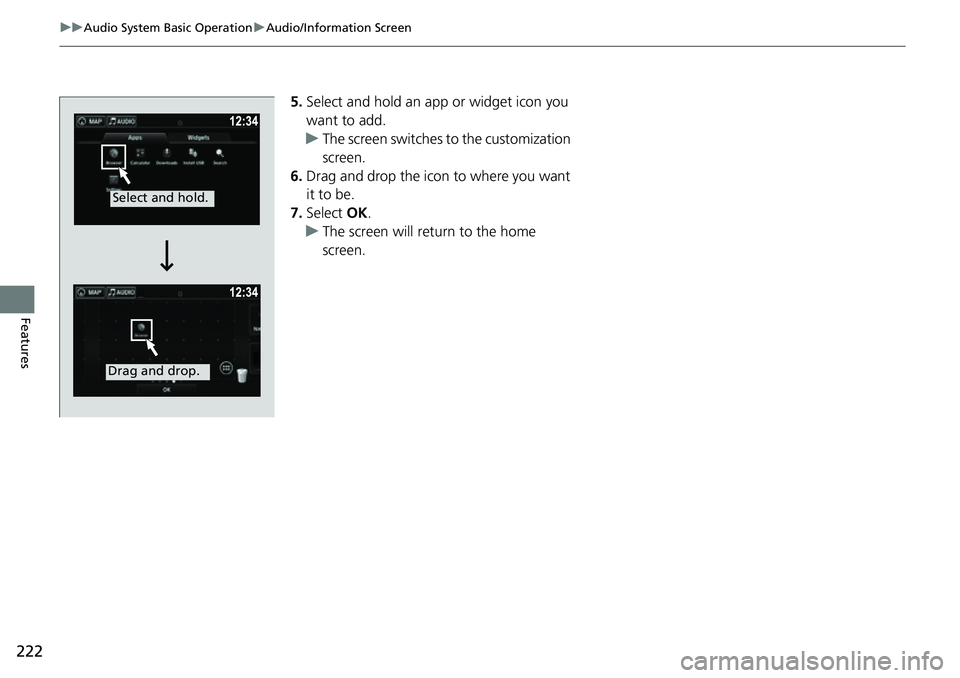
5. Select and hold an a pp or widget icon you
want to add.
u The screen switches to the customization
screen.
6. Drag and drop the icon to where you want
it to be.
7. Select OK.
u The screen will return to the home
screen.
Select and hold.
Drag and drop.
Page 225 of 598
223
uuAudio System Basic Operation uAudio/Information Screen
Continued
Features
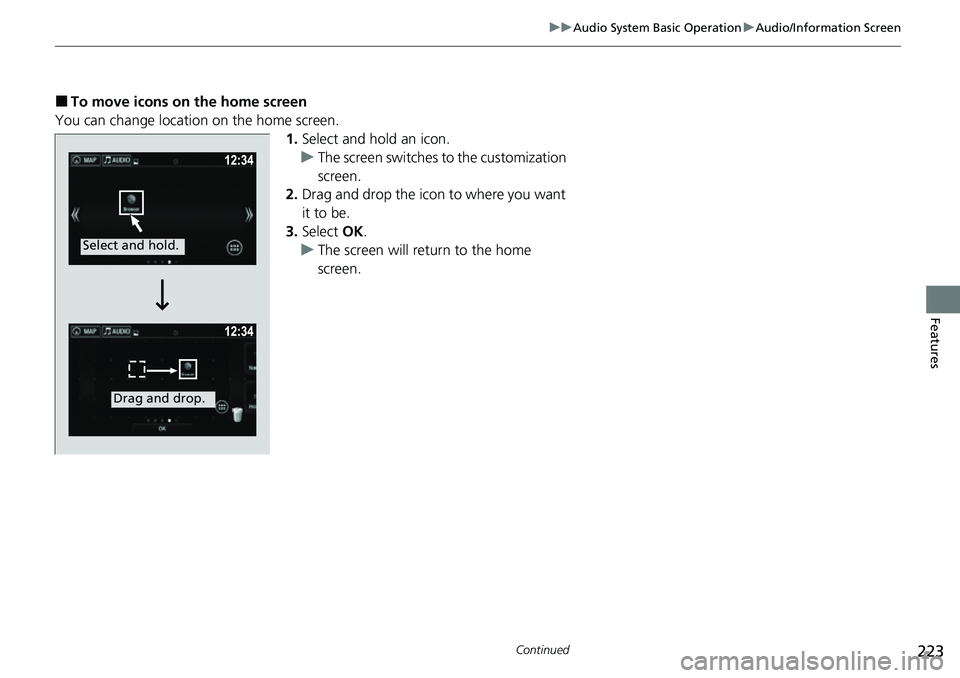
■To move icons on the home screen
You can change location on the home screen. 1.Select and hold an icon.
u The screen switches to the customization
screen.
2. Drag and drop the icon to where you want
it to be.
3. Select OK.
u The screen will return to the home
screen.
Select and hold.
Drag and drop.
Page 226 of 598
uuAudio System Basic Operation uAudio/Information Screen
224
Features
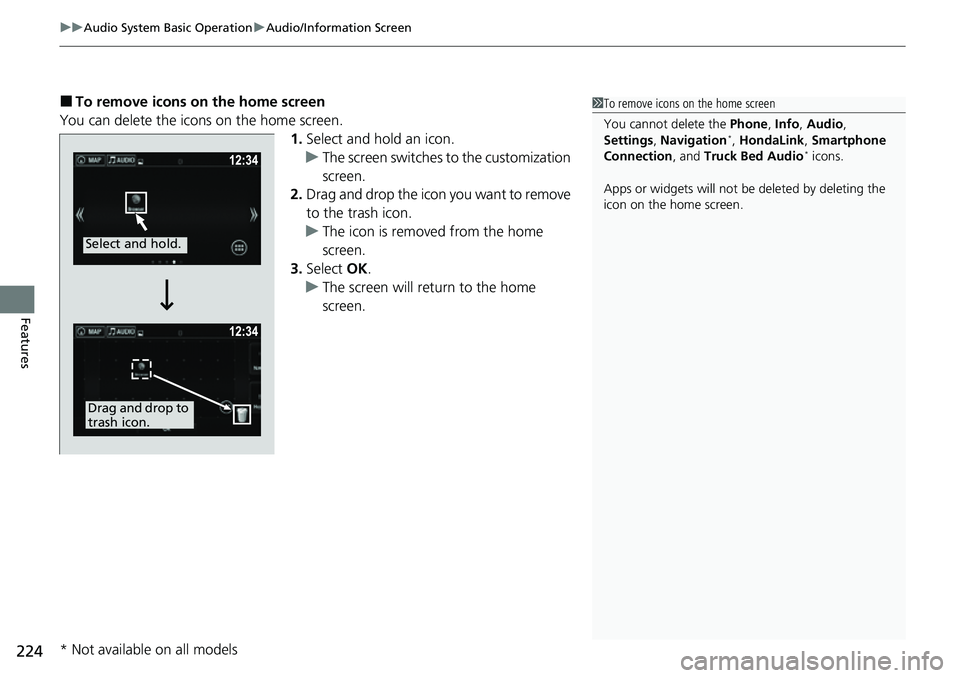
■To remove icons on the home screen
You can delete the icons on the home screen. 1.Select and hold an icon.
u The screen switches to the customization
screen.
2. Drag and drop the icon you want to remove
to the trash icon.
u The icon is removed from the home
screen.
3. Select OK.
u The screen will return to the home
screen.1To remove icons on the home screen
You cannot delete the Phone, Info, Audio ,
Settings , Navigation
*, HondaLink , Smartphone
Connection , and Truck Bed Audio* icons.
Apps or widgets will not be deleted by deleting the
icon on the home screen.
Select and hold.
Drag and drop to
trash icon.
* Not available on all models
Page 228 of 598
uuAudio System Basic Operation uAudio/Information Screen
226
Features
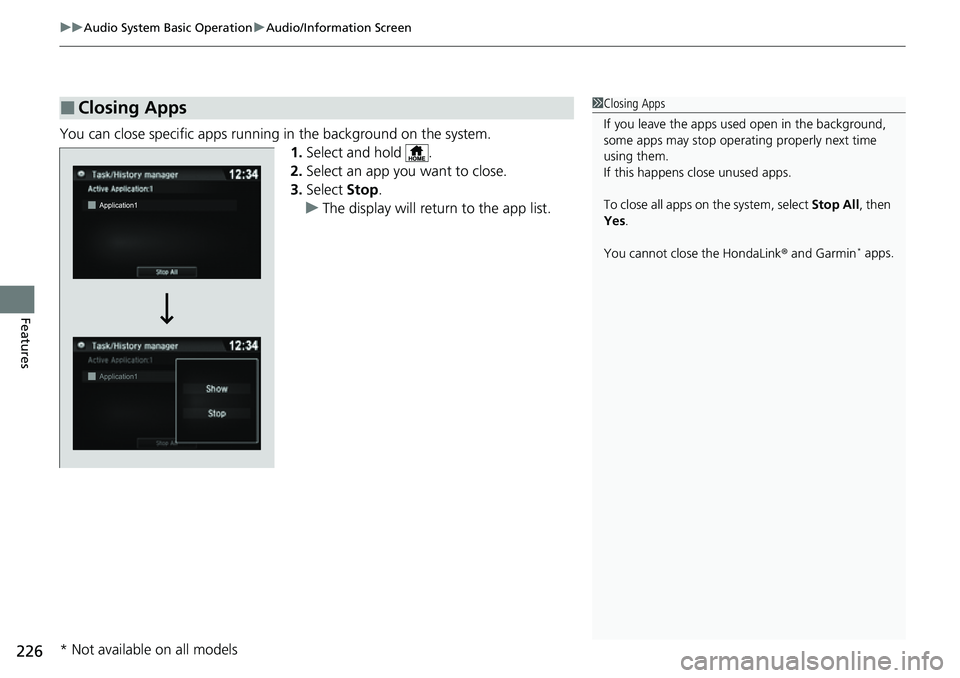
You can close specific apps running in the background on the system.
1.Select and hold .
2. Select an app you want to close.
3. Select Stop.
u The display will return to the app list.
■Closing Apps1Closing Apps
If you leave the apps used open in the background,
some apps may stop operati ng properly next time
using them.
If this happens close unused apps.
To close all apps on the system, select Stop All, then
Yes .
You cannot close the HondaLink ® and Garmin
* apps.
* Not available on all models
Page 238 of 598
236
uuAudio System Basic Operation uPlaying AM/FM Radio
Features
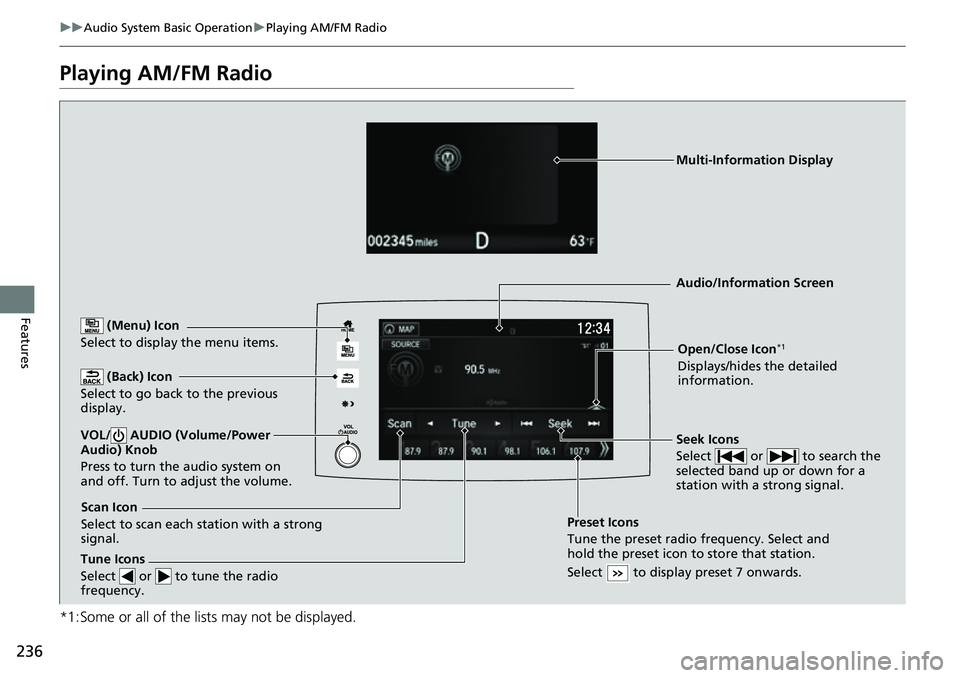
Playing AM/FM Radio
*1:Some or all of the lists may not be displayed.
(Back) Icon
Select to go back to the previous
display.
Seek Icons
Select or to search the
selected band up or down for a
station with a strong signal.VOL/ AUDIO (Volume/Power
Audio) Knob
Press to turn the audio system on
and off. Turn to adjust the volume.
Open/Close Icon*1
Displays/hides the detailed
information.
(Menu) Icon
Select to display the menu items.
Tune Icons
Select or to tune the radio
frequency.
Audio/Information Screen
Scan Icon
Select to scan each station with a strong
signal. Preset Icons
Tune the preset radio frequency. Select and
hold the preset icon to
store that station.
Select to display preset 7 onwards.
Multi-Information Display
Page 239 of 598
Continued237
uuAudio System Basic Operation uPlaying AM/FM Radio
Features
To store a station:
1. Tune to the selected station.
2. Select and hold the preset number for the station you want to store.
You can also store a preset station by the following procedure.
1. Tune to the selected station.
2. Select the open/close icon to display a list.
3. Select the Preset tab.
4. Select and hold the preset number for the station you want to store.
Lists the strongest stations on the selected band.
1. Select the open/close icon to display a list.
2. Select the Station List tab.
3. Select the station.
■Manual update
Updates your available st ation list at any time.
1. Select the open/close icon to display a list.
2. Select the Station List tab.
3. Select Refresh .
Samples each of the strongest stations on th e selected band for 10 seconds. To turn
off scan, select Cancel or .
■Preset Memory
■Station List
■Scan
1Preset Memory
The ST indicator appears on the display indicating
stereo FM broadcasts.
Stereo reproduction in AM is not available.
Switching the Audio Mode
Press the SOURCE button on the steering wheel or
select SOURCE on the screen.
2 Audio Remote Controls P. 209
You can store 6 AM stations and 12 FM stations into
preset memory.
HD Radio Technology manufactured under license
from iBiquity Digi tal Corporation. U.S. and Foreign
Patents. For patents, see http://dts.com/patents. HD
Radio, Artist Experience, and the HD, HD Radio, and
“ARC” logos are registered trademarks or
trademarks of iBiquity Di gital Corporation in the
United States and/ or other countries.
Models with HD RadioTM
Page 241 of 598
239
uuAudio System Basic Operation uPlaying SiriusXM ® Radio*
Continued
Features
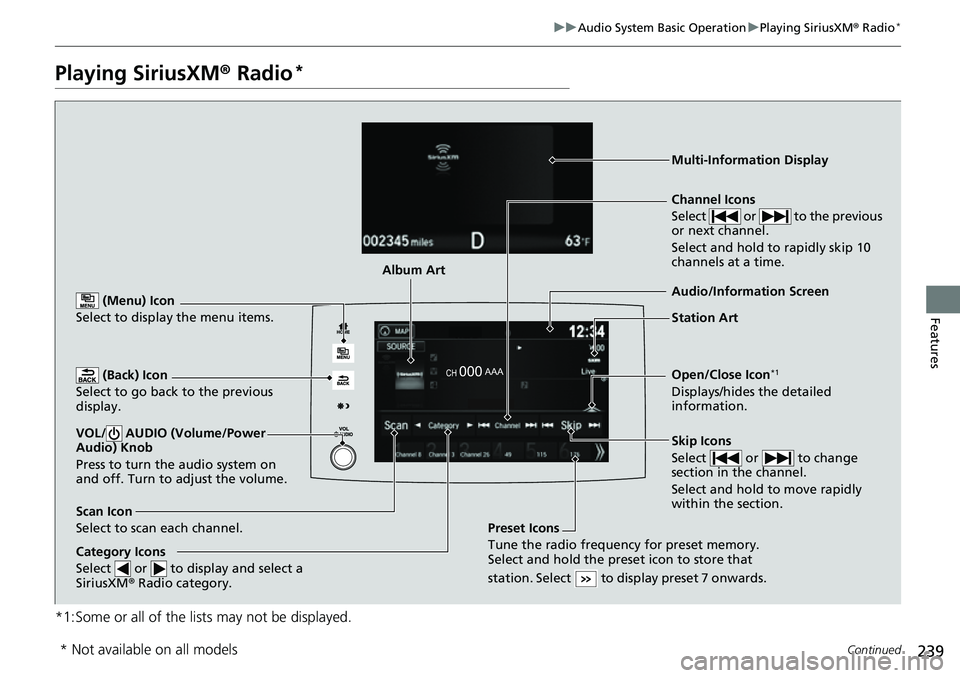
Playing SiriusXM® Radio*
*1:Some or all of the lists may not be displayed.
(Back) Icon
Select to go back to the previous
display.
Channel Icons
Select or to the previous
or next channel.
Select and hold to rapidly skip 10
channels at a time.
VOL/ AUDIO (Volume/Power
Audio) Knob
Press to turn the audio system on
and off. Turn to adjust the volume.
Open/Close Icon*1
Displays/hides the detailed
information.
(Menu) Icon
Select to display the menu items.
Category Icons
Select or to display and select a
SiriusXM ® Radio category.
Audio/Information Screen
Scan Icon
Select to scan each channel. Preset Icons
Tune the radio frequency for preset memory.
Select and hold the preset icon to store that
station. Select to display preset 7 onwards.
Skip Icons
Select or to change
section in the channel.
Select and hold to move rapidly
within the section.
Multi-Information Display
Album Art
Station Art
* Not available on all models