light HONDA RIDGELINE 2023 Repair Manual
[x] Cancel search | Manufacturer: HONDA, Model Year: 2023, Model line: RIDGELINE, Model: HONDA RIDGELINE 2023Pages: 598, PDF Size: 12.34 MB
Page 304 of 598
302
uuCustomized Features u
Features
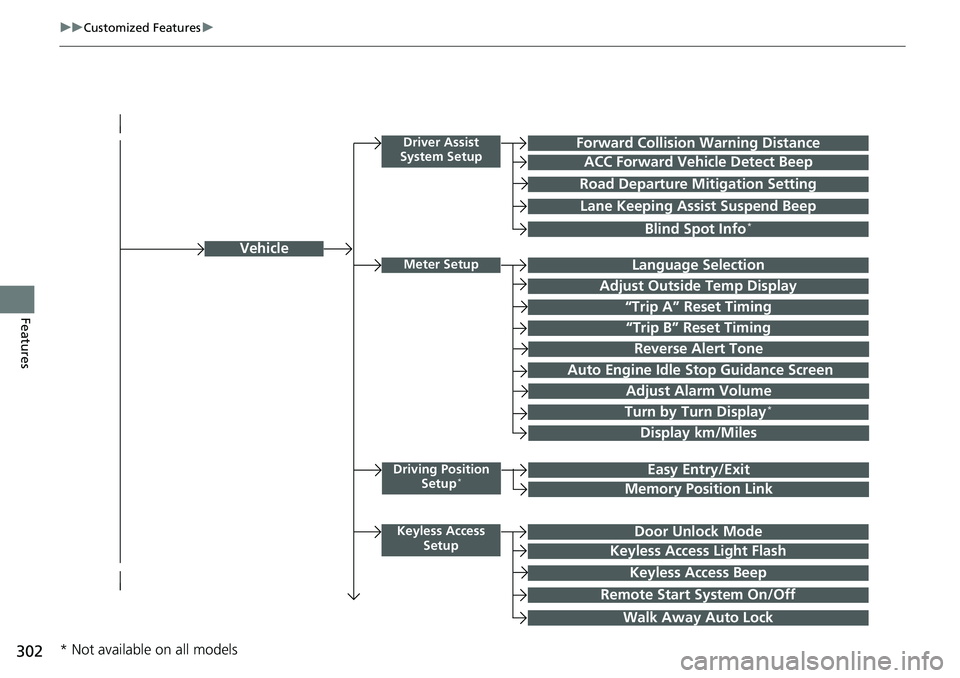
Vehicle
Driver Assist
System SetupForward Collision Warning Distance
ACC Forward Vehicle Detect Beep
Road Departure Mi tigation Setting
Lane Keeping Assist Suspend Beep
Blind Spot Info*
Meter SetupLanguage Selection
Adjust Outside Temp Display
“Trip A” Reset Timing
“Trip B” Reset Timing
Adjust Alarm Volume
Turn by Turn Display*
Display km/Miles
Driving Position
Setup*Easy Entry/Exit
Memory Position Link
Keyless Access SetupDoor Unlock Mode
Keyless Access Light Flash
Keyless Access Beep
Remote Start System On/Off
Walk Away Auto Lock
Reverse Alert Tone
Auto Engine Idle Stop Guidance Screen
* Not available on all models
Page 305 of 598
303
uuCustomized Features u
Continued
Features
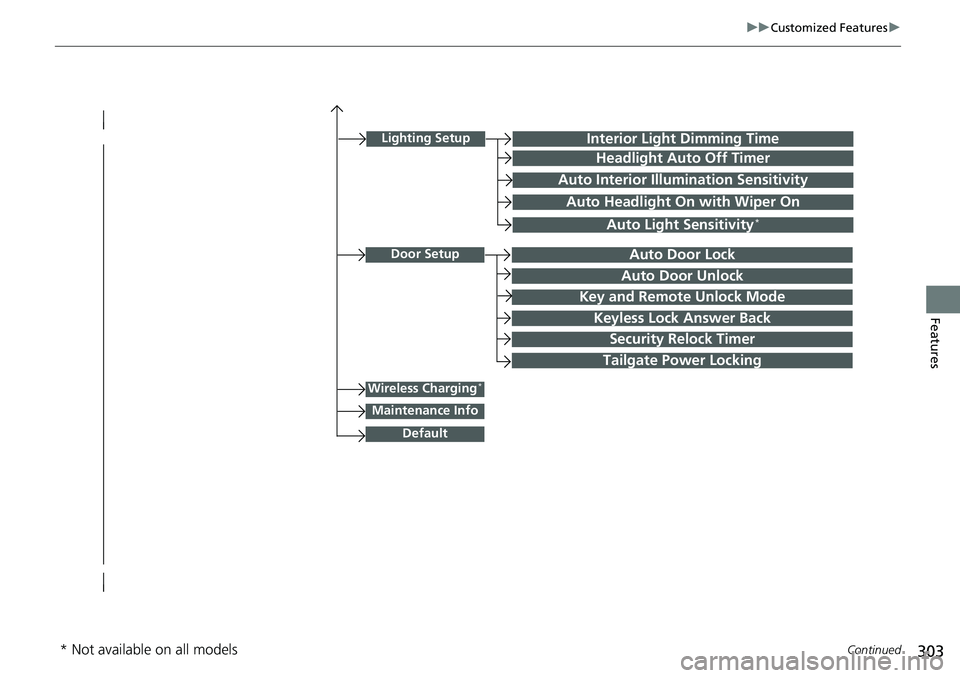
Lighting SetupInterior Light Dimming Time
Headlight Auto Off Timer
Auto Interior Illumination Sensitivity
Auto Headlight On with Wiper On
Auto Light Sensitivity*
Door SetupAuto Door Lock
Auto Door Unlock
Key and Remote Unlock Mode
Keyless Lock Answer Back
Security Relock Timer
Wireless Charging*
Default
Tailgate Power Locking
Maintenance Info
* Not available on all models
Page 307 of 598
305
uuCustomized Features u
Continued
Features
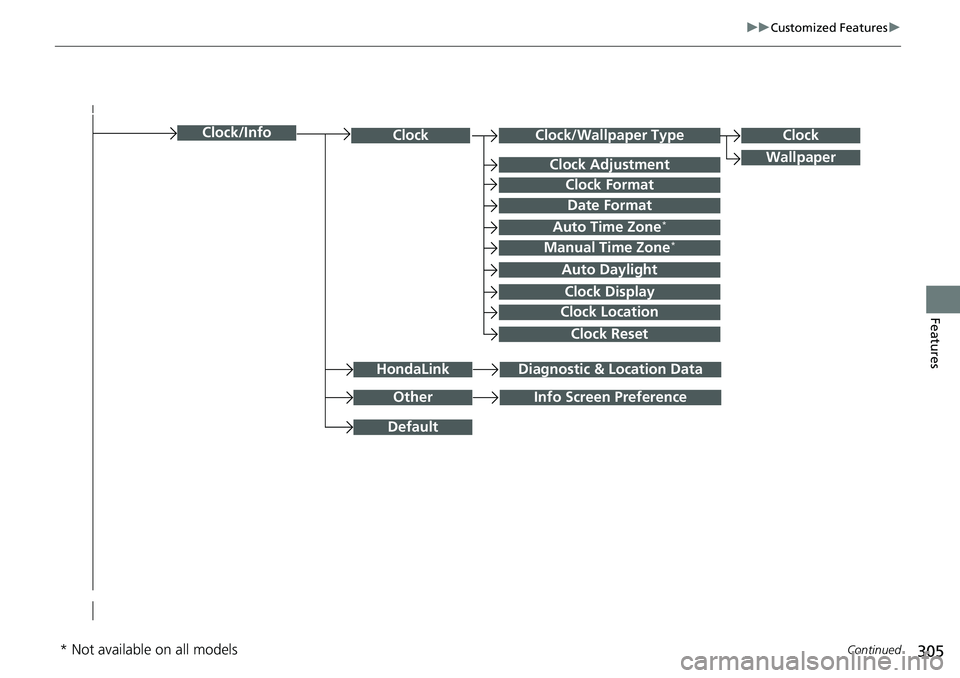
Clock/Wallpaper TypeClockClock
WallpaperClock Adjustment
Clock Format
Date Format
Auto Time Zone*
Manual Time Zone*
Auto Daylight
Clock Display
Clock Location
Clock Reset
OtherInfo Screen Preference
Default
Clock/Info
HondaLinkDiagnostic & Location Data
* Not available on all models
Page 312 of 598
310
uuCustomized Features u
Features
*1:Default SettingSetup
Group Customizable Featur
es Description Sel ectable Settings
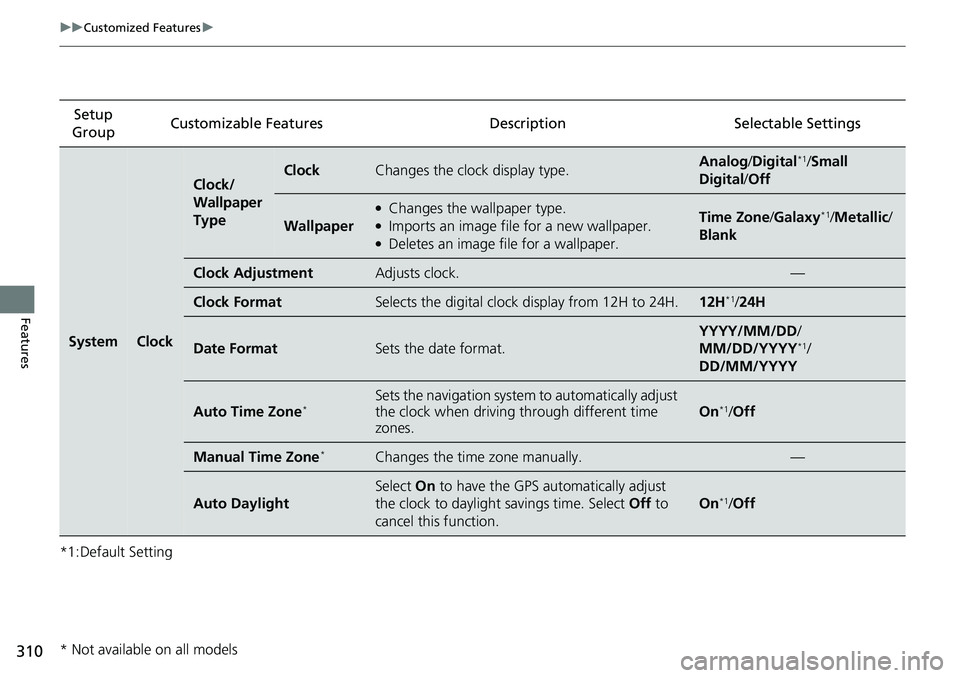
SystemClock
Clock/
Wallpaper
TypeClockChanges the clock display type.Analog/Digital*1/Small
Digital /Off
Wallpaper
●Changes the wallpaper type.●Imports an image file for a new wallpaper.●Deletes an image file for a wallpaper.
Time Zone /Galaxy*1/Metallic /
Blank
Clock AdjustmentAdjusts clock.—
Clock FormatSelects the digital clock display from 12H to 24H.12H*1/ 24H
Date FormatSets the date format.
YYYY/MM/DD/
MM/DD/YYYY*1/
DD/MM/YYYY
Auto Time Zone*Sets the navigation system to automatically adjust
the clock when driving through different time
zones.
On*1/ Off
Manual Time Zone*Changes the time zone manually.—
Auto Daylight
Select On to have the GPS automatically adjust
the clock to daylight savings time. Select Off to
cancel this function.
On*1/ Off
* Not available on all models
Page 316 of 598
314
uuCustomized Features u
Features
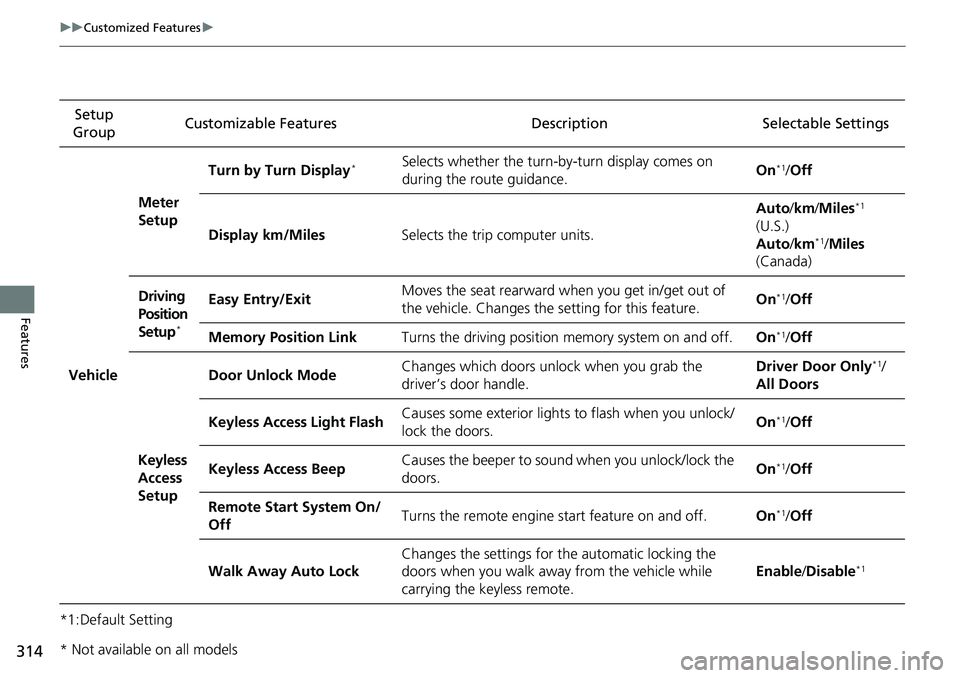
*1:Default SettingSetup
Group Customizable Features Description Selectable Settings
Vehicle
Meter
SetupTurn by Turn Display
*Selects whether the turn-b
y-turn display comes on
during the route guidance. On*1/
Off
Display km/Miles Selects the trip computer units. Auto
/km /Miles
*1
(U.S.)
Auto /km*1/Miles
(Canada)
Driving
Position
Setup
*
Easy Entry/Exit Moves the seat rearward wh
en you get in/get out of
the vehicle. Changes the setting for this feature. On*1/
Off
Memory Position Link Turns the driving position memory system on and off. On
*1/Off
Keyless
Access
Setup Door Unlock Mode
Changes which doors unlock when you grab the
driver’s door handle. Driver Door Only
*1/
All Doors
Keyless Access Light FlashCauses some exterior lights to flash when you unlock/
lock the doors. On
*1/
Off
Keyless Access Beep Causes the beeper to sou
nd when you unlock/lock the
doors. On
*1/
Off
Remote Start System On/
Off Turns the remote engine start feature on and off.
On
*1/Off
Walk Away Auto Lock Changes the settings for the automatic locking the
doors when you walk away
from the vehicle while
carrying the keyless remote. Enable
/Disable
*1
* Not available on all models
Page 317 of 598
315
uuCustomized Features u
Continued
Features
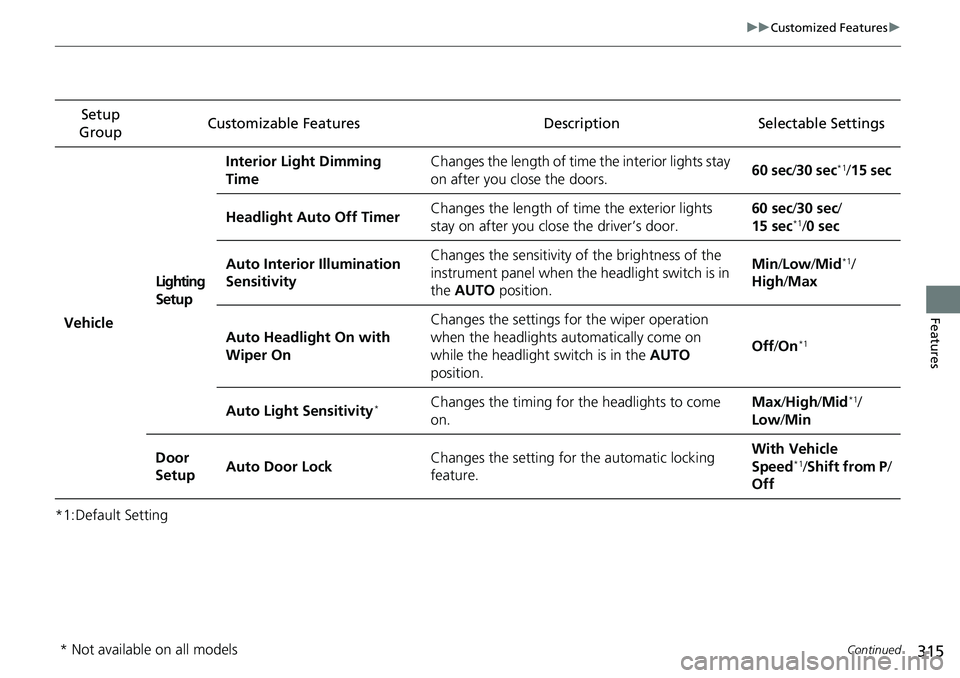
*1:Default SettingSetup
Group Customizable Features Description Selectable Settings
VehicleLighting
SetupInterior Light Dimming
Time
Changes the length of time the interior lights stay
on after you close the doors.
60 sec
/30 sec
*1/15 sec
Headlight Auto Off Timer Changes the length of time the exterior lights
stay on after you close the driver’s door. 60 sec/
30 sec/
15 sec
*1/ 0 sec
Auto Interior Illumination
Sensitivity Changes the sensitivity of the brightness of the
instrument panel when the headlight switch is in
the
AUTO position. Min
/Low /Mid
*1/
High /Max
Auto Headlight On with
Wiper On Changes the settings fo
r the wiper operation
when the headlights automatically come on
while the headlight switch is in the AUTO
position. Off
/On
*1
Auto Light Sensitivity*Changes the timing for the headlights to come
on. Max
/High /Mid*1/
Low /Min
Door
Setup Auto Door Lock Changes the setting for the automatic locking
feature. With Ve
hicle
Speed
*1/ Shift from P /
Off
* Not available on all models
Page 318 of 598
316
uuCustomized Features u
Features
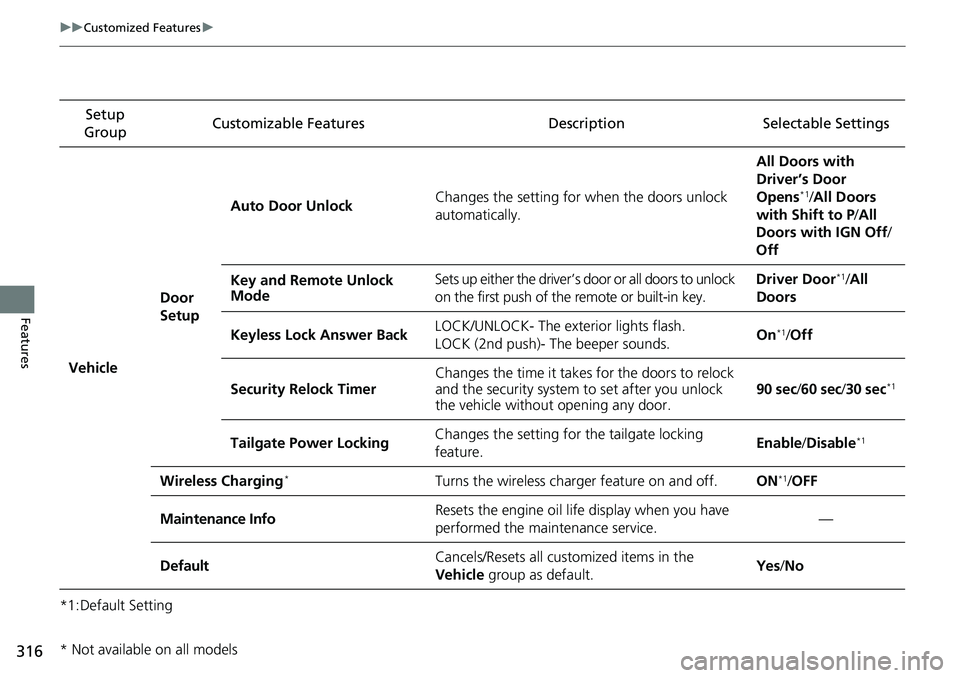
*1:Default SettingSetup
Group Customizable Features Descri
ption Selectable Settings
Vehicle
Door
SetupAuto Door Unlock
Changes the setting for when the doors unlock
automatically. All Doors with
Driver’s Door
Opens
*1/
All Doors
with Shift to P /All
Doors with IGN Off /
Off
Key and Remote Unlock
Mode Sets up either the driver’s door or all doors to unlock
on the first push of the remote or built-in key. Driver Door
*1/
All
Doors
Keyless Lock Answer Back LOCK/UNLOCK- The exterior lights flash.
LOCK (2nd push)- The beeper sounds. On
*1/
Off
Security Relock Timer Changes the time it takes for the doors to relock
and the security system to set after you unlock
the vehicle without opening any door.
90 sec
/60 sec /30 sec
*1
Tailgate Power Locking Changes the setting for the tailgate locking
feature. Enable
/Disable*1
Wireless Charging*Turns the wireless charger feature on and off.ON*1/OFF
Maintenance InfoResets the engine oil life display when you have
performed the maintenance service.—
DefaultCancels/Resets all cust omized items in the
Vehicle group as default.Yes/No
* Not available on all models
Page 321 of 598
319
uuCustomized Features u
Continued
Features
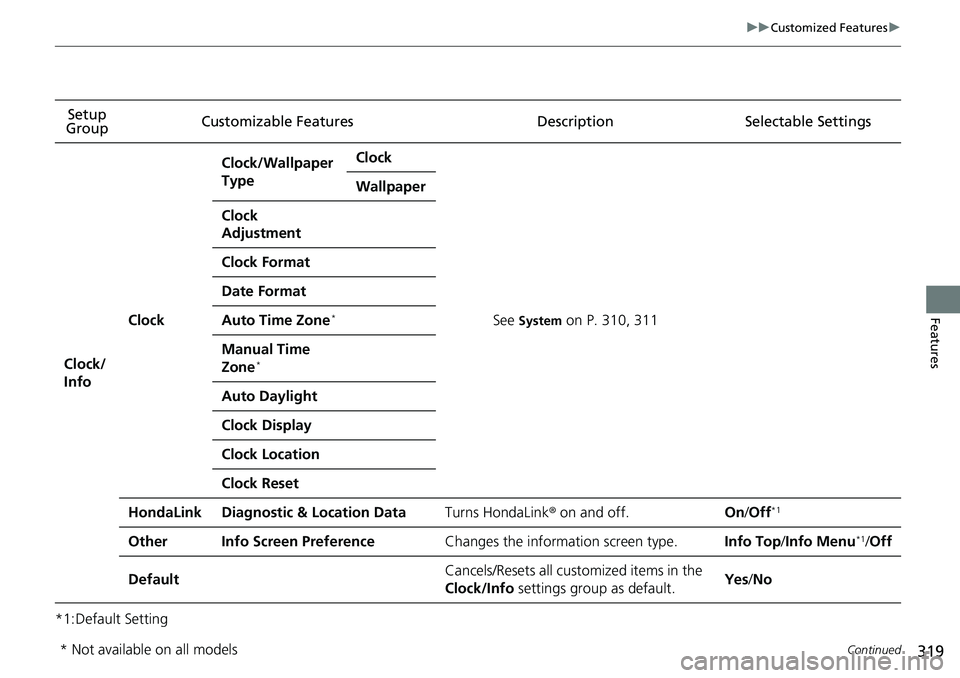
*1:Default SettingSetup
Group Customizable Features Desc
ription Selectable Settings
Clock/
Info
Clock
Clock/Wallpaper
TypeClock
See System on P. 310, 311
Wallpaper
Clock
Adjustment
Clock Format
Date Format
Auto Time Zone*
Manual Time
Zone*
Auto Daylight
Clock Display
Clock Location
Clock Reset
HondaLinkDiagnostic & Location DataTurns HondaLink® on and off.On/Off*1
OtherInfo Screen PreferenceChanges the information screen type.Info Top /Info Menu*1/Off
DefaultCancels/Resets all customized items in the
Clock/Info settings group as default.Yes/No
* Not available on all models
Page 326 of 598
324
Features
HomeLink® Universal Transceiver
The HomeLink ® Universal Transceiver can be pr ogrammed to operate up to three
remote controlled devices around your home , such as garage doors, lighting, or
home security systems.
Refer to the safety information that came wi th your garage door opener to test that
the safety features are functioning properly. If you do not have the safety
information, contac t the manufacturer.
Before programming HomeLink, make sure th at people and objects are out of the
way of the garage or gate to prevent potential injury or damage.
When programming a garage door opener, park just outside the garage door’s path.
■Important Safety Precautions
1HomeLink ® Universal Transceiver
Before programming HomeLi nk to operate a garage
door opener, confirm that the opener has an external
entrapment protection system , such as an “electronic
eye,” or other safety and reverse stop features. If it
does not, HomeLink may not be able to operate it.
Page 328 of 598
uuHomeLink ® Universal Transceiver uTraining HomeLink
326
Features
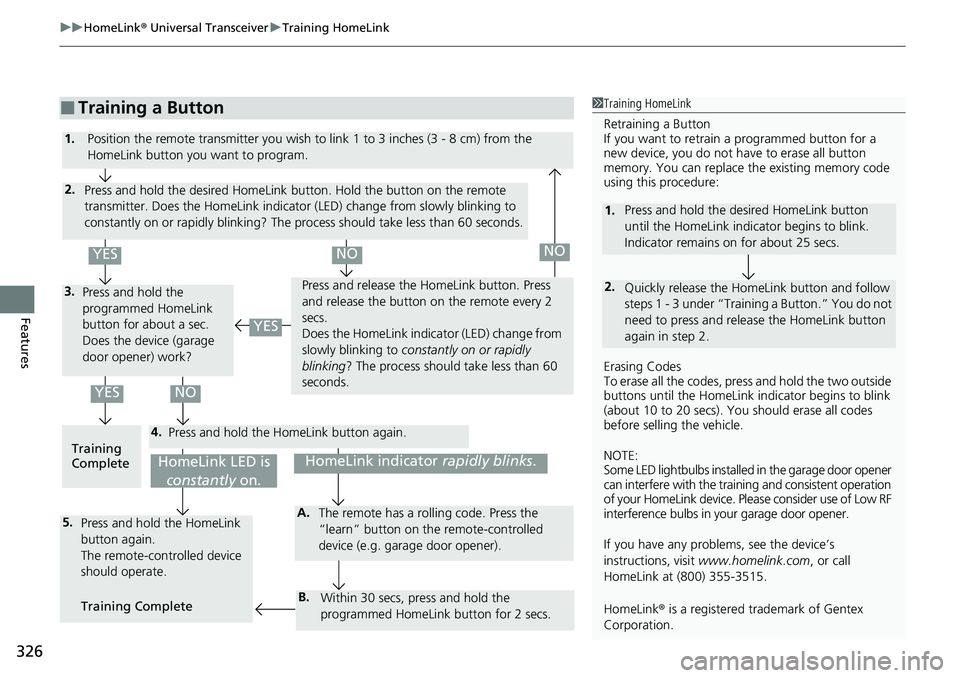
■Training a Button1Training HomeLink
Retraining a Button
If you want to retrain a programmed button for a
new device, you do not ha ve to erase all button
memory. You can replace the existing memory code
using this procedure:
Erasing Codes
To erase all the codes, press and hold the two outside
buttons until the HomeLink i ndicator begins to blink
(about 10 to 20 secs). You should erase all codes
before selling the vehicle.
NOTE:
Some LED lightbulbs installed in the garage door opener
can interfere with the traini ng and consistent operation
of your HomeLink device. Pl ease consider use of Low RF
interference bulbs in your garage door opener.
If you have any problems, see the device’s
instructions, visit www.homelink.com , or call
HomeLink at (800) 355-3515.
HomeLink® is a registered tra demark of Gentex
Corporation.
2.
1. Press and hold the desired HomeLink button
until the HomeLink indi
cator begins to blink.
Indicator remains on for about 25 secs.
Quickly release the Home Link button and follow
steps 1 - 3 under “Training a Button.” You do not
need to press and rel ease the HomeLink button
again in step 2.
4.
3.
2.
5.A.
B.
1. Position the remote transmitter you wish to link 1 to 3 inches (3 - 8 cm) from the
HomeLink button you want to program.
Press and hold the desired HomeLink button. Hold the button on the remote
transmitter. Does the HomeLink indicato r (LED) change from slowly blinking to
constantly on or rapidly blinking? The process should take less than 60 seconds.
Press and hold the
programmed HomeLink
button for about a sec.
Does the device (garage
door opener) work? Press and release the Ho
meLink button. Press
and release the button on the remote every 2
secs.
Does the HomeLink indica tor (LED) change from
slowly blinking to constantly on or rapidly
blinking ? The process should take less than 60
seconds.
Training
Complete Press and hold the HomeLink button again.
Press and hold the HomeLink
button again.
The remote-controlled device
should operate.
Training Complete The remote has a ro
lling code. Press the
“learn” button on the remote-controlled
device (e.g. garage door opener).
Within 30 secs, press and hold the
programmed HomeLink button for 2 secs.
HomeLink indicator rapidly blinks.HomeLink LED is
constantly on.
YESNO
YES
YESNONO