Front seat HONDA RIDGELINE 2023 Owners Manual
[x] Cancel search | Manufacturer: HONDA, Model Year: 2023, Model line: RIDGELINE, Model: HONDA RIDGELINE 2023Pages: 598, PDF Size: 12.34 MB
Page 6 of 598
Contents
This owner’s manual should be considered a permanent part of the
vehicle and should remain with the vehicle when it is sold.
The Navigation Manual is available online at owners.honda.com
(U.S.) or honda.ca (Canada). If you are the first registered owner
of your vehicle, you may request a complimentary printed
copy of the Navigation Manual within the first six months of
vehicle purchase. To request a copy, visit owners.honda.com. In
Canada, please request a copy from your Honda dealer.
This owner’s manual covers all models of your vehicle. You may find
descriptions of equipment and features that are not on your
particular model.
Images throughout this owner’s ma nual (including the front cover)
represent features and equipment that are available on some, but
not all, models. Your particular mo del may not have some of these
features.
This owner’s manual is for vehicles sold in the United States and
Canada.
The information and specifications in cluded in this publication were
in effect at the time of approval for printing. Honda Motor Co., Ltd.
reserves the right, however, to discontinue or change specifications
or design at any time without notice and without incurring any
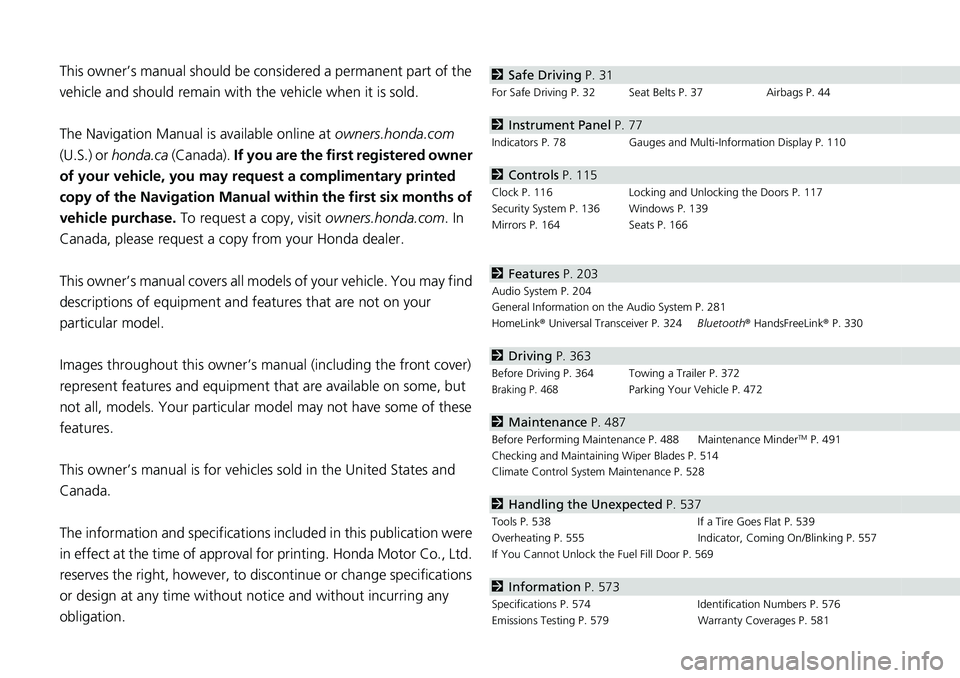
obligation.2 Safe Driving P. 31
For Safe Driving P. 32 Seat Belts P. 37 Airbags P. 44
2Instrument Panel P. 77
Indicators P. 78 Gauges and Multi-Information Display P. 110
2Controls P. 115
Clock P. 116 Locking and Unlocking the Doors P. 117
Security System P. 136 Windows P. 139
Mirrors P. 164 Seats P. 166
2Features P. 203
Audio System P. 204
General Information on the Audio System P. 281
HomeLink ® Universal Transceiver P. 324 Bluetooth® HandsFreeLink ® P. 330
2 Driving P. 363
Before Driving P. 364 Towing a Trailer P. 372
Braking P. 468Parking Your Vehicle P. 472
2Maintenance P. 487
Before Performing Maintenance P. 488 Maintenance MinderTM P. 491
Checking and Maintaining Wiper Blades P. 514
Climate Control System Maintenance P. 528
2Handling the Unexpected P. 537
Tools P. 538 If a Tire Goes Flat P. 539
Overheating P. 555 Indicator, Coming On/Blinking P. 557
If You Cannot Unlock the Fuel Fill Door P. 569
2 Information P. 573
Specifications P. 574 Identification Numbers P. 576
Emissions Testing P. 579 Warranty Coverages P. 581
Page 8 of 598
6
Quick Reference Guide
Quick Reference Guide
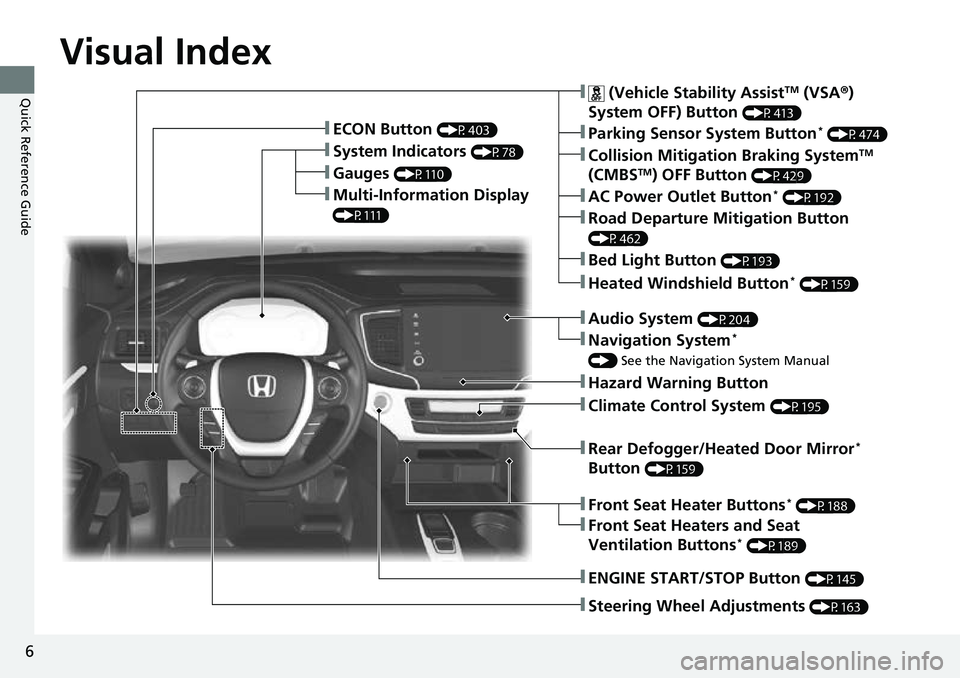
Visual Index
❚Gauges (P110)
❚Multi-Information Display
(P111)
❚System Indicators (P78)
❚ECON Button (P403)
❚Collision Mitigation Braking SystemTM
(CMBSTM) OFF Button (P429)
❚Heated Windshield Button* (P159)
❚Parking Sensor System Button* (P474)
❚Steering Wheel Adjustments (P163)
❚ENGINE START/STOP Button (P145)
❚AC Power Outlet Button* (P192)
❚Road Departure Mitigation Button
(P462)
❚ (Vehicle Stability AssistTM (VSA ®)
System OFF) Button
(P413)
❚Bed Light Button (P193)
❚Audio System (P204)
❚Navigation System*
() See the Navigation System Manual
❚Hazard Warning Button
❚Rear Defogger/Heated Door Mirror*
Button
(P159)
❚Climate Control System (P195)
❚Front Seat Heaters and Seat
Ventilation Buttons* (P189)
❚Front Seat Heater Buttons* (P188)
Page 10 of 598
Visual Index
8
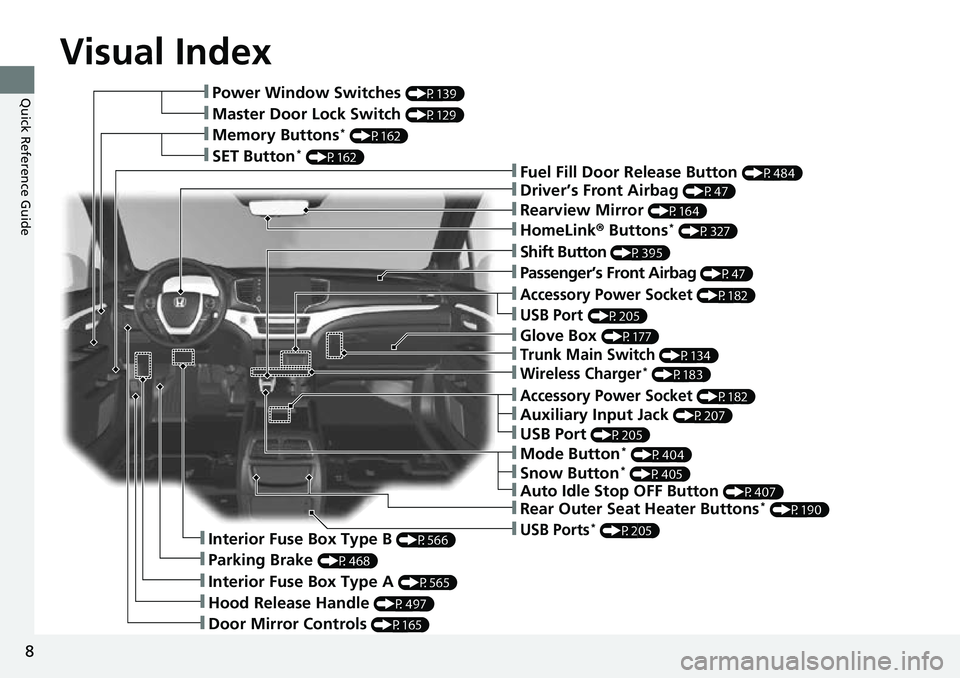
Quick Reference Guide❚Power Window Switches (P139)
❚Master Door Lock Switch (P129)
❚Memory Buttons* (P162)
❚SET Button* (P162)❚Fuel Fill Door Release Button (P484)
❚Driver’s Front Airbag (P47)
❚Shift Button (P395)
❚Auxiliary Input Jack (P207)
❚Parking Brake (P468)
❚Interior Fuse Box Type A (P565)
❚Hood Release Handle (P497)
❚Door Mirror Controls (P165)
❚Accessory Power Socket (P182)
❚USB Port (P205)
❚Auto Idle Stop OFF Button (P407)
❚Mode Button* (P404)
❚Trunk Main Switch (P134)
❚Interior Fuse Box Type B (P566)
❚Snow Button* (P405)
❚Wireless Charger* (P183)
❚Glove Box (P177)
❚USB Ports* (P205)
❚Accessory Power Socket (P182)
❚Passenger’s Front Airbag (P47)
❚Rearview Mirror (P164)
❚HomeLink® Buttons* (P327)
❚Rear Outer Seat Heater Buttons* (P190)
❚USB Port (P205)
Page 11 of 598
9
Quick Reference Guide
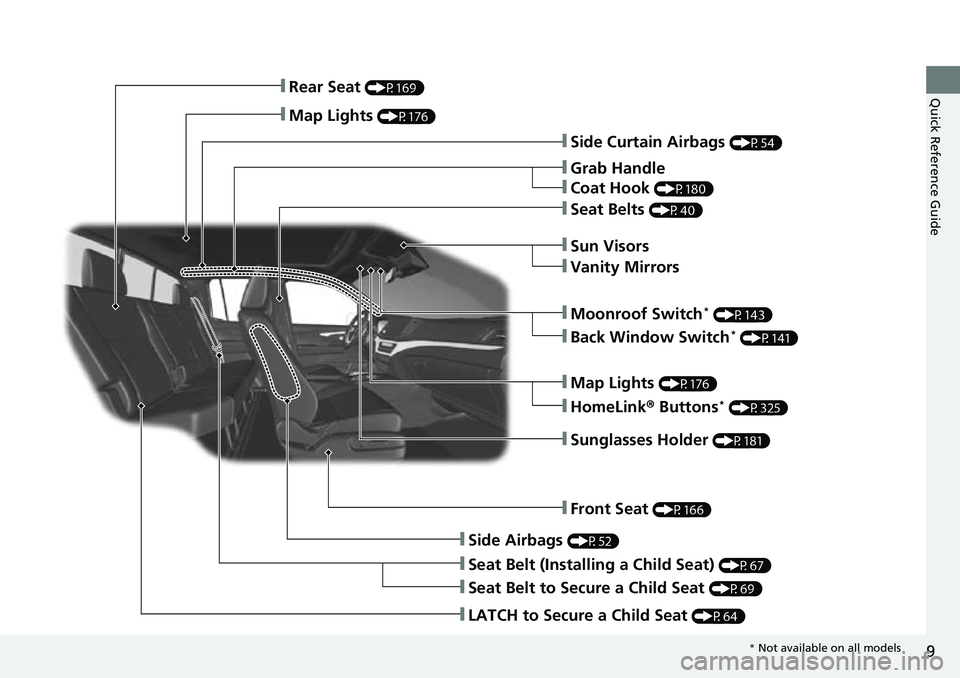
❚Side Curtain Airbags (P54)
❚Grab Handle
❚Coat Hook (P180)
❚Seat Belts (P40)
❚Sun Visors
❚Vanity Mirrors
❚Moonroof Switch* (P143)
❚Map Lights (P176)
❚HomeLink® Buttons* (P325)
❚Sunglasses Holder (P181)
❚Front Seat (P166)
❚Side Airbags (P52)
❚Seat Belt (Installing a Child Seat) (P67)
❚Seat Belt to Secure a Child Seat (P69)
❚LATCH to Secure a Child Seat (P64)
❚Rear Seat (P169)
❚Map Lights (P176)
❚Back Window Switch* (P141)
* Not available on all models
Page 15 of 598

13
Quick Reference Guide
Safe Driving (P31)
Airbags (P44)
●Your vehicle is fitted with airbags to help protect you and
your passengers during a moderate-to-severe collision.
Child Safety (P59)
●All children 12 and younger should be seated in the rear seat.●Smaller children should be properly restrained in a forward-facing child seat.●Infants must be properly restrained in a rear-facing child seat.
Exhaust Gas Hazard (P74)
●Your vehicle emits dangerous exhaust gases that contain carbon
monoxide. Do not run the engine in confined spaces where carbon
monoxide gas can accumulate.
Before Driving Checklist (P36)
●Before driving, check that the front seats, head restraints,
steering wheel, and mirrors have been properly adjusted.
Seat Belts (P37)
●Fasten your seat belt and sit upright well
back in the seat.
●Check that your passengers are wearing
their seat belts correctly.
Fasten your lap belt as
low as possible.
Page 30 of 598
28
Quick Reference Guide
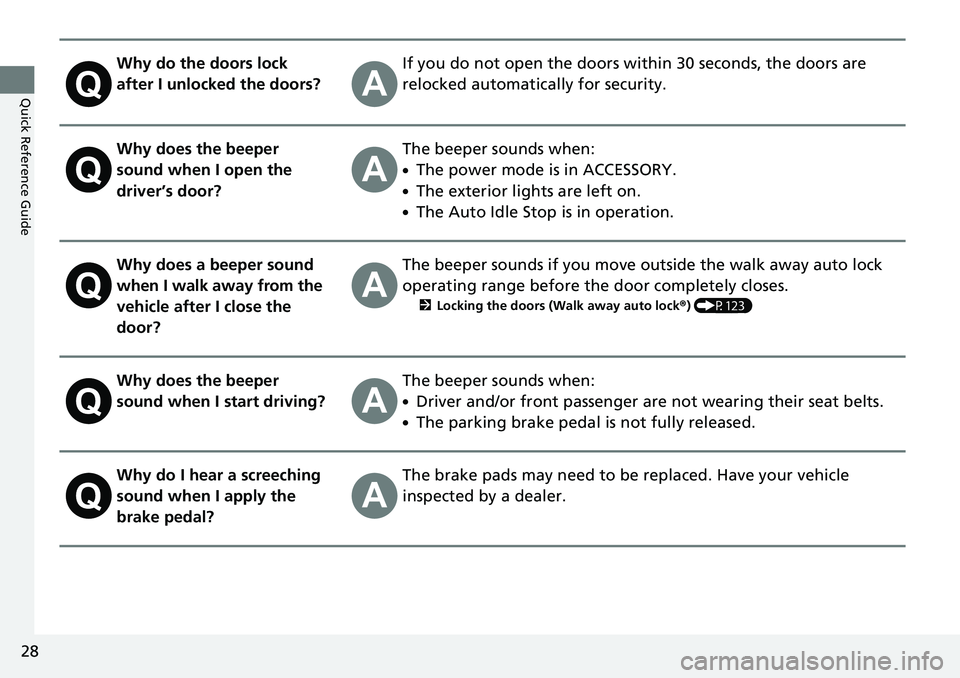
Why do the doors lock
after I unlocked the doors?If you do not open the doors within 30 seconds, the doors are
relocked automatically for security.
Why does the beeper
sound when I open the
driver’s door?The beeper sounds when:
●The power mode is in ACCESSORY.
●The exterior lights are left on.
●The Auto Idle Stop is in operation.
Why does a beeper sound
when I walk away from the
vehicle after I close the
door?The beeper sounds if you move outside the walk away auto lock
operating range before the door completely closes.
2Locking the doors (Walk away auto lock ®) (P123)
Why does the beeper
sound when I start driving?The beeper sounds when:
●Driver and/or front passenger are not wearing their seat belts.
●The parking brake pedal is not fully released.
Why do I hear a screeching
sound when I apply the
brake pedal?The brake pads may need to be replaced. Have your vehicle
inspected by a dealer.
Page 33 of 598
31
Safe Driving
You can find many safety recommendations throughout this chapter, and throughout this manual.
For Safe Driving
Important Safety Precautions.............. 32
Important Handling Information ......... 34
Your Vehicle’s Safety Features ............ 35
Safety Checklist ................................. 36
Seat Belts About Your Seat Belts ........................ 37
Fastening a Seat Belt .......................... 40
Seat Belt Inspection ............................ 43 Airbags
Airbag System Components ............... 44
Types of Airbags ................................ 47
Front Airbags (SRS) ............................ 47
Side Airbags....................................... 52
Side Curtain Airbags .......................... 54
Airbag System Indicators .................... 55
Airbag Care ....................................... 58 Child Safety
Protecting Child Passengers ............... 59
Safety of Infants and Small Children .... 61
Safety of Larger Children ................... 72
Exhaust Gas Hazard Carbon Monoxide Gas ....................... 74
Safety Labels Label Locations .................................. 75
Page 34 of 598
32
Safe Driving
For Safe Driving
The following pages explain your vehicle’s safety features and how to use them
properly. The safety precautions below are ones that we consider to be among the
most important.
Important Safety Precautions
■Always wear your seat belt
A seat belt is your best protection in all types of collisions. Airbags are designed to
supplement seat belts, not replace them. So even though your vehicle is equipped
with airbags, make sure you and your passengers always wear your seat belts, and
wear them properly.
■Restrain all children
Children ages 12 and under should ride properly restrained in a back seat, not the
front seat. Infants and small children shoul d be restrained in a child seat. Larger
children should use a booster seat and a lap/shoulder seat belt until they can use the
belt properly without a booster seat.
■Be aware of airbag hazards
While airbags can save lives, they can cause serious or fatal injuries to occupants
who sit too close to them, or are not prop erly restrained. Infants, young children,
and short adults are at the greatest risk. Be sure to follow all instructions and
warnings in this manual.
■Don’t drink and drive
Alcohol and driving don’t mix. Even one dr ink can reduce your ability to respond to
changing conditions, and your reaction time gets worse with every additional drink.
So don’t drink and drive, and don’t let your friends drink and drive, either.
1Important Safety Precautions
Some states, provinces and te rritories prohibit the use
of cell phones other than hands-free devices by the
driver while driving.
Page 37 of 598
35
uuFor Safe Driving uYour Vehicle’s Safety Features
Safe Driving
Your Vehicle’s Safety Features
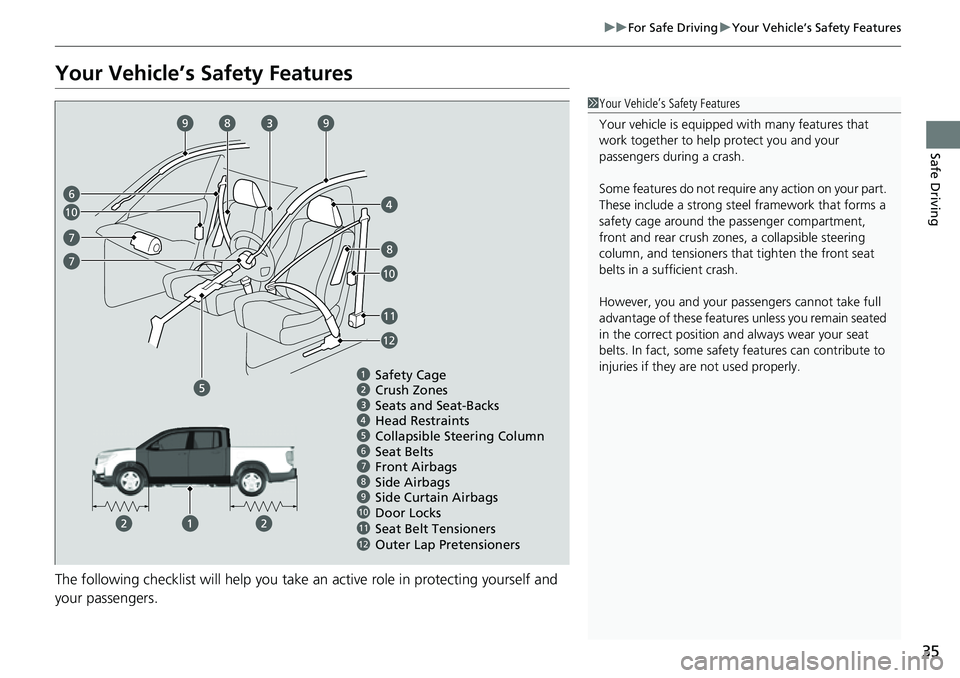
The following checklist will help you take an active role in protecting yourself and
your passengers.
1Your Vehicle’s Safety Features
Your vehicle is equipped wi th many features that
work together to help protect you and your
passengers during a crash.
Some features do not require any action on your part.
These include a strong steel framework that forms a
safety cage around the passenger compartment,
front and rear crush zone s, a collapsible steering
column, and tensioners that tighten the front seat
belts in a sufficient crash.
However, you and your passe ngers cannot take full
advantage of these features unless you remain seated
in the correct position and always wear your seat
belts. In fact, some safety features can contribute to
injuries if they are not used properly.
678910
Safety Cage
Crush Zones
Seats and Seat-Backs
Head Restraints
Collapsible Steering Column
Seat Belts
Front Airbags
Door Locks
Seat Belt Tensioners Side Curtain Airbags
11
6
7
8
8
9
10
10
11
7
Side Airbags
9
12
Outer Lap Pretensioners12
Page 38 of 598
36
uuFor Safe Driving uSafety Checklist
Safe Driving
Safety Checklist
For the safety of you and your passenge rs, make a habit of checking these items
each time before you drive.
• After everyone has entered the vehicle, be sure all doors are closed and locked.
Locking the doors helps prevent an occupant from being ejected and an outsider
from unexpectedly opening a door.
2 Locking/Unlocking the Doors from the Inside P. 127
•Adjust your seat to a position suitable for driving. Be sure the front seats are
adjusted as far to the rear as possible while allowing the driver to control the
vehicle. Sitting too close to a front airbag can result in serious or fatal injury in a
crash.
2 Seats P. 166
•Adjust head restraints to the proper position. Head restraints are most effective
when the center of the head restraint alig ns with the center of your head. Taller
persons should adjust their head restraint to the highest position.
2 Adjusting the front head restraint positions P. 171
•Always wear your seat belt, and make sure you wear it properly. Confirm that any
passengers are properly belted as well.
2 Fastening a Seat Belt P. 40
•Protect children by using seat belts or child seats according to a child’s age,
height, and weight.
2 Child Safety P. 59
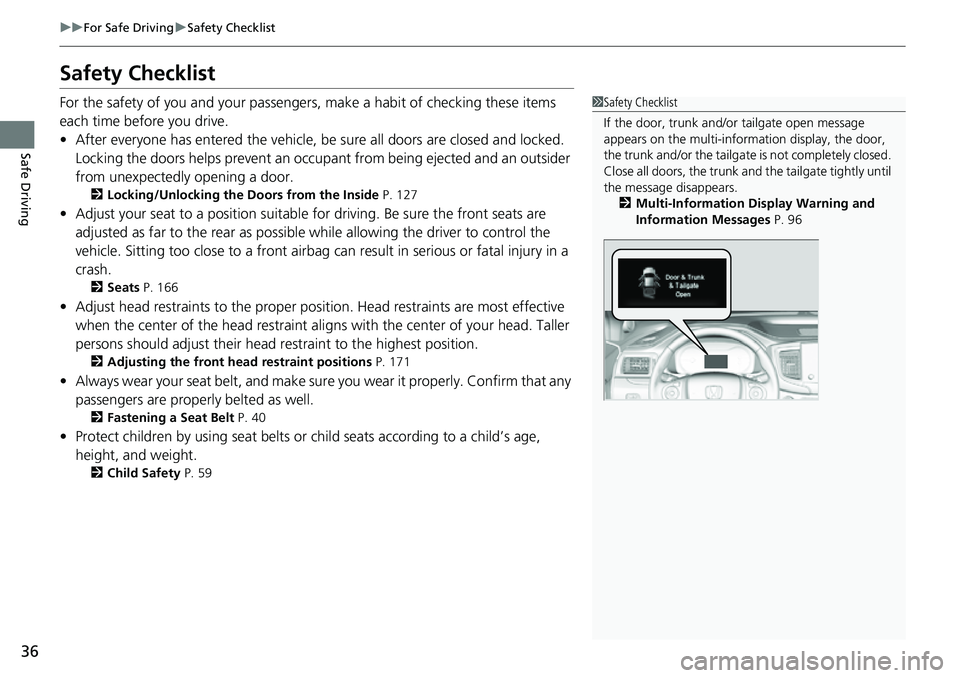
1Safety Checklist
If the door, trunk and/or tailgate open message
appears on the multi-inform ation display, the door,
the trunk and/or the tailgate is not completely closed.
Close all doors, the trunk and the tailgate tightly until
the message disappears. 2 Multi-Information Display Warning and
Information Messages P. 96