key remote HONDA RIDGELINE 2023 Owners Manual
[x] Cancel search | Manufacturer: HONDA, Model Year: 2023, Model line: RIDGELINE, Model: HONDA RIDGELINE 2023Pages: 598, PDF Size: 12.34 MB
Page 100 of 598
98
uuIndicators uMulti-Information Display Warn ing and Information Messages
Instrument Panel
MessageConditionExplanation
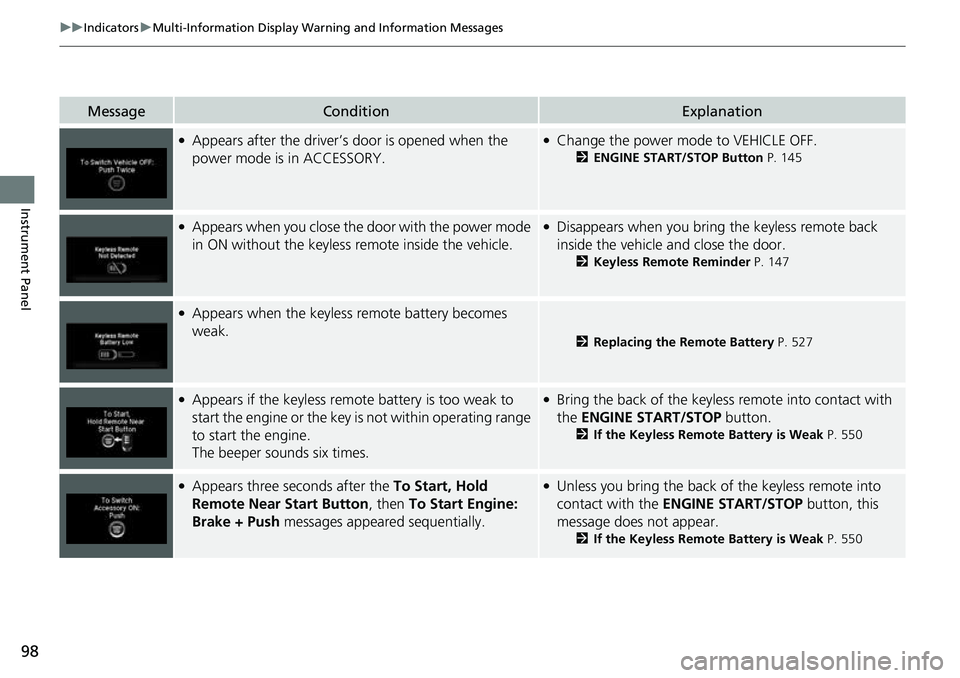
●Appears after the driver’s door is opened when the
power mode is in ACCESSORY.●Change the power mode to VEHICLE OFF.
2 ENGINE START/STOP Button P. 145
●Appears when you close the door with the power mode
in ON without the keyless remote inside the vehicle.●Disappears when you bring the keyless remote back
inside the vehicle and close the door.
2Keyless Remote Reminder P. 147
●Appears when the keyless remote battery becomes
weak.
2Replacing the Remote Battery P. 527
●Appears if the keyless remote battery is too weak to
start the engine or the key is not within operating range
to start the engine.
The beeper sounds six times.●Bring the back of the keyless remote into contact with
the ENGINE START/STOP button.
2If the Keyless Remote Battery is Weak P. 550
●Appears three seconds after the To Start, Hold
Remote Near Start Button, then To Start Engine:
Brake + Push messages appeared sequentially.●Unless you bring the back of the keyless remote into
contact with the ENGINE START/STOP button, this
message does not appear.
2 If the Keyless Remote Battery is Weak P. 550
Page 105 of 598
103
uuIndicators uMulti-Information Display Warning and Information Messages
Continued
Instrument Panel
MessageConditionExplanation
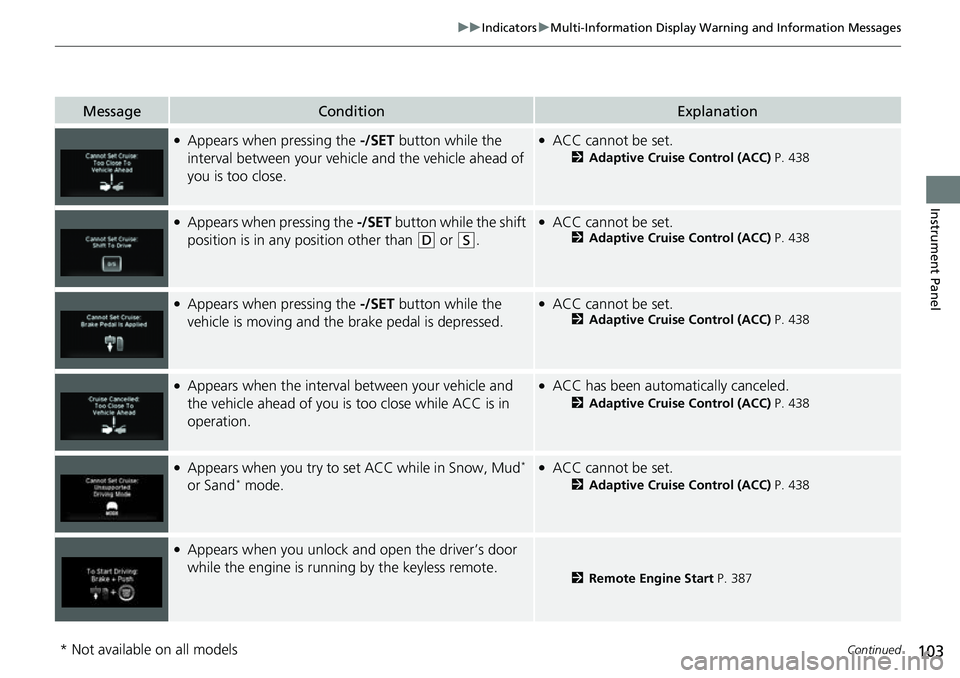
●Appears when pressing the -/SET button while the
interval between your vehicle and the vehicle ahead of
you is too close.●ACC cannot be set.
2 Adaptive Cruise Control (ACC) P. 438
●Appears when pressing the -/SET button while the shift
position is in any position other than
(D or (S.
●ACC cannot be set.2 Adaptive Cruise Control (ACC) P. 438
●Appears when pressing the -/SET button while the
vehicle is moving and the brake pedal is depressed.●ACC cannot be set.2 Adaptive Cruise Control (ACC) P. 438
●Appears when the interval between your vehicle and
the vehicle ahead of you is too close while ACC is in
operation.●ACC has been automatically canceled.
2 Adaptive Cruise Control (ACC) P. 438
●Appears when you try to set ACC while in Snow, Mud*
or Sand* mode.
●ACC cannot be set.
2 Adaptive Cruise Control (ACC) P. 438
●Appears when you unlock and open the driver’s door
while the engine is running by the keyless remote.
2 Remote Engine Start P. 387
* Not available on all models
Page 117 of 598
115
Controls
This chapter explains how to operate the various controls necessary for driving.
Clock.................................................. 116
Locking and Unlocking the Doors Key .................................................. 117
Low Keyless Remote Signal Strength .....119
Locking/Unlocking the Doors from the Outside .......................................... 120
Locking/Unlocking the Doors from the
Inside ............................................. 127
Childproof Door Locks ..................... 129
Auto Door Locking/Unlocking .......... 130
Tailgate .............................................. 131
Opening and Closing the Trunk ....... 133
Security System
Immobilizer System .......................... 136
Security System Alarm ...................... 136Windows ............................................... 139
Moonroof*............................................... 143Operating the Switches Around the Steering Wheel ENGINE START/STOP Button............. 145
Turn Signals ..................................... 148
Light Switches.................................. 149
Fog Lights ........................................ 152
Daytime Running Lights ................... 153
Auto High-Beam (H igh Beam Support
System) .......................................... 154
Wipers and Washers ........................ 157
Rear Defogger/Heat ed Door Mirror
*
Button ........................................... 159 Heated Windshield Button
*............. 159
Brightness Control ........................... 160
Driving Position Memory System
*.... 161
Adjusting the Steering Wheel .......... 163
Mirrors Interior Rearview Mirror ................... 164
Power Door Mirrors ......................... 165
Seats .................................................. 166
Interior/Exterior Convenience Items
Interior Lights .................................. 175
Storage Items .................................. 177
Other Interior Convenience Items..... 182
In-Bed Convenience Items................ 191
Climate Control System ................... 195
* Not available on all models
Page 119 of 598
117Continued
Controls
Locking and Unlocking the Doors
Key
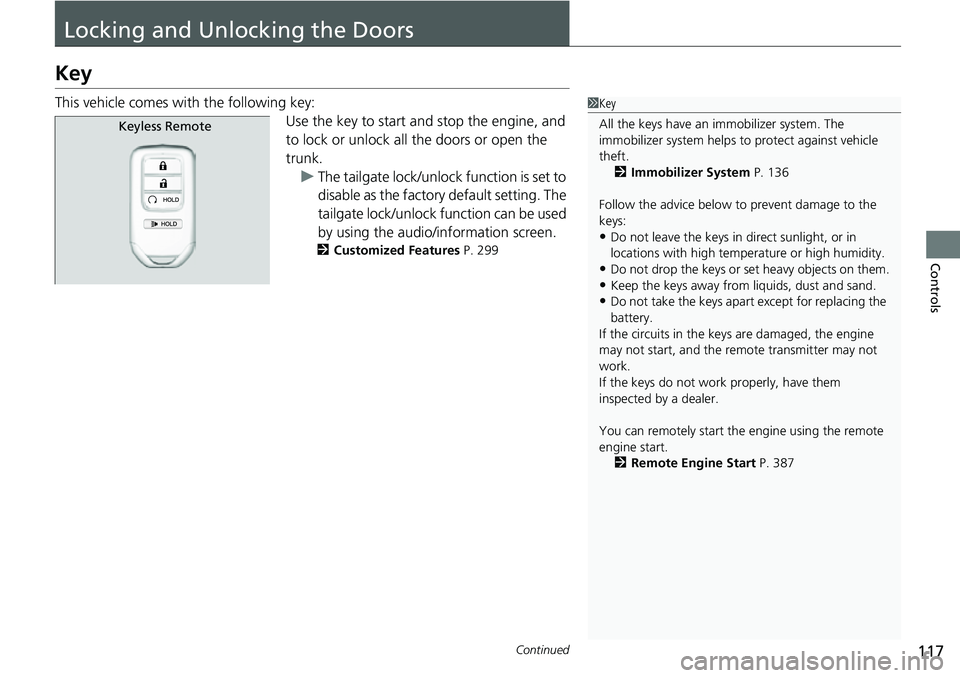
This vehicle comes with the following key:Use the key to start and stop the engine, and
to lock or unlock all the doors or open the
trunk.u The tailgate lock/unlock function is set to
disable as the factory default setting. The
tailgate lock/unlock f unction can be used
by using the audio/information screen.
2 Customized Features P. 299
1Key
All the keys have an immobilizer system. The
immobilizer system helps to protect against vehicle
theft. 2 Immobilizer System P. 136
Follow the advice below to prevent damage to the
keys:
•Do not leave the keys in direct sunlight, or in
locations with high temperature or high humidity.
•Do not drop the keys or set heavy objects on them.•Keep the keys away from liquids, dust and sand.
•Do not take the keys apart except for replacing the
battery.
If the circuits in the keys are damaged, the engine
may not start, and the remote transmitter may not
work.
If the keys do not work properly, have them
inspected by a dealer.
You can remotely start the engine using the remote
engine start. 2 Remote Engine Start P. 387
Keyless Remote
Page 120 of 598
uuLocking and Unlocking the Doors uKey
118
Controls
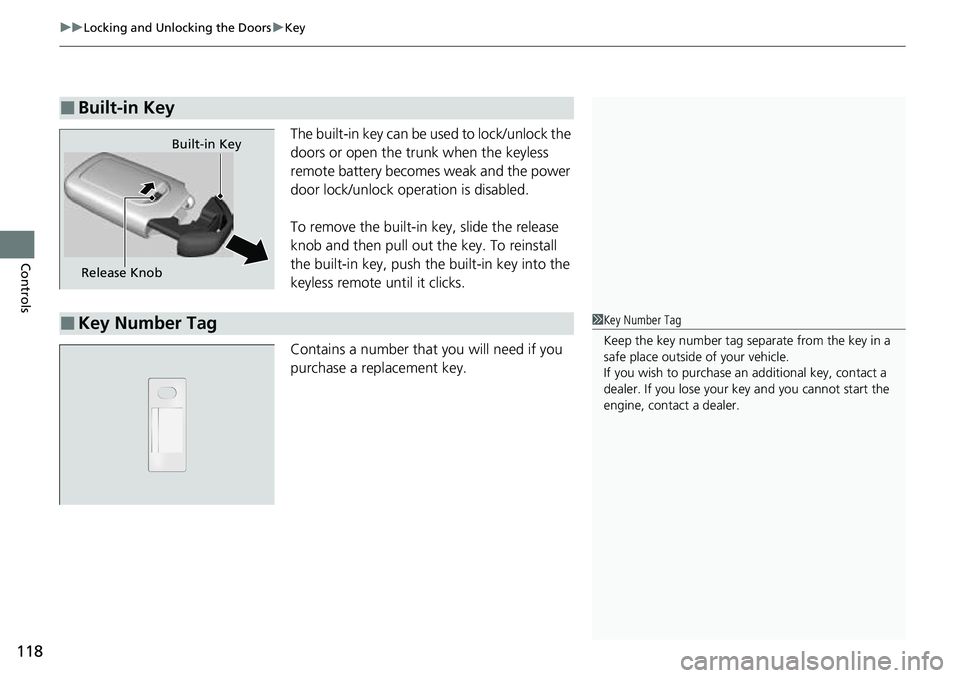
The built-in key can be used to lock/unlock the
doors or open the tru nk when the keyless
remote battery becomes weak and the power
door lock/unlock operation is disabled.
To remove the built-in key, slide the release
knob and then pull out the key. To reinstall
the built-in key, push th e built-in key into the
keyless remote until it clicks.
Contains a number that you will need if you
purchase a replacement key.
■Built-in Key
Release Knob Built-in Key
■Key Number Tag1
Key Number Tag
Keep the key number tag separate from the key in a
safe place outside of your vehicle.
If you wish to purchase an additional key, contact a
dealer. If you lose your key and you cannot start the
engine, contact a dealer.
Page 121 of 598
119
uuLocking and Unlocking the Doors uLow Keyless Remote Signal Strength
Controls
Low Keyless Remote Signal Strength
The vehicle transmits radio waves to lo cate the keyless remote when locking/
unlocking the doors, opening the trunk, or to start the engine.
In the following cases, locking/unlocking the doors, opening the trunk, or starting
the engine may be inhibited or operation may be unstable:
• Strong radio waves are being transmitted by nearby equipment.
• You are carrying the keyless remote together with telecommunications
equipment, laptop computers, ce ll phones, or wireless devices.
• A metallic object is touching or covering the keyless remote.1Low Keyless Remote Signal Strength
Communication between the keyless remote and the
vehicle consumes the ke yless remote’s battery.
Battery life is about two years, but this varies
depending on re gularity of use.
The battery is consumed whenever the keyless
remote is receivi ng strong radio wave s. Avoid placing
it near electrical appliances such as televisions and
personal computers.
Page 122 of 598
120
uuLocking and Unlocking the Doors uLocking/Unlocking the Doors from the Outside
Controls
Locking/Unlocking the Doors from the Outside
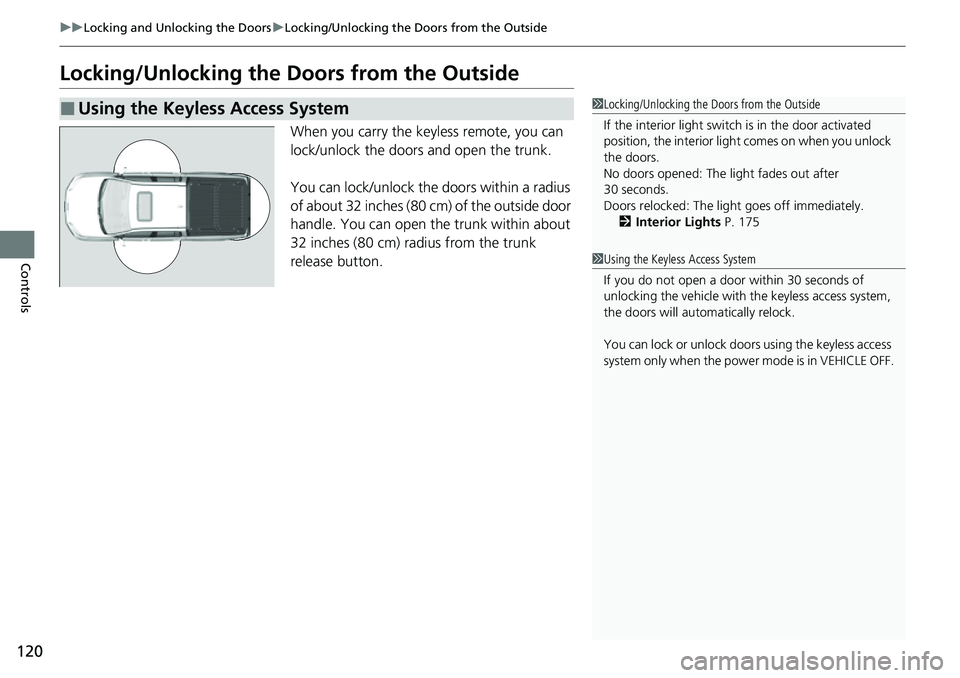
When you carry the keyless remote, you can
lock/unlock the doors and open the trunk.
You can lock/unlock the doors within a radius
of about 32 inches (80 cm) of the outside door
handle. You can open the trunk within about
32 inches (80 cm) radius from the trunk
release button.
■Using the Keyless Access System1Locking/Unlocking the Doors from the Outside
If the interior light switch is in the door activated
position, the interior light comes on when you unlock
the doors.
No doors opened: The li ght fades out after
30 seconds.
Doors relocked: The light goes off immediately.
2 Interior Lights P. 175
1Using the Keyless Access System
If you do not open a door within 30 seconds of
unlocking the vehicle with the keyless access system,
the doors will automatically relock.
You can lock or unlock doors using the keyless access
system only when the power mode is in VEHICLE OFF.
Page 123 of 598
Continued121
uuLocking and Unlocking the Doors uLocking/Unlocking the Doors from the Outside
Controls
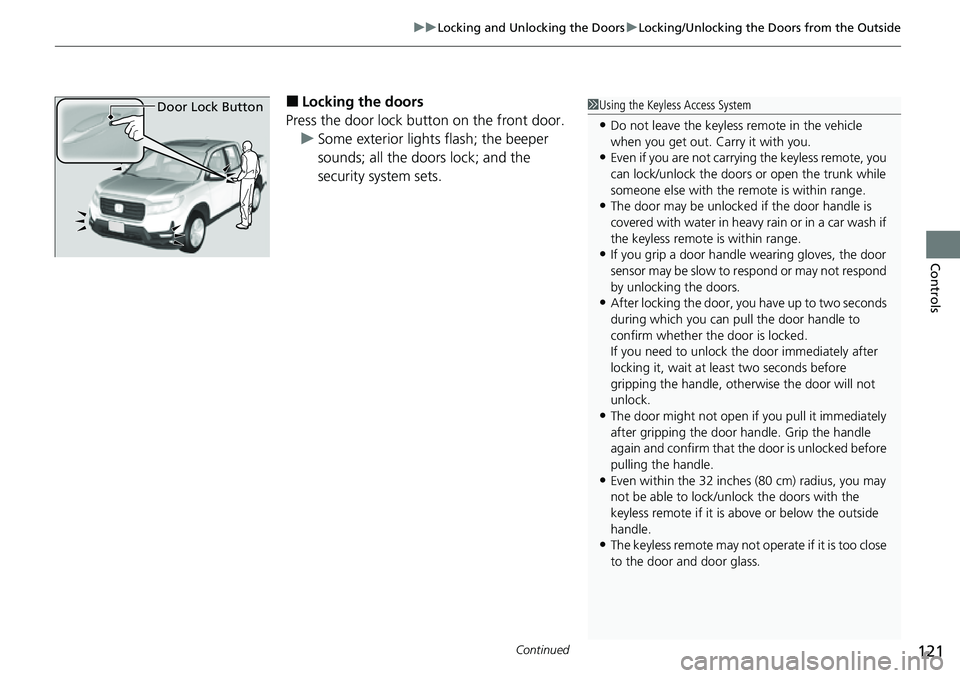
■Locking the doors
Press the door lock button on the front door. u Some exterior lights flash; the beeper
sounds; all the doors lock; and the
security system sets.1Using the Keyless Access System
•Do not leave the keyless remote in the vehicle
when you get out. Carry it with you.
•Even if you are not carrying the keyless remote, you
can lock/unlock the doors or open the trunk while
someone else with the remote is within range.
•The door may be unlocked if the door handle is
covered with water in heavy rain or in a car wash if
the keyless remote is within range.
•If you grip a door handle wearing gloves, the door
sensor may be slow to respond or may not respond
by unlocking the doors.
•After locking the door, yo u have up to two seconds
during which you can pull the door handle to
confirm whether the door is locked.
If you need to unlock the door immediately after
locking it, wait at l east two seconds before
gripping the handle, othe rwise the door will not
unlock.
•The door might not open if you pull it immediately
after gripping the door handle. Grip the handle
again and confirm that th e door is unlocked before
pulling the handle.
•Even within the 32 inches (80 cm) radius, you may
not be able to lock/unl ock the doors with the
keyless remote if it is above or below the outside
handle.
•The keyless remote may not operate if it is too close
to the door and door glass.
Door Lock Button
Page 125 of 598
Continued123
uuLocking and Unlocking the Doors uLocking/Unlocking the Doors from the Outside
Controls
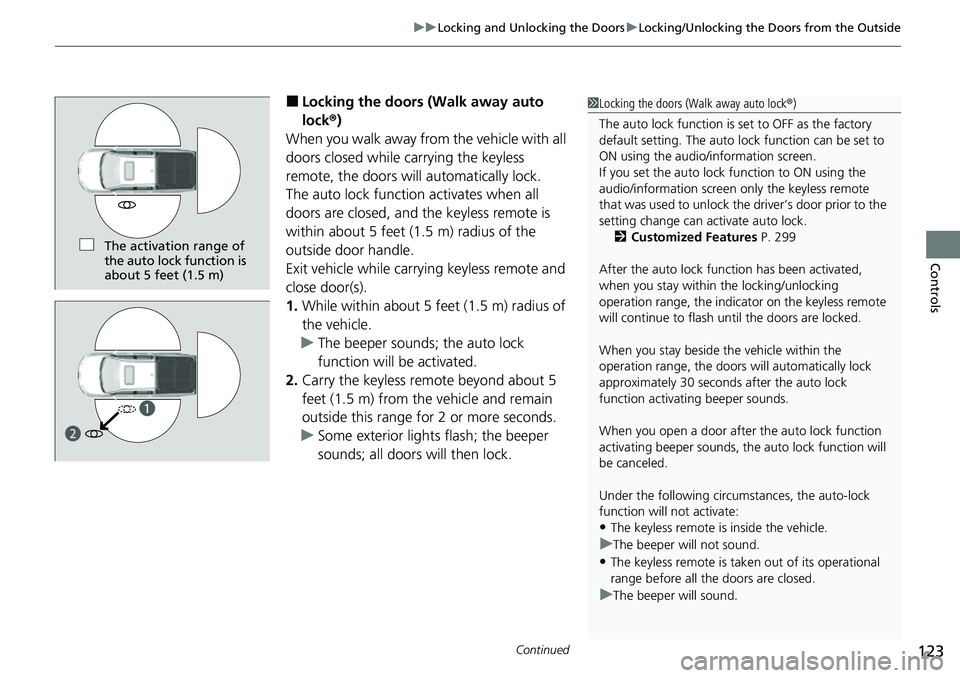
■Locking the doors (Walk away auto
lock ®)
When you walk away fro m the vehicle with all
doors closed while carrying the keyless
remote, the doors will automatically lock.
The auto lock function activates when all
doors are closed, and the keyless remote is
within about 5 feet (1.5 m) radius of the
outside door handle.
Exit vehicle while carrying keyless remote and
close door(s).
1. While within about 5 feet (1.5 m) radius of
the vehicle.
u The beeper sounds; the auto lock
function will be activated.
2. Carry the keyless remote beyond about 5
feet (1.5 m) from the vehicle and remain
outside this range for 2 or more seconds.
u Some exterior lights flash; the beeper
sounds; all doors will then lock.1Locking the doors (Walk away auto lock ®)
The auto lock function is set to OFF as the factory
default setting. The auto lo ck function can be set to
ON using the audio/information screen.
If you set the auto lock function to ON using the
audio/information screen only the keyless remote
that was used to unlock th e driver’s door prior to the
setting change can ac tivate auto lock.
2 Customized Features P. 299
After the auto lock function has been activated,
when you stay within the locking/unlocking
operation range, the indicato r on the keyless remote
will continue to flash until the doors are locked.
When you stay beside the vehicle within the
operation range, the doors wi ll automatically lock
approximately 30 seconds after the auto lock
function activating beeper sounds.
When you open a door after the auto lock function
activating beeper sounds, the auto lock function will
be canceled.
Under the following circumstances, the auto-lock
function will not activate:
•The keyless remote is inside the vehicle.
uThe beeper will not sound.
•The keyless remote is taken out of its operational
range before all the doors are closed.
uThe beeper will sound.
The activation range of
the auto lock function is
about 5 feet (1.5 m)
a
b
Page 126 of 598
uuLocking and Unlocking the Doors uLocking/Unlocking the Doors from the Outside
124
Controls
To temporarily deactivate the function:
1. Set the power mode to VEHICLE OFF.
2. Open the driver’s door.
3. Using the master door lock switch, operate
the lock as follows:
Lock Unlock Lock Unlock.
u The beeper sounds and the function is
deactivated.
To restore the function:
• Set the power mode to ON.
• Lock the vehicle without using the auto lock
function
• With the keyless remote on you, move out
of the auto lock function operation range.
• Open any door.1Locking the doors (Walk away auto lock ®)
The auto lock function does not operate when any of
the following conditions are met.
•The keyless remote is inside the vehicle.
•A door or the hood is not closed.
•The power mode is set to any mode other than
OFF.
•The keyless remote is not located within a radius of
about 5 feet (1.5 m) from the vehicle when you get
out of the vehicle and close the doors.
Auto lock function operation stop beeper
After the auto lock function has been activated, the
auto lock operation stop beeper sounds for
approximately two seconds in the following cases.
•The keyless remote is put inside the vehicle through
a window.
•You are located too close to the vehicle.•The keyless remote is put inside the trunk.
If the warning beeper sounds, check that you are
carrying the keyless remote. Then, open/close a door
and confirm the auto lock activation beeper sounds
once.