dashboard HONDA S2000 2000 1.G User Guide
[x] Cancel search | Manufacturer: HONDA, Model Year: 2000, Model line: S2000, Model: HONDA S2000 2000 1.GPages: 273, PDF Size: 21.58 MB
Page 43 of 273

Safety Labels
These labels are in the locations
shown.
They warn you of potential
hazards that could cause serious
injury. Read these labels carefully.
If a label comes off or becomes hard
to read, contact your Honda dealer
for a replacement.
DASHBOARD U.S. models only
A WARNING
Children Can Be KILLED or INJURED by Passenger Air Bag Male sure all ctilcran use aeatbalts or~ild seata
40 Driver and Passenger Safety
SUN VISOR
U.S. models
Canadian models
SEAT BELT TENSIONER
I ... "·'·"''""" I ... ~iEUl1>11 I UrLOIIH "'•[OIH '""'"' ~"'"'""'lOS I' o l'oN""""" ..... , ..... , ... , ......... , .. _ , .... , ............. , ........... . •Do ,., "~'" " ""'"~'" ""' "" .,.,,. •• ''"""" '"" '" ··-...... ~ .. """ •h••'"-"' "~"'" ~;··;;;;;;;;:·:7 .. ·.:~··· :~;::;~::;;;;;::;:::::·;:::~:~::~:~~···
BATTERY
SUPPLEMENTAL RESTRAINT SYSTEM (SRS)@ ~~~'-------=::_'7=~i-Y~~----I This vehlclf Is equipped with driver and front seal passenger airbags All S RS electrical wir1ng and con 1ecto rs ore co I or ed ~ell ow. Tamoering wit~, disconnecting or using e I ec ~~ i ca I test equIpment on the S R S wl rln g can maXe the syslem inoperatiH or cause Hcidentat firing of th inflator A WARNING The alrbag Inflator Is uplosive and, II a c c ide r.t a II y de p I o ~ e d, can serious I y h urI 'IOU Fc',lcw Service Manual instructions caretulll'·
Page 58 of 273
Cruise Control
Cruise control allows you to maintain
a
set speed above 25 mph ( 40 km/h)
without keeping your foot on the
accelerator pedal. It should be used
for cruising on straight, open
highways.
It is not recommended for
conditions such as city driving,
winding roads, slippery roads, heavy
rain, or bad weather. You should
have full control of
the car under
those conditions.
Improper use of the cruise
control can lead to a crash.
Use the cruise
control only
when traveling on open
highways
in good weather.
NOTICE
The cruise control, as it operates,
moves the accelerator pedal. You can
damage your vehicle's accelerator
mechanism by resting your
foot under
the pedal and blocking the movement.
Steering Wheel Controls
Using the Cruise Control
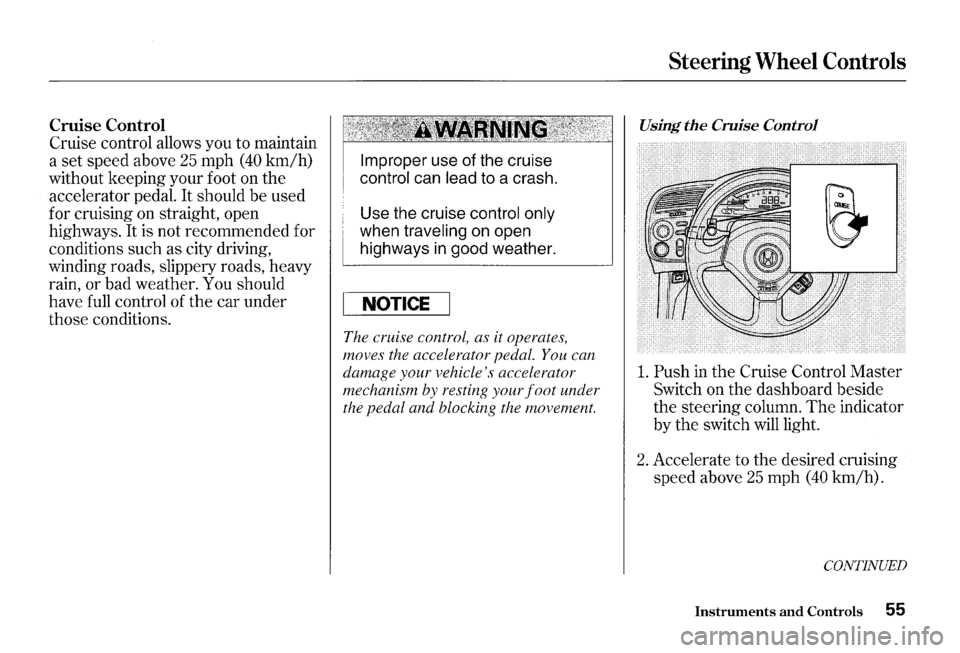
1. Push in the Cruise Control Master
Switch on the dashboard beside
the steering column. The indicator
by
the switch will light.
2. Accelerate to the desired cruising
speed above
25 mph (40 km/h).
CONTINUED
Instruments and Controls 55
Page 90 of 273
Mode Control Dial
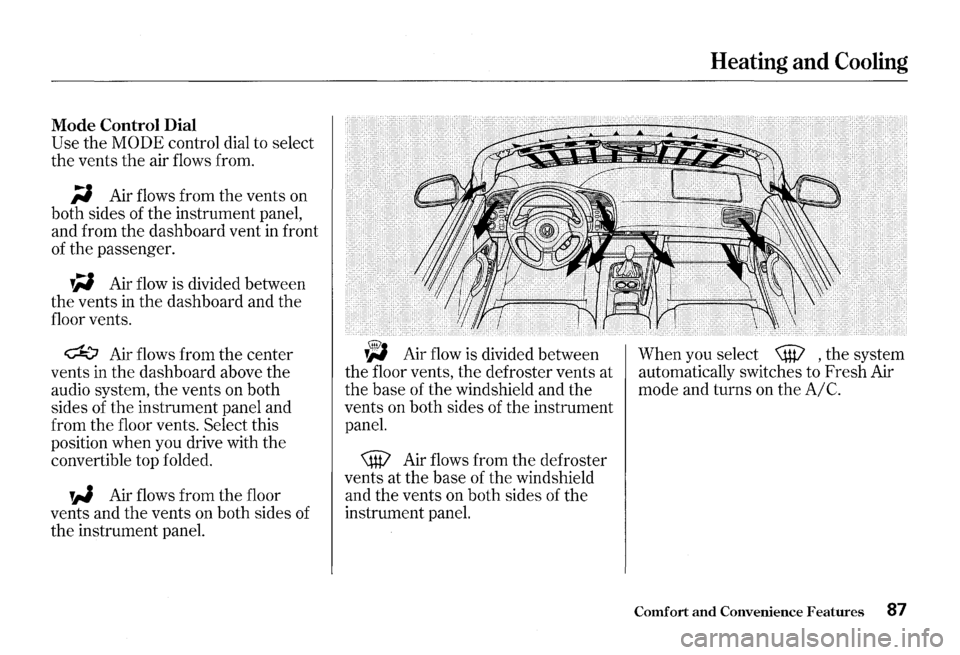
Use the MODE control dial to select
the vents
the air flows from.
;i Air flows from the vents on
both sides of the instrument panel,
and from the dashboard vent
in front
of the passenger.
W Air flow is divided between
the vents
in the dashboard and the
floor vents.
~ Air flows from the center
vents in the dashboard above the
audio system, the vents on both
sides of the instrument panel and
from the floor vents.
Select this
position when you drive with the
convertible top folded.
W Air flows from the floor
vents and
the vents on both sides of
the instrument panel.
~ Air flow is divided between
the floor vents, the defroster vents at
the base of the windshield and the
vents on both sides of the instrument
panel.
\W Air flows from the defroster
vents at the base of the windshield
and the vents on both sides of the
instrument panel.
Heating and Cooling
When you select \W , the system
automatically switches to Fresh Air
mode and turns on the
A/C.
Comfort and Convenience Features 87
Page 91 of 273
Heating and Cooling
Vent Controls
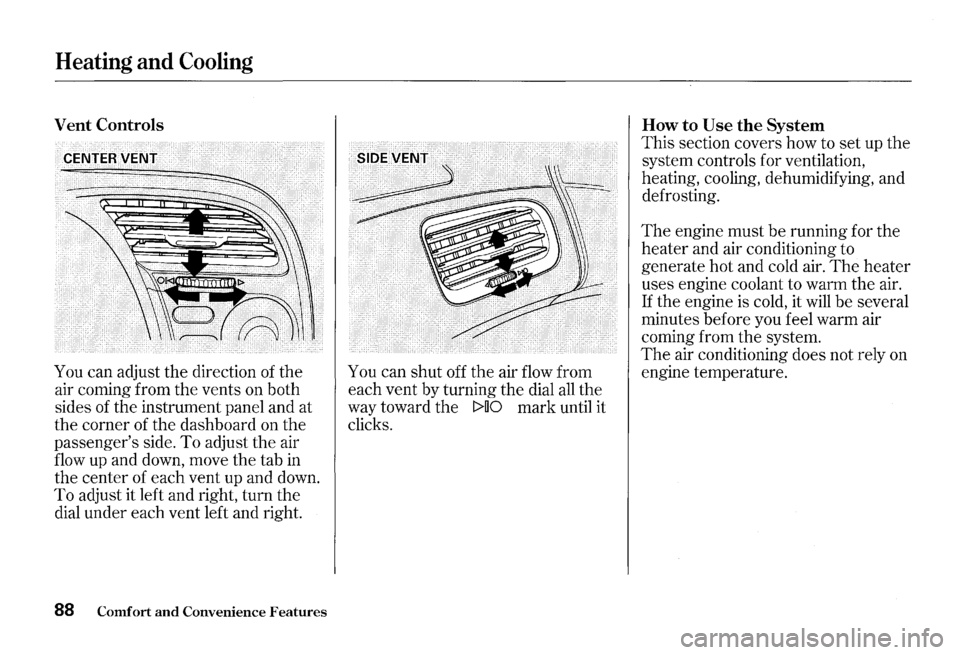
You can adjust the direction of the
air coming from the vents on both
sides of the instrument panel and at
the corner of the dashboard on the
passenger's side.
To adjust the air
flow up and down, move the tab
in
the center of each vent up and down.
To adjust it left and right, turn the
dial under each vent left and right.
88 Comfort and Convenience Features
You can shut off the air flow from
each vent by turning the dial
all the
way toward the
t>UO mark until it
clicks. How
to Use the System
This
section covers how to set up the
system controls for ventilation,
heating, cooling, dehumidifying, and
defrosting.
The engine must be running for the
heater and air conditioning to
generate hot and cold air.
The heater
uses engine coolant to warm the air.
If the engine is cold, it will be several
minutes before you feel warm air
coming from the system.
The air conditioning does not rely on
engine temperature.
Page 115 of 273
Audio System
Remote Audio Controls
AUDIO CbNTROL··.······· BUTTON ....
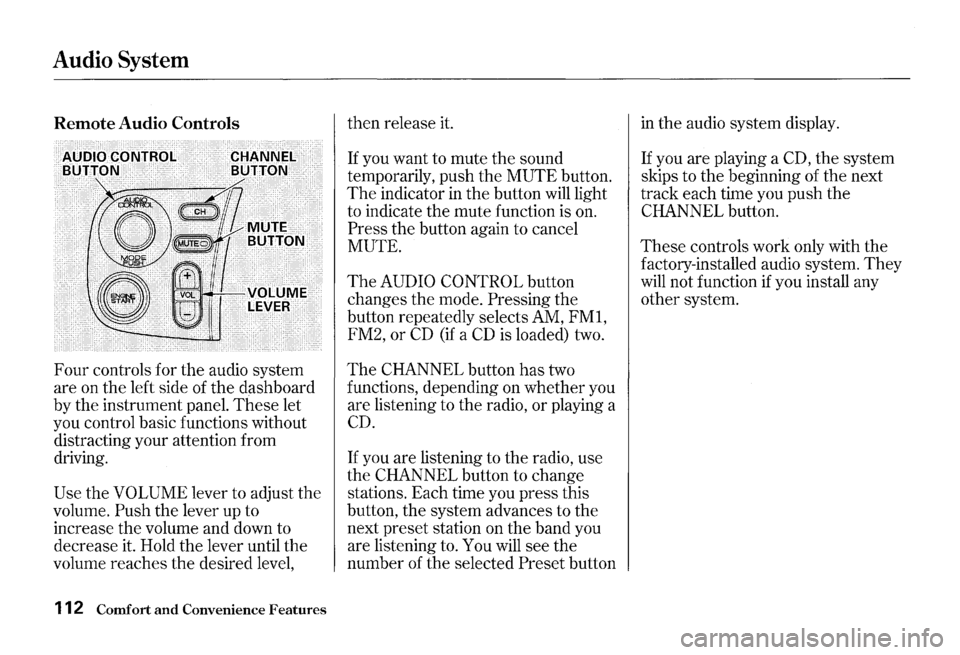
Four controls for the audio system
are on the left side of the dashboard
by the instrument panel.
These let
you control basic functions without
distracting your attention from
driving.
Use the VOLUME lever to adjust the
volume.
Push the lever up to
increase the volume and down to
decrease it. Hold the lever until the
volume reaches the desired level,
112 Comfort and Convenience Features
then release it.
If you want to mute the sound
temporarily, push the
MUTE button.
The indicator in the button will light
to indicate the mute function is on.
Press the button again to cancel
MUTE.
The AUDIO CONTROL button
changes the mode.
Pressing the
button repeatedly selects AM,
FMl,
FM2, or CD (if a CD is loaded) two.
The CHANNEL button has two
functions, depending on whether you
are listening to the radio,
or playing a
CD.
If you are listening to the radio, use
the
CHANNEL button to change
stations. Each time you press this
button, the system advances to the
next preset station on the band you
are listening to. You will see the
number of the selected
Preset button
in the audio system display.
If you are playing a CD, the system
skips to the beginning of the next
track each time you push the
CHANNEL button.
These controls work only with the
factory-installed audio system.
They
will not function if you install any
other system.
Page 121 of 273
Service Station Procedures
4. Stop filling the tank after the fuel
nozzle automatically clicks off. Do
not try to
"top off" the tank, leave
some room for the fuel to expand
with temperature changes.
5. Screw the fuel fill cap back on,
tighten it until it clicks at least
three times.
If you do not properly
tighten the cap, the Malfunction
Indicator Lamp may come on (see
page
228 ).
6. Push the fuel fill door closed until
it latches.
118 Before Driving
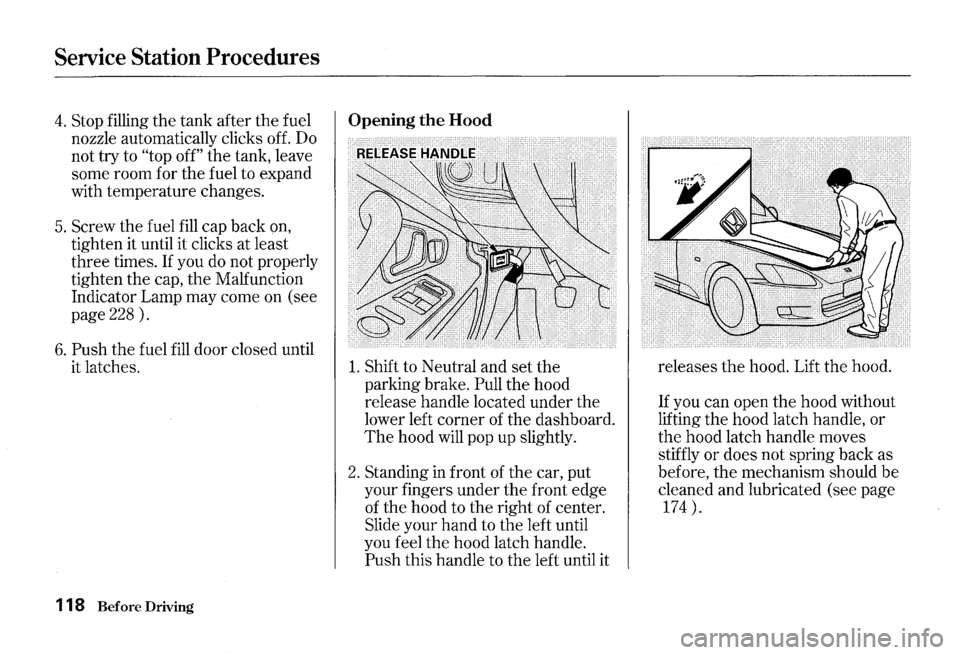
Opening the Hood
1. Shift to Neutral and set the
parking brake.
Pull the hood
release handle located under the
lower left corner of the dashboard.
The hood will pop up slightly.
2. Standing in front of the car, put
your fingers under the front edge
of the hood to the right of center.
Slide your hand to the left until
you feel the hood latch handle.
Push this handle to the left until it releases
the hood.
Lift the hood.
If you can open the hood without
lifting the hood latch handle, or
the hood latch handle moves
stiffly or does not spring back as
before, the mechanism should
be
cleaned and lubricated (see page
174 ).
Page 126 of 273
Modifications
Do not remove any original
equipment or modify your car in any
way
that would alter its design or
operation. This could make your car
unsafe and illegal to drive.
For example, do not make any
modifications
that would change the
ride height of your car, or install
wheels and tires with a different
overall diameter.
Such modifications can adversely
affect handling, and interfere with
the operation of the car's anti-lock
brakes and other systems.
Accessories and Modifications
In addition, any modifications that
decrease ground clearance increase
the chance of undercarriage parts
striking a curb, speed bump, or other
raised object, which could cause
your airbags to deploy.
Do not modify your steering wheel
or any other part of your
Supplemental Restraint System.
Modifications could make the
system ineffective. Additional Safety Precaution
Do not attach or place objects on the
airbag covers. Any object attached to
or placed on the covers marked
"SRS
AIRBAG," in the center of the
steering wheel and on top of the
dashboard, could interfere with the
proper operation of the airbags.
Or,
if the airbags inflate, the objects
could be propelled inside the car and
hurt someone.
Before Driving 123
Page 233 of 273
Closing the Convertible Top
If the electric motor will not close
the convertible top, do the following.
1. Check the fuse for the convertible
top motor (see page
231 ) . If the
fuse is blown, replace it with one
of
the same or lower rating.
2. Try closing the convertible top. If
the new fuse blows immediately or
the convertible top still does not
operate, you can close
the
convertible top manually.
230 Taking Care of the Unexpected
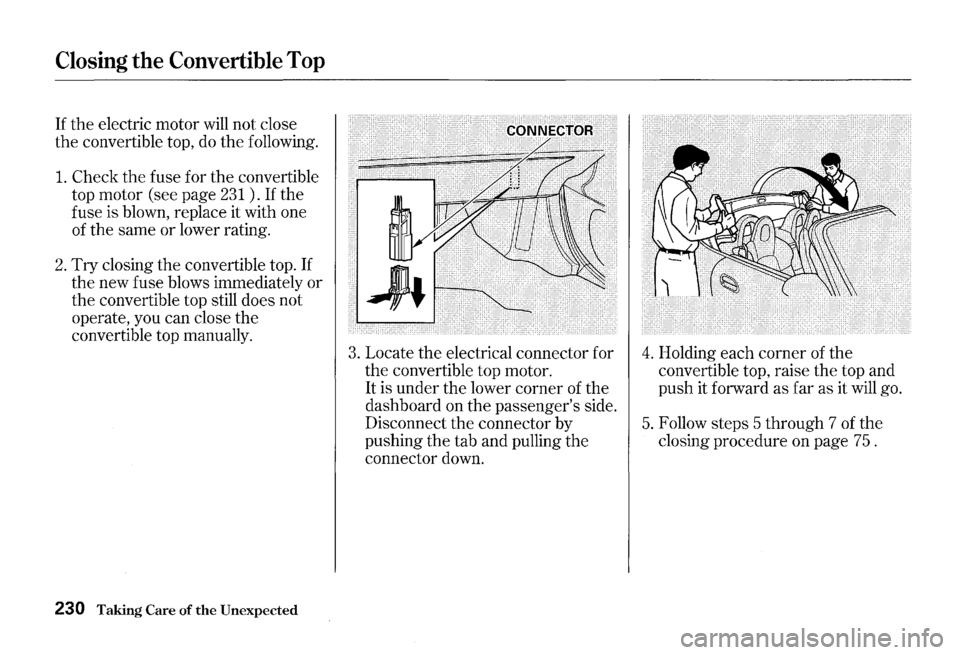
3. Locate the electrical connector for
the convertible top motor.
It is under the lower corner of the
dashboard on the passenger's side.
Disconnect
the connector by
pushing
the tab and pulling the
connector down.
4. Holding each corner of the
convertible top, raise the top and
push it forward as far as it will go.
5. Follow steps 5 through 7 of the
closing procedure on page 75 .
Page 234 of 273
All the electrical circuits in your car
have fuses to protect them from a
short circuit or overload.
These
fuses are located in three fuse boxes.
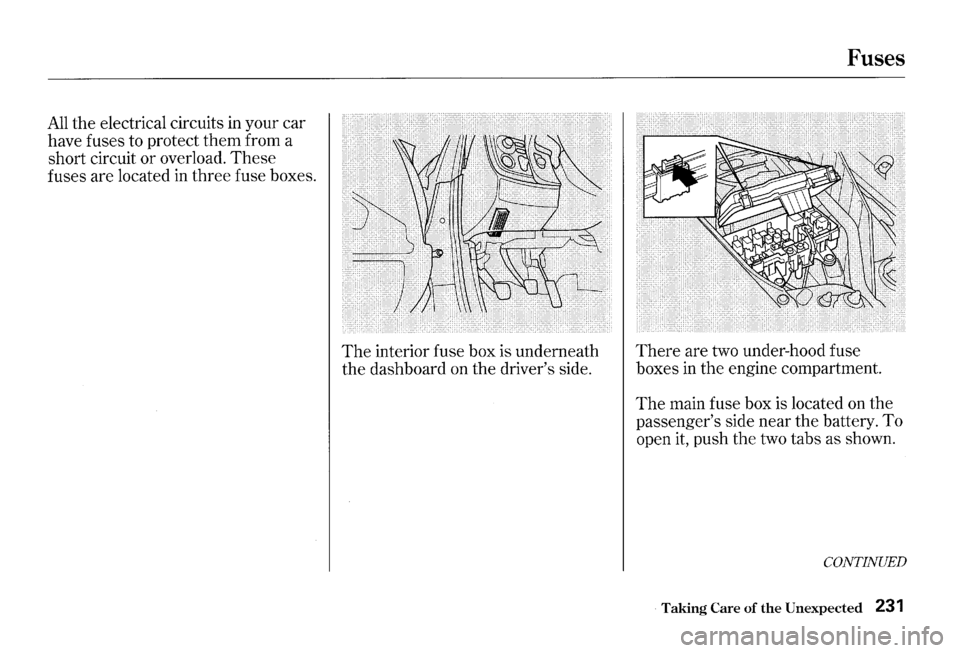
The interior fuse box is underneath
the dashboard on the driver's side.
Fuses
There are two under-hood fuse
boxes
in the engine compartment.
The main fuse box is located on the
passenger's side near the battery. To
open it, push the two tabs as shown.
CONTINUED
Taking Care of the Unexpected 231
Page 245 of 273
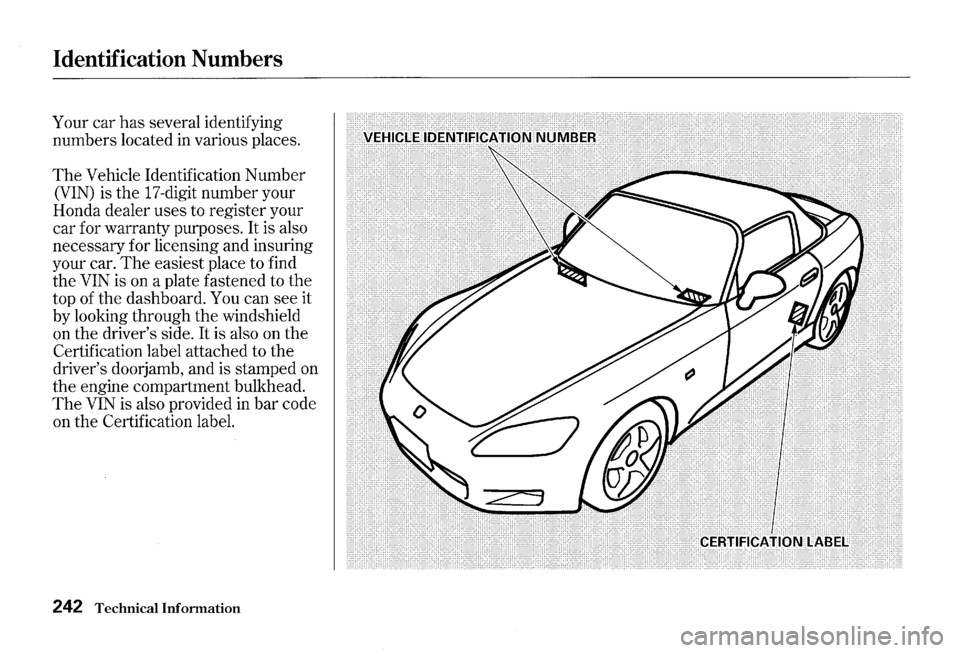
Identification Numbers
Your car has several identifying
numbers located
in various places.
The Vehicle Identification Number
(VIN) is the 17-digit number your
Honda dealer uses to register your
car for warranty purposes. It is also
necessary for licensing and insuring
your car.
The easiest place to find
the
VIN is on a plate fastened to the
top of the dashboard. You can see it
by looking through the windshield
on the driver's side.
It is also on the
Certification label attached to the
driver's doorjamb, and is stamped on
the engine compartment bulkhead.
The VIN is also provided in bar code
on the Certification label.
242 Technical Information