display HONDA S2000 2000 1.G User Guide
[x] Cancel search | Manufacturer: HONDA, Model Year: 2000, Model line: S2000, Model: HONDA S2000 2000 1.GPages: 273, PDF Size: 21.58 MB
Page 110 of 273
Operating the CD Changer
(Optional)
A Compact Disc changer is available
for your vehicle.
It holds up to six
discs, providing several hours of
continuous entertainment. You
operate this
CD changer with the
same controls used for the in-dash
CD player.
Load the desired
CDs in the
magazine and load the magazine in
the changer according to the
instructions that came with the unit.
Play only standard round discs. Odd
shaped CDs may jam in the drive or
cause other problems.
To select the CD changer, press the
CD button. The disc and track
numbers
will be displayed.
To select a different disc, press the
appropriate preset button
(1-6). If
you select an empty slot in the
magazine, the changer
will, after
finding that slot empty, try to load
the
CD in the next slot. This
continues until it finds a CD to load
and play.
If you load a CD in the in-dash player
while the changer is playing a
CD,
the system will stop the changer and
begin playing the in-dash
CD. To
select the changer again, press the
CD button. Play will begin where it
left off.
Use the CD button to switch
between the player and the changer.
If you eject the in-dash CD while it is
playing, the system
will automatically
switch to the
CD changer and begin
play where it left off.
If there are no
CDs in the changer, the display will
flash. You will have to select another
mode
(AM or FM) with the button.
Audio System
When you switch back to CD mode,
the system selects the same unit
(in
dash or changer) that was playing
when you switched out of
CD mode.
To use the SKIP, REPEAT, and
RANDOM functions, refer to the in
dash player operating instructions.
Comfort and Convenience Features 1 07
Page 113 of 273
Audio System
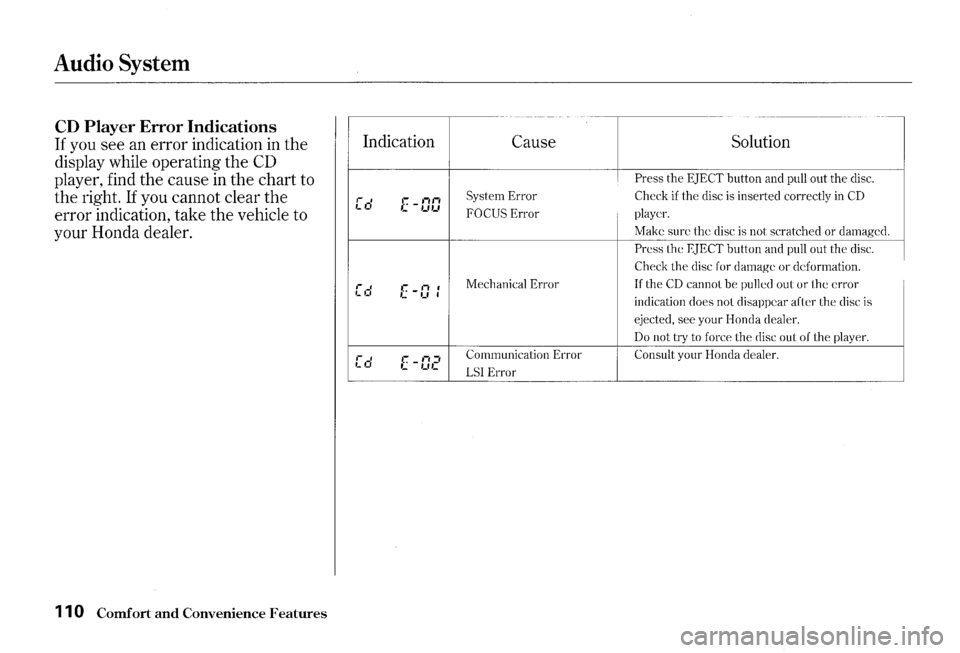
CD Player Error Indications
If you see an error indication in the
display while operating the
CD
player, find the cause in the chart to
the right.
If you cannot clear the
error indication, take the vehicle to
your Honda dealer.
11 0 Comfort and Convenience Features
I
Indication
C-----
,-.J ,_ ,_f .-.-..• c -,_.,_,
I [d •:: _ti I '-,_, I
,-I
·--=· E -IJ,?
Cause Solution
Press the EJECT button and pull out the disc.
System Error Check if the disc is inserted correctly in CD
FOCUS Error player.
Make sure the disc is not scratched or damaged.
Press the EJECT button and pull out the elise.
Check the disc for damage or deformation.
Mechanical Error
If the CD cannot be pulled out or the error
indication does not disappear after the disc is
ejected, see your Honda dealer.
D_
Consult your Honda dealer.
LSI Error -----------------------------------
Page 114 of 273
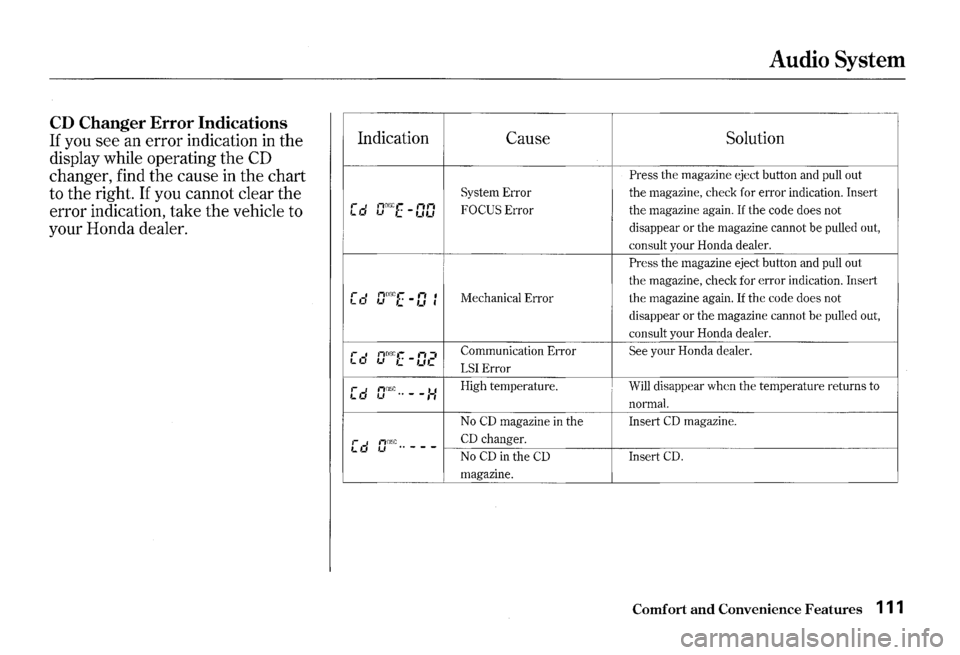
CD Changer Error Indications
If you see an error indication in the
display while operating the
CD
changer, find the cause in the chart
to the right.
If you cannot clear the
error indication, take
the vehicle to
your Honda dealer.
:
Indication
I""_, ,_ '-' aJ~~E -DO
[d crrx[-I] • •
[d rrrd~E-:J2
[d n1J:sc .. --:-: '-'
.-' I,DSC .. ---L Cl '-'
Audio System
Cause Solution
·
Press the magazine eject button and pull out
System Error the magazine, check for error indication. Insert
FOCUS Error i the magazine again. If the code does not
disappear
or the magazine cannot be pulled out,
consult your Honda dealer.
Press the magazine eject button and pull out
the magazine, check for error indication. Insert
Mechanical Error the magazine again. If the code does not
disappear
or the magazine cannot be pulled out,
consult your Honda dealer.
Communication Error
See your Honda dealer.
LSI Error
High temperature. Will disappear when the temperature returns to
normal.
No CD magazine in the Insert CD magazine.
CD changer.
No CD in the CD Insert CD.
magazine.
Comfort and Convenience Features 111
Page 115 of 273
Audio System
Remote Audio Controls
AUDIO CbNTROL··.······· BUTTON ....
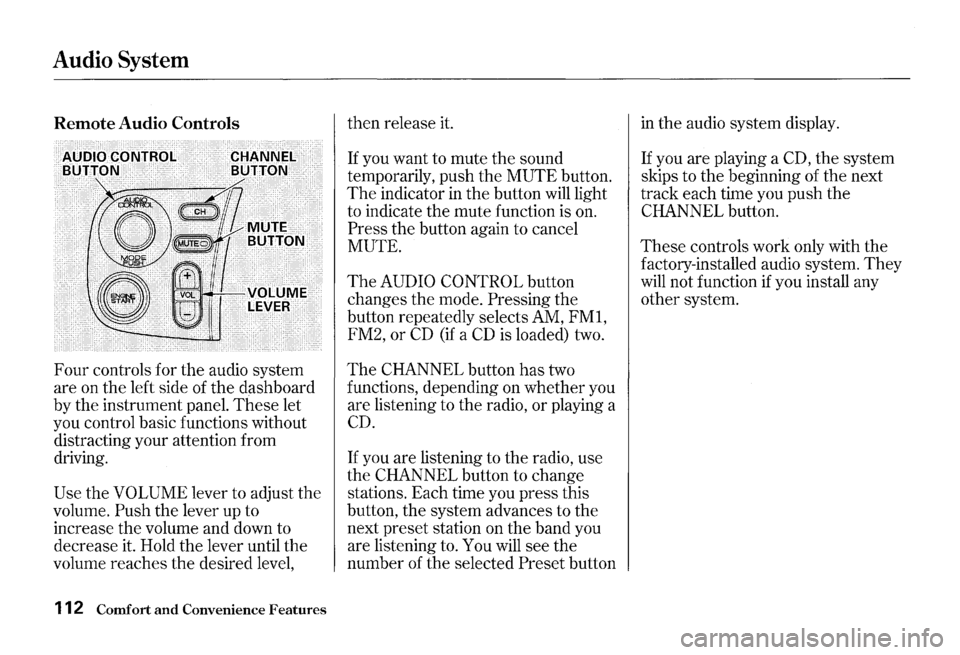
Four controls for the audio system
are on the left side of the dashboard
by the instrument panel.
These let
you control basic functions without
distracting your attention from
driving.
Use the VOLUME lever to adjust the
volume.
Push the lever up to
increase the volume and down to
decrease it. Hold the lever until the
volume reaches the desired level,
112 Comfort and Convenience Features
then release it.
If you want to mute the sound
temporarily, push the
MUTE button.
The indicator in the button will light
to indicate the mute function is on.
Press the button again to cancel
MUTE.
The AUDIO CONTROL button
changes the mode.
Pressing the
button repeatedly selects AM,
FMl,
FM2, or CD (if a CD is loaded) two.
The CHANNEL button has two
functions, depending on whether you
are listening to the radio,
or playing a
CD.
If you are listening to the radio, use
the
CHANNEL button to change
stations. Each time you press this
button, the system advances to the
next preset station on the band you
are listening to. You will see the
number of the selected
Preset button
in the audio system display.
If you are playing a CD, the system
skips to the beginning of the next
track each time you push the
CHANNEL button.
These controls work only with the
factory-installed audio system.
They
will not function if you install any
other system.
Page 116 of 273
Theft Protection
Your car's audio system will disable
itself
if it is disconnected from
electrical power for any reason. To
make it work again, the user must
enter a specific five-digit code in the
Preset buttons. Because there are
hundreds of number combinations
possible from five digits, making the
system work without knowing the
exact code is nearly impossible.
You should have received a card that
lists your audio system's code
number and serial number.
It is best
to store this card
in a safe place at
horne.
In addition, you should write
the audio system's serial number
in
this Owner's Manual. If you should
happen to lose
the card, you must
obtain the code number from your
Honda dealer. To do this, you
will
need the system's serial number.
If your car's battery is disconnected
or goes dead, or the radio fuse is
removed,
the audio system will
disable itself. If this happens, you
will see "Code" in the frequency
display the next time you turn on the
system.
Use the Preset buttons to
enter the five-digit code.
If it is
entered correctly, the radio
will start
playing.
If you make a mistake entering the
code,
do not start over or try to
correct your mistake. Complete the
five-digit sequence, then enter the
correct code.
You have ten tries to
enter the correct code.
If you are
unsuccessful
in ten attempts, you
must then leave the system on for
one hour before trying again.
Audio System
You will have to store your favorite
stations
in the Preset buttons after
the system begins working. Your
original settings were lost when
power was disconnected.
Comfort and Convenience Features 113
Page 161 of 273
Engine Oil
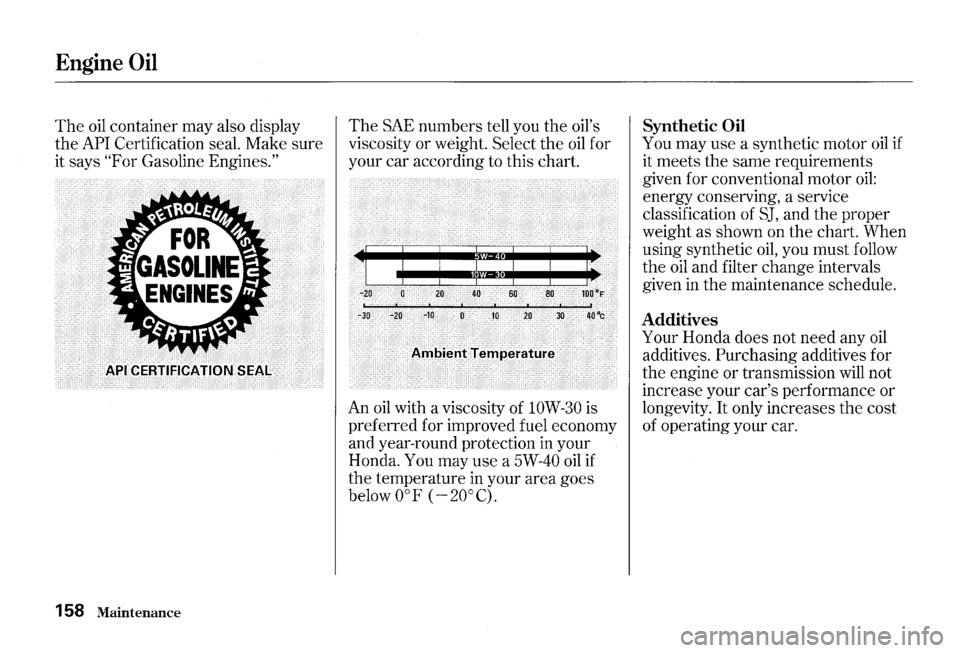
The oil container may also display
the
API Certification seal. Make sure
it says
"For Gasoline Engines."
158 Maintenance
The SAE numbers tell you the oil's
viscosity or weight. Select the
oil for
your car according to this chart.
60
. 10 20
" ~ c" ' -c '
AnlbielltTertlperature
An oil with a viscosity of lOW-30 is
preferred for improved fuel economy
and year-round protection in your
Honda.
You may use a 5W-40 oil if
the temperature in your area goes
below oaF (
-20°C).
Synthetic Oil
You may use a synthetic motor oil if
it meets the same requirements
given for conventional motor
oil:
energy conserving, a service
classification of
SJ, and the proper
weight as shown on the chart. When
using synthetic
oil, you must follow
the
oil and filter change intervals
given
in the maintenance schedule.
Additives
Your Honda does not need any oil
additives. Purchasing additives for
the engine or transmission will not
increase your car's performance or
longevity.
It only increases the cost
of operating your car.
Page 182 of 273
If your car's battery is disconnected
or goes dead, the audio system will
disable itself. The next time you turn
on the radio you
will see "Code" in
the frequency display. Use the
Preset buttons to enter the five-digit
code (see page
113 ) .
I NOTICE
Charging the battery with the cables
connected can seriously damage your
car's electronic controls. Detach the
battery cables before connecting the
battery
to a charger.
Battery
Maintenance 179