Theft Protection
Your car's audio system will disable
itself
if it is disconnected from
electrical power for any reason. To
make it work again, the user must
enter a specific five-digit code in the
Preset buttons. Because there are
hundreds of number combinations
possible from five digits, making the
system work without knowing the
exact code is nearly impossible.
You should have received a card that
lists your audio system's code
number and serial number.
It is best
to store this card
in a safe place at
horne.
In addition, you should write
the audio system's serial number
in
this Owner's Manual. If you should
happen to lose
the card, you must
obtain the code number from your
Honda dealer. To do this, you
will
need the system's serial number.
If your car's battery is disconnected
or goes dead, or the radio fuse is
removed,
the audio system will
disable itself. If this happens, you
will see "Code" in the frequency
display the next time you turn on the
system.
Use the Preset buttons to
enter the five-digit code.
If it is
entered correctly, the radio
will start
playing.
If you make a mistake entering the
code,
do not start over or try to
correct your mistake. Complete the
five-digit sequence, then enter the
correct code.
You have ten tries to
enter the correct code.
If you are
unsuccessful
in ten attempts, you
must then leave the system on for
one hour before trying again.
Audio System
You will have to store your favorite
stations
in the Preset buttons after
the system begins working. Your
original settings were lost when
power was disconnected.
Comfort and Convenience Features 113
If your car's battery is disconnected
or goes dead, the audio system will
disable itself. The next time you turn
on the radio you
will see "Code" in
the frequency display. Use the
Preset buttons to enter the five-digit
code (see page
113 ) .
I NOTICE
Charging the battery with the cables
connected can seriously damage your
car's electronic controls. Detach the
battery cables before connecting the
battery
to a charger.
Battery
Maintenance 179
7. Install the new bulb in the socket.
8. Push the socket into the light
assembly and turn it clockwise
until it locks.
9. Test the lights to make sure the
new bulb is working.
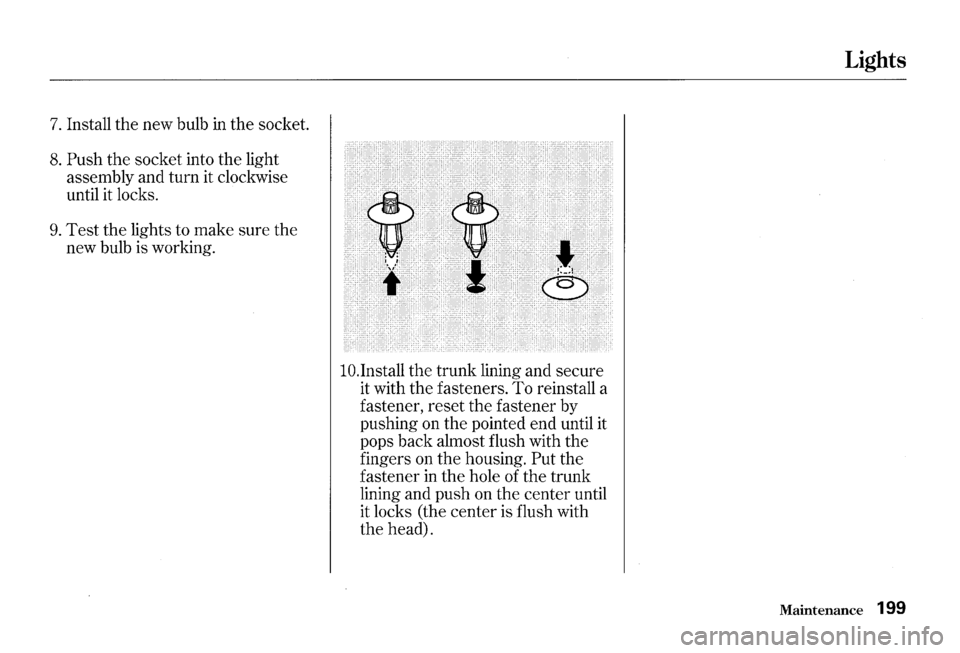
lO.Install the trunk lining and secure
it with the fasteners. To reinstall a
fastener, reset the fastener by
pushing on the pointed end until it
pops back almost flush with the
fingers on the housing.
Put the
fastener
in the hole of the trunk
lining and push on the center until
it locks (the center is flush with
the head).
Lights
Maintenance 199