radio controls HUMMER H2 2006 User Guide
[x] Cancel search | Manufacturer: HUMMER, Model Year: 2006, Model line: H2, Model: HUMMER H2 2006Pages: 502, PDF Size: 3.35 MB
Page 246 of 502

Problem Recommended Action
The fast forward, fast
reverse, previous,
and next functions
do not work.
Some commands that
do one thing for
DVDs will not always
work or perform the
same function for
audio, audio discs, or
games. These
functions may also be
disabled when the
DVD is playing the
copyright information
or the previews.
Picture color is poor.
Spots or dotted
lines/stripes appear.
Set brightness/
color/tint controls to
the proper settings.
Change the location
of the vehicle. Poor
picture color can be
caused by neon
signs, high-voltage
power lines, CB
transmitter, and
neighboring vehicle’s
ignition plugs, cell
phones, etc.
Problem Recommended Action
No remote control
operation or unstable
operation.
Remove any obstacle
between the system
remote control and
the remote sensor on
the monitor.
Replace batteries
with new ones.
Make sure the
batteries are
inserted correctly.
No rear seat
entertainment audio
sound from vehicle radio.
Turn on the POWER
to the radio, turn up
the volume.
Turn on the POWER
to the FM Modulator.
Tune FM Modulator
and vehicle radio to
the same FM
frequency.
Make sure the
driver’s side monitor
is switched to on.
3-106
Page 248 of 502
Cleaning the Video Screens
The video display screens are made of a specially
coated glass and can be scratched or damaged
by abrasive products, solvents, or ammonia-based
window cleaners. Occasionally take a soft, lint-free,
cotton cloth that has been slightly dampened with warm
water and wrung out completely. Dry the screens by
wiping with a clean dry cotton cloth.
Cleaning the Components
Use care when directly touching or cleaning the
components such as the DVD player and the discs that
are used for your viewing entertainment, as damage
may result. SeeCare of the CD and DVD Player
on page 3-113andCare of Your CDs and DVDs on
page 3-113in this manual for more information.
Rear Seat Audio (RSA)
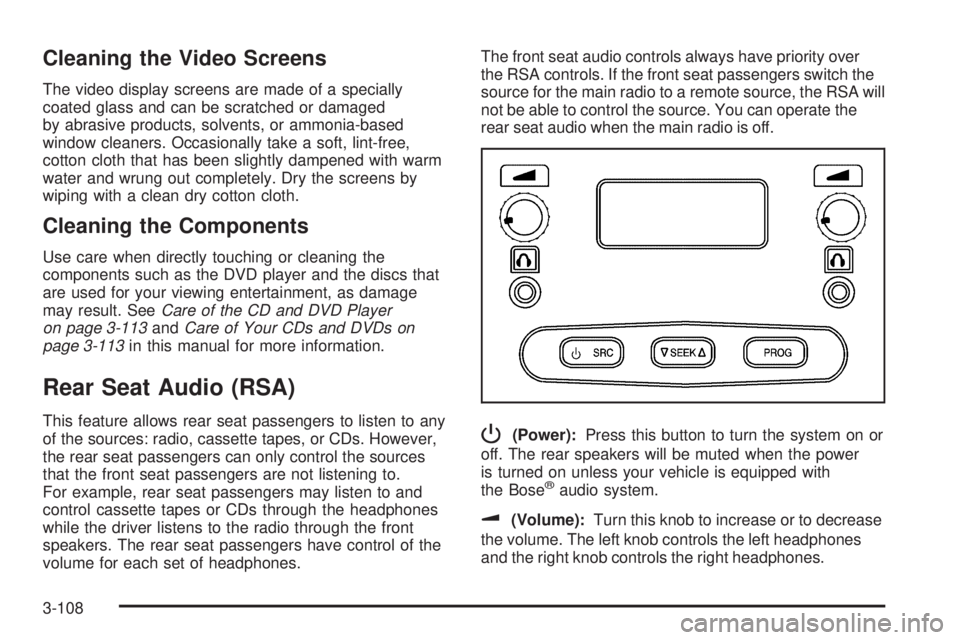
This feature allows rear seat passengers to listen to any
of the sources: radio, cassette tapes, or CDs. However,
the rear seat passengers can only control the sources
that the front seat passengers are not listening to.
For example, rear seat passengers may listen to and
control cassette tapes or CDs through the headphones
while the driver listens to the radio through the front
speakers. The rear seat passengers have control of the
volume for each set of headphones.The front seat audio controls always have priority over
the RSA controls. If the front seat passengers switch the
source for the main radio to a remote source, the RSA will
not be able to control the source. You can operate the
rear seat audio when the main radio is off.P(Power):Press this button to turn the system on or
off. The rear speakers will be muted when the power
is turned on unless your vehicle is equipped with
the Bose
®audio system.
u(Volume):Turn this knob to increase or to decrease
the volume. The left knob controls the left headphones
and the right knob controls the right headphones.
3-108
Page 250 of 502

Audio Steering Wheel Controls
If your vehicle has this feature, some audio controls can
be adjusted at the steering wheel. They include the
following:
g(OnStar®/Mute):Press this button to interact with
the OnStar system. See theOnStar®System on
page 2-48in this manual for more information.
PROG (Program):Press this button to play the stations
that are programmed on the radio preset pushbuttons.
The radio will go to the rst preset station, play for a few
seconds, then go to the next preset station. Press this
button again to stop scanning. The radio will only
scan preset stations with a strong signal that are in the
selected band.When a cassette tape is playing, press this button to
play the other side of the tape.
When a CD is playing in the CD changer, press this
button to go to the next available CD, if multiple CDs
are loaded.
QSOURCER:Press this button to switch between
FM1, FM2, AM, or XM1, or XM2 (if equipped), or a
cassette tape or CD. The cassette or CD must be loaded
to play. Available loaded sources are shown on the
display as a tape or a CD symbol.
QSEEKR:Press the up or the down arrow to go to
the next or to the previous radio station and stay
there. The radio will only seek stations with a strong
signal that are in the selected band.
When a cassette tape or CD is playing, press the up or
the down arrow to fast forward or reverse.
QVOLR(Volume):Press the up or the down arrow
to increase or to decrease the volume.
3-110
Page 489 of 502
A
Accessories and Modications............................ 5-3
Accessory Inator...........................................5-68
Accessory Power Outlet(s)...............................3-21
Adding Equipment to Your Airbag-Equipped
Vehicle.......................................................1-69
Additives, Fuel................................................. 5-6
Add-On Electrical Equipment...........................5-114
Air Cleaner/Filter, Engine.................................5-19
Air Conditioning..............................................3-22
Air Suspension...............................................4-62
Airbag
Off Light.....................................................3-32
Readiness Light..........................................3-32
Airbag Sensing and Diagnostic Module (SDM)....7-10
Airbag System................................................1-58
Adding Equipment to Your Airbag-Equipped
Vehicle...................................................1-69
Airbag Off Switch........................................1-65
How Does an Airbag Restrain?......................1-63
Servicing Your Airbag-Equipped Vehicle..........1-68
What Makes an Airbag Inate?......................1-63
What Will You See After an Airbag Inates?....1-63
When Should an Airbag Inate?....................1-62
Where Are the Airbags?...............................1-60
Antenna, Fixed Mast......................................3-114
Antenna, XM™ Satellite Radio Antenna System . . . 3-114
Anti-Lock Brake System (ABS)........................... 4-7
Anti-Lock Brake, System Warning Light..............3-36Appearance Care
Aluminum Wheels......................................5-111
Care of Safety Belts...................................5-108
Chemical Paint Spotting..............................5-112
Cleaning Exterior Lamps/Lenses..................5-109
Cleaning the Inside of Your Vehicle..............5-105
Fabric/Carpet............................................5-107
Finish Care...............................................5-110
Finish Damage..........................................5-112
Instrument Panel, Vinyl, and Other Plastic
Surfaces...............................................5-108
Leather....................................................5-107
Sheet Metal Damage..................................5-112
Speaker Covers.........................................5-108
Tires........................................................5-111
Underbody Maintenance.............................5-112
Vehicle Care/Appearance Materials...............5-113
Washing Your Vehicle.................................5-109
Weatherstrips............................................5-108
Windshield, Backglass, and Wiper Blades......5-110
Wood Panels............................................5-108
Ashtray(s)......................................................3-22
Assist Steps...................................................4-34
Audio System(s).............................................3-61
Audio Steering Wheel Controls....................3-110
Care of Your Cassette Tape Player...............3-111
Care of Your CD and DVD Player................3-113
Care of Your CDs and DVDs.......................3-113
Chime Level Adjustment.............................3-114
Fixed Mast Antenna...................................3-114
1
Page 497 of 502
Outside
Automatic Dimming Mirror with Curb View
Assist.....................................................2-47
Convex Mirror.............................................2-46
Heated Mirrors............................................2-47
Power Mirrors.............................................2-45
Overheated Engine Protection Operating Mode . . . 5-28
Owner Checks and Services.............................. 6-8
Owners, Canadian............................................... ii
P
Park Aid........................................................3-18
Park (P)
Shifting Into................................................2-35
Shifting Out of............................................2-36
Parking
Brake........................................................2-34
Over Things That Burn.................................2-37
Passing.........................................................4-13
Passlock
®......................................................2-23
Power
Accessory Outlet(s)......................................3-21
Door Locks.................................................. 2-9
Electrical System.......................................5-115
Lumbar Controls........................................... 1-3
Retained Accessory (RAP)............................2-25Power (cont.)
Seat............................................................ 1-2
Steering Fluid.............................................5-33
Windows....................................................2-18
Power Winch Platform.....................................4-54
Programmable Automatic Door Locks.................2-10
Q
Questions and Answers About Safety Belts.........1-18
R
Radios..........................................................3-61
Care of Your Cassette Tape Player...............3-111
Care of Your CD and DVD Player................3-113
Care of Your CDs and DVDs.......................3-113
Navigation/Radio System, see Navigation
Manual...................................................3-88
Radio with Cassette and CD.........................3-63
Radio with Six-Disc CD................................3-76
Rear Seat Audio........................................3-108
Setting the Time..........................................3-62
Theft-Deterrent..........................................3-109
Understanding Reception............................3-111
Reading Lamps..............................................3-18
9