transmission HUMMER H2 2006 User Guide
[x] Cancel search | Manufacturer: HUMMER, Model Year: 2006, Model line: H2, Model: HUMMER H2 2006Pages: 502, PDF Size: 3.35 MB
Page 110 of 502
Shifting Out of NEUTRAL
To shift the transfer case out of NEUTRAL, do
the following:
1. Set the parking brake and apply the regular
brake pedal.
2. Shift the transmission to NEUTRAL (N) and turn the
ignition to RUN with the engine off.
3. Press the button for the desired transfer case shift
position (Four-Wheel High, Four-Wheel-High Lock,
or Four-Wheel-Low Lock).
4. After the transfer case has shifted out of NEUTRAL
the red light will go out.
Notice:Shifting the transmission into gear before
the indicator light stops ashing could cause
damage to the transfer case. Always wait until the
indicator light stops ashing before putting the
transmission back in gear.
5. You may start the engine and shift the transmission
to the desired position.
Parking Brake
To set the parking brake, hold the regular brake pedal
down with your right foot. Push down the parking
brake pedal with your left foot.
A chime will activate and the warning light will ash when
the parking brake is applied and the vehicle is moving at
least 3 mph (5 km/h) for at least three seconds.
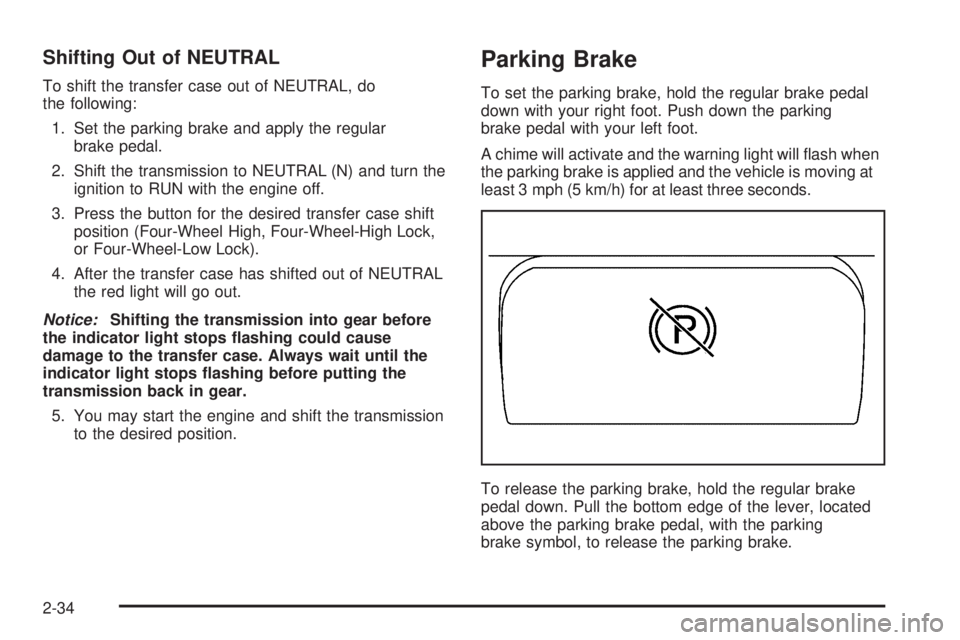
To release the parking brake, hold the regular brake
pedal down. Pull the bottom edge of the lever, located
above the parking brake pedal, with the parking
brake symbol, to release the parking brake.
2-34
Page 112 of 502
Leaving Your Vehicle With the Engine
Running
{CAUTION:
It can be dangerous to leave your vehicle with
the engine running. Your vehicle could move
suddenly if the shift lever is not fully in
PARK (P) with the parking brake rmly set.
And, if you leave the vehicle with the engine
running, it could overheat and even catch re.
You or others could be injured. Do not leave
your vehicle with the engine running.
If you have to leave your vehicle with the engine
running, be sure your vehicle is in PARK (P) and the
parking brake is rmly set before you leave it. After you
move the shift lever into PARK (P), hold the regular
brake pedal down. Then, see if you can move the shift
lever away from PARK (P) without rst pulling it
toward you. If you can, it means that the shift lever was
not fully locked into PARK (P).
Torque Lock
If you are parking on a hill and you do not shift your
vehicle into PARK (P) properly, the weight of the vehicle
may put too much force on the parking pawl in the
transmission. You may nd it difficult to pull the shift
lever out of PARK (P). This is called torque lock.
To prevent torque lock, set the parking brake and then
shift into PARK (P) properly before you leave the
driver’s seat. To nd out how, seeShifting Into Park (P)
on page 2-35.
When you are ready to drive, move the shift lever out of
PARK (P) before you release the parking brake.
If torque lock does occur, you may need to have another
vehicle push yours a little uphill to take some of the
pressure from the parking pawl in the transmission, so
you can pull the shift lever out of PARK (P).
Shifting Out of Park (P)
Your vehicle has an automatic transmission shift lock
control system. You have to fully apply the regular
brakes before you can shift from PARK (P) when the
ignition is in RUN. SeeAutomatic Transmission
Operation on page 2-27.
2-36
Page 127 of 502

Keep the original hand-held transmitter for use in other
vehicles as well as for future Universal Home Remote
programming. It is also recommended that upon the sale
of the vehicle, the programmed Universal Home
Remote buttons should be erased for security purposes.
See “Erasing Universal Home Remote Buttons” later
in this section or, for assistance, seeCustomer
Assistance Offices on page 7-4.
Be sure that people and objects are clear of the garage
door or gate operator you are programming. When
programming a garage door, it is advised to park outside
of the garage.
It is recommended that a new battery be installed in
your hand-held transmitter for quicker and more
accurate transmission of the radio-frequency signal.
Programming Universal Home Remote
Follow these steps to program up to three channels:
1. Press and hold down the two outside Universal
Home Remote buttons, releasing only when the
Universal Home Remote indicator light begins to
ash, after 20 seconds. Do not hold down the
buttons for longer than 30 seconds and do not repeat
this step to program a second and/or third hand-held
transmitter to the remaining two Universal Home
Remote buttons.
2. Position the end of your hand-held transmitter
about 1 to 3 inches (3 to 8 cm) away from the
Universal Home Remote buttons while keeping the
indicator light in view.3. Simultaneously press and hold both the desired
Universal Home Remote button and the hand-held
transmitter button. Do not release the buttons
until Step 4 has been completed.
Some entry gates and garage door openers may
require you to substitute Step 3 with the procedure
noted in “Gate Operator and Canadian
Programming” later in this section.
4. The indicator light will ash slowly at rst and then
rapidly after Universal Home Remote successfully
receives the frequency signal from the hand-held
transmitter. Release both buttons.
5. Press and hold the newly-trained Universal Home
Remote button and observe the indicator light.
If the indicator light stays on constantly,
programming is complete and your device should
activate when the Universal Home Remote button is
pressed and released.
To program the remaining two Universal Home
Remote buttons, begin with Step 2 under
“Programming Universal Home Remote.” Do not
repeat Step 1 as this will erase all of the
programmed channels.
If the indicator light blinks rapidly for two seconds
and then turns to a constant light, continue with
Steps 6 through 8 following to complete the
programming of a rolling-code equipped device,
most commonly, a garage door opener.
2-51
Page 128 of 502

6. Locate in the garage, the garage door opener
receiver (motor-head unit). Locate the “Learn”
or “Smart” button. This can usually be found where
the hanging antenna wire is attached to the
motor-head unit.
7. Firmly press and release the “Learn” or “Smart”
button. The name and color of the button may
vary by manufacturer.
You will have 30 seconds to start Step 8.
8. Return to the vehicle. Firmly press and hold the
programmed Universal Home Remote button for
two seconds, then release. Repeat the press/
hold/release sequence a second time, and
depending on the brand of the garage door opener,
or other rolling code device, repeat this sequence
a third time to complete the programming.
The Universal Home Remote should now activate
your rolling-code equipped device.
To program the remaining two Universal Home Remote
buttons, begin with Step 2 of “Programming Universal
Home Remote.” You do not want to repeat Step 1,
as this will erase all previous programming from
the Universal Home Remote buttons.Gate Operator and Canadian
Programming
Canadian radio-frequency laws require transmitter
signals to time out or quit after several seconds of
transmission. This may not be long enough for Universal
Home Remote to pick up the signal during programming.
Similarly, some U.S. gate operators are manufactured
to time out in the same manner.
If you live in Canada, or you are having difficulty
programming a gate operator or garage door opener by
using the “Programming Universal Home Remote”
procedures, regardless of where you live, replace
Step 3 under “Programming Universal Home Remote”
with the following:
Continue to press and hold the Universal Home Remote
button while you press and release every two seconds
(cycle) the hand-held transmitter button until the
frequency signal has been successfully accepted by the
Universal Home Remote. The Universal Home Remote
indicator light will ash slowly at rst and then rapidly.
Proceed with Step 4 under “Programming Universal
Home Remote” to complete.
Using Universal Home Remote
Press and hold the appropriate Universal Home Remote
button for at least half of a second. The indicator light
will come on while the signal is being transmitted.
2-52
Page 141 of 502
Instrument Panel Overview...............................3-4
Hazard Warning Flashers................................3-6
Other Warning Devices...................................3-6
Horn.............................................................3-6
Tilt Wheel.....................................................3-6
Turn Signal/Multifunction Lever.........................3-7
Turn and Lane-Change Signals........................3-7
Headlamp High/Low-Beam Changer..................3-8
Flash-to-Pass.................................................3-8
Windshield Wipers..........................................3-9
Windshield Washer.........................................3-9
Rear Window Wiper/Washer (SUV).................3-10
Cruise Control..............................................3-11
Exterior Lamps.............................................3-14
Headlamps on Reminder................................3-15
Daytime Running Lamps (DRL).......................3-15
Automatic Headlamp System..........................3-16
Off-Road Lamps...........................................3-17
Instrument Panel Brightness...........................3-17
Dome Lamps...............................................3-18
Dome Lamp Override....................................3-18
Entry/Exit Lighting.........................................3-18
Reading Lamps............................................3-18
Battery Run-Down Protection..........................3-18
Rear Vision Camera......................................3-18
Accessory Power Outlet(s).............................3-21
Ashtray(s) and Cigarette Lighter......................3-22Climate Controls............................................3-22
Dual Automatic Climate Control System...........3-22
Outlet Adjustment.........................................3-28
Warning Lights, Gages, and Indicators............3-29
Instrument Panel Cluster................................3-30
Speedometer and Odometer...........................3-31
Trip Odometer..............................................3-31
Tachometer.................................................3-31
Safety Belt Reminder Light.............................3-31
Airbag Readiness Light..................................3-32
Airbag Off Light............................................3-32
Charging System Light..................................3-34
Voltmeter Gage............................................3-34
Brake System Warning Light..........................3-35
Anti-Lock Brake System Warning Light.............3-36
Traction Off Light..........................................3-36
Engine Coolant Temperature Gage..................3-37
Transmission Temperature Gage.....................3-37
Malfunction Indicator Lamp.............................3-39
Oil Pressure Gage........................................3-41
Security Light...............................................3-42
Cruise Control Light......................................3-43
Highbeam On Light.......................................3-43
Tow/Haul Mode Light....................................3-43
Fuel Gage...................................................3-44
Low Fuel Warning Light.................................3-44
Section 3 Instrument Panel
3-1
Page 145 of 502
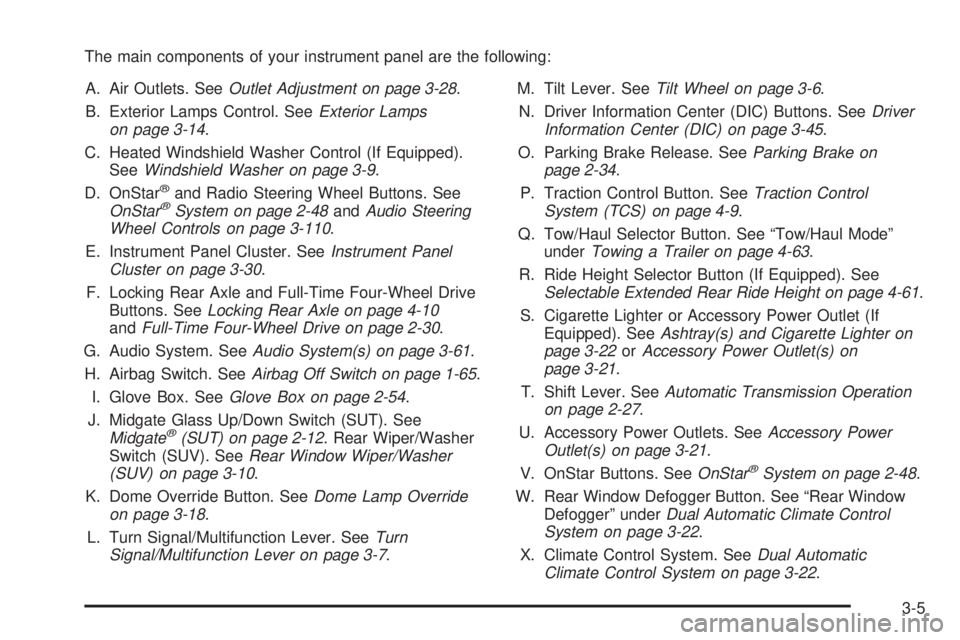
The main components of your instrument panel are the following:
A. Air Outlets. SeeOutlet Adjustment on page 3-28.
B. Exterior Lamps Control. SeeExterior Lamps
on page 3-14.
C. Heated Windshield Washer Control (If Equipped).
SeeWindshield Washer on page 3-9.
D. OnStar
®and Radio Steering Wheel Buttons. See
OnStar®System on page 2-48andAudio Steering
Wheel Controls on page 3-110.
E. Instrument Panel Cluster. SeeInstrument Panel
Cluster on page 3-30.
F. Locking Rear Axle and Full-Time Four-Wheel Drive
Buttons. SeeLocking Rear Axle on page 4-10
andFull-Time Four-Wheel Drive on page 2-30.
G. Audio System. SeeAudio System(s) on page 3-61.
H. Airbag Switch. SeeAirbag Off Switch on page 1-65.
I. Glove Box. SeeGlove Box on page 2-54.
J. Midgate Glass Up/Down Switch (SUT). See
Midgate
®(SUT) on page 2-12. Rear Wiper/Washer
Switch (SUV). SeeRear Window Wiper/Washer
(SUV) on page 3-10.
K. Dome Override Button. SeeDome Lamp Override
on page 3-18.
L. Turn Signal/Multifunction Lever. SeeTurn
Signal/Multifunction Lever on page 3-7.M. Tilt Lever. SeeTilt Wheel on page 3-6.
N. Driver Information Center (DIC) Buttons. SeeDriver
Information Center (DIC) on page 3-45.
O. Parking Brake Release. SeeParking Brake on
page 2-34.
P. Traction Control Button. SeeTraction Control
System (TCS) on page 4-9.
Q. Tow/Haul Selector Button. See “Tow/Haul Mode”
underTowing a Trailer on page 4-63.
R. Ride Height Selector Button (If Equipped). See
Selectable Extended Rear Ride Height on page 4-61.
S. Cigarette Lighter or Accessory Power Outlet (If
Equipped). SeeAshtray(s) and Cigarette Lighter on
page 3-22orAccessory Power Outlet(s) on
page 3-21.
T. Shift Lever. SeeAutomatic Transmission Operation
on page 2-27.
U. Accessory Power Outlets. SeeAccessory Power
Outlet(s) on page 3-21.
V. OnStar Buttons. SeeOnStar
®System on page 2-48.
W. Rear Window Defogger Button. See “Rear Window
Defogger” underDual Automatic Climate Control
System on page 3-22.
X. Climate Control System. SeeDual Automatic
Climate Control System on page 3-22.
3-5
Page 153 of 502
Reducing Speed While Using
Cruise Control
Press in the button at the end of the lever until you
reach the lower speed you want, then release it.
To slow down in very small amounts, briey press
the set button. Each time you do this, you’ll go
about 1 mph (1.6 km/h) slower.
Passing Another Vehicle While Using
Cruise Control
Use the accelerator pedal to increase your speed.
When you take your foot off the pedal, your vehicle will
slow down to the cruise control speed you set earlier.
Using Cruise Control on Hills
How well your cruise control will work on hills depends
upon your speed, load and the steepness of the
hills. When going up steep hills, you may want to step
on the accelerator pedal to maintain your speed.
When going downhill, you may have to brake or shift to
a lower gear to keep your speed down. Of course,
applying the brake takes you out of cruise control. Many
drivers nd this to be too much trouble and don’t use
cruise control on steep hills.
Ending Cruise Control
There are four ways to turn off the cruise control:
Step lightly on the brake pedal,
move the cruise control switch to off, or
shift the transmission to NEUTRAL (N).
If road conditions cause the traction control system
to activate, cruise control will turn off. SeeTraction
Control System (TCS) on page 4-9.
If the accelerator pedal is held for 60 seconds or
longer, cruise control will turn off.
Erasing Speed Memory
When you turn off the cruise control or the ignition, your
cruise control set speed memory is erased.
3-13
Page 155 of 502
;(Parking Lamps):Turn the control to this position to
turn on the parking lamps, together with the following:
Sidemarker Lamps
Taillamps
License Plate Lamps
Roof Marker Lamps
Instrument Panel Lights
2(Headlamps):Turn the control to this position to
turn on the headlamps, together with the previously
listed lamps and lights.
When the vehicle is turned off and the headlamps are in
AUTO, the headlamps may automatically remain on
for a set time. You can change this delay time using the
DIC. SeeDriver Information Center (DIC) on page 3-45.
You can switch your headlamps from low to high-beam
by pushing the turn signal/multifunction lever toward
the instrument panel.
Headlamps on Reminder
If a door is open, a reminder chime will sound when your
headlamps or parking lamps are manually turned on and
your key is out of the ignition. To turn off the chime, turn
the headlamp switch to off or AUTO and then back on. In
the AUTO mode, the headlamps turn off once the ignition
is in LOCK or may remain on until the headlamp delay
ends (if enabled in the DIC).
Daytime Running Lamps (DRL)
Daytime Running Lamps (DRL) can make it easier for
others to see the front of your vehicle during the
day. DRL can be helpful in many different driving
conditions, but they can be especially helpful in the short
periods after dawn and before sunset. Fully functional
daytime running lamps are required on all vehicles
rst sold in Canada.
The DRL system will come on when the following
conditions are met:
The ignition is on,
the exterior lamps control is in AUTO, if enabled,
the transmission is not in PARK (P), and
the light sensor determines it is daytime.
3-15
Page 177 of 502
Engine Coolant Temperature Gage
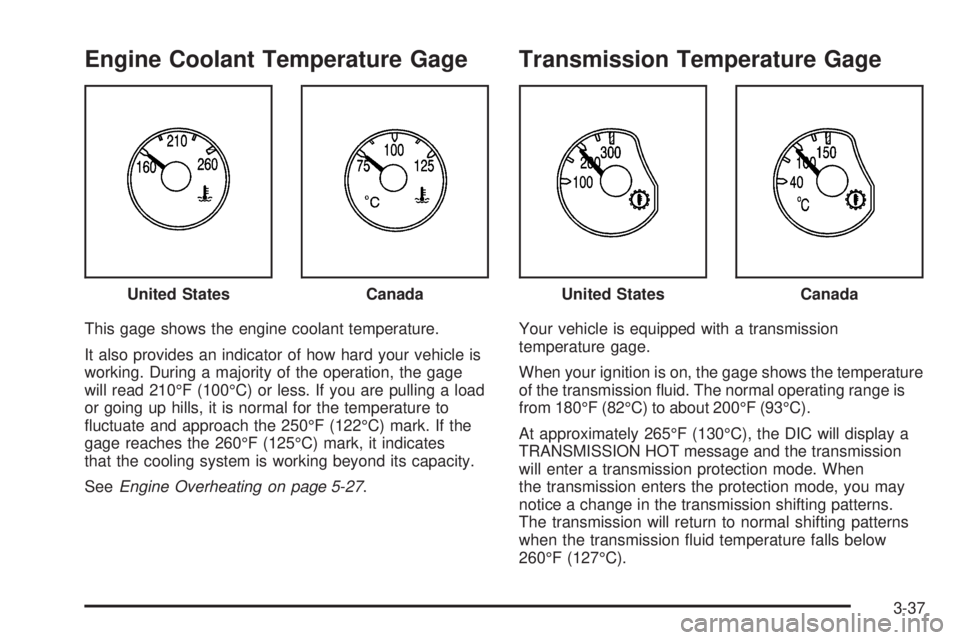
This gage shows the engine coolant temperature.
It also provides an indicator of how hard your vehicle is
working. During a majority of the operation, the gage
will read 210°F (100°C) or less. If you are pulling a load
or going up hills, it is normal for the temperature to
uctuate and approach the 250°F (122°C) mark. If the
gage reaches the 260°F (125°C) mark, it indicates
that the cooling system is working beyond its capacity.
SeeEngine Overheating on page 5-27.
Transmission Temperature Gage
Your vehicle is equipped with a transmission
temperature gage.
When your ignition is on, the gage shows the temperature
of the transmission uid. The normal operating range is
from 180°F (82°C) to about 200°F (93°C).
At approximately 265°F (130°C), the DIC will display a
TRANSMISSION HOT message and the transmission
will enter a transmission protection mode. When
the transmission enters the protection mode, you may
notice a change in the transmission shifting patterns.
The transmission will return to normal shifting patterns
when the transmission uid temperature falls below
260°F (127°C). United States
CanadaUnited StatesCanada
3-37
Page 178 of 502

If the transmission uid reaches temperatures of
approximately 275°F (135°C) or greater, the DIC will
display a TRANS HOT IDLE ENGINE warning message
and a chime will sound. Pull the vehicle off the
roadway when it is safe to do so. Set the parking brake,
place the transmission in PARK (P) and allow the
engine to idle until the transmission temperature falls
below 260°F (127°C). If the transmission continues
to operate above 265°F (130°C), please contact your
nearest dealer or the GM Roadside Assistance Center.
SeeDriver Information Center (DIC) on page 3-45
for further information.
Notice:If you drive your vehicle with the
transmission temperature gage above normal
operating range, you can damage the transmission.
This could lead to costly repairs that would not
be covered by your warranty. Do not drive your
vehicle while the transmission temperature gage
reading is above normal. See your dealer for service.The following situations can cause the transmission to
operate at higher temperatures:
Towing a trailer,
hot outside air temperatures,
hauling a large or heavy load,
low transmission uid level,
high transmission uid level,
restricted air ow to the radiator.
A temporary solution to hotter transmission operating
temperatures may be to let the transmission cool down. If
the transmission is operated at higher temperatures on a
frequent basis, seeScheduled Maintenance on page 6-4
for the proper transmission maintenance intervals.
3-38