light HUMMER H2 2006 Manual PDF
[x] Cancel search | Manufacturer: HUMMER, Model Year: 2006, Model line: H2, Model: HUMMER H2 2006Pages: 502, PDF Size: 3.35 MB
Page 224 of 502
To insert multiple CDs, do the following:
1. Turn the ignition on.
2. Press and hold the LOAD button for two seconds.
You will hear a beep and the indicator light, located
to the right of the slot, will begin to ash and
MULTI LOAD # will appear on the display.
3. Once the light stops ashing and turns green,
INSERT CD # will appear on the display, load
a CD. Insert the CD partway into the slot, label side
up. The player will pull the CD in.
Once the CD is loaded, the indicator light will begin
ashing again. Once the light stops ashing and
turns green, you can load another CD. The
CD player takes up to six CDs. Do not try to load
more than six.
To load more than one CD but less than six, complete
Steps 1 through 3. When nished loading CDs,
press the LOAD button to cancel the loading function.
The radio will begin to play the last CD loaded.
If more than one CD has been loaded, a number for
each CD will appear on the display.Playing a Specic Loaded CD
For every CD loaded, a number will appear on the
display. To play a specic CD, rst (if not in CD mode)
press the CD AUX button, then press the numbered
pushbutton that corresponds to the CD. A small bar will
appear under the CD number that is playing and the
track number will appear on the display.
If an error appears on the display, see “CD Messages”
later in this section.
CD
Z(Eject):Press this button to eject CD(s).
To eject the CD that is currently playing, press and
release this button.
To eject multiple CDs, do the following:
1. Press and hold the CD eject button for ve seconds.
You will hear a beep and the indicator light, located
to the right of the slot, will begin to ash and
EJECT ALL will appear on the display.
2. Once the light stops ashing REMOVE CD # will
appear on the display. The CD will eject and can
be removed.
Once the CD is removed, the indicator light will
begin ashing again and another CD will eject.
To stop ejecting the CDs, press the LOAD or the
eject button.
3-84
Page 229 of 502
Before You Drive
The RSE system will play DVD, CD, and MP3 discs. You
can also connect an auxiliary device to the RSE system
to play games, watch videos, view photos, etc.
Notice:Normal operation for the RSE system may
be limited under extreme temperatures. Using
the RSE system during extreme temperatures may
cause damage to the system. Wait until the inside of
the vehicle is at a safe temperature range of
32°-140°F (0°-60°C) before using the system.
Headphones
Wireless Headphones
The RSE system may include two sets of wireless
headphones. Each headphone will have an L marked
on the left-side, for the left ear and an R marked on the
right-side, for the right ear. The L and R marks are to
show how the headphones should be worn.
OFF/ON (Power):The wireless headphones have an
OFF/ON power switch located on the left of the
earpiece. To use the headphones, turn the switch to
ON. An indicator light on the right earpiece of the
headphones will illuminate. If the light does not
illuminate, the batteries may need to be replaced. See
“Battery Replacement” later in this section. Switch
the headphones to OFF when not in use.The headphones will shut off automatically to save the
battery power if the RSE system is shut off or if the
headphones are out of range of the transmitter window
for more than three minutes. The transmitter window
is located on the bottom edge of the monitor. If
you move too far forward or step out of the vehicle,
the headphones will lose the audio signal.
Channel Selector:The wireless headphones have a
channel selector switch located on the right earpiece.
The channel selector switches between Channel A and
Channel B. Since each monitor has the capability to
function as two independent sources through auxiliary
input, it is necessary to transmit audio signals on
separate channels. The driver’s side monitor is
designated as Channel A, and the passenger’s side as
Channel B. The Headphone channel selector switch
must be set to the appropriate channel according to the
monitor being viewed. When the head restraint
monitor is initially turned on the message, “To listen
to this monitor tune your headphones to channel A
(or B)” will be displayed for ve seconds then disappear.
3-89
Page 230 of 502

VOL0(Volume):To adjust the volume on the
wireless headphones, use the volume control.
Notice:Do not store the headphones in heat or
direct sunlight. This could damage the headphones
and repairs will not be covered by your warranty.
Keep the headphones stored in a cool, dry place.
If there is a decreased audio signal during CD, MP3, or
DVD play, there may be a soft hissing noise through
the speakers and/or headphones. If the hissing sound in
the wireless headphones seem excessive, make sure
that the headphone batteries are fully charged. A
small amount of hissing is normal.
Battery Replacement
To change the batteries, do the following:
1. Press down on the left earpiece and slide the
battery compartment panel down to expose the
battery compartment.2. Replace the two AAA batteries in the compartment.
Make sure that they are installed correctly using the
diagram on the inside of the battery compartment.
3. Slide the battery compartment panel back and
then down until the panel closes into the
headphone ear piece.
If the headphones are to be stored for a long period of
time, remove the batteries, and keep them in a cool,
dry place.
Wired Headphones
There is a headphone jack on the left lower side of the
video screen. Use this jack with universal wired
headphones. To adjust the volume, do the following:
1. Plug the headphone into the corresponding
jack, located on the bottom left of the video screen,
next to the auxiliary jack.
2. Press the up or down arrow buttons on the monitor
to increase or to decrease the volume.
3-90
Page 233 of 502
AUX (Auxiliary):The monitor-mounted auxiliary input
jack is an AV 2 input jack. This auxiliary input jack allows
viewing of auxiliary sources such as portable DVD
units, game stations, video cameras, etc., on each
individual monitor. The sources connected to these
inputs cannot be shared between the monitors.
Press the SOURCE button on either monitor, or the
SEL button on the system remote control to select the
desired auxiliary source. See “SOURCE” under
Video Screens earlier in this section.
X(Wired Headphone Jack):This type of headphone
jack is used with universal wired headphones. The
wired headphone volume is adjusted using the up and
down arrow buttons. See “Wired Headphones” earlier in
this section.
Infrared Remote Sensor:The infrared remote sensor
receives light signals from the system’s remote
control. This type of sensor works as a line-of-sight
signal as the transmitted signals are received. In order
for the sensor to work properly, it must remain
unobstructed at all times.
DVD Player
The DVD player is located in the center console.
The DVD player can be controlled by the buttons on the
DVD player or by the buttons on the remote control.
See “Remote Control” later in this section for more
information.
The RSE system DVD player is only compatible with
DVDs of the appropriate region code for the country
where the vehicle was sold. The DVD region code is
printed on the jacket of most DVDs.
DVDs, Standard audio CDs, CD-R, CD-RW, enhanced
CDs, video CDs, and CD-ROM with MP3 media are
supported by this DVD player. DVD+R, DVD+RW, and
copy protected CDs may or may not be supported by the
DVD player. The DVD player does not support
DVD-RAM, DVD-ROM, DVD-R, DVD-R/W, and DVD
audio media. An error message will appear on the display
if this type of media is inserted into the DVD player.
If an error message appears on the video screen, see
“DVD Messages” later in this section.
3-93
Page 235 of 502
If a disc is already in the player, make sure that the
DVD player is on, then press the PLAY button on the
player faceplate or on the remote control to start playing
a disc.
Some DVDs will not allow fast forwarding or skipping of
the copyright information or previews. Some DVDs
will begin playing after the previews have nished. If the
DVD does not begin playing at the main title, refer to
the on-screen instructions.
Ejecting a Disc
Press the eject button on the DVD player faceplate, to
eject the disc. As the disc is ejected, the display on
the video screen will indicate Open.
If a disc is ejected from the player, but not removed, the
disc will not reload until it is pushed back into the
player. Another way to reload a disc that has been
ejected, but not removed from the DVD player, is
to either press the eject button or the PLAY button. The
DVD player will automatically reload the disc and
display Close on the video screen.
Remote Control
The system’s remote control combines the control of all
monitor and DVD player functions. To use the remote
control, aim at the remote sensor located on the
upper right side of the monitor and press the desired
button on the remote control. The remote works
best when held at a comfortable distance from the
monitors.
Direct sunlight or very bright light may affect the ability
of the transmitter to receive signals from the remote
control. If the remote control does not seem to be
working, the batteries may need to be replaced. See
“Battery Replacement” later in this section. Objects
blocking the line-of-sight will affect the function of the
remote control.
Notice:Storing the remote control in a hot area or
in direct sunlight may damage it, and the repairs
will not be covered by your warranty. Keep the
remote control stored in a cool, dry place.
3-95
Page 244 of 502

Tips and Troubleshooting Chart
Problem Recommended Action
Unit does not operate.
Turn the key to the
on position.
Press the power on
from the remote.
Fuse blown, replace
with a fuse of the
same capacity.
Turn the monitor’s
power on.
Consult with your
dealership.
No picture is produced.
Playback does not start.
Switch to the
appropriate
audio/video source.
Check if the disc is
loaded with the label
side facing up.
Clean the disc.
Check for the disc
compatibility.
Press MENU to turn
the menu off.
Problem Recommended Action
Picture is unclear
or noisy.
During fast-forward or
fast-reverse, the
picture can be slightly
distorted. This is a
normal situation.
Consult with
your dealership.
Image sometimes
stumbles or freezes.
Clean or replace the
disc if it is scratched.
Load a known
good disc.
Black and white monitor,
blank monitor, or frozen
monitor.
Overheating. Turn the
system power off and
then turn the power
back on again. If the
display still does not
appear normal, leave
the power off until
the temperature
decreases and
then turn power
back on again.
3-104
Page 248 of 502
Cleaning the Video Screens
The video display screens are made of a specially
coated glass and can be scratched or damaged
by abrasive products, solvents, or ammonia-based
window cleaners. Occasionally take a soft, lint-free,
cotton cloth that has been slightly dampened with warm
water and wrung out completely. Dry the screens by
wiping with a clean dry cotton cloth.
Cleaning the Components
Use care when directly touching or cleaning the
components such as the DVD player and the discs that
are used for your viewing entertainment, as damage
may result. SeeCare of the CD and DVD Player
on page 3-113andCare of Your CDs and DVDs on
page 3-113in this manual for more information.
Rear Seat Audio (RSA)
This feature allows rear seat passengers to listen to any
of the sources: radio, cassette tapes, or CDs. However,
the rear seat passengers can only control the sources
that the front seat passengers are not listening to.
For example, rear seat passengers may listen to and
control cassette tapes or CDs through the headphones
while the driver listens to the radio through the front
speakers. The rear seat passengers have control of the
volume for each set of headphones.The front seat audio controls always have priority over
the RSA controls. If the front seat passengers switch the
source for the main radio to a remote source, the RSA will
not be able to control the source. You can operate the
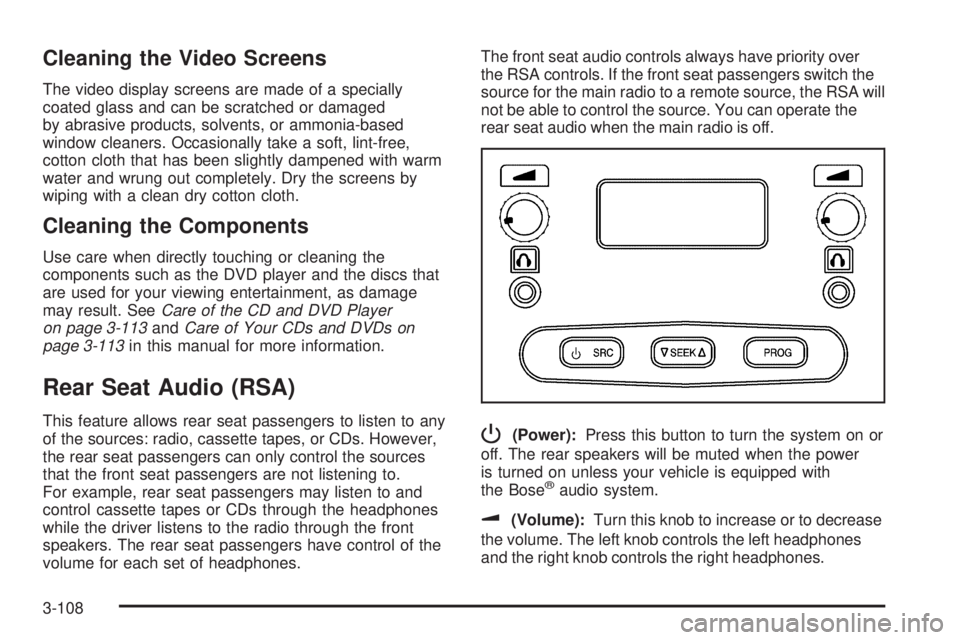
rear seat audio when the main radio is off.P(Power):Press this button to turn the system on or
off. The rear speakers will be muted when the power
is turned on unless your vehicle is equipped with
the Bose
®audio system.
u(Volume):Turn this knob to increase or to decrease
the volume. The left knob controls the left headphones
and the right knob controls the right headphones.
3-108
Page 249 of 502

SRC (Source):Press this button to select a source:
radio, cassette tape, or CD.
xSEEKw:When listening to FM1, FM2, AM, or
XM1 or XM2 (if equipped), press the up or the
down arrow to go to the next or to the previous station
and stay there. This function is inactive if the front
seat passengers are listening to the radio.
When a cassette tape is playing, press the up or the
down arrow to go to the next or the previous selection.
This function is inactive if the front seat passengers
are listening to a cassette tape.
When a CD is playing, press the up arrow to got to the
next track on the CD. Press the down arrow to go to
the start of the current track if more than eight seconds
have played. This function is inactive if the front seat
passengers are listening to a CD.
PROG (Program):Press this button to go to the next
preset radio station set on the pushbuttons on the
main radio. This function is inactive if the front seat
passengers are listening to the radio.When a cassette tape is playing, press this button to go to
the other side of the tape. This function is inactive if the
front seat passengers are listening to a cassette tape.
When a CD is playing, press this button to go to the
beginning of the CD. This function is inactive if the front
seat passengers are listening to a CD.
When a CD is playing in the six-disc CD changer, press
this button to select the next CD, if multiple CDs are
loaded. This function is inactive if the front seat
passengers are listening to a CD.
Theft-Deterrent Feature
THEFTLOCK®is designed to discourage theft of your
vehicle’s radio. The feature works automatically by
learning a portion of the Vehicle Identication
Number (VIN). If the radio is moved to a different
vehicle, it will not operate and LOCKED will appear on
the display.
When the radio and vehicle are turned off, the blinking
red light indicates that THEFTLOCK
®is armed.
With THEFTLOCK
®activated, the radio will not operate
if stolen.
3-109
Page 251 of 502
Radio Reception
You may experience frequency interference and static
during normal radio reception if items such as cellphone
chargers, vehicle convenience accessories, and
external electronic devices are plugged into the
accessory power outlet. If there is interference or static,
unplug the item from the accessory power outlet.
AM
The range for most AM stations is greater than for
FM, especially at night. The longer range can cause
station frequencies to interfere with each other.
For better radio reception, most AM radio stations will
boost the power levels during the day, and then reduce
these levels during the night. Static can also occur
when things like storms and power lines interfere with
radio reception. When this happens, try reducing
the treble on your radio.
FM Stereo
FM stereo will give the best sound, but FM signals will
reach only about 10 to 40 miles (16 to 65 km). Tall
buildings or hills can interfere with FM signals, causing
the sound to fade in and out.
XM™ Satellite Radio Service
XM™ Satellite Radio Service gives digital radio
reception from coast-to-coast in the 48 contiguous
United States, and in Canada (if available). Just as with
FM, tall buildings or hills can interfere with satellite
radio signals, causing the sound to fade in and out. In
addition, traveling or standing under heavy foliage,
bridges, garages, or tunnels may cause loss of the
XM™ signal for a period of time. The radio may display
NO SIGNAL to indicate interference.
Care of the Cassette Tape Player
A tape player that is not cleaned regularly can cause
reduced sound quality, ruined cassettes, or a damaged
mechanism. Cassette tapes should be stored in their
cases away from contaminants, direct sunlight, and
extreme heat. If they are not, they may not operate
properly or may cause failure of the tape player.
3-111
Page 253 of 502
A non-scrubbing action, wet-type cleaner which uses a
cassette with a fabric belt to clean the tape head
can be used. This type of cleaning cassette will not
eject on its own. A non-scrubbing action cleaner may not
clean as thoroughly as the scrubbing type cleaner.
The use of a non-scrubbing action, dry-type cleaning
cassette is not recommended.
After the player is cleaned, press and hold the eject
button for ve seconds to reset the CLEAN indicator.
The radio will display --- or CLEANED to show the
indicator was reset.
Cassettes are subject to wear and the sound
quality may degrade over time. Always make sure
the cassette tape is in good condition before the
tape player is serviced.Care of Your CDs and DVDs
Handle CDs and DVDs carefully. Store them in their
original cases or other protective cases and away from
direct sunlight and dust. The CD and DVD player
scans the bottom surface of the disc. If the surface of a
CD or DVD is damaged, such as cracked, broken, or
scratched, the CD or DVD will not play properly or not at
all. If the surface of a CD or DVD is soiled, take a
soft, lint free cloth or dampen a clean, soft cloth in a
mild, neutral detergent solution mixed with water,
and clean it. Make sure the wiping process starts from
the center to the edge. If a dampened cloth was
used to clean the disc, dry it with a dry cotton cloth.
Do not touch the bottom side of a CD or DVD
while handling it; this could damage the surface. Pick up
CDs or DVDs by grasping the outer edges or the
edge of the hole and the outer edge.
Care of the CD and DVD Player
The use of CD or DVD lens cleaners for CDs or DVDs
are not advised, due to the risk of contaminating the
lens of the CD optics with lubricants internal to the CD
or DVD mechanism.
3-113