battery HUMMER H2 2007 Owner's Manual
[x] Cancel search | Manufacturer: HUMMER, Model Year: 2007, Model line: H2, Model: HUMMER H2 2007Pages: 570, PDF Size: 3.34 MB
Page 234 of 570

TURN SIGNAL ON
This message displays and a chime sounds if a
turn signal is left on for 3/4 of a mile (1.2 km).
Move the turn signal/multifunction lever to the off
position. Press any of the DIC buttons, or the
trip stem, to acknowledge this message and clear
it from the DIC display.
DIC Vehicle Customization
Your vehicle may have customization capabilities
that allow you to program some features to
one personalized setting based on your
preference. All of the customizable options listed
may not be available on your vehicle. Only
the options available will be displayed on the
Driver Information Center (DIC).
The default settings for the customization features
were set when your vehicle left the factory, but
may have been changed from their default
state since then.
To change feature preferences, make sure the
ignition is on and the vehicle is in PARK (P). To
avoid excessive drain on the battery, it is
recommended that the headlamps are turned off.Press the customization button to scroll through
the available customizable options.
After pressing the customization button, VEHICLE
SETTINGS will momentarily display before
going to a customization option.
Lock Doors
Press the customization button until LOCK
DOORS appears in the display. To select your
preference for automatic locking, press the select
button while LOCK DOORS is displayed on
the DIC. Pressing the select button will scroll
through the following choices:
LOCK DOORS: IN GEAR (default):The doors
will lock when the vehicle is shifted out of
PARK (P).
LOCK DOORS: WITH SPEED:The doors will
lock when the vehicle speed is above
8 mph (13 km/h) for three seconds.
Choose one of the available options and press the
customization button while it is displayed on the
DIC to select it and move on to the next feature.
234
Page 272 of 570

Headphones
Wireless Headphones
The RSE system might include two sets of
wireless headphones. Each headphone has an
L marked on the left-side, for the left ear and an
R marked on the right-side, for the right ear. The
L and R marks are to show how the headphones
should be worn.
OFF/ON (Power):The wireless headphones have
an OFF/ON power switch located on the
earpiece. To use the headphones, turn the switch
to ON. An indicator light on the earpiece of the
headphones illuminates. If the light does not
illuminate, the batteries might need to be replaced.
See “Battery Replacement” later in this section.
Switch the headphones to OFF when not in use.
The headphones shut off automatically to save the
battery power if the RSE system is shut off or if
the headphones are out of range of the transmitter
window for more than three minutes. The
transmitter window is located on the bottom edge
of the monitor. If you move too far forward or
step out of the vehicle, the headphones could lose
the audio signal.Channel Selector:The wireless headphones
have a channel selector switch located on the right
earpiece. The channel selector switches between
Channel A and Channel B. Since each monitor
can function as two independent sources through
auxiliary input, it is necessary to transmit audio
signals on separate channels. The driver’s
side monitor is designated as Channel A, and the
passenger’s side as Channel B. The Headphone
channel selector switch must be set to the
correct channel according to the monitor being
viewed. When the head restraint monitor is initially
turned on, the message, “To listen to this
monitor tune your headphones to channel A
(or B)” displays for ve seconds then disappears.
VOL
0(Volume):To adjust the volume
on the wireless headphones, use the volume
control.
Notice:Do not store the headphones in heat
or direct sunlight. This could damage the
headphones and repairs will not be covered by
your warranty. Keep the headphones stored
in a cool, dry place.
272
Page 273 of 570

If there is a decreased audio signal during CD,
MP3, or DVD play, there could be a soft hissing
noise through the speakers and/or headphones.
If the hissing sound in the wireless headphones
seem excessive, make sure the headphone
batteries are fully charged. A small amount of
hissing is normal.
Battery Replacement
To change the batteries, do the following:
1. Press down on the left earpiece and slide the
battery compartment panel down to expose
the battery compartment.
2. Replace the two AAA batteries in the
compartment. Make sure they are installed
correctly using the diagram on the inside
of the battery compartment.
3. Slide the battery compartment panel back and
then down until the panel closes into the
headphone ear piece.
If the headphones are to be stored for a long
period of time, remove the batteries, and keep
them in a cool, dry place.
Wired Headphones
There is a headphone jack on the left lower side
of the video screen. Use this jack with universal
wired headphones. To adjust the volume, do
the following:
1. Press the power button on the monitor to turn
the video screen on. Briey press the power
button again to toggle between monitor and
DVD control buttons. The appropriate toggle is
monitor. Main menu function icons display.
2. Plug the headphone into the corresponding
jack, located on the bottom left of the video
screen, next to the auxiliary jack.
3. Press the soft key buttons on the monitor,
located under the up and down arrow icons,
to increase or to decrease the volume.
Audio Output
Audio from the DVD player or auxiliary devices
can be heard through the vehicle speakers or the
wireless/wired headphones. The FM Modulator
control has to be set to one of eight frequencies in
order for these devices to be heard through the
vehicle’s speakers. See “FM Modulator Control”
later in this section.
273
Page 280 of 570

Remote Control
The system’s remote control combines the control
of all monitor and DVD player functions. To use
the system’s remote control, aim at the remote
sensor located on the upper right side of the
monitor and press the desired button on the
remote control. The remote works best when held
at a comfortable distance from the monitors.
Direct sunlight or very bright light can affect the
ability of the transmitter to receive signals from the
system’s remote control. If the remote control
does not seem to be working, the batteries might
need to be replaced. See “Battery Replacement”
later in this section. Objects blocking the
line-of-sight affects the function of the system’s
remote control.
Notice:Storing the remote control in a hot
area or in direct sunlight may damage it,
and the repairs will not be covered by your
warranty. Keep the remote control stored in a
cool, dry place.
Remote Control Buttons
(Monitor Control Functions)
P(Power/Monitor):Press this button to turn
the monitor on and off.
PICTURE:Press this button to adjust the basic
monitor control functions such as: CONTRAST,
BRIGHTNESS, COLOR, TINT, RESET, MODE,
and SHARPNESS.
280
Page 284 of 570
Battery Replacement
To change the remote control batteries, do the
following:
1. Slide the battery door, located on the back of
the remote control, down.
2. Replace the two AAA batteries in the
compartment. Make sure they are installed
correctly, using the diagram on the inside
of the battery compartment.
3. Close the battery door.
If the remote control is to be stored for a long
period of time, remove the batteries and keep them
in a cool, dry place.
Using the RSE On-Screen
Display (OSD) Menu
To use the RSE OSD menu while using the DVD
player or an auxiliary device, do the following:
1. Press the SETUP button on the system’s
remote control to access the general setup
menu, see “Remote Control” earlier in
this section.
2. Once this menu is on the screen, press the
directional arrows and then the ENTER
button to navigate the screen.
This menu lets you select default preferences
for language, video, audio, and ratings.
Not all DVDs support all of the feature defaults
in the setup menus. If a feature is not
supported, the defaults are provided by the
DVD media.
The default language selection applies to all
future DVDs.
3. Press the RETURN button on the system’s
remote control to exit this menu, or wait for
the menu to time out.
284
Page 291 of 570
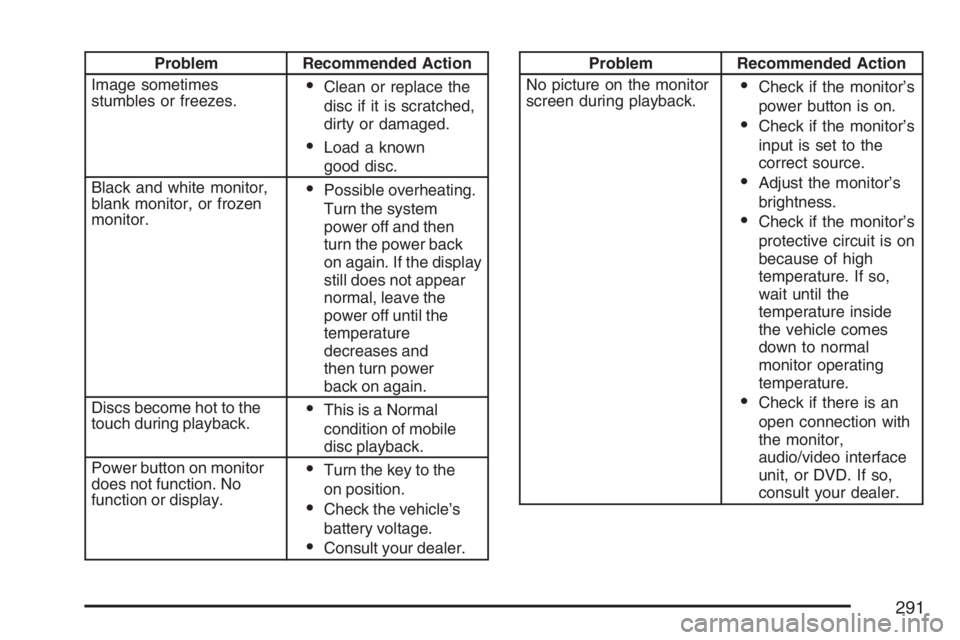
Problem Recommended Action
Image sometimes
stumbles or freezes.
Clean or replace the
disc if it is scratched,
dirty or damaged.
Load a known
good disc.
Black and white monitor,
blank monitor, or frozen
monitor.
Possible overheating.
Turn the system
power off and then
turn the power back
on again. If the display
still does not appear
normal, leave the
power off until the
temperature
decreases and
then turn power
back on again.
Discs become hot to the
touch during playback.
This is a Normal
condition of mobile
disc playback.
Power button on monitor
does not function. No
function or display.
Turn the key to the
on position.
Check the vehicle’s
battery voltage.
Consult your dealer.
Problem Recommended Action
No picture on the monitor
screen during playback.
Check if the monitor’s
power button is on.
Check if the monitor’s
input is set to the
correct source.
Adjust the monitor’s
brightness.
Check if the monitor’s
protective circuit is on
because of high
temperature. If so,
wait until the
temperature inside
the vehicle comes
down to normal
monitor operating
temperature.
Check if there is an
open connection with
the monitor,
audio/video interface
unit, or DVD. If so,
consult your dealer.
291
Page 311 of 570

Locking Rear Axle
The locking rear axle can give your vehicle
additional traction from the rear wheels when
traveling in off-road situations such as mud, snow,
sand, steep hills and uneven terrain.
The button used to turn
this feature on or off is
located above the
transfer case buttons
to the right of the
steering wheel.
To lock the rear axle, do the following:
1. Place the transfer case in the Four-Wheel-Low
Lock mode. This is the only mode which will
allow the rear axle to lock. SeeFull-Time
Four-Wheel Drive on page 128for more
information regarding the transfer case and
Four-Wheel-Low-Lock mode.
2. Press the button with the vehicle stopped or
moving less than 2 mph (3 km/h).You must wait for the light in the button to stop
ashing and remain illuminated before the
rear axle is locked.
Notice:If you try to lock the rear axle while
your vehicle is stuck and the tires are spinning,
you could damage your vehicle’s drivetrain.
The repairs would not be covered by your
warranty. Always lock the rear axle before
attempting situations and/or navigating terrain
which could possibly cause the vehicle to
become stuck.
The locking rear axle will be disengaged when the
vehicle’s speed is greater than 20 mph (32 km/h), if
the vehicle’s battery is low and/or the transfer case
is shifted out of Four-Wheel-Low-Lock mode.
Notice:If you lock the rear axle while driving
on pavement, you could damage your
vehicle’s drivetrain. The repairs would not be
covered by your warranty. Do not use the
locking rear axle on pavement. If you need
four-wheel drive when traveling on pavement,
use only 4HI.
311
Page 356 of 570

You can run the engine to keep warm, but be
careful.
{CAUTION:
Snow can trap exhaust gases under your
vehicle. This can cause deadly CO
(carbon monoxide) gas to get inside.
CO could overcome you and kill you. You
cannot see it or smell it, so you might not
know it is in your vehicle. Clear away
snow from around the base of your
vehicle, especially any that is blocking
your exhaust pipe. And check around
again from time to time to be sure snow
does not collect there.
Open a window just a little on the side of
the vehicle that is away from the wind.
This will help keep CO out.
Run your engine only as long as you must.
This saves fuel. When you run the engine, make it
go a little faster than just idle. That is, push the
accelerator slightly. This uses less fuel for the heat
that you get and it keeps the battery charged.
356
Page 357 of 570

You will need a well-charged battery to restart the
vehicle, and possibly for signaling later on with your
headlamps. Let the heater run for a while.
Then, shut the engine off and close the window
almost all the way to preserve the heat. Start
the engine again and repeat this only when you
feel really uncomfortable from the cold. But do it as
little as possible. Preserve the fuel as long as
you can. To help keep warm, you can get out of
the vehicle and do some fairly vigorous exercises
every half hour or so until help comes.
If Your Vehicle is Stuck in Sand,
Mud, Ice, or Snow
In order to free your vehicle when it is stuck,
you will need to spin the wheels, but you do not
want to spin your wheels too fast. The method
known as rocking can help you get out when you
are stuck, but you must use caution.
{CAUTION:
If you let your vehicle’s tires spin at high
speed, they can explode, and you or others
could be injured. And, the transmission or
other parts of the vehicle can overheat.
That could cause an engine compartment
re or other damage. When you are stuck,
spin the wheels as little as possible. Do not
spin the wheels above 35 mph (55 km/h) as
shown on the speedometer.
Notice:Spinning the wheels can destroy parts
of your vehicle as well as the tires. If you
spin the wheels too fast while shifting
the transmission back and forth, you can
destroy the transmission.
For information about using tire chains on your
vehicle, seeTire Chains on page 465.
357
Page 370 of 570

Dinghy Towing
Use the following procedure to tow your vehicle:
1. Shift the transmission to PARK (P).
2. Turn the engine off, but leave the ignition in
ACCESSORY.
3. Firmly set the parking brake.
4. Securely attach the vehicle being towed to the
tow vehicle.
{CAUTION:
Shifting a full-time four-wheel-drive
vehicle’s transfer case into NEUTRAL can
cause your vehicle to roll even if the
transmission is in PARK (P). You or others
could be injured. Make sure the parking
brake is rmly set before you shift the
transfer case to NEUTRAL.
5. Shift the transfer case to NEUTRAL (N).
SeeFull-Time Four-Wheel Drive on
page 128for the proper procedure to select
the NEUTRAL position for your vehicle.6. Release the parking brake only after the
vehicle being towed is rmly attached to
the towing vehicle. You can use your vehicle’s
front mounted receiver with the proper
accessories to tow it. See “Front Mounted
Receiver” underIf Your Vehicle is Stuck
in Sand, Mud, Ice, or Snow on page 357.
7. Turn the ignition to ACCESSORY.
8. Disconnect the battery if you are going to tow
for long distances or long periods of time.
When towing your vehicle for extended periods of
time, start your vehicle as often as possible to
prevent battery drain. This should only be
done when the tow vehicle is parked.
Dolly Towing
Your vehicle cannot be dolly towed. If you must
tow your vehicle behind another, use the
dinghy towing procedure listed previously.
Notice:Dolly towing your vehicle will damage
drivetrain components. Do not dolly tow
your vehicle.
370